
使用正则爬取红牛分公司数据:
# 插入模块
import requests
import re
# 1.朝页面发送get请求获取页面数据
res = requests.get("http://www.redbull.com.cn/about/branch")
# 2.分析数据特征 书写相应正则
# 2.1.正则解析分公司名称
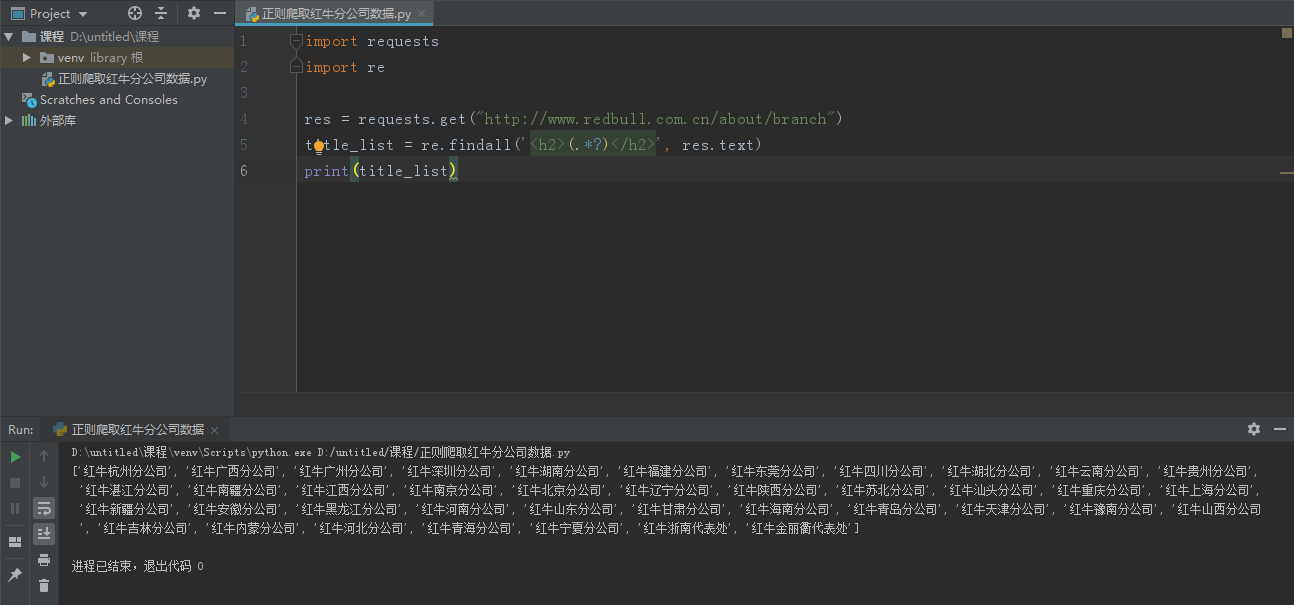
title_list = re.findall('<h2>(.*?)</h2>', res.text)
print(title_list)
'''
获取使用.*?代替的所有数据 非贪婪模式
'''
# 2.2.正则解析分公司地址
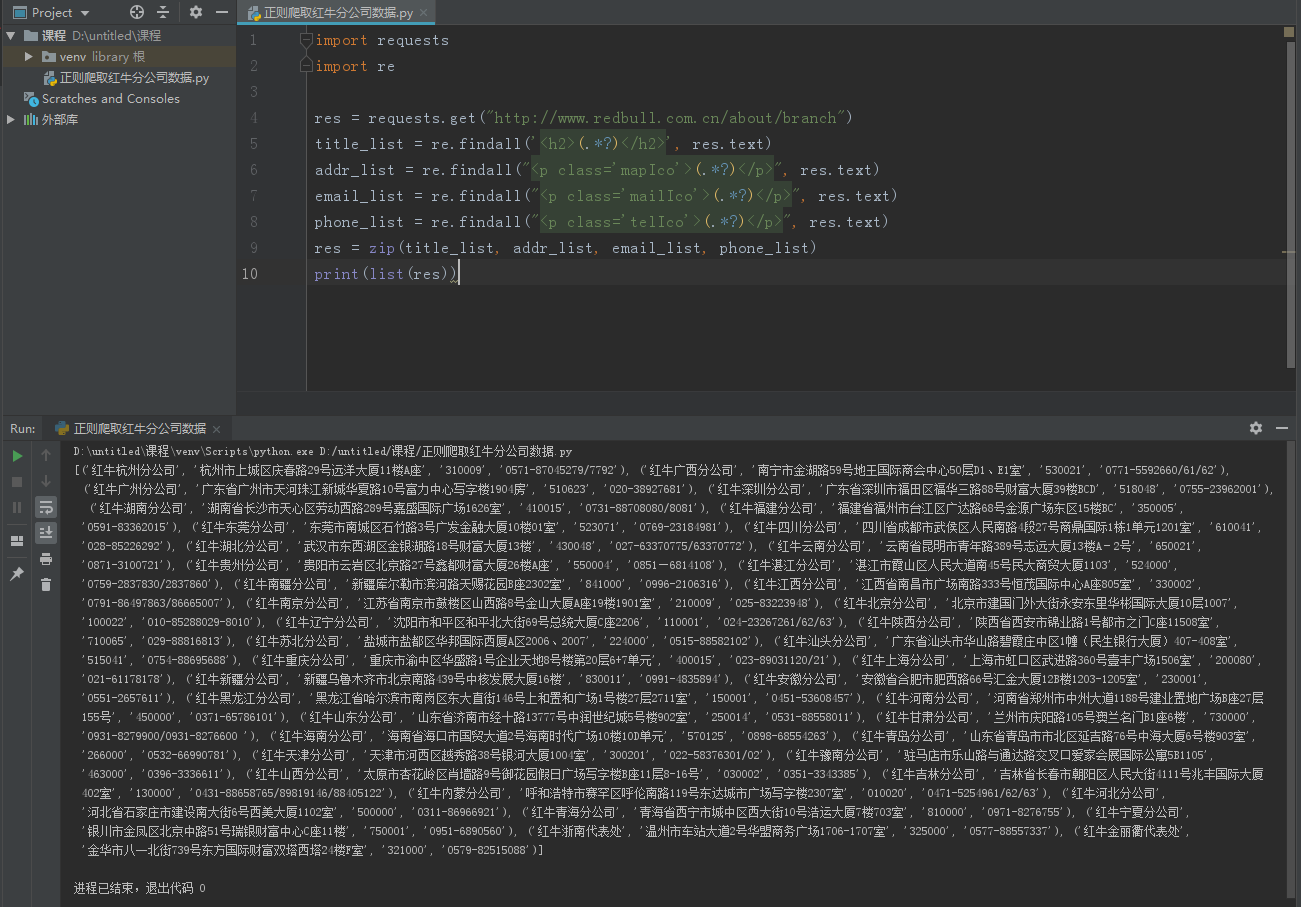
addr_list = re.findall("<p class='mapIco'>(.*?)</p>", res.text)
# 2.3.正则解析分公司邮编
email_list = re.findall("<p class='mailIco'>(.*?)</p>", res.text)
# 2.4.正则解析分公司电话
phone_list = re.findall("<p class='telIco'>(.*?)</p>", res.text)
res = zip(title_list, addr_list, email_list, phone_list) # 拉链方法
print(list(res)) # 将迭代器转换成普通的列表
# 列表 包含 元组
爬取糗图图片数据
import requests
from bs4 import BeautifulSoup
import os
if not os.path.exists(r'糗图图片'):
os.mkdir(r'糗图图片')
def get_img(url):
# 1.发送get请求获取页面数据
res = requests.get(url)
# 2.解析库bs4
soup = BeautifulSoup(res.text, 'lxml')
# 3.研究标签特征 获取图片链接
img_tag_list = soup.find_all(name='img', attrs={'class': 'illustration'})
for img in img_tag_list:
img_src = img.get('src')
full_src = 'https:' + img_src
# 朝图片完整的地址发送请求保存数据
res1 = requests.get(full_src)
img_name = full_src.rsplit('/')[-1]
file_path = os.path.join(r'糗图图片', img_name)
with open(file_path, 'wb') as f:
f.write(res1.content)
print('图片:%s 保存成功' % img_name)
for i in range(1, 5):
base_url = "https://www.qiushibaike.com/imgrank/page/%s/" % i
get_img(base_url)
爬取优美图库高清图片:
import requests
from bs4 import BeautifulSoup
import os
if not os.path.exists(r'优美图片库'):
os.mkdir(r'优美图片库')
# 1.朝主页面发送get请求
res = requests.get('https://www.umei.cc/bizhitupian/diannaobizhi/')
'''当使用.text方法之前最好先确认一下页面数据是否乱码'''
res.encoding = 'utf-8' # 容易忽略
# 2.获取二次详情页地址链接
soup = BeautifulSoup(res.text, 'lxml')
# 由于页面上有很多列表标签 我们需要先进行区分 所以先找上一层div标签
div_tag = soup.find(name='div', attrs={'class': 'TypeList'})
# 先获取所有的li标签
li_list = div_tag.find_all(name='li')
# ['li>a','li>a',...]
# for循环一个个li标签 获取内部a标签
# 提前定义根目录地址
base_url = 'https://www.umei.cc'
for li in li_list:
a_tag = li.find(name='a')
a_link = a_tag.get('href')
a_full_link = base_url + a_link
# 朝一个个链接地址发送请求
res1 = requests.get(a_full_link)
'''由于我们只需要链接 并且发现链接没有字符 全是英文 所以此处不需要考虑'''
soup1 = BeautifulSoup(res1.text, 'lxml')
# 筛选出页面上的图片src地址
img_tag = soup1.select('div.ImageBody img') # 列表
for img in img_tag:
src = img.get('src')
# 朝图片的地址发送请求获取图片数据
res2 = requests.get(src)
file_path = os.path.join(r'优美图片库', src[-10:])
with open(file_path, 'wb') as f:
f.write(res2.content)
print('图片:%s 下载成功' % file_path)
爬取梨视频视频数据:
import requests
from bs4 import BeautifulSoup
# 定义根目录地址
base_url = 'https://www.pearvideo.com/'
# 1.发送get请求获取页面数据
res = requests.get('https://www.pearvideo.com/category_31')
# 2.使用bs4模块解析
soup = BeautifulSoup(res.text, 'lxml')
# 3.研究视频详情链接
li_list = soup.select('li.categoryem')
# 4.循环获取每个li里面的a标签
for li in li_list:
a_tag = li.find(name='a')
a_href_link = a_tag.get('href') # video_1742158
# second_link = base_url + a_href_link
# https://www.pearvideo.com/video_1742158
'''研究发现详情页视频数据并不是直接加载的 也就意味着朝上述地址发送get请求没有丝毫作用'''
"""
video_1742158
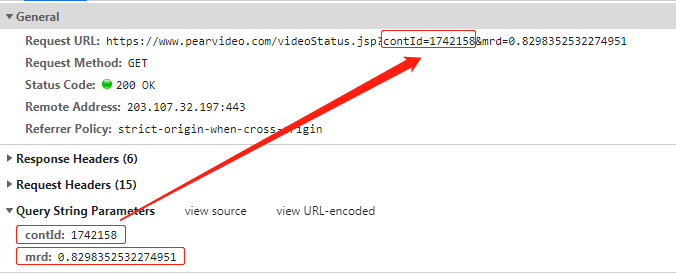
内部动态请求的地址
https://www.pearvideo.com/videoStatus.jsp?contId=1742158&mrd=0.8298352532274951
contId: 1742158
mrd: 0.8298352532274951 0到1之间的随机小数
动态请求之后返回的核心数据
https://video.pearvideo.com/mp4/adshort/20210920/1632283823415-15771122_adpkg-ad_hd.mp4
真实视频地址
https://video.pearvideo.com/mp4/adshort/20210920/cont-1742158-15771122_adpkg-ad_hd.mp4
"""
# 通过研究发现详情页数据是动态加载的 所以通过network获取到地址
video_id = a_href_link.split('_')[-1]
headers = {
"Referer": "https://www.pearvideo.com/video_%s" % video_id
}
res1 = requests.get('https://www.pearvideo.com/videoStatus.jsp',
params={'contId': video_id},
headers=headers
)
data_dict = res1.json()
src_url = data_dict['videoInfo']['videos']['srcUrl']
systemTime = data_dict['systemTime']
# https://video.pearvideo.com/mp4/adshort/20210920/1632285084621-15771122_adpkg-ad_hd.mp4
'''如何替换核心数据 通过研究发现systemTime是关键'''
real_url = src_url.replace(systemTime, 'cont-%s' % video_id)
