

资源管理
1.String资源, int资源,drawable资源
(1)MianActivity.java
 1 package com.example.administrator.hello;
 2
 3 import android.content.res.TypedArray;
 4 import android.support.v7.app.AppCompatActivity;
 5 import android.os.Bundle;
 6 import android.util.Log;
 7 import android.widget.ArrayAdapter;
 8 import android.widget.ListView;
 9 import android.widget.TextView;
10
11 public class MainActivity extends AppCompatActivity {
12
13     /*private ListView listView;*/
14     /*private  String[] items;*/
15    /* private  int[] text1;*/
16
17     private  TextView textView1,textView2;
18     private TypedArray typedArray;
19     @Override
20     protected void onCreate(Bundle savedInstanceState) {
21         super.onCreate(savedInstanceState);
22         setContentView(R.layout.activity_main);
      /*String资源 */
23        /* listView = (ListView) findViewById(R.id.lv);
24         items = getResources().getStringArray(R.array.a);
25         ArrayAdapter arrayAdapter = new ArrayAdapter(MainActivity.this,android.R.layout.simple_list_item_1,items);
26         listView.setAdapter(arrayAdapter);*/
27      /*int资源*/
28         /*text1 = getResources().getIntArray(R.array.b);
29         for (int i:text1){
30             Log.i("tag",i+"");
31         }*/
32      /*color资源*/
33         textView1 = (TextView) findViewById(R.id.tv1);
34         textView2=(TextView) findViewById(R.id.tv2);
35         typedArray = getResources().obtainTypedArray(R.array.c);
36         textView1.setBackgroundColor(typedArray.getColor(0,0));
37         textView2.setBackgroundColor(typedArray.getColor(1,0));
38
39
40
41     }
42 }
(2)activity_mian.xml
 1 <?xml version="1.0" encoding="utf-8"?>
 2 <LinearLayout xmlns:android="http://schemas.android.com/apk/res/android"
 3     xmlns:tools="http://schemas.android.com/tools"
 4     android:layout_width="match_parent"
 5     android:layout_height="match_parent"
 6     android:paddingBottom="@dimen/activity_vertical_margin"
 7     android:paddingLeft="@dimen/activity_horizontal_margin"
 8     android:paddingRight="@dimen/activity_horizontal_margin"
 9     android:paddingTop="@dimen/activity_vertical_margin"
10     android:orientation="vertical"
11     tools:context="com.example.administrator.hello.MainActivity">
12
13     <ListView
14         android:id="@+id/lv"
        android:entries="@array/a" 只能用来设置字符串资源
15 android:layout_width="match_parent"
16         android:layout_height="wrap_content"></ListView>
17     <TextView
18         android:id="@+id/tv"
19         android:layout_width="match_parent"
20         android:layout_height="wrap_content" />
21
22     <Button
23         android:text="按钮"
24         android:background="@drawable/bt_state"
25         android:layout_width="match_parent"
26         android:layout_height="wrap_content" />
27
28     <TextView
29         android:id="@+id/tv1"
30         android:text="hello1"
31         android:layout_width="match_parent"
32         android:layout_height="wrap_content" />
33     <TextView
34         android:id="@+id/tv2"
35         android:text="hello2"
36         android:layout_width="match_parent"
37         android:layout_height="wrap_content" />
38 </LinearLayout>
(3)用来使用设置按钮的按下状态
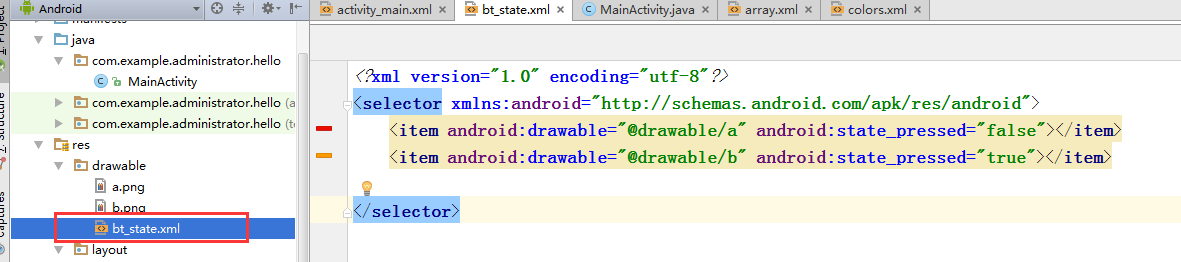
(4)array.xml
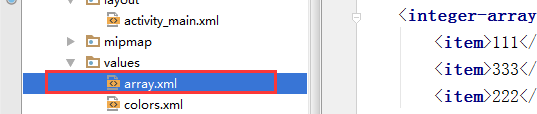
 1 <?xml version="1.0" encoding="utf-8"?>
 2 <resources>
 3     <string-array name="a">
 4         <item>aaa</item>
 5         <item>bbb</item>
 6         <item>ccc</item>
 7     </string-array>
 8     <integer-array name="b">
 9         <item>111</item>
10         <item>333</item>
11         <item>222</item>
12     </integer-array>
13
14     <array name="c">
15         <item>@color/colorAccent</item>
16         <item>@color/colorPrimary</item>
17         <item>@color/colorPrimaryDark</item>
18     </array>
19 </resources>

 浙公网安备 33010602011771号