


实用指南:豆瓣图书评论数据分析与可视化
【题目描述】豆瓣图书评论数据爬取。以《平凡的世界》、《都挺好》等为分析对象,编写程序爬取豆瓣读书上针对该图书的短评信息,要求:
(1)对前3页短评信息进行跨页连续爬取;
(2)爬取的数据包含用户名、短评内容、评论时间、评分和点赞数(有用数);
(3)能够根据选择的排序方式(热门或最新)进行爬取,并分别针对热门和最新排序,输出前10位短评信息(包括用户名、短评内容、评论时间、评分和点赞数)。
(4)根据点赞数的多少,按照从多到少的顺序将排名前10位的短评信息输出;
(5附加)结合中文分词和词云生成,对前3页的短评内容进行文本分析:按照词语出现的次数从高到低排序,输出前10位排序结果;并生成一个属于自己的词云图形。
1. 抓取获取<<都挺好>>短评的 url
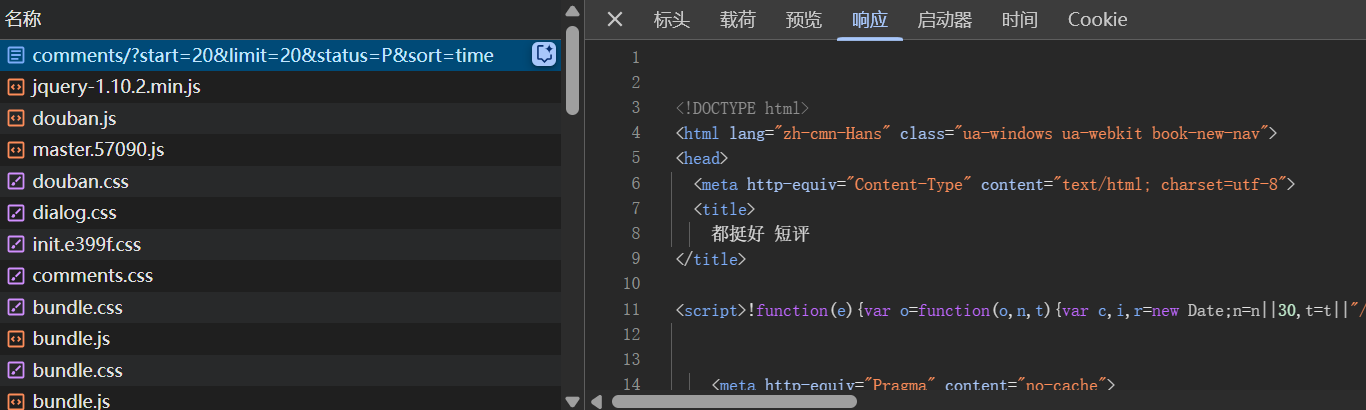
https://book.douban.com/subject/20492971/comments/?start=20&limit=20&status=P&sort=score
分析url
subject/20492971:书籍ID为20492971comments/:评论页面start=20:从第20条评论开始显示(分页参数)limit=20:每页显示20条评论status=P:只显示已发布的评论(P代表Published)sort=score:按点赞量排序
经分析 sort=time 为按时间排序 (最新) - 需要登录豆瓣
2. 获取headers 和 Cookie
在爬取豆瓣等反爬机制较严格的网站时,模拟浏览器行为 是关键。以下是补全的爬虫策略,包括 请求头设置、Cookies、延迟控制、代理IP 等关键点:
关键反爬策略:
- 必须配置完整的请求头(Headers)和Cookies
- 建议使用代理IP池(特别是大规模爬取时)
- 合理设置请求间隔(本示例未展示,但生产环境建议添加)
分享一个好用的网站
Convert curl commands to Python
它可以将 cURL 命令快速转换为 Python、JavaScript、PHP 等多种语言的代码,非常适合爬虫开发时快速生成请求模板。
使用方法 : 以cURL(bash)格式复制 , 复制到网站
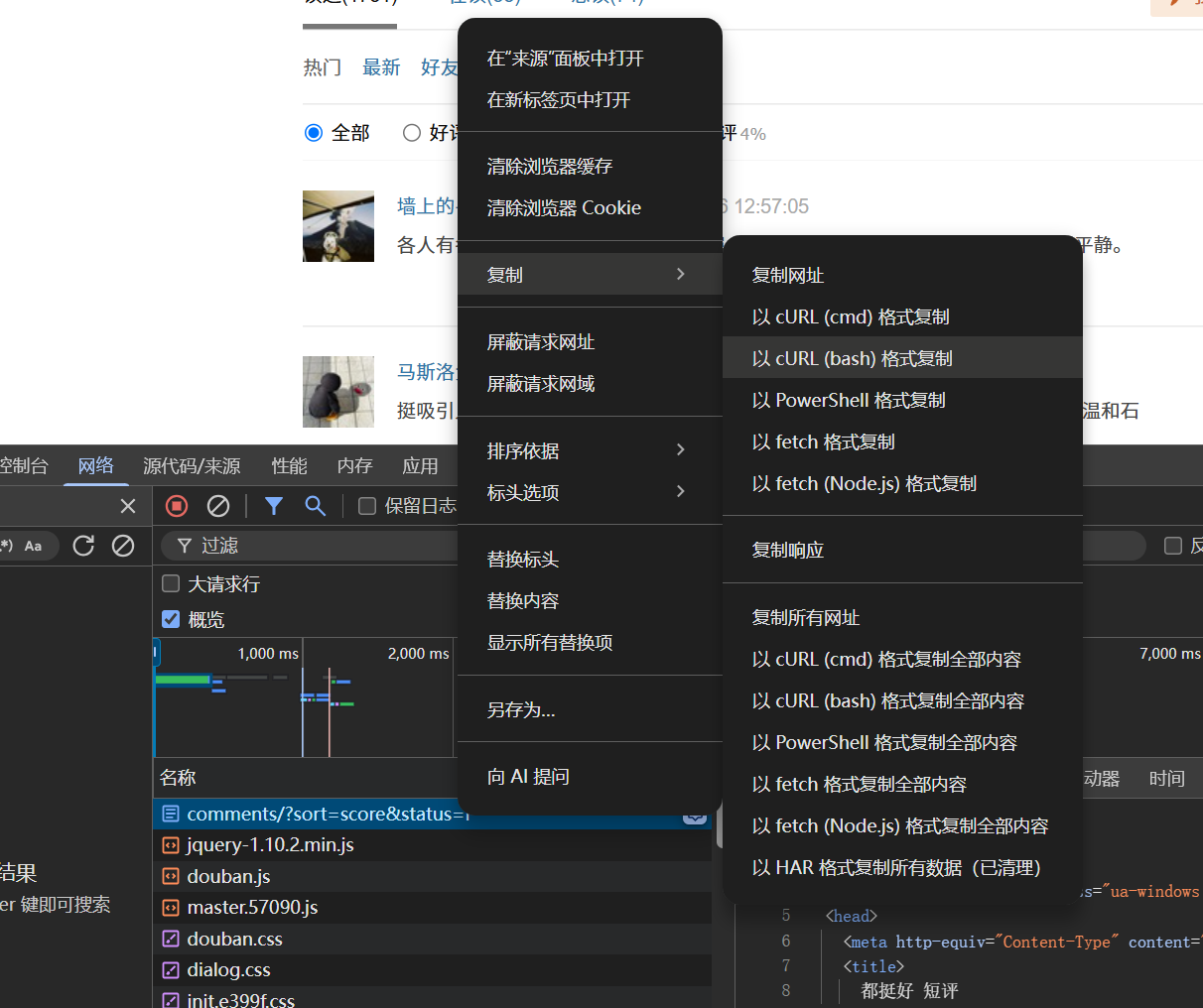
复制到curl command , 下方会自动生成代码 , 可以选择不同的语言
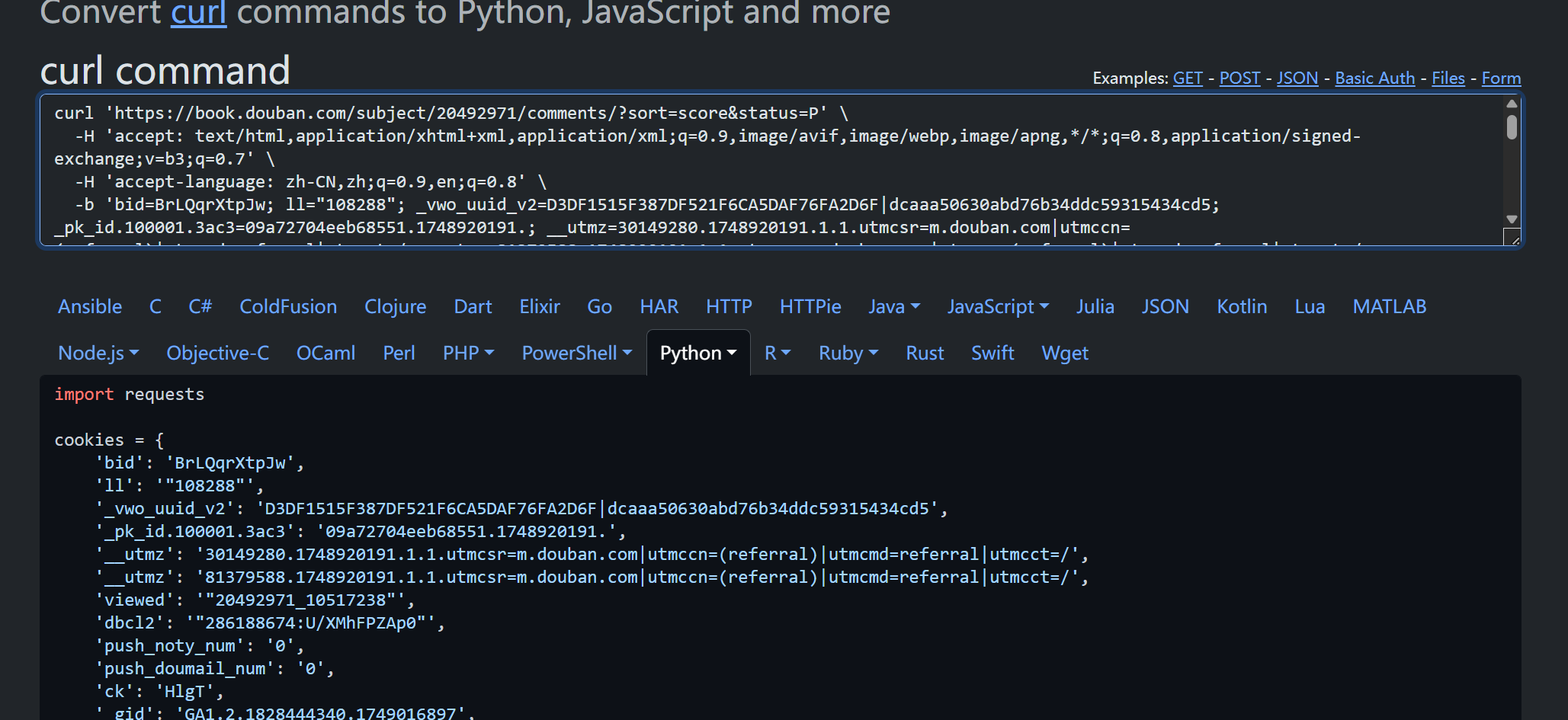
有了cookies 和 headers 剩下的就是爬虫的基本功了
代码:
import matplotlibimport requestsfrom lxml import etreeimport jiebafrom collections import Counterfrom wordcloud import WordCloudimport matplotlib.pyplot as pltmatplotlib.rcParams['font.sans-serif'] = ['SimHei'] # 设置中文字体为 SimHeimatplotlib.rcParams['axes.unicode_minus'] = False # 正确显示负号cookies = { # 你的cookies} headers = { # 你的headers}# proxies = {# # 可以配置一个代理池# # 'http': 'http://120.25.1.15:7890',# # 'https': 'http://120.25.1.15:7890', # } def get_comment(page, sort_type, comment_list): url = f'https://book.douban.com/subject/20492971/comments/?start={page * 20}&limit=20&sort={sort_type}&status=P' response = requests.get(url, cookies=cookies, headers=headers) response.encoding = 'utf-8' tree = etree.HTML(response.text) li_list = tree.xpath('//*[@id="comments"]/div[1]/ul/li') for li in li_list: try: like_count = li.xpath('./div[2]/h3/span[1]/span/text()')[0].strip() name = li.xpath('./div[2]/h3/span[2]/a[1]/text()')[0].strip() score = li.xpath('./div[2]/h3/span[2]/span/@title')[0].strip() time = li.xpath('./div[2]/h3/span[2]/a[2]/text()')[0].strip() comment = li.xpath('./div[2]/p/span/text()')[0].strip() comment_list.append({ 'name': name, 'score': score, 'time': time, 'like_count': like_count, 'comment': comment }) except Exception: continue print(f'第{page + 1}页爬取成功') def analyze_text(comment_list): all_text = ''.join([c['comment'] for c in comment_list]) words = jieba.lcut(all_text) # 去除常见无意义词(可根据需要扩展) stop_words = set(['的', '了', '和', '是', '我', '也', '就', '都', '很', '在', '有', '不', '人']) words = [word for word in words if len(word) > 1 and word not in stop_words] # 统计词频 word_counts = Counter(words) top_words = word_counts.most_common(10) print("词频前10名:") for i, (word, count) in enumerate(top_words, 1): print(f"{i}. {word}:{count} 次") # 生成词云 wc = WordCloud( font_path='simhei.ttf', # 确保有中文字体 background_color='white', width=800, height=600 ).generate_from_frequencies(word_counts) plt.figure(figsize=(10, 6)) plt.imshow(wc, interpolation='bilinear') plt.axis('off') plt.title("豆瓣短评词云", fontsize=18) plt.show() wc.to_file("wordcloud.png") def main(): choice = input("请输入查看类型(1:热门评论,2:最新评论):") if choice == '1': sort_type = 'score' elif choice == '2': sort_type = 'time' else: print("无效输入,默认使用热门评论。") sort_type = 'score' comment_list = [] for i in range(3): get_comment(i, sort_type, comment_list) # 展示前10条评论 print("\n前10条评论:\n") for i, c in enumerate(comment_list[:10], 1): print(f"{i}. {c['name']} | {c['score']} | {c['time']} | 赞:{c['like_count']}\n评论:{c['comment']}\n") # 分析评论文本 analyze_text(comment_list) if __name__ == '__main__': main()需要替换为你的
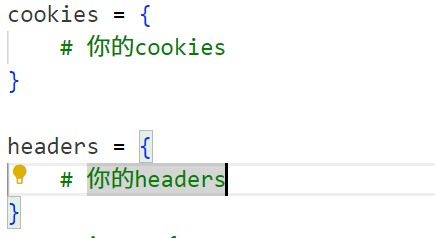
安装包的命令
# 基础请求与解析库pip install requests lxml jieba # 词云与数据分析库pip install wordcloud matplotlib完成
技术要点解析
反爬对策:
- 使用真实浏览器的Headers和Cookies
- 建议添加随机延迟(time.sleep(random.uniform(1,3)))
- 重要项目建议使用代理IP池
数据解析技巧:
- 使用lxml的XPath定位元素
- 健壮的异常处理(网络超时、元素不存在等)
- 数据清洗(去除空白字符等)
文本分析优化:
- 扩展停用词表提升分析质量
- 可考虑添加自定义词典(jieba.load_userdict())
- 词云可调整参数:背景色、最大词汇数、遮罩形状等
本项目展示了从数据爬取到分析可视化的完整流程,读者可根据实际需求进行扩展。建议在遵守豆瓣Robots协议的前提下合理使用爬虫技术,注意控制请求频率,避免对目标网站造成负担。
提醒 : 大规模爬取会被豆瓣封ip
声明:本教程仅用于学习交流,请勿用于商业用途或大规模爬取,尊重网站的数据版权。

 浙公网安备 33010602011771号