

1 二层组网AP上线
一、实验目标
掌握配置WLAN源接口的命令
掌握配置DHCP服务器的命令
掌握手工确认AP上线的方法a
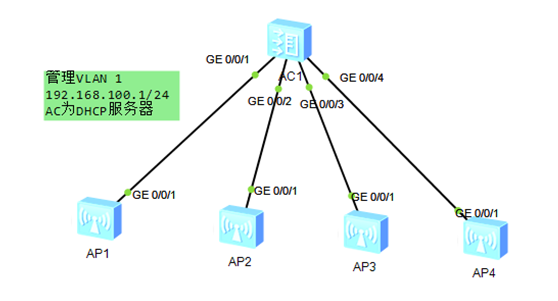
二、实验拓扑
三、实验配置
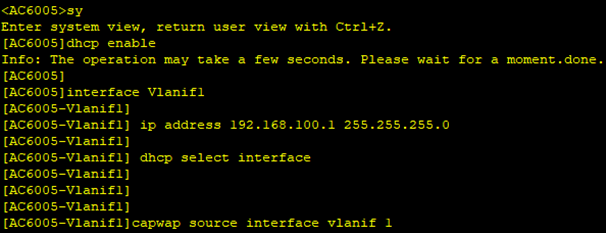
AC基础配置,主要是配置管理VLAN的IP地址,及DHCP服务,因为这里是二层组网,所以不用配置option
dhcp enable
interface Vlanif1
ip address 192.168.100.1 255.255.255.0
dhcp select interface
capwap source interface vlanif 1
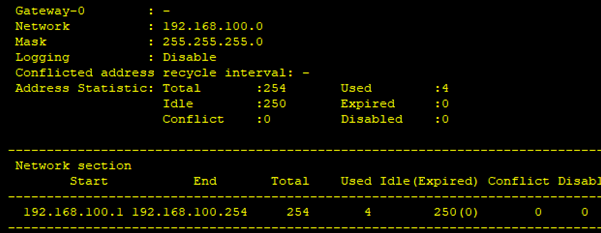
配置检查先检查下DHCP是否分出地址,可以用dis ip pool inter Vlanif1 来检查,这里可以看到已经为4个AP分出地址了
[AC6005]dis ip pool interface Vlanif1
Pool-name : Vlanif1
Pool-No : 0
Lease : 1 Days 0 Hours 0 Minutes
Domain-name : -
DNS-server0 : -
NBNS-server0 : -
Netbios-type : -
Position : Interface Status : Unlocked
Gateway-0 : 192.168.100.1
Mask : 255.255.255.0
VPN instance : --
-----------------------------------------------------------------------------
Start End Total Used Idle(Expired) Conflict Disable
-----------------------------------------------------------------------------
192.168.100.1 192.168.100.254 253 4 249(0) 0 0
-----------------------------------------------------------------------------
因为默认华为的AC使用了mac地址对AP的上线进行认证,所以现在还不能看到AP,但是通过dis arp 可以看到AP的MAC
[AC6005]dis ap all
All AP information(Normal-0,UnNormal-0):
------------------------------------------------------------------------------
AP AP AP Profile AP AP
/Region
ID Type MAC ID State Sysname
------------------------------------------------------------------------------
------------------------------------------------------------------------------
Total number: 0
[AC6005]dis arp
IP ADDRESS MAC ADDRESS EXPIRE(M) TYPE INTERFACE VPN-INSTANCE
VLAN/CEVLAN PVC
------------------------------------------------------------------------------
192.168.100.1 00e0-fc03-800f I - Vlanif1
192.168.100.254 00e0-fc03-8e30 20 D-0 GE0/0/1
1/-
192.168.100.253 00e0-fc03-b310 20 D-0 GE0/0/3
1/-
192.168.100.252 00e0-fc03-da40 20 D-0 GE0/0/2
1/-
192.168.100.251 00e0-fc03-dc50 20 D-0 GE0/0/4
1/-
------------------------------------------------------------------------------
Total:5 Dynamic:4 Static:0 Interface:1

可能通过dis unauthorized-ap record查看未通过认证的AP列表
[AC6005] dis ap unauthorized record
Unauthorized AP record:
Total number: 4
------------------------------------------------------------------------------
AP type: AP6010DN-AGN
AP sn: 210235448310E6766418
AP mac address: 00e0-fc03-dc50
AP ip address: 192.168.100.251
Record time: 2013-12-06 12:13:25
------------------------------------------------------------------------------
AP type: AP6010DN-AGN
AP sn: 2102354483106D748F23
AP mac address: 00e0-fc03-8e30
AP ip address: 192.168.100.254
Record time: 2013-12-06 12:13:24
------------------------------------------------------------------------------
AP type: AP6010DN-AGN
AP sn: 210235448310BE35BA59
AP mac address: 00e0-fc03-b310
AP ip address: 192.168.100.253
Record time: 2013-12-06 12:12:59
------------------------------------------------------------------------------
AP type: AP6010DN-AGN
AP sn: 210235448310152A7C4D
AP mac address: 00e0-fc03-da40
AP ip address: 192.168.100.252
Record time: 2013-12-06 12:12:58
----------------------------------------------------------------------------

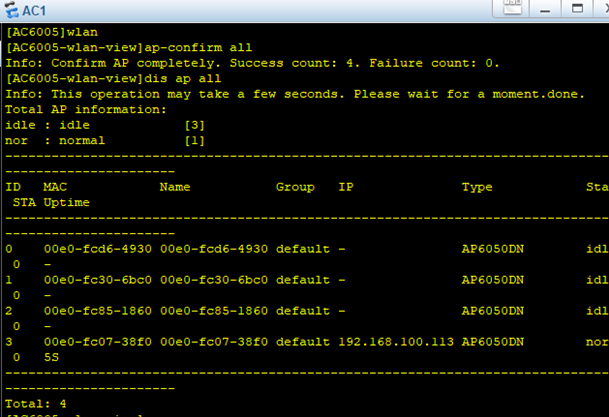
通过命令确认AP上线:
[AC6005] wlan
[AC6005-wlan-view]ap-confirm all
Info: Confirm AP completely. Success count: 4. Failure count: 0.
[AC6005-wlan-view]dis ap all
All AP information(Normal-4,UnNormal-0):
------------------------------------------------------------------------------
AP AP AP Profile AP AP
/Region
ID Type MAC ID State Sysname
------------------------------------------------------------------------------
0 AP6010DN-AGN 00e0-fc03-dc50 0/0 normal ap-0
1 AP6010DN-AGN 00e0-fc03-8e30 0/0 normal ap-1
2 AP6010DN-AGN 00e0-fc03-b310 0/0 normal ap-2
3 AP6010DN-AGN 00e0-fc03-da40 0/0 normal ap-3
------------------------------------------------------------------------------
Total number: 4
四、补充知识
1、如果已经知道AP的MAC地址,也可以通过下面命令上AP上线
wlan
ap-mac XXXX-XXXX-XXXX
2、如果想重启一个AP,可以在WLAN配置示图下使用命令ap reset id x 或ap reset all重启AP.
[AC6005-wlan-view]ap-reset ap-id 0
Warning: Reset AP! Continue? [Y/N]y
Info: Reset AP completely.
[AC6005-wlan-view]dis ap all
All AP information(Normal-3,UnNormal-1):
------------------------------------------------------------------------------
AP AP AP Profile AP AP
/Region
ID Type MAC ID State Sysname
------------------------------------------------------------------------------
0 AP6010DN-AGN 00e0-fc03-dc50 0/0 fault ap-0
1 AP6010DN-AGN 00e0-fc03-8e30 0/0 normal ap-1
2 AP6010DN-AGN 00e0-fc03-b310 0/0 normal ap-2
3 AP6010DN-AGN 00e0-fc03-da40 0/0 normal ap-3
------------------------------------------------------------------------------
Total number: 4

 浙公网安备 33010602011771号