
实验1:类与对象
 1 #include <iostream>
 2 #include <cmath>
 3
 4 class Complex
 5 {
 6
 7 public:
 8     Complex() {};
 9     Complex(double x) :real{ x }, imag{ 0 }{}
10     Complex(double x, double y) :real{ x }, imag{ y }{}
11     Complex(const Complex& obj):real{ obj.real }, imag{ obj.imag }{};
12     ~Complex() = default;
13     double get_real() const {return real;}
14     double get_imag() const {return imag;}
15     void show() const;
16     void add(Complex c);
17     friend Complex add(Complex x1, Complex x2);
18     friend bool is_equal(Complex obj1, Complex obj2);
19     friend double abs(Complex obj);
20 private:
21     double real, imag;
22
23 };
24
25
26 void Complex::show() const
27 {
28     using namespace std;
29     if (imag > 0)
30         cout << real << "+" << imag << "i" << endl;
31     else if (imag == 0)
32         cout << real << endl;
33     else
34         cout << real  << imag << "i" << endl;
35 }
36
37 void Complex::add(Complex obj)
38 {
39     real += obj.real;
40     imag += obj.imag;
41 }
42
43 Complex add(Complex c1, Complex c2)
44 {
45     Complex c(c1.real + c2.real, c1.imag + c2.imag);
46     return c;
47 }
48
49
50 double abs(Complex obj)
51 {
52     double x = sqrt(obj.get_imag() * obj.get_imag() + obj.get_real() * obj.get_real());
53     return x;
54 }
55
56
57 bool is_equal(Complex obj1, Complex obj2) {
58     if (obj1.get_real() == obj2.get_real() && obj1.get_imag() == obj2.get_imag())
59         return true;
60     else return false;
61 }
以下为task3.cpp:
 1 #include <iostream>
 2 #include "Complex.hpp"
 3
 4 int main()
 5 {
 6     using namespace std;
 7
 8     Complex c1(6,-8);
 9     const Complex c2(2.5);
10     Complex c3(c1);
11
12     cout << "c1 = ";
13     c1.show();
14     cout << endl;
15
16     cout << "c2 = ";
17     c2.show();
18     cout << endl;
19     cout << "c2.imag = " << c2.get_imag() << endl;
20
21     cout << "c3 = ";
22     c3.show();
23     cout << endl;
24
25     cout << "abs(c1) = ";
26     cout << abs(c1) << endl;
27
28     cout << boolalpha;
29     cout << "c1 == c3 : " << is_equal(c1, c3) << endl;
30     cout << "c1 == c2 : " << is_equal(c1, c2) << endl;
31
32     Complex c4;
33     c4 = add(c1, c2);
34     cout << "c4 = c1 + c2 = ";
35     c4.show();
36     cout << endl;
37
38     c1.add(c2);
39     cout << "c1 += c2, " << "c1 = ";
40     c1.show();
41     cout << endl;
42 }
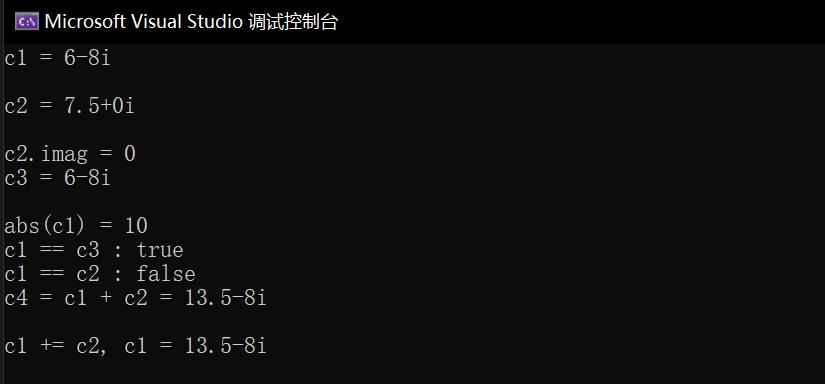
以下为运行结果截图:
二,实验任务4
以下为User.hpp.源码
 1 #pragma once
 2 #pragma once
 3 #include <string>
 4 #include<iostream>
 5 using namespace std;
 6 class User
 7 {
 8 public:
 9     User();
10     User(string name1) :name{ name1 }, passwd{ "111111" }, email{ " " } {
11         n++;
12     };
13     User(string name1, string passwd1, string email1)
14         :name{ name1 }, passwd{ passwd1 }, email{ email1 }{
15         n++;
16     };
17     ~User();
18     void set_email();
19     void change_passwd();
20     void print_info() {cout << "name:" << name << endl
21         << "passwd:" << "******" <<endl
22         << "email:" << email <<endl;
23     };
24     static void print_n() {
25         cout << "There are " << n << " users" << endl;
26     }
27 private:
28     string name;
29     string passwd;
30     string email;
31     static int n;
32 };
33 int User::n = 0;
34
35 User::User()
36 {
37     n++;
38 }
39
40 User::~User()
41 {
42     n--;
43 }
44 void User::set_email() {
45     string email1;
46     cout << "Enter email address:" ;
47     cin >> email1;
48     email = email1;
49     cout << "email is set successfully!" << endl;
50 }
51 void User::change_passwd() {
52     int a = 1,n = 2;
53     string passwd1,passwd0;
54     cout << "Enter old password:" << endl;
55     cin >> passwd1;
56     a = passwd1.compare(passwd);
57     while (a != 0&&n--) {
58         cout << "Please reenter again:";
59         cin >> passwd1;
60         a = passwd1.compare(passwd);
61     }
62     if (a == 0){
63         cout << "Enter new password:";
64         cin >> passwd1;
65         passwd = passwd1;
66     }
67     else {
68         cout << "password input error,please try after a while" << endl;
69     }
70 }
以下为task4.cpp的源码(已修改数据):
 1 #include "User.hpp"
 2 #include <iostream>
 3
 4 int main()
 5 {
 6     using namespace std;
 7
 8     cout << "testing 1......" << endl;
 9     User user1("Jean", "666666", "aka@hotdog.com");
10     user1.print_info();
11
12     cout << endl
13          << "testing 2......" << endl
14          << endl;
15     User user2("Happy");
16     user2.change_passwd();
17     user2.set_email();
18     user2.print_info();
19
20     User::print_n();
21 }
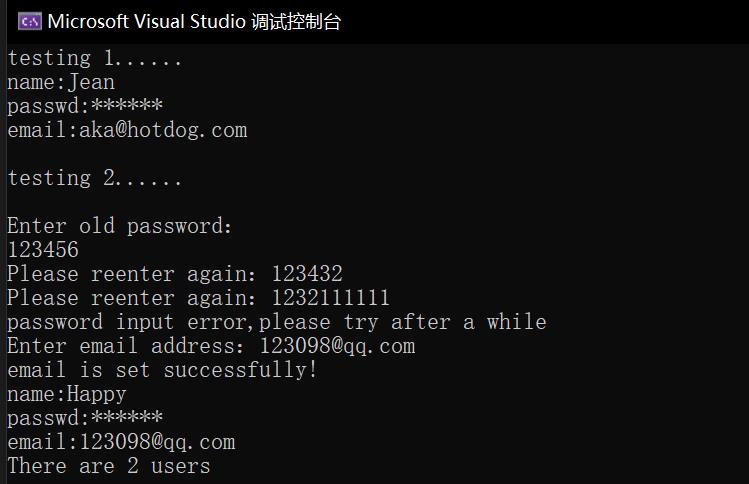
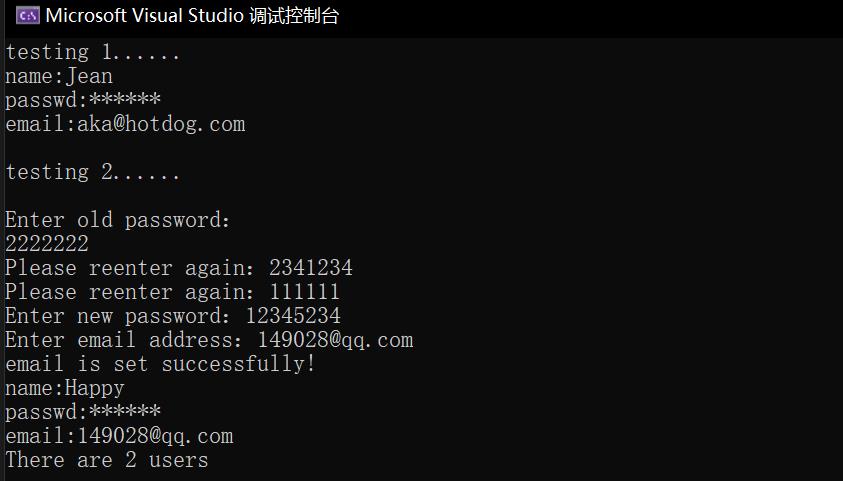
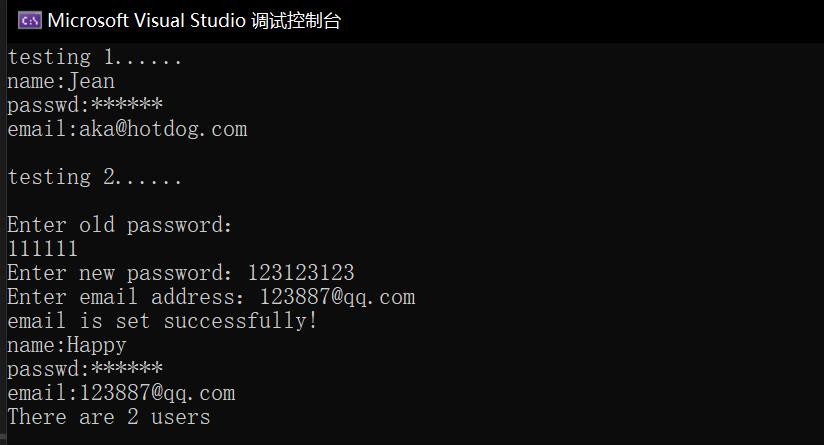
以下为运行结果截图:
实验总结
此次实验学到的新东西,掌握的新的运用方法很多。
(1)在正式实践时,总是提示开头文件包含失败。结合实验二分析之后,才知道包含其他源文件时,应该将放在同一个路径文件之上,不能仅仅在默认路径创建一个新文件,然后再导入别的路径下的现有文件。
(2)对const的应用有了更好的掌握。
const放在成员函数之后,表示不会对成员属性进行修改;
放在函数的最前面,表示不能修改返回值;
放在括号中的形参前面,表示函数体内不能修改形参的值。
常量对象只能调用const的函数。普通对象都可以调用。
(3)类内函数的参数不需要使用引用形式,可以直接修改属性。
(4)用静态的成员变量来统计类对象的数量,初始化必须在类外实现,格式如下
<数据类型><类名>::<静态数据成员名>=<值>
前面不用加static,以免与一般静态变量或对象相混淆。

 浙公网安备 33010602011771号