
异步分页
企业门户一般有新闻展示,需要分页以查询过往记录,本文采用MVC框架分部视图实现;
ajax异步分页后页面切换正常不会产生历史记录,使用H5方法history.pushState和history.replaceState生成历史记录,并修改地址栏,在地址后添加'/'和页码,页面标题改为'新闻管理-3'格式,3为页码;点击前进或后退可以回溯到浏览过的数据页面,点击刷新仍显示本页内容,效果如图;
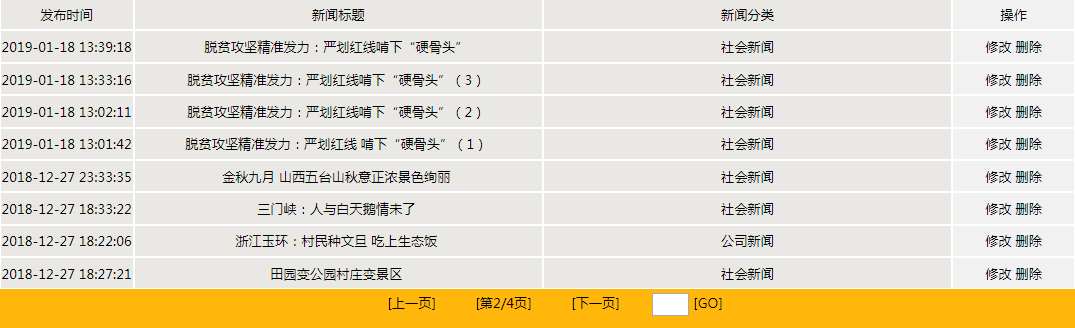
可复用分部视图ajaxPagnation代码:
<div style="clear:both;height:25px;text-align:center;line-height:25px;">

    <div style="display:inline-block;width:80px;">
        <a id="PreviousPage" href="javascript:;" style="text-decoration: none; color: black;">[上一页]</a>
    </div>
    <div style="display: inline-block; width: 80px; ">
        <a id="PageNoInfo" style="color:black;">[第<span id="PageNo">@ViewBag.PageNo</span>/<span id="PageCount">@ViewBag.PageCount</span>页]</a>
    </div>
    <div style="display: inline-block; width: 80px; ">
        <a id="NextPage" href="javascript:;" style="text-decoration: none; color: black;">[下一页]</a>
    </div>
    <div style="display: inline-block; width: 80px; ">
        <input name="txtGoToPageNo" type="text" id="txtGoToPageNo" style="width:30px;height:15px; vertical-align:middle; " />
        <a id="GoToPage" href="javascript:;" style="text-decoration: none; color: black;">[GO]</a>
    </div>

</div>

<script type="text/javascript">
    //页面加载处理
    //总页数
    var nPageCount = parseInt('@ViewBag.PageCount');
    //获取地址栏最后一个斜线后内容
    var param = location.href.split("/").pop();
    //如果是数字,显示此页,否则显示指定页,2019-01-19
    var sPageNo = (isNaN(param)) ? '@ViewBag.PageNo' : param;
    var nPageNo = parseInt(sPageNo);
    pageOnload(nPageNo);

    //页面加载,修改历史记录
    function pageOnload(pageno) {
        pageUpdate(pageno);

        //处理历史记录
        var state = '@ViewBag.state' + '/' + pageno;
        var title = '@ViewBag.title' + '-' + pageno;

        var url = location.href;
        var param = location.href.split("/").pop();
        //修改浏览器地址栏和历史记录
        if (!history.state && isNaN(param)) {
            //首次加载
            history.replaceState(state, title, url + "/" + pageno);
        } else {
            //刷新或前进后退时
            history.replaceState(state, title, url.substr(0, url.lastIndexOf('/')) + "/" + pageno);
        }
        document.title = title;
    }

    //页面切换,增加历史记录
    function ajaxSubmit(pageno) {
        pageUpdate(pageno);

        //处理历史记录
        var state = '@ViewBag.state' + '/' + pageno;
        var title = '@ViewBag.title' + '-' + pageno;

        var url = location.href;
        var param = location.href.split("/").pop();
        //页面切换增加历史记录
        history.pushState(state, title, url.substr(0, url.lastIndexOf('/')) + "/" + pageno);
        document.title = title;
    }

    //页面更新处理
    function pageUpdate(pageno) {
        //页码显示更新
        document.getElementById('PageNo').innerText = pageno;
        //页切换链接更新
        paged();

        //总页数为零不显示内容,2019-01-19
        if (nPageCount == 0) { return; }
        //越下限不显示内容,2019-01-19
        if (pageno <= 0) { return; }
        //如果删除一个记录后页码超出总页数,显示最后一页
        if (pageno >= nPageCount) {
            pageno = nPageCount;
        }

        //展示动态内容
        ajaxPagnation(pageno);
    }

    //页切换链接更新
    function paged() {
        var PreviousPage = document.getElementById('PreviousPage');
        var NextPage = document.getElementById('NextPage');
        var txtPageNo = parseInt(document.getElementById('PageNo').innerText);
        var txtPageCount = parseInt(document.getElementById('PageCount').innerText);
        PreviousPage.style.display = 'none';
        NextPage.style.display = 'none';
        //上一页显示
        if (txtPageNo >= 2) {
            PreviousPage.style.display = 'inline';
            PreviousPage.onclick = function () { ajaxSubmit(txtPageNo - 1) };
        }
        //下一页显示
        if (txtPageNo <= txtPageCount - 1) {
            NextPage.style.display = 'inline';
            NextPage.onclick = function () { ajaxSubmit(txtPageNo + 1) };
        }

        //目标页码
        var txtGoToPageNo = document.getElementById('txtGoToPageNo');
        //页面GO直达链接
        var GoToPage = document.getElementById('GoToPage');

        //文本框失去焦点时修改链接地址
        txtGoToPageNo.onblur = function () {
            var nGoToPageNo = parseInt(txtGoToPageNo.value);
            //越下限显示首页
            if (nGoToPageNo <= 1) {
                nGoToPageNo = 1;
            }//越上限显示末页
            else if (nGoToPageNo >= txtPageCount) {
                nGoToPageNo = txtPageCount;
            }

            //链接事件
            GoToPage.onclick = function () { ajaxSubmit(nGoToPageNo) };
            //Enter键按下事件
            document.onkeydown = function () {
                if (event.keyCode == 13) {
                    ajaxSubmit(nGoToPageNo);
                }
            };
        }
    }

    //分页数据异步请求并展示
    function ajaxPagnation(pageno) {
        $.ajax({
            type: "POST",
            url: "@Url.Action(ViewBag.url)",
            data: { PageNo: pageno },
            dataType: "json",
            //返回整个html页面时,退回请求页面,2019-01-14
            error: function (xhr, status, error) {
                history.go(-1);
            },
            //此分布视图复用,在不同页面展示内容不同,故cbPagnation方法在前端页面实现
            success: cbPagnation
        });
    }

    //监听浏览器后退、前进事件,以在浏览过的不同页面切换
    if (history.pushState) {
        window.addEventListener("popstate", function (event) {
            var pageno = history.state.split("/").pop();
            pageOnload(pageno);
        });
    }
</script>
前端代码:
@model List<Models.News>

@{
    Layout = "~/Views/Shared/MP_News.cshtml";
}

@section Css{
    <link href="~/Styles/News.css" rel="stylesheet" />
}
<script src="~/Scripts/jquery-1.8.2.min.js"></script>

<div id="ajaxDiv">

</div>

<script type="text/javascript">
    //收到数据分页展示
    function cbPagnation(data) {
        var list = JSON.parse(data);
        //var content = $('.nlistdiv')[0].parentNode;
        var content = document.getElementById('ajaxDiv');
        //清空原有显示内容
        content.innerHTML = '';
        for (var i in list) {
            //拼接显示内容
            var html = '<div class="nlistdiv">';
            html += '<div class="newsItem">';
            html += '<div class="newtitle"><a href="@Url.Action("NewsDetail")?newsId=' + list[i].NewsId + '" target="_blank">' + list[i].NewsTitle + '</a></div>';
            html += '<div class="newsdate">' + list[i].PublishTime + '</div>';
            html += '</div>';
            html += '</div>';
            //重绘内容区域
            content.innerHTML += html;
        }
    }
</script>
<!--调用分部视图分页-->
@Html.Partial("ajaxPagnation")
控制器代码:
    [Authorize]
    public class NewsController : Controller
    {
        //
        // GET: /HotelWebMge/News/

        public ActionResult Index()
        {
            return View();
        }
        //页记录数
        int PageSize = 8;

        //新闻信息列表入口
        public ActionResult NewsManager()
        {
            ViewBag.url = "NewsPagination";
            ViewBag.state = "NewsManager";
            ViewBag.title = "新闻管理";
            //查询总记录数
            int TotalCount = new NewsMge().GetNewsCount();
            //获得总页数
            int PageCount = TotalCount % PageSize == 0 ? TotalCount / PageSize : (TotalCount / PageSize + 1);
            ViewBag.PageCount = PageCount;
            int PageNo = 1;
            //没有内容时当前页数显示0
            if (PageCount == 0)
            {
                PageNo = 0;
            }
            ViewBag.PageNo = PageNo;

            return View();
        }

        //分页获取信息列表
        public ActionResult NewsPagination(int PageNo)
        {
            int Top = PageSize * (PageNo - 1);
            List<NewsJson> list = new NewsMge().GetNewsListByPage(Top, PageSize);

            JavaScriptSerializer jss = new JavaScriptSerializer();
            string strList = jss.Serialize(list);

            //解决日期序列化问题:"PublishTime":"\/Date(1529490525523)\/",2018-10-24
            strList = System.Text.RegularExpressions.Regex.Replace(strList, @"\\/Date\((\d+)\)\\/", match =>
            {
                DateTime dt = new DateTime(1970, 1, 1);
                dt = dt.AddMilliseconds(long.Parse(match.Groups[1].Value));
                dt = dt.ToLocalTime();
                return dt.ToString("yyyy-MM-dd HH:mm:ss");
            });

            return Json(strList, JsonRequestBehavior.AllowGet);
        }
     }

 浙公网安备 33010602011771号