
Unity 事件中心 - C#实现
前言
一个简单版本的事件中心实现
为什么需要事件中心?
游戏中可能有多个模块需要使用到同一个事件,比如怪物死亡事件需要被结算模块、任务模块、其他怪物等监听到,并作出相应处理
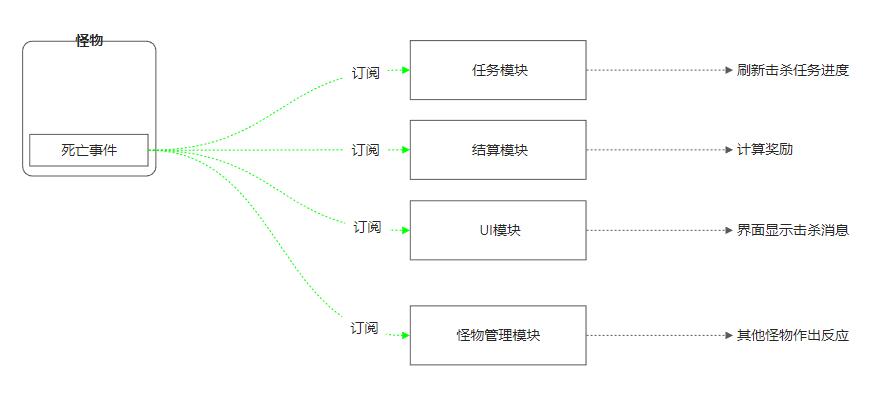
实现原理
核心采用C# 委托来实现事件中心
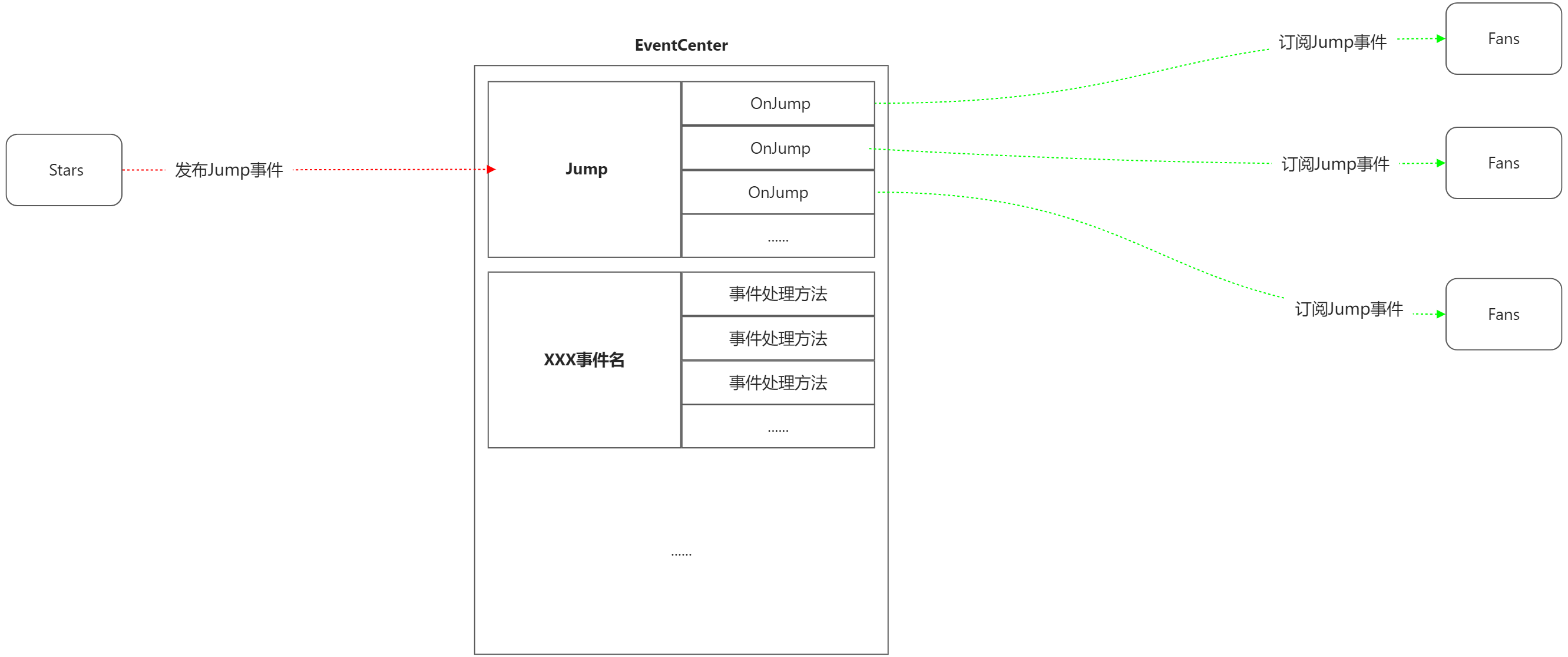
代码实现
核心脚本
- EventCenter.cs
- EventType.cs
其他测试脚本
- Fans.cs
- Stars.cs
EventCenter.cs
using System;
using System.Collections.Generic;

/// <summary>
/// 事件中心,负责注册、发布事件
/// </summary>
public class EventCenter
{

    private static EventCenter _instance = null;
    public static EventCenter Instance
    {
        get
        {
            if (_instance == null)
            {
                _instance = new EventCenter();
            }

            return _instance;
        }
    }

    private Dictionary<EventType, List<Action>> eventDict = new Dictionary<EventType, List<Action>>();

    private EventCenter() { }

    /// <summary>
    /// 订阅事件
    /// </summary>
    /// <param name="eventType">事件类型</param>
    /// <param name="eventHandler">事件处理方法</param>
    public void SubscribeEvent(EventType eventType, Action eventHandler)
    {
        if (eventDict.ContainsKey(eventType))
        {
            eventDict[eventType].Add(eventHandler);
        }
        else
        {
            List<Action> list = new List<Action>();
            list.Add(eventHandler);
            eventDict.Add(eventType, list);
        }
    }

    /// <summary>
    /// 取消订阅事件
    /// </summary>
    /// <param name="eventType">事件类型</param>
    /// <param name="eventHandler">事件处理方法</param>
    public void RemoveSubscribedEvent(EventType eventType, Action eventHandler)
    {
        if(eventDict.ContainsKey(eventType))
        {
            eventDict[eventType].Remove(eventHandler);
        }
    }

    /// <summary>
    /// 发布事件
    /// </summary>
    /// <param name="eventType">事件类型</param>
    public void PublishEvent(EventType eventType)
    {
        if (eventDict.ContainsKey(eventType))
        {
            foreach (Action handler in eventDict[eventType])
            {
                handler?.Invoke();
            }
        }
    }
}
EventType.cs
/// <summary>
/// 事件类型
/// </summary>
public enum EventType
{
    Jump = 1,
}
Fans.cs 粉丝脚本
using System.Collections;
using UnityEngine;

// 粉丝
public class Fans : MonoBehaviour
{
    Animator animator;

    void Start()
    {
        animator = GetComponent<Animator>();
        EventCenter.Instance.SubscribeEvent(EventType.Jump, OnJump);
    }

    void OnDestory()
    {
        EventCenter.Instance.RemoveSubscribedEvent(EventType.Jump, OnJump);
    }

    private void OnJump()
    {
        Jump(Random.Range(0f, 1f));
    }

    IEnumerator JumpAsync(float delayTime)
    {
        yield return new WaitForSeconds(delayTime);
        animator?.SetTrigger("Jump");
        Debug.Log("粉丝:接收到起跳事件");
    }

    public void Jump(float delayTime)
    {
        StartCoroutine(JumpAsync(delayTime));
    }
}
Stars.cs 明星脚本
using System.Collections;
using UnityEngine;

// 明星
public class Stars : MonoBehaviour
{
    Animator animator;

    void Start()
    {
        animator = GetComponent<Animator>();
    }

    Rect btnRect = new Rect(0, 0, 200, 50);
    string btnText = "明星起跳";

    void OnGUI()
    {
        if (GUI.Button(btnRect, btnText))
        {
            animator?.SetTrigger("Jump");
            Debug.Log("明星:发布起跳事件");
            StartCoroutine(JumpAsync(1.2f));
        }
    }

    IEnumerator JumpAsync(float delayTime)
    {
        yield return new WaitForSeconds(delayTime);
        EventCenter.Instance.PublishEvent(EventType.Jump);
    }
}
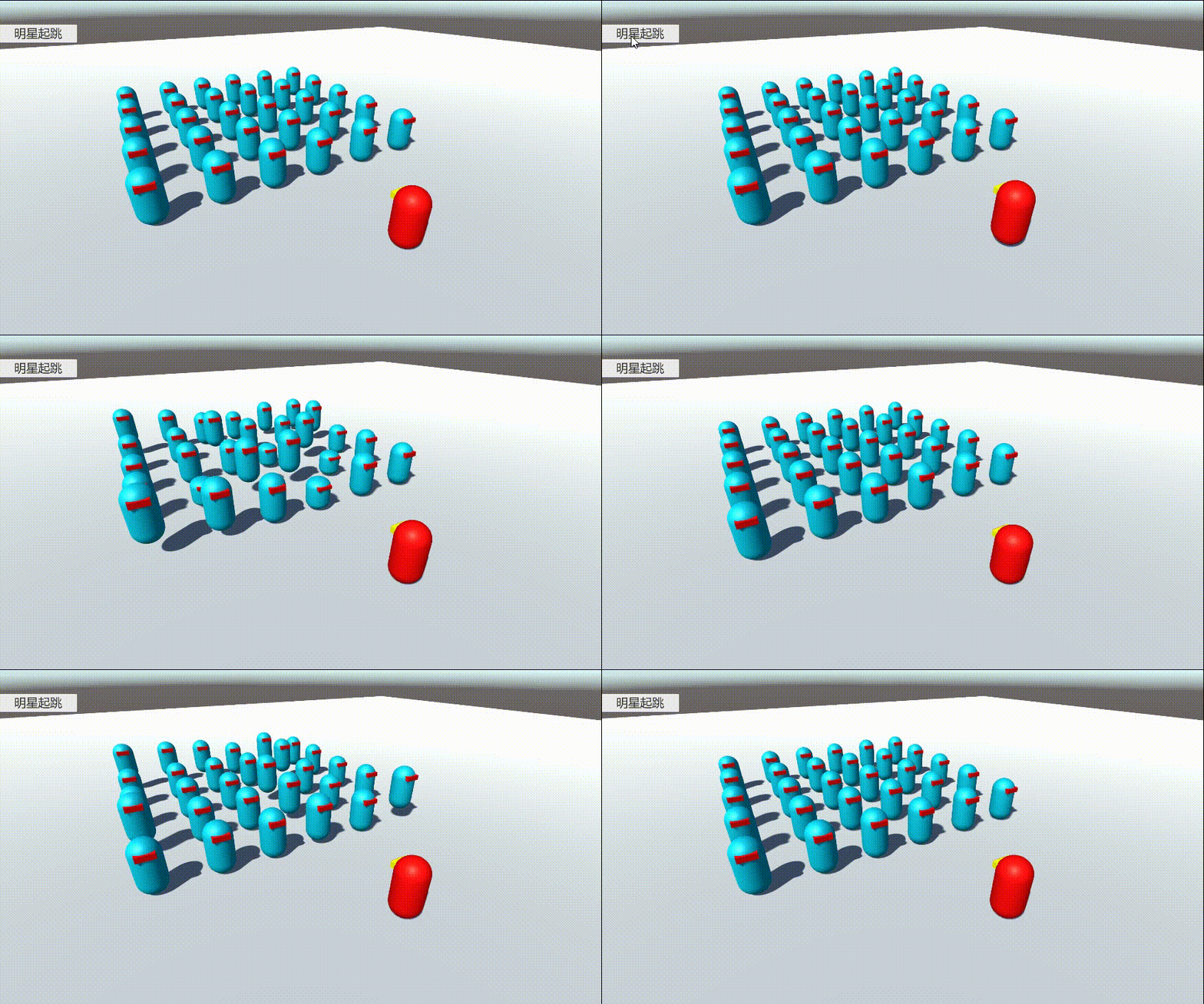
测试结果

 浙公网安备 33010602011771号