
DASCTF July X CBCTF 4th MISC 复现
red_vs_blue
猜测是红队赢还是蓝队赢,但是每一次连接两队的输赢情况不会变,所以可以边猜边记录
需要用到pwn库的几个函数
from pwn import *
p.remote('example.com','端口') # 远程连接
p.recv() # 接收数据
p.recvline() #接收一行数据
p.recvuntil(string) #接收数据直到收到 string
p.sendline(string) #发送一行数据(string)
脚本
from pwn import *
# connection
p = remote('node4.buuoj.cn','26219')
# recieve intro text
p.recvline()# Here are 66 AWD Games will begin!
p.recvline()# The winner is between Red Team and Blue Team
p.recvline()# To get the flag if you predict the results of all games successfully!
p.recvline()# Game 1
p.recvline()# choose one [r] Red Team,[b] Blue Team:

# record the results
s=''

while (1):

	p.sendline(bytes("r",encoding="utf-8"))
	print("r")
	print(p.recvline().decode(),end="") # Your choice xxx Team
	print(p.recvline().decode(),end="") # The result xxx Team
	# win: The number of successful predictions xx
	# lose: Sorry!You are wrong!
	result = p.recvline().decode()
	print(result)
	#print(result.find("successful"))
	if result.find("successful")!=-1:
		#print("continue..")
		s+="r"
		print(p.recvline().decode(),end="")# Game x
		p.recvline()# choose one [r] Red Team,[b] Blue Team:

	elif result.find("wrong")!=-1:
		#print("retry..")
		s+="b"
		p.sendline(bytes("y",encoding="utf-8"))
		print(p.recvline().decode(),end="")# Play again? (y/n):Game 1
		print("y")
		# repeat
		for i in range(len(s)):
			#print(p.recvline().decode(),end="")# Game x
			p.recvline()
			#print(p.recvline().decode(),end="")# choose one [r] Red Team,[b] Blue Team:
			p.sendline(bytes(s[i],encoding="utf-8"))
			print(s[i])
			p.recvline()# Your choice xxx Team
			p.recvline()# The result xxx Team
			p.recvline()# win: The number of successful predictions xx

			print(p.recvline().decode(),end="")# Game x
		print(p.recvline().decode(),end="") # choose one [r] Red Team,[b] Blue Team:
funny_maze
走迷宫,一共有四关,要求10秒内计算出从S到E最短用了几步
很明显人类不能在10秒内计算出结果,所以要用脚本来完成
迷宫可以用深度优先搜索或者广度优先搜索算法,c代码可以看这个:https://blog.csdn.net/LY_624/article/details/51315671
参考c代码写一个python版
import numpy
from pwn import *

def get_start(maps):

    for i in range(0,length):
        for j in range(0,length):
            if maps[i][j] == "S":
                return i,j

def get_end(maps):
    for i in range(0,length):
        for j in range(0,length):
            if maps[i][j]=="E":
                return i,j

def dfs(x,y,step):
    global mins
    #print(sx,sy,ex,ey)
    if x == ex and y == ey:
        if step < mins:
            mins = step
        return

    nextStep = [[0,1],[1,0],[0,-1],[-1,0]]
    for i in range(0,len(nextStep)):
        tx = x+nextStep[i][0]
        ty = y+nextStep[i][1]
        if tx<0 or tx>=length or ty<0 or ty>=length:
            continue
        if (maps[tx][ty]==" " or maps[tx][ty]=="E")and book[tx][ty]==0:
            book[tx][ty]=1 # 标记当前点,表示已经走过
            #print(tx,ty,step)
            dfs(tx,ty,step+1) # 递归搜索
            book[tx][ty]=0 # 取消标记,表示退回到这一步
    return

def ini(maze):
    global length
    global book
    global maps
    global sx,sy,ex,ey
    # 处理一下接收到的迷宫

    # 计算迷宫的宽度
    length = len(maze.split("\n")[0])
    # 生成对应大小的book,用来记录当前位置有没有被走过
    book = [[0]*length for i in range(length+1)]
    # 字符串转为二维数组
    cnt=0
    for i in range(length+1):
        tmp=[]
        for j in range(length+1):
            if cnt>=len(maze):
                break
            if maze[cnt] == "\n":
                cnt+=1
                continue
            tmp.append(maze[cnt])
            cnt+=1
        maps.append(tmp)
   # 找到开始位置和结束位置
    sx,sy=get_start(maps)
    ex,ey=get_end(maps)
    #print(sx,sy,ex,ey)
    dfs(sx,sy,0)
    #print(mins+1)

p=remote("node4.buuoj.cn","25467")
print(p.recvuntil("3.Introduction to this game\n").decode(),end="")
print(1)
p.sendline(b"1")

maze = ""
length = 0
maps = []
book = []
mins = 999999999
cnt=0
sx=0
sy=0
ex=0
ey=0

for counts in range(0,4):
	#print("...receiving data...")
	data=p.recvuntil("Please enter your answer:")
	print(data.decode())
	maze = data.decode()[:-26]
	#print(maze)
	mins = 999999999
	maps = []

	ini(maze)

	print(str(mins))
	p.sendline(bytearray(str(mins+1),encoding="utf-8"))
	if counts<3:
		print(p.recvuntil("So, Let's move on to the next level!\n").decode())
	else:
		print(p.recvline())
		print(p.recvline())
		print(p.recvline())
		print(p.recvline())
		print(p.recvline())
Just a GIF
分解GIF
import os
from PIL import Image

fileName = "Just_a_GIF.gif"
img = Image.open(fileName)
print(img.n_frames)
for i in range(img.n_frames):
    img.seek(i)
    new = Image.new("RGBA",img.size)
    new.paste(img)
    new.save("dd/{:0>3d}.png".format(i))
每11张图片是一个循环,将相同的图片对比,相同位置像素值不同的点画下来
import os
from PIL import Image

dirs = "dd"

files = os.listdir(dirs)
# print(files)

for i in range(0,11):
    rawImg = Image.open("dd/{:0>3d}.png".format(i))
    resImg = Image.new("RGBA",rawImg.size)
    for j in range(1,41):
        print("dd/{:03d}.png".format(i+11*j))
        cmpImg = Image.open("dd/{:03d}.png".format(i+11*j))
        for x in range(cmpImg.size[0]):
            for y in range(cmpImg.size[1]):
                #print(cmpImg.getpixel((x,y)),rawImg.getpixel((x,y)))
                if cmpImg.getpixel((x,y))!=rawImg.getpixel((x,y)):
                    resImg.putpixel((x,y),(0,0,0))
    resImg.save("{}.png".format(i))
    resImg.close()
        #print(i+11*j)
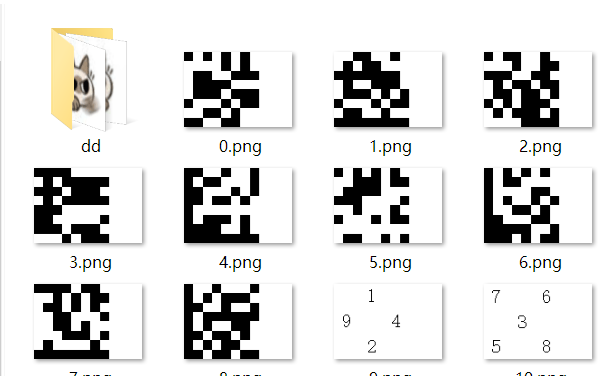
根据提示拼图,得到一张不知道是什么类型的二维码,中国编码app扫一扫得到flag

DASCTF{6bb73086aeb764b5727529d82b084cce}
ezSteganography
预期解没看懂,不过找到了套神的非预期
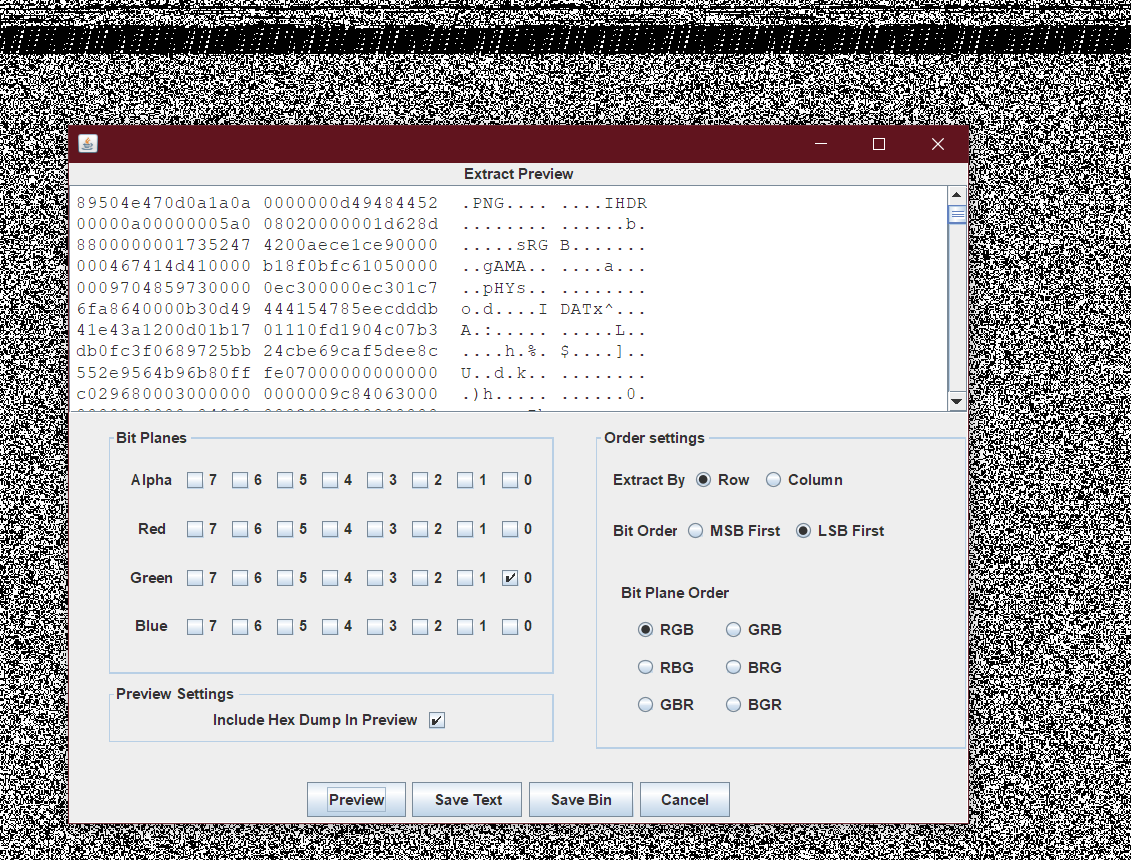
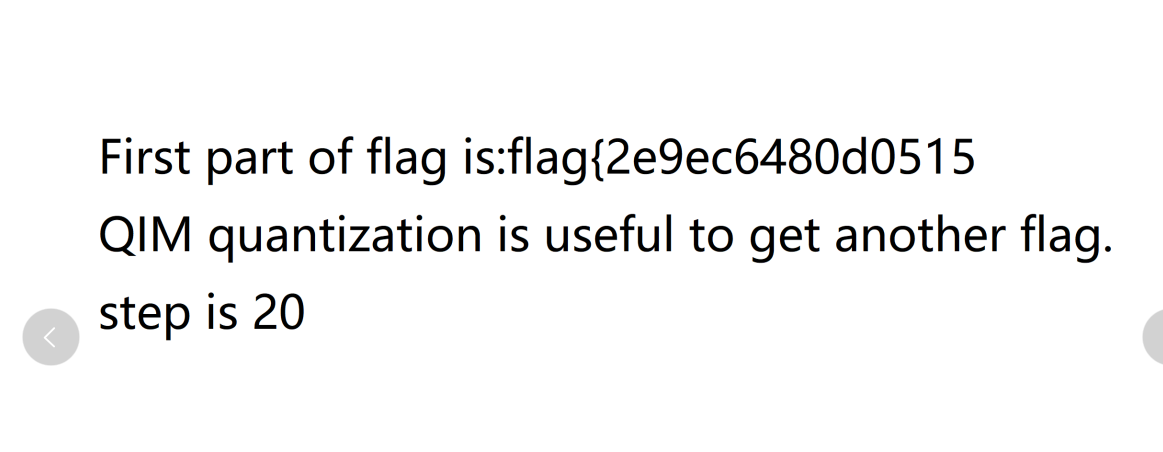
g0通道 data extract 可以看到一张png, 提取出来是前半部分flag
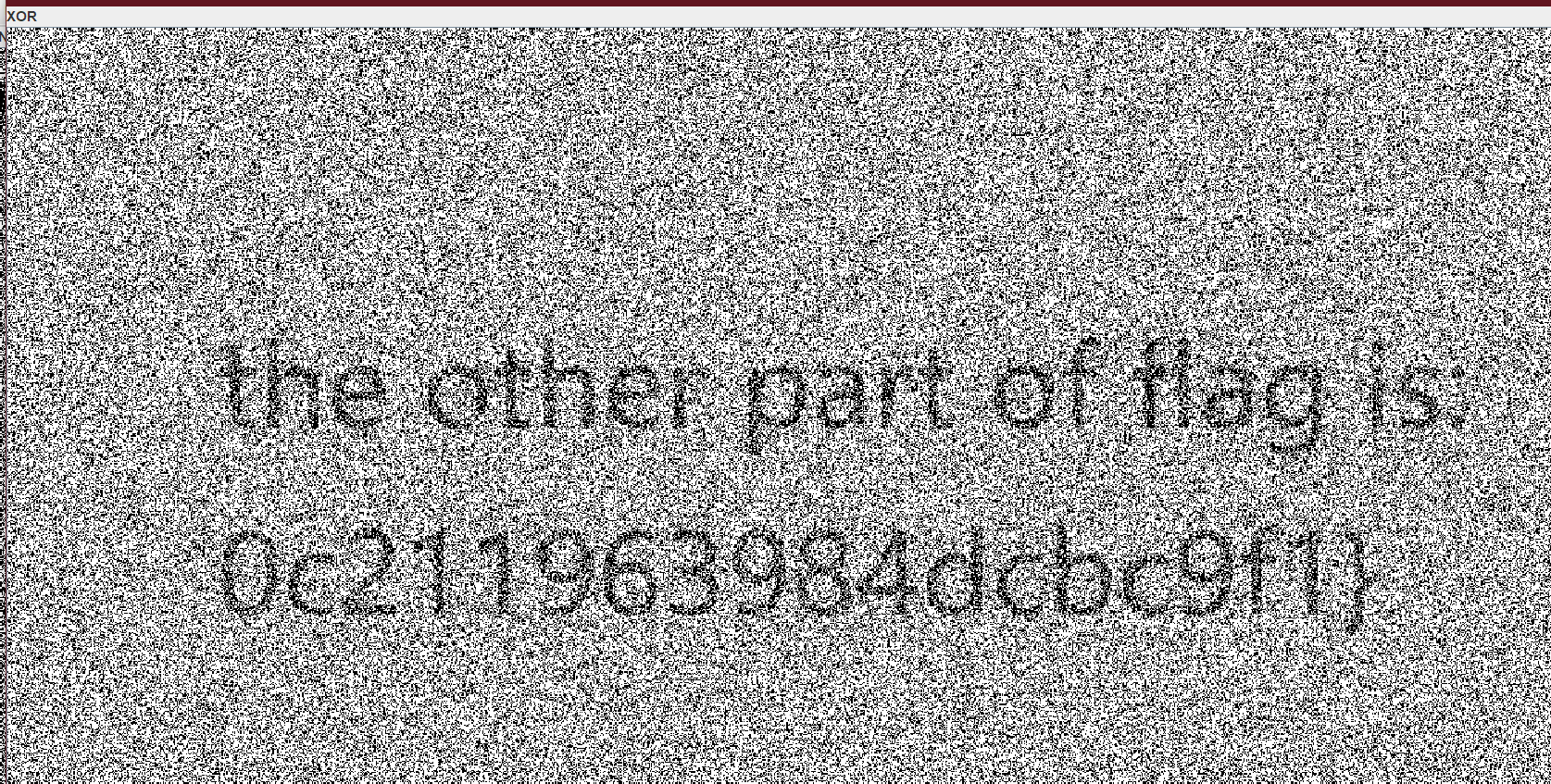
提取g1通道和g0通道xor可以找到后半部分flag
Nuclear wastewater
二维码
from PIL import Image
from collections import Counter

img = Image.open("1.png")
r = open("res.txt","w")

s=[]
x,y = img.size

for i in range(1,x-1):
    for j in range(1,y-1):
        tmp = img.getpixel((i,j))
        for color in range(3):
            if tmp[color] >32 and tmp[color]<128:
                s.append(chr(tmp[color]))
ss=""
for i in s:
    print(i,end="")
    ss+=i

c=Counter(ss)
print()
print(c)
压缩包的密码是#R@/&p~!
零宽度字节隐写
工具:http://330k.github.io/misc_tools/unicode_steganography.html
关于参数如何选择:用010 editor打开
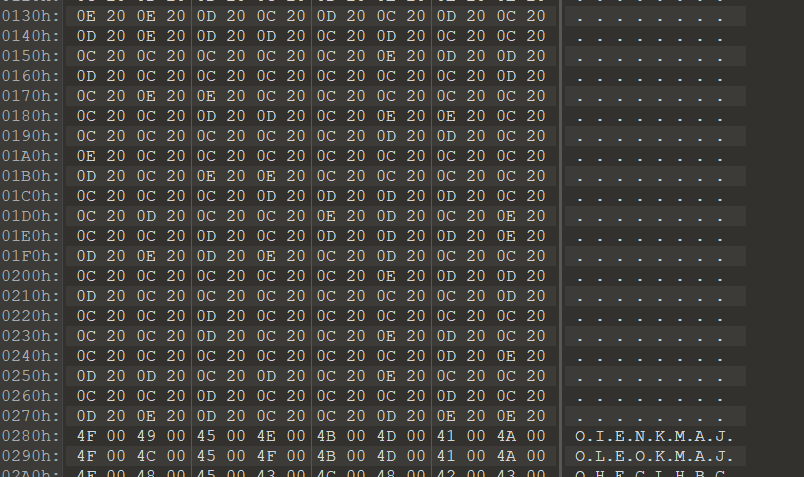
容易观察到文件中有200C 200D 200E, 解密时勾选这几项
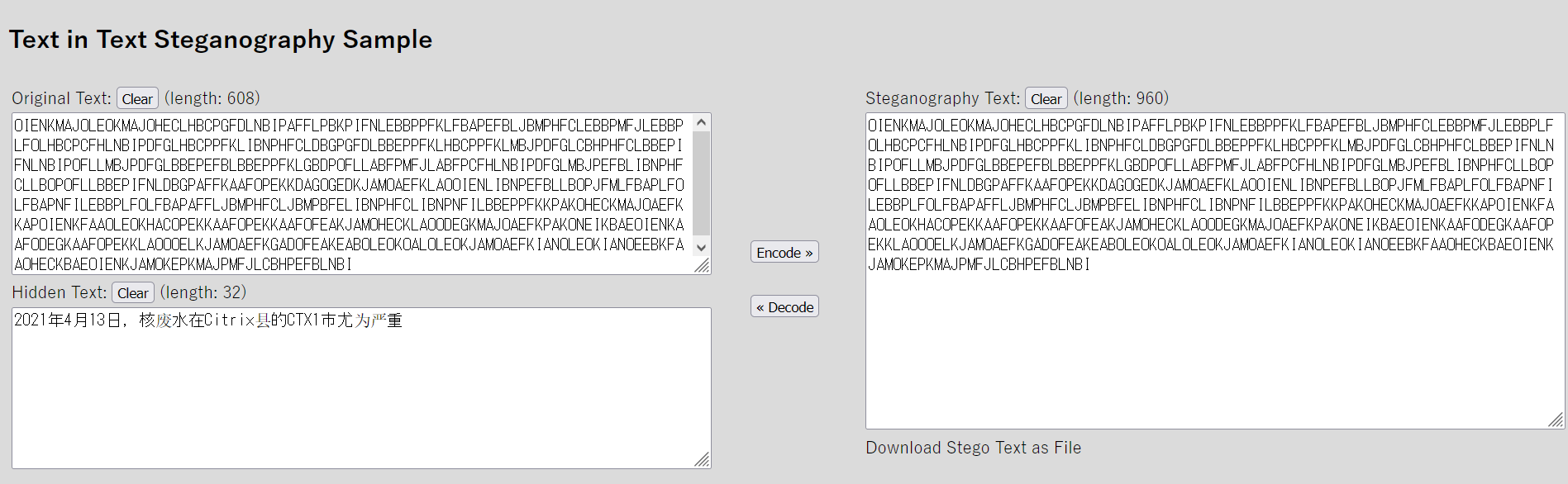
这是提示Citrix CTX1
可以用Cyber chef解决
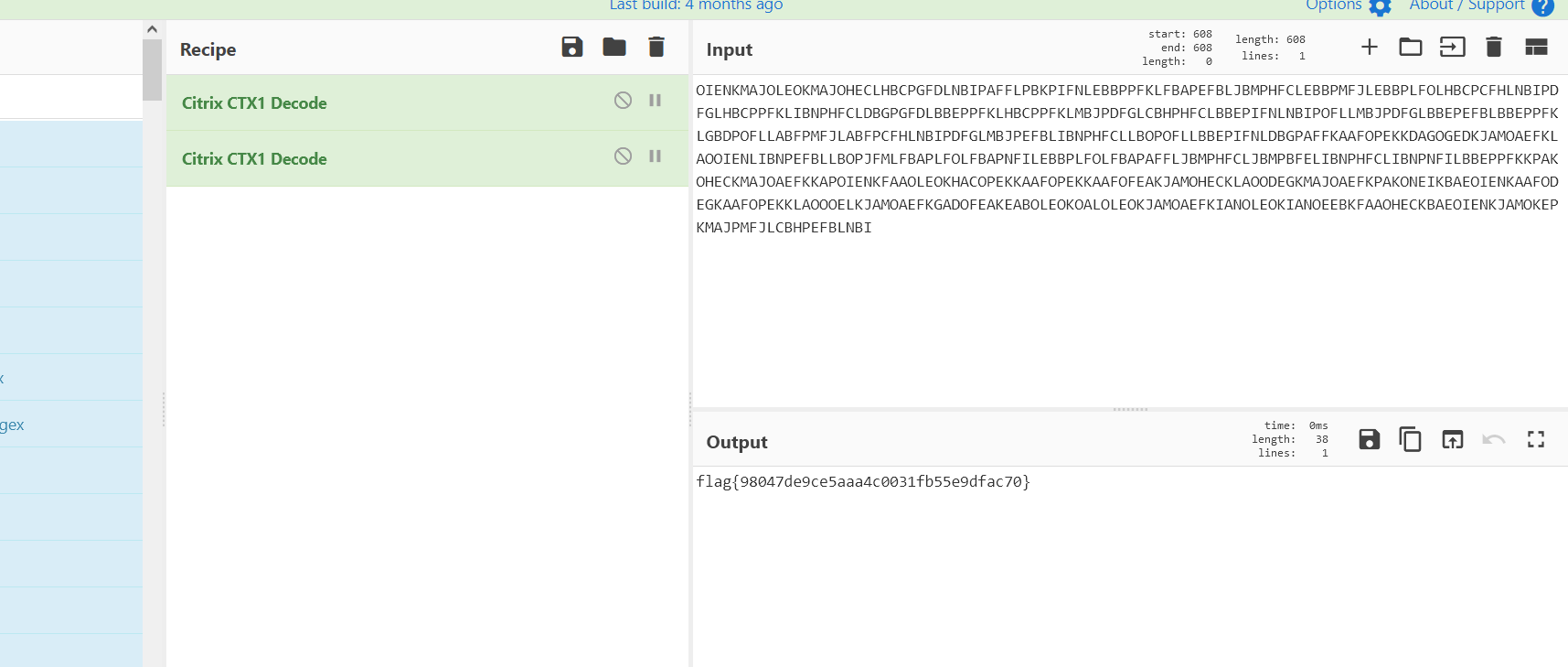
注意复制的时候不要把零宽度字节的部分复制进去

 浙公网安备 33010602011771号