
Element UI的第一个程序(标签使用)
1:Element UI 官方文档:https://element.faas.ele.me/
2:Element UI是什么?
-
网站快速成型工具
-
Element,一套为开发者、设计师和产品经理准备的基于 Vue 2.0 的桌面端组件库
此博客只是 记录一下按钮组件的使用:
使用步骤:先创建一个vue项目:
- 输入cmd :输入命令:vue init webpack hello-vue来创建一个vue项目:
-
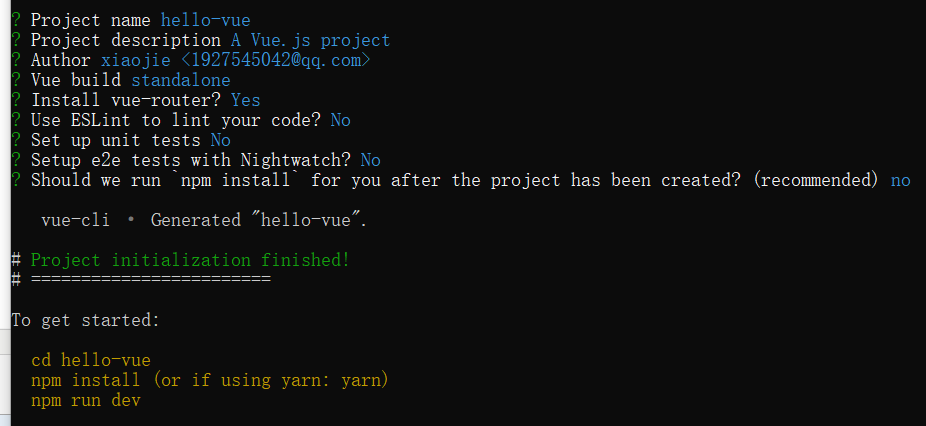
- 然后创建成功进入hello-vue文件夹:cd hello-vue:

- 然后安装vue-router:npm install vue-router --save-dev:

- 继续安装 element-ui:npm i element-ui -S:

- 安装依赖:npm install:

- 安装SASS 加载器:cnpm install sass-loader node-sass --save-dev:

- 启动测试:npm run start:

- 输入:http://localhost:8081 如果页面显示成功就代表创建成功
idea中打开hello-vue文件夹
在main.js文件中引入Element UI:
//引入element ui样式
import ElementUI from 'element-ui';
import 'element-ui/lib/theme-chalk/index.css';
//使用element ui
Vue.use(ElementUI);
我们现在可以进行饿了么 UI的操作了 来最简单的按钮操作:
在components:创建:Butten.vue:
<template>

</template>

<script>
    export default {
        name: "butten.vue"
    }
</script>

<style scoped>

</style>
然后在index.js中:引入组件并配置
import Vue from 'vue'
import Router from 'vue-router'
//引入组件
import Button from '../components/Butten'

Vue.use(Router)
//path(string): 路由匹配路径。(没有path属性的Route 总是会 匹配);
// component表示路径对应显示的组件。
export default new Router({
  routes: [
    {path: '/butten', component:Button}
  ]
})
然后在APP.vue中:
<template>
  <div id="app">
    <a href="#/butten">点我显示出来butten</a>
    <router-view/>
  </div>
</template>
<script>
export default {
  name: 'App'
}
</script>

<style>
#app {
  font-family: 'Avenir', Helvetica, Arial, sans-serif;
  -webkit-font-smoothing: antialiased;
  -moz-osx-font-smoothing: grayscale;
  text-align: center;
  color: #2c3e50;
  margin-top: 60px;
}
</style>
然后从官网中找出按钮标签的基础用法:
<el-row>
  <el-button>默认按钮</el-button>
  <el-button type="primary">主要按钮</el-button>
  <el-button type="success">成功按钮</el-button>
  <el-button type="info">信息按钮</el-button>
  <el-button type="warning">警告按钮</el-button>
  <el-button type="danger">危险按钮</el-button>
</el-row>

<el-row>
  <el-button plain>朴素按钮</el-button>
  <el-button type="primary" plain>主要按钮</el-button>
  <el-button type="success" plain>成功按钮</el-button>
  <el-button type="info" plain>信息按钮</el-button>
  <el-button type="warning" plain>警告按钮</el-button>
  <el-button type="danger" plain>危险按钮</el-button>
</el-row>

<el-row>
  <el-button round>圆角按钮</el-button>
  <el-button type="primary" round>主要按钮</el-button>
  <el-button type="success" round>成功按钮</el-button>
  <el-button type="info" round>信息按钮</el-button>
  <el-button type="warning" round>警告按钮</el-button>
  <el-button type="danger" round>危险按钮</el-button>
</el-row>
Butten.vue中导入:
<template>
<div>
  <el-row>
    <el-button>默认按钮</el-button>
    <el-button type="primary">主要按钮</el-button>
    <el-button type="success">成功按钮</el-button>
    <el-button type="info">信息按钮</el-button>
    <el-button type="warning">警告按钮</el-button>
    <el-button type="danger">危险按钮</el-button>
  </el-row>
</div>
</template>

<script>
    export default {
        name: "butten.vue"
    }
</script>

<style scoped>

</style>
显示为:
如果想改变格式可以参考官网的: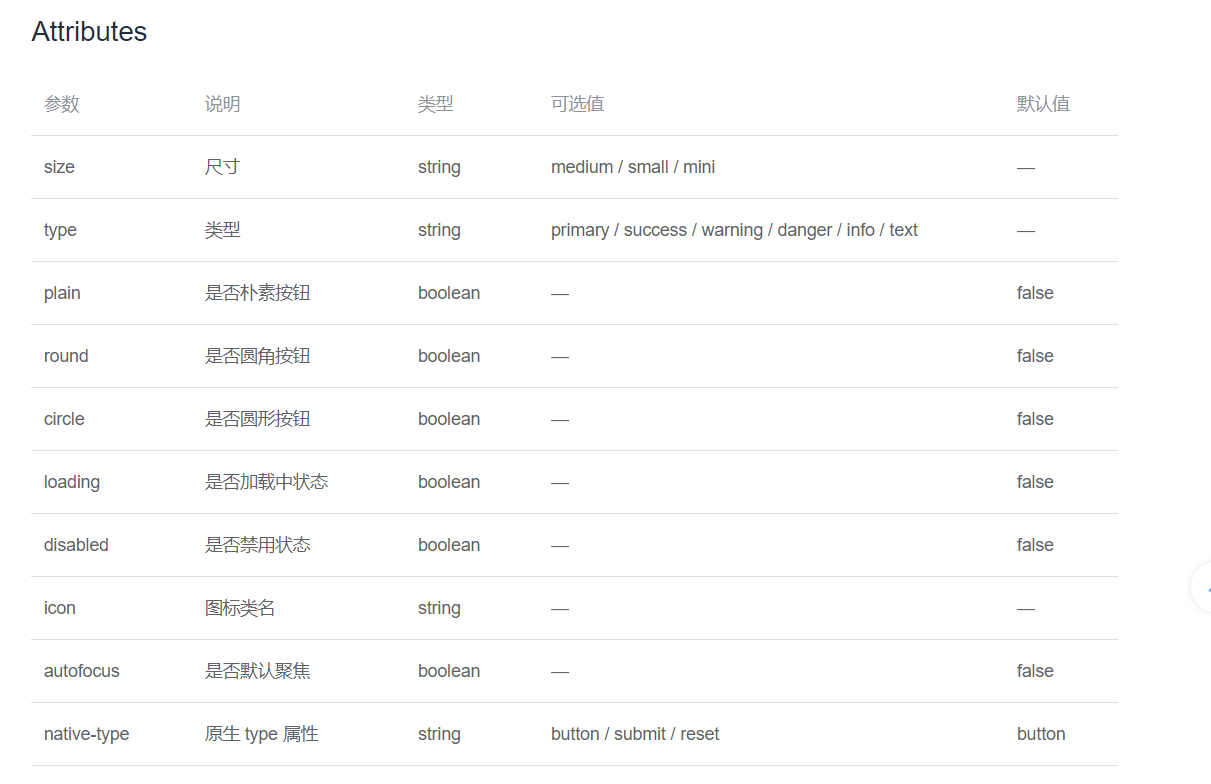
在标签中修改 添加即可:比如:有些布尔类型属性没有写值 因为有默认值
<el-button type="primary" size="small" plain>主要按钮</el-button>
小杰的Element UI笔记 会慢慢更新一系列!

 浙公网安备 33010602011771号