
Python3.6.1安装(Win7 64位)及PyCharm5.0.3测试
1. Python3.6.1安装
1.1下载
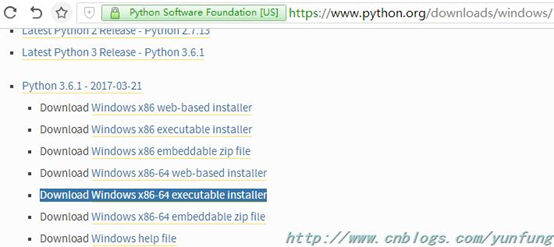
在https://www.python.org/downloads/windows/网页中,点击Download Windows x86-64 executable installer(Download Windows x86 executable installer,32位),下载python-3.6.1-amd64.exe。
1.2 安装
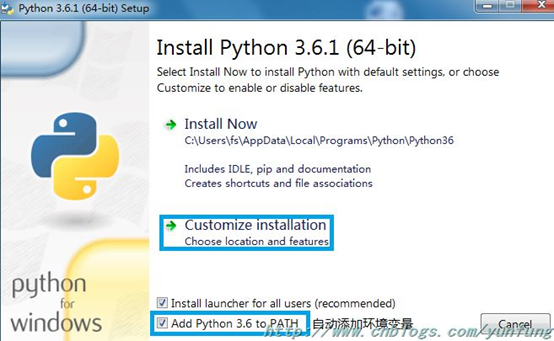
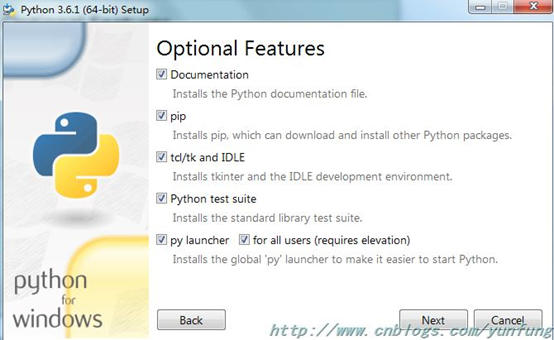
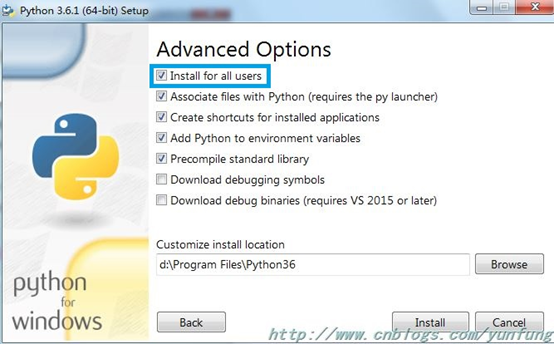
双击python-3.6.1-amd64.exe进行安装,步骤选项如下图所示。
1.3 验证
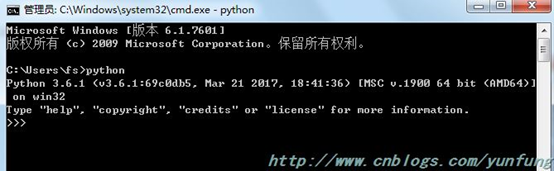
打开cmd命令,输入Python,如看到下面的界面,说明Python已经安装成功。
2. PyCharm5.0.3 测试
1)打开PyCharm5.0.3,点击 Create New Project,选择创建的项目类型,本地位置,以及解释器。

2) 在项目上右键-->New-->Python File,然后输入项目名称

3) 在文件中输入内容,右键点击Run,效果如下图


 浙公网安备 33010602011771号