


Android学习
UI
Android UI组件层次结构
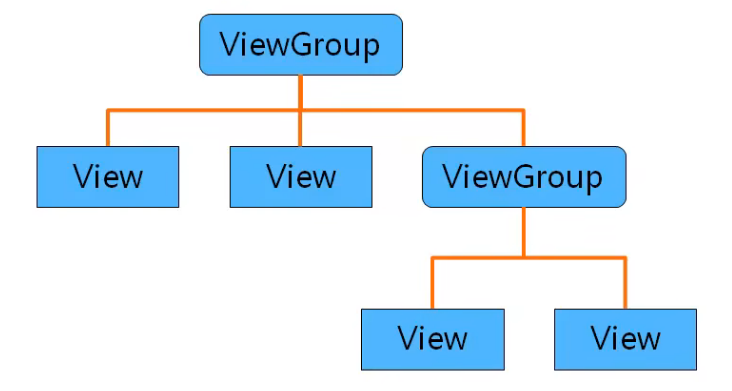
View
id:android:id = "@+id/test"
背景:android:background = "@mipmap/bg",android:background = "#FF0000"
内边距:android:padding = "16dp"
- 自定义尺寸资源:
android:padding = "@dimen/activity_margin"
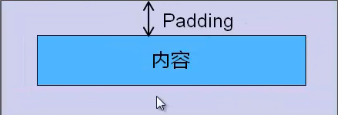
- 上/下/左/右边距:
android:paddingTop,android:paddingBottom
android:paddingLeft,android:paddingRight
ViewGroup
抽象类,控制View组件的摆放
ViewGroup的子类——布局管理器
控制子组件分布时依赖的内部类有
ViewGroup.LayoutParams类
控制位置、高度、宽度
属性:android:layout_height android:layout_width
可用常量:最大适配 FILL_PARENT , MATCH_PARENT(API 8) 最小适配 WRAP_CONRENT
ViewGroup.MarginLayoutParams类
主要用于控制外边距
属性:android:layout_marginTop , android:layout_marginBottom , android:layout_marginLeft , android:layout_marginRight
API 大于 17可用: android:layout_marginStart , android:layout_marginEnd
可用常量:同上
布局管理器
嵌套原则
- 根布局管理器必须有xmlns属性
- 最多只能有一个根布局管理器
- 套娃太多会影响性能
RelativeLayout 相对布局管理器
属性:android:gravity
使用id指定组件不受gravity影响:android:ignoreGravity
内部类:RelativeLayout.LayoutParams
提供一些控制布局管理器中组件的属性——设置在子组件上
相对位置:android:layout_above , android:layout_below , android:layout_toLeftOf , android:layout_toRightOf
与父容器对齐(布尔类型):android:layout_alignParentTop , android:layout_alignParentBott , android:layout_alignParentLeft , android:layout_alignParentRight
与某组件某边界对齐:android:layout_alignTop , android:layout_alignBottom , android:layout_alignLeft , android:layout_alignRight
位置:
android:layout_centerHorizontal 水平居中
android:layout_centerInParent 中心
android:layout_centerVertical 垂直居中
LinearLayout 线性布局管理器
排列方向:android:orientation
可用值: vertical horizontal
布局方式: android:gravity
可用值: center right|bottom 等
子组件属性
去除子组件大小后剩余空间分配权重: android:layout_weight
FrameLayout 帧布局管理器
前景图像(始终位于最顶层): android:foreground
设置前景图像位置: android:foregroundGravity
TableLayout 表格布局管理器
子容器,行组件: <TableRow> </TableRow>
隐藏指定列(0 ~): android:collapseColumns = "0, 2"
允许拉伸的列:android:stretchColumns
允许收缩的列: android:shrinkColumns
GridLayout 网格布局管理器
最大列数: android:columnCount
最大行数: android:rowCount
默认排列方向: android:orientation
内部类:GridLayout.LayoutParams
所在列/行序数(0~):android:layout_column android:layout_row
所跨列/行数:android:layout_columnSpan android:layout_rowSpan
横/纵向权重:android:layout_columnWeight android:layout_rowWeight
布局方式:android:layout_gravity
各类组件
内边距: android:padding
外边距:android:layout_margin
布局方式(居中、靠左...): android:layout_gravity
TextView
内部文本在TextView中的位置布局:android:gravity,区别于android:layout_gravity
行数:android:lines
最大/小行数:android:maxLines = "3" android:minLines = "2"
单行文本,多出的以省略号代替:android:singleLine = "true"
文本:android:text = "@string/demo"
文本大小:android:textSize = "27sp",Android推荐使用sp单位
插入图片: android:drawableTop android:drawableBottom android:drawableLeft android:drawableRight
API17: android:drawableStart android:drawableEnd
控制与插入图片的间距:android:drawablePadding
EditText
是文本框组件(TextView)的子类
提示文本: android:hint = "提示文本"
输入类型: android:inputType
常用值:textPassword number textMultiLine(多行文本) 等
ImageView
引入资源:android:src = @mipmap/image
拉伸(?):android:scaleType

 浙公网安备 33010602011771号