


Markdown - 如何输入数学公式 - 样例
公式样例
要点:
- 行内, 用 $...$ 括起来 (把$想象成C语言的大括号)
- 块级公式: 用 $$ 开始新行, 也用 $$ 结尾, 中间是 LaTex ($$也类似C语言的大括号)
# 数学公式示例

## 行内公式
- 勾股定理:$a^2 + b^2 = c^2$
- 欧拉公式:$e^{i\pi} + 1 = 0$
- 质能方程: $E = mc^2$
- 二次方程求根公式: $x = \frac{-b \pm \sqrt{b^2 - 4ac}}{2a}$

## 块级公式

- 高斯积分:
$$
\int_{-\infty}^{\infty} e^{-x^2} dx = \sqrt{\pi}
$$

- 傅里叶变换:
$$
F(\omega) = \int_{-\infty}^{\infty} f(t) e^{-i\omega t} dt
$$


## 复杂公式

麦克斯韦方程组:
$$
\begin{aligned}
\nabla \cdot \mathbf{E} &= \frac{\rho}{\varepsilon_0} \\
\nabla \cdot \mathbf{B} &= 0 \\
\nabla \times \mathbf{E} &= -\frac{\partial \mathbf{B}}{\partial t} \\
\nabla \times \mathbf{B} &= \mu_0 \mathbf{J} + \mu_0 \varepsilon_0 \frac{\partial \mathbf{E}}{\partial t}
\end{aligned}
$$

$$
\frac{\partial u}{\partial t} = \alpha \nabla^2 u
$$

## 简单矩阵
$$
\mathbf{A} = \begin{bmatrix} 1 & 2 & 3 \\ 4 & 5 & 6 \\ 7 & 8 & 9 \end{bmatrix}
$$

$$
\begin{pmatrix}
P_1 & P_2 & P_3 & P_4 & P_5 & P_6 & P_7 \\
P_8 & P_9 & P_{10} & P_{11} & P_{12} & P_{13} & P_{14} \\
P_{15} & P_{16} & P_{17} & P_{18} & P_{19} & P_{20} & P_{21} \\
P_{22} & P_{23} & P_{24} & P_{25} & P_{26} & P_{27} & P_{28} \\
P_{29} & P_{30} & P_{31} & P_{32} & P_{33} & P_{34} & P_{35} \\
P_{36} & P_{37} & P_{38} & P_{39} & P_{40} & P_{41} & P_{42} \\
P_{43} & P_{44} & P_{45} & P_{46} & P_{47} & P_{48} & P_{49}
\end{pmatrix}
$$
我这里呈现出来的结果
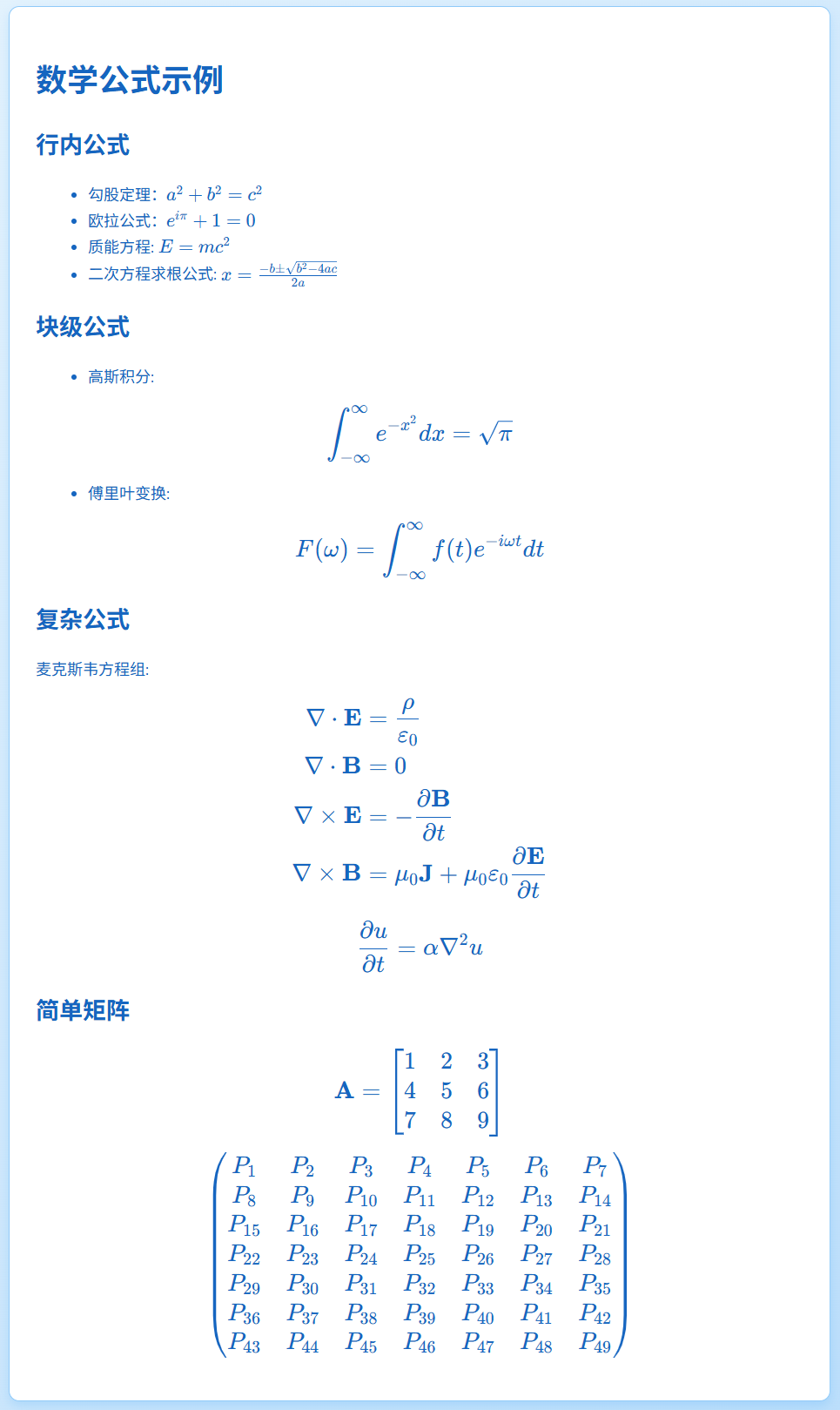
复杂矩阵样例
要点:
- 左右排成一行的元素, 中间用 & 隔开
- 用 \vdots 来显示 竖直的 3 个点 ..., \cdots 代表水平的3点, 而 \ddots 代表斜角的3点
- 两个反斜杠是换行 \\, 注意这个是矩阵元素的换行,不是整个换行
- 如果想把两个矩阵显示在一行中, 用 {aligned} 语法
- 既可以用 {array} 来精确控制, 也可以直接用 {pmatrix}, 后者更简洁
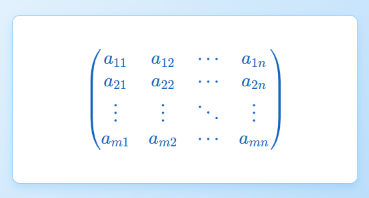
样例1 - 省略号:
$$
\begin{pmatrix}
a_{11} & a_{12} & \cdots & a_{1n} \\
a_{21} & a_{22} & \cdots & a_{2n} \\
\vdots & \vdots & \ddots & \vdots \\
a_{m1} & a_{m2} & \cdots & a_{mn}
\end{pmatrix}
$$
呈现
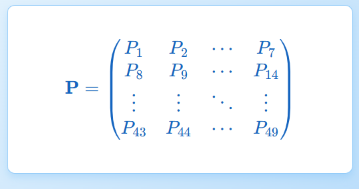
样例2 - 省略号:
$$
\mathbf{P} = \begin{pmatrix}
P_1 & P_2 & \cdots & P_7 \\
P_8 & P_9 & \cdots & P_{14} \\
\vdots & \vdots & \ddots & \vdots \\
P_{43} & P_{44} & \cdots & P_{49}
\end{pmatrix}
$$
呈现
样例3 - 带上标
$$
\mathbf{p} = \begin{pmatrix}
P_1 & P_2 & P_3 & P_4 & \cdots & P_{46} & P_{47} & P_{48} & P_{49}
\end{pmatrix}^T
$$
呈现

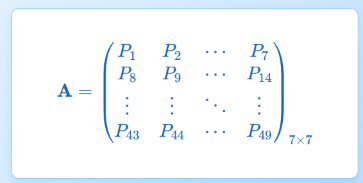
样例4 - 带下标
$$
\mathbf{A} = \begin{pmatrix}
P_1 & P_2 & \cdots & P_7 \\
P_8 & P_9 & \cdots & P_{14} \\
\vdots & \vdots & \ddots & \vdots \\
P_{43} & P_{44} & \cdots & P_{49}
\end{pmatrix}_{7\times7}
$$
呈现
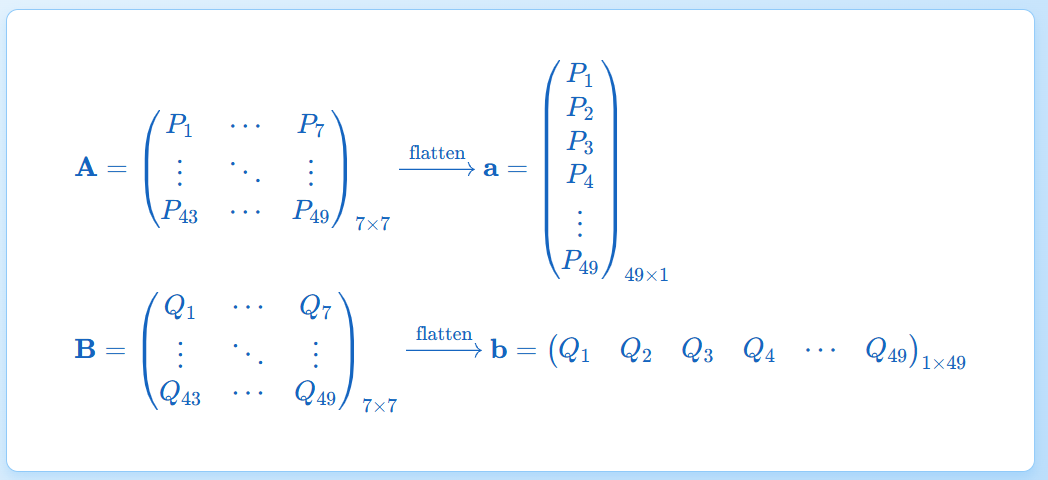
样例5 - 多个矩阵显示在一行上
$$
\begin{aligned}
&\mathbf{A} = \begin{pmatrix}
P_1 & \cdots & P_7 \\
\vdots & \ddots & \vdots \\
P_{43} & \cdots & P_{49}
\end{pmatrix}_{7\times7}
\xrightarrow{\text{flatten}}
\mathbf{a} = \begin{pmatrix}
P_1 \\ P_2 \\ P_3 \\ P_4 \\ \vdots \\ P_{49}
\end{pmatrix}_{49\times1} \\
&\mathbf{B} = \begin{pmatrix}
Q_1 & \cdots & Q_7 \\
\vdots & \ddots & \vdots \\
Q_{43} & \cdots & Q_{49}
\end{pmatrix}_{7\times7}
\xrightarrow{\text{flatten}}
\mathbf{b} = \begin{pmatrix}
Q_1 & Q_2 & Q_3 & Q_4 & \cdots & Q_{49}
\end{pmatrix}_{1\times49}
\end{aligned}
$$
呈现
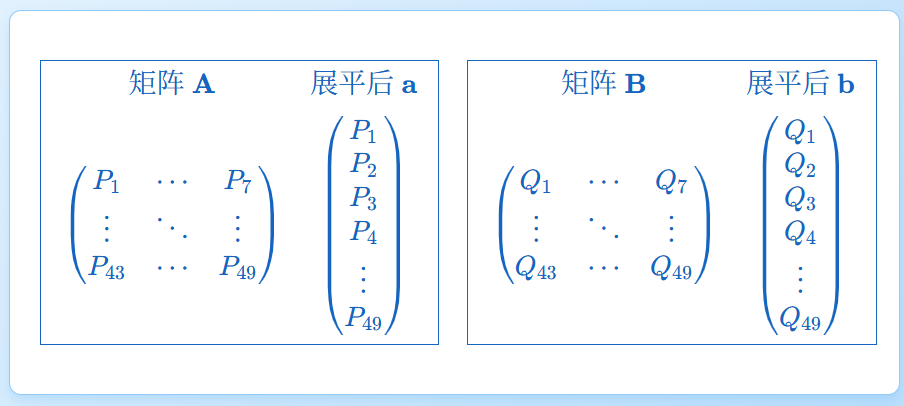
样例6 - 加外框
$$
\boxed{
\begin{array}{cc}
\text{矩阵}\ \mathbf{A} & \text{展平后}\ \mathbf{a} \\[1ex]
\begin{pmatrix}
P_1 & \cdots & P_7 \\
\vdots & \ddots & \vdots \\
P_{43} & \cdots & P_{49}
\end{pmatrix} &
\begin{pmatrix}
P_1 \\ P_2 \\ P_3 \\ P_4 \\ \vdots \\ P_{49}
\end{pmatrix}
\end{array}
}
\quad
\boxed{
\begin{array}{cc}
\text{矩阵}\ \mathbf{B} & \text{展平后}\ \mathbf{b} \\[1ex]
\begin{pmatrix}
Q_1 & \cdots & Q_7 \\
\vdots & \ddots & \vdots \\
Q_{43} & \cdots & Q_{49}
\end{pmatrix} &
\begin{pmatrix}
Q_1 \\ Q_2 \\ Q_3 \\ Q_4 \\ \vdots \\ Q_{49}
\end{pmatrix}
\end{array}
}
$$
呈现
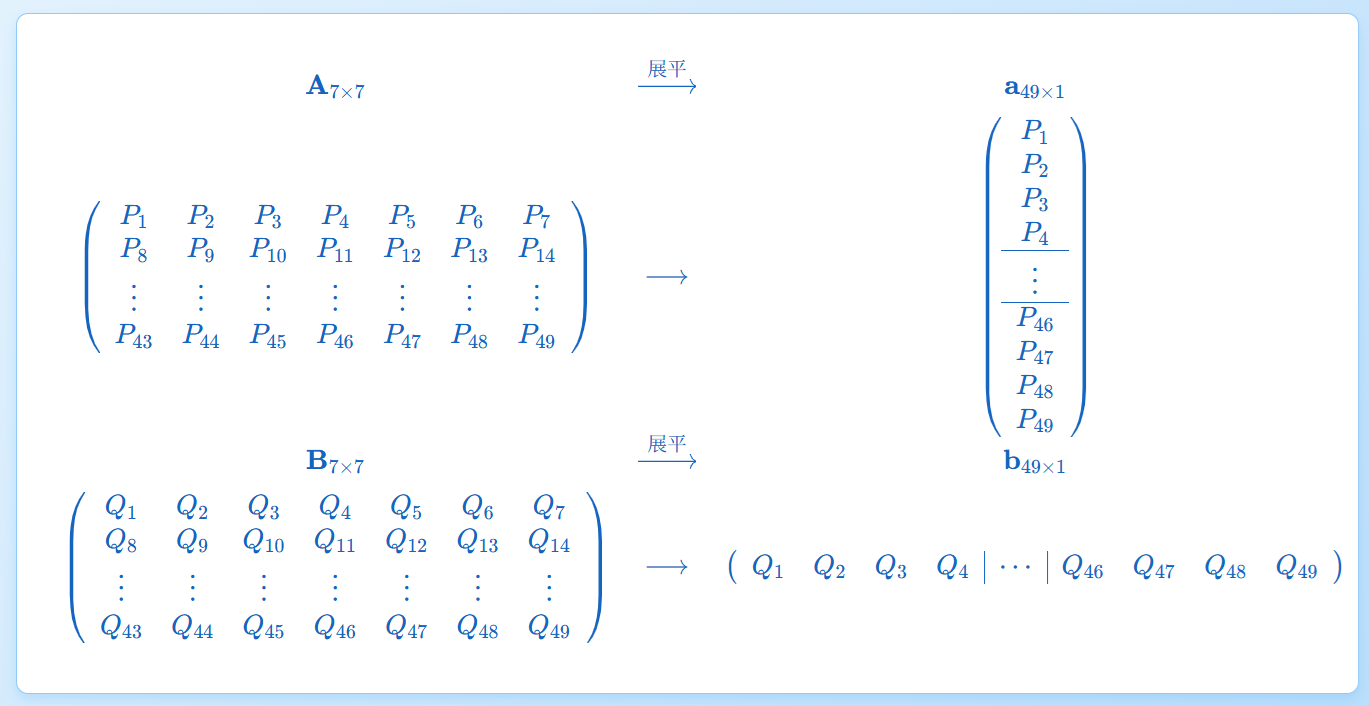
样例7 - 带横线或竖线,作为分隔指示
$$
\begin{array}{ccc}
\mathbf{A}_{7\times7} & \xrightarrow{\text{展平}} & \mathbf{a}_{49\times1} \\[1ex]
\left(\begin{array}{ccccccc}
P_1 & P_2 & P_3 & P_4 & P_5 & P_6 & P_7 \\
P_8 & P_9 & P_{10} & P_{11} & P_{12} & P_{13} & P_{14} \\
\vdots & \vdots & \vdots & \vdots & \vdots & \vdots & \vdots \\
P_{43} & P_{44} & P_{45} & P_{46} & P_{47} & P_{48} & P_{49}
\end{array}\right) & \longrightarrow &
\left(\begin{array}{c}
P_1 \\ P_2 \\ P_3 \\ P_4 \\
\hline
\vdots \\
\hline
P_{46} \\ P_{47} \\ P_{48} \\ P_{49}
\end{array}\right) \\[3ex]
\mathbf{B}_{7\times7} & \xrightarrow{\text{展平}} & \mathbf{b}_{49\times1} \\[1ex]
\left(\begin{array}{ccccccc}
Q_1 & Q_2 & Q_3 & Q_4 & Q_5 & Q_6 & Q_7 \\
Q_8 & Q_9 & Q_{10} & Q_{11} & Q_{12} & Q_{13} & Q_{14} \\
\vdots & \vdots & \vdots & \vdots & \vdots & \vdots & \vdots \\
Q_{43} & Q_{44} & Q_{45} & Q_{46} & Q_{47} & Q_{48} & Q_{49}
\end{array}\right) & \longrightarrow &
\left(\begin{array}{cccc|c|cccc}
Q_1 & Q_2 & Q_3 & Q_4 & \cdots &
Q_{46} & Q_{47} & Q_{48} & Q_{49}
\end{array}\right)
\end{array}
$$
呈现
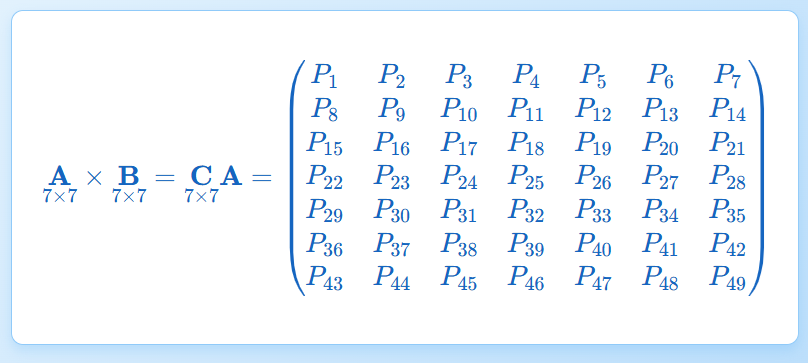
样例8 - 带维度标注
$$
\underset{7\times7}{\mathbf{A}} \times \underset{7\times7}{\mathbf{B}} = \underset{7\times7}{\mathbf{C}}

\mathbf{A} =
\begin{pmatrix}
P_1 & P_2 & P_3 & P_4 & P_5 & P_6 & P_7 \\
P_8 & P_9 & P_{10} & P_{11} & P_{12} & P_{13} & P_{14} \\
P_{15} & P_{16} & P_{17} & P_{18} & P_{19} & P_{20} & P_{21} \\
P_{22} & P_{23} & P_{24} & P_{25} & P_{26} & P_{27} & P_{28} \\
P_{29} & P_{30} & P_{31} & P_{32} & P_{33} & P_{34} & P_{35} \\
P_{36} & P_{37} & P_{38} & P_{39} & P_{40} & P_{41} & P_{42} \\
P_{43} & P_{44} & P_{45} & P_{46} & P_{47} & P_{48} & P_{49}
\end{pmatrix}
$$
呈现
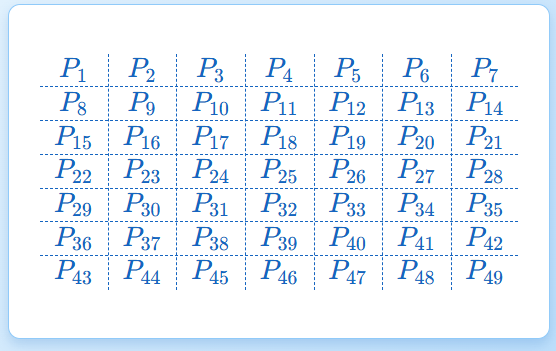
样例9 - 带网格线的矩阵
$$
\begin{array}{c:c:c:c:c:c:c}
P_1 & P_2 & P_3 & P_4 & P_5 & P_6 & P_7 \\
\hdashline
P_8 & P_9 & P_{10} & P_{11} & P_{12} & P_{13} & P_{14} \\
\hdashline
P_{15} & P_{16} & P_{17} & P_{18} & P_{19} & P_{20} & P_{21} \\
\hdashline
P_{22} & P_{23} & P_{24} & P_{25} & P_{26} & P_{27} & P_{28} \\
\hdashline
P_{29} & P_{30} & P_{31} & P_{32} & P_{33} & P_{34} & P_{35} \\
\hdashline
P_{36} & P_{37} & P_{38} & P_{39} & P_{40} & P_{41} & P_{42} \\
\hdashline
P_{43} & P_{44} & P_{45} & P_{46} & P_{47} & P_{48} & P_{49}
\end{array}
$$
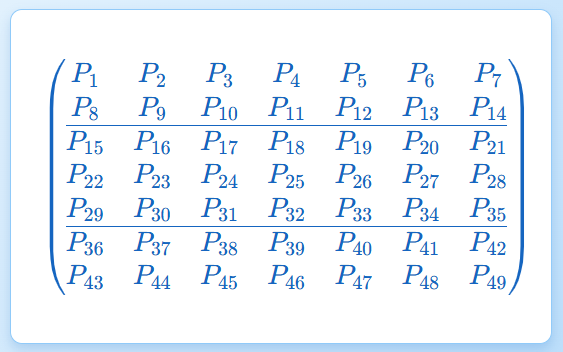
样例10 - 分块矩阵
$$
\begin{pmatrix}
P_1 & P_2 & P_3 & P_4 & P_5 & P_6 & P_7 \\
P_8 & P_9 & P_{10} & P_{11} & P_{12} & P_{13} & P_{14} \\
\hline
P_{15} & P_{16} & P_{17} & P_{18} & P_{19} & P_{20} & P_{21} \\
P_{22} & P_{23} & P_{24} & P_{25} & P_{26} & P_{27} & P_{28} \\
P_{29} & P_{30} & P_{31} & P_{32} & P_{33} & P_{34} & P_{35} \\
\hline
P_{36} & P_{37} & P_{38} & P_{39} & P_{40} & P_{41} & P_{42} \\
P_{43} & P_{44} & P_{45} & P_{46} & P_{47} & P_{48} & P_{49}
\end{pmatrix}
$$
样例11 - 颜色美化
$$
\colorbox{lightblue}{$
\begin{array}{ccc}
a & b & c \\
d & e & f
\end{array}
$}
$$

颜色也可以用16进制
$$
\colorbox{#e6f2ff}{$
\begin{array}{ccc}
a & b & c \\
d & e & f
\end{array}
$}
$$
更多的颜色样例,包括公式和矩阵
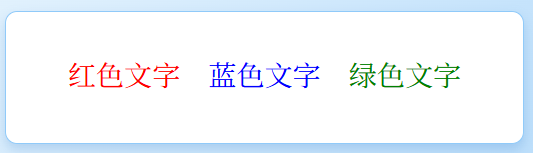
纯文本:
$$
\textcolor{red}{红色文字} \quad
\textcolor{blue}{蓝色文字} \quad
\textcolor{green}{绿色文字}
$$
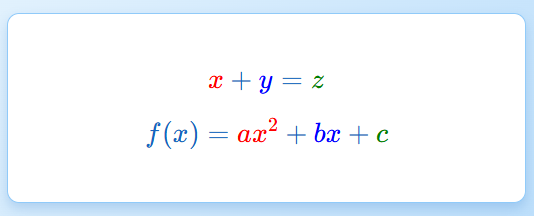
公式:
$$
\textcolor{red}{x} + \textcolor{blue}{y} = \textcolor{green}{z}
$$

$$
f(x) = \textcolor{red}{ax^2} + \textcolor{blue}{bx} + \textcolor{green}{c}
$$
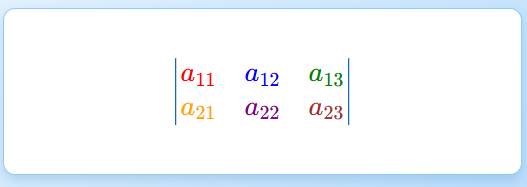
矩阵/行列式:
$$
\begin{vmatrix}
\textcolor{red}{a_{11}} & \textcolor{blue}{a_{12}} & \textcolor{green}{a_{13}} \\
\textcolor{orange}{a_{21}} & \textcolor{purple}{a_{22}} & \textcolor{brown}{a_{23}}
\end{vmatrix}
$$
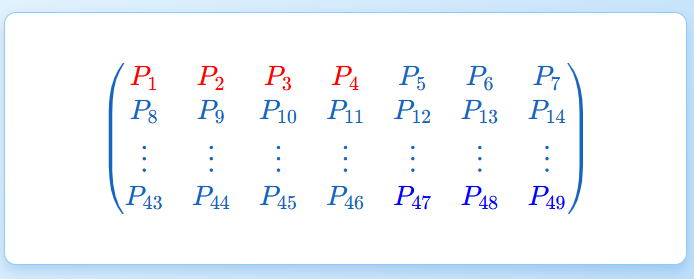
部分着色:
$$
\begin{pmatrix}
\textcolor{red}{P_1} & \textcolor{red}{P_2} & \textcolor{red}{P_3} & \textcolor{red}{P_4} & P_5 & P_6 & P_7 \\
P_8 & P_9 & P_{10} & P_{11} & P_{12} & P_{13} & P_{14} \\
\vdots & \vdots & \vdots & \vdots & \vdots & \vdots & \vdots \\
P_{43} & P_{44} & P_{45} & P_{46} & \textcolor{blue}{P_{47}} & \textcolor{blue}{P_{48}} & \textcolor{blue}{P_{49}}
\end{pmatrix}
$$
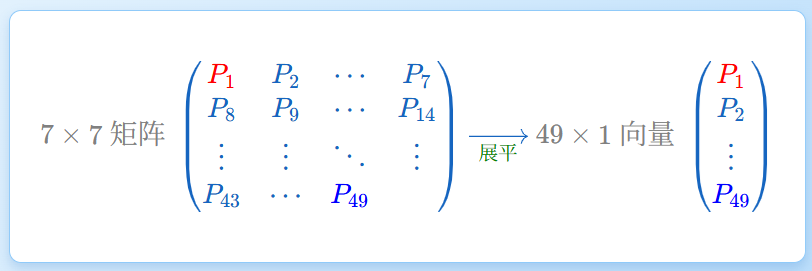
$$
\textcolor{gray}{7\times7\ 矩阵}\
\begin{pmatrix}
\textcolor{red}{P_1} & P_2 & \cdots & P_7 \\
P_8 & P_9 & \cdots & P_{14} \\
\vdots & \vdots & \ddots & \vdots \\
P_{43} & \cdots & \textcolor{blue}{P_{49}}
\end{pmatrix}
\xrightarrow[\textcolor{green}{\text{展平}}]{}
\textcolor{gray}{49\times1\ 向量}\
\begin{pmatrix}
\textcolor{red}{P_1} \\ P_2 \\ \vdots \\ \textcolor{blue}{P_{49}}
\end{pmatrix}
$$
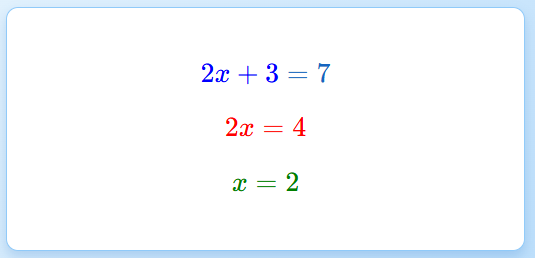
方程步骤着色:
$$
\textcolor{blue}{2x + 3} = 7
$$
$$
\textcolor{red}{2x = 4}
$$
$$
\textcolor{green}{x = 2}
$$
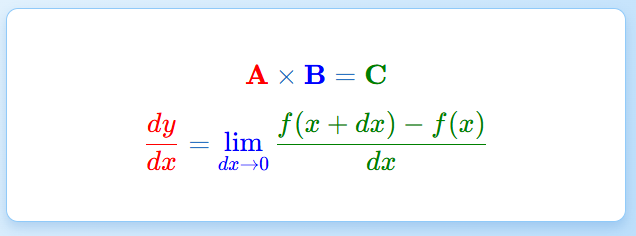
结合其他命令着色:
$$
\mathbf{\textcolor{red}{A}} \times
\mathbf{\textcolor{blue}{B}} =
\mathbf{\textcolor{green}{C}}
$$

$$
\textcolor{red}{\frac{dy}{dx}} =
\textcolor{blue}{\lim_{dx \to 0}}
\textcolor{green}{\frac{f(x+dx)-f(x)}{dx}}
$$
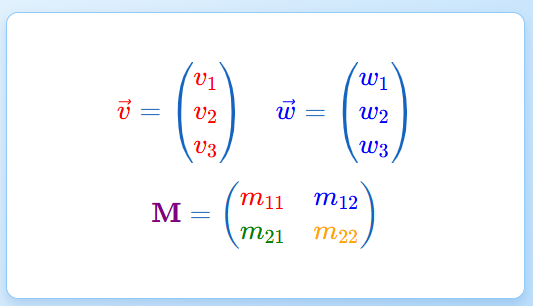
彩色向量和矩阵:
$$
\textcolor{red}{\vec{v}} =
\begin{pmatrix}
\textcolor{red}{v_1} \\ \textcolor{red}{v_2} \\ \textcolor{red}{v_3}
\end{pmatrix}
\quad
\textcolor{blue}{\vec{w}} =
\begin{pmatrix}
\textcolor{blue}{w_1} \\ \textcolor{blue}{w_2} \\ \textcolor{blue}{w_3}
\end{pmatrix}
$$

$$
\textcolor{purple}{\mathbf{M}} =
\begin{pmatrix}
\textcolor{red}{m_{11}} & \textcolor{blue}{m_{12}} \\
\textcolor{green}{m_{21}} & \textcolor{orange}{m_{22}}
\end{pmatrix}
$$
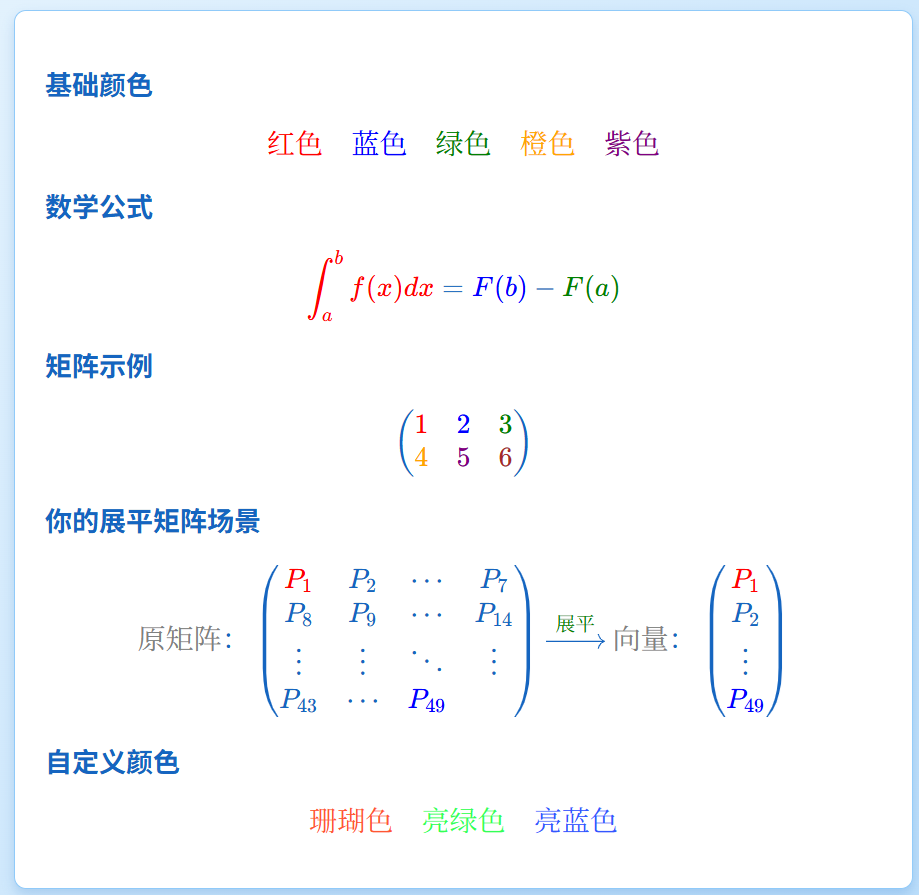
大杂烩:
## 基础颜色
$$
\textcolor{red}{红色} \quad
\textcolor{blue}{蓝色} \quad
\textcolor{green}{绿色} \quad
\textcolor{orange}{橙色} \quad
\textcolor{purple}{紫色}
$$

## 数学公式
$$
\textcolor{red}{\int_a^b f(x) dx} =
\textcolor{blue}{F(b)} - \textcolor{green}{F(a)}
$$

## 矩阵示例
$$
\begin{pmatrix}
\textcolor{red}{1} & \textcolor{blue}{2} & \textcolor{green}{3} \\
\textcolor{orange}{4} & \textcolor{purple}{5} & \textcolor{brown}{6}
\end{pmatrix}
$$

## 你的展平矩阵场景
$$
\textcolor{gray}{\text{原矩阵}}:
\begin{pmatrix}
\textcolor{red}{P_1} & P_2 & \cdots & P_7 \\
P_8 & P_9 & \cdots & P_{14} \\
\vdots & \vdots & \ddots & \vdots \\
P_{43} & \cdots & \textcolor{blue}{P_{49}}
\end{pmatrix}
\xrightarrow{\textcolor{green}{\text{展平}}}
\textcolor{gray}{\text{向量}}:
\begin{pmatrix}
\textcolor{red}{P_1} \\ P_2 \\ \vdots \\ \textcolor{blue}{P_{49}}
\end{pmatrix}
$$

## 自定义颜色
$$
\textcolor{#FF5733}{珊瑚色} \quad
\textcolor{#33FF57}{亮绿色} \quad
\textcolor{#3357FF}{亮蓝色}
$$
`array` vs `pmatrix` 对竖线的支持
| 特性 | array | pmatrix |
| 竖线支持 | 完全支持 | 不支持 |
| 横线支持 | \hline | 不支持 |
| 括号 | 需手动添加\left(... \right) | 自动添加 |
| 推荐场景 | 带分隔线的表格 | 标准矩阵 |

 浙公网安备 33010602011771号