WebGL进阶(9)聚光灯属性与应用
1.重点代码
      // 聚光灯
      const spotLight = new THREE.SpotLight(0xffffff, 1)
      spotLight.position.set(5, 5, 5)
      spotLight.castShadow = true
      spotLight.intensity = 2

      // 设置阴影贴图模糊度
      spotLight.shadow.radius = 20
      // 设置阴影贴图的分辨率
      spotLight.shadow.mapSize.set(4096, 4096)

      spotLight.target = sphere
      spotLight.angle = Math.PI / 6
      spotLight.distance = 0
      spotLight.penumbra = 0
      spotLight.decay = 0
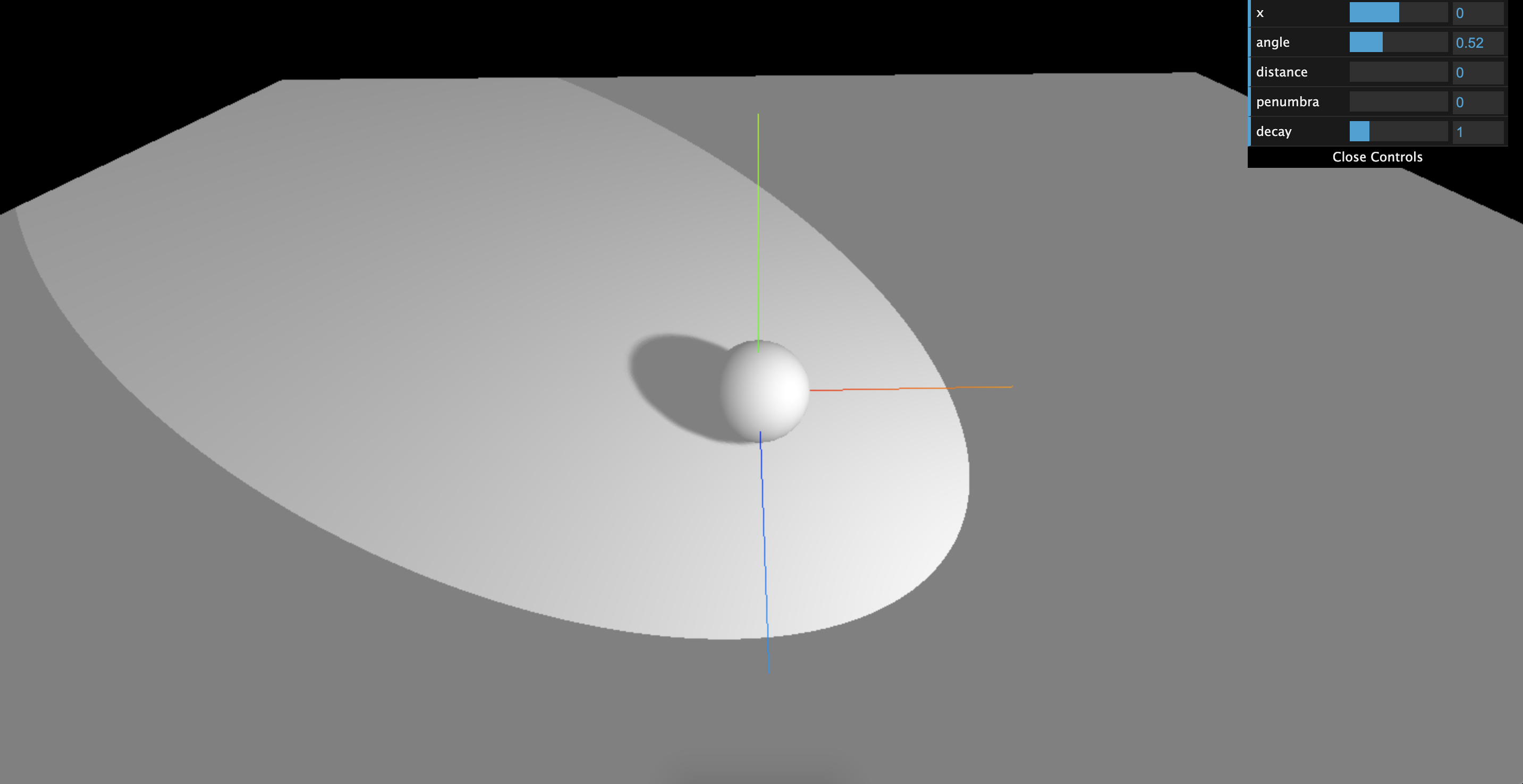
2. 效果图
3. 全部代码
<template>
  <div class="home">
    <div id="threeContainer" class="threeContainer"></div>
  </div>
</template>

<script>
import * as THREE from 'three'
import { OrbitControls } from 'three/examples/jsm/controls/OrbitControls' // 导入轨道控制器
// import { RGBELoader } from "three/examples/jsm/loaders/RGBELoader"
import * as dat from "dat.gui"
export default {
  name: 'Home',
  data () {
    return {
      scene: null,  //场景对象
      camera: null,  //相机对象
      cube: null, //物体
      controls: null, // 控制器
      renderer: null  //渲染器对象
    }
  },
  mounted () {
    this.init()
  },
  methods: {
    init () {
      // 1. 创建场景
      this.scene = new THREE.Scene()

      // 2. 创建相机
      this.camera = new THREE.PerspectiveCamera( 75, window.innerWidth / window.innerHeight, 0.1, 1000 )
      this.camera.position.set( 0, 0, 10 ) // 设置相机位置
      this.scene.add(this.camera)

      // 3. 添加物体

      // 创建一个物体 球
      const sphereGeometry = new THREE.SphereBufferGeometry(1, 20, 20)
      const material = new THREE.MeshStandardMaterial()

      const sphere = new THREE.Mesh(sphereGeometry, material);
      // 投射阴影
      sphere.castShadow = true
      this.scene.add(sphere)

      // 创建平面
      const planeGeometry = new THREE.PlaneBufferGeometry(50, 50)
      const plane = new THREE.Mesh(planeGeometry, material)
      plane.position.set(0, -1, 0)
      plane.rotation.x = - Math.PI / 2
      // 接收阴影
      plane.receiveShadow = true
      this.scene.add(plane)

      // 灯光
      // 环境光
      const light = new THREE.AmbientLight(0xffffff, 0.5); // soft white light
      this.scene.add(light);

      // 聚光灯
      const spotLight = new THREE.SpotLight(0xffffff, 0.5)
      spotLight.position.set(5, 5, 5)
      spotLight.castShadow = true
      // spotLight.intensity = 2

      // // 设置阴影贴图模糊度
      spotLight.shadow.radius = 20
      // // 设置阴影贴图的分辨率
      spotLight.shadow.mapSize.set(4096, 4096)

      // 设置透视相机属性
      spotLight.target = sphere
      spotLight.angle = Math.PI / 6
      spotLight.distance = 0
      spotLight.penumbra = 0
      spotLight.decay = 0

      this.scene.add(spotLight)

      const gui = new dat.GUI();
      gui.add(sphere.position, "x").min(-5).max(5).step(0.1)
      gui
        .add(spotLight, "angle")
        .min(0)
        .max(Math.PI / 2)
        .step(0.01)
      gui.add(spotLight, "distance").min(0).max(10).step(0.01)
      gui.add(spotLight, "penumbra").min(0).max(1).step(0.01)
      gui.add(spotLight, "decay").min(0).max(5).step(0.01)

      // 4. 初始化渲染器
      this.renderer = new THREE.WebGLRenderer()
      // 设置渲染器的尺寸大小
      this.renderer.setSize( window.innerWidth, window.innerHeight )
      // 开启场景中的阴影贴图
      this.renderer.shadowMap.enabled = true
      // 将webgl渲染的canvas内容添加到body中
      document.getElementById('threeContainer').appendChild( this.renderer.domElement )

      // 创建轨道控制器
      this.controls = new OrbitControls( this.camera, this.renderer.domElement )
      // 设置控制器阻尼,让控制器更真实
      this.controls.enableDamping = true

      // 添加坐标轴辅助器
      const axesHelper = new THREE.AxesHelper( 5 )
      this.scene.add( axesHelper )

      // 渲染函数
      this.render()
      // 监听尺寸变化
      this.resize()
    },
    // 渲染函数
    render () {
      this.controls.update()
      this.renderer.render( this.scene, this.camera )
      // 渲染下一帧的时候就会调用render函数
      requestAnimationFrame( this.render )
    },
    // 监听尺寸变化,更新渲染页面
    resize () {
      window.addEventListener('resize', () => {
        // 更新摄像头
        this.camera.aspect = window.innerWidth / window.innerHeight
        // 更新摄像机的投影矩阵
        this.camera.updateProjectionMatrix()
        // 更新渲染器
        this.renderer.setSize( window.innerWidth, window.innerHeight )
        // 设置渲染器的像素比
        this.renderer.setPixelRatio(window.devicePixelRatio)
      })
    }
  }
}
</script>

 浙公网安备 33010602011771号