

SPI协议及驱动开发框架
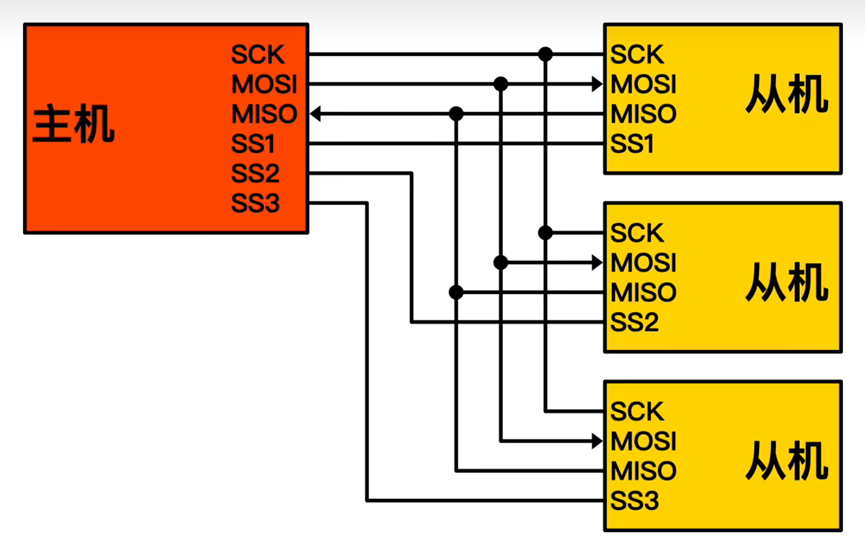
SPI(Serial Peripheral Interface)是用于芯片之间进行通信的一种协议,采用一主多从模式,一般主控Soc作为主,而外设作为从,如下图所示
硬件时序
SPI接口一般采用4条线,分别为时钟线SCK,由主机控制;主机输出从机输入线MOSI;主机输入从机输出线MISO;片选信号线SS,可以有多个,其电平决定连接的外设是否使能,一般为低电平有效,但也有例外,如下面我们举例的93C46。SPI从设备支持的SPI总线最高时钟频率决定了SCK的频率。
与I2C通讯不同的是,SPI通讯的信号采集是在时钟信号的跳变沿进行采集,不同外设的时钟空闲状态也不一样,需要根据数据手册确定外设的时钟相位CPHA、时钟极性CPOL。CPOL决定时钟线空闲状态为低电平还是高电平,而CPHA决定是在第几个跳变沿进行采集。SPI总线时序图如下。
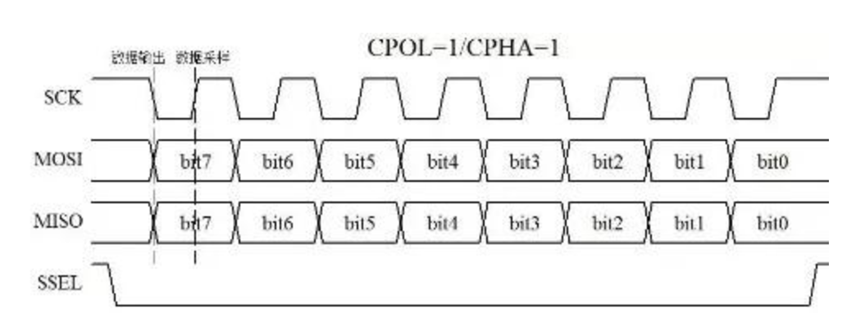
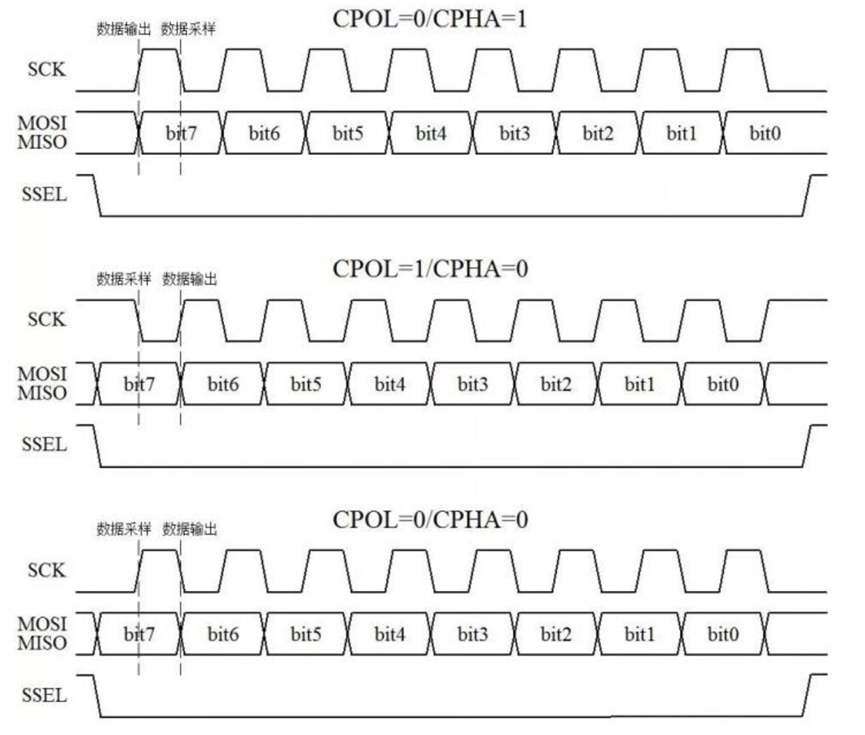
数据输出是指数据何时从设备发出。数据从产生的时刻到它的稳定是需要一定时间的,那么,如果主机在上升沿输出数据到MOSI上,从机就只能在下降沿去采样这个数据了。反之如果一方在下降沿输出数据,那么另一方就必须在上升沿采样这个数据。
与I2C和Uart不同,SPI没有规定起始、应答和停止,只负责进行通信,不管是否成功,也没有规定具体的帧格式,具体数据如何传输要参考外设的芯片手册。
数据传输
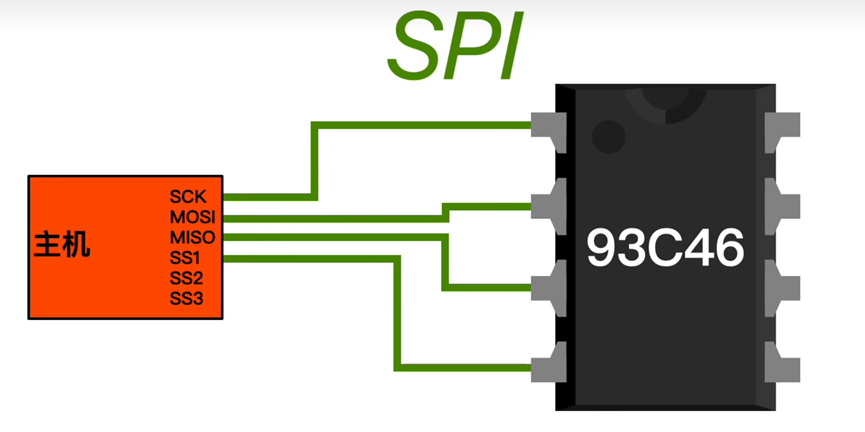
93C46是一个EEPROM存储器,相当于电脑的固态硬盘,大小为128byte,每个字节都有一个访问地址,分别为0x00~0xFF,可经受100w次擦写。这里就以93C46为例,看一下SPI的数据传输。
- 设置片选信号
- 参考93C46的数据手册,片选信号为高电平有效,其他从机不要生效。

- 确定读写格式
- 参考芯片手册,查找读写格式
![image]()
- 查看支持的时钟频率,配置时钟频率,配置时钟极性CPOL和时钟相位CPHA
- CPOL=0,CPHA=0
- 读写数据
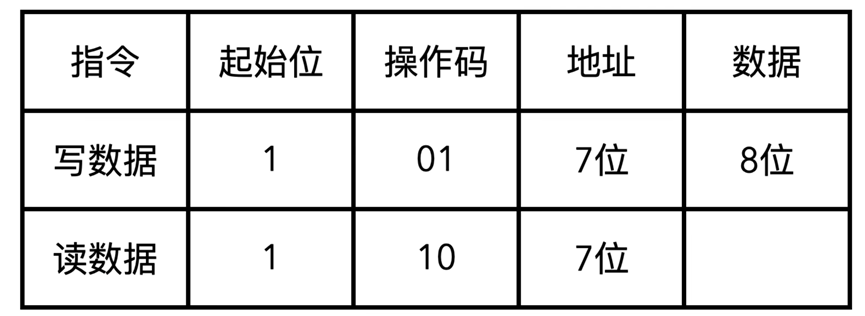
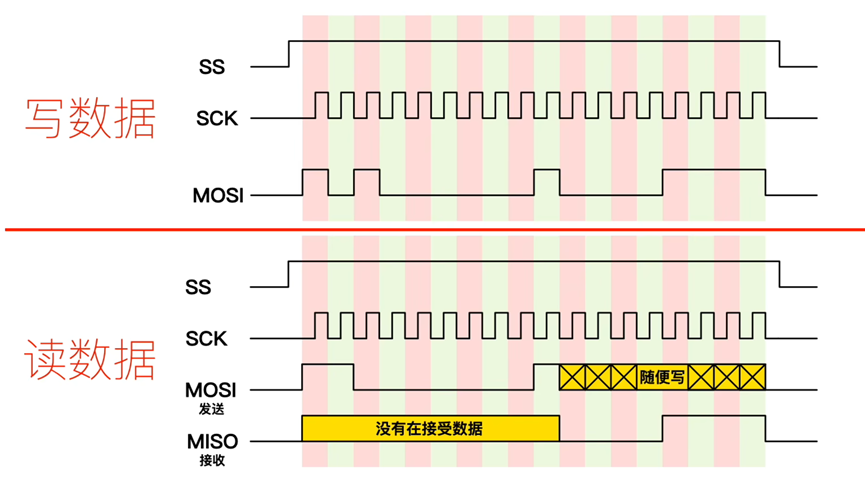
驱动框架
SPI子系统整体框架
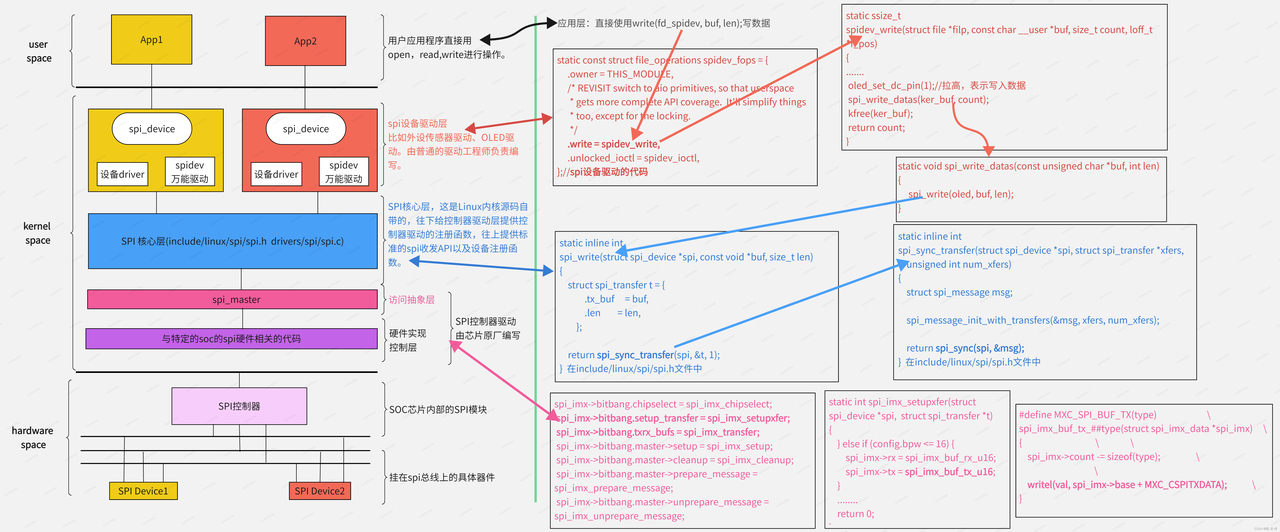
SPI子系统框架主要分为三部分,用户空间、内核空间和硬件。
- 用户空间指我们的应用程序,由应用工程师负责编写,只负责对设备进行open、read、write等系统调用;
- 内核空间就是我们的驱动程序,可分为设备驱动层、核心层和控制器驱动层。同I2C驱动,设备驱动层由设备驱动工程师进行编写,核心层是Linux源码中包含,控制器驱动由芯片原厂编写;
- 硬件层包括主机的SPI控制器及从机的外设设备。
SPI驱动软件框架
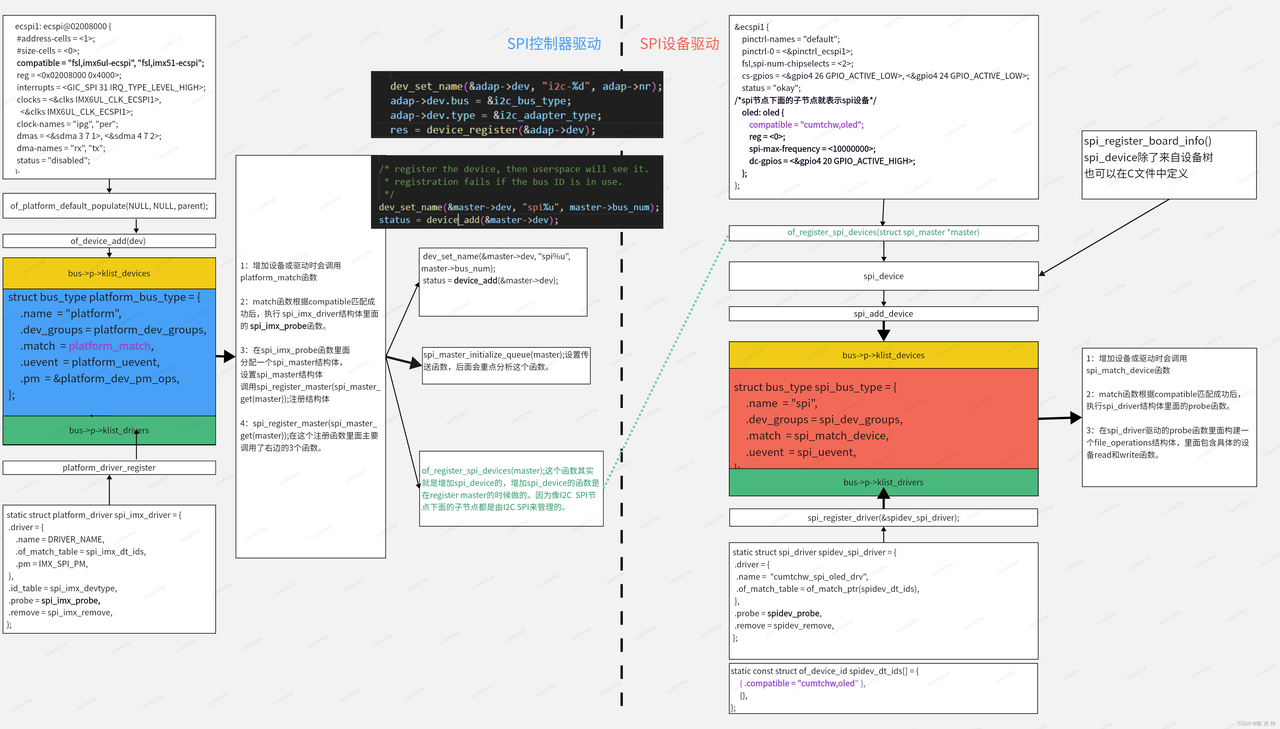
总线、设备、驱动的模型贯穿SPi控制器驱动和SPI设备驱动,上图展示了SPI控制器驱动和设备驱动的注册流程。
- SPI控制器设备和驱动是挂在在platform_bus_type总线上的,通过compatible属性值进行匹配,匹配成功后会执行driver->probe函数,在probe函数中的主要工作就是分配、初始化并注册一个spi_master结构体,是spi控制器的抽象(类似i2c_adapter),同时会注册发送和接收函数,并创建一个工作线程,并指定work->fuc为发送函数(无数据发送时处于睡眠状态),最后注册到spi总线上,然后通过of_register_spi_devices检测挂在在SPI节点下的spi外设,将spi外设注册到spi_bus_type总线上。
- SPI设备驱动同样注册到spi_bus_type类型的总线上,同样通过compatible属性进行匹配,然后调用drv->probe函数完成file_operations结构体的初始化,并可能注册字符设备,供应用程序进行访问。file_operations->write函数最终会调用到核心层的spi_write()--->spi_sync()--->开始工作线程,并等待完成传输。
数据发送过程
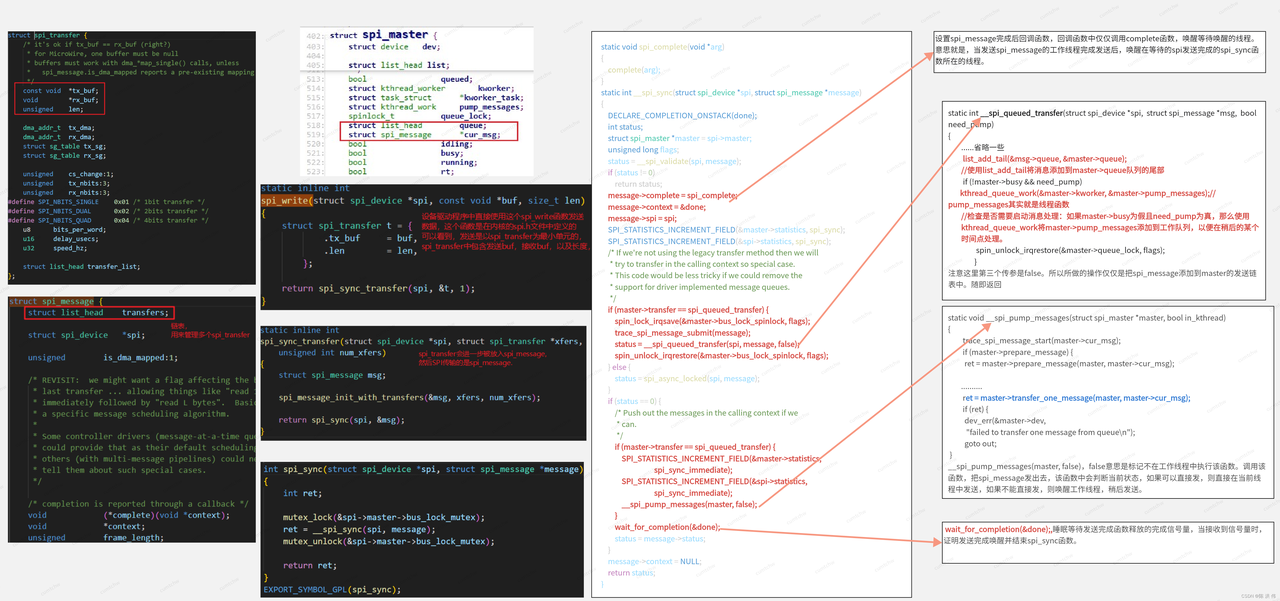
SPI发送数据的最小单位是spi_transfer,把发送数据buf赋值给spi_transfer,但最终会被放到spi_message里面,依次调用spi_write()--->spi_sync()-->_spi_sync(),在这个函数里面,会做这些事:
- 设置spi_message的完成回调函数complete(),该函数会在工作线程发送完成后被调用,以唤醒正在等待发送完成的spi_sync()函数;
- _spi_queued_transfer(spi, message, false)函数,这个函数里面就是将数据添加到发送队列中,检查是否需要启动消息处理:如果master->busy为假且need_pump为真,那么使用kthread_queue_work将master->pump_messages添加到工作队列,以便在稍后的某个时间点处理;
- _spi_pump_messages(master, false)函数,_spi_pump_messages(master, false),false意思是标记不在工作线程中执行该函数。调用该函数,把spi_message发出去,该函数中会判断当前状态,如果可以直接发,则直接在当前线程中发送,如果不能直接发,则唤醒工作线程,稍后发送。
- wait_for_completion(&done),睡眠等待发送完成函数释放的完成信号量,当接收到信号量时,证明发送完成唤醒并结束spi_sync函数
SPI设备驱动框架
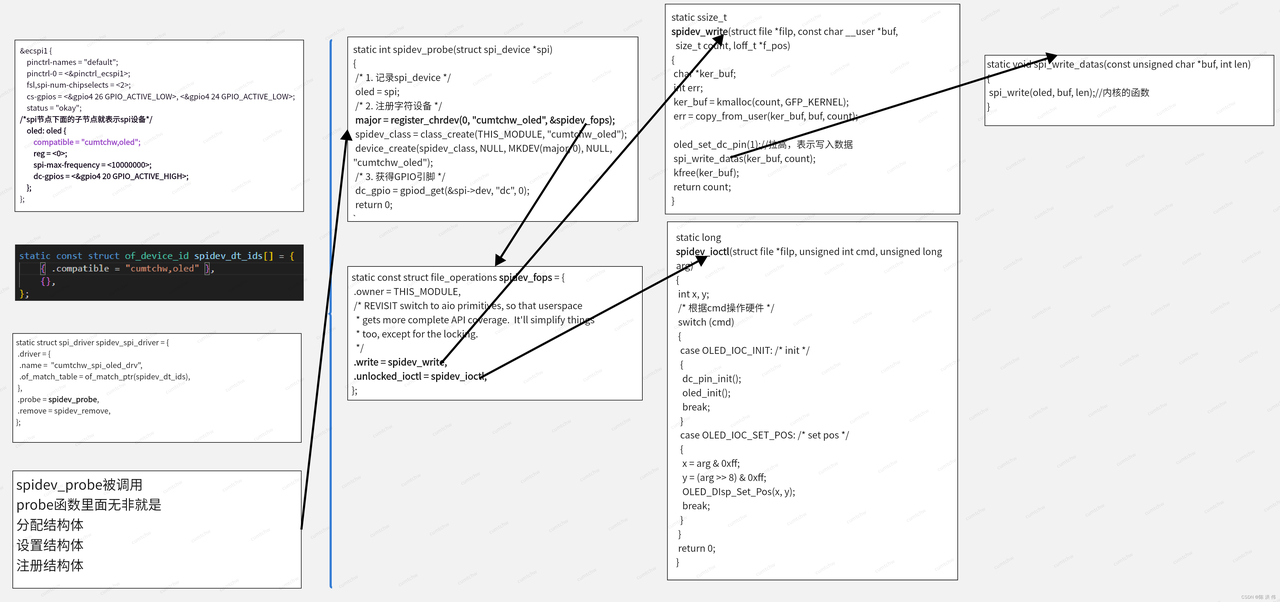
理解了总线、设备、驱动的关系,SPI设备驱动就很简单,其实就是进行初始化,为用户空间提供访问方法的一个过程,让用户的应用程序无需去阅读芯片数据手册就能操作该SPI外设。
spidev万能驱动
绕过普通的设备驱动,让应用程序编写者去阅读芯片手册,直接去操作外设。
OLED代码示例
这里旨在理解流程,未贴出头文件。在OLED屏幕指定位置,输出一串字符。
- 设备驱动 oled_drv.c
![]() View Code
View Code/* * Simple synchronous userspace interface to SPI devices * * Copyright (C) 2006 SWAPP * Andrea Paterniani <a.paterniani@swapp-eng.it> * Copyright (C) 2007 David Brownell (simplification, cleanup) * * This program is free software; you can redistribute it and/or modify * it under the terms of the GNU General Public License as published by * the Free Software Foundation; either version 2 of the License, or * (at your option) any later version. * * This program is distributed in the hope that it will be useful, * but WITHOUT ANY WARRANTY; without even the implied warranty of * MERCHANTABILITY or FITNESS FOR A PARTICULAR PURPOSE. See the * GNU General Public License for more details. */ #include <linux/init.h> #include <linux/module.h> #include <linux/ioctl.h> #include <linux/fs.h> #include <linux/device.h> #include <linux/err.h> #include <linux/list.h> #include <linux/errno.h> #include <linux/mutex.h> #include <linux/slab.h> #include <linux/compat.h> #include <linux/of.h> #include <linux/of_device.h> #include <linux/acpi.h> #include <linux/spi/spi.h> #include <linux/spi/spidev.h> #include <linux/uaccess.h> #include <linux/gpio/consumer.h> #define OLED_IOC_INIT 123 #define OLED_IOC_SET_POS 124 //为0 表示命令,为1表示数据 #define OLED_CMD 0 #define OLED_DATA 1 /*-------------------------------------------------------------------------*/ static struct spi_device *oled; static int major; static struct gpio_desc *dc_gpio; static void dc_pin_init(void) { gpiod_direction_output(dc_gpio, 1); } static void oled_set_dc_pin(int val) { gpiod_set_value(dc_gpio, val); } static void spi_write_datas(const unsigned char *buf, int len) { spi_write(oled, buf, len); } /********************************************************************** * 函数名称: oled_write_cmd * 功能描述: oled向特定地址写入数据或者命令 * 输入参数:@uc_data :要写入的数据 @uc_cmd:为1则表示写入数据,为0表示写入命令 * 输出参数:无 * 返 回 值: 无 * 修改日期 版本号 修改人 修改内容 * ----------------------------------------------- * 2020/03/04 V1.0 芯晓 创建 ***********************************************************************/ static void oled_write_cmd_data(unsigned char uc_data,unsigned char uc_cmd) { if(uc_cmd==0) { oled_set_dc_pin(0); } else { oled_set_dc_pin(1);//拉高,表示写入数据 } spi_write_datas(&uc_data, 1);//写入 } /********************************************************************** * 函数名称: oled_init * 功能描述: oled_init的初始化,包括SPI控制器得初始化 * 输入参数:无 * 输出参数: 初始化的结果 * 返 回 值: 成功则返回0,否则返回-1 * 修改日期 版本号 修改人 修改内容 * ----------------------------------------------- * 2020/03/15 V1.0 芯晓 创建 ***********************************************************************/ static int oled_init(void) { oled_write_cmd_data(0xae,OLED_CMD);//关闭显示 oled_write_cmd_data(0x00,OLED_CMD);//设置 lower column address oled_write_cmd_data(0x10,OLED_CMD);//设置 higher column address oled_write_cmd_data(0x40,OLED_CMD);//设置 display start line oled_write_cmd_data(0xB0,OLED_CMD);//设置page address oled_write_cmd_data(0x81,OLED_CMD);// contract control oled_write_cmd_data(0x66,OLED_CMD);//128 oled_write_cmd_data(0xa1,OLED_CMD);//设置 segment remap oled_write_cmd_data(0xa6,OLED_CMD);//normal /reverse oled_write_cmd_data(0xa8,OLED_CMD);//multiple ratio oled_write_cmd_data(0x3f,OLED_CMD);//duty = 1/64 oled_write_cmd_data(0xc8,OLED_CMD);//com scan direction oled_write_cmd_data(0xd3,OLED_CMD);//set displat offset oled_write_cmd_data(0x00,OLED_CMD);// oled_write_cmd_data(0xd5,OLED_CMD);//set osc division oled_write_cmd_data(0x80,OLED_CMD);// oled_write_cmd_data(0xd9,OLED_CMD);//ser pre-charge period oled_write_cmd_data(0x1f,OLED_CMD);// oled_write_cmd_data(0xda,OLED_CMD);//set com pins oled_write_cmd_data(0x12,OLED_CMD);// oled_write_cmd_data(0xdb,OLED_CMD);//set vcomh oled_write_cmd_data(0x30,OLED_CMD);// oled_write_cmd_data(0x8d,OLED_CMD);//set charge pump disable oled_write_cmd_data(0x14,OLED_CMD);// oled_write_cmd_data(0xaf,OLED_CMD);//set dispkay on return 0; } //坐标设置 /********************************************************************** * 函数名称: OLED_DIsp_Set_Pos * 功能描述:设置要显示的位置 * 输入参数:@ x :要显示的column address @y :要显示的page address * 输出参数: 无 * 返 回 值: * 修改日期 版本号 修改人 修改内容 * ----------------------------------------------- * 2020/03/15 V1.0 芯晓 创建 ***********************************************************************/ static void OLED_DIsp_Set_Pos(int x, int y) { oled_write_cmd_data(0xb0+y,OLED_CMD); oled_write_cmd_data((x&0x0f),OLED_CMD); oled_write_cmd_data(((x&0xf0)>>4)|0x10,OLED_CMD); } static long spidev_ioctl(struct file *filp, unsigned int cmd, unsigned long arg) { int x, y; /* 根据cmd操作硬件 */ switch (cmd) { case OLED_IOC_INIT: /* init */ { dc_pin_init(); oled_init(); break; } case OLED_IOC_SET_POS: /* set pos */ { x = arg & 0xff; y = (arg >> 8) & 0xff; OLED_DIsp_Set_Pos(x, y); break; } } return 0; } static ssize_t spidev_write(struct file *filp, const char __user *buf, size_t count, loff_t *f_pos) { char *ker_buf; int err; ker_buf = kmalloc(count, GFP_KERNEL); err = copy_from_user(ker_buf, buf, count); oled_set_dc_pin(1);//拉高,表示写入数据 spi_write_datas(ker_buf, count); kfree(ker_buf); return count; } static const struct file_operations spidev_fops = { .owner = THIS_MODULE, /* REVISIT switch to aio primitives, so that userspace * gets more complete API coverage. It'll simplify things * too, except for the locking. */ .write = spidev_write, .unlocked_ioctl = spidev_ioctl, }; /*-------------------------------------------------------------------------*/ /* The main reason to have this class is to make mdev/udev create the * /dev/spidevB.C character device nodes exposing our userspace API. * It also simplifies memory management. */ static struct class *spidev_class; static const struct of_device_id spidev_dt_ids[] = { { .compatible = "cumtchw,oled" }, {}, }; /*-------------------------------------------------------------------------*/ static int spidev_probe(struct spi_device *spi) { /* 1. 记录spi_device */ oled = spi; /* 2. 注册字符设备 */ major = register_chrdev(0, "cumtchw_oled", &spidev_fops); spidev_class = class_create(THIS_MODULE, "cumtchw_oled"); device_create(spidev_class, NULL, MKDEV(major, 0), NULL, "cumtchw_oled"); /* 3. 获得GPIO引脚 */ dc_gpio = gpiod_get(&spi->dev, "dc", 0); return 0; } static int spidev_remove(struct spi_device *spi) { gpiod_put(dc_gpio); /* 反注册字符设备 */ device_destroy(spidev_class, MKDEV(major, 0)); class_destroy(spidev_class); unregister_chrdev(major, "cumtchw_oled"); return 0; } static struct spi_driver spidev_spi_driver = { .driver = { .name = "cumtchw_spi_oled_drv", .of_match_table = of_match_ptr(spidev_dt_ids), }, .probe = spidev_probe, .remove = spidev_remove, /* NOTE: suspend/resume methods are not necessary here. * We don't do anything except pass the requests to/from * the underlying controller. The refrigerator handles * most issues; the controller driver handles the rest. */ }; /*-------------------------------------------------------------------------*/ static int __init spidev_init(void) { int status; status = spi_register_driver(&spidev_spi_driver); if (status < 0) { } return status; } module_init(spidev_init); static void __exit spidev_exit(void) { spi_unregister_driver(&spidev_spi_driver); } module_exit(spidev_exit); MODULE_LICENSE("GPL"); * 设备树配置 ```c &ecspi1 { pinctrl-names = "default"; pinctrl-0 = <&pinctrl_ecspi1>; fsl,spi-num-chipselects = <2>; cs-gpios = <&gpio4 26 GPIO_ACTIVE_LOW>, <&gpio4 24 GPIO_ACTIVE_LOW>; status = "okay"; oled: oled { compatible = "cumtchw,oled"; reg = <0>; spi-max-frequency = <10000000>; dc-gpios = <&gpio4 20 GPIO_ACTIVE_HIGH>; }; };
应用程序
![]() View Code
View Code#include <stdio.h> #include <unistd.h> #include <stdlib.h> #include <fcntl.h> #include <string.h> #include <sys/ioctl.h> #include <sys/types.h> #include <sys/stat.h> #include <linux/types.h> #include <linux/spi/spidev.h> #include "font.h" #define OLED_IOC_INIT 123 #define OLED_IOC_SET_POS 124 //为0 表示命令,为1表示数据 #define OLED_CMD 0 #define OLED_DATA 1 static int fd_spidev; static int dc_pin_num; void OLED_DIsp_Set_Pos(int x, int y); void oled_write_datas(const unsigned char *buf, int len) { write(fd_spidev, buf, len); } /********************************************************************** * 函数名称: OLED_DIsp_Clear * 功能描述: 整个屏幕显示数据清0 * 输入参数:无 * 输出参数: 无 * 返 回 值: * 修改日期 版本号 修改人 修改内容 * ----------------------------------------------- * 2020/03/15 V1.0 芯晓 创建 ***********************************************************************/ void OLED_DIsp_Clear(void) { unsigned char x, y; char buf[128]; memset(buf, 0, 128); for (y = 0; y < 8; y++) { OLED_DIsp_Set_Pos(0, y); oled_write_datas(buf, 128); } } /********************************************************************** * 函数名称: OLED_DIsp_All * 功能描述: 整个屏幕显示全部点亮,可以用于检查坏点 * 输入参数:无 * 输出参数:无 * 返 回 值: * 修改日期 版本号 修改人 修改内容 * ----------------------------------------------- * 2020/03/15 V1.0 芯晓 创建 ***********************************************************************/ void OLED_DIsp_All(void) { unsigned char x, y; char buf[128]; memset(buf, 0xff, 128); for (y = 0; y < 8; y++) { OLED_DIsp_Set_Pos(0, y); oled_write_datas(buf, 128); } } //坐标设置 /********************************************************************** * 函数名称: OLED_DIsp_Set_Pos * 功能描述:设置要显示的位置 * 输入参数:@ x :要显示的column address @y :要显示的page address * 输出参数: 无 * 返 回 值: * 修改日期 版本号 修改人 修改内容 * ----------------------------------------------- * 2020/03/15 V1.0 芯晓 创建 ***********************************************************************/ void OLED_DIsp_Set_Pos(int x, int y) { ioctl(fd_spidev, OLED_IOC_SET_POS, x | (y << 8)); } /********************************************************************** * 函数名称: OLED_DIsp_Char * 功能描述:在某个位置显示字符 1-9 * 输入参数:@ x :要显示的column address @y :要显示的page address @c :要显示的字符的ascii码 * 输出参数: 无 * 返 回 值: * 修改日期 版本号 修改人 修改内容 * ----------------------------------------------- * 2020/03/15 V1.0 芯晓 创建 ***********************************************************************/ void OLED_DIsp_Char(int x, int y, unsigned char c) { int i = 0; /* 得到字模 */ const unsigned char *dots = oled_asc2_8x16[c - ' ']; /* 发给OLED */ OLED_DIsp_Set_Pos(x, y); /* 发出8字节数据 */ //for (i = 0; i < 8; i++) // oled_write_cmd_data(dots[i], OLED_DATA); oled_write_datas(&dots[0], 8); OLED_DIsp_Set_Pos(x, y+1); /* 发出8字节数据 */ //for (i = 0; i < 8; i++) //oled_write_cmd_data(dots[i+8], OLED_DATA); oled_write_datas(&dots[8], 8); } /********************************************************************** * 函数名称: OLED_DIsp_String * 功能描述: 在指定位置显示字符串 * 输入参数:@ x :要显示的column address @y :要显示的page address @str :要显示的字符串 * 输出参数: 无 * 返 回 值: 无 * 修改日期 版本号 修改人 修改内容 * ----------------------------------------------- * 2020/03/15 V1.0 芯晓 创建 ***********************************************************************/ void OLED_DIsp_String(int x, int y, char *str) { unsigned char j=0; while (str[j]) { OLED_DIsp_Char(x, y, str[j]);//显示单个字符 x += 8; if(x > 127) { x = 0; y += 2; }//移动显示位置 j++; } } /********************************************************************** * 函数名称: OLED_DIsp_CHinese * 功能描述:在指定位置显示汉字 * 输入参数:@ x :要显示的column address @y :要显示的page address @chr :要显示的汉字,三个汉字“百问网”中选择一个 * 输出参数: 无 * 返 回 值: 无 * 修改日期 版本号 修改人 修改内容 * ----------------------------------------------- * 2020/03/15 V1.0 芯晓 创建 ***********************************************************************/ void OLED_DIsp_CHinese(unsigned char x,unsigned char y,unsigned char no) { unsigned char t,adder=0; OLED_DIsp_Set_Pos(x,y); for(t=0;t<16;t++) {//显示上半截字符 oled_write_datas(&hz_1616[no][t*2], 1); adder+=1; } OLED_DIsp_Set_Pos(x,y+1); for(t=0;t<16;t++) {//显示下半截字符 oled_write_datas(&hz_1616[no][t*2+1], 1); adder+=1; } } /********************************************************************** * 函数名称: OLED_DIsp_Test * 功能描述: 整个屏幕显示测试 * 输入参数:无 * 输出参数: 无 * 返 回 值: 无 * 修改日期 版本号 修改人 修改内容 * ----------------------------------------------- * 2020/03/15 V1.0 芯晓 创建 ***********************************************************************/ void OLED_DIsp_Test(void) { int i; OLED_DIsp_String(0, 0, "https://blog.csdn.net/u013171226"); } /* spi_oled /dev/cumtchw_oled */ int main(int argc, char **argv) { if (argc != 2) { printf("Usage: %s /dev/cumtchw_oled\n", argv[0]); return -1; } fd_spidev = open(argv[1], O_RDWR); if (fd_spidev < 0) { printf("open %s err\n", argv[1]); return -1; } ioctl(fd_spidev, OLED_IOC_INIT); OLED_DIsp_Clear(); OLED_DIsp_Test(); return 0; }



 浙公网安备 33010602011771号