
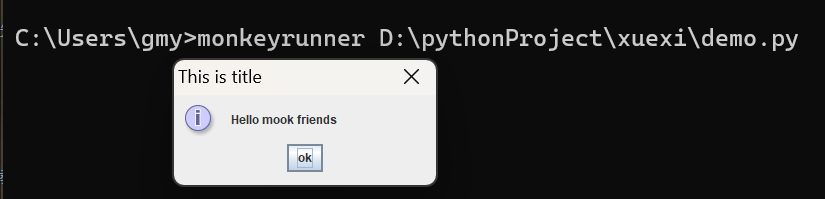
一、MonkeyRunner--alert警告框
void alert(string message,string title,string okTitle)
message:弹框提示内容
title:弹框标题
okTitle:按钮文字
1、编写.py脚本(IDE报红不用管,因为是MonkeyRunner执行脚本,MonkeyRunner 是sdk自带的工具,路径在tools文件目录下)

2、MonkeyRunner 执行脚本,查看结果
二、monkeyrunnner API --waitForConnection 等待设备连接,有多个device id ,需要指明具体哪个设备。
waitForConnection(float timeout, string deviceid)
timeout 等待连接设备的超时时间,单位“秒”
deviceid 设备名称
三、MonkeyDevice API --drag 拖动
drag(tuple start, tuple end, float duration, integer steps)
start 起点位置
end 终点位置
duration 手势持续的时间
steps 插值点的步数,默认10
四、MonkeyDevice API --press 按键
press(string keycode, dictionary type)
keycode :按键值
type 类型:Down、 UP、DOWN_AND_UP
五、MonkeyDevice API --startActivity 启动应用
startActivity(package+'/'+activity)
六、MonkeyDevice API --touch 点击
touch(integer x, integer y , integer type)
x坐标值,y坐标值
type:DOWN,UP,DOWN_AND_UP
七、MonkeyDevice API --type 输入
type(string message)
八、MonkeyDevice API --takeSnapshot 截屏
MonkeyImage takeSnapshot()
九、MonkeyImage API ---sameAs 图像对比
boolean sameAs(MonkeyImage other,float percent)
MonkeyImage other:图像名称
percent:相似度百分比
十、MonkeyImage API ---writetoFile 保存图像文件
void writeToFile(string path,string format)
path 图像路径
format 图像格式

 浙公网安备 33010602011771号