


ES的JVM基础环境优化
# 修改ES的JVM大小dd
[root@elk91/elk92/elk92 ~]# vim /etc/elasticsearch/jvm.options
-Xms256m
-Xmx256m
    # 学习环境推荐为256M,生产环境建议设置为物理内存一半,但不建议超过32GB
# 重启服务
[root@elk91/elk92/elk92 ~]# systemctl restart elasticsearch.service
[root@elk91/elk92/elk92 ~]# free -h
              total        used        free      shared  buff/cache   available
Mem:           1.9G        667M        1.1G        1.6M        205M        1.3G
Swap:          2.0G         21M        2.0G
logstash概述
- logstash用于处理日志,聚合日志,分析的功能。功能丰富但比较笨重,目前ELK的市场逐渐被EFK替代
- filebeat很多功能基本是都是基于logstash为原型使用Golang编程语言重写的。轻量级的日志采集工具
- Logstash是免费且开放的服务器端数据处理管道,能够从多个来源采集数据,转换数据,然后将数据发送到您最喜欢的“存储库”中
logstash环境搭建
# 安装logstash
[root@elk93 ~]# wget https://artifacts.elastic.co/downloads/logstash/logstash-7.17.28-x86_64.rpm
[root@elk93 ~]# rpm -i logstash-7.17.28-x86_64.rpm

# 添加logstash命令到PATH环境变量
[root@elk93 ~]# ln -svf /usr/share/logstash/bin/logstash /usr/local/sbin/
‘/usr/local/sbin/logstash’ -> ‘/usr/share/logstash/bin/logstash’

# 编写logstash的配置文件
[root@elk93 ~]# mkdir -p /etc/logstash/myconfig/
[root@elk93 ~]# cat /etc/logstash/myconfig/stdin-to-stdout.conf
input {
  stdin {}
}
output {
  stdout {}
}

# 启动logstash实例
[root@elk93 ~]# logstash -f /etc/logstash/myconfig/stdin-to-stdout.conf
logstash处理自定义业务的日志
python脚本生成数据
INFO 2025-10-18 11:25:08 [com.yuanxiaojiang.generate_log] - DAU|5712|清空购物车|1|1330.29
[root@elk93 ~]# cat /etc/logstash/myconfig/generate_log.py
import datetime
import random
import logging
import time
import sys

LOG_FORMAT = "%(levelname)s %(asctime)s [com.yuanxiaojiang.%(module)s] - %(message)s "
DATE_FORMAT = "%Y-%m-%d %H:%M:%S"

# 配置root的logging.Logger实例的基本配置
logging.basicConfig(level=logging.INFO, format=LOG_FORMAT, datefmt=DATE_FORMAT, filename=sys.argv[1], filemode='a',)
actions = ["浏览页面", "评论商品", "加入收藏", "加入购物车", "提交订单", "使用优惠券", "领取优惠券",\
"搜索", "查看订单", "付款", "清空购物车"]

while True:
    time.sleep(random.randint(1, 5))
    user_id = random.randint(1, 10000)
    # 对生成的浮点数保留2位有效数字.
    price = round(random.uniform(15, 3000),2)
    action = random.choice(actions)
    svip = random.choice([0,1])
    logging.info("DAU|{0}|{1}|{2}|{3}".format(user_id, action,svip,price))

[root@elk93 ~]# python3 /etc/logstash/myconfig/generate_log.py /tmp/apps.log
编写logstash配置文件
[root@elk93 ~]# cat /etc/logstash/myconfig/file-to-stdout.conf
input {
    # 输入类型是一个file,代表的是文本文件
    file {
        # path可以指定多个文件 path => ["path01" "path02"]
        path => "/tmp/apps.log"
        # 指定源文件采集位置(begginning,end默认值),该参数只在首次采集新文件时生效,后续采集将无视此参数
        start_position => "beginning"
    }
}
filter {
    mutate {
        # 对指定的字段进行切分
        split => { "message" => "|" }
        # 添加字段(在同一个 mutate 块中,add_field 创建的字段不能立即在同一过滤器中引用)
        add_field => {
          "other" => "%{[message][0]}"
          "userid" => "%{[message][1]}"
          "action" => "%{[message][2]}"
          "svip" => "%{[message][3]}"
          "price" => "%{[message][4]}"
        }
    }
    mutate {
        split => { "other" => " " }
        add_field => {
          "datetime" => "%{[other][1]} %{[other][2]}"
        }
        # 移除字段
        remove_field => ["message","other","@version"]
        convert => {
          "price" => "float"
          "userid" => "integer"
        }
        # 转换字段的数据类型
        convert => {
          "price" => "float"
          "userid" => "integer"
        }
    }
}

output {
    # stdout {}
}
启动logstash实例(进程)
[root@elk93 ~]# logstash -r -f /etc/logstash/myconfig/file-to-stdout.conf
-f:指定 Logstash 要加载的配置文件或配置目录
-r:自动监测配置文件变化并重新加载(如若变化则重新加载),无需手动停止和重启进程


# 采集文件的读取位置点
会在"/usr/share/logstash/data/plugins/inputs/file/"文件中记录offset
    1. 停止logstash
    2. 清除sincedb文件
      [root@elk93 ~]# ls -a /usr/share/logstash/data/plugins/inputs/file/
      . .. .sincedb_c3e21f60a15f19878632de9b335e4596
      [root@elk93 ~]# rm -f /usr/share/logstash/data/plugins/inputs/file/.sincedb_c3e21f60a15f19878632de9b335e4596
    3. 重启启动logstash
logstash处理日志的访问时间

date模块:将各种格式的日期字符串转换成 Logstash 标准时间戳(@timestamp字段)
# 在/etc/logstash/myconfig/file-to-stdout.conf文件filter{}中添加date
    date {
        # 匹配日期字段,将"datetime"转化为日期格式
        # 源数据:"datetime" => "2025-10-18 15:11:50"
        match => [ "datetime", "yyyy-MM-dd HH:mm:ss" ]
        # tag:指定match匹配到的时间数据类型存储在哪个字段(若不指定,则默认使用覆盖"@timestamp")
        # target => "yuanxiaojiang-datetime"
    }

logstash将数据写入ES自定义索引
output {
    # stdout {}
    elasticsearch {
        # 指定ES集群地址
        hosts => ["http://10.0.0.91:9200","http://10.0.0.92:9200","http://10.0.0.93:9200"]
        # # 指定ES自定义索引的名称
        index => "logstash-apps-%{+yyyy.MM.dd}"
    }
}

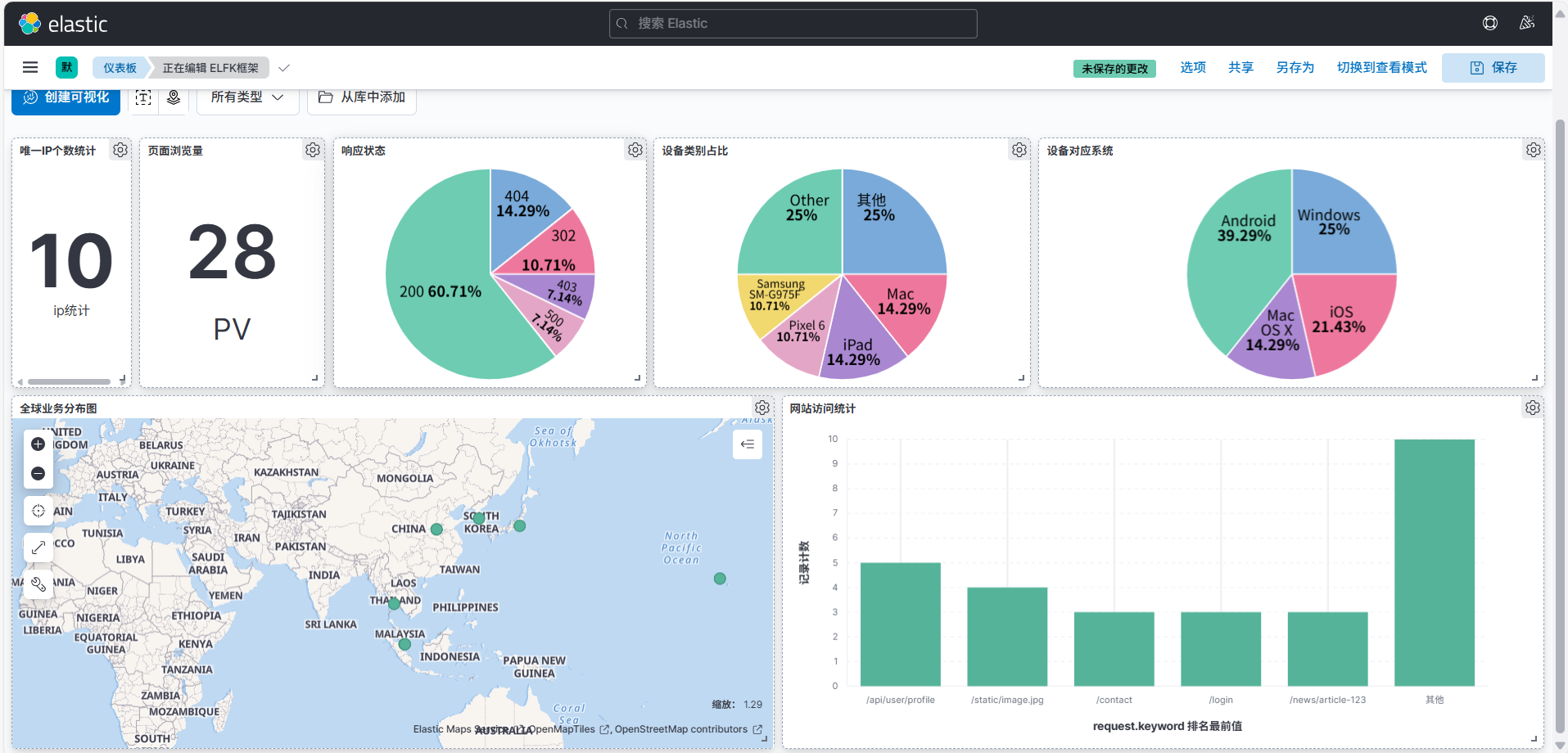
基于ELFK架构分析nginx访问日志


[root@elk91 ~]# cat /var/log/nginx/access.log
123.45.67.89 - - [18/Jan/2024:10:15:22 +0800] "GET /news/article-123 HTTP/1.1" 200 3421 "https://www.baidu.com" "Mozilla/5.0 (Linux; Android 10; SM-G975F) AppleWebKit/537.36 (KHTML, like Gecko) Chrome/98.0.4758.101 Mobile Safari/537.36" "-"
203.156.78.234 - - [18/Jan/2024:10:16:45 +0800] "GET /products/iphone-case HTTP/1.1" 200 1890 "https://www.google.com" "Mozilla/5.0 (iPhone; CPU iPhone OS 15_3 like Mac OS X) AppleWebKit/605.1.15 (KHTML, like Gecko) Version/15.3 Mobile/15E148 Safari/604.1" "-"
58.96.127.88 - - [18/Jan/2024:10:17:33 +0800] "GET /api/user/profile HTTP/1.1" 200 876 "https://app.example.com" "Mozilla/5.0 (Windows NT 10.0; Win64; x64) AppleWebKit/537.36 (KHTML, like Gecko) Chrome/121.0.0.0 Safari/537.36" "-"
172.104.56.201 - - [18/Jan/2024:10:18:12 +0800] "POST /login HTTP/1.1" 302 0 "https://www.taobao.com" "Mozilla/5.0 (Linux; Android 12; Pixel 6) AppleWebKit/537.36 (KHTML, like Gecko) Chrome/121.0.0.0 Mobile Safari/537.36" "-"
45.76.189.122 - - [18/Jan/2024:10:19:28 +0800] "GET /admin/dashboard HTTP/1.1" 403 1256 "-" "Mozilla/5.0 (Macintosh; Intel Mac OS X 10_15_7) AppleWebKit/537.36 (KHTML, like Gecko) Chrome/121.0.0.0 Safari/537.36" "-"
198.51.100.45 - - [18/Jan/2024:10:20:15 +0800] "GET /static/image.jpg HTTP/1.1" 404 234 "-" "Mozilla/5.0 (iPad; CPU OS 14_7 like Mac OS X) AppleWebKit/605.1.15 (KHTML, like Gecko) Version/14.1.2 Mobile/15E148 Safari/604.1" "-"
112.73.204.167 - - [18/Jan/2024:10:21:07 +0800] "GET /products/laptop HTTP/1.1" 200 2987 "https://www.jd.com" "Mozilla/5.0 (Windows NT 10.0; Win64; x64; rv:109.0) Gecko/20100101 Firefox/115.0" "-"
76.88.154.233 - - [18/Jan/2024:10:22:34 +0800] "POST /api/checkout HTTP/1.1" 500 0 "https://shop.example.com" "Mozilla/5.0 (Linux; Android 11; Mi 10) AppleWebKit/537.36 (KHTML, like Gecko) Chrome/121.0.0.0 Mobile Safari/537.36" "-"
139.162.78.91 - - [18/Jan/2024:10:23:51 +0800] "GET /about HTTP/1.1" 200 1567 "-" "Mozilla/5.0 (Macintosh; Intel Mac OS X 10_15_7) AppleWebKit/605.1.15 (KHTML, like Gecko) Version/16.3 Safari/605.1.15" "-"
221.178.45.129 - - [18/Jan/2024:10:24:22 +0800] "GET /contact HTTP/1.1" 200 1345 "https://weibo.com" "Mozilla/5.0 (Linux; Android 13; SM-S901U) AppleWebKit/537.36 (KHTML, like Gecko) Chrome/121.0.0.0 Mobile Safari/537.36" "-"
[root@elk93 ~]# cat /etc/logstash/myconfig/beat-filter-es.conf
input {
    beats {
        port => 9999
    }
}
filter {
    mutate {
        remove_field => [ "ecs","agent","tags","input","@version" ]
    }
    grok {
        match => {
          message => "%{HTTPD_COMMONLOG}"
        }
    }
    geoip {
        source => "clientip"
    }
    useragent {
        source => "message"
        target => "yuan-device"
    }
    date {
        match => ["timestamp","dd/MMM/yyyy:HH:mm:ss Z"]
    }
}

output {
    #stdout {}
    elasticsearch {
        hosts => ["http://10.0.0.91:9200","http://10.0.0.92:9200","http://10.0.0.93:9200"]
        index => "logstash-nginx-access-%{+yyyy.MM.dd}"
    }
}
[root@elk93 ~]# vim /etc/logstash/myconfig/beat-filter-es.conf

input {
    # 接收beats组件发送来的数据(此处特指filebeat)
    # 端口是Logstash的输入监听端口,这个端口用于接收来自Beats客户端发送的日志数据
    beats {
        port => 9999
    }
}
filter {
    mutate {
        remove_field => [ "ecs","agent","tags","input","@version" ]
    }
}
output {
    stdout {}
    #elasticsearch {
    #    hosts => ["http://10.0.0.91:9200","http://10.0.0.92:9200","http://10.0.0.93:9200"]
    #    index => "logstash-apps-%{+yyyy.MM.dd}"
    #}
}
[root@elk93 ~]# ls -a /usr/share/logstash/data/plugins/inputs/file/
. .. .sincedb_c3e21f60a15f19878632de9b335e4596
[root@elk93 ~]# rm -f /usr/share/logstash/data/plugins/inputs/file/.sincedb_c3e21f60a15f19878632de9b335e4596
[root@elk93 ~]# logstash -rf /etc/logstash/myconfig/beat-filter-es.conf
[root@elk91 ~]# cat /etc/filebeat/myconfig/modules_nginx.yaml
filebeat.config.modules:
  path: ${path.config}/modules.d/*.yml
  reload.enabled: true
  reload.period: 5s
# 将数据推送到logstash
output.logstash:
  hosts: ["10.0.0.93:9999"]

[root@elk91 ~]# rm -rf /var/lib/filebeat/*
[root@elk91 ~]# filebeat -e -c /etc/filebeat/myconfig/modules_nginx.yaml
{
    "@timestamp" => 2025-10-18T10:31:42.159Z,
       "service" => {
        "type" => "nginx"
    },
          "host" => {
        "name" => "elk91"
    },
       "fileset" => {
        "name" => "access"
    },
       "message" => "221.178.45.129 - - [18/Jan/2024:10:24:22 +0800] \"GET /contact HTTP/1.1\" 200 1345 \"https://weibo.com\" \"Mozilla/5.0 (Linux; Android 13; SM-S901U) AppleWebKit/537.36 (KHTML, like Gecko) Chrome/121.0.0.0 Mobile Safari/537.36\" \"-\"",
         "event" => {
          "module" => "nginx",
         "dataset" => "nginx.access",
        "timezone" => "+08:00"
    },
           "log" => {
          "file" => {
            "path" => "/var/log/nginx/access.log"
        },
        "offset" => 2037
    }
}
基于正则匹配nginx的访问日志并解析相应格式(匹配模式)
[root@elk93 ~]# cat /etc/logstash/myconfig/beat-filter-es.conf
# 在filter中添加grok
    grok {
        match => {
          message => "%{HTTPD_COMMONLOG}"
        }
    }
{
       "clientip" => "221.178.45.129",
      "timestamp" => "18/Jan/2024:10:24:22 +0800",
     "@timestamp" => 2025-10-18T10:35:39.949Z,
        "service" => {
        "type" => "nginx"
    },
    "httpversion" => "1.1",
           "host" => {
        "name" => "elk91"
    },
        "fileset" => {
        "name" => "access"
    },
          "bytes" => "1345",
        "request" => "/contact",
        "message" => "221.178.45.129 - - [18/Jan/2024:10:24:22 +0800] \"GET /contact HTTP/1.1\" 200 1345 \"https://weibo.com\" \"Mozilla/5.0 (Linux; Android 13; SM-S901U) AppleWebKit/537.36 (KHTML, like Gecko) Chrome/121.0.0.0 Mobile Safari/537.36\" \"-\"",
          "ident" => "-",
           "verb" => "GET",
          "event" => {
          "module" => "nginx",
         "dataset" => "nginx.access",
        "timezone" => "+08:00"
    },
       "response" => "200",
            "log" => {
          "file" => {
            "path" => "/var/log/nginx/access.log"
        },
        "offset" => 2037
    },
           "auth" => "-"
}
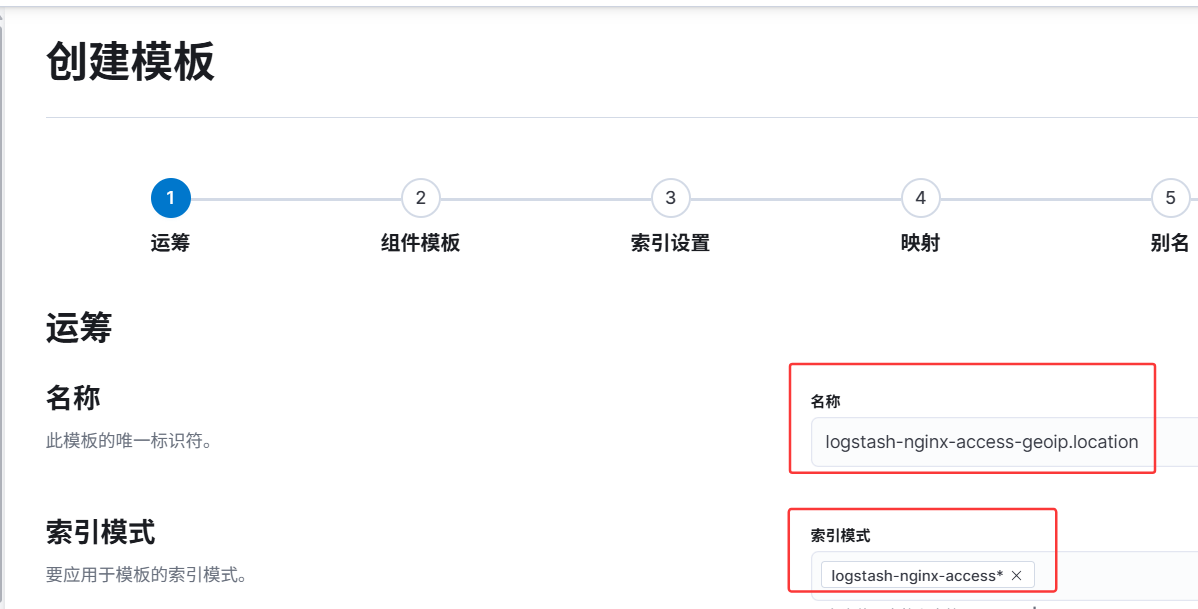
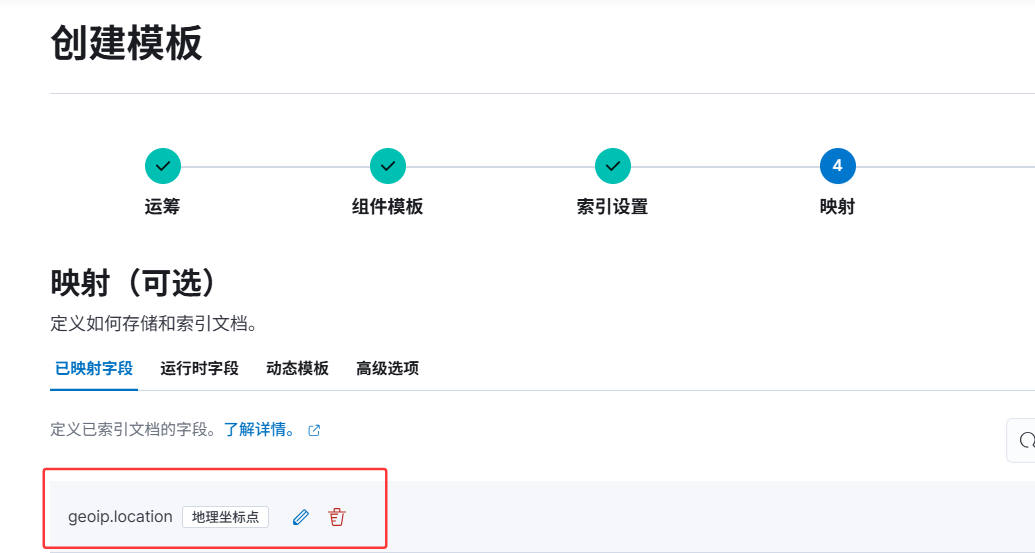
基于公网地址分析经纬度,城市的名称等信息
[root@elk93 ~]# cat /etc/logstash/myconfig/beat-filter-es.conf
# 在filter中添加geoip
    geoip {
        source => "clientip"
    }
{
       "clientip" => "221.178.45.129",
           "auth" => "-",
      "timestamp" => "18/Jan/2024:10:24:22 +0800",
        "request" => "/contact",
          "ident" => "-",
          "geoip" => {
                    "ip" => "221.178.45.129",
              "timezone" => "Asia/Shanghai",
             "city_name" => "Jiulong",
         "country_code3" => "CN",
              "latitude" => 22.4984,
           "region_code" => "GD",
              "location" => {
            "lat" => 22.4984,
            "lon" => 112.9947
        },
        "continent_code" => "AS",
          "country_name" => "China",
           "region_name" => "Guangdong",
             "longitude" => 112.9947,
         "country_code2" => "CN"
    },
        "service" => {
        "type" => "nginx"
    },
       "response" => "200",
     "@timestamp" => 2025-10-18T10:49:13.528Z,
          "event" => {
        "timezone" => "+08:00",
         "dataset" => "nginx.access",
          "module" => "nginx"
    },
        "message" => "221.178.45.129 - - [18/Jan/2024:10:24:22 +0800] \"GET /contact HTTP/1.1\" 200 1345 \"https://weibo.com\" \"Mozilla/5.0 (Linux; Android 13; SM-S901U) AppleWebKit/537.36 (KHTML, like Gecko) Chrome/121.0.0.0 Mobile Safari/537.36\" \"-\"",
            "log" => {
        "offset" => 2037,
          "file" => {
            "path" => "/var/log/nginx/access.log"
        }
    },
          "bytes" => "1345",
        "fileset" => {
        "name" => "access"
    },
           "host" => {
        "name" => "elk91"
    },
    "httpversion" => "1.1",
           "verb" => "GET"
}
基于message字段分析用户的设备类型
# 基于message字段分析用户的设备类型,将分析的结果存储在"yuan-device"字段中
[root@elk93 ~]# cat /etc/logstash/myconfig/beat-filter-es.conf
# 在filter中添加useragent
    useragent {
        source => "message"
        target => "yuan-device"
    }
{
       "clientip" => "221.178.45.129",
           "auth" => "-",
      "timestamp" => "18/Jan/2024:10:24:22 +0800",
        "request" => "/contact",
          "ident" => "-",
          "geoip" => {
                    "ip" => "221.178.45.129",
              "timezone" => "Asia/Shanghai",
             "city_name" => "Jiulong",
         "country_code3" => "CN",
              "latitude" => 22.4984,
           "region_code" => "GD",
              "location" => {
            "lat" => 22.4984,
            "lon" => 112.9947
        },
        "continent_code" => "AS",
          "country_name" => "China",
           "region_name" => "Guangdong",
             "longitude" => 112.9947,
         "country_code2" => "CN"
    },
        "service" => {
        "type" => "nginx"
    },
       "response" => "200",
     "@timestamp" => 2025-10-18T11:36:26.029Z,
    "yuan-device" => {
              "name" => "Chrome Mobile",
             "minor" => "0",
           "os_name" => "Android",
           "os_full" => "Android 13",
           "version" => "121.0.0.0",
             "major" => "121",
        "os_version" => "13",
          "os_major" => "13",
            "device" => "Samsung SM-S901U",
             "patch" => "0",
                "os" => "Android"
    },
          "event" => {
        "timezone" => "+08:00",
         "dataset" => "nginx.access",
          "module" => "nginx"
    },
        "message" => "221.178.45.129 - - [18/Jan/2024:10:24:22 +0800] \"GET /contact HTTP/1.1\" 200 1345 \"https://weibo.com\" \"Mozilla/5.0 (Linux; Android 13; SM-S901U) AppleWebKit/537.36 (KHTML, like Gecko) Chrome/121.0.0.0 Mobile Safari/537.36\" \"-\"",
            "log" => {
        "offset" => 2037,
          "file" => {
            "path" => "/var/log/nginx/access.log"
        }
    },
          "bytes" => "1345",
        "fileset" => {
        "name" => "access"
    },
           "host" => {
        "name" => "elk91"
    },
    "httpversion" => "1.1",
           "verb" => "GET"
}
自定义匹配模式
# 测试数据
[root@elk93 ~]# cat /tmp/patterns.log
xiaoyuanedu linux92 2024 春季
xiaoyeedu linux93 2023 秋季
xiaozhangedu linux94 2025 秋季

# 自定义模式文件内容
[root@elk93 ~]# mkdir -p /etc/logstash/my-patterns
[root@elk93 ~]# vim /etc/logstash/my-patterns/custom-patterns
SCHOOL [a-zA-Z]+edu
CLASS linux\d+
YEAR 20\d{2}
TERM [春夏秋冬]季
# Logstash 配置
input {
    file {
        path => "/tmp/patterns.log"
        start_position => "beginning"
    }
}
filter {
    grok {
        patterns_dir => ["/etc/logstash/my-patterns/"]
        match => {
          "message" => "%{SCHOOL:school_name} %{CLASS:class_name} %{YEAR:enroll_year} %{TERM:term}"
        }
    }
}
output {
    stdout {}
}

[root@elk93 ~]# logstash -rf /etc/logstash/myconfig/my_patterns.conf
{
           "term" => "秋季",
        "message" => "xiaozhangedu linux94 2025 秋季",
           "path" => "/tmp/patterns.log",
    "school_name" => "xiaozhangedu",
    "enroll_year" => "2025",
       "@version" => "1",
           "host" => "elk93",
     "class_name" => "linux94",
     "@timestamp" => 2025-10-18T13:36:21.705Z
}
logstash的多分支语句
input {
  file {
    path => ["/tmp/patterns.log"]
    start_position => "beginning"
    type => "patterns"
  }
  tcp {
    port => 8888
    type => "tcpconnect"
  }
  stdin {
    type => "stdin"
  }
}
filter {
  if [type] == "patterns" {
    grok {
      patterns_dir => ["/etc/logstash/my-patterns/"]
      match => {
        "message" => "%{SCHOOL:school_name} %{CLASS:class_name} %{YEAR:enroll_year} %{TERM:term}"
      }
    }
  } else if [type] == "tcpconnect" {
  } else {}
}
output {
  if [type] == "patterns" {
      elasticsearch {
         hosts => ["http://10.0.0.91:9200","http://10.0.0.92:9200","http://10.0.0.93:9200"]
         index => "logstash-if-patterns-%{+yyyy.MM.dd}"
      }
  } else if [type] == "tcpconnect" {
      elasticsearch {
         hosts => ["http://10.0.0.91:9200","http://10.0.0.92:9200","http://10.0.0.93:9200"]
         index => "logstash-if-tcpconnect-%{+yyyy.MM.dd}"
      }
  }else {
      elasticsearch {
         hosts => ["http://10.0.0.91:9200","http://10.0.0.92:9200","http://10.0.0.93:9200"]
         index => "logstash-if-stdin-%{+yyyy.MM.dd}"
      }
  }
}
logstash的多实例
[root@elk93 ~]# logstash -rf /etc/logstash/myconfig/input_multiple-to-stdout.conf
[root@elk93 ~]# logstash -rf /etc/logstash/myconfig/beat-filter-es.conf --path.data=/tmp/logstash
logstash的数据处理管道(pipeline)
[root@elk93 ~]# mkdir -p /usr/share/logstash/config/
[root@elk93 ~]# vim /usr/share/logstash/config/pipelines.yml
- pipeline.id: yuanxiaojiang01
  path.config: "/etc/logstash/myconfig/input_multiple-to-stdout.conf"
- pipeline.id: yuanxiaojiang02
  path.config: "/etc/logstash/myconfig/beat-filter-es.conf"

[root@elk93 ~]# logstash -r
温馨提示:
如果使用“-f”选项,则自动忽略"pipelines.yml "该文件
多分支语句,logstash实例,多实例,pipeline之间的关系
    1.pipeline     和多分支语句的关系
        - input
        - filter
        - output

        在每个pipeline中,都可以使用多分支语法。

    2.logstash实例和pipeline的关系
        一个logstash可以启动多个pipeline,本质上就启动了一个进程。

        本质上就是一个进程加载了多个配置文件。


    3.logstash多实例
        启动多个logstash进程,每个logstash进程都有一个main的pipeline。

        本质上就是每个进程加载一个配置文件。

 浙公网安备 33010602011771号