
renpyGUI定制确认界面
项目创建后默认的confirm界面代码,在screen.rpy文件中:
screen confirm(message, yes_action, no_action):

    ## 显示此界面时,确保其他界面无法输入。
    modal True

    zorder 200

    style_prefix "confirm"

    add "gui/overlay/confirm.png"

    frame:

        vbox:
            xalign .5
            yalign .5
            spacing 30

            label _(message):
                style "confirm_prompt"
                xalign 0.5

            hbox:
                xalign 0.5
                spacing 100

                textbutton _("确定") action yes_action
                textbutton _("取消") action no_action

    ## 右键点击退出并答复“no”(取消)。
    key "game_menu" action no_action

style confirm_frame is gui_frame
style confirm_prompt is gui_prompt
style confirm_prompt_text is gui_prompt_text
style confirm_button is gui_medium_button
style confirm_button_text is gui_medium_button_text

style confirm_frame:
    background Frame([ "gui/confirm_frame.png", "gui/frame.png"], gui.confirm_frame_borders, tile=gui.frame_tile)
    padding gui.confirm_frame_borders.padding
    xalign .5
    yalign .5

style confirm_prompt_text:
    text_align 0.5
    layout "subtitle"

style confirm_button:
    properties gui.button_properties("confirm_button")

style confirm_button_text:
    properties gui.button_text_properties("confirm_button")
将confirm.png用ps调整为完全透明,替换frame.png文件,并修改screen.rpy的confirm内的frame,将图片xy坐标调整为0.5 0.4,xy大小为723,374,
两个按钮从textbutton改为imagebutton,把图片放入game/gui/button目录下命名为yes_hover.png、yes_idle.png、no_hover.png、no_idle.png,分别是按钮的空闲状态和选中状态,把原来的两个textbutton修改为imagebutton:
imagebutton:调整后的代码
screen confirm(message, yes_action, no_action):

    ## 显示此界面时,确保其他界面无法输入。
    modal True

    zorder 200

    style_prefix "confirm"

    add "gui/overlay/confirm.png"

    frame:
        xalign 0.5 yalign 0.4 xysize(723,374)

        vbox:
            xalign .5
            yalign .5
            spacing 45

            label _(message):
                style "confirm_prompt"
                xalign 0.5

            hbox:
                xalign 0.5
                spacing 150

                imagebutton:
                    idle "gui/button/yes_idle.png"
                    hover "gui/button/yes_hover.png"
                    action yes_action

                imagebutton:
                    idle "gui/button/no_idle.png"
                    hover "gui/button/no_hover.png"
                    action no_action

    ## 右键点击退出并答复 no(取消)。
    key "game_menu" action no_action


style confirm_frame is gui_frame
style confirm_prompt is gui_prompt
style confirm_prompt_text is gui_prompt_text
style confirm_button is gui_medium_button
style confirm_button_text is gui_medium_button_text

style confirm_frame:
    background Frame([ "gui/confirm_frame.png", "gui/frame.png"], gui.confirm_frame_borders, tile=gui.frame_tile)
    padding gui.confirm_frame_borders.padding
    xalign .5
    yalign .5

style confirm_prompt_text:
    text_align 0.5
    layout "subtitle"

style confirm_button:
    properties gui.button_properties("confirm_button")

style confirm_button_text:
    properties gui.button_text_properties("confirm_button")
修改后的效果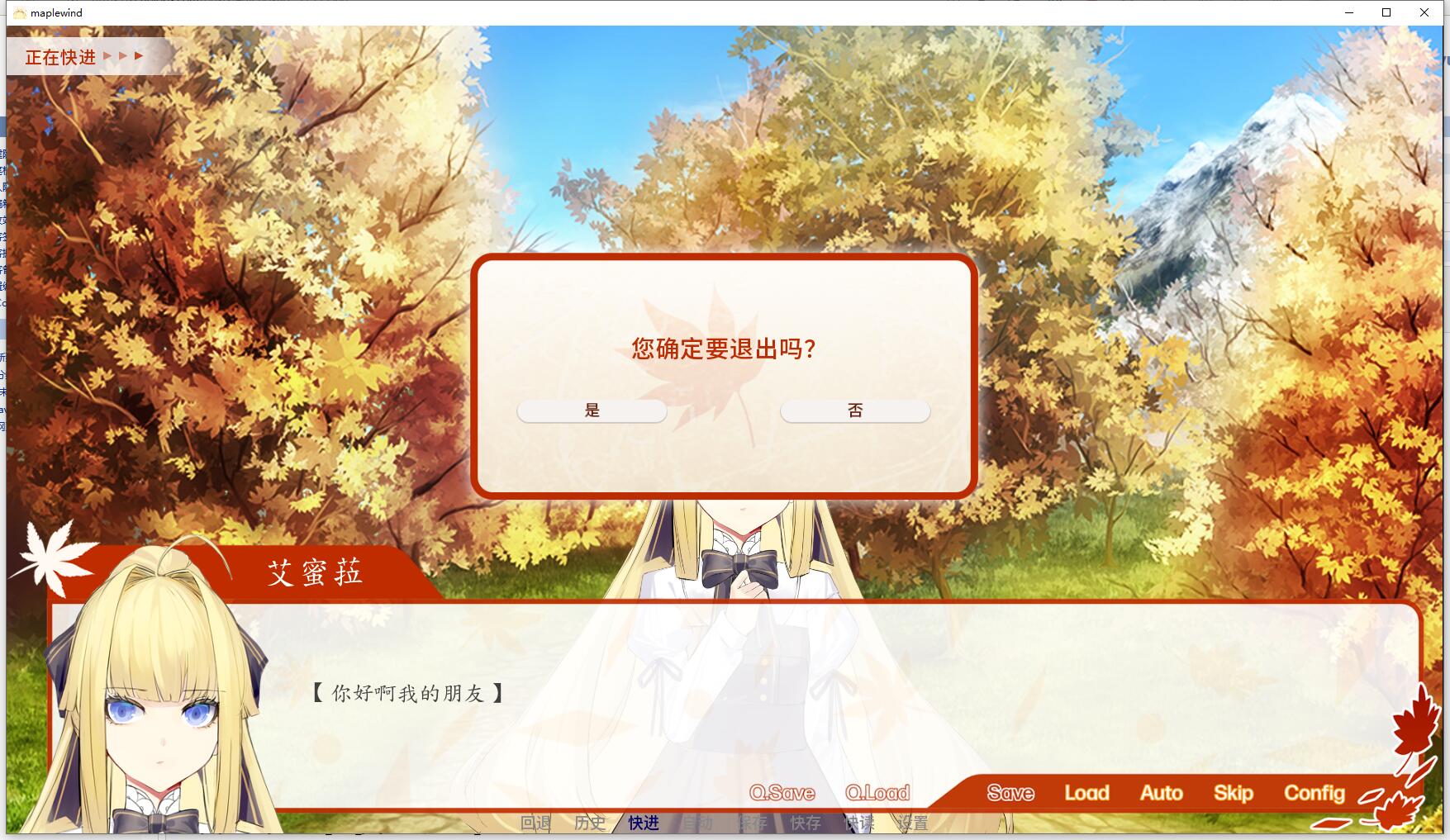

 浙公网安备 33010602011771号