


JDBC事务管理、概述、实现
JDBC事务管理
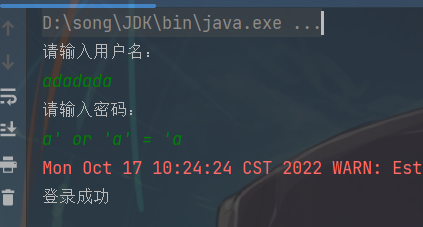
sql注入问题:
用户名随便输入,密码输入:a' or 'a' = 'a,它居然登录成功了!
注意:后期都会使用PrrparedStatement来完成增删改查的所有操作
1.可以防止sql注入
2.效率更高
优化代码
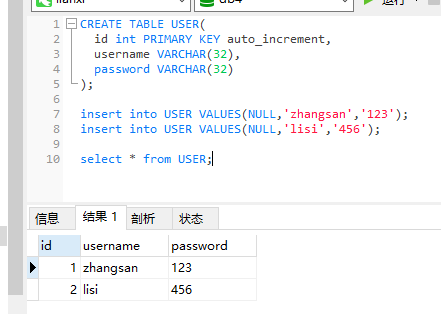
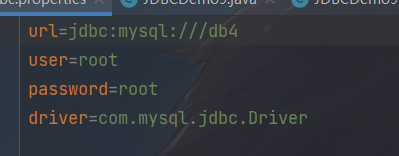
配置文件
JDBCUtiles工具类不用改,还是原来的
public class JDBCUtils {
    private static String url;
    private static String user;
    private static String password;
    private static String driver;
    /**
     * 文件的读取,只需要读取一次即可拿到这些值,使用静态代码块
     */
    static{
        //读取资源文件,获取值

        try {
            //1.创建Properties集合
            Properties properties = new Properties();
            //获取src路径下的文件的方式---》ClassLoader 类加载器
            ClassLoader classLoader = JDBCUtils.class.getClassLoader();
            URL resource = classLoader.getResource("jdbc.properties");
            String path = resource.getPath();
            //System.out.println(path);
            //2.加载文件
            properties.load(new FileReader(path));
            //3.获取数据,赋值
            url=properties.getProperty("url");
            user=properties.getProperty("user");
            password=properties.getProperty("password");
            driver=properties.getProperty("driver");
            //4.注册驱动
            Class.forName(driver);

        } catch (IOException e) {
            throw new RuntimeException(e);
        } catch (ClassNotFoundException e) {
            throw new RuntimeException(e);
        }

    }

    /**
     * 获取连接
     * @return   连接对象
     */
    public static Connection getConnection()throws SQLException{
        return DriverManager.getConnection(url,user,password);
    }

    /**
     * 释放资源
     * @param stmt
     * @param conn
     */
    public static void close(Statement stmt,Connection conn){
        if(stmt!=null){
            try {
                stmt.close();
            } catch (SQLException e) {
                throw new RuntimeException(e);
            }
        }
        if(conn!=null){
            try {
                conn.close();
            } catch (SQLException e) {
                throw new RuntimeException(e);
            }
        }
    }

    /**
     * 释放资源
     * @param stmt
     * @param conn
     */
    public static void close(ResultSet re, Statement stmt, Connection conn){
        if (re!=null){
            try {
                re.close();
            } catch (SQLException e) {
                throw new RuntimeException(e);
            }
        }
        if(stmt!=null){
            try {
                stmt.close();
            } catch (SQLException e) {
                throw new RuntimeException(e);
            }
        }
        if(conn!=null){
            try {
                conn.close();
            } catch (SQLException e) {
                throw new RuntimeException(e);
            }
        }
    }
优化后的代码
  public static void main(String[] args) throws SQLException {
        //1.键盘录入,接受用户和密码
        Scanner sc=new Scanner(System.in);
        System.out.println("请输入用户名:");
        String username=sc.nextLine();
        System.out.println("请输入密码:");
        String password=sc.nextLine();

        //2.调用方法,非静态方法new一个对象
        boolean flag = new JDBCDemo9lx().login(username, password);

        //3.判断结果,输出不同语句
        if (flag){
            System.out.println("登录成功");
        }else{
            System.out.println("登录失败");
        }
    }
    /*写一个登陆方法,有参数用户和密码,返回是否登陆成功*/
    public boolean login(String username, String password) throws SQLException {
        //判断录入的密码和用户名是否为空
        if (username == null || password == null) {
            return false;
        }
        //连接数据库判断是否登陆成功
        Connection conn = null;
        PreparedStatement stmt=null;
        ResultSet rs=null;

        //1.获取链接

        try {
            conn = JDBCUtils.getConnection();
            //2.定义sql语句
            String sql="select * from user where username= ? and password = ?";
            //3.获取执行sql的对象
            stmt = conn.prepareStatement(sql);
            //给?赋值
            stmt.setString(1,username);
            stmt.setString(2,password);
            //4.执行查询
            rs = stmt.executeQuery();
            //5.判断结果集是不是有数据
            return rs.next(); //返回为布尔型数据,如果有下一行就返回true
        } catch (SQLException e) {
            e.printStackTrace();
        }finally {
            //6.释放资源
            JDBCUtils.close(rs,stmt,conn);
        }
        return false;
    }
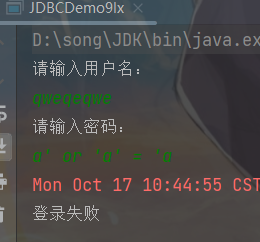
JDBC事务管理-概述
事务:一个包含多个步骤的业务操作,如果这个业务操作被事务管理,则这多个步骤要么同时成功,要么同时失败
操作:开始事务
提交事务
回滚事务
使用Connection对象来管理事务
开启事务:setAttoCommit(boolean autoCommit):调用该方法设置参数为false。即开启事务
提交事务:commit();
回滚事务:rollback();
JDBC事务管理-实现
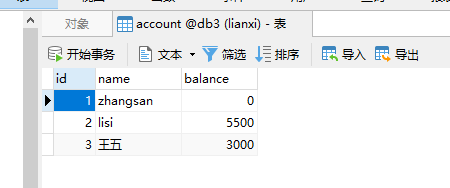
JDBCUtiles工具类
public class JDBCUtils {
    private static String url;
    private static String user;
    private static String password;
    private static String driver;
    /**
     * 文件的读取,只需要读取一次即可拿到这些值,使用静态代码块
     */
    static{
        //读取资源文件,获取值

        try {
            //1.创建Properties集合
            Properties properties = new Properties();
            //获取src路径下的文件的方式---》ClassLoader 类加载器
            ClassLoader classLoader = JDBCUtils.class.getClassLoader();
            URL resource = classLoader.getResource("jdbc.properties");
            String path = resource.getPath();
            //System.out.println(path);
            //2.加载文件
            properties.load(new FileReader(path));
            //3.获取数据,赋值
            url=properties.getProperty("url");
            user=properties.getProperty("user");
            password=properties.getProperty("password");
            driver=properties.getProperty("driver");
            //4.注册驱动
            Class.forName(driver);

        } catch (IOException e) {
            throw new RuntimeException(e);
        } catch (ClassNotFoundException e) {
            throw new RuntimeException(e);
        }

    }

    /**
     * 获取连接
     * @return   连接对象
     */
    public static Connection getConnection()throws SQLException{
        return DriverManager.getConnection(url,user,password);
    }

    /**
     * 释放资源
     * @param stmt
     * @param conn
     */
    public static void close(Statement stmt,Connection conn){
        if(stmt!=null){
            try {
                stmt.close();
            } catch (SQLException e) {
                throw new RuntimeException(e);
            }
        }
        if(conn!=null){
            try {
                conn.close();
            } catch (SQLException e) {
                throw new RuntimeException(e);
            }
        }
    }

    /**
     * 释放资源
     * @param stmt
     * @param conn
     */
    public static void close(ResultSet re, Statement stmt, Connection conn){
        if (re!=null){
            try {
                re.close();
            } catch (SQLException e) {
                throw new RuntimeException(e);
            }
        }
        if(stmt!=null){
            try {
                stmt.close();
            } catch (SQLException e) {
                throw new RuntimeException(e);
            }
        }
        if(conn!=null){
            try {
                conn.close();
            } catch (SQLException e) {
                throw new RuntimeException(e);
            }
        }
    }
JDBCDemo10类
public static void main(String[] args) {
    Connection conn = null;
    PreparedStatement pstm1 = null;
    PreparedStatement pstm2 = null;
    try {

        // 1、 获取连接对象Connection
        conn = JDBCUtils.getConnection();
        // 开启事务
        conn.setAutoCommit(false);
        // 2. sql语句
        String sql1 = "update account set balance = balance - ? where id = ?";
        String sql2 = "update account set balance = balance + ? where id = ?";
        // 3. 获取预处理sql语句PreparedStatement的对象
        pstm1 = conn.prepareStatement(sql1);
        pstm2 = conn.prepareStatement(sql2);
        // 4. ?赋值
        pstm1.setDouble(1, 500);
        pstm1.setInt(2, 1);
        pstm2.setDouble(1, 500);
        pstm2.setInt(2, 2);
        // 5. 执行SQL操作
        pstm1.executeUpdate();
        // 模拟异常
       // int x = 5/0;
        pstm2.executeUpdate();

        // 业务完成正常提交
        conn.commit();
    }  catch (Exception e) {
        // 业务异常,回滚
        try {
            if(conn != null)
                conn.rollback();
        } catch (SQLException e1) {
            e1.printStackTrace();
        }
        e.printStackTrace();
    } finally {
        // 6. 释放资源
        JDBCUtils.close(pstm1, conn);
        JDBCUtils.close(pstm2, null);
    }
}
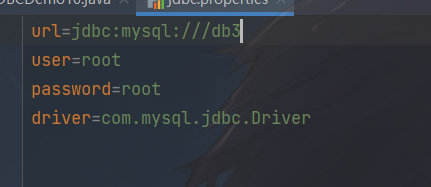
配置文件
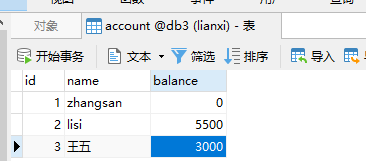
运行结果

不会发生变化

 浙公网安备 33010602011771号