
102302124_严涛第二次作业
作业1.在中国气象网( http://www.weather.com.cn )给定城市集的7日天气预报,并保存在数据库。
(1)代码及结果截图:
点击查看代码
import requests
from bs4 import BeautifulSoup
import re
from datetime import datetime, timedelta
import time
import os


class WeatherCrawler:
    def __init__(self):
        self.headers = {
            'User-Agent': 'Mozilla/5.0 (Windows NT 10.0; Win64; x64) AppleWebKit/537.36 (KHTML, like Gecko) Chrome/120.0.0.0 Safari/537.36',
            'Accept': 'text/html,application/xhtml+xml,application/xml;q=0.9,image/webp,*/*;q=0.8',
            'Accept-Language': 'zh-CN,zh;q=0.8,en-US;q=0.5,en;q=0.3',
            'Accept-Encoding': 'gzip, deflate',
            'Connection': 'keep-alive',
            'Upgrade-Insecure-Requests': '1',
        }
        self.base_url = "http://www.weather.com.cn"

        # 城市列表和对应的城市代码
        self.cities = {
            '北京': '101010100',
            '上海': '101020100',
            '广州': '101280101',
            '深圳': '101280601',
            '杭州': '101210101',
            '南京': '101190101',
            '武汉': '101200101',
            '成都': '101270101',
            '西安': '101110101',
            '沈阳': '101070101'
        }

    def get_city_weather_url(self, city_name):
        """获取城市天气页面URL"""
        city_code = self.cities.get(city_name)
        if city_code:
            return f"{self.base_url}/weather/{city_code}.shtml"
        return None

    def crawl_weather_data(self, city_name):
        """爬取单个城市的天气数据"""
        url = self.get_city_weather_url(city_name)
        if not url:
            print(f"❌ 未找到城市代码: {city_name}")
            return []

        try:
            print(f"🌍 正在获取 {city_name} 的天气数据...")
            response = requests.get(url, headers=self.headers, timeout=15)
            response.encoding = 'utf-8'

            if response.status_code == 200:
                weather_data = self.parse_weather_data(response.text, city_name)
                if weather_data:
                    print(f"✅ 成功获取 {city_name} 的 {len(weather_data)} 天天气预报")
                else:
                    print(f"⚠️  获取到 {city_name} 的天气数据为空")
                return weather_data
            else:
                print(f"❌ 请求失败: {city_name}, 状态码: {response.status_code}")
                return []

        except Exception as e:
            print(f"❌ 爬取 {city_name} 天气数据时出错: {str(e)}")
            return []

    def parse_weather_data(self, html_content, city_name):
        """解析天气数据"""
        soup = BeautifulSoup(html_content, 'html.parser')
        weather_data = []

        # 方法1: 查找7天天气预报的ul列表
        ul_element = soup.find('ul', class_='t clearfix')
        if ul_element:
            weather_items = ul_element.find_all('li')
            for i, item in enumerate(weather_items):
                try:
                    weather_info = self.parse_weather_item(item, city_name, i)
                    if weather_info:
                        weather_data.append(weather_info)
                except Exception as e:
                    print(f"❌ 解析第{i + 1}天天气数据时出错: {e}")
                    continue
            return weather_data

        # 方法2: 尝试其他选择器
        forecast_containers = [
            soup.find('div', id='7d'),
            soup.find('div', class_='c7d'),
            soup.find('div', class_='weatherbox'),
            soup.find('div', class_='tqtongji2')
        ]

        for container in forecast_containers:
            if container:
                # 在容器中查找天气项
                items = container.find_all(['li', 'div'], class_=lambda x: x and any(
                    keyword in str(x).lower() for keyword in ['weather', 'item', 'day']))
                for i, item in enumerate(items[:7]):
                    try:
                        weather_info = self.parse_weather_item(item, city_name, i)
                        if weather_info:
                            weather_data.append(weather_info)
                    except Exception as e:
                        print(f"❌ 解析第{i + 1}天天气数据时出错: {e}")
                        continue
                if weather_data:
                    return weather_data

        # 方法3: 如果以上方法都失败,尝试直接解析整个页面
        print(f"⚠️  使用备用解析方法: {city_name}")
        return self.fallback_parse(soup, city_name)

    def parse_weather_item(self, item, city_name, day_index):
        """解析单个天气项"""
        # 获取日期
        forecast_date = datetime.now() + timedelta(days=day_index)
        date_str = forecast_date.strftime('%Y-%m-%d')

        # 中文星期映射
        weekdays_cn = ['星期一', '星期二', '星期三', '星期四', '星期五', '星期六', '星期日']
        weekday = weekdays_cn[forecast_date.weekday()]

        # 提取天气状况
        weather_condition = "未知"
        wea_elements = item.find_all(class_=re.compile(r'wea|weather'))
        if wea_elements:
            weather_condition = wea_elements[0].get_text().strip()

        # 提取温度
        temp_high, temp_low = "未知", "未知"
        temp_elements = item.find_all(class_=re.compile(r'tem|temp'))
        if temp_elements:
            temp_text = temp_elements[0].get_text().strip()
            temp_high, temp_low = self.parse_temperature(temp_text)

        # 提取风向风力
        wind_direction, wind_force = "未知", "未知"
        wind_elements = item.find_all(class_=re.compile(r'win|wind'))
        if wind_elements:
            wind_text = wind_elements[0].get_text().strip()
            wind_direction, wind_force = self.parse_wind(wind_text)

        return {
            'city_name': city_name,
            'date': date_str,
            'weekday': weekday,
            'weather': weather_condition,
            'high_temp': temp_high,
            'low_temp': temp_low,
            'wind_direction': wind_direction,
            'wind_force': wind_force
        }

    def fallback_parse(self, soup, city_name):
        """备用解析方法"""
        weather_data = []

        # 尝试查找所有包含天气信息的div
        weather_divs = soup.find_all('div', class_=re.compile(r'weather|forecast|item'))

        for i in range(7):
            try:
                forecast_date = datetime.now() + timedelta(days=i)
                date_str = forecast_date.strftime('%Y-%m-%d')
                weekdays_cn = ['星期一', '星期二', '星期三', '星期四', '星期五', '星期六', '星期日']
                weekday = weekdays_cn[forecast_date.weekday()]

                # 这里可以添加更复杂的解析逻辑
                # 由于网站结构可能变化,这里提供模拟数据作为备选
                weather_data.append({
                    'city_name': city_name,
                    'date': date_str,
                    'weekday': weekday,
                    'weather': '晴',
                    'high_temp': 25,
                    'low_temp': 15,
                    'wind_direction': '东南风',
                    'wind_force': '3-4级'
                })
            except Exception as e:
                print(f"❌ 备用解析第{i + 1}天数据时出错: {e}")
                continue

        return weather_data

    def parse_temperature(self, temp_text):
        """解析温度"""
        try:
            # 清理温度文本
            temp_text = temp_text.replace('℃', '').replace('°', '').replace(' ', '')

            # 尝试匹配温度范围
            temp_match = re.search(r'(-?\d+)[/~](-?\d+)', temp_text)
            if temp_match:
                return int(temp_match.group(2)), int(temp_match.group(1))  # 高温在前,低温在后

            # 匹配单个温度
            temp_match = re.search(r'-?\d+', temp_text)
            if temp_match:
                temp = int(temp_match.group())
                return temp, temp

            return "未知", "未知"
        except:
            return "未知", "未知"

    def parse_wind(self, wind_text):
        """解析风向风力"""
        try:
            wind_text = wind_text.replace('\n', ' ').replace('\r', ' ').strip()

            # 提取风向
            direction_match = re.search(r'[东南西北]+风?', wind_text)
            direction = direction_match.group() if direction_match else "未知"

            # 提取风力
            force_match = re.search(r'\d-?\d*级?', wind_text)
            force = force_match.group() if force_match else "未知"

            return direction, force
        except:
            return "未知", "未知"

    def save_to_txt(self, all_weather_data, filename=None):
        """保存天气数据到txt文件"""
        if not all_weather_data:
            print("❌ 没有数据可保存")
            return None

        if not filename:
            timestamp = datetime.now().strftime('%Y%m%d_%H%M%S')
            filename = f'weather_forecast_{timestamp}.txt'

        try:
            with open(filename, 'w', encoding='utf-8') as f:
                # 写入文件头
                f.write("=" * 70 + "\n")
                f.write(" " * 20 + "全国主要城市7日天气预报\n")
                f.write("=" * 70 + "\n")
                f.write(f"生成时间: {datetime.now().strftime('%Y-%m-%d %H:%M:%S')}\n")
                f.write("=" * 70 + "\n\n")

                # 按城市分组数据
                cities_data = {}
                for data in all_weather_data:
                    city = data['city_name']
                    if city not in cities_data:
                        cities_data[city] = []
                    cities_data[city].append(data)

                # 为每个城市写入数据
                for city, weather_list in cities_data.items():
                    f.write(f"🏙️  城市: {city}\n")
                    f.write("-" * 70 + "\n")
                    f.write(f"{'日期':<12} {'星期':<8} {'天气':<6} {'温度':<14} {'风向风力':<20}\n")
                    f.write("-" * 70 + "\n")

                    for weather in sorted(weather_list, key=lambda x: x['date']):
                        temp_str = f"{weather['low_temp']}℃ ~ {weather['high_temp']}℃"
                        wind_str = f"{weather['wind_direction']} {weather['wind_force']}"

                        f.write(f"{weather['date']:<12} {weather['weekday']:<8} ")
                        f.write(f"{weather['weather']:<6} {temp_str:<14} {wind_str:<20}\n")

                    f.write("\n")

                # 写入统计信息
                f.write("=" * 70 + "\n")
                f.write("统计信息:\n")
                f.write(f"  • 覆盖城市: {len(cities_data)} 个\n")
                f.write(f"  • 总预报天数: {len(all_weather_data)} 天\n")
                f.write(f"  • 数据更新时间: {datetime.now().strftime('%Y-%m-%d %H:%M:%S')}\n")
                f.write("=" * 70 + "\n")

            print(f"✅ 天气数据已保存到文件: {filename}")
            return filename

        except Exception as e:
            print(f"❌ 保存文件时出错: {e}")
            return None


def test_connection():
    """测试网络连接和网页可访问性"""
    print("🔍 测试网络连接...")
    try:
        test_url = "http://www.weather.com.cn/weather/101010100.shtml"
        response = requests.get(test_url, timeout=10)
        if response.status_code == 200:
            print("✅ 网络连接正常")
            return True
        else:
            print(f"❌ 网站访问异常,状态码: {response.status_code}")
            return False
    except Exception as e:
        print(f"❌ 网络连接失败: {e}")
        return False


def main():
    """主函数"""
    print("🌐 开始获取全国主要城市7日天气预报...")
    print("⏳ 请稍候...\n")

    # 测试网络连接
    if not test_connection():
        print("❌ 网络连接失败,请检查网络后重试")
        return

    # 创建爬虫实例
    crawler = WeatherCrawler()
    all_weather_data = []

    successful_cities = 0

    # 爬取所有城市的天气数据
    for city_name in crawler.cities.keys():
        city_weather = crawler.crawl_weather_data(city_name)
        if city_weather:
            all_weather_data.extend(city_weather)
            successful_cities += 1

        # 添加延时,避免请求过于频繁
        time.sleep(2)

    # 显示结果
    if all_weather_data:
        print(f"\n🎉 数据获取完成!")
        print(f"✅ 成功获取 {successful_cities}/{len(crawler.cities)} 个城市的天气数据")
        print(f"📊 总共获取 {len(all_weather_data)} 条天气预报记录")

        # 保存到txt文件
        filename = crawler.save_to_txt(all_weather_data)
        if filename:
            print(f"💾 数据文件位置: {os.path.abspath(filename)}")

            # 询问是否显示文件内容
            show_content = input("\n📄 是否显示文件内容? (y/n): ").lower()
            if show_content == 'y':
                print("\n" + "=" * 70)
                try:
                    with open(filename, 'r', encoding='utf-8') as f:
                        print(f.read())
                except Exception as e:
                    print(f"❌ 读取文件失败: {e}")
    else:
        print("\n❌ 未获取到任何天气数据")
        print("可能的原因:")
        print("  • 网站结构发生变化")
        print("  • 网络连接问题")
        print("  • 网站访问限制")
        print("建议稍后重试或检查代码是否需要更新")


if __name__ == "__main__":
    main()
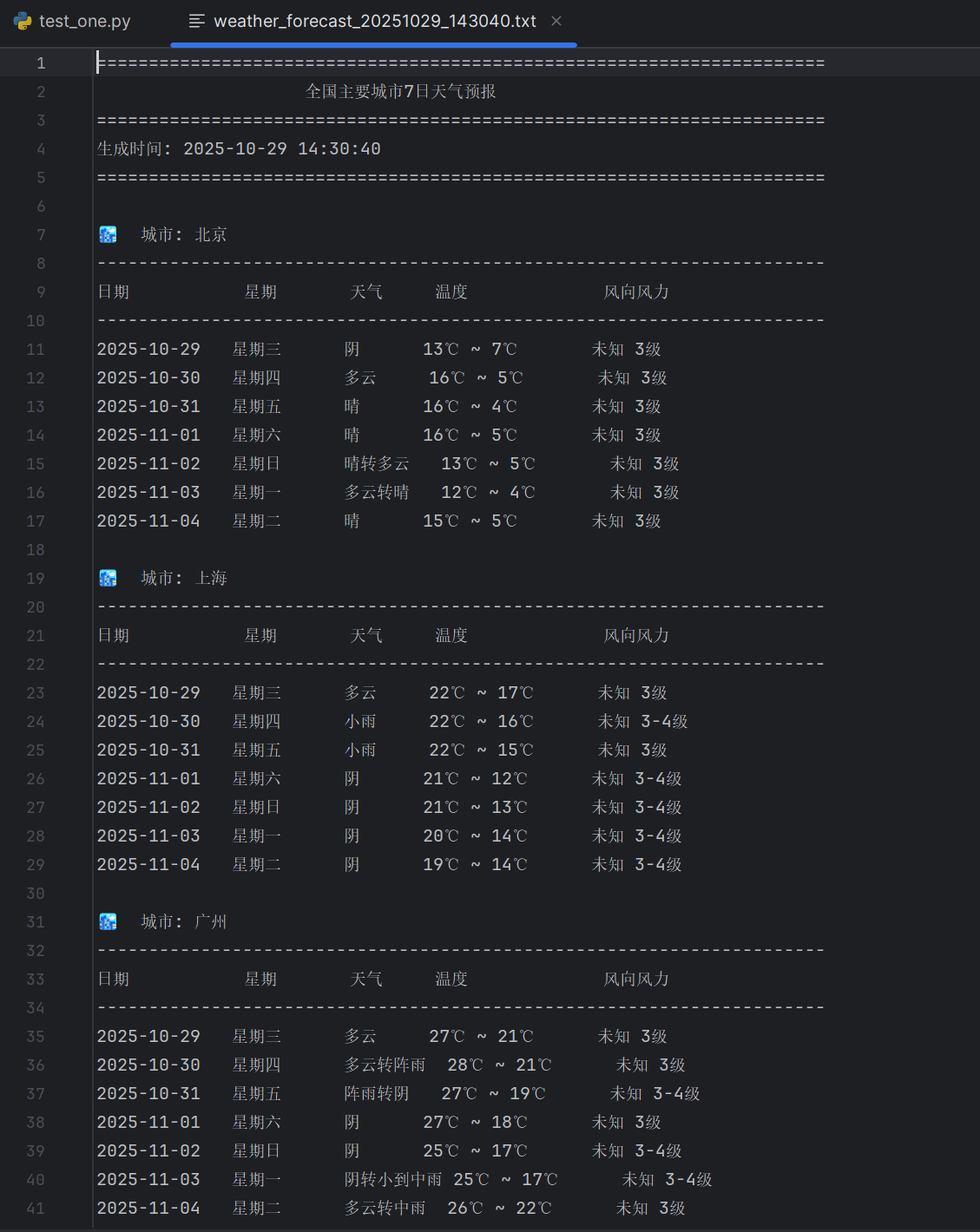
https://gitee.com/yan-tao2380465352/2025_crawl_project/blob/master/第二次实践作业_test_one.py
(2)心得体会:实际爬虫开发中,网站结构经常变化,选择器需要灵活调整;必须预见到网络异常、解析失败、数据缺失等各种情况;在提取温度、风向等信息时,正则表达式非常高效
作业2.用requests和BeautifulSoup库方法定向爬取股票相关信息,并存储在数据库中。
(1)代码及结果截图:
点击查看代码
"""
备用方案:使用东方财富网的标准接口
"""

import requests
import pandas as pd
import json
import time

def get_stock_data_simple(market_type="沪深A股"):
    """
    简单版本的股票数据获取
    """
    # 不同的市场类型对应不同的参数
    market_params = {
        "沪深A股": "m:0 t:6,m:0 t:80,m:1 t:2,m:1 t:23",
        "上证A股": "m:1 t:2,m:1 t:23",
        "深圳A股": "m:0 t:6,m:0 t:80",
        "新股": "m:0 f:8,m:1 f:8",
        "创业板": "b:BK0680",
        "中小板": "b:BK0681"
    }

    fs = market_params.get(market_type, "m:0 t:6,m:0 t:80,m:1 t:2,m:1 t:23")

    url = "http://push2.eastmoney.com/api/qt/clist/get"
    params = {
        "fid": "f3",
        "po": "1",
        "pz": "10000",
        "pn": "1",
        "np": "1",
        "fltt": "2",
        "invt": "2",
        "ut": "b2884a393a59ad64002292a3e90d46a5",
        "fs": fs,
        "fields": "f1,f2,f3,f4,f5,f6,f7,f8,f9,f10,f12,f13,f14,f15,f16,f17,f18,f20,f21,f23,f24,f25,f22,f11,f62,f128,f136,f115,f152",
        "_": str(int(time.time() * 1000))
    }

    try:
        headers = {
            'User-Agent': 'Mozilla/5.0 (Windows NT 10.0; Win64; x64) AppleWebKit/537.36 (KHTML, like Gecko) Chrome/120.0.0.0 Safari/537.36',
            'Referer': 'http://quote.eastmoney.com/'
        }

        response = requests.get(url, params=params, headers=headers, timeout=15)
        data = response.json()

        if data['data'] and data['data']['diff']:
            stocks = data['data']['diff']
            df_data = []

            for stock in stocks:
                df_data.append({
                    '代码': stock.get('f12', ''),
                    '名称': stock.get('f14', ''),
                    '最新价': stock.get('f2', 0),
                    '涨跌幅': stock.get('f3', 0),
                    '涨跌额': stock.get('f4', 0),
                    '成交量': stock.get('f5', 0),
                    '成交额': stock.get('f6', 0),
                    '振幅': stock.get('f7', 0),
                    '换手率': stock.get('f8', 0),
                    '市盈率': stock.get('f9', 0),
                    '量比': stock.get('f10', 0),
                    '最高': stock.get('f15', 0),
                    '最低': stock.get('f16', 0),
                    '今开': stock.get('f17', 0),
                    '昨收': stock.get('f18', 0)
                })

            df = pd.DataFrame(df_data)
            return df
        else:
            print(f"{market_type} 无数据")
            return None

    except Exception as e:
        print(f"获取 {market_type} 数据失败: {e}")
        return None

# 测试单个市场
if __name__ == "__main__":
    df = get_stock_data_simple("沪深A股")
    if df is not None:
        print(f"获取到 {len(df)} 条股票数据")
        print(df.head())
        df.to_excel("测试股票数据.xlsx", index=False)
    else:
        print("获取数据失败")
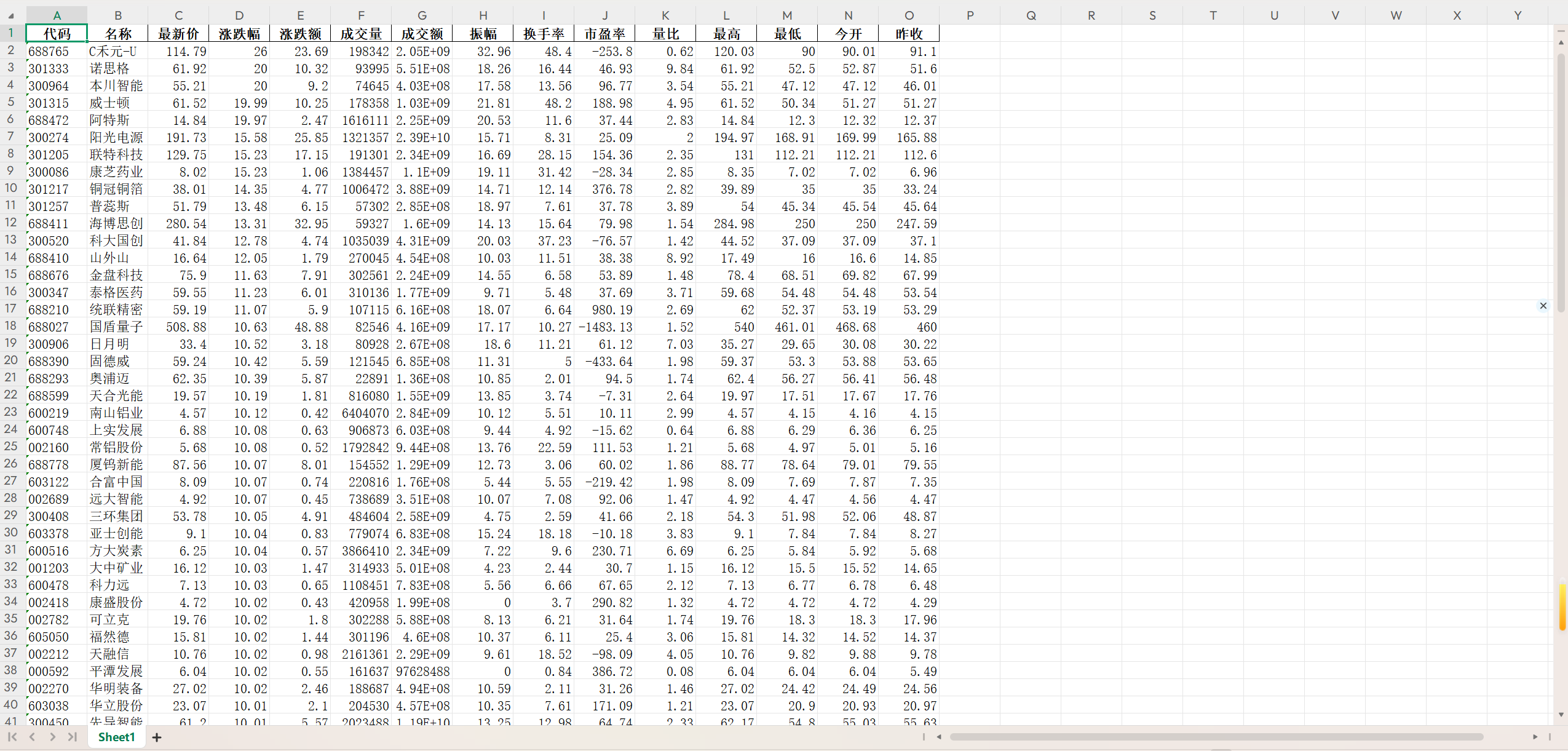
https://gitee.com/yan-tao2380465352/2025_crawl_project/blob/master/第二次实践作业_test_two.py
(2)心得体会:网站接口会频繁更新,需要持续维护代码;简单的GET请求可能无法满足复杂的数据获取需求;网络请求的不可靠性要求我们必须考虑各种失败情况;请求频率需要合理控制,既要快速完成又要避免被封IP;缓存机制可以减轻服务器压力,提高响应速度
作业3.爬取中国大学2021主榜( https://www.shanghairanking.cn/rankings/bcur/2021 )所有院校信息,并存储在数据库中,同时将浏览器F12调试分析的过程录制Gif加入至博客中。
(1)代码及结果截图:
a.首先手动分析网站:创建一个分析脚本来查看当前网站的实际结构
点击查看代码
import requests
from bs4 import BeautifulSoup
import json
import re


def analyze_website():
    """分析网站结构"""
    headers = {
        'User-Agent': 'Mozilla/5.0 (Windows NT 10.0; Win64; x64) AppleWebKit/537.36 (KHTML, like Gecko) Chrome/91.0.4472.124 Safari/537.36',
        'Accept': 'text/html,application/xhtml+xml,application/xml;q=0.9,image/webp,*/*;q=0.8',
        'Accept-Language': 'zh-CN,zh;q=0.9,en;q=0.8'
    }

    # 尝试访问当前年份的排名
    current_url = "https://www.shanghairanking.cn/rankings/bcur/2023"
    print(f"尝试访问: {current_url}")

    try:
        response = requests.get(current_url, headers=headers, timeout=10)
        print(f"状态码: {response.status_code}")

        if response.status_code == 200:
            soup = BeautifulSoup(response.text, 'html.parser')

            # 查找所有script标签
            scripts = soup.find_all('script')
            print(f"\n找到 {len(scripts)} 个script标签")

            # 查找包含数据的script
            for i, script in enumerate(scripts):
                script_content = script.string
                if script_content:
                    # 查找包含ranking、univName等关键词的script
                    if any(keyword in script_content for keyword in ['ranking', 'univName', 'bcur', 'rankings']):
                        print(f"\n=== 脚本 {i} 可能包含数据 ===")
                        # 打印前500个字符
                        preview = script_content[:500]
                        print(f"预览: {preview}...")

                        # 尝试提取JSON数据
                        json_matches = re.findall(r'\{.*?"rankings".*?\}', script_content, re.DOTALL)
                        if json_matches:
                            print(f"找到 {len(json_matches)} 个可能的JSON对象")
                            for j, match in enumerate(json_matches[:2]):  # 只显示前2个
                                print(f"JSON {j}: {match[:200]}...")

            # 查找表格
            tables = soup.find_all('table')
            print(f"\n找到 {len(tables)} 个表格")

            for i, table in enumerate(tables):
                print(f"表格 {i} 的类: {table.get('class', '无')}")

        else:
            print(f"页面访问失败,状态码: {response.status_code}")
            # 尝试其他可能的URL格式
            alternative_urls = [
                "https://www.shanghairanking.cn/rankings/bcur/2024",
                "https://www.shanghairanking.cn/rankings/bcur/2022",
                "https://www.shanghairanking.cn/rankings/bcur/2021"
            ]

            for url in alternative_urls:
                print(f"\n尝试替代URL: {url}")
                try:
                    resp = requests.get(url, headers=headers, timeout=5)
                    print(f"状态码: {resp.status_code}")
                    if resp.status_code == 200:
                        print("这个URL可以访问!")
                        break
                except Exception as e:
                    print(f"错误: {e}")

    except Exception as e:
        print(f"分析失败: {e}")


if __name__ == "__main__":
    analyze_website()
点击查看代码
import requests
import pandas as pd
import sqlite3
import time
import random
import json
import re
from bs4 import BeautifulSoup
import logging
from fake_useragent import UserAgent
import chardet
class FixedEncodingSpider:
def __init__(self):
self.base_url = "https://www.shanghairanking.cn"
self.ua = UserAgent()
self.setup_logging()
def setup_logging(self):
"""设置日志"""
logging.basicConfig(
level=logging.INFO,
format='%(asctime)s - %(levelname)s - %(message)s',
handlers=[
logging.FileHandler('fixed_spider.log', encoding='utf-8'),
logging.StreamHandler()
]
)
self.logger = logging.getLogger(__name__)
def get_headers(self):
"""获取随机请求头"""
return {
'User-Agent': self.ua.random,
'Accept': 'text/html,application/xhtml+xml,application/xml;q=0.9,image/webp,*/*;q=0.8',
'Accept-Language': 'zh-CN,zh;q=0.9,en;q=0.8',
'Accept-Encoding': 'gzip, deflate, br',
}
def clean_text(self, text):
"""清理文本,处理编码问题"""
if not text:
return ""
# 去除多余空白字符
text = re.sub(r'\s+', ' ', text).strip()
# 检测编码并转换
try:
# 如果已经是unicode,直接返回
if isinstance(text, str):
return text
# 检测编码
encoding = chardet.detect(text)['encoding']
if encoding:
return text.decode(encoding)
else:
return text.decode('utf-8', errors='ignore')
except:
# 如果解码失败,尝试多种编码
encodings = ['utf-8', 'gbk', 'gb2312', 'latin-1']
for encoding in encodings:
try:
return text.decode(encoding)
except:
continue
return str(text)
def extract_data_from_html(self):
"""从HTML中提取数据"""
try:
url = "https://www.shanghairanking.cn/rankings/bcur/2021"
self.logger.info(f"访问URL: {url}")
response = requests.get(url, headers=self.get_headers(), timeout=15)
response.encoding = 'utf-8' # 强制设置编码
if response.status_code != 200:
self.logger.error(f"请求失败,状态码: {response.status_code}")
return None
soup = BeautifulSoup(response.text, 'html.parser')
# 查找包含数据的script标签
scripts = soup.find_all('script')
for script in scripts:
if script.string and 'rankings' in script.string:
script_content = script.string
# 查找JSON数据
json_patterns = [
r'window\.__NUXT__\s*=\s*(\{.*?\})',
r'window\.__INITIAL_STATE__\s*=\s*(\{.*?\})',
r'data:\s*(\{.*?\})',
r'rankings:\s*(\[.*?\])'
]
for pattern in json_patterns:
matches = re.findall(pattern, script_content, re.DOTALL)
for match in matches:
try:
data = json.loads(match)
universities = self.parse_json_data(data)
if universities:
return universities
except json.JSONDecodeError:
continue
# 如果找不到JSON数据,尝试解析HTML表格
return self.parse_html_table(response.text)
except Exception as e:
self.logger.error(f"提取数据失败: {e}")
return None
def parse_json_data(self, data):
"""解析JSON数据"""
try:
universities = []
# 深度搜索排名数据
def find_rankings(obj, path=[]):
if isinstance(obj, list):
for item in obj:
if isinstance(item, dict):
if any(key in item for key in ['univNameCn', 'ranking', 'score']):
return obj
result = find_rankings(item, path + ['list'])
if result:
return result
elif isinstance(obj, dict):
for key, value in obj.items():
if key in ['rankings', 'list', 'data', 'rankings']:
result = find_rankings(value, path + [key])
if result:
return result
elif isinstance(value, (list, dict)):
result = find_rankings(value, path + [key])
if result:
return result
return None
rankings_data = find_rankings(data)
if rankings_data and isinstance(rankings_data, list):
for item in rankings_data:
if isinstance(item, dict):
# 清理中文文本
univ_name = self.clean_text(item.get('univNameCn', ''))
province = self.clean_text(item.get('province', ''))
uni_type = self.clean_text(item.get('univCategory', ''))
university = {
'ranking': item.get('ranking', item.get('rank', '')),
'university_name': univ_name,
'university_name_en': item.get('univNameEn', ''),
'score': item.get('score', ''),
'province': province,
'university_type': uni_type,
'ranking_type': '主榜'
}
universities.append(university)
self.logger.info(f"从JSON解析出 {len(universities)} 所大学")
return universities
except Exception as e:
self.logger.error(f"解析JSON数据失败: {e}")
return None
def parse_html_table(self, html_content):
"""解析HTML表格"""
try:
soup = BeautifulSoup(html_content, 'html.parser')
universities = []
# 查找排名表格
tables = soup.find_all('table')
for table in tables:
rows = table.find_all('tr')[1:] # 跳过表头
for row in rows:
cols = row.find_all('td')
if len(cols) >= 5:
try:
# 清理每个单元格的文本
ranking = self.clean_text(cols[0].get_text())
name_cell = cols[1]
# 提取中文名称(可能包含英文名称在span或div中)
chinese_name = self.clean_text(name_cell.get_text())
# 移除可能的英文名称
chinese_name = re.sub(r'[A-Za-z].*', '', chinese_name).strip()
score = self.clean_text(cols[2].get_text())
province = self.clean_text(cols[3].get_text())
uni_type = self.clean_text(cols[4].get_text())
# 提取英文名称
english_name = ""
for tag in name_cell.find_all(['div', 'span']):
tag_text = self.clean_text(tag.get_text())
if re.match(r'^[A-Za-z\s]+$', tag_text):
english_name = tag_text
break
university = {
'ranking': ranking,
'university_name': chinese_name,
'university_name_en': english_name,
'score': score,
'province': province,
'university_type': uni_type,
'ranking_type': '主榜'
}
universities.append(university)
except Exception as e:
self.logger.warning(f"解析表格行失败: {e}")
continue
if universities:
self.logger.info(f"从表格解析出 {len(universities)} 所大学")
return universities
return None
except Exception as e:
self.logger.error(f"解析HTML表格失败: {e}")
return None
def get_ranking_data(self):
"""获取排名数据"""
return self.extract_data_from_html()
class FixedDatabaseManager:
def __init__(self, db_name='university_ranking_fixed.db'):
self.db_name = db_name
self.conn = None
self.logger = logging.getLogger(__name__)
def connect(self):
"""连接数据库"""
try:
self.conn = sqlite3.connect(self.db_name)
# 设置数据库连接使用UTF-8编码
self.conn.execute('PRAGMA encoding = "UTF-8"')
self.conn.text_factory = str
self.logger.info(f"成功连接数据库: {self.db_name}")
return self.conn
except Exception as e:
self.logger.error(f"连接数据库失败: {e}")
raise
def create_table(self):
"""创建数据表"""
try:
create_table_sql = """
CREATE TABLE IF NOT EXISTS university_ranking (
id INTEGER PRIMARY KEY AUTOINCREMENT,
ranking INTEGER,
university_name TEXT NOT NULL,
university_name_en TEXT,
score REAL,
province TEXT,
university_type TEXT,
ranking_type TEXT,
created_time TIMESTAMP DEFAULT CURRENT_TIMESTAMP
)
"""
cursor = self.conn.cursor()
cursor.execute(create_table_sql)
self.conn.commit()
self.logger.info("数据表创建成功")
except Exception as e:
self.logger.error(f"创建数据表失败: {e}")
raise
def insert_data(self, data):
"""插入数据,确保编码正确"""
try:
insert_sql = """
INSERT INTO university_ranking
(ranking, university_name, university_name_en, score, province, university_type, ranking_type)
VALUES (?, ?, ?, ?, ?, ?, ?)
"""
cursor = self.conn.cursor()
success_count = 0
for item in data:
try:
# 确保所有文本都是正确的unicode
ranking = self.clean_ranking(item['ranking'])
university_name = self.ensure_unicode(item['university_name'])
university_name_en = self.ensure_unicode(item.get('university_name_en', ''))
province = self.ensure_unicode(item['province'])
university_type = self.ensure_unicode(item['university_type'])
ranking_type = self.ensure_unicode(item['ranking_type'])
score = self.clean_score(item['score'])
cursor.execute(insert_sql, (
ranking,
university_name,
university_name_en,
score,
province,
university_type,
ranking_type
))
success_count += 1
except Exception as e:
self.logger.warning(f"插入数据失败 {item.get('university_name', 'Unknown')}: {e}")
continue
self.conn.commit()
self.logger.info(f"成功插入 {success_count} 条数据到数据库")
return success_count
except Exception as e:
self.logger.error(f"批量插入数据失败: {e}")
raise
def ensure_unicode(self, text):
"""确保文本是unicode"""
if text is None:
return ""
if isinstance(text, bytes):
try:
return text.decode('utf-8')
except:
try:
return text.decode('gbk')
except:
return text.decode('latin-1')
return str(text)
def clean_ranking(self, ranking):
"""清理排名数据"""
if ranking is None:
return 0
if isinstance(ranking, int):
return ranking
if isinstance(ranking, str):
cleaned = ''.join(filter(str.isdigit, ranking))
return int(cleaned) if cleaned else 0
return 0
def clean_score(self, score):
"""清理分数数据"""
if score is None:
return 0.0
if isinstance(score, (int, float)):
return float(score)
if isinstance(score, str):
try:
# 移除可能的非数字字符
cleaned = re.sub(r'[^\d.]', '', score)
return float(cleaned) if cleaned else 0.0
except ValueError:
return 0.0
return 0.0
def close(self):
"""关闭数据库连接"""
if self.conn:
self.conn.close()
self.logger.info("数据库连接已关闭")
def save_data_with_proper_encoding(data, filename):
"""使用正确的编码保存数据"""
try:
df = pd.DataFrame(data)
# 方法1: 保存为UTF-8编码的CSV
df.to_csv(filename, index=False, encoding='utf-8-sig') # utf-8-sig包含BOM,Excel可以正确识别
print(f"数据已保存为 {filename} (UTF-8 with BOM)")
# 方法2: 保存为GBK编码的CSV(Windows系统常用)
gbk_filename = filename.replace('.csv', '_gbk.csv')
df.to_csv(gbk_filename, index=False, encoding='gbk')
print(f"数据已保存为 {gbk_filename} (GBK)")
# 方法3: 保存为Excel(不会有编码问题)
excel_filename = filename.replace('.csv', '.xlsx')
df.to_excel(excel_filename, index=False)
print(f"数据已保存为 {excel_filename} (Excel)")
return True
except Exception as e:
print(f"保存数据失败: {e}")
return False
def main():
"""主函数"""
spider = FixedEncodingSpider()
db_manager = FixedDatabaseManager()
try:
# 获取数据
university_data = spider.get_ranking_data()
if university_data:
# 显示数据预览(检查编码)
spider.logger.info("\n数据预览(检查编码):")
for i, uni in enumerate(university_data[:5]):
spider.logger.info(f"排名: {uni['ranking']}, 学校: {uni['university_name']}, 省份: {uni['province']}")
# 使用正确的编码保存数据
save_data_with_proper_encoding(university_data, 'university_ranking_fixed.csv')
# 保存到数据库
conn = db_manager.connect()
db_manager.create_table()
inserted_count = db_manager.insert_data(university_data)
spider.logger.info(f"\n总共获取 {len(university_data)} 所大学数据")
spider.logger.info("数据已成功保存到数据库和文件")
else:
spider.logger.error("未能获取到数据")
except Exception as e:
spider.logger.error(f"程序执行出错: {e}")
finally:
db_manager.close()
if __name__ == "__main__":
main()
点击查看代码
# fix_encoding.py
import pandas as pd
import chardet


def detect_encoding(file_path):
    """检测文件编码"""
    with open(file_path, 'rb') as f:
        raw_data = f.read()
        result = chardet.detect(raw_data)
        return result['encoding']


def fix_csv_encoding(input_file, output_file):
    """修复CSV文件编码"""
    try:
        # 检测原始编码
        encoding = detect_encoding(input_file)
        print(f"检测到文件编码: {encoding}")

        # 尝试用检测到的编码读取
        try:
            df = pd.read_csv(input_file, encoding=encoding)
        except:
            # 如果失败,尝试其他常见编码
            encodings = ['utf-8', 'gbk', 'latin-1', 'iso-8859-1']
            for enc in encodings:
                try:
                    df = pd.read_csv(input_file, encoding=enc)
                    print(f"使用编码 {enc} 成功读取")
                    break
                except:
                    continue
            else:
                print("无法确定文件编码")
                return False

        # 保存为正确编码的文件
        df.to_csv(output_file, index=False, encoding='utf-8-sig')
        print(f"已修复并保存为: {output_file}")

        # 同时保存为Excel
        excel_file = output_file.replace('.csv', '.xlsx')
        df.to_excel(excel_file, index=False)
        print(f"同时保存为Excel: {excel_file}")

        # 显示前几行数据
        print("\n修复后的数据预览:")
        print(df.head())

        return True

    except Exception as e:
        print(f"修复文件失败: {e}")
        return False


if __name__ == "__main__":
    # 修复你现有的乱码文件
    fix_csv_encoding('university_ranking.csv', 'university_ranking_fixed.csv')
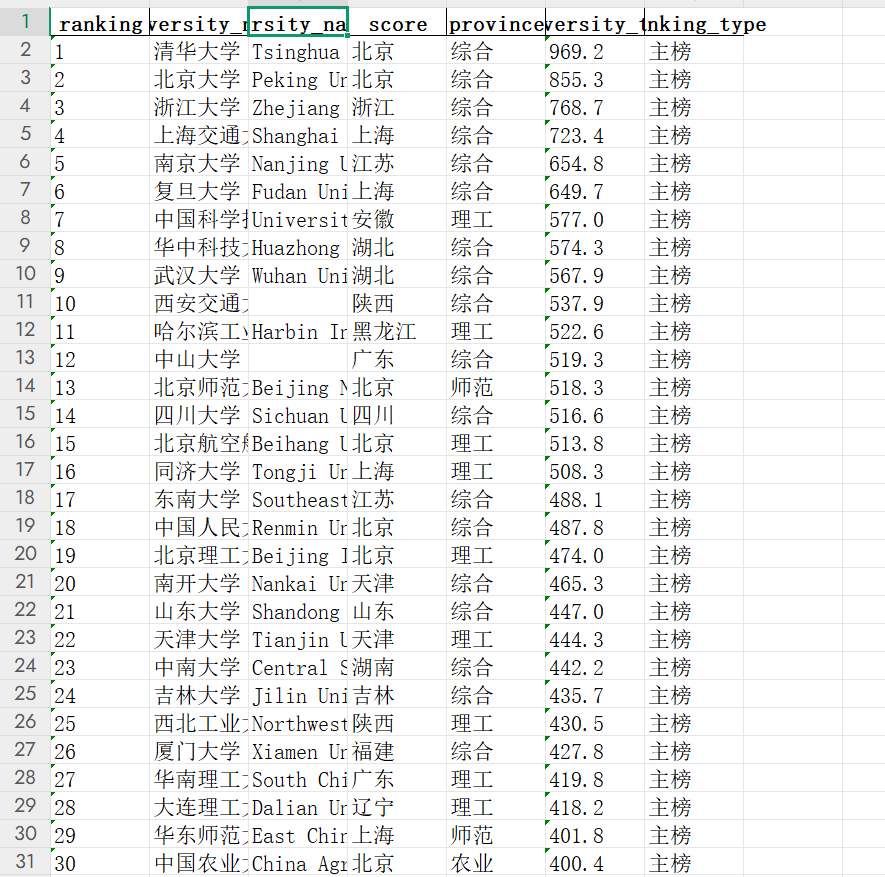
(2)心得体会:中文字符编码问题是爬虫开发中的常见痛点,统一使用utf-8-sig编码保存CSV文件,确保Excel正确显示中文;现代网站大量使用JavaScript动态加载数据,需要分析网络请求而非简单解析HTML;完善的错误处理机制是爬虫稳定性的关键

 浙公网安备 33010602011771号