


Mybatis Generator(逆向工程)
1.如何使用mybatis 的逆向工程,在百度上搜索mybatis Generator进入官网。英文不好的同学可以翻译成中文
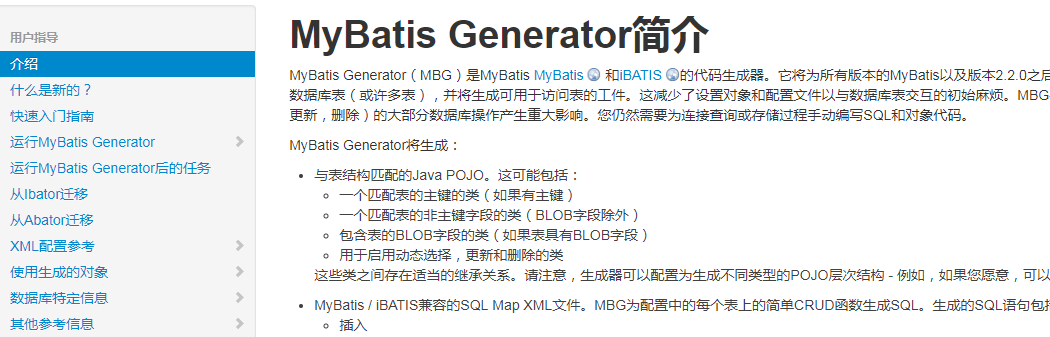
2.在我们的项目中新建一个xml配置文件名字mbg.xml,在官网上找到mybatis Generator快速入门指南点击XML配置文件参考复制xml中的内容并粘贴在我们自己新建的xml文件中。
<?xml version =“1.0”encoding =“UTF-8”?>
<!DOCTYPE generatorConfiguration
  PUBLIC“ -  // mybatis.org//DTD MyBatis Generator Configuration 1.0 // EN”
  “http://mybatis.org/dtd/mybatis-generator-config_1_0.dtd”>

<generatorConfiguration>
  <classPathEntry location =“/ Program Files / IBM / SQLLIB / java / db2java.zip”/>

  <context id =“DB2Tables”targetRuntime =“MyBatis3”>
    <jdbcConnection driverClass =“COM.ibm.db2.jdbc.app.DB2Driver”
        的ConnectionURL = “JDBC:DB2:TEST”
        用户id = “DB2ADMIN”
        密码= “DB2ADMIN”>
    </ jdbcConnection>

    <javaTypeResolver>
      <property name =“forceBigDecimals”value =“false”/>
    </ javaTypeResolver>

    <javaModelGenerator targetPackage =“test.model”targetProject =“\ MBGTestProject \ src”>
      <property name =“enableSubPackages”value =“true”/>
      <property name =“trimStrings”value =“true”/>
    </ javaModelGenerator>

    <sqlMapGenerator targetPackage =“test.xml”targetProject =“\ MBGTestProject \ src”>
      <property name =“enableSubPackages”value =“true”/>
    </ sqlMapGenerator>

    <javaClientGenerator type =“XMLMAPPER”targetPackage =“test.dao”targetProject =“\ MBGTestProject \ src”>
      <property name =“enableSubPackages”value =“true”/>
    </ javaClientGenerator>

    <table schema =“DB2ADMIN”tableName =“ALLTYPES”domainObjectName =“Customer”>
      <property name =“useActualColumnNames”value =“true”/>
      <generatedKey column =“ID”sqlStatement =“DB2”identity =“true”/>
      <columnOverride column =“DATE_FIELD”property =“startDate”/>
      <ignoreColumn column =“FRED”/>
      <columnOverride column =“LONG_VARCHAR_FIELD”jdbcType =“VARCHAR”/>
    </ TABLE>

  </上下文>
</ generatorConfiguration>
3.修改xml文件,还有一些代码我删除了(没用)
<?xml version="1.0" encoding="UTF-8"?>
<!DOCTYPE generatorConfiguration
  PUBLIC "-//mybatis.org//DTD MyBatis Generator Configuration 1.0//EN"
  "http://mybatis.org/dtd/mybatis-generator-config_1_0.dtd">

<generatorConfiguration>

  <context id="DB2Tables" targetRuntime="MyBatis3">
          <!-- 去掉生成文件中的注释 -->
          <commentGenerator>
          <property name="suppressAllComments" value="true"></property>
          </commentGenerator>
  <!-- 数据库连接配置 -->
    <jdbcConnection driverClass="com.mysql.jdbc.Driver"
        connectionURL="jdbc:mysql://localhost:3306/studentInfoManager"
        userId="root"
        password="admin">
    </jdbcConnection>

    <javaTypeResolver >
      <property name="forceBigDecimals" value="false" />
    </javaTypeResolver>
    <!-- 配置生成的实体类的存放路径-->
    <javaModelGenerator targetPackage="com.zhiyuan.bean" targetProject=".\src\main\java">
      <property name="enableSubPackages" value="true" />
      <property name="trimStrings" value="true" />
    </javaModelGenerator>
    <!-- 配置生成的mapper.xml存放路径 -->
    <sqlMapGenerator targetPackage="mapper"  targetProject=".\src\main\resources">
      <property name="enableSubPackages" value="true" />
    </sqlMapGenerator>
    <!-- 配置生成的接口路径 -->
    <javaClientGenerator type="XMLMAPPER" targetPackage="com.zhiyuan.dao"  targetProject=".\src\main\java">
      <property name="enableSubPackages" value="true" />
    </javaClientGenerator>
    <!-- 配置数据库中的表与对应的实体类 -->
    <table schema="DB2ADMIN" tableName="s_aattendance" domainObjectName="Saattendance" >
    </table>
    <table schema="DB2ADMIN" tableName="s_badbehavior" domainObjectName="Sbadbehavior" >
    </table>
     <table schema="DB2ADMIN" tableName="s_basicmessage" domainObjectName="Sbasicmessage" >
    </table>
     <table schema="DB2ADMIN" tableName="s_charge" domainObjectName="Scharge" >
    </table>
     <table schema="DB2ADMIN" tableName="s_charge_launch" domainObjectName="SchargeLaunch" >
    </table>
     <table schema="DB2ADMIN" tableName="s_class" domainObjectName="Sclass" >
    </table>
     <table schema="DB2ADMIN" tableName="s_honour" domainObjectName="Shonour" >
    </table>
     <table schema="DB2ADMIN" tableName="s_login" domainObjectName="Slogin" >
    </table>
     <table schema="DB2ADMIN" tableName="s_performance" domainObjectName="Sperformance" >
    </table>
     <table schema="DB2ADMIN" tableName="s_profession" domainObjectName="Sprofession" >
    </table>
     <table schema="DB2ADMIN" tableName="s_reg" domainObjectName="Sreg" >
    </table>
     <table schema="DB2ADMIN" tableName="s_work" domainObjectName="Swork" >
    </table>

  </context>
</generatorConfiguration>
4.编写我的运行程序
           List<String> warnings = new ArrayList<String>();
           boolean overwrite = true;
           File configFile = new File("mbg.xml");
           ConfigurationParser cp = new ConfigurationParser(warnings);
           Configuration config = cp.parseConfiguration(configFile);
           DefaultShellCallback callback = new DefaultShellCallback(overwrite);
           MyBatisGenerator myBatisGenerator = new MyBatisGenerator(config, callback, warnings);
           myBatisGenerator.generate(null);
5.运行成功就可以了,查看你配置的路径下是否有包有mapper文件
学习本是一个不断抄袭、模仿、练习、创新的过程。
虽然,园中已有本人无法超越的同主题博文,为什么还是要写。
对于自己,博文只是总结。在总结的过程发现问题,解决问题。
对于他人,在此过程如果还能附带帮助他人,那就再好不过了。
由于博主能力有限,文中可能存在描述不正确,欢迎指正、补充!
感谢您的阅读。如果文章对您有用,那么请轻轻点个赞,以资鼓励。

 浙公网安备 33010602011771号