


1.查看帮助文档
ffmpeg是一个开源的音视频转码工具
ffmpeg安装完成后,输入ffmpeg -h打印帮助文档
[root@localhost input]# ffmpeg -h
ffmpeg version 2.8.15 Copyright (c) 2000-2018 the FFmpeg developers
  built with gcc 4.8.5 (GCC) 20150623 (Red Hat 4.8.5-36)
  configuration: --prefix=/usr --bindir=/usr/bin --datadir=/usr/share/ffmpeg --incdir=/usr/include/ffmpeg --libdir=/usr/lib64 --mandir=/usr/share/man --arch=x86_64 --optflags='-O2 -g -pipe -Wall -Wp,-D_FORTIFY_SOURCE=2 -fexceptions -fstack-protector-strong --param=ssp-buffer-size=4 -grecord-gcc-switches -m64 -mtune=generic' --extra-ldflags='-Wl,-z,relro ' --enable-libopencore-amrnb --enable-libopencore-amrwb --enable-libvo-amrwbenc --enable-version3 --enable-bzlib --disable-crystalhd --enable-gnutls --enable-ladspa --enable-libass --enable-libcdio --enable-libdc1394 --enable-libfdk-aac --enable-nonfree --disable-indev=jack --enable-libfreetype --enable-libgsm --enable-libmp3lame --enable-openal --enable-libopenjpeg --enable-libopus --enable-libpulse --enable-libschroedinger --enable-libsoxr --enable-libspeex --enable-libtheora --enable-libvorbis --enable-libv4l2 --enable-libx264 --enable-libx265 --enable-libxvid --enable-x11grab --enable-avfilter --enable-avresample --enable-postproc --enable-pthreads --disable-static --enable-shared --enable-gpl --disable-debug --disable-stripping --shlibdir=/usr/lib64 --enable-runtime-cpudetect
  libavutil      54. 31.100 / 54. 31.100
  libavcodec     56. 60.100 / 56. 60.100
  libavformat    56. 40.101 / 56. 40.101
  libavdevice    56.  4.100 / 56.  4.100
  libavfilter     5. 40.101 /  5. 40.101
  libavresample   2.  1.  0 /  2.  1.  0
  libswscale      3.  1.101 /  3.  1.101
  libswresample   1.  2.101 /  1.  2.101
  libpostproc    53.  3.100 / 53.  3.100
Hyper fast Audio and Video encoder
usage: ffmpeg [options] [[infile options] -i infile]... {[outfile options] outfile}...

Getting help:
    -h      -- print basic options
    -h long -- print more options
    -h full -- print all options (including all format and codec specific options, very long)
    See man ffmpeg for detailed description of the options.

Print help / information / capabilities:
-L                  show license
-h topic            show help
-? topic            show help
-help topic         show help
--help topic        show help
-version            show version
-buildconf          show build configuration
-formats            show available formats
-devices            show available devices
-codecs             show available codecs
-decoders           show available decoders
-encoders           show available encoders
-bsfs               show available bit stream filters
-protocols          show available protocols
-filters            show available filters
-pix_fmts           show available pixel formats
-layouts            show standard channel layouts
-sample_fmts        show available audio sample formats
-colors             show available color names
-sources device     list sources of the input device
-sinks device       list sinks of the output device
-hwaccels           show available HW acceleration methods

Global options (affect whole program instead of just one file:
-loglevel loglevel  set logging level
-v loglevel         set logging level
-report             generate a report
-max_alloc bytes    set maximum size of a single allocated block
-y                  overwrite output files
-n                  never overwrite output files
-ignore_unknown     Ignore unknown stream types
-stats              print progress report during encoding
-max_error_rate ratio of errors (0.0: no errors, 1.0: 100% error  maximum error rate
-bits_per_raw_sample number  set the number of bits per raw sample
-vol volume         change audio volume (256=normal)

Per-file main options:
-f fmt              force format
-c codec            codec name
-codec codec        codec name
-pre preset         preset name
-map_metadata outfile[,metadata]:infile[,metadata]  set metadata information of outfile from infile
-t duration         record or transcode "duration" seconds of audio/video
-to time_stop       record or transcode stop time
-fs limit_size      set the limit file size in bytes
-ss time_off        set the start time offset
-sseof time_off     set the start time offset relative to EOF
-seek_timestamp     enable/disable seeking by timestamp with -ss
-timestamp time     set the recording timestamp ('now' to set the current time)
-metadata string=string  add metadata
-target type        specify target file type ("vcd", "svcd", "dvd", "dv" or "dv50" with optional prefixes "pal-", "ntsc-" or "film-")
-apad               audio pad
-frames number      set the number of frames to output
-filter filter_graph  set stream filtergraph
-filter_script filename  read stream filtergraph description from a file
-reinit_filter      reinit filtergraph on input parameter changes
-discard            discard
-disposition        disposition

Video options:
-vframes number     set the number of video frames to output
-r rate             set frame rate (Hz value, fraction or abbreviation)
-s size             set frame size (WxH or abbreviation)
-aspect aspect      set aspect ratio (4:3, 16:9 or 1.3333, 1.7777)
-bits_per_raw_sample number  set the number of bits per raw sample
-vn                 disable video
-vcodec codec       force video codec ('copy' to copy stream)
-timecode hh:mm:ss[:;.]ff  set initial TimeCode value.
-pass n             select the pass number (1 to 3)
-vf filter_graph    set video filters
-ab bitrate         audio bitrate (please use -b:a)
-b bitrate          video bitrate (please use -b:v)
-dn                 disable data

Audio options:
-aframes number     set the number of audio frames to output
-aq quality         set audio quality (codec-specific)
-ar rate            set audio sampling rate (in Hz)
-ac channels        set number of audio channels
-an                 disable audio
-acodec codec       force audio codec ('copy' to copy stream)
-vol volume         change audio volume (256=normal)
-af filter_graph    set audio filters

Subtitle options:
-s size             set frame size (WxH or abbreviation)
-sn                 disable subtitle
-scodec codec       force subtitle codec ('copy' to copy stream)
-stag fourcc/tag    force subtitle tag/fourcc
-fix_sub_duration   fix subtitles duration
-canvas_size size   set canvas size (WxH or abbreviation)
-spre preset        set the subtitle options to the indicated preset
可选视频编码方案
1. MP4封装:H264视频编码+AAC音频编码(最通用)
2. WebM封装: VP8视频编码+Vorbis音频编码(Google为了避开专利开发,无明显优势)
3. OGG封装: Theora视频编码 +Vorvis音频编码(完全开源的编码方式,无专利,HTML5可用)
2.音频转码
例子 flac转mp3
ffmpeg -i input.flac -acodec libmp3lame -ar 44100 -ab 320k -ac 2 out.mp3
-
-acodec 输入编码器,不输入也可以,ffmpeg会自动根据后缀名选择编码器
-
-ar rate 指定采样频率,不指定采样频率会根据输入音视频的采样频率
-
-ab audio byte rates 指定比特率,如果不输入默认是128K,这点就有点坑了。128K作为视频的音轨比较合适,但是这个音质作为单纯的音频来说还是基本上是最低音质,平时我们在手机里听听的水平。
-
-ac audio channel 指定声道数
3.视频压制
ffmpeg -i in.webm -s 1920*1080 -pix_format yuv420p -vcodec libx264 -preset medium -profile:v high -level:v -crf 23
compress = "ffmpeg -i {} -b:v {}k -bufsize {}k -vf scale={} -minrate {}k -pix_fmt yuv420p -vcodec libx264 -preset veryslow -profile:v baseline -crf 23 {}".format(self.fileInputPath, self.bitrate, self.bitrate, self.resolution, int(self.bitrate) + 100, self.fileOutPath)
isRun = os.system(compress)
-
-s size 指定视频尺寸进行缩放
- -b:v 2000k主要是控制平均码率
- -bufsize 2000k 用于设置码率控制缓冲器的大小,设置的好处是,让整体的码率更趋近于希望的值,减少波动。(简单来说,比如1 2的平均值是1.5, 1.49 1.51 也是1.5, 当然是第二种比较好)
- -minrate 2500k -maxrate就简单了,在线视频有时候,希望码率波动,不要超过一个阈值,可以设置maxrate。
- -vf scale=640:360 将输入的1920x1080(视频分辨率)缩小到960x540输出:
-
-pix_format 指定视频使用的颜色空间 ,输入
ffmpeg -pix_fmts可以打印出所有支持的选项。我就知道两个YUV和RGB,YUV表示明亮度,色度和浓度,因为人的色觉对亮度的敏感程度要高一些,所以网络视频通常会对色度层面进行压缩。也就是所谓的yuv420p。Y保留全部UV进行压缩 -
-vcodex 指定视频编码器,建议使用libx264
-
-preset 对编码器的预设,精度越高编码速度越慢,占用cpu性能越高,默认是medium
有以下几个选项
1. ultrafast
2. superfast
3. veryfast
4. faster
5. fast
6. medium
7. slow
8. slower
9. veryslow
10. placebo
通常我们在网络上发布视频,会使用veryfast选项。较快,消耗性能少,对播放器的要求也低,缺点是生成的视频会大一些
压制视频的时候,一般采用veryslow选项。
-
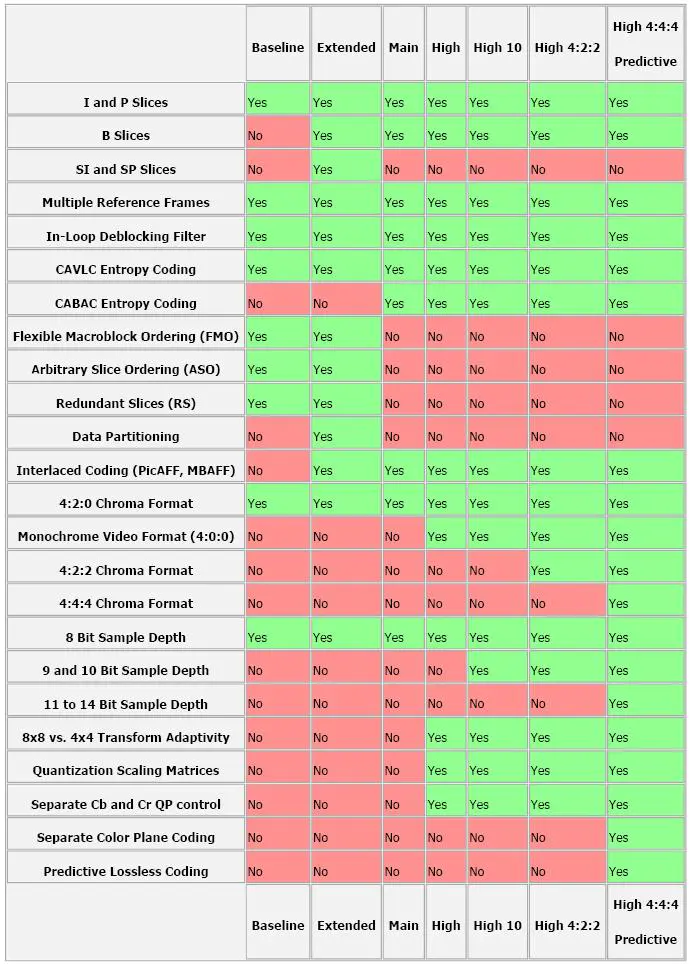
-profile:v 指定编码器配置,主要和压缩比有关。
如下图所示,越往左支持的选项越少,质量越低
实时通信领域采用baseline
流媒体领域 使用 main
超清视频 使用high
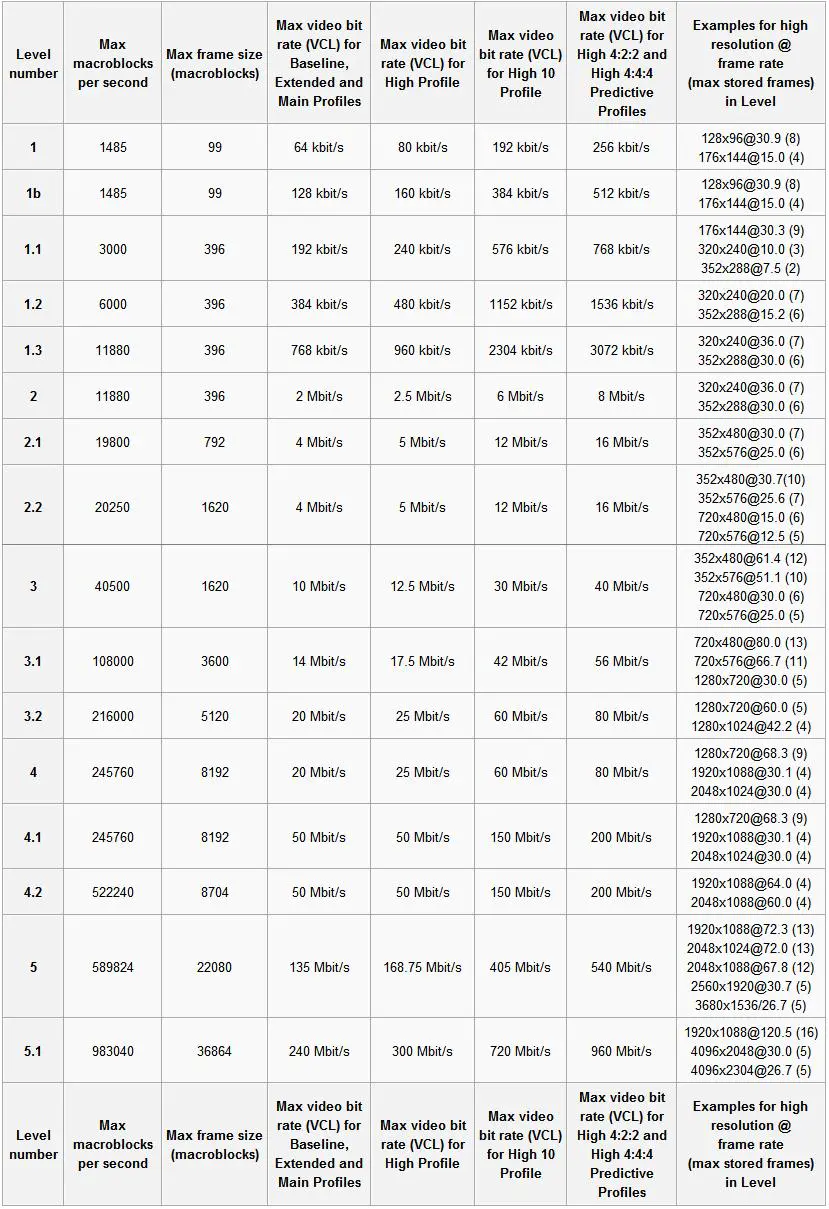
- -level:v 对编码器配置的限制,如下表
一般情况下1080P及以下视频选用4.1即可
-
-crf Constant Rate Factor 恒定速率因子模式,每一帧的画面都按照要求的视频质量计算需要的比特数,画质均衡,但是无法控制码率,也无法控制最终生成文件的大小。 适用于对于画质有要求,文件大小没有要求的情况,范围0-51,默认值就是23,数字越小质量越高
-
-r 设置视频帧率
-
-b:a 同 -ab 设置音频比特率,大多数视频网站的音频比特率都是128K或者192K
4.码率控制模式
fmmpeg支持3种码率控制模式
1. -qp 恒定量化器模式,量化器就是用算法将每一帧的质量转化为数字,可以设置,建议让软件自动设置。
体积最大
一般不使用这种模式,除非你想无损压制视频
无损压制视频的例子(快速编码)
ffmpeg -i input -vcodec libx264 -preset ultrafast -qp 0 output.mkv
无损压制视频的例子(高压缩比)
ffmpeg -i input -vcodec libx264 -preset veryslow -qp 0 output.mkv
尝试了用这种无损压缩方式压缩dvd镜像中提取的vob文件,发现这种方式压制出来的文件体积竟然是原来的两倍。所以说还是使用crf 18,这样就比较接近无损了。
2. -crf 恒定速率因子模式,相当于浮动值的qp模式,会给每个画面不同的量化值,比如说把人眼不敏感的部分码率调低。一般压制视频使用这个选项。但是不懂不推荐乱设置,让软件自动配置即可
值的范围是0-51,默认值是23,通常认为crf值18压制出来的视频视觉上是无损的。18-23之间的变化不明显。
3. -b 固定目标码率模式,当上传视频网站有码率限制时,可以使用这个选项。但是不推荐。crf也可以获得合适的体积和画质。没必要
使用上面3个选项压制,都是单遍编码,最好加上-preset veryslow 选项,这样软件对参数的控制会更精准
比特率模式
VBR 动态比特率,ffmpeg默认采用,简单的内容少给码率,复杂内容多给码率。
ABR 平均比特率,网络视频会采用这一格式,因为VBR码率变化太大,不适用网络传输
CBR 恒定比特率, 通常没有人使用
输入 ffmpeg -h encoder=libx264 查看最常用的x264编码器的使用方式
-nal-hrd 可以指定VBR和CBR两种,但是CBR在.mp4不支持?
其余还有-maxrate -minrate 选项,设置这两个选项就能达到ABR的效果
[root@localhost input]# ffmpeg -h encoder=libx264
ffmpeg version 2.8.15 Copyright (c) 2000-2018 the FFmpeg developers
  built with gcc 4.8.5 (GCC) 20150623 (Red Hat 4.8.5-36)
  configuration: --prefix=/usr --bindir=/usr/bin --datadir=/usr/share/ffmpeg --incdir=/usr/include/ffmpeg --libdir=/usr/lib64 --mandir=/usr/share/man --arch=x86_64 --optflags='-O2 -g -pipe -Wall -Wp,-D_FORTIFY_SOURCE=2 -fexceptions -fstack-protector-strong --param=ssp-buffer-size=4 -grecord-gcc-switches -m64 -mtune=generic' --extra-ldflags='-Wl,-z,relro ' --enable-libopencore-amrnb --enable-libopencore-amrwb --enable-libvo-amrwbenc --enable-version3 --enable-bzlib --disable-crystalhd --enable-gnutls --enable-ladspa --enable-libass --enable-libcdio --enable-libdc1394 --enable-libfdk-aac --enable-nonfree --disable-indev=jack --enable-libfreetype --enable-libgsm --enable-libmp3lame --enable-openal --enable-libopenjpeg --enable-libopus --enable-libpulse --enable-libschroedinger --enable-libsoxr --enable-libspeex --enable-libtheora --enable-libvorbis --enable-libv4l2 --enable-libx264 --enable-libx265 --enable-libxvid --enable-x11grab --enable-avfilter --enable-avresample --enable-postproc --enable-pthreads --disable-static --enable-shared --enable-gpl --disable-debug --disable-stripping --shlibdir=/usr/lib64 --enable-runtime-cpudetect
  libavutil      54. 31.100 / 54. 31.100
  libavcodec     56. 60.100 / 56. 60.100
  libavformat    56. 40.101 / 56. 40.101
  libavdevice    56.  4.100 / 56.  4.100
  libavfilter     5. 40.101 /  5. 40.101
  libavresample   2.  1.  0 /  2.  1.  0
  libswscale      3.  1.101 /  3.  1.101
  libswresample   1.  2.101 /  1.  2.101
  libpostproc    53.  3.100 / 53.  3.100
Encoder libx264 [libx264 H.264 / AVC / MPEG-4 AVC / MPEG-4 part 10]:
    Threading capabilities: no
    Supported pixel formats: yuv420p yuvj420p yuv422p yuvj422p yuv444p yuvj444p nv12 nv16
libx264 AVOptions:
  -preset            <string>     E..V.... Set the encoding preset (cf. x264 --fullhelp) (default "medium")
  -tune              <string>     E..V.... Tune the encoding params (cf. x264 --fullhelp)
  -profile           <string>     E..V.... Set profile restrictions (cf. x264 --fullhelp)
  -fastfirstpass     <int>        E..V.... Use fast settings when encoding first pass (from 0 to 1) (default 1)
  -level             <string>     E..V.... Specify level (as defined by Annex A)
  -passlogfile       <string>     E..V.... Filename for 2 pass stats
  -wpredp            <string>     E..V.... Weighted prediction for P-frames
  -x264opts          <string>     E..V.... x264 options
  -crf               <float>      E..V.... Select the quality for constant quality mode (from -1 to FLT_MAX) (default -1)
  -crf_max           <float>      E..V.... In CRF mode, prevents VBV from lowering quality beyond this point. (from -1 to FLT_MAX) (default -1)
  -qp                <int>        E..V.... Constant quantization parameter rate control method (from -1 to INT_MAX) (default -1)
  -aq-mode           <int>        E..V.... AQ method (from -1 to INT_MAX) (default -1)
     none                         E..V....
     variance                     E..V.... Variance AQ (complexity mask)
     autovariance                 E..V.... Auto-variance AQ
  -aq-strength       <float>      E..V.... AQ strength. Reduces blocking and blurring in flat and textured areas. (from -1 to FLT_MAX) (default -1)
  -psy               <int>        E..V.... Use psychovisual optimizations. (from -1 to 1) (default -1)
  -psy-rd            <string>     E..V.... Strength of psychovisual optimization, in <psy-rd>:<psy-trellis> format.
  -rc-lookahead      <int>        E..V.... Number of frames to look ahead for frametype and ratecontrol (from -1 to INT_MAX) (default -1)
  -weightb           <int>        E..V.... Weighted prediction for B-frames. (from -1 to 1) (default -1)
  -weightp           <int>        E..V.... Weighted prediction analysis method. (from -1 to INT_MAX) (default -1)
     none                         E..V....
     simple                       E..V....
     smart                        E..V....
  -ssim              <int>        E..V.... Calculate and print SSIM stats. (from -1 to 1) (default -1)
  -intra-refresh     <int>        E..V.... Use Periodic Intra Refresh instead of IDR frames. (from -1 to 1) (default -1)
  -bluray-compat     <int>        E..V.... Bluray compatibility workarounds. (from -1 to 1) (default -1)
  -b-bias            <int>        E..V.... Influences how often B-frames are used (from INT_MIN to INT_MAX) (default INT_MIN)
  -b-pyramid         <int>        E..V.... Keep some B-frames as references. (from -1 to INT_MAX) (default -1)
     none                         E..V....
     strict                       E..V.... Strictly hierarchical pyramid
     normal                       E..V.... Non-strict (not Blu-ray compatible)
  -mixed-refs        <int>        E..V.... One reference per partition, as opposed to one reference per macroblock (from -1 to 1) (default -1)
  -8x8dct            <int>        E..V.... High profile 8x8 transform. (from -1 to 1) (default -1)
  -fast-pskip        <int>        E..V.... (from -1 to 1) (default -1)
  -aud               <int>        E..V.... Use access unit delimiters. (from -1 to 1) (default -1)
  -mbtree            <int>        E..V.... Use macroblock tree ratecontrol. (from -1 to 1) (default -1)
  -deblock           <string>     E..V.... Loop filter parameters, in <alpha:beta> form.
  -cplxblur          <float>      E..V.... Reduce fluctuations in QP (before curve compression) (from -1 to FLT_MAX) (default -1)
  -partitions        <string>     E..V.... A comma-separated list of partitions to consider. Possible values: p8x8, p4x4, b8x8, i8x8, i4x4, none, all
  -direct-pred       <int>        E..V.... Direct MV prediction mode (from -1 to INT_MAX) (default -1)
     none                         E..V....
     spatial                      E..V....
     temporal                     E..V....
     auto                         E..V....
  -slice-max-size    <int>        E..V.... Limit the size of each slice in bytes (from -1 to INT_MAX) (default -1)
  -stats             <string>     E..V.... Filename for 2 pass stats
  -nal-hrd           <int>        E..V.... Signal HRD information (requires vbv-bufsize; cbr not allowed in .mp4) (from -1 to INT_MAX) (default -1)
     none                         E..V....
     vbr                          E..V....
     cbr                          E..V....
  -avcintra-class    <int>        E..V.... AVC-Intra class 50/100/200 (from -1 to 200) (default -1)
  -motion-est        <int>        E..V.... Set motion estimation method (from -1 to 4) (default -1)
     dia                          E..V....
     hex                          E..V....
     umh                          E..V....
     esa                          E..V....
     tesa                         E..V....
  -forced-idr        <int>        E..V.... If forcing keyframes, force them as IDR frames. (from -1 to 1) (default -1)
  -x264-params       <string>     E..V.... Override the x264 configuration using a :-separated list of key=value parameters
5.合并,提取视频
01.提取视频流,
假设我们提取mp4视频中的视频流
ffmpeg -i in.mp4 -vcodec copy -an v.mp4
-an选项是 audio no 也就是忽略音频
02.提取音频
ffmpeg -i in.mp4 -acodec copy -vn a.m4a
同理 -vn 即忽略音频
如果提取多个音轨的视频:
比如我们用ffprobe看到如下

提取第二条 只需加上-map 0:3
03.合并音视频
ffmpeg -i a.m4a -i v.mp4 -c copy out.mp4
瞬间就能完成合并,因为音频和视频都是现成的,不用重新编码
-c 就是 -codec的简写
6.截取、连接音视频
01.截取音视频
ffmpeg -i in.mp3 -ss 00:01:00 -to 00:01:10 -acodec copy out.mp3
-ss 设置起始时间位移
-to 设置结束时间位移
也可以使用下面的方式
ffmpeg -i in.mp3 -ss 00:01:00 -t 10 -acodec copy out.mp3
-t 设置截取时长
还有-sseof 选项 是以媒体末尾作为起点,可以配合-t截取末尾多少秒
看下面2条命令
ffmpeg -i in.mp4 -ss 00:01:00 -to 00:01:10 -acodec copy out.mp4

ffmpeg -ss 00:01:00 -i in.mp4 -to 00:01:10 -acodec copy out.mp4
调换-ss和-i的位置对结果的影响?
-ss在前面会调用关键帧技术,可能导致截取的时间并不准确
ffmpeg -ss 00:01:00 -i in.mp4 -to 00:01:10 -acodec copy -copyts out.mp4
我们可以加上 -copyts选项,作用是保留时间戳,这样就能正确截取了。
02.合并音视频
方法一
ffmpeg -i "concat:01.mp4|02.mp4|03.mp4" -c copy out.mp4
当合并的几个视频参数一致时,很快就合并完成了。
合并不同参数的视频,操作会比较麻烦。
方法二
上面的方法其实相当于把两个文件直接拼在一起,适用于mp2之类的视频,如果是flv连接处会有卡顿现象
下面的方法,先在一个txt文本中把要拼接的文件列出来。
这条命令只要是相同格式的视频均可以拼接
ffmpeg -f concat -safe 0 -i files.txt -c copy output.mp4
-safe 命令是让ffmpeg无视安全问题报错
在txt文件中的格式需要是这样子
file 'file1.mp4'
file 'file2.mp4'
可以使用开源软件Avidemux,图形化界面,操作方便
7.截图、水印、动图
01.截图
ffmpeg -i in.mp4 -ss 5 -vframes 1 img.jpg
-vframe 指定截取的帧
02.加水印
ffmpeg -i in.mp4 -i logo.png -filter_complex "overlay=20:20"
-filter_complex 添加滤镜 overlay20:20 指的是,离左边20像素,离上边20像素
03.制作GIF动图
ffmpeg -i in.mp4 -ss 4.5 -to 8.5 -s 640*320 -r 15 out.gif
8.录屏、直播
01.录屏
ffmpeg -f gdigrab -i desktop rec.mp4
默认录屏参数是下面这样的
Input #0, mov,mp4,m4a,3gp,3g2,mj2, from '.\rec.mp4':

  Metadata:

    major_brand    : isom

    minor_version  : 512

    compatible_brands: isomiso2avc1mp41

    encoder        : Lavf58.24.101

  Duration: 00:00:04.11, start: 0.000000, bitrate: 676 kb/s

    Stream #0:0(und): Video: h264 (High 4:4:4 Predictive) (avc1 / 0x31637661), yuv444p, 2560x1440, 672 kb/s, 29.97 fps, 29.97 tbr, 30k tbn, 59.94 tbc (default)

    Metadata:

      handler_name    : VideoHandler
清晰度相当不错,字符都很清楚,但是没有声音
-f 格式化 gdigrab 是ffmpeg的一个组件,用来捕获视频。 在windows系统中,ffmpeg自带的就是和默认使用的gdigrab,只能录制屏幕,不能录制声音
直播推荐使用OBS Studio,开源免费,功能强大
02.直播推流
ffmpeg -re -i rec.mp4 按网站要求输入想要的编码 -f flv rtmp地址
