
Hadoop之HDFS学习笔记(一)
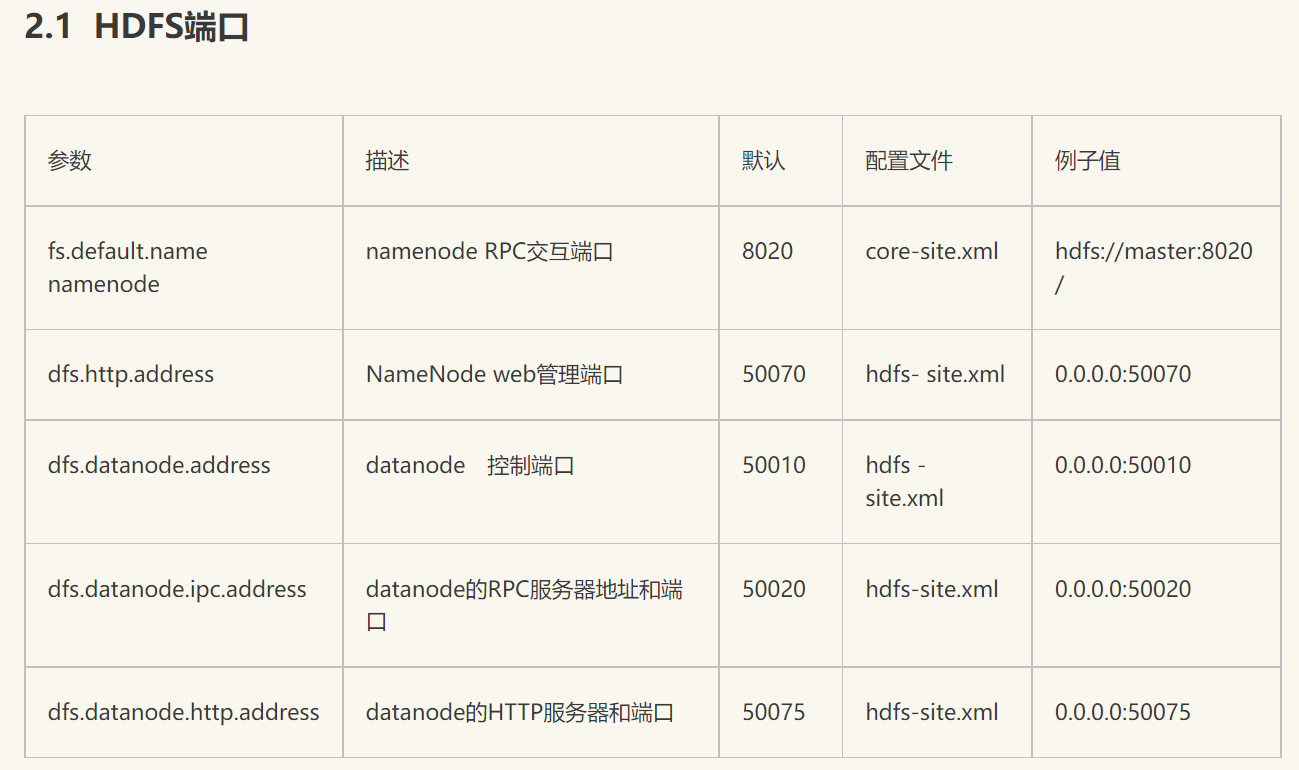
HDFS 命令
hdfs dfs -ls /  #查看
hdfs dfs -mkdir /app-logs/input  #创建 input目录
hdfs dfs -put  account.text  /app-logs/input  #上传
hdfs dfs -get  /app-logs/input/account.text   account2.text #下载并重命名
hdfs dfs -ls -R /app-logs  #递归现实app-logs下面所有目录和文件
hdfs dfs -copyFromLocal <localsrc> URI  #从本地复制文件到hdfs文件系统(与-put命令相似)
hdfs dfs -copyToLocal URI <localsrc>    #下载文件和-get功能一样
hdfs dfs -rm -rf URI  #删除文件
Python
包:hdfs.client
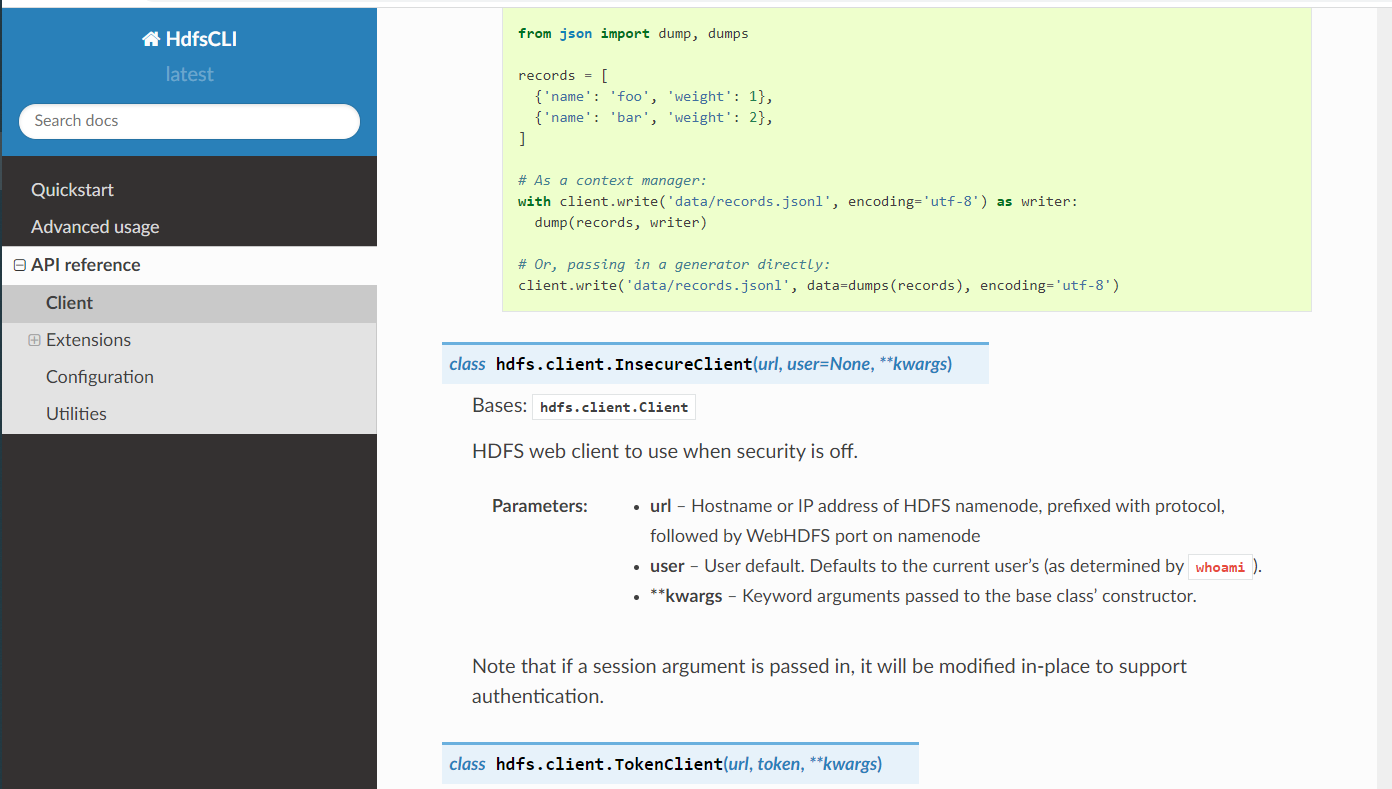
# 关于python操作hdfs的API可以查看官网:
from hdfs.client import Client
# 关于python操作hdfs的API可以查看官网:
# https://hdfscli.readthedocs.io/en/latest/api.html
# 读取hdfs文件内容,将每行存入数组返回
def read_hdfs_file(client, filename):
# with client.read('samples.csv', encoding='utf-8', delimiter='\n') as reader:
# for line in reader:
# pass
lines = []
with client.read(filename, encoding='utf-8', delimiter='\n') as reader:
for line in reader:
# pass
# print line.strip()
lines.append(line.strip())
return lines
# 创建目录
def mkdirs(client, hdfs_path):
client.makedirs(hdfs_path)
# 删除hdfs文件
def delete_hdfs_file(client, hdfs_path):
client.delete(hdfs_path)
# 上传文件到hdfs
def put_to_hdfs(client, local_path, hdfs_path):
client.upload(hdfs_path, local_path, cleanup=True)
# 从hdfs获取文件到本地
def get_from_hdfs(client, hdfs_path, local_path):
client.download(hdfs_path, local_path, overwrite=False)
# 追加数据到hdfs文件
def append_to_hdfs(client, hdfs_path, data):
client.write(hdfs_path, data, overwrite=False, append=True, encoding='utf-8')
# 覆盖数据写到hdfs文件
def write_to_hdfs(client, hdfs_path, data):
client.write(hdfs_path, data, overwrite=True, append=False, encoding='utf-8')
# 移动或者修改文件
def move_or_rename(client, hdfs_src_path, hdfs_dst_path):
client.rename(hdfs_src_path, hdfs_dst_path)
# 返回目录下的文件
def list(client, hdfs_path):
return client.list(hdfs_path, status=False)
# 设置副本数量
def setReplication(client,hdfs_path,replication):
return client.set_replication(hdfs_path,replication)
# client = Client(url, root=None, proxy=None, timeout=None, session=None)
# client = Client("http://hadoop:50070")
client = Client("http://ambari01:50070/",root="/",timeout=10000,session=False)
# client = InsecureClient("http://120.78.186.82:50070", user='ann');
# move_or_rename(client,'/input/2.csv', '/input/emp.csv')
# read_hdfs_file(client,'/input/emp.csv')
# append_to_hdfs(client,'/input/emp.csv','我爱你'+'\n')
# write_to_hdfs(client, '/emp.csv', "sadfafdadsf")
# read_hdfs_file(client,'/input/emp.csv')
# move_or_rename(client,'/input/emp.csv', '/input/2.csv')
# mkdirs(client,'/input/python')
# print(list(client, '/'))
# chown(client,'/input/1.csv', 'root')
print(list(client,'/app-logs/input/'))
#put_to_hdfs(client, 'D:\\bbb.txt', '/app-logs')
#get_from_hdfs(client,'/app-logs/input/account.java','D:\\')
setReplication(client,'/app-logs/input/account.java',4)
Kafka Connect HDFS
配置connector文件 quickstart-hdfs.properties
name:连接器名称
topics:kafka写入消息的topic, 多个topics逗号分割
topics.dir:配置的是hdfs写入的父路径,/xiehh/hdfstopic/partition=0/…
二层路径为topic名,三层路径为分区名
flush.size 几条消息一个文件
logs.dir:配置的是hdfs 日志目录
cat /opt/confluent-5.3.1/share/confluent-hub-components/confluentinc-kafka-connect-hdfs/etc/quickstart-hdfs.properties


name=hdfs-sink
connector.class=io.confluent.connect.hdfs.HdfsSinkConnector
format.class=io.confluent.connect.hdfs.string.StringFormat
tasks.max=1
topics=test_hdfs,connect-test
hdfs.url=hdfs://192.168.0.161:8020
flush.size=5
topics.dir=kafka_topics
配置:connect-standalone.properties
# Licensed to the Apache Software Foundation (ASF) under one or more
# contributor license agreements.  See the NOTICE file distributed with
# this work for additional information regarding copyright ownership.
# The ASF licenses this file to You under the Apache License, Version 2.0
# (the "License"); you may not use this file except in compliance with
# the License.  You may obtain a copy of the License at
#
#    http://www.apache.org/licenses/LICENSE-2.0
#
# Unless required by applicable law or agreed to in writing, software
# distributed under the License is distributed on an "AS IS" BASIS,
# WITHOUT WARRANTIES OR CONDITIONS OF ANY KIND, either express or implied.
# See the License for the specific language governing permissions and
# limitations under the License.

# These are defaults. This file just demonstrates how to override some settings.
bootstrap.servers=192.168.0.161:6667
rest.port=8822

# The converters specify the format of data in Kafka and how to translate it into Connect data. Every Connect user will
# need to configure these based on the format they want their data in when loaded from or stored into Kafka
key.converter=org.apache.kafka.connect.storage.StringConverter
value.converter=org.apache.kafka.connect.storage.StringConverter
# Converter-specific settings can be passed in by prefixing the Converter's setting with the converter we want to apply
# it to
key.converter.schemas.enable=false
value.converter.schemas.enable=false

internal.key.converter=org.apache.kafka.connect.storage.StringConverter
internal.value.converter=org.apache.kafka.connect.storage.StringConverter
internal.key.converter.schemas.enable=false
internal.value.converter.schemas.enable=false

offset.storage.file.filename=/tmp/connect.offsets
# Flush much faster than normal, which is useful for testing/debugging
offset.flush.interval.ms=10000

# Set to a list of filesystem paths separated by commas (,) to enable class loading isolation for plugins
# (connectors, converters, transformations). The list should consist of top level directories that include
# any combination of:
# a) directories immediately containing jars with plugins and their dependencies
# b) uber-jars with plugins and their dependencies
# c) directories immediately containing the package directory structure of classes of plugins and their dependencies
# Note: symlinks will be followed to discover dependencies or plugins.
# Examples:
# plugin.path=/usr/local/share/java,/usr/local/share/kafka/plugins,/opt/connectors,
plugin.path=/usr/share/java,/opt/confluent-5.3.1/share/confluent-hub-components
bin/connect-standalone etc/kafka/connect-standalone.properties share/confluent-hub-components/confluentinc-kafka-connect-hdfs/etc/quickstart-hdfs.properties

 浙公网安备 33010602011771号