
Revit二次开发-忽略警告对话框
在Revit二次开发的工作中,或许会遇见这样的需求,根据Id选取Element 但是如果在当前View中未显示该Element 就会出现以下警告对话框,那么Api是否提供了相关接口来处理该对话框呢,答案是肯定的。
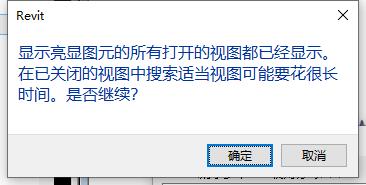
public event EventHandler<DialogBoxShowingEventArgs> DialogBoxShowing这个事件用于处理各种对话框,在帮助手册下也提供了一段Demo供我们参考。
public class Application_DialogBoxShowing : IExternalApplication
{
    // Implement the OnStartup method to register events when Revit starts.
    public Result OnStartup(UIControlledApplication application)
    {
        // Register related events
        application.DialogBoxShowing +=
            new EventHandler<Autodesk.Revit.UI.Events.DialogBoxShowingEventArgs>(AppDialogShowing);
        return Result.Succeeded;
    }

    // Implement this method to unregister the subscribed events when Revit exits.
    public Result OnShutdown(UIControlledApplication application)
    {
        // unregister events
        application.DialogBoxShowing -=
            new EventHandler<Autodesk.Revit.UI.Events.DialogBoxShowingEventArgs>(AppDialogShowing);
        return Result.Succeeded;
    }

    // The DialogBoxShowing event handler, which allow you to
    // do some work before the dialog shows
    void AppDialogShowing(object sender, DialogBoxShowingEventArgs args)
    {
        // Get the string id of the showing dialog
        String dialogId = args.DialogId;

        // Format the prompt information string
        String promptInfo = "A Revit dialog will be opened.\n";
        promptInfo += "The DialogId of this dialog is " + dialogId + "\n";
        promptInfo += "If you don't want the dialog to open, please press cancel button";

        // Show the prompt message, and allow the user to close the dialog directly.
        TaskDialog taskDialog = new TaskDialog("Revit");
        taskDialog.Id = "Customer DialogId";
        taskDialog.MainContent = promptInfo;
        TaskDialogCommonButtons buttons = TaskDialogCommonButtons.Ok |
                                            TaskDialogCommonButtons.Cancel;
        taskDialog.CommonButtons = buttons;
        TaskDialogResult result = taskDialog.Show();
        if (TaskDialogResult.Cancel == result)
        {
            // Do not show the Revit dialog
            args.OverrideResult(1);
        }
        else
        {
            // Continue to show the Revit dialog
            args.OverrideResult(0);
        }
    }
}
具体使用:
 public class TestDemo : IExternalCommand
    {
        public Result Execute(ExternalCommandData commandData, ref string message, ElementSet elements)
        {
            //相关业务代码 假设会出现对话框

            commandData.Application.DialogBoxShowing += Application_DialogBoxShowing; ;
            return Result.Succeeded;
        }

        private void Application_DialogBoxShowing(object sender, DialogBoxShowingEventArgs e)
        {
            e.OverrideResult(1); // 非0值会处理掉不会显示 0会显示
        }
    }

 浙公网安备 33010602011771号