
IO输出输入流
IO输出输入流
一、.序列化与返序列化
//序列化
 ObjectOutputStream oo = new ObjectOutputStream(new FileOutputStream(new File("D:/goods.txt")));
 oo.writeObject(goodsList);
 System.out.println("Person对象序列化成功!");
 oo.close();
 System.out.println(goodsList);
 //反序列化
 ObjectInputStream ois = new ObjectInputStream(new FileInputStream(new File("D:/goods.txt")));
 List<Content> goodsList = (List<Content>) ois.readObject();
 System.out.println("Person对象反序列化成功!");
 goodsList.forEach(System.out::println);
二、IO流分类
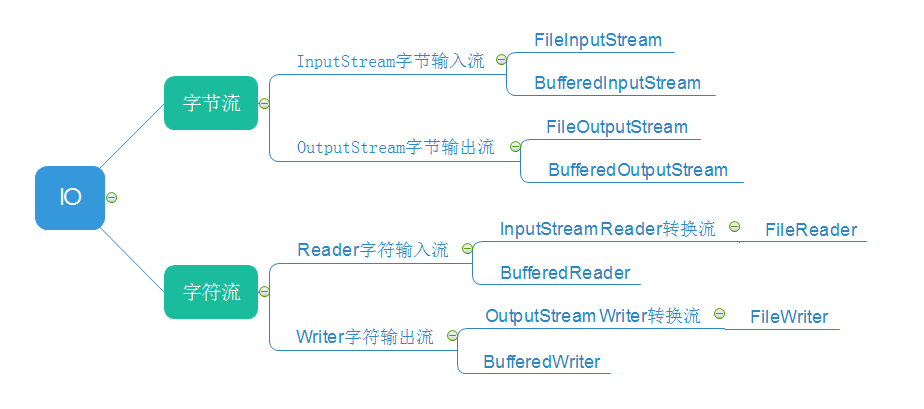
三、使用
-
字节输入流
 //1.创建字节流
 FileInputStream fis  = new FileInputStream( filePath );
 //2.创建byte数组,用于缓存数据
 byte[] array = new byte[1024*8];
 //3.把数据读取到数组中
 fis.read( array ) ;
 //4.将结果数组转换位字符串,输出
 result = new String(array);
-
字节输出流,创建文件
 //1、根据文件路径创建输出流
 FileOutputStream fos  = new FileOutputStream( filePath );
 //2、把字符串数据转换为byte数组;
 byte[] array = "hello world".getBytes() ;
 //3、把byte数组写入到文件;
 fos.write( array );
IO流实现复制文件
public static void main(String[] args) throws IOException {
         File file=new File("d:/test.txt");
         InputStream in = new FileInputStream(file);
         FileOutputStream out = new FileOutputStream("d:/test2.txt");
         int len=0;
         byte[] buffer = new byte[1024];
         while ((len=in.read(buffer))>0) {
             out.write(buffer,0,len);
         }
         in.close();
         out.flush();
         out.close();
}

 浙公网安备 33010602011771号