

023、半同步复制+GTID复制
半同步复制
半同步复制 mysql 5.5之后,在异步复制的基础之上,(已搭好主从的基础上)搭建半同步复制。

1、主库安装插件
mysql> install plugin rpl_semi_sync_master soname 'semisync_master.so';
Query OK, 0 rows affected (0.12 sec)
--若卸载:uninstall plugin rpl_semi_sync_master.
2、从库安装插件
mysql> install plugin rpl_semi_sync_slave soname 'semisync_slave.so';
Query OK, 0 rows affected (0.09 sec)
3、开启半同步复制开关
主库执行:
mysql> show variables like '%semi%';
+------------------------------------+-------+
| Variable_name                      | Value |
+------------------------------------+-------+
| rpl_semi_sync_master_enabled       | OFF   |
| rpl_semi_sync_master_timeout       | 10000 |  --半同步复制等待超时设置,单位毫秒
| rpl_semi_sync_master_trace_level   | 32    |
| rpl_semi_sync_master_wait_no_slave | ON    |
+------------------------------------+-------+
4 rows in set (0.08 sec)

mysql> set global rpl_semi_sync_master_enabled=on;
Query OK, 0 rows affected (0.02 sec)
从库执行:
mysql> show variables like '%semi%';
+---------------------------------+-------+
| Variable_name                   | Value |
+---------------------------------+-------+
| rpl_semi_sync_slave_enabled     | OFF   |
| rpl_semi_sync_slave_trace_level | 32    |
+---------------------------------+-------+
2 rows in set (0.01 sec)

mysql> set global rpl_semi_sync_slave_enabled=on;
4、查看参数状态
主库查看状态:
mysql> show global status like '%semi%';
+--------------------------------------------+-------+
| Variable_name                              | Value |
+--------------------------------------------+-------+
| Rpl_semi_sync_master_clients               | 0     |
| Rpl_semi_sync_master_net_avg_wait_time     | 0     |
| Rpl_semi_sync_master_net_wait_time         | 0     |
| Rpl_semi_sync_master_net_waits             | 0     |
| Rpl_semi_sync_master_no_times              | 0     |
| Rpl_semi_sync_master_no_tx                 | 0     |
| Rpl_semi_sync_master_status                | ON    |
| Rpl_semi_sync_master_timefunc_failures     | 0     |
| Rpl_semi_sync_master_tx_avg_wait_time      | 0     |
| Rpl_semi_sync_master_tx_wait_time          | 0     |
| Rpl_semi_sync_master_tx_waits              | 0     |
| Rpl_semi_sync_master_wait_pos_backtraverse | 0     |
| Rpl_semi_sync_master_wait_sessions         | 0     |
| Rpl_semi_sync_master_yes_tx                | 0     |
+--------------------------------------------+-------+
14 rows in set (0.09 sec)
从库查看状态:
mysql> show global status like '%semi%';
+----------------------------+-------+
| Variable_name              | Value |
+----------------------------+-------+
| Rpl_semi_sync_slave_status | OFF   |
+----------------------------+-------+
1 row in set (0.05 sec)
状态是off,原因是:未激活,需要重启主从。
从库重启主从之后再查看:
mysql> stop slave;
Query OK, 0 rows affected (0.02 sec)

mysql> start slave;
Query OK, 0 rows affected (0.06 sec)

mysql> show global status like '%semi%';
+----------------------------+-------+
| Variable_name              | Value |
+----------------------------+-------+
| Rpl_semi_sync_slave_status | ON    |
+----------------------------+-------+
1 row in set (0.00 sec)
主库查看:
mysql> show global status like '%semi%';
+--------------------------------------------+-------+
| Variable_name                              | Value |
+--------------------------------------------+-------+
| Rpl_semi_sync_master_clients               | 1     |
| Rpl_semi_sync_master_net_avg_wait_time     | 0     |
| Rpl_semi_sync_master_net_wait_time         | 0     |
| Rpl_semi_sync_master_net_waits             | 0     |
| Rpl_semi_sync_master_no_times              | 0     |
| Rpl_semi_sync_master_no_tx                 | 0     |
| Rpl_semi_sync_master_status                | ON    |
| Rpl_semi_sync_master_timefunc_failures     | 0     |
| Rpl_semi_sync_master_tx_avg_wait_time      | 0     |
| Rpl_semi_sync_master_tx_wait_time          | 0     |
| Rpl_semi_sync_master_tx_waits              | 0     |
| Rpl_semi_sync_master_wait_pos_backtraverse | 0     |
| Rpl_semi_sync_master_wait_sessions         | 0     |
| Rpl_semi_sync_master_yes_tx                | 0     |
+--------------------------------------------+-------+
14 rows in set (0.00 sec)
--连接数为1
5、验证
从库执行:
mysql> stop slave io_thread;
Query OK, 0 rows affected (0.01 sec)

mysql> show slave status \G;
*************************** 1. row ***************************
               Slave_IO_State:
                  Master_Host: 192.168.100.111
                  Master_User: uslave
                  Master_Port: 3306
                Connect_Retry: 60
              Master_Log_File: mysql-bin.000008
          Read_Master_Log_Pos: 949
               Relay_Log_File: localhost-relay-bin.000003
                Relay_Log_Pos: 283
        Relay_Master_Log_File: mysql-bin.000008
             Slave_IO_Running: No
            Slave_SQL_Running: Yes
该操作会导致binlog内容无法传递。
主库执行插入操作:
mysql> insert into t select 2;
Query OK, 1 row affected (10.21 sec)
Records: 1  Duplicates: 0  Warnings: 0
可以看到,简单的插入操作,等待了10秒。
半同步复制关闭:
mysql> show global status like '%semi%';
+--------------------------------------------+-------+
| Variable_name                              | Value |
+--------------------------------------------+-------+
| Rpl_semi_sync_master_clients               | 1     |
| Rpl_semi_sync_master_net_avg_wait_time     | 655   |
| Rpl_semi_sync_master_net_wait_time         | 655   |
| Rpl_semi_sync_master_net_waits             | 1     |
| Rpl_semi_sync_master_no_times              | 1     |
| Rpl_semi_sync_master_no_tx                 | 1     |
| Rpl_semi_sync_master_status                | OFF   |
| Rpl_semi_sync_master_timefunc_failures     | 0     |
| Rpl_semi_sync_master_tx_avg_wait_time      | 0     |
| Rpl_semi_sync_master_tx_wait_time          | 0     |
| Rpl_semi_sync_master_tx_waits              | 0     |
| Rpl_semi_sync_master_wait_pos_backtraverse | 0     |
| Rpl_semi_sync_master_wait_sessions         | 0     |
| Rpl_semi_sync_master_yes_tx                | 0     |
+--------------------------------------------+-------+
14 rows in set (0.00 sec)
从库开启io thread之后,恢复正常:
mysql> start slave io_thread;
Query OK, 0 rows affected (0.00 sec)
mysql> show global status like '%semi%';
+----------------------------+-------+
| Variable_name              | Value |
+----------------------------+-------+
| Rpl_semi_sync_slave_status | ON    |
+----------------------------+-------+
1 row in set (0.00 sec)
这也是半同步复制的缺点,网络不好时,与异步复制互相切换,影响业务。
查看主从延迟
1、从库查看主从同步状态
mysql> show slave status \G;
*************************** 1. row ***************************
               Slave_IO_State: Waiting for master to send event
                  Master_Host: 192.168.100.111
                  Master_User: uslave
                  Master_Port: 3306
                Connect_Retry: 60
              Master_Log_File: mysql-bin.000006
          Read_Master_Log_Pos: 120
               Relay_Log_File: localhost-relay-bin.000012
                Relay_Log_Pos: 283
        Relay_Master_Log_File: mysql-bin.000006
             Slave_IO_Running: Yes
            Slave_SQL_Running: Yes
              Replicate_Do_DB:
          Replicate_Ignore_DB:
           Replicate_Do_Table:
       Replicate_Ignore_Table:
      Replicate_Wild_Do_Table:
  Replicate_Wild_Ignore_Table:
                   Last_Errno: 0
                   Last_Error:
                 Skip_Counter: 0
          Exec_Master_Log_Pos: 120
              Relay_Log_Space: 623
              Until_Condition: None
               Until_Log_File:
                Until_Log_Pos: 0
           Master_SSL_Allowed: No
           Master_SSL_CA_File:
           Master_SSL_CA_Path:
              Master_SSL_Cert:
            Master_SSL_Cipher:
               Master_SSL_Key:
        Seconds_Behind_Master: 0
Master_SSL_Verify_Server_Cert: No
                Last_IO_Errno: 0
                Last_IO_Error:
               Last_SQL_Errno: 0
               Last_SQL_Error:
  Replicate_Ignore_Server_Ids:
             Master_Server_Id: 3
                  Master_UUID: d11d7e9d-a69e-11eb-ac06-080027d46e3d
             Master_Info_File: /u01/data/mysql/master.info
                    SQL_Delay: 0
          SQL_Remaining_Delay: NULL
      Slave_SQL_Running_State: Slave has read all relay log; waiting for the slave I/O thread to update it
           Master_Retry_Count: 86400
                  Master_Bind:
      Last_IO_Error_Timestamp:
     Last_SQL_Error_Timestamp:
               Master_SSL_Crl:
           Master_SSL_Crlpath:
           Retrieved_Gtid_Set:
            Executed_Gtid_Set:
                Auto_Position: 0
1 row in set (0.00 sec)
主要看两个参数:Read_Master_Log_Pos,Exec_Master_Log_Pos,若前者比较大,则有延迟。若两个参数值相同,则没有延迟。
次要看参数:Seconds_Behind_Master,该参数供参考,不太准确。若该参数值很大,则证明有延迟的存在。
2、使用percona工具的命令
工具下载地址:https://www.percona.com/downloads/percona-toolkit/LATEST/
安装该工具:
[root@localhost soft]# yum install percona-toolkit-3.3.1-1.el7.x86_64.rpm3、使用工具监控延迟
主库执行:
[root@localhost ~]# pt-heartbeat --database=test --update --create-table --daemonize -uroot -proot意思是:在test库下创建心跳表,并实时更新。
mysql> select * from heartbeat;
+----------------------------+-----------+------------------+----------+-----------------------+---------------------+
| ts                         | server_id | file             | position | relay_master_log_file | exec_master_log_pos |
+----------------------------+-----------+------------------+----------+-----------------------+---------------------+
| 2021-05-11T17:05:00.001120 |         3 | mysql-bin.000010 |    37435 | NULL                  |                NULL |
+----------------------------+-----------+------------------+----------+-----------------------+---------------------+
1 row in set (0.00 sec)从库执行:
[root@localhost ~]# pt-heartbeat --master-server-id=3 --monitor --database=test -uroot -proot --defaults-file=/etc/my.cnf需要指定主库的server id,指定行为为监控。
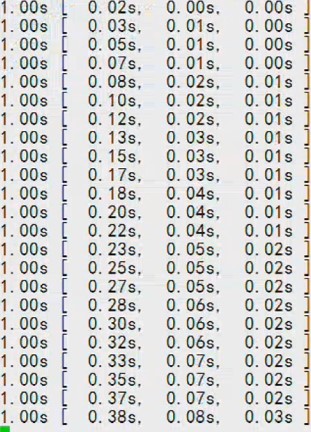 :每秒钟刷新一次,结果显示了延时的时间。
GTID复制
GTID(Global Transaction ID)是对于一个已提交事务的编号,并且是一个全局唯一的编号。GTID实际上是由UUID+TID组成的。其中UUID是一个MySQL实例的唯一标识,保存在mysql数据目录下的auto.cnf文件里。TID代表了该实例上已经提交的事务数量,并且随着事务提交单调递增。
MySQL 5.6.10之后,出现了GTID复制,区别于传统复制(binlog+posititon),使用全局事务号进行标识。
借助GTID,在发生主备切换的情况下,MySQL的其它Slave可以自动在新主上找到正确的复制位置,这大大简化了复杂复制拓扑下集群的维护,也减少了人为设置复制位置发生误操作的风险。另外,基于GTID的复制可以忽略已经执行过的事务,减少了数据发生不一致的风险。
搭建GTID复制,建议不要在现有的主从基础上搭建,建议在新环境搭建。
初始化从库前,主库的备份就不需要加--master-data参数了,因为GTID不支持binlog+position号。
GTID的相关参数,需要修改配置文件,并重启数据库才生效(5.7之后可以动态修改)。
GTID的工作原理:
- master更新数据时,会在事务前产生GTID,一同记录到binlog日志中。
- slave端的i/o线程将变更的binlog,写入到本地的relay log中。
- sql线程从relay log中获取GTID,然后对比slave端的binlog是否有记录。
- 如果有记录,说明该GTID的事务已经执行,slave会忽略。
- 如果没有记录,slave就会从relay log中执行该GTID的事务,并记录到binlog。
- 在解析过程中会判断是否有主键,如果没有就用二级索引,如果没有就用全部扫描。
1、清理环境,从库执行
[root@localhost ~]# pkill mysql[root@localhost ~]# rm -rf /u01/data/mysql/2、初始化数据库
[root@localhost ~]# mkdir -p /u01/data/mysql
[root@localhost ~]# chown -R mysql:mysql /u01/data/mysql/
[root@localhost ~]# /usr/local/mysql/scripts/mysql_install_db --defaults-file=/etc/my.cnf --user=mysql --basedir=/usr/local/mysql --datadir=/u01/data/mysql
[root@localhost ~]# mysqld_safe --defaults-file=/etc/my.cnf &3、主库备份,从库恢复
[root@localhost ~]# mysqldump --single-transaction -uroot -proot -A > /u01/bakdata/mysqldump/all_for_slave.sql
Warning: Using a password on the command line interface can be insecure.
--不需要加--master-data,因为GTID不支持binlog+position号
[root@localhost ~]# scp /u01/bakdata/mysqldump/all_for_slave.sql 192.168.100.112:/u01/bakdata/mysqldump/
root@192.168.100.112's password:
all_for_slave.sql                                                               100%  639KB  20.7MB/s   00:00
[root@localhost ~]# mysql < /u01/bakdata/mysqldump/all_for_slave.sql4、修改参数文件,并重启数据库
添加以下参数:
[root@localhost ~]# vi /etc/my.cnf
gtid_mode=on
log_slave_updates=1
enforce_gtid_consistency=1
重启数据库生效(5.7之后可以动态修改):
[root@localhost ~]# pkill mysql
[root@localhost ~]# mysqld_safe --defaults-file=/etc/my.cnf &
4、搭建主库
主库赋权:
mysql> grant replication slave on *.* to 'uslave'@'192.168.100.%' identified by 'uslave';
Query OK, 0 rows affected (0.02 sec)

mysql> flush privileges;
Query OK, 0 rows affected (0.04 sec)从库执行,注意不要忘记参数master_auto_position=1:
mysql> CHANGE MASTER TO MASTER_HOST='192.168.100.111',MASTER_USER='uslave',MASTER_PASSWORD='uslave',MASTER_PORT=3306,master_auto_position=1;
Query OK, 0 rows affected, 2 warnings (0.07 sec)
mysql> start slave;
Query OK, 0 rows affected (0.01 sec)
从库查看状态:
mysql> show slave status \G;
*************************** 1. row ***************************
               Slave_IO_State: Waiting for master to send event
                  Master_Host: 192.168.100.111
                  Master_User: uslave
                  Master_Port: 3306
                Connect_Retry: 60
              Master_Log_File: mysql-bin.000012
          Read_Master_Log_Pos: 88357
               Relay_Log_File: localhost-relay-bin.000002
                Relay_Log_Pos: 88567
        Relay_Master_Log_File: mysql-bin.000012
             Slave_IO_Running: Yes
            Slave_SQL_Running: Yes
              Replicate_Do_DB:
          Replicate_Ignore_DB:
           Replicate_Do_Table:
       Replicate_Ignore_Table:
      Replicate_Wild_Do_Table:
  Replicate_Wild_Ignore_Table:
                   Last_Errno: 0
                   Last_Error:
                 Skip_Counter: 0
          Exec_Master_Log_Pos: 88357
              Relay_Log_Space: 88775
              Until_Condition: None
               Until_Log_File:
                Until_Log_Pos: 0
           Master_SSL_Allowed: No
           Master_SSL_CA_File:
           Master_SSL_CA_Path:
              Master_SSL_Cert:
            Master_SSL_Cipher:
               Master_SSL_Key:
        Seconds_Behind_Master: 0
Master_SSL_Verify_Server_Cert: No
                Last_IO_Errno: 0
                Last_IO_Error:
               Last_SQL_Errno: 0
               Last_SQL_Error:
  Replicate_Ignore_Server_Ids:
             Master_Server_Id: 3
                  Master_UUID: e1fe2aff-afc8-11eb-a7c9-08002765b4fe
             Master_Info_File: /u01/data/mysql/master.info
                    SQL_Delay: 0
          SQL_Remaining_Delay: NULL
      Slave_SQL_Running_State: Slave has read all relay log; waiting for the slave I/O thread to update it
           Master_Retry_Count: 86400
                  Master_Bind:
      Last_IO_Error_Timestamp:
     Last_SQL_Error_Timestamp:
               Master_SSL_Crl:
           Master_SSL_Crlpath:
           Retrieved_Gtid_Set: e1fe2aff-afc8-11eb-a7c9-08002765b4fe:1-241
            Executed_Gtid_Set: e1fe2aff-afc8-11eb-a7c9-08002765b4fe:1-241
                Auto_Position: 1
1 row in set (0.00 sec)
--最后可以看到事务ID
GTID局限性
主库执行:
mysql> create table t1 as select * from t;
ERROR 1786 (HY000): CREATE TABLE ... SELECT is forbidden when @@GLOBAL.ENFORCE_GTID_CONSISTENCY = 1.
GTID复制不支持这种sql语句。
- 不支持 CREATE TABLE … SELECT 语句。 因为在 ROW 格式下,该语句将会被记录为具有不同 GTID 的两个事务,此时从服务器将无法正确处理。
- 事务,过程,函数和触发器内部的 CREATE TEMPORARY TABLE 和 DROP TEMPORARY TABLE 语句均不受支持。
为防止执行不受支持的语句,建议配置和上文配置一样,开启 enforce-gtid-consistency 属性, 开启后在主库上执行以上不受支持的语句都将抛出异常并提示。
GTID的优点:
1.根据GTID可以知道事务最初是在哪个实例上提交的
2.GTID的存在方便了Replication的Failover

 浙公网安备 33010602011771号