

022、逻辑备份搭建主从
搭建主从的目的
1、读写分离,分担主库的压力
2、作为备份,解决单点故障,主库故障时,从库接管业务。

传统方法搭建主从
现有环境介绍:
| 主库 | server id | 从库 | server id | 端口号 |
| 192.168.100.111 | 3 | 192.168.100.112 | 4 | 3306 |
注意,主库和从库需要有不同的server id和uuid,若从库服务器是直接克隆的主库服器,则需要修改server id和uuid:/etc/my.cnf和/u01/data/mysql/auto.cnf(直接删除该文件)。
server id命名:IP地址最后一位,比如192.168.100.111,server id命名为:1113306
server id太小可能导致从库自动宕机。
在开始之前,先在主库加全局的锁,保证搭建过程不会发生数据变化:
mysql> flush tables with read lock;
Query OK, 0 rows affected (0.00 sec)
验证:
mysql> drop table test.t;
ERROR 1223 (HY000): Can't execute the query because you have a conflicting read lock
mysql> insert into test.t select 100;
ERROR 1223 (HY000): Can't execute the query because you have a conflicting read lock
可以发现,DML和DDL都不允许操作。
该命令主要用于备份工具获取一致性备份(数据与binlog位点匹配)。
注:没有锁定主服务器,这里记录的主服务器二进制日志position值可能会大于做mysqldump时的值,这将导致从服务器丢失在此期间的更新。如果可以保证在此期间主服务器不会出现创建新表的更新,那么丢失的影响不大;否则,将导致从服务器复制线程失败,这时必须在做mysqldump时锁定主服务器。
1、准备从库的初始化数据
过程就是,在主库执行全备操作,将备份文件传送到从库,备份之前,查看主库当前的二进制日志和position号:
mysql> show master status;
+------------------+----------+--------------+------------------+-------------------+
| File             | Position | Binlog_Do_DB | Binlog_Ignore_DB | Executed_Gtid_Set |
+------------------+----------+--------------+------------------+-------------------+
| mysql-bin.000004 |      120 |              |                  |                   |
+------------------+----------+--------------+------------------+-------------------+
1 row in set (0.03 sec)
执行全库备份:
[root@localhost ~]# mysqldump --single-transaction -uroot -proot -A > /u01/databak/mysqldump/all_for_slave_20210507.sql
Warning: Using a password on the command line interface can be insecure.
将备份传送到从库:
[root@localhost ~]# scp /u01/databak/mysqldump/all_for_slave_20210507.sql 192.168.100.112:/u01/databak/mysqldump2、在从库恢复主库传来的数据(备份文件)
[root@localhost ~]# mysql -uroot -proot < /u01/databak/mysqldump/all_for_slave_20210507.sql
--注意,从库原有的表,与主库表名不同时,并不会被清除,所以在搭建之前,尽量保证从库没有数据
3、授权(在主库授权)
建立主从复制的用户名,密码,指定ip地址:
mysql> grant replication slave on *.* to 'uslave'@'192.168.100.%' identified by 'uslave';
Query OK, 0 rows affected (0.02 sec)
刷新权限:
mysql> flush privileges;
Query OK, 0 rows affected (0.01 sec)
4、搭建主从(在从库执行)
在从库配置读取主库的ip地址,复制的用户名,密码,读取主库的binlog文件,偏移量是多少:
查看帮助:
mysql> ? change master to
……
CHANGE MASTER TO
  MASTER_HOST='master2.mycompany.com',
  MASTER_USER='replication',
  MASTER_PASSWORD='bigs3cret',
  MASTER_PORT=3306,
  MASTER_LOG_FILE='master2-bin.001',
  MASTER_LOG_POS=4,
  MASTER_CONNECT_RETRY=10;
  ……
执行命令:
mysql> change master to MASTER_HOST='192.168.100.111',MASTER_USER='uslave',MASTER_PASSWORD='uslave',MASTER_PORT=3306,MASTER_LOG_FILE='mysql-bin.000004',MASTER_LOG_POS=419;
Query OK, 0 rows affected, 2 warnings (0.07 sec)
mysql> show warnings;
--注意,这里的告警,是密码太简单
5、开启主从(在从库执行)
开启主从复制开关,实现原理其实就是启动从库的IO thread和SQL thread:
mysql> start slave;
Query OK, 0 rows affected (0.01 sec)
6、验证主从状态(在从库执行)
mysql> show slave status \G;
*************************** 1. row ***************************
               Slave_IO_State: Waiting for master to send event
                  Master_Host: 192.168.100.111
                  Master_User: uslave
                  Master_Port: 3306
                Connect_Retry: 60
              Master_Log_File: mysql-bin.000004
          Read_Master_Log_Pos: 606
               Relay_Log_File: localhost-relay-bin.000004
                Relay_Log_Pos: 470
        Relay_Master_Log_File: mysql-bin.000004
             Slave_IO_Running: Yes
            Slave_SQL_Running: Yes
……
7、在主库解锁
去掉主库上的锁:
mysql> unlock tables;
Query OK, 0 rows affected (0.00 sec)
以上方式搭建主从的缺点:需要加全局读锁,影响现有的业务。
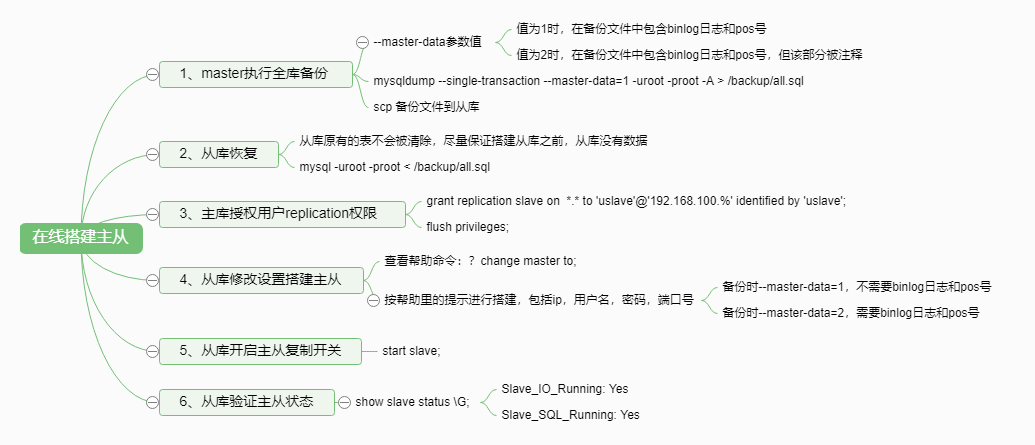
后期在线online 搭建主从环境:mysqldump --master-data=1/2
在线搭建主从
先清除现有主从,在从库执行:
mysql> stop slave; --停止主从
Query OK, 0 rows affected (0.03 sec)
mysql> reset slave all; --清除设置
Query OK, 0 rows affected (0.01 sec)
mysql> show slave status \G;
Empty set (0.00 sec)
查看帮助
[root@localhost ~]# mysqldump --help
……
--master-data[=#]     This causes the binary log position and filename to be
                      appended to the output. If equal to 1, will print it as a
                      CHANGE MASTER command; if equal to 2, that command will
                      be prefixed with a comment symbol. This option will turn
                      --lock-all-tables on, unless --single-transaction is
                      specified too (in which case a global read lock is only
                      taken a short time at the beginning of the dump; don't
                      forget to read about --single-transaction below). In all
                      cases, any action on logs will happen at the exact moment
                      of the dump. Option automatically turns --lock-tables
                      off.
……
mysqldump --master-data,该参有两个值,1和2,默认值为1。
下面演示参数的作用。
master-data值为1时
发起备份:
[root@localhost ~]# mysqldump --single-transaction --master-data=1 -uroot -proot -A > /u01/bakdata/mysqldump/all_for_slave.sql查看备份内容:
[root@localhost ~]# less /u01/bakdata/mysqldump/all_for_slave.sql
--文件中多了以下内容
-- Position to start replication or point-in-time recovery from
--

CHANGE MASTER TO MASTER_LOG_FILE='mysql-bin.000007', MASTER_LOG_POS=1076;
将备份传送到从库:
[root@localhost ~]# scp /u01/bakdata/mysqldump/all_for_slave.sql 192.168.100.112:/u01/bakdata/mysqldump
root@192.168.100.112's password:
all_for_slave.sql                                                               100%  638KB  74.4MB/s   00:00
从库恢复:
[root@localhost ~]# mysql -uroot -proot < /u01/bakdata/mysqldump/all_for_slave.sql
Warning: Using a password on the command line interface can be insecure.
主库赋权:
mysql> grant replication slave on *.* to 'uslave'@'192.168.100.%' identified by 'uslave';
Query OK, 0 rows affected (0.01 sec)
从库搭建主从:
mysql> CHANGE MASTER TO MASTER_HOST='192.168.100.111',MASTER_USER='uslave',MASTER_PASSWORD='uslave',MASTER_PORT=3306;
Query OK, 0 rows affected, 2 warnings (0.04 sec)
--注意,不需要指定日志名称和position号
从库开启主从:
mysql> start slave;
Query OK, 0 rows affected (0.05 sec)
查看主从状态:
mysql> show slave status \G;
*************************** 1. row ***************************
               Slave_IO_State: Waiting for master to send event
                  Master_Host: 192.168.100.111
                  Master_User: uslave
                  Master_Port: 3306
                Connect_Retry: 60
              Master_Log_File: mysql-bin.000005
          Read_Master_Log_Pos: 534
               Relay_Log_File: localhost-relay-bin.000005
                Relay_Log_Pos: 697
        Relay_Master_Log_File: mysql-bin.000005
             Slave_IO_Running: Yes
            Slave_SQL_Running: Yes
master-data值为2时
当值为2时,步骤基本相同,区别是,备份内容如下(加了注释):
[root@localhost ~]# less /u01/bakdata/mysqldump/all_for_slave.sql
--文件中多了以下内容
-- Position to start replication or point-in-time recovery from
--

--CHANGE MASTER TO MASTER_LOG_FILE='mysql-bin.000007', MASTER_LOG_POS=1076;
CHANGE MASTER TO后,仍需加日志名和position号,值从备份文件中找。
从库服务器:
mysql> show slave status \G;
……
Master_Server_Id: 3
                  Master_UUID: d11d7e9d-a69e-11eb-ac06-080027d46e3d
             Master_Info_File: /u01/data/mysql/master.info
                    SQL_Delay: 0
          SQL_Remaining_Delay: NULL
……
其中,Master_Info_File可以查看一些信息:
[root@localhost ~]# cat /u01/data/mysql/master.info
23
mysql-bin.000005
721
192.168.100.111
uslave
uslave
3306
60
0


0
1800.000

0
d11d7e9d-a69e-11eb-ac06-080027d46e3d
86400


0
mysql复制参数说明
Slave_IO_State:显示当前IO线程的状态,一般情况下就是显示等待主服务器发送二进制日志。
Master_Log_File:显示当前同步的主服务器的二进制日志。
Read_Master_Log_Pos:显示当前同步到主服务器上二进制日志的偏移量位置。
Relay_Master_Log_File:当前中继日志同步的二进制日志。
Relay_Log_File:显示当前写入的中继日志。
Relay_Log_Pos:显示当前执行到中继日志的偏移量位置。
Slave_IO_Running:从服务器中IO线程状态,yes代表正常。
Slave_SQL_Running:从服务中的SQL线程状态,yes代表正常。
Exec_Master_Log_Pos:表示同步到主服务器的二进制日志的偏移量位置。
mysql> show slave status \G;
*************************** 1. row ***************************
               Slave_IO_State: Waiting for master to send event    --当前IO线程的状态
                  Master_Host: 192.168.100.111
                  Master_User: uslave
                  Master_Port: 3306
                Connect_Retry: 60
              Master_Log_File: mysql_bin.000005                    --当前同步的主服务器的二进制日志
          Read_Master_Log_Pos: 120                                 --当前同步到主服务器上二进制日志的偏移量位置
               Relay_Log_File: localhost-relay-bin.000007          --当前写入的中继日志
                Relay_Log_Pos: 283                                 --当前执行到中继日志的偏移量位置
        Relay_Master_Log_File: mysql_bin.000005                    --当前中继日志同步的二进制日志
             Slave_IO_Running: Yes                                 --从服务器中IO线程状态
            Slave_SQL_Running: Yes                                 --从服务中的SQL线程状态
              Replicate_Do_DB:
          Replicate_Ignore_DB:
           Replicate_Do_Table:
       Replicate_Ignore_Table:
      Replicate_Wild_Do_Table:
  Replicate_Wild_Ignore_Table:
                   Last_Errno: 0
                   Last_Error:
                 Skip_Counter: 0
          Exec_Master_Log_Pos: 120
              Relay_Log_Space: 623
              Until_Condition: None
               Until_Log_File:
                Until_Log_Pos: 0
           Master_SSL_Allowed: No
           Master_SSL_CA_File:
           Master_SSL_CA_Path:
              Master_SSL_Cert:
            Master_SSL_Cipher:
               Master_SSL_Key:
        Seconds_Behind_Master: 0
Master_SSL_Verify_Server_Cert: No
                Last_IO_Errno: 0
                Last_IO_Error:
               Last_SQL_Errno: 0
               Last_SQL_Error:
  Replicate_Ignore_Server_Ids:
             Master_Server_Id: 1113306
                  Master_UUID: da81a297-d889-11eb-b188-08002765b4fe
             Master_Info_File: /u01/data/mysql/master.info
                    SQL_Delay: 0
          SQL_Remaining_Delay: NULL
      Slave_SQL_Running_State: Slave has read all relay log; waiting for the sla                                                   ve I/O thread to update it
           Master_Retry_Count: 86400
                  Master_Bind:
      Last_IO_Error_Timestamp:
     Last_SQL_Error_Timestamp:
               Master_SSL_Crl:
           Master_SSL_Crlpath:
           Retrieved_Gtid_Set:
            Executed_Gtid_Set:
                Auto_Position: 0
1 row in set (0.00 sec)
<wiz_tmp_tag id="wiz-table-range-border" contenteditable="false" style="display: none;">

 浙公网安备 33010602011771号