

019、逻辑备份演练
mysqldump备份数据
1、备份某个库
[root@localhost ~]# mysqldump --single-transaction -uroot -proot test > /u01/databak/test_20210425_1428.sql
Warning: Using a password on the command line interface can be insecure.
逻辑备份出的文件可以直接vi查看:
[root@localhost ~]# vi /u01/databak/test_20210425_1428.sql2、备份某个表
[root@localhost ~]# mysqldump --single-transaction -uroot -proot test sbtest > /u01/databak/test_sbtest_20210425_1428.sql
Warning: Using a password on the command line interface can be insecure.
备份时加-c选项:
[root@localhost ~]# mysqldump --single-transaction -uroot -proot test t > /u01/databak/test_t_20210425.sql
Warning: Using a password on the command line interface can be insecure.
[root@localhost ~]# mysqldump --single-transaction -c -uroot -proot test t > /u01/databak/test_t_c_20210425.sql
Warning: Using a password on the command line interface can be insecure.
比较两个文件内容:
[mysql@localhost ~]$ vimdiff /u01/bakdata/mysqldump/t.sql /u01/bakdata/mysqldump/t_c.sql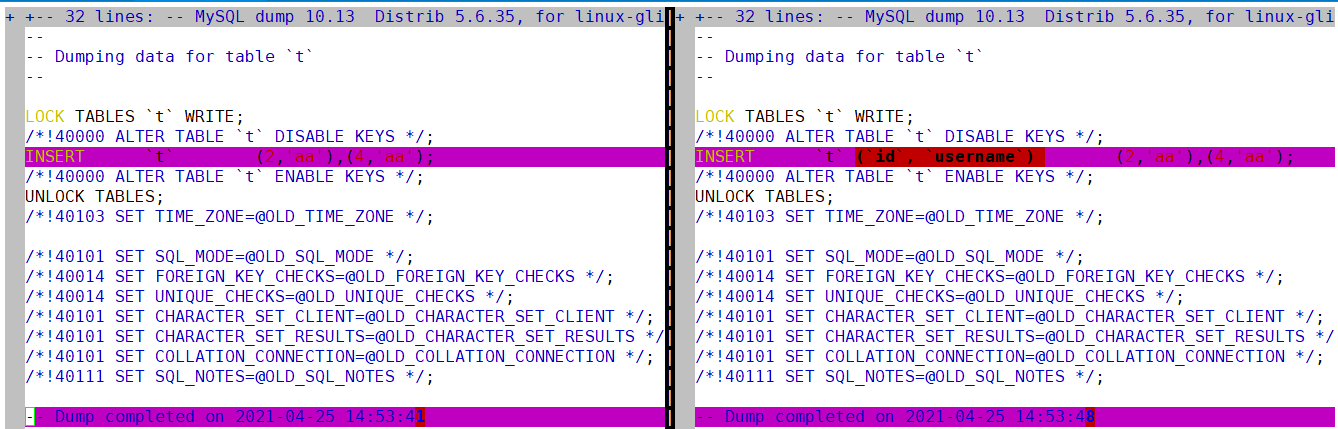
其中,加-c选项,会备份出完整的insert 语句,在插入时,写出列名。
3、备份时,只保留表结构,不要表数据
[root@localhost ~]# mysqldump --single-transaction -d -uroot -proot test t > /u01/databak/test_t_d_20210425.sql
Warning: Using a password on the command line interface can be insecure.
查看备份内容:
[root@localhost ~]# vi /u01/databak/test_t_d_20210425.sql
……
DROP TABLE IF EXISTS `t`;
/*!40101 SET @saved_cs_client     = @@character_set_client */;
/*!40101 SET character_set_client = utf8 */;
CREATE TABLE `t` (
  `id` int(11) NOT NULL AUTO_INCREMENT,
  `username` varchar(20) DEFAULT NULL,
  PRIMARY KEY (`id`),
  KEY `username` (`username`)
) ENGINE=InnoDB AUTO_INCREMENT=5 DEFAULT CHARSET=utf8;
/*!40101 SET character_set_client = @saved_cs_client */;
/*!40103 SET TIME_ZONE=@OLD_TIME_ZONE */;
……
mysqldump -d 只备份表结构信息,不备份数据内容。
4、备份时,只保留表数据,不要表结构
[root@localhost ~]# mysqldump --single-transaction -t -uroot -proot test t > /u01/databak/test_t_t_20210425.sql
Warning: Using a password on the command line interface can be insecure.
查看备份内容:
[root@localhost ~]# vi /u01/databak/test_t_t_20210425.sql
……
LOCK TABLES `t` WRITE;
/*!40000 ALTER TABLE `t` DISABLE KEYS */;
INSERT INTO `t` VALUES (2,'aa'),(4,'aa');
/*!40000 ALTER TABLE `t` ENABLE KEYS */;
UNLOCK TABLES;
/*!40103 SET TIME_ZONE=@OLD_TIME_ZONE */;
……
mysqldump -t 只备份表数据信息,不备份表结构内容。
5、备份时,添加where条件,只保留部分数据
[root@localhost ~]# mysqldump --single-transaction -w "id=2" -uroot -proot test t > /u01/databak/test_t_w_20210425.sql
Warning: Using a password on the command line interface can be insecure.
查看文件内容:
[root@localhost ~]# vi /u01/databak/test_t_w_20210425.sql
……
DROP TABLE IF EXISTS `t`;
/*!40101 SET @saved_cs_client     = @@character_set_client */;
/*!40101 SET character_set_client = utf8 */;
CREATE TABLE `t` (
  `id` int(11) NOT NULL AUTO_INCREMENT,
  `username` varchar(20) DEFAULT NULL,
  PRIMARY KEY (`id`),
  KEY `username` (`username`)
) ENGINE=InnoDB AUTO_INCREMENT=5 DEFAULT CHARSET=utf8;
/*!40101 SET character_set_client = @saved_cs_client */;

--
-- Dumping data for table `t`
--
-- WHERE:  id=2

LOCK TABLES `t` WRITE;
/*!40000 ALTER TABLE `t` DISABLE KEYS */;
INSERT INTO `t` VALUES (2,'aa');
/*!40000 ALTER TABLE `t` ENABLE KEYS */;
UNLOCK TABLES;
/*!40103 SET TIME_ZONE=@OLD_TIME_ZONE */;
……
针对逻辑备份的恢复
1、单表的恢复
mysql -u*** -p*** db_name < 备份文件:
先删除表:
mysql> show tables;
+----------------+
| Tables_in_test |
+----------------+
| sbtest         |
| t              |
| t1             |
+----------------+
3 rows in set (0.00 sec)

mysql> drop table sbtest;
Query OK, 0 rows affected (0.12 sec)
恢复表:
[root@localhost ~]# mysql -uroot -proot test </u01/databak/test_sbtest_20210425_1428.sql
Warning: Using a password on the command line interface can be insecure.
验证:
mysql> show tables;
+----------------+
| Tables_in_test |
+----------------+
| sbtest         |
| t              |
| t1             |
+----------------+
3 rows in set (0.00 sec)

mysql> select count(*) from sbtest;
+----------+
| count(*) |
+----------+
|   100018 |
+----------+
1 row in set (0.07 sec)
2、某个数据库的恢复
注意:如果没有库了,需要在库里面重新创建个原名字的数据库。
删除数据库:
mysql> drop database test;
Query OK, 3 rows affected (0.22 sec)
恢复数据库,查看报错信息:
[root@localhost ~]# mysql -uroot -proot test < /u01/databak/test_20210425_1428.sql
Warning: Using a password on the command line interface can be insecure.
ERROR 1049 (42000): Unknown database 'test'
创建数据库:
mysql> create database test;
Query OK, 1 row affected (0.07 sec)

mysql> show databases;
+--------------------+
| Database           |
+--------------------+
| information_schema |
| mysql              |
| performance_schema |
| test               |
+--------------------+
4 rows in set (0.00 sec)
恢复某个库:
[root@localhost ~]# mysql -uroot -proot test < /u01/databak/test_20210425_1428.sql
Warning: Using a password on the command line interface can be insecure.
3、全库恢复
先进行全库备份:
[root@localhost ~]# mysqldump --single-transaction -A -uroot -proot > /u01/databak/full_20210425.sql
Warning: Using a password on the command line interface can be insecure.
删除某个库:
mysql> drop database test;
Query OK, 3 rows affected (0.12 sec)
进行全库恢复:
[root@localhost ~]# mysql -uroot -proot < /u01/databak/full_20210425.sql
Warning: Using a password on the command line interface can be insecure.
验证:
mysql> show databases;
+--------------------+
| Database           |
+--------------------+
| information_schema |
| mysql              |
| performance_schema |
| test               |
+--------------------+
4 rows in set (0.00 sec)从全备文件中,筛选数据
1、全库备份文件,恢复库
针对全库的备份文件,只恢复一个库的内容:mysql -u *** -p *** db_name -o < 备份文件
删除某个库:
mysql> drop database test;
Query OK, 3 rows affected (0.15 sec)
使用全库文件,恢复该库,同样需要先创建:
mysql> create database test;
Query OK, 1 row affected (0.02 sec)

[root@localhost ~]# mysql -uroot -proot test -o  < /u01/databak/full_20210425.sql
Warning: Using a password on the command line interface can be insecure.

mysql> show databases;
+--------------------+
| Database           |
+--------------------+
| information_schema |
| mysql              |
| performance_schema |
| test               |
+--------------------+
4 rows in set (0.00 sec)
2、全库备份,恢复某个表
从全备中导出表结构:sed -e'/./{H;$!d;}' -e 'x;/CREATE TABLE `table_name`/!d;q' all.sql
从全备中导出表数据:grep 'INSERT INTO `table_name`' all.sql
先删除某个表:
mysql> use test;
Database changed
mysql> drop table sbtest;
Query OK, 0 rows affected (0.06 sec)
使用正则表达式,筛选出建表语句:
[root@localhost databak]# sed -e'/./{H;$!d;}' -e 'x;/CREATE TABLE `sbtest`/!d;q'  full_20210425.sql

DROP TABLE IF EXISTS `sbtest`;
/*!40101 SET @saved_cs_client     = @@character_set_client */;
/*!40101 SET character_set_client = utf8 */;
CREATE TABLE `sbtest` (
  `id` int(10) unsigned NOT NULL AUTO_INCREMENT,
  `k` int(10) unsigned NOT NULL DEFAULT '0',
  `c` char(120) NOT NULL DEFAULT '',
  `pad` char(60) NOT NULL DEFAULT '',
  PRIMARY KEY (`id`),
  KEY `k` (`k`)
) ENGINE=InnoDB AUTO_INCREMENT=100019 DEFAULT CHARSET=utf8;
/*!40101 SET character_set_client = @saved_cs_client */;
使用正则表达式,筛选出插入语句:
[root@localhost databak]# grep 'INSERT INTO `sbtest`' full_20210425.sql以上两条结果,合并转存到文件中:
[root@localhost databak]# sed -e'/./{H;$!d;}' -e 'x;/CREATE TABLE `sbtest`/!d;q'  full_20210425.sql > 1.sql
[root@localhost databak]# grep 'INSERT INTO `sbtest`' full_20210425.sql >>1.sql
执行该文件,恢复表:
[root@localhost ~]# mysql -uroot -proot test < /u01/databak/1.sql
Warning: Using a password on the command line interface can be insecure.

mysql> use test;
Database changed
mysql> select count(*) from sbtest;
+----------+
| count(*) |
+----------+
|   100018 |
+----------+
1 row in set (0.02 sec)
3、针对某个库的备份,选出某个表
查看有哪些表:
mysql> show tables;
+----------------+
| Tables_in_test |
+----------------+
| sbtest         |
| t              |
| t1             |
+----------------+
3 rows in set (0.00 sec)
删除表:
mysql> drop table sbtest;
Query OK, 0 rows affected (0.11 sec)
从备份中选出表:
[root@localhost databak]# cat test_20210425_1428.sql | sed -n -e '/Table structure for table .sbtest./,/Table structure for table .t./p' > 2.sql
--注意,sed语句中sbtest和表t的顺序,备份中,sbtest和t表是紧挨着备份的,如果将t换成t1或sbtest,则2.sql不仅包含sbtest的恢复语句,还包含其他表的恢复语句
执行恢复操作:
[root@localhost ~]# mysql -uroot -proot test < /u01/databak/2.sql
Warning: Using a password on the command line interface can be insecure.

mysql> show tables;
+----------------+
| Tables_in_test |
+----------------+
| sbtest         |
| t              |
| t1             |
+----------------+
3 rows in set (0.00 sec)
逻辑备份的另一种
1、将查询出来的数据导出到文本文件中
mysql> select * from sbtest into outfile '/u01/databak/sbtest.txt';
ERROR 1290 (HY000): The MySQL server is running with the --secure-file-priv option so it cannot execute this statement
--此报错信息,需要修改参数文件,并重启数据库。如下参数
报错原因:mysql文件的导入和导出路径有默认的设置,即 secure-file-priv,当传入或传出的csv文件路径与默认的路径冲突时就会报错。
修改参数文件:
[root@localhost ~]# vi /etc/my.cnf
secure_file_priv=''
重新导出:
mysql> select * from sbtest into outfile '/u01/databak/sbtest.txt';
Query OK, 100018 rows affected (0.35 sec)
文件内容:
1       0               qqqqqqqqqqwwwwwwwwwweeeeeeeeeerrrrrrrrrrtttttttttt
2       0               qqqqqqqqqqwwwwwwwwwweeeeeeeeeerrrrrrrrrrtttttttttt
3       0               qqqqqqqqqqwwwwwwwwwweeeeeeeeeerrrrrrrrrrtttttttttt
……
2、通过load data导入到数据库中
注意点:保证表结构一定是存在的。
查看帮助:
mysql> ? load data清除表sbtest的数据:
mysql> select count(*) from sbtest;
+----------+
| count(*) |
+----------+
|   100018 |
+----------+
1 row in set (0.05 sec)

mysql> delete from sbtest;
Query OK, 100018 rows affected (1.16 sec)
使用load data导入:
mysql> load data infile '/u01/databak/sbtest.txt' into table test.sbtest;
Query OK, 100018 rows affected (2.01 sec)
Records: 100018  Deleted: 0  Skipped: 0  Warnings: 0

mysql> select count(*) from sbtest;
+----------+
| count(*) |
+----------+
|   100018 |
+----------+
1 row in set (0.05 sec)
使用load data方式导入到数据库中,比insert速度快几百倍。
备份脚本
####数据库全备脚本####
#author ning#
######################

####定义变量##########

user=bakuser
password=bakpwd
host=192.168.100.111
port=3306
date=`date +%Y%m%d`
mysql_bin=/usr/local/mysql/bin

#########备份##########

$mysql_bin/mysqldump -u$user -p$password -h$host -P 3306 --single-transaction te
st > /u01/bakdata/mysqldump/test_$date.sql

#######压缩############

if [ -f /u01/bakdata/mysqldump/test_$date.sql ]
then
cd /u01/bakdata/mysqldump/
tar -zcvf test_$date.sql.tar.gz test_$date.sql
rm -rf test_$date.sql
fi

##########删除n天以前的备份###########

find /u01/bakdata/mysqldump/ -type f -name "*sql*" -mtime +30|xargs rm -rf {};
 浙公网安备 33010602011771号