

012、索引及压力测试实验
索引分类介绍

B+树索引分为:聚集索引(可以理解为主键)和辅助索引(普通索引)。
聚集索引:可以理解为主键,索引和数据是在一起的,所以经常讲,innodb表数据即索引,索引即数据。
辅助索引又分为:单列索引、多列联合索引、全文索引、前缀索引。
辅助索引:也叫非聚集索引,叶子级别不包含行的全部数据,叶节点除了包含索引本身键值以外,每个叶级别中的索引行中还包含一个书签,该书签就是相应行数据的聚集索引键,数据查找会根据聚集索引键去聚集索引查找数据。
联合索引:是指对表上的多个列作索引,可以更好的缩短段池的范围,更快的检索到数据,在使用过程中,要遵循最左前缀原则。
但是不管是聚集索引还是非聚集索引,其内部都是B+树的,即高度是平衡的,叶子节点存放着所有的数据。聚集索引与非聚集索引不同的是:叶子节点存放的是否是一整行的信息。
innodb存储引擎表是索引组织表(IOT表),即表中数据按照主键顺序存放,而聚集索引就是按照每张表的主键构造一棵B+树,并且叶子节点中存放着整张表的行记录数据,因此也让聚集索引的页节点成为数据页。聚集索引的这个特性决定了索引组织表中数据也是索引的一部分。
聚集索引对于主键的排序查找和范围查找速度非常快。主键的选择原则上选择与业务无关的列作为主键,一般是ID列。
主键的特性:非空not null,唯一性,自增属性。
myisam存储引擎:没有聚集索引,它是堆栈表,myisam的普通索引和主键索引在结构上没有任何区别。
索引的创建和删除
B+树索引的创建和删除可以通过两种方法:
- alter table
- create/drop index
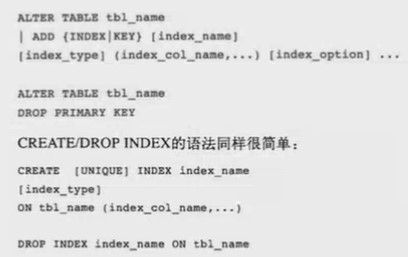
构造数据
1、创建实验表
mysql> use test;
Database changed
mysql> create table su(
    ->   id int unsigned not null auto_increment,
    ->   c1 int not null default '0',
    ->   c2 int not null default '0',
    ->   c3 int not null default '0',
    ->   c4 int not null default '0',
    ->   c5 timestamp not null,
    ->   c6 varchar(200) not null default '',
    ->   primary key(id)
    -> );
Query OK, 0 rows affected (0.09 sec)
2、编写存储过程
mysql> delimiter $$
mysql> drop procedure if exists `insert_su` $$
Query OK, 0 rows affected (0.00 sec)

mysql> create procedure `insert_su`(in row_num int)
    -> begin
    ->   declare i int default 0;
    ->   while i < row_num do
    ->     insert into su(c1,c2,c3,c4,c5,c6) values(floor(rand()*row_num),floor(rand()*row_num),floor(rand()*row_num),floor(rand()*row_num),now(),repeat('su',floor(rand()*20)));
    ->     set i = i+1;
    ->   end while;
    -> end$$
Query OK, 0 rows affected (0.00 sec)

mysql> delimiter ;
3、调用存储过程插入数据
mysql> call insert_su(50000);
Query OK, 1 row affected (8 min 40.95 sec)

mysql> select count(*) from su;
+----------+
| count(*) |
+----------+
|    50000 |
+----------+
1 row in set (0.01 sec)
查看执行计划
1、运行sql语句
mysql> select * from su a,(select c2 from su where id=10) b where a.c2=b.c2; --括号中的部分会先执行
+-------+-------+-------+-------+-------+---------------------+----------------------------------+-------+
| id    | c1    | c2    | c3    | c4    | c5                  | c6                               | c2    |
+-------+-------+-------+-------+-------+---------------------+----------------------------------+-------+
|    10 | 45855 | 15814 | 41507 | 10093 | 2021-04-14 16:23:57 | susususususususususu             | 15814 |
| 25642 | 20821 | 15814 | 16607 | 35591 | 2021-04-14 16:28:22 | sususususususususususu           | 15814 |
| 34191 | 40308 | 15814 |  8147 | 43293 | 2021-04-14 16:29:53 | susususususususususususususususu | 15814 |
+-------+-------+-------+-------+-------+---------------------+----------------------------------+-------+
3 rows in set (0.04 sec)
--这个sql是自连接查询,含义是:将所有与(id为10的c2列)值相同的记录筛选出来
2、查看一张表有什么索引
mysql> show index from su;
+-------+------------+----------+--------------+-------------+-----------+-------------+----------+--------+------+------------+---------+---------------+
| Table | Non_unique | Key_name | Seq_in_index | Column_name | Collation | Cardinality | Sub_part | Packed | Null | Index_type | Comment | Index_comment |
+-------+------------+----------+--------------+-------------+-----------+-------------+----------+--------+------+------------+---------+---------------+
| su    |          0 | PRIMARY  |            1 | id          | A         |       49919 |     NULL | NULL   |      | BTREE      |         |               |
+-------+------------+----------+--------------+-------------+-----------+-------------+----------+--------+------+------------+---------+---------------+
1 row in set (0.00 sec)
3、查看sql语句的执行计划
用explain/desc 来查看sql的执行计划,sql本身并没有执行,只是看plan:
mysql> desc select * from su a,(select c2 from su where id=10) b where a.c2=b.c2;
+----+-------------+------------+--------+---------------+---------+---------+-------+-------+-------------+
| id | select_type | table      | type   | possible_keys | key     | key_len | ref   | rows  | Extra       |
+----+-------------+------------+--------+---------------+---------+---------+-------+-------+-------------+
|  1 | PRIMARY     | <derived2> | system | NULL          | NULL    | NULL    | NULL  |     1 | NULL        |
|  1 | PRIMARY     | a          | ALL    | NULL          | NULL    | NULL    | NULL  | 49919 | Using where |
|  2 | DERIVED     | su         | const  | PRIMARY       | PRIMARY | 4       | const |     1 | NULL        |
+----+-------------+------------+--------+---------------+---------+---------+-------+-------+-------------+
3 rows in set (0.00 sec)

mysql> explain select * from su a,(select c2 from su where id=10) b where a.c2=b.c2;
+----+-------------+------------+--------+---------------+---------+---------+-------+-------+-------------+
| id | select_type | table      | type   | possible_keys | key     | key_len | ref   | rows  | Extra       |
+----+-------------+------------+--------+---------------+---------+---------+-------+-------+-------------+
|  1 | PRIMARY     | <derived2> | system | NULL          | NULL    | NULL    | NULL  |     1 | NULL        |
|  1 | PRIMARY     | a          | ALL    | NULL          | NULL    | NULL    | NULL  | 49919 | Using where |
|  2 | DERIVED     | su         | const  | PRIMARY       | PRIMARY | 4       | const |     1 | NULL        |
+----+-------------+------------+--------+---------------+---------+---------+-------+-------+-------------+
3 rows in set (0.00 sec)
4、执行计划的查看要点
- 先看type列,当type列出现all这样的关键字的时候,代表全表扫描
- 再看key列,然后看rows(行数)一般情况下,rows的值不应超过5000行。
- 最后看Extra,额外信息池。Using filesort 代表磁盘排序,Using index 证明使用到了覆盖索引。
在where条件后面的字段,可以尝试创建索引,需要考虑该字段合适不合适来作为索引。
查看索引的选择性:select count(distinct(column))/count(*) from table_name;
mysql> select count(distinct c2)/count(*) from su;
+-----------------------------+
| count(distinct c2)/count(*) |
+-----------------------------+
|                      0.6314 |
+-----------------------------+
1 row in set (0.03 sec)
值越接近于1,选择性越高,越适合建立索引。
创建索引
B+树索引的创建和删除可以通过两种方法:
- alter table
- create/drop index
1、创建单列索引
mysql> alter table su add index idx_c2(c2);
Query OK, 0 rows affected (0.25 sec)
Records: 0  Duplicates: 0  Warnings: 0
或者:
mysql> create index idx_c2 on su(c2);
Query OK, 0 rows affected (0.14 sec)
Records: 0  Duplicates: 0  Warnings: 0
查看表结构:
mysql> show create table su \G;
*************************** 1. row ***************************
       Table: su
Create Table: CREATE TABLE `su` (
  `id` int(10) unsigned NOT NULL AUTO_INCREMENT,
  `c1` int(11) NOT NULL DEFAULT '0',
  `c2` int(11) NOT NULL DEFAULT '0',
  `c3` int(11) NOT NULL DEFAULT '0',
  `c4` int(11) NOT NULL DEFAULT '0',
  `c5` timestamp NOT NULL DEFAULT CURRENT_TIMESTAMP ON UPDATE CURRENT_TIMESTAMP,
  `c6` varchar(200) NOT NULL DEFAULT '',
  PRIMARY KEY (`id`),
  KEY `idx_c2` (`c2`)
) ENGINE=InnoDB AUTO_INCREMENT=50001 DEFAULT CHARSET=utf8
1 row in set (0.00 sec)
查看表su有哪些索引:
mysql> show index from su;
+-------+------------+----------+--------------+-------------+-----------+-------------+----------+--------+------+------------+---------+---------------+
| Table | Non_unique | Key_name | Seq_in_index | Column_name | Collation | Cardinality | Sub_part | Packed | Null | Index_type | Comment | Index_comment |
+-------+------------+----------+--------------+-------------+-----------+-------------+----------+--------+------+------------+---------+---------------+
| su    |          0 | PRIMARY  |            1 | id          | A         |       49919 |     NULL | NULL   |      | BTREE      |         |               |
| su    |          1 | idx_c2   |            1 | c2          | A         |       49919 |     NULL | NULL   |      | BTREE      |         |               |
+-------+------------+----------+--------------+-------------+-----------+-------------+----------+--------+------+------------+---------+---------------+
2 rows in set (0.00 sec)
2、再次查看执行计划
mysql> explain select * from su a,(select c2 from su where id=10) b where a.c2=b.c2;
+----+-------------+------------+--------+---------------+---------+---------+-------+------+-------+
| id | select_type | table      | type   | possible_keys | key     | key_len | ref   | rows | Extra |
+----+-------------+------------+--------+---------------+---------+---------+-------+------+-------+
|  1 | PRIMARY     | <derived2> | system | NULL          | NULL    | NULL    | NULL  |    1 | NULL  |
|  1 | PRIMARY     | a          | ref    | idx_c2        | idx_c2  | 4       | const |    3 | NULL  |
|  2 | DERIVED     | su         | const  | PRIMARY       | PRIMARY | 4       | const |    1 | NULL  |
+----+-------------+------------+--------+---------------+---------+---------+-------+------+-------+
3 rows in set (0.00 sec)
可以看到key列已经使用了索引,rows减少了很多。
覆盖索引:
查找的字段,作为检索条件的时候又是索引。不回表直接可以从索引中,找到我想要的数据。
mysql> explain select c2 from su where c2=111;
+----+-------------+-------+------+---------------+--------+---------+-------+------+-------------+
| id | select_type | table | type | possible_keys | key    | key_len | ref   | rows | Extra       |
+----+-------------+-------+------+---------------+--------+---------+-------+------+-------------+
|  1 | SIMPLE      | su    | ref  | idx_c2        | idx_c2 | 4       | const |    2 | Using index |
+----+-------------+-------+------+---------------+--------+---------+-------+------+-------------+
1 row in set (0.08 sec)
2、建立联合索引
联合索引必须满足最左前缀原则(a,b,c),语法如下:
mysql> create index idx_c3_c4 on su(c3,c4);
Query OK, 0 rows affected (0.31 sec)
Records: 0  Duplicates: 0  Warnings: 0

mysql> show index from su;
+-------+------------+-----------+--------------+-------------+-----------+-------------+----------+--------+------+------------+---------+---------------+
| Table | Non_unique | Key_name  | Seq_in_index | Column_name | Collation | Cardinality | Sub_part | Packed | Null | Index_type | Comment | Index_comment |
+-------+------------+-----------+--------------+-------------+-----------+-------------+----------+--------+------+------------+---------+---------------+
| su    |          0 | PRIMARY   |            1 | id          | A         |       49919 |     NULL | NULL   |      | BTREE      |         |               |
| su    |          1 | idx_c2    |            1 | c2          | A         |       49919 |     NULL | NULL   |      | BTREE      |         |               |
| su    |          1 | idx_c3_c4 |            1 | c3          | A         |       49919 |     NULL | NULL   |      | BTREE      |         |               |
| su    |          1 | idx_c3_c4 |            2 | c4          | A         |       49919 |     NULL | NULL   |      | BTREE      |         |               |
+-------+------------+-----------+--------------+-------------+-----------+-------------+----------+--------+------+------------+---------+---------------+
4 rows in set (0.00 sec)
查看以下几种模式下的执行计划:
以c3为where条件进行查询:
mysql> desc select * from su where c3=40680;
+----+-------------+-------+------+---------------+-----------+---------+-------+------+-------+
| id | select_type | table | type | possible_keys | key       | key_len | ref   | rows | Extra |
+----+-------------+-------+------+---------------+-----------+---------+-------+------+-------+
|  1 | SIMPLE      | su    | ref  | idx_c3_c4     | idx_c3_c4 | 4       | const |    1 | NULL  |
+----+-------------+-------+------+---------------+-----------+---------+-------+------+-------+
1 row in set (0.00 sec)
以c4为条件进行查询:
mysql> desc select * from su where c4=40680;
+----+-------------+-------+------+---------------+------+---------+------+-------+-------------+
| id | select_type | table | type | possible_keys | key  | key_len | ref  | rows  | Extra       |
+----+-------------+-------+------+---------------+------+---------+------+-------+-------------+
|  1 | SIMPLE      | su    | ALL  | NULL          | NULL | NULL    | NULL | 49919 | Using where |
+----+-------------+-------+------+---------------+------+---------+------+-------+-------------+
1 row in set (0.00 sec)
以c3为条件查询,并按照c4排序:
mysql> desc select * from su where c3=40680 order by c4;
+----+-------------+-------+------+---------------+-----------+---------+-------+------+-------------+
| id | select_type | table | type | possible_keys | key       | key_len | ref   | rows | Extra       |
+----+-------------+-------+------+---------------+-----------+---------+-------+------+-------------+
|  1 | SIMPLE      | su    | ref  | idx_c3_c4     | idx_c3_c4 | 4       | const |    1 | Using where |
+----+-------------+-------+------+---------------+-----------+---------+-------+------+-------------+
1 row in set (0.00 sec)
以c4为条件查询,按照c3排序:
mysql> desc select * from su where c4=40680 order by c3;
+----+-------------+-------+------+---------------+------+---------+------+-------+-----------------------------+
| id | select_type | table | type | possible_keys | key  | key_len | ref  | rows  | Extra                       |
+----+-------------+-------+------+---------------+------+---------+------+-------+-----------------------------+
|  1 | SIMPLE      | su    | ALL  | NULL          | NULL | NULL    | NULL | 49919 | Using where; Using filesort |
+----+-------------+-------+------+---------------+------+---------+------+-------+-----------------------------+
1 row in set (0.00 sec)
查询c3或者c4:使用or的查询,无法使用索引,除非建立两个单列索引在c3、c4列上。
mysql> desc select * from su where c3=40680 or c4=40680;
+----+-------------+-------+------+---------------+------+---------+------+-------+-------------+
| id | select_type | table | type | possible_keys | key  | key_len | ref  | rows  | Extra       |
+----+-------------+-------+------+---------------+------+---------+------+-------+-------------+
|  1 | SIMPLE      | su    | ALL  | idx_c3_c4     | NULL | NULL    | NULL | 49919 | Using where |
+----+-------------+-------+------+---------------+------+---------+------+-------+-------------+
1 row in set (0.00 sec)
查询c3和c4:
mysql> desc select * from su where c3=40680 and c4=40680;
+----+-------------+-------+------+---------------+-----------+---------+-------------+------+-------+
| id | select_type | table | type | possible_keys | key       | key_len | ref         | rows | Extra |
+----+-------------+-------+------+---------------+-----------+---------+-------------+------+-------+
|  1 | SIMPLE      | su    | ref  | idx_c3_c4     | idx_c3_c4 | 8       | const,const |    1 | NULL  |
+----+-------------+-------+------+---------------+-----------+---------+-------------+------+-------+
1 row in set (0.00 sec)结论:查询条件满足最左前缀原则会使用索引。建议:联合索引的建立,其中一个字段用于检索,另外的字段用于排序,这样可能会避免磁盘排序(Using filesort)。order by后的字段,最好也创建索引。
查询语句中,只能用到一个(索引)index。用到两个索引的情况:or语句中两个列都建立了索引,type:index_merge(索引合并)。
mysql> drop index idx_c3_c4 on su;
Query OK, 0 rows affected (0.09 sec)
Records: 0  Duplicates: 0  Warnings: 0

mysql> create index idx_c3 on su(c3);
Query OK, 0 rows affected (0.27 sec)
Records: 0  Duplicates: 0  Warnings: 0

mysql> create index idx_c4 on su(c4);
Query OK, 0 rows affected (0.13 sec)
Records: 0  Duplicates: 0  Warnings: 0

mysql> desc select * from su where c3=40680 or c4=40680;
+----+-------------+-------+-------------+---------------+---------------+---------+------+------+-----------------------------------------+
| id | select_type | table | type        | possible_keys | key           | key_len | ref  | rows | Extra                                   |
+----+-------------+-------+-------------+---------------+---------------+---------+------+------+-----------------------------------------+
|  1 | SIMPLE      | su    | index_merge | idx_c3,idx_c4 | idx_c3,idx_c4 | 4,4     | NULL |    2 | Using union(idx_c3,idx_c4); Using where |
+----+-------------+-------+-------------+---------------+---------------+---------+------+------+-----------------------------------------+
1 row in set (0.00 sec)
or子句如何优化:
- 我们可以在or前后字段加两个单列索引;
- 把or子句,改成union al;
3、建立全文索引
InnoDB引擎对FULLTEXT索引的支持是MySQL5.6新引入的特性,之前只有MyISAM引擎支持FULLTEXT索引。对于FULLTEXT索引的内容可以使用MATCH()…AGAINST()语法进行查询。
mysql> create fulltext index idx_c6 on su(c6);
Query OK, 0 rows affected, 1 warning (1.78 sec)
Records: 0  Duplicates: 0  Warnings: 1
查看执行计划:
mysql> explain select * from su where match(c6) against('sususu');
+----+-------------+-------+----------+---------------+--------+---------+------+------+-------------+
| id | select_type | table | type     | possible_keys | key    | key_len | ref  | rows | Extra       |
+----+-------------+-------+----------+---------------+--------+---------+------+------+-------------+
|  1 | SIMPLE      | su    | fulltext | idx_c6        | idx_c6 | 0       | NULL |    1 | Using where |
+----+-------------+-------+----------+---------------+--------+---------+------+------+-------------+
1 row in set (0.00 sec)
4、前缀索引
创建索引时,只取字段值的前n个字母或者字符就可以确定该字段的值,不需要给整个字段创建索引。
--create index idx_name on table_name (name(5));
mysql> create index idx_c6 on su(c6(5));
Query OK, 0 rows affected (0.37 sec)
Records: 0  Duplicates: 0  Warnings: 0
查看执行计划:
mysql> explain select * from su where c6='ab';
+----+-------------+-------+------+---------------+--------+---------+-------+------+-------------+
| id | select_type | table | type | possible_keys | key    | key_len | ref   | rows | Extra       |
+----+-------------+-------+------+---------------+--------+---------+-------+------+-------------+
|  1 | SIMPLE      | su    | ref  | idx_c6        | idx_c6 | 17      | const |    1 | Using where |
+----+-------------+-------+------+---------------+--------+---------+-------+------+-------------+
1 row in set (0.00 sec)
索引对null值的处理
建立测试表:
mysql> create table tb_1(
    ->   id int unsigned not null auto_increment,
    ->   c1 varchar(200) default null,
    ->   c2 int not null,
    ->   primary key(id)
    -> );
Query OK, 0 rows affected (0.18 sec)
插入数据:
mysql> insert into tb_1(c1,c2) values(null,1),(1,2),(null,3);
Query OK, 3 rows affected (0.01 sec)
Records: 3  Duplicates: 0  Warnings: 0
查询:
mysql> select * from tb_1;
+----+------+----+
| id | c1   | c2 |
+----+------+----+
|  1 | NULL |  1 |
|  2 | 1    |  2 |
|  3 | NULL |  3 |
+----+------+----+
3 rows in set (0.00 sec)

mysql> select count(c1),count(*),count(1),count(c2),count(id) from tb_1;
+-----------+----------+----------+-----------+-----------+
| count(c1) | count(*) | count(1) | count(c2) | count(id) |
+-----------+----------+----------+-----------+-----------+
|         1 |        3 |        3 |         3 |         3 |
+-----------+----------+----------+-----------+-----------+
1 row in set (0.00 sec)
结论:索引不包含null值。
删除tb_1表,修改sql,重新创建:
mysql> drop table tb_1;
Query OK, 0 rows affected (0.05 sec)

mysql> create table tb_1(
    ->   id int unsigned not null auto_increment,
    ->   c1 varchar(200) default '',
    ->   c2 int not null,
    ->   primary key(id)
    -> );
Query OK, 0 rows affected (0.15 sec)
插入测试数据:
mysql> insert into tb_1(c1,c2) values('',1),(1,2),('',3);
Query OK, 3 rows affected (0.09 sec)
Records: 3  Duplicates: 0  Warnings: 0
查看结果:
mysql> select count(c1),count(*),count(1),count(c2),count(id) from tb_1;
+-----------+----------+----------+-----------+-----------+
| count(c1) | count(*) | count(1) | count(c2) | count(id) |
+-----------+----------+----------+-----------+-----------+
|         3 |        3 |        3 |         3 |         3 |
+-----------+----------+----------+-----------+-----------+
1 row in set (0.00 sec)
结论:在索引中,不保存null值,但是保存空字符串的值。所以,创建表,字段上面有索引时,定义字段默认值时,修改default null为default '' 取代null.
另外,where条件中,函数不使用索引:select * from su where YEAR(adddate)<2007;
建议符号左边不要进行函数运算,将函数放在符号右侧。
索引优点:
提高检索效率,提高聚合函数的效率(max,min,avg),提高排序效率,表连接。
使用不到索引的情况:
- 通过索引扫描的记录数超过30%,变成全表扫描 *
- 联合索引中,第一个索引列使用范围查询,所谓范围查询就是查询一个区间的值,比如:BETWEEN
- 联合索引中,第一个查询条件不是最左索引列
- 模糊查询条件列最左以通配符 % 开始
- 内存表(HEAP 表)使用HASH索引时,使用范围检索或者ORDER BY
- 两个独立索引,其中一个用于检索,一个用于排序
- 使用了不同的 ORDER BY 和 GROUP BY 表达式
书写压力测试报告
新业务上线之前,需要对数据库进行压力测试。目的是为反映出数据库能处理的事务量和数据库能处理的请求数(TPS,QPS的值)。
- 介绍新上线业务系统的名称;
- 介绍数据库的基础信息:数据库架构(主从、主主、主从从)、DB的相关参数(主要是重要参数,innodb_buffer_pool,redo log的刷新机制,binlog的刷新机制,脏页page的刷新机制);
- 介绍操作系统的信息(CPU核数、是否做超线程,内存大小,swap大小,磁盘类型、磁盘阵列,CPU是否最大性能模式);
通过测试工具sysbench反应出数据库(TPS,QPS的值)。
安装sysbench
1、上传软件包,并解压:
[root@localhost soft]# pwd
/u01/soft
[root@localhost soft]# ls
sysbench-0.4.8.tar.gz
[root@localhost soft]# gunzip sysbench-0.4.8.tar.gz
[root@localhost soft]# ls
sysbench-0.4.8.tar
[root@localhost soft]# tar -xvf sysbench-0.4.8.tar
2、编译,指定MySQL的lib库
[root@localhost sysbench-0.4.8]# pwd
/u01/soft/sysbench-0.4.8
[root@localhost sysbench-0.4.8]# ls
acinclude.m4  autogen.sh  config     configure.ac  doc      install-sh   Makefile.in  mkinstalldirs  scripts   TODO
aclocal.m4    ChangeLog   configure  COPYING       INSTALL  Makefile.am  missing      README         sysbench
编译过程中如果报错,可能是lib包不全,使用yum安装libtool之后再进行编译。
[root@localhost ~]# yum install libtool
[root@localhost sysbench-0.4.8]# ./configure --with-mysql-includes=/usr/local/mysql/include --with-mysql-libs=/usr/local/mysql/lib
3、安装
[root@localhost sysbench-0.4.8]# pwd
/u01/soft/sysbench-0.4.8
[root@localhost sysbench-0.4.8]# ls
acinclude.m4  ChangeLog   config.status  COPYING  install-sh  Makefile.am  mkinstalldirs  sysbench
aclocal.m4    config      configure      doc      libtool     Makefile.in  README         TODO
autogen.sh    config.log  configure.ac   INSTALL  Makefile    missing      scripts
[root@localhost sysbench-0.4.8]# make
[root@localhost sysbench-0.4.8]# make install
4、设置环境变量
安装完成后,会产生一个可执行文件,执行时报错:
[root@localhost sysbench-0.4.8]# cd sysbench/
[root@localhost sysbench]# ls
db_driver.c  drivers      Makefile.in  sb_logger.h   sb_options.h  sb_timer.h  sysbench.c  tests
db_driver.h  Makefile     sb_list.h    sb_logger.o   sb_options.o  sb_timer.o  sysbench.h
db_driver.o  Makefile.am  sb_logger.c  sb_options.c  sb_timer.c    sysbench    sysbench.o
[root@localhost sysbench]# ./sysbench
./sysbench: error while loading shared libraries: libmysqlclient.so.18: cannot open shared object file: No such file or directory
需要设置环境变量:
[root@localhost ~]# vi /etc/profile
--添加内容:export LD_LIBRARY_PATH=/usr/local/mysql/lib
[root@localhost ~]# source /etc/profile
4、压力测试之前构造数据
[root@localhost sysbench]# ./sysbench --test=oltp --mysql-table-engine=innodb --mysql-db=test --oltp-table-size=100000 \
> --db-driver=mysql --mysql-socket=/tmp/mysql.sock --mysql-user=root --mysql-host=localhost --mysql-password=root prepare
--准备10万条数据
5、执行压力测试
[root@localhost sysbench]# ./sysbench --test=oltp --mysql-table-engine=innodb --mysql-db=test --oltp-table-size=100000 \
> --db-driver=mysql --num-threads=2 --mysql-socket=/tmp/mysql.sock \
> --mysql-user=root --mysql-host=localhost --mysql-password=root run
sysbench v0.4.8:  multi-threaded system evaluation benchmark

WARNING: Preparing of "BEGIN" is unsupported, using emulation
(last message repeated 1 times)
Running the test with following options:
Number of threads: 2

Doing OLTP test.
Running mixed OLTP test
Using Special distribution (12 iterations,  1 pct of values are returned in 75 pct cases)
Using "BEGIN" for starting transactions
Using auto_inc on the id column
Maximum number of requests for OLTP test is limited to 10000
Threads started!
Done.

OLTP test statistics:
    queries performed:
        read:                            140000
        write:                           50000
        other:                           20000
        total:                           210000
    transactions:                        10000  (114.84 per sec.)   --每秒处理事务数(tps)
    deadlocks:                           0      (0.00 per sec.)
    read/write requests:                 190000 (2181.94 per sec.)  --每秒请求数(qps)
    other operations:                    20000  (229.68 per sec.)

Test execution summary:
    total time:                          87.0783s
    total number of events:              10000
    total time taken by event execution: 174.0889
    per-request statistics:
         min:                            0.0072s
         avg:                            0.0174s
         max:                            0.6707s
         approx.  95 percentile:         0.0491s

Threads fairness:
    events (avg/stddev):           5000.0000/5.00
    execution time (avg/stddev):   87.0444/0.00
参数说明:
--number-threads=8表示发起8个并发连接 *cpu
--oltp-read-only=off表示不要进行只读测试,也就是会采用读写混合模式测试
--report-interval=10表示每10秒输出一次测试进度报告*
--rand-type=uniform表示随即类型为固定模式,其他几个可选随机模式:uniform(固定),gaussian(高斯),special(特定的),pareto(帕累托)
--max-time=120表示最大执行时长为120秒 *
--max-requests=0表示总请求数为0,因为上面已经定义了总执行时长,所以总请求数可以设定为0;也可以只设定总请求数,不设定最大执行时长
--percentile=99表示设定采样比例,默认值时95%,99表示丢弃1%的长请求,再剩余的99%里取最大值。
可以通过调整数据库参数使tps和qps更高:
调整redo log和binlog的刷新参数:
mysql> set global innodb_flush_log_at_trx_commit=2;
Query OK, 0 rows affected (0.00 sec)

mysql> set global sync_binlog=0;
Query OK, 0 rows affected (0.00 sec)
重新执行压力测试:
[root@localhost sysbench]# sysbench --test=oltp --mysql-table-engine=innodb --mysql-db=test --oltp-table-size=100000
> --db-driver=mysql --num-threads=2 --mysql-socket=/tmp/mysql.sock
> --mysql-user=root --mysql-host=localhost --mysql-password=root run
sysbench v0.4.8:  multi-threaded system evaluation benchmark

WARNING: Preparing of "BEGIN" is unsupported, using emulation
(last message repeated 1 times)
Running the test with following options:
Number of threads: 2

Doing OLTP test.
Running mixed OLTP test
Using Special distribution (12 iterations,  1 pct of values are returned in 75 pct cases)
Using "BEGIN" for starting transactions
Using auto_inc on the id column
Maximum number of requests for OLTP test is limited to 10000
Threads started!
Done.

OLTP test statistics:
    queries performed:
        read:                            140000
        write:                           50000
        other:                           20000
        total:                           210000
    transactions:                        10000  (702.90 per sec.)
    deadlocks:                           0      (0.00 per sec.)
    read/write requests:                 190000 (13355.08 per sec.)
    other operations:                    20000  (1405.80 per sec.)

Test execution summary:
    total time:                          14.2268s
    total number of events:              10000
    total time taken by event execution: 28.3987
    per-request statistics:
         min:                            0.0018s
         avg:                            0.0028s
         max:                            0.8632s
         approx.  95 percentile:         0.0033s

Threads fairness:
    events (avg/stddev):           5000.0000/15.00
    execution time (avg/stddev):   14.1994/0.00
调整完参数以后可以发现tps和qps值都变大了。

 浙公网安备 33010602011771号