

002、vnc连接Linux
CentOS开启VNC服务
下面介绍centos开启vnc服务的方法。
1、安装VNC软件包
[root@ning ~]# yum install tigervnc* -y2、使用目标用户开启vnc服务
[oracle@ning ~]$ vncserver
#此处的密码是使用vncviewer连接时需要输入的密码。
You will require a password to access your desktops.

Password:
Verify:

New 'ning:1 (oracle)' desktop is ning:1

Creating default startup script /home/oracle/.vnc/xstartup
Starting applications specified in /home/oracle/.vnc/xstartup
Log file is /home/oracle/.vnc/ning:1.log
[oracle@ning ~]$ vncserver -list

TigerVNC server sessions:

X DISPLAY #     PROCESS ID
:1              16092
3、修改配置文件
服务启动以后,会生成配置文件,编辑该文件:
[oracle@ning ~]$ vi /home/oracle/.vnc/xstartup将该文件原有内容全部注释,加入以下内容:
/etc/X11/xinit/Xclients修改完成以后,保存退出,重启服务。
重启服务:
[oracle@ning ~]$ vncserver -kill :1
Killing Xvnc process ID 16092
[oracle@ning ~]$ vncserver

New 'ning:1 (oracle)' desktop is ning:1

Starting applications specified in /home/oracle/.vnc/xstartup
Log file is /home/oracle/.vnc/ning:1.log
4、使用vncviewer连接Linux服务器
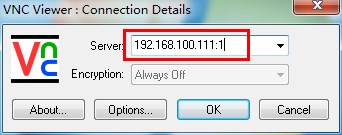
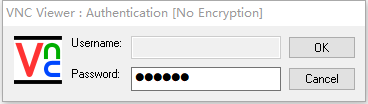
需要注意的是IP地址后面的 :1
效果如图:


 浙公网安备 33010602011771号