
自动化的并发执行
当累计的自动化测试用例比较多,规模比较大的时候,执行一次比较耗时间。
怎么样才能快速跑完一轮呢?
pytest里面有个并发执行的插件, pytest-xdist
网上看到的资料都是随便写几个assert, 然后调用 "-n" 来实现并发。
这样用例毫无代表性,没有任何业务联系,不是真实地测试场景。
一般的业务测试用例,基本上都是有联系的,基本的是最开始是需要一个登录。
这个该怎么做呢?
分布式执行用例的设计原则(重中之重的重点)
用例之间是独立的,用例之间没有依赖关系,用例可以完全独立运行【独立运行】
用例执行没有顺序,随机顺序都能正常执行【随机执行】
每个用例都能重复运行,运行结果不会影响其他用例【不影响其他用例】
插件安装
pip3 install pytest-xdist -i http://pypi.douban.com/simple/ --trusted-host pypi.douban.com
pytest-xdist通过一些独特的测试执行模式扩展了pytest
测试运行并行化:如果有多个CPU或主机,则可以将它们用于组合的测试运行。这样可以加快开发速度或使用远程计算机的特殊资源。
--looponfail:在子进程中重复运行测试。每次运行之后,pytest都会等到项目中的文件更改后再运行之前失败的测试。重复此过程,直到所有测试通过,然后再次执行完整运行。
跨平台覆盖:您可以指定不同的Python解释程序或不同的平台,并在所有这些平台上并行运行测试。
好了,知道了这些原理,开始实践。
我这里以登录某个web论坛,然后在登录后打开某些只有登录后才能操作的页面。
import pytest
from selenium import webdriver
import time,os
import allure

data = [('beerbox', 'yyyy'), ('snake', 'xxxx')]
id = ["adminlogin", "guestlogin"]


@pytest.fixture()
def driver():
    _driver = webdriver.Chrome()
    yield _driver
    _driver.quit()

# @pytest.mark.parametrize('username,password', [('beerbox', 'yyyy'), ('snake', 'xxxx')])
# @pytest.mark.smoke
# @pytest.mark.flaky(reruns=1)
#@pytest.fixture(autouse=True, params=data, ids=id)
@allure.story("differnt user login")
@allure.description("{} log in".format(id))
@pytest.fixture(autouse=True, params=data, ids=id)
def login(request,driver):

    username = (request.param)[0]
    password = (request.param)[1]

    driver.get("https://testerhome.com/account/sign_in")
    time.sleep(2)
    username_loc = driver.find_element_by_id("user_login")
    username_loc.clear()
    with allure.step("input username {}".format((request.param)[0])):
        username_loc.send_keys(username)
    password_loc = driver.find_element_by_id("user_password")
    password_loc.clear()
    password_loc.send_keys(password)
    driver.find_element_by_name("commit").click()

    yield
    with allure.step("logout or quit"):
        driver.delete_all_cookies()
    # driver.find_element_by_class_name("dropdown-toggle nav-link").click()
    # driver.find_element_by_link_text("退出")


def test_login(login,driver):

    time.sleep(3)
    assert 1 == 1

@allure.step("go to profile page")
@allure.description("just check profile page")
def test_profile(driver):
    time.sleep(3)
    driver.find_element_by_id("navbar-user-menu").click()
    assert 1 == 1

@allure.step("go to 个人资料设置 page")
@allure.description("just check 个人资料设置 page")
def test_setting(driver):
    time.sleep(3)
    driver.find_element_by_link_text("个人资料设置").click()
    driver.back()
    assert 1 == 1

@allure.step("go to 记事本 page")
@allure.description("just check 记事本 page")
def test_node(driver):
    time.sleep(3)
    driver.find_element_by_link_text("记事本").click()
    driver.back()
    assert 1 == 1


if __name__ == "__main__":
    # pytest.main(["-vs", "test_home.py","-n=4"])
    pytest.main(["-vs", "test_home.py","--alluredir","./report"])
    os.system("allure serve ./report")
每个用例都是独立的,都会去登录和退出。
先用单个进程跑,
pytest.main(["-vs", "test_home.py","--alluredir","./report"])
    os.system("allure serve ./report")
跑出的结果是:
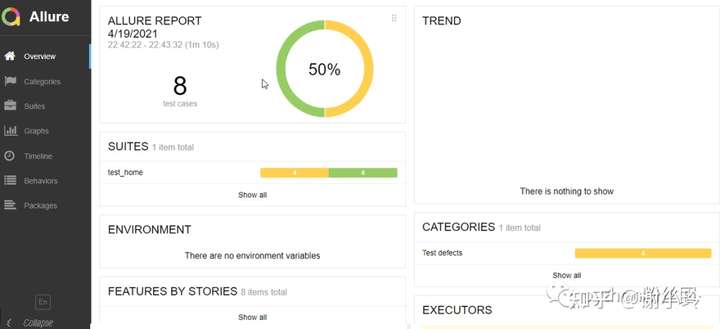
70秒。
看看跑的效果:
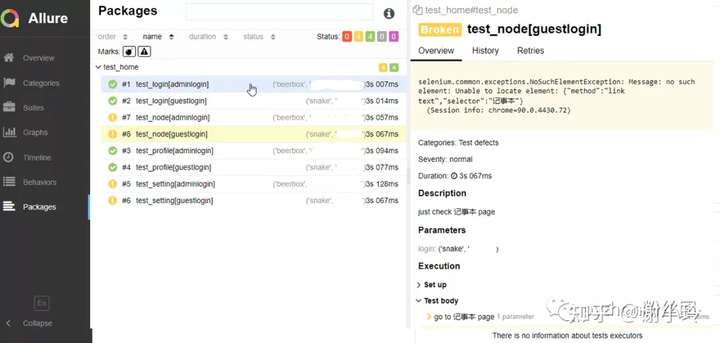
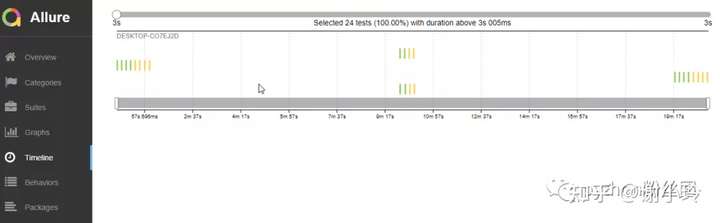
然后看看timeline:
我们将进程设置为2,
pytest.main(["-vs", "test_home.py","--alluredir","./report","-n=2"])
    os.system("allure serve ./report")
看看效果:
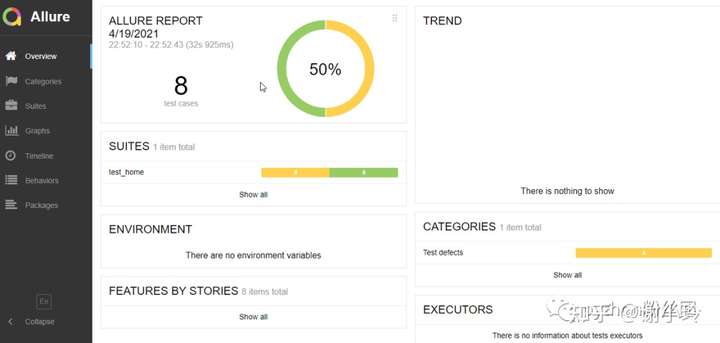
32秒,时间将近少了一半。
看看跑的效果:
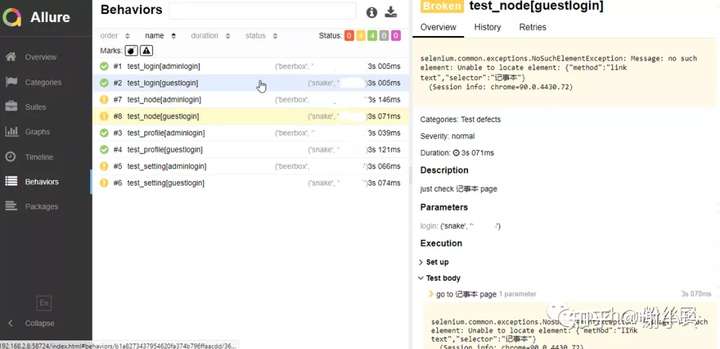
几乎跟单个进程跑的效果是一样一样的。
然后看看timeline:
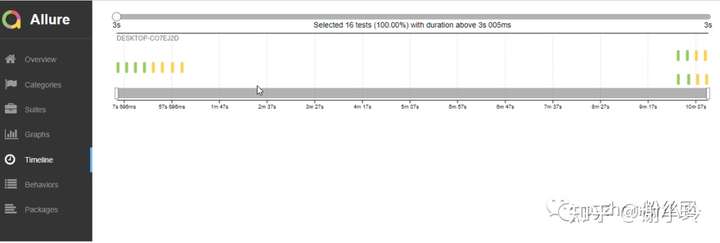
时间明显少一些。
综上,跑出来效果差不错,但是时间能减少。
我在电脑上看到的效果是,同时启动两个浏览器,两个一起操作。这就达到了我们并发测试的效果。
如果浏览器类型不同,就实现的兼容性测试,不同的浏览器同时执行一样的操作。
如果我们想进一步提高效率,可以用分布式,多开几个测试机器。这里就需要用到grid.
例如造航母,我们可以让江南,或者沪东,或者大连造船厂单个工厂慢慢造。
如果要赶进度,我们可以同时让江南和沪东一起造,就可以同时造两艘航母。
但是战事吃紧,我们不能等那么久,怎么办。增加人手,就是这里的多进程来执行。
如果我们更迫不及待,想沪东造船身,江南造武器系统,怎么分工?怎么来合拢?
这里只讲了web, app是咋样的呢?
先别急。
作者:谢小玲
链接:https://zhuanlan.zhihu.com/p/431602422
来源:知乎
著作权归作者所有。商业转载请联系作者获得授权,非商业转载请注明出处。

 浙公网安备 33010602011771号