
自动处理过长字符串显示的Web控件
我们很多时候需要在一行上显示一段说明文字,而由于Web页面宽度的不确定性,我们任意调节其宽度后,常常搞得文字撑出页面或者折成好多行![]() 。通过使用CSS,我们可以限制为一行的宽度,并使多余的字符隐藏。为了方便,做成一个小Web控件来使用。
。通过使用CSS,我们可以限制为一行的宽度,并使多余的字符隐藏。为了方便,做成一个小Web控件来使用。
![]() using System;
using System;
![]() using System.Web.UI;
using System.Web.UI;
![]() using System.Web.UI.WebControls;
using System.Web.UI.WebControls;
![]() using System.ComponentModel;
using System.ComponentModel;
![]()
![]() namespace cnblogs.birdshome.WebControls
namespace cnblogs.birdshome.WebControls
![]() {
{
![]() /// <summary>
/// <summary>
![]() /// Summary description for AutoLabel.
/// Summary description for AutoLabel.
![]() /// </summary>
/// </summary>
![]() [DefaultProperty("Text"),
[DefaultProperty("Text"),
![]() ToolboxData("<{0}:AutoLabel runat=server></{0}:AutoLabel>")]
ToolboxData("<{0}:AutoLabel runat=server></{0}:AutoLabel>")]
![]() public class AutoLabel : System.Web.UI.WebControls.Label
public class AutoLabel : System.Web.UI.WebControls.Label
![]() {
{
![]() protected override void CreateChildControls()
protected override void CreateChildControls()
![]() {
{
![]() base.CreateChildControls ();
base.CreateChildControls ();
![]() this.Width = Unit.Percentage(100);
this.Width = Unit.Percentage(100);
![]() this.Attributes["onmouseover"] =
this.Attributes["onmouseover"] =
![]() "if ( this.clientWidth < this.scrollWidth ) this.title = this.innerText; else this.title = '';";
"if ( this.clientWidth < this.scrollWidth ) this.title = this.innerText; else this.title = '';";
![]() this.Attributes.CssStyle["white-space"] = "nowrap";
this.Attributes.CssStyle["white-space"] = "nowrap";
![]() this.Attributes.CssStyle["overflow"] = "hidden";
this.Attributes.CssStyle["overflow"] = "hidden";
![]() this.Attributes.CssStyle["text-overflow"] = "ellipsis";
this.Attributes.CssStyle["text-overflow"] = "ellipsis";
![]() }
}
![]() }
}
![]() }
}
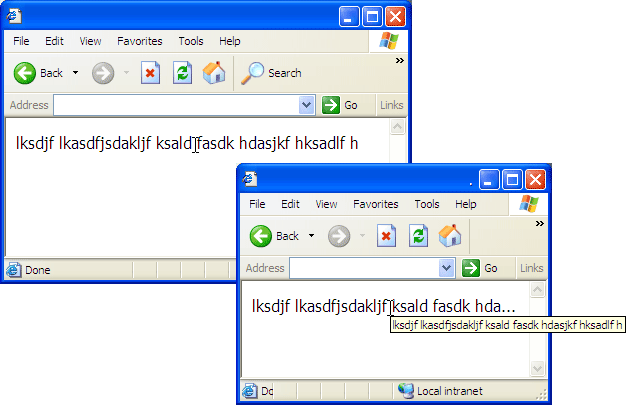
AutoLabel继承至Label控件,默认宽度为"100%",当把AutoLabel放入容器类元素中后,其内容的宽度受容器大小自动调整。并且当AutoLabel出现"..."号后,鼠标放在上面,其ToolTip会自动显示器完整内容。 如下图:
![AutoLabel.gif]()
enjoy it!
 。通过使用CSS,我们可以限制为一行的宽度,并使多余的字符隐藏。为了方便,做成一个小Web控件来使用。
 using System;using System.Web.UI;using System.Web.UI.WebControls;using System.ComponentModel;namespace cnblogs.birdshome.WebControls
 {
{

 /// <summary>
 /// Summary description for AutoLabel.
 /// </summary> [DefaultProperty("Text"), ToolboxData("<{0}:AutoLabel runat=server></{0}:AutoLabel>")] public class AutoLabel : System.Web.UI.WebControls.Label { protected override void CreateChildControls() { base.CreateChildControls (); this.Width = Unit.Percentage(100); this.Attributes["onmouseover"] = "if ( this.clientWidth < this.scrollWidth ) this.title = this.innerText; else this.title = '';"; this.Attributes.CssStyle["white-space"] = "nowrap"; this.Attributes.CssStyle["overflow"] = "hidden"; this.Attributes.CssStyle["text-overflow"] = "ellipsis"; } }
 }
}AutoLabel继承至Label控件,默认宽度为"100%",当把AutoLabel放入容器类元素中后,其内容的宽度受容器大小自动调整。并且当AutoLabel出现"..."号后,鼠标放在上面,其ToolTip会自动显示器完整内容。 如下图:
enjoy it!

 浙公网安备 33010602011771号