
Spring Security 简单介绍与使用
1. Spring Security简介
Spring Security 基于Spring 框架,提供了一套web应用安全性的完整解决方案。
一般来说,Web 应用的安全性包括两部分:
- 用户认证(Authentication)
- 用户授权(Authorization)
在用户认证方面,Spring Security 框架支持主流的认证方式,包括 HTTP 基本认证、HTTP 表单验证、HTTP 摘要认证、OpenID 和 LDAP 等。
在用户授权方面,Spring Security 提供了基于角色的访问控制和访问控制列表(Access Control List,ACL),可以对应用中的领域对象进行细粒度的控制。
2. SpringSecurity 过滤器链
SpringSecurity 采用的是责任链的设计模式,它有一条很长的过滤器链.
-
WebAsyncManagerIntegrationFilter: 将Security上下文与Spring Web 中用于处理异步请求映射的WebAsyncManager进行集成。
-
SecurityContextPersistenceFilter:在每次请求处理之前将该请求相关的安全上下文信息加载到 SecurityContextHolder 中,然后在该次请求处理完成之后,将 SecurityContextHolder 中关于这次请求的信息存储到一个“仓储”中,然后将 SecurityContextHolder 中的信息清除,例如在Session中维护一个用户的安全信息就是这个过滤器处理的。
-
HeaderWriterFilter:用于将头信息加入响应中。
-
CsrfFilter:用于处理跨站请求伪造。
-
LogoutFilter:用于处理退出登录。
-
UsernamePasswordAuthenticationFilter:用于处理基于表单的登录请求,从表单中获取用户名和密码。默认情况下处理来自 /login 的请求。从表单中获取用户名和密码时,默认使用的表单 name 值为 username 和 password,这两个值可以通过设置这个过滤器的usernameParameter 和 passwordParameter 两个参数的值进行修改。
-
DefaultLoginPageGeneratingFilter:如果没有配置登录页面,那系统初始化时就会配置这个过滤器,并且用于在需要进行登录时生成一个登录表单页面。
-
BasicAuthenticationFilter:检测和处理 http basic 认证。
-
RequestCacheAwareFilter:用来处理请求的缓存。
-
SecurityContextHolderAwareRequestFilter:主要是包装请求对象request。
-
AnonymousAuthenticationFilter:检测 SecurityContextHolder 中是否存在 Authentication 对象,如果不存在为其提供一个匿名 Authentication。
-
SessionManagementFilter:管理 session 的过滤器
-
ExceptionTranslationFilter:处理 AccessDeniedException 和 AuthenticationException 异常。
-
FilterSecurityInterceptor:可以看做过滤器链的出口。
-
RememberMeAuthenticationFilter:当用户没有登录而直接访问资源时, 从 cookie 里找出用户的信息, 如果 Spring Security 能够识别出用户提供的remember me cookie, 用户将不必填写用户名和密码, 而是直接登录进入系统,该过滤器默认不开启。
3. 流程说明
- 户端发起一个请求,进入 Security 过滤器链。
- 当到 LogoutFilter 的时候判断是否是登出路径,如果是登出路径则到 logoutHandler ,如果登出成功则到 logoutSuccessHandler 登出成功处理,如果登出失败则由 ExceptionTranslationFilter ;如果不是登出路径则直接进入下一个过滤器。
- 当到 UsernamePasswordAuthenticationFilter 的时候判断是否为登录路径,如果是,则进入该过滤器进行登录操作,如果登录失败则到 AuthenticationFailureHandler 登录失败处理器处理,如果登录成功则到 AuthenticationSuccessHandler 登录成功处理器处理,如果不是登录请求则不进入该过滤器。
- 当到 FilterSecurityInterceptor 的时候会拿到 uri ,根据 uri 去找对应的鉴权管理器,鉴权管理器做鉴权工作,鉴权成功则到 Controller 层否则到 AccessDeniedHandler 鉴权失败处理器处理。
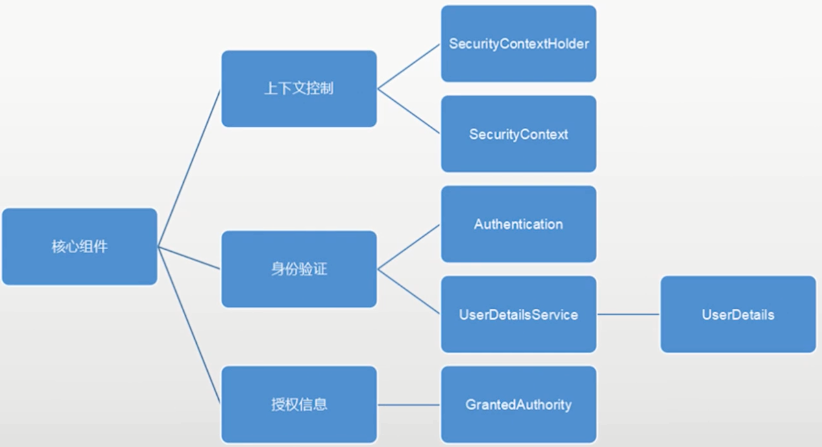
4. SpringSecurity 核心组件
- SecurityContextHolder:提供对SecurityContext的访问
- SecurityContext,:持有Authentication对象和其他可能需要的信息
- AuthenticationManager:其中可以包含多个AuthenticationProvider
- ProviderManager:对象为AuthenticationManager接口的实现类
- AuthenticationProvider :主要用来进行认证操作的类 调用其中的authenticate()方法去进行认证操作
- Authentication:Spring Security方式的认证主体
- GrantedAuthority:对认证主题的应用层面的授权,含当前用户的权限信息,通常使用角色表示
- UserDetails:构建Authentication对象必须的信息,可以自定义,可能需要访问DB得到
- UserDetailsService:通过username构建UserDetails对象,通过loadUserByUsername根据userName获取UserDetail对象 (可以在这里基于自身业务进行自定义的实现 如通过数据库,xml,缓存获取等)
![]()
- Spring Security入门
使用SpringBoot+SpringSecurity+thymeleaf.
相关依赖:
<!--security 启动器-->
<dependency>
    <groupId>org.springframework.boot</groupId>
    <artifactId>spring-boot-starter-security</artifactId>
</dependency>
<!--thymeleaf 模板引擎-->
<dependency>
    <groupId>org.springframework.boot</groupId>
    <artifactId>spring-boot-starter-thymeleaf</artifactId>
</dependency>
<!--spring security结合thymeleaf-->
<dependency>
    <groupId>org.thymeleaf.extras</groupId>
    <artifactId>thymeleaf-extras-springsecurity5</artifactId>
</dependency>
<!--web 启动器-->
<dependency>
    <groupId>org.springframework.boot</groupId>
    <artifactId>spring-boot-starter-web</artifactId>
</dependency>
自定义登录页面:
<!DOCTYPE html>
<html lang="en" xmlns:th="http://www.thymeleaf.org">
<head>
    <meta charset="UTF-8">
    <title>登录</title>
    <!-- 最新版本的 Bootstrap 核心 CSS 文件 -->
    <link rel="stylesheet" href="https://cdn.jsdelivr.net/npm/bootstrap@3.3.7/dist/css/bootstrap.min.css"
          integrity="sha384-BVYiiSIFeK1dGmJRAkycuHAHRg32OmUcww7on3RYdg4Va+PmSTsz/K68vbdEjh4u" crossorigin="anonymous">
</head>
<body>

<div class="container">

    <div class="row clearfix">

        <div class="col-md-12 column">
            <div class="page-header">
                <h1>
                    <small>用户登录</small>
                </h1>
            </div>
        </div>
        <div class="col-md-4 column" th:text="${msg}"></div>
    </div>

    <div class="clearfix" style="width: 40%;">

        <form method="post" th:action="@{/login}">
            <div class="form-group">
                <label for="txtUserName">用户名:</label>
                <input type="text" class="form-control" name="username" id="txtUserName" placeholder="username" required>
            </div>
            <div class="form-group">
                <label for="txtPassword">密 码:</label>
                <input type="password" class="form-control" name="password" id="txtPassword" placeholder="password" required>
            </div>
            <button type="submit" style="width: 100%;" class="btn btn-default">登 录</button>
        </form>
    </div>
</div>
</body>
</html>
默认页设置:
package cn.sivan.config;

import org.springframework.context.annotation.Configuration;
import org.springframework.web.servlet.config.annotation.ViewControllerRegistry;
import org.springframework.web.servlet.config.annotation.WebMvcConfigurationSupport;
import org.springframework.web.servlet.config.annotation.WebMvcConfigurer;

/**
 * 设置默认页
 * 使用WebMvcConfigurationSupport,会使用SpringBoot配置失效
 * 问题发现:无法访问static目录资源
 */
@Configuration
public class DefaultView implements WebMvcConfigurer {
    @Override
    public void addViewControllers(ViewControllerRegistry registry) {
        registry.addViewController("/").setViewName("index");
        registry.addViewController("/index").setViewName("index");
    }
}
SpringSecurity配置类:
package cn.sivan.config;

import org.springframework.beans.factory.annotation.Autowired;
import org.springframework.context.annotation.Bean;
import org.springframework.security.config.annotation.authentication.builders.AuthenticationManagerBuilder;
import org.springframework.security.config.annotation.method.configuration.EnableGlobalMethodSecurity;
import org.springframework.security.config.annotation.web.builders.HttpSecurity;
import org.springframework.security.config.annotation.web.configuration.EnableWebSecurity;
import org.springframework.security.config.annotation.web.configuration.WebSecurityConfigurerAdapter;
import org.springframework.security.crypto.bcrypt.BCryptPasswordEncoder;
import org.springframework.security.crypto.password.PasswordEncoder;
import org.springframework.security.web.authentication.AuthenticationSuccessHandler;
import org.springframework.security.web.authentication.logout.LogoutSuccessHandler;

@EnableWebSecurity
//开启SpringSecurity授权注解
@EnableGlobalMethodSecurity(securedEnabled = true)
public class SpringSecurity extends WebSecurityConfigurerAdapter {

    @Autowired
    private AuthenticationSuccessHandler authenticationSuccessHandler;

    @Autowired
    private LogoutSuccessHandler logoutSuccessHandler;

    /**
     * 加密方式
     */
    @Autowired
    private PasswordEncoder passwordEncoder;

    @Bean
    public PasswordEncoder passwordEncoder(){
        return new BCryptPasswordEncoder();
    }

    /**
     * 身份认证管理器 可指定认证方式
     * 指定userDetailsService、authenticationProvider
     * @param auth
     * @throws Exception
     */
    @Override
    protected void configure(AuthenticationManagerBuilder auth) throws Exception {

        /**
         * inMemoryAuthentication
         * 在内存中注册用户
         */

        //指定密码加密方式
        auth.inMemoryAuthentication().passwordEncoder(passwordEncoder)
                .withUser("admin").password(passwordEncoder.encode("123")).roles("ADMIN");

        //忽略密码加密{noop}
        //auth.inMemoryAuthentication()
        //        .withUser("user").password("{noop}123").roles("USER");
    }

    /**
     * 安全设置
     * @param http
     * @throws Exception
     */
    @Override
    protected void configure(HttpSecurity http) throws Exception {
        http.authorizeRequests()

                //不定向参数,匹配url规则
                //设置静态资源允许访问
                .antMatchers("/css/**", "/js/**", "/favicon.ico").permitAll()

                //指定角色可访问
                //.antMatchers("/user/**").hasAnyRole("ADMIN")
                //.antMatchers("/order/**").hasAnyRole("USER", "ADMIN")

                //使用正则表达式进行匹配
                //.regexMatchers(".+[.]js").permitAll()

                //其他所有请求 都需要认证
                .anyRequest().authenticated()

                //统一前缀 等同antMatchers("/prefix/demo")
                //.mvcMatchers("demo").servletPath("/prefix").permitAll()

                .and()

                //进行有关登录的一些设置
                .formLogin()
                    //指定登录页面
                    .loginPage("/login/user")
                    //指定登录参数 用户名、密码字段
                    //.usernameParameter("username")
                    //.passwordParameter("password")
                    //指定登录地址
                    .loginProcessingUrl("/login")

                    //登录成功页
                    //如果是认证失败跳到登录的,登录成功后,会回到想去的页面,比较友好
                    //第二个参数设置为true,等于failureForwardUrl
                    .defaultSuccessUrl("/")

                    //登录成功后就跳到指定页面
                    //注意:html不支持响应头带有post的应答包
                    //.successForwardUrl("/")

                    //登录失败跳转
                    .failureForwardUrl("/login/failure")
                    //.failureUrl("/login/failure")

                    //登录成功的Handler
                    //.successHandler(authenticationSuccessHandler)

                    .permitAll()
                    .and()

                //注销登录
                .logout()

                    //用户注销地址
                    .logoutUrl("/logout")

                    //注销成功后的页面
                    .logoutSuccessUrl("/login/user")

                    //注销成功的Handler
                    //.logoutSuccessHandler(logoutSuccessHandler)

                    //session失效
                    .invalidateHttpSession(true)
                    .and()

                //跨域伪造请求
                .csrf().disable();
    }
}
自定义认证成功Handler实例:
package cn.sivan.config;

import com.fasterxml.jackson.databind.ObjectMapper;
import org.springframework.security.core.Authentication;
import org.springframework.security.web.authentication.AuthenticationSuccessHandler;
import org.springframework.security.web.authentication.logout.LogoutSuccessHandler;
import org.springframework.stereotype.Component;

import javax.servlet.ServletException;
import javax.servlet.http.HttpServletRequest;
import javax.servlet.http.HttpServletResponse;
import java.io.IOException;
import java.io.PrintWriter;
import java.util.HashMap;
import java.util.Map;

/**
 * 自定义认证成功Handler
 */
@Component
public class CustomizeAuthenticationSuccessHandler implements AuthenticationSuccessHandler {
    @Override
    public void onAuthenticationSuccess(HttpServletRequest request, HttpServletResponse response, Authentication authentication) throws IOException, ServletException {
        response.setContentType("application/json;charset=utf-8");
        PrintWriter out = response.getWriter();
        Map<String, Object> map = new HashMap<>();
        map.put("code", "200");
        map.put("msg", "登录成功");
        map.put("path", request.getRequestURI());

        out.write(new ObjectMapper().writeValueAsString(map));
        out.flush();
        out.close();
    }
}
SpringSecurity注解使用示例:
@Controller
@RequestMapping("/order")
public class OrderController {

    @RequestMapping("/list")
    @Secured({"ROLE_USER", "ROLE_ADMIN"})
    public String list() {
        return "order/orderList";
    }
}
thymeleaf结合security的实例:
<!DOCTYPE html>
<html lang="zh" xmlns:sec="http://www.thymeleaf.org/extras/spring-security"
      xmlns:th="http://www.thymeleaf.org">
<head>
    <meta charset="UTF-8">
    <title>首页</title>
</head>

<body sec:authorize="isAuthenticated()">

<!--获取登录用户名-->
<p>登录名:<span sec:authentication="name"></span></p>

<!--注销-->
<form th:action="@{/logout}" method="post">
    <button type="submit">退出登录</button>
</form>

<!--判断对应角色-->
<span sec:authorize="hasRole('ROLE_ADMIN')">
    <a th:href="@{/user/list}">用户管理</a>
</span>
<span sec:authorize="hasAnyRole('ROLE_ADMIN','ROLE_USER')">
    <a th:href="@{/order/list}">订单管理</a>
</span>

</body>
</html>

 浙公网安备 33010602011771号