
基于控制台的图书商店
一、项目介绍
使用Java控制台实现图书的增加、删除、修改、查询等操作
主要实现代码:Map集合、switch条件分支选择、while循环、forEach循环遍历
二、权限
- 1.用户:查看图书信息、修改图书库存数量、查看订单信息、删除订单信息
- 2.管理员:添加图书信息、删除图书信息、修改图书信息、查看图书信息
三、类图
1.model
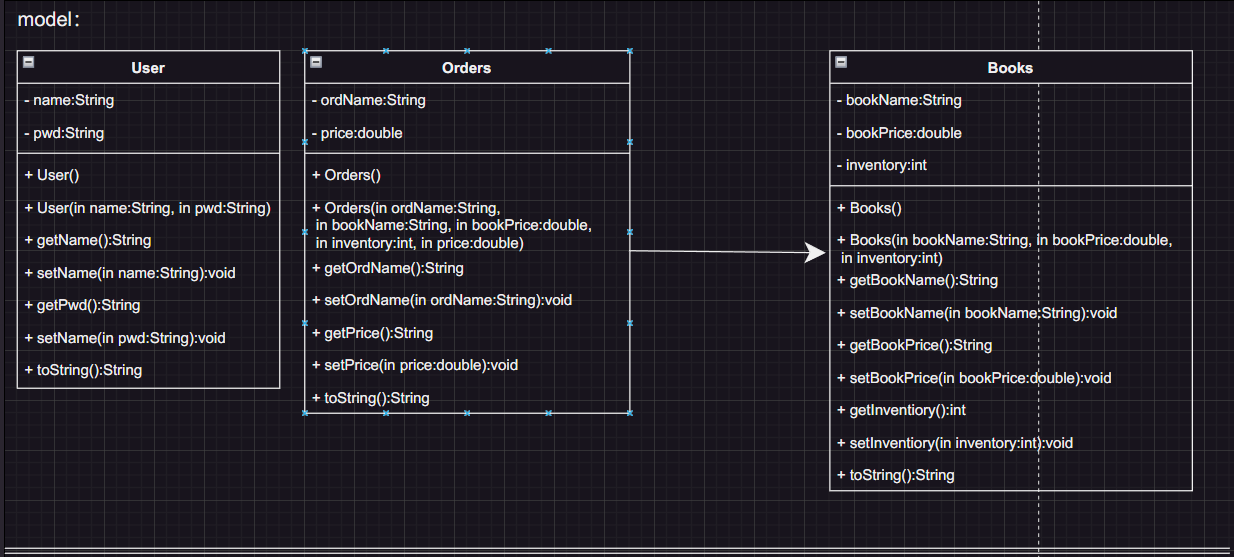
2.service
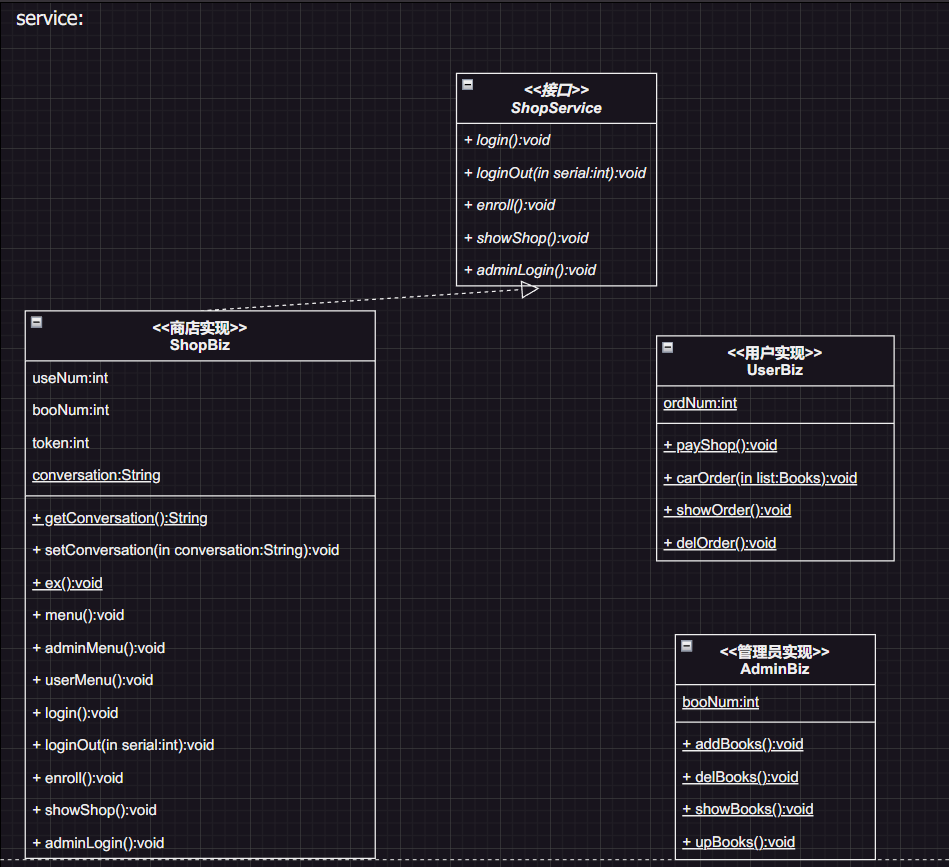
3.exception
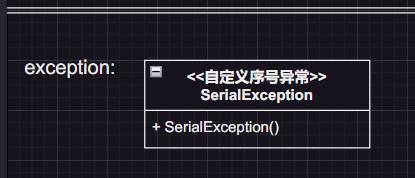
四、实体类
1.User
# 变量名称
- 1.name ----> 用户名
- 2.pwd ----> 密码
-
完整代码
public class User {
    //用户名
    private String name;
    //密码
    private String pwd;

    public User() {
    }

    public User(String name, String pwd) {
        this.name = name;
        this.pwd = pwd;
    }

    public String getName() {
        return name;
    }

    public void setName(String name) {
        this.name = name;
    }

    public String getPwd() {
        return pwd;
    }

    public void setPwd(String pwd) {
        this.pwd = pwd;
    }

    @Override
    public String toString() {
        return name + "\t" + pwd;
    }
}
2.Orders
# 变量名称
- 1.ordName ----> 收货人
- 2.price ----> 总价
-
完整代码
public class Orders extends Books {
    //收货人
    private String ordName;
    //总价
    private double price;

    public Orders() {
    }

    public Orders(String ordName, String bookName, double bookPrice, int inventory, double price) {
        super(bookName, bookPrice, inventory);
        this.ordName = ordName;
        this.price = price;
    }

    public String getOrdName() {
        return ordName;
    }

    public void setOrdName(String ordName) {
        this.ordName = ordName;
    }

    public double getPrice() {
        return price;
    }

    public void setPrice(double price) {
        price = price;
    }

    @Override
    public String toString() {
        return ordName + "\t" + getBookName() + "\t" + getBookPrice() + "\t" + getInventory() + "\t" + price;
    }
}
3.Books
# 变量名称
- 1.bookName ----> 图书名称
- 2.bookPrice ----> 图书价格
- 3.inventory ----> 图书库存
-
完整代码
public class Books {
    //图书名称
    private String bookName;
    //图书价格
    private double bookPrice;
    //图书库存
    private int inventory;

    public Books() {
    }

    public Books(String bookName, double bookPrice, int inventory) {
        this.bookName = bookName;
        this.bookPrice = bookPrice;
        this.inventory = inventory;
    }

    public String getBookName() {
        return bookName;
    }

    public void setBookName(String bookName) {
        this.bookName = bookName;
    }

    public double getBookPrice() {
        return bookPrice;
    }

    public void setBookPrice(double bookPrice) {
        this.bookPrice = bookPrice;
    }

    public int getInventory() {
        return inventory;
    }

    public void setInventory(int inventory) {
        this.inventory = inventory;
    }

    @Override
    public String toString() {
        return bookName + "\t" + bookPrice + "\t" + inventory;
    }
}
五、项目菜单
主要实现各个功能间的跳转
1.主菜单
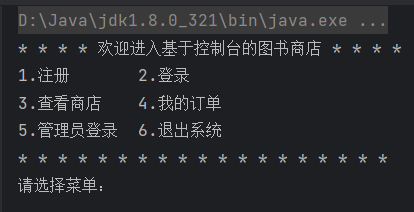
# 说明
- 1.注册 ----> 可跳转至注册界面
- 2.登录 ----> 可跳转至登录界面
- 3.查看商店 ----> 可跳转至查看图书信息界面
- 4.我的订单 ----> 可跳转至订单信息界面(登录状态下)
- 5.管理员登录 ----> 可跳转至管理员登录界面
- 6.退出系统 ----> 强行终止JVM虚拟机
-
完整代码
    public void menu() throws SerialException, InterruptedException {
        ...
        System.out.println("* * * * 欢迎进入基于控制台的图书商店 * * * *");
        System.out.print("1.注册\t\t2.登录\t\n3.查看商店\t4.我的订单\n5.管理员登录\t6.退出系统\n");
        System.out.println("* * * * * * * * * * * * * * * * * * *");
        System.out.print("请选择菜单:");
        ex();
        int serial = input.nextInt();
        loginOut(serial);
        switch (serial) {
            case 1:
                System.out.println("\n- - - -> 当前处于注册界面:");
                System.out.println("1.注册\n2.返回");
                System.out.println(" * * * * * * * * * * * * * * * * *");
                System.out.print("请选择菜单:");
                ex();
                serial = input.nextInt();
                switch (serial) {
                    case 1:
                        enroll();
                        break;
                    case 2:
                    default:
                        menu();
                        break;
                }
                break;
            case 2:
                System.out.println("\n- - - -> 当前处于登录界面:");
                System.out.println("1.登录\n2.返回");
                System.out.println("* * * * * * * * * * * * * * * *");
                System.out.print("请选择菜单:");
                ex();
                serial = input.nextInt();
                switch (serial) {
                    case 1:
                        login();
                        userMenu();
                        break;
                    case 2:
                    default:
                        menu();
                        break;
                }
                break;
            case 3:
                System.out.println("\n- - - -> 当前处于商店界面:");
                showShop();
                break;
            case 4:
                if (conversation == null || "logOut".equals(conversation)) {
                    System.out.println("\n对不起您未登录,请先登录!");
                    login();
                }
                userMenu();
                break;
            case 5:
                System.out.println("\n- - - -> 当前处于管理员登录界面:");
                System.out.println("1.登录\n2.返回");
                System.out.println("* * * * * * * * * * * * * * * *");
                System.out.print("请选择菜单:");
                ex();
                serial = input.nextInt();
                switch (serial) {
                    case 1:
                        adminLogin();
                        adminMenu();
                        break;
                    case 2:
                    default:
                        menu();
                        break;
                }
                break;
            case 6:
                System.exit(1);
                break;
            default:
                menu();
                break;
        }
    }
2.用户菜单
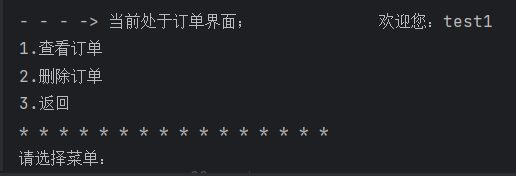
# 说明
- 1.查看订单 ----> 可查看当前登录用户的订单信息
- 2.删除订单 ----> 可输出当前登录替换的订单信息
- 3.返回 ----> 返回上一页
-
完整代码
public void userMenu() throws SerialException, InterruptedException {
        System.out.println("\n- - - -> 当前处于订单界面;\t\t\t\t欢迎您:" + conversation);
        System.out.println("1.查看订单\n2.删除订单\n3.返回");
        System.out.println("* * * * * * * * * * * * * * * *");
        System.out.print("请选择菜单:");
        ex();
        int serial = input.nextInt();
        switch (serial) {
            case 1:
                System.out.println("\n- - - -> 当前处于查看订单界面:");
                UserServiceImpl.showOrder();
                break;
            case 2:
                System.out.println("\n- - - -> 当前处于删除订单界面:");
                UserServiceImpl.delOrder();
                break;
            case 3:
                menu();
                break;
            default:
                userMenu();
                break;
        }
    }
3.管理员菜单
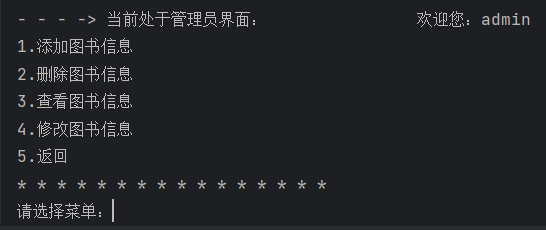
# 说明
- 1.添加图书信息 ----> 可添加新的图书信息
- 2.删除图书信息 ----> 可删除当前列表中存在的图书信息
- 3.查看图书信息 ----> 可查看当前列表中存在的图书信息
- 4.修改图书信息 ----> 可修改当前列表中存在的图书信息
- 5.返回上一页
-
完整代码
public void adminMenu() throws SerialException, InterruptedException {
        System.out.println("\n- - - -> 当前处于管理员界面:\t\t\t\t欢迎您:" + conversation);
        System.out.println("1.添加图书信息\n2.删除图书信息\n3.查看图书信息\n4.修改图书信息\n5.返回");
        System.out.println("* * * * * * * * * * * * * * * *");
        System.out.print("请选择菜单:");
        ex();
        int serial = input.nextInt();
        switch (serial) {
            case 1:
                System.out.println("\n- - - -> 当前处于添加图书信息界面");
                AdminsServiceImpl.addBooks();
                break;
            case 2:
                System.out.println("\n- - - -> 当前处于删除图书信息界面");
                AdminsServiceImpl.delBooks();
                break;
            case 3:
                System.out.println("\n- - - -> 当前处于查看图书信息界面");
                AdminsServiceImpl.showBooks();
                break;
            case 4:
                System.out.println("\n- - - -> 当前处于修改图书信息界面");
                AdminsServiceImpl.upBooks();
                break;
            case 5:
                menu();
                break;
            default:
                adminMenu();
                break;
        }
    }
六、初始数据
public void menu() throws SerialException, InterruptedException {
        //初始化数据
        token = 0;
        if (userMap.size() == 0) {
            userMap.put((useNum++), new User("test1", "shopPwd"));
            userMap.put((useNum++), new User("test2", "shopPwd"));
            userMap.put((useNum++), new User("test3", "shopPwd"));
            userMap.put((useNum++), new User("test4", "shopPwd"));
        }
        if (ordersMap.size() == 0) {
            ordersMap.put((ordNum++), new Orders("test1", "Java入门到精通", 49, 1, 49));
            ordersMap.put((ordNum++), new Orders("test2", "Java入门到精通", 49, 2, 98));
            ordersMap.put((ordNum++), new Orders("test3", "HTML入门到精通", 39.1, 4, 156.4));
            ordersMap.put((ordNum++), new Orders("test2", "MySQl入门到精通", 29.5, 1, 29.5));
        }
        if (booksMap.size() == 0) {
            booksMap.put((booNum++), new Books("Java入门到精通", 49, 12));
            booksMap.put((booNum++), new Books("PHP 入门到精通", 66.8, 34));
            booksMap.put((booNum++), new Books("MySQl入门到精通", 29.5, 56));
            booksMap.put((booNum++), new Books(".NET入门到精通", 39.1, 21));
            booksMap.put((booNum++), new Books("HTML入门到精通", 89.9, 18));
        }
        ...
    }
七、接口
public interface ShopService {
    /**
     * 登录
     */
    void login();

     /**
     * 退出登录
     */
    void loginOut(int serial) throws SerialException, InterruptedException;

    /**
     * 注册
     */
    void enroll() throws SerialException, InterruptedException;

    /**
     * 查看商店
     */
    void showShop() throws SerialException, InterruptedException;

    /**
     * 管理员登录
     */
    void adminLogin() throws SerialException, InterruptedException;
}
八、功能的实现
1.商店
(1)用户登录
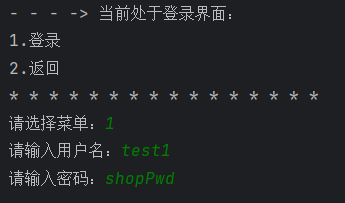
# 说明
- 1.通过循环,判断用户输入的字段是否符合要求
- 2.通过遍历userMap查找用户名是否存在且密码是否正确
- 3.页面跳转
-
完整代码
public void login() {
        String name = null, pwd = null;
        boolean flag = true;
        while (flag) {
            System.out.print("请输入用户名:");
            name = input.next();
            System.out.print("请输入密码:");
            pwd = input.next();
            if (name.length() < 3 || pwd.length() < 6) {
                System.out.println("\n用户名长度不能小于3,密码长度不能小于6!");
                continue;
            }
            flag = false;
        }
        String finalName = name;
        String finalPwd = pwd;
        userMap.forEach((serial, list) -> {
            if (list.getName().equals(finalName) & list.getPwd().equals(finalPwd)) {
                conversation = finalName;
                try {
                    if (token == 1) {
                        showShop();
                    } else {
                        userMenu();
                    }
                } catch (Exception e) {
                    System.err.println("菜单项不存在!");
                }

            }
        });
        System.out.println("\n用户名或密码不正确!");
        login();
    }
(2)退出登录
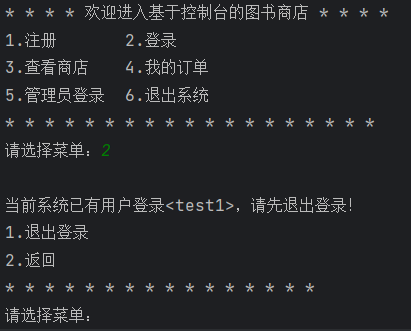
# 说明
- 1.通过判断conversation的值确认系统是否为登录状态
- 1.通过判断用户输入的字段确认当前账户是管理员还是用户
- 2.通过询问用户是否退出登录实现loginOut
- 3.页面跳转
-
完整代码
public void loginOut(int serial) throws SerialException, InterruptedException {
        if (serial == 1 || serial == 2 || serial == 4 || serial == 5) {
            if (serial == 4) {
                if (!"admin".equals(conversation) & !"logOut".equals(conversation) & conversation != null) {
                    userMenu();
                }
            }
            if (serial == 5) {
                if ("admin".equals(conversation)) {
                    adminMenu();
                }
            }
            if (conversation != null & !"logOut".equals(conversation)) {
                System.out.println("\n当前系统已有用户登录<" + conversation + ">,请先退出登录!");
                System.out.println("1.退出登录\n2.返回");
                System.out.println("* * * * * * * * * * * * * * * *");
                System.out.print("请选择菜单:");
                ex();
                serial = input.nextInt();
                switch (serial) {
                    case 1:
                        conversation = "logOut";
                        menu();
                        break;
                    case 2:
                        menu();
                        break;
                    default:
                        loginOut(serial);
                        break;
                }
            }
        }
    }
(3)用户注册
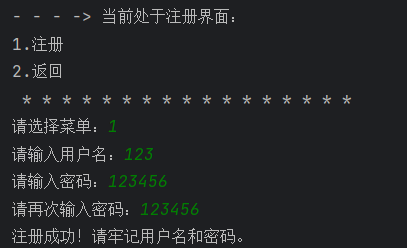
# 说明
- 1.通过循环,判断用户输入的字段是否符合要求
- 2.通过遍历userMap查找用户名是否存在
- 3.通过创建带参数的User对象并添加到userMap
- 4.页面跳转
-
完整代码
public void enroll() throws SerialException, InterruptedException {
        String name = null, pwd = null, pwds = null;
        boolean flag = true;
        while (flag) {
            System.out.print("请输入用户名:");
            name = input.next();
            System.out.print("请输入密码:");
            pwd = input.next();
            if (name.length() < 3 || pwd.length() < 6) {
                System.out.println("\n用户名长度不能小于3,密码长度不能小于6!");
                continue;
            }
            flag = false;
        }
        flag = true;
        while (flag) {
            System.out.print("请再次输入密码:");
            pwds = input.next();
            if (!pwds.equals(pwd)) {
                System.out.println("\n两次输入的密码不相同!");
                continue;
            }
            flag = false;
        }
        String finalName = name;
        userMap.forEach((serial, list) -> {
            if (list.getName().equals(finalName)) {
                System.out.println("\n用户名已存在!");
                //是否继续访问
                System.out.println("1.继续注册\n2.返回");
                System.out.println(" * * * * * * * * * * * * * * * * *");
                System.out.print("请选择菜单:");
                try {
                    ex();
                    int ren = ShopServiceImpl.input.nextInt();
                    switch (ren) {
                        case 1:
                            enroll();
                            break;
                        case 2:
                        default:
                            menu();
                            break;
                    }
                } catch (Exception e) {
                    System.err.println("菜单项不存在!");
                }
            }
        });
        User user = new User(name, pwd);
        userMap.put((useNum++), user);
        System.out.println("注册成功!请牢记用户名和密码。");
        menu();
    }
(4)查看商店
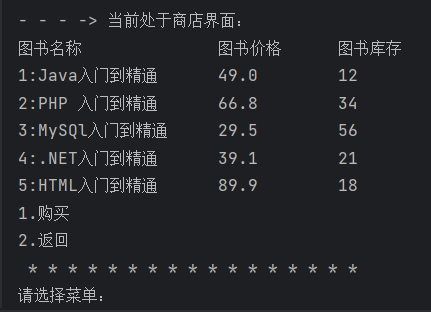
# 说明
- 1.通过遍历booksMap
- 2.判断图书库存是否存在为0的将其删除
- 3.通过switch询问用户操作
- 4.判断当前用户是否已登录
- 5.页面跳转
-
完整代码
public void showShop() throws SerialException, InterruptedException {
        System.out.println("图书名称\t\t\t\t图书价格\t\t图书库存");
        //遍历bookMap
        booksMap.forEach((serial, list) -> {
            //删除图书库存为0的图书信息
            if (list.getInventory() == 0) {
                booksMap.remove(serial);
            } else {
                System.out.println(serial + ":" + list.getBookName() + "\t\t" + list.getBookPrice() + "\t\t" + list.getInventory());
            }
        });
        System.out.println("1.购买\n2.返回");
        System.out.println(" * * * * * * * * * * * * * * * * *");
        System.out.print("请选择菜单:");
        ex();
        int serial = input.nextInt();
        switch (serial) {
            case 1:
                if (conversation == null || "logOut".equals(conversation) || "admin".equals(conversation)) {
                    System.out.println("\n对不起您未登录或当前用户权限无效,请先登录!");
                    token = 1;
                    login();
                }
                UserServiceImpl.payShop();
                break;
            case 2:
                menu();
                break;
            default:
                showShop();
                break;
        }
    }
(5)管理员登录
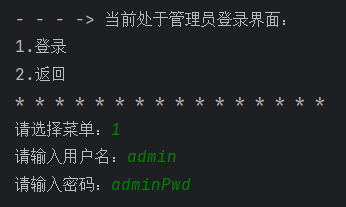
# 说明
- 1.通过循环,判断用户输入的字段是否符合要求
- 2.判断用户输入的用户名和密码是否正确
- 3.页面跳转
-
完整代码
public void adminLogin() throws SerialException, InterruptedException {
        String name = null, pwd = null;
        String adminName = "admin", adminPwd = "adminPwd";
        boolean flag = true;
        while (flag) {
            System.out.print("请输入用户名:");
            name = input.next();
            System.out.print("请输入密码:");
            pwd = input.next();
            if (name.length() < 3 || pwd.length() < 6) {
                System.out.println("\n用户名长度不能小于3,密码长度不能小于6!");
                continue;
            }
            flag = false;
        }
        if (adminName.equals(name) & adminPwd.equals(pwd)) {
            conversation = name;
            adminMenu();
        }
        System.out.println("\n用户名或密码不正确!");
        adminLogin();
    }
}
2.用户
(1)购买图书
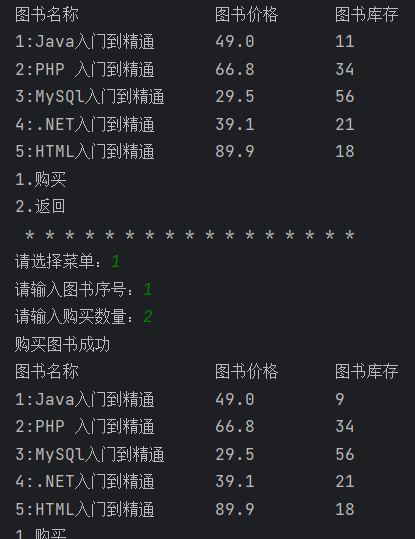
# 说明
- 1.通过循环,判断用户输入的字段是否符合要求
- 2.判断用户输入的图书库存是否超过图书列表中的图书库存
- 3.通过创建带参数的Books对象并添加到bookMap
- 4.页面跳转
-
完整代码
public static void payShop() throws SerialException, InterruptedException {
        int bookserial, num;
        boolean flag = true;
        while (flag) {
            System.out.print("请输入图书序号:");
            ex();
            bookserial = ShopServiceImpl.input.nextInt();
            System.out.print("请输入购买数量:");
            ex();
            num = ShopServiceImpl.input.nextInt();
            int finalBookSerial = bookserial;
            int finalNum = num;
            //遍历bookMap
            booksMap.forEach((serial, list) -> {
                //查找图书序号是否存在并判断购买数量是否超过库存数量
                if (serial == finalBookSerial & finalNum > list.getInventory()) {
                    System.out.println("\n购买数量不能超过库存数量!");
                    try {
                        payShop();
                        String mapName = list.getBookName();
                        double mapPrice = list.getBookPrice();
                        int temp = list.getInventory() - finalNum;
                        Books newList = new Books(mapName, mapPrice, temp);
                        booksMap.put(serial, newList);
                        carOrder(list);
                    } catch (Exception e) {
                        System.err.println("菜单项不存在!");
                    }
                }
            });
            flag = false;
        }
        System.out.println("\n图书序号不存在!");
        shopServiceImpl.showShop();
    }
(2)创建订单
# 说明
- 1.通过创建带参数的Orders对象将传入的list参数赋值并添加到ordersMap
- 2.页面跳转
-
完整代码
public static void carOrder(Books list) throws SerialException, InterruptedException {
        Orders orders = new Orders(conversation, list.getBookName(), list.getBookPrice(), list.getInventory(), list.getBookPrice() * list.getInventory());
        ordersMap.put((ordNum++), orders);
        System.out.println("购买图书成功");
        shopServiceImpl.showShop();
    }
(3)查看订单
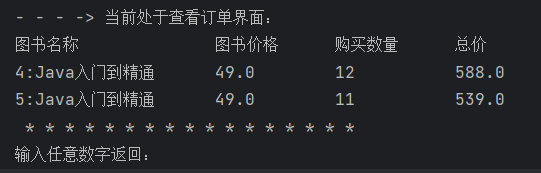
# 说明
- 1.通过遍历ordersMap显示当前登录用户的订单信息
- 2.页面跳转
-
完整代码
public static void showOrder() throws SerialException, InterruptedException {
        System.out.println("图书名称\t\t\t\t图书价格\t\t购买数量\t\t总价");
        //遍历ordersMap
        ordersMap.forEach((serial, list) -> {
            //仅查看当前登录用户的订单信息
            if (list.getOrdName().equals(conversation)) {
                System.out.println(serial + ":" + list.getBookName() + "\t\t" + list.getBookPrice() + "\t\t" + list.getInventory() + "\t\t\t" + list.getPrice());
            }
        });
        System.out.println(" * * * * * * * * * * * * * * * * *");
        System.out.print("输入任意数字返回:");
        ex();
        int serial = input.nextInt();
        switch (serial) {
            default:
                shopServiceImpl.userMenu();
                break;
        }
    }
(4)删除订单
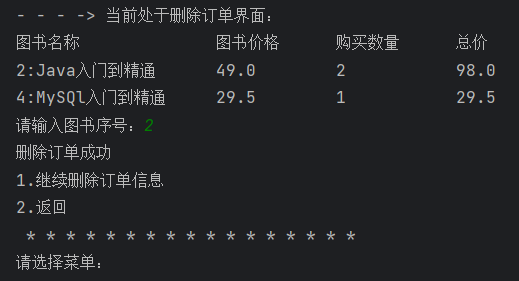
# 说明
- 1.通过遍历ordersMap显示当前登录用户的订单信息
- 2.通过循环,判断用户输入的字段是否符合要求
- 3.判断订单序号是否存在
- 4.通过图书序号删除订单信息
- 5.页面跳转
-
完整代码
public static void delOrder() throws SerialException, InterruptedException {
        System.out.println("图书名称\t\t\t\t图书价格\t\t购买数量\t\t总价");
        //遍历ordersMap
        ordersMap.forEach((serial, list) -> {
            //仅查看当前登录用户的订单信息
            if (list.getOrdName().equals(conversation)) {
                System.out.println(serial + ":" + list.getBookName() + "\t\t" + list.getBookPrice() + "\t\t" + list.getInventory() + "\t\t\t" + list.getPrice());
            }
        });
        int bookserial;
        boolean flag = true;
        while (flag) {
            System.out.print("请输入图书序号:");
            ex();
            bookserial = input.nextInt();
            int finalBookSerial = bookserial;
            //遍历ordersMap
            ordersMap.forEach((serial, list) -> {
                //仅查看当前登录用户的订单信息并查找订单序号是否存在
                if (list.getOrdName().equals(conversation) & serial == finalBookSerial) {
                    ordersMap.remove(serial);
                    System.out.println("删除订单成功");
                    //是否继续访问
                    System.out.println("1.继续删除订单信息\n2.返回");
                    System.out.println(" * * * * * * * * * * * * * * * * *");
                    System.out.print("请选择菜单:");
                    try {
                        ex();
                        int ren = input.nextInt();
                        switch (ren) {
                            case 1:
                                delOrder();
                                break;
                            case 2:
                            default:
                                shopServiceImpl.userMenu();
                                break;
                        }
                    } catch (Exception e) {
                        System.err.println("菜单项不存在!");
                    }
                }
            });
            flag = false;
        }
        System.out.println("\n订单序号不存在!");
        //是否继续访问
        System.out.println("1.继续删除订单信息\n2.返回");
        System.out.println(" * * * * * * * * * * * * * * * * *");
        System.out.print("请选择菜单:");
        ex();
        int ren = input.nextInt();
        switch (ren) {
            case 1:
                delOrder();
                break;
            case 2:
            default:
                shopServiceImpl.userMenu();
                break;
        }
    }
}
3.管理员
(1)添加图书信息
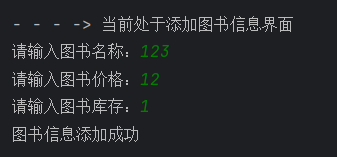
# 说明
- 1.通过循环,判断用户输入的字段是否符合要求
- 2.判断图书名称是否存在
- 3.通过创建带参数的Books对象添加图书信息
- 4.页面跳转
-
完整代码
public static void addBooks() throws SerialException, InterruptedException {
        String bookName;
        double bookPrice;
        int bookInventory;
        boolean flag = true;
        while (flag) {
            System.out.print("请输入图书名称:");
            bookName = input.next();
            System.out.print("请输入图书价格:");
            ex();
            bookPrice = input.nextDouble();
            System.out.print("请输入图书库存:");
            ex();
            bookInventory = input.nextInt();
            String finalBookName = bookName;
            double finalBookPrice = bookPrice;
            int finalBookInventory = bookInventory;
            Books newList = new Books(finalBookName, finalBookPrice, finalBookInventory);
            booksMap.put((booNum++), newList);
            System.out.println("图书信息添加成功");
            try {
                shopServiceImpl.adminMenu();
            } catch (Exception e) {
                System.err.println("菜单项不存在!");
            }
            flag = false;
        }
        System.out.println("\n图书信息添加失败!");
        addBooks();
    }
(2)删除图书信息
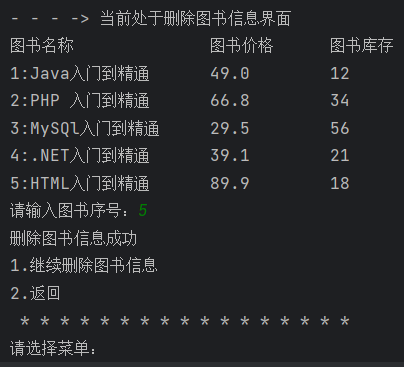
# 说明
- 1.通过遍历booksMap显示图书信息
- 2.通过循环,判断用户输入的字段是否符合要求
- 3.判断图书序号是否存在
- 4.通过图书序号删除图书信息
- 5.页面跳转
-
完整代码
public static void delBooks() throws SerialException, InterruptedException {
        System.out.println("图书名称\t\t\t\t图书价格\t\t图书库存");
        //遍历bookMap
        booksMap.forEach((serial, list) -> {
            System.out.println(serial + ":" + list.getBookName() + "\t\t" + list.getBookPrice() + "\t\t" + list.getInventory());
        });
        int bookSerial;
        boolean flag = true;
        while (flag) {
            System.out.print("请输入图书序号:");
            ex();
            bookSerial = input.nextInt();
            int finalBookSerial = bookSerial;
            //遍历bookMap
            booksMap.forEach((serial, list) -> {
                //查找图书序号是否存在
                if (serial == finalBookSerial) {
                    booksMap.remove(serial);
                    System.out.println("删除图书信息成功");
                    //是否继续访问
                    System.out.println("1.继续删除图书信息\n2.返回");
                    System.out.println(" * * * * * * * * * * * * * * * * *");
                    System.out.print("请选择菜单:");
                    try {
                        ex();
                        int ren = input.nextInt();
                        switch (ren) {
                            case 1:
                                delBooks();
                                break;
                            case 2:
                            default:
                                shopServiceImpl.adminMenu();
                                break;
                        }
                    } catch (Exception e) {
                        System.err.println("菜单项不存在!");
                    }
                }
            });
            flag = false;
        }
        System.out.println("\n图书序号不存在!");
        delBooks();
    }
(3)查看图书信息
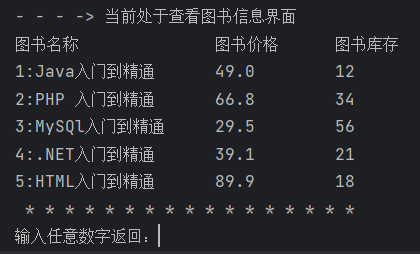
# 说明
- 1.通过遍历booksMap显示图书信息
- 5.页面跳转
-
完整代码
public static void showBooks() throws SerialException, InterruptedException {
        System.out.println("图书名称\t\t\t\t图书价格\t\t图书库存");
        //遍历bookMap
        booksMap.forEach((serial, list) -> {
            System.out.println(serial + ":" + list.getBookName() + "\t\t" + list.getBookPrice() + "\t\t" + list.getInventory());
        });
        System.out.println(" * * * * * * * * * * * * * * * * *");
        System.out.print("输入任意数字返回:");
        ex();
        int serial = input.nextInt();
        switch (serial) {
            default:
                shopServiceImpl.adminMenu();
                break;
        }
    }
(4)修改图书信息
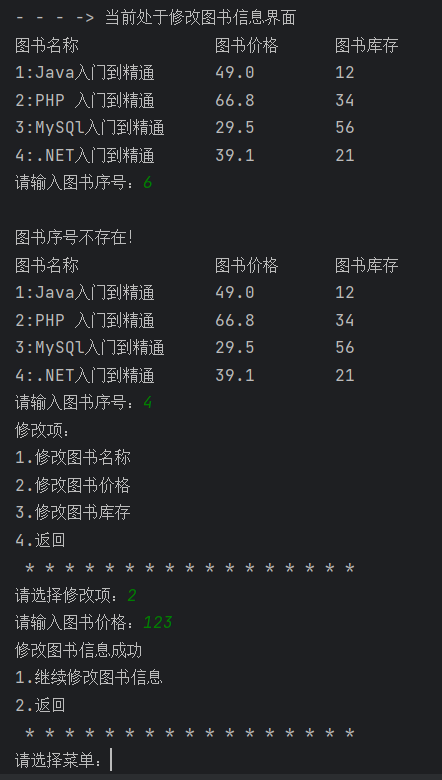
# 说明
- 1.通过遍历booksMap显示图书信息
- 2.通过循环,判断用户输入的字段是否符合要求
- 3.判断图书序号是否存在
- 4.通过图书序号修改图书信息
- 5.页面跳转
-
完整代码
public static void upBooks() throws SerialException, InterruptedException {
        System.out.println("图书名称\t\t\t\t图书价格\t\t图书库存");
        //遍历bookMap
        booksMap.forEach((serial, list) -> {
            System.out.println(serial + ":" + list.getBookName() + "\t\t" + list.getBookPrice() + "\t\t" + list.getInventory());
        });
        final String[] bookName = {null};
        final double[] bookPrice = {0};
        int bookSerial;
        final int[] inventory = {0};
        boolean flag = true;
        while (flag) {
            System.out.print("请输入图书序号:");
            ex();
            bookSerial = input.nextInt();
            int finalBookSerial = bookSerial;
            //遍历bookMap
            booksMap.forEach((serial, list) -> {
                //查找图书序号是否存在
                if (serial == finalBookSerial) {
                    System.out.println("修改项:");
                    System.out.println("1.修改图书名称\n2.修改图书价格\n3.修改图书库存\n4.返回");
                    System.out.println(" * * * * * * * * * * * * * * * * *");
                    System.out.print("请选择修改项:");
                    try {
                        ex();
                        int ser = input.nextInt();
                        switch (ser) {
                            case 1:
                                System.out.print("请输入图书名称:");
                                bookName[0] = input.next();
                                break;
                            case 2:
                                System.out.print("请输入图书价格:");
                                ex();
                                bookPrice[0] = input.nextDouble();
                                break;
                            case 3:
                                System.out.print("请输入图书库存:");
                                ex();
                                inventory[0] = input.nextInt();
                                break;
                            case 4:
                                shopServiceImpl.adminMenu();
                                break;
                            default:
                                upBooks();
                                break;
                        }
                    } catch (Exception e) {
                        System.err.println("菜单项不存在!");
                    }
                    //判断当前的修改项
                    if (bookName[0] == null) {
                        bookName[0] = list.getBookName();
                    }
                    if (bookPrice[0] == 0) {
                        bookPrice[0] = list.getBookPrice();
                    }
                    if (inventory[0] == 0) {
                        inventory[0] = list.getInventory();
                    }
                    Books newList = new Books(bookName[0], bookPrice[0], inventory[0]);
                    booksMap.put(serial, newList);
                    System.out.println("修改图书信息成功");
                    //是否继续访问
                    System.out.println("1.继续修改图书信息\n2.返回");
                    System.out.println(" * * * * * * * * * * * * * * * * *");
                    System.out.print("请选择菜单:");
                    try {
                        ex();
                        int ren = input.nextInt();
                        switch (ren) {
                            case 1:
                                upBooks();
                                break;
                            case 2:
                            default:
                                shopServiceImpl.adminMenu();
                                break;
                        }
                    } catch (Exception e) {
                        System.err.println("菜单项不存在!");
                    }
                }
            });
            flag = false;
        }
        System.out.println("\n图书序号不存在!");
        upBooks();
    }
}
九、异常
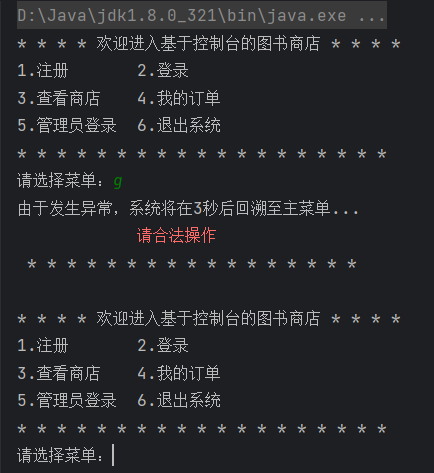
# 说明
- 1.通过继承Exception创建自定义异常
- 2.通过ex()方法,判断用户输入的字段是否符合要求
- 3.处理异常
- 4.休眠JVM虚拟机
- 5.页面跳转
-
完整代码
public class SerialException extends Exception {
    /**
     * Constructs a new exception with {@code null} as its detail message.
     * The cause is not initialized, and may subsequently be initialized by a
     * call to {@link #initCause}.
     */
    public SerialException() throws InterruptedException, SerialException {
        System.out.println("由于发生异常,系统将在3秒后回溯至主菜单...");
        System.err.println("\t\t\t请合法操作");
        Thread.sleep(100);
        System.out.println(" * * * * * * * * * * * * * * * * *\n");
        //睡眠3秒
        Thread.sleep(3000);
        ShopBiz shopServiceImpl = new ShopBiz();
        shopServiceImpl.menu();
    }
}
1.ex()方法
# 说明
- 1.通过ex()方法,判断用户输入的字段是否符合要求
- 2.判断用户输入的是否为int或double类型
- 3.清空input的值
- 4.处理异常
- 5.页面跳转
-
完整代码
public static void ex() throws SerialException, InterruptedException {
        if (!input.hasNextInt()) {
            String dbug = input.next();//释放hanNextInt空间中的值
            throw new SerialException();
        }
        if (!input.hasNextDouble()) {
            String dbug = input.next();//释放hasNextDouble空间中的值
            throw new SerialException();
        }
    }

 浙公网安备 33010602011771号