
ab简单使用
Mac 安装
-
安装
homebrew -
使用brew安装
apr、apr-util和pcrebrew install apr brew install apr-util brew install pcre -
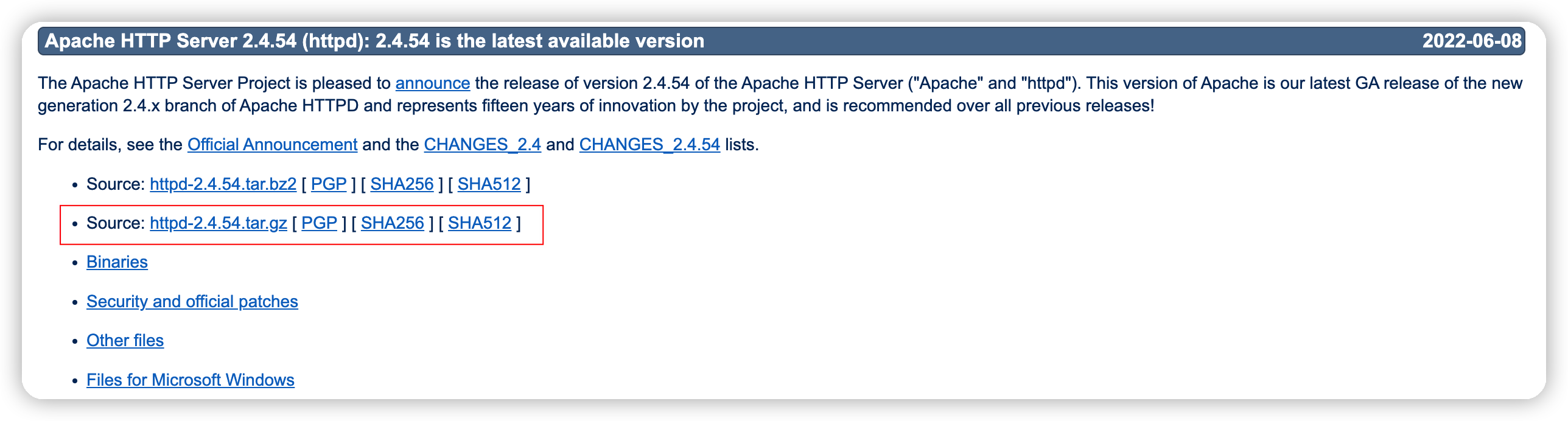
下载安装包
-
https://httpd.apache.org/download.cgi
![]()
-
解压并进入到目录下
-
-
安装
-
./configure问题:
➜  httpd-2.4.54 ./configure
checking for chosen layout... Apache
checking for working mkdir -p... yes
checking for grep that handles long lines and -e... /usr/bin/grep
checking for egrep... /usr/bin/grep -E
checking build system type... x86_64-apple-darwin21.5.0
checking host system type... x86_64-apple-darwin21.5.0
checking target system type... x86_64-apple-darwin21.5.0
configure:
configure: Configuring Apache Portable Runtime library...
configure:
checking for APR... no
configure: error: APR not found.  Please read the documentation.
处理:
./configure --with-apr=/usr/local/opt/apr --with-apr-util=/usr/local/opt/apr-util --with-pcre=/usr/local/Cellar/pcre/8.45路径需要自行确认,改为自己的路径即可
-
make -
make install问题1:
➜  httpd-2.4.54 make install
Making install in srclib
Making install in os
Making install in unix
Making install in server
Making install in mpm
Making install in event
mkdir /usr/local/apache2
mkdir: /usr/local/apache2: Permission denied
mkdir /usr/local/apache2/modules
mkdir: /usr/local/apache2: No such file or directory
make[4]: *** [install-modules-yes] Error 1
make[3]: *** [install-recursive] Error 1
make[2]: *** [install-recursive] Error 1
make[1]: *** [install-recursive] Error 1
make: *** [install-recursive] Error 1
处理:
sudo make install
-
-
验证, 直接输入
ab命令,出现命令提示说明已经安装成功-
➜  ~ ab
ab: wrong number of arguments
Usage: ab [options] [http[s]://]hostname[:port]/path
Options are:
    -n requests     Number of requests to perform
    -c concurrency  Number of multiple requests to make at a time
    -t timelimit    Seconds to max. to spend on benchmarking
                    This implies -n 50000
    -s timeout      Seconds to max. wait for each response
                    Default is 30 seconds
    -b windowsize   Size of TCP send/receive buffer, in bytes
    -B address      Address to bind to when making outgoing connections
    -p postfile     File containing data to POST. Remember also to set -T
    -u putfile      File containing data to PUT. Remember also to set -T
    -T content-type Content-type header to use for POST/PUT data, eg.
                    'application/x-www-form-urlencoded'
                    Default is 'text/plain'
    -v verbosity    How much troubleshooting info to print
    -w              Print out results in HTML tables
    -i              Use HEAD instead of GET
    -x attributes   String to insert as table attributes
    -y attributes   String to insert as tr attributes
    -z attributes   String to insert as td or th attributes
    -C attribute    Add cookie, eg. 'Apache=1234'. (repeatable)
    -H attribute    Add Arbitrary header line, eg. 'Accept-Encoding: gzip'
                    Inserted after all normal header lines. (repeatable)
    -A attribute    Add Basic WWW Authentication, the attributes
                    are a colon separated username and password.
    -P attribute    Add Basic Proxy Authentication, the attributes
                    are a colon separated username and password.
    -X proxy:port   Proxyserver and port number to use
    -V              Print version number and exit
    -k              Use HTTP KeepAlive feature
    -d              Do not show percentiles served table.
    -S              Do not show confidence estimators and warnings.
    -q              Do not show progress when doing more than 150 requests
    -l              Accept variable document length (use this for dynamic pages)
    -g filename     Output collected data to gnuplot format file.
    -e filename     Output CSV file with percentages served
    -r              Don't exit on socket receive errors.
    -m method       Method name
    -h              Display usage information (this message)
    -I              Disable TLS Server Name Indication (SNI) extension
    -Z ciphersuite  Specify SSL/TLS cipher suite (See openssl ciphers)
    -f protocol     Specify SSL/TLS protocol
                    (TLS1, TLS1.1, TLS1.2 or ALL)
    -E certfile     Specify optional client certificate chain and private key
-
ab使用
参数说明
-n:在测试会话中所执行的请求个数。默认时,仅执行一个请求。

-c:一次产生的请求个数。默认是一次一个。

-t:测试所进行的最大秒数。其内部隐含值是-n 50000,它可以使对服务器的测试限制在一个固定的总时间以内。默认时,没有时间限制。

-p:包含了需要POST的数据的文件。

-P:对一个中转代理提供BASIC认证信任。用户名和密码由一个:隔开,并以base64编码形式发送。无论服务器是否需要(即是否发送了401认证需求代码),此字符串都会被发送。

-T:POST数据所使用的Content-type头信息。

-v:设置显示信息的详细程度-4或更大值会显示头信息,3或更大值可以显示响应代码(404,200等),2或更大值可以显示警告和其他信息。

-V:显示版本号并退出。

-w:以HTML表的格式输出结果。默认时,它是白色背景的两列宽度的一张表。

-i:执行HEAD请求,而不是GET。

-x:设置<table>属性的字符串。

-X:对请求使用代理服务器。

-y:设置<tr>属性的字符串。

-z:设置<td>属性的字符串。

-C:对请求附加一个Cookie:行。其典型形式是name=value的一个参数对,此参数可以重复。

-H:对请求附加额外的头信息。此参数的典型形式是一个有效的头信息行,其中包含了以冒号分隔的字段和值的对(如,"Accept-Encoding:zip/zop;8bit")。

-A:对服务器提供BASIC认证信任。用户名和密码由一个:隔开,并以base64编码形式发送。无论服务器是否需要(即,是否发送了401认证需求代码),此字符串都会被发送。

-h:显示使用方法。

-d:不显示"percentage served within XX [ms] table"的消息(为以前的版本提供支持)。

-e:产生一个以逗号分隔的(CSV)文件,其中包含了处理每个相应百分比的请求所需要(从1%到100%)的相应百分比的(以微妙为单位)时间。由于这种格式已经“二进制化”,所以比'gnuplot'格式更有用。

-g:把所有测试结果写入一个'gnuplot'或者TSV(以Tab分隔的)文件。此文件可以方便地导入到Gnuplot,IDL,Mathematica,Igor甚至Excel中。其中的第一行为标题。

-i:执行HEAD请求,而不是GET。

-k:启用HTTP KeepAlive功能,即在一个HTTP会话中执行多个请求。默认时,不启用KeepAlive功能。

-q:如果处理的请求数大于150,ab每处理大约10%或者100个请求时,会在stderr输出一个进度计数。此-q标记可以抑制这些信息。
常用
无参数
ab -n 100 -c 10 http://127.0.0.1:8804/swagger-ui
GET请求
# GET 请求加参数,URL需要用双引号包含起来,否则ab无法解析url
ab -n 100 -c 10 "http://127.0.0.1:8804/authors/?item=d606b5a3-61dc-4d03-acd8-05eab6791d9f"
POST请求
authors.json
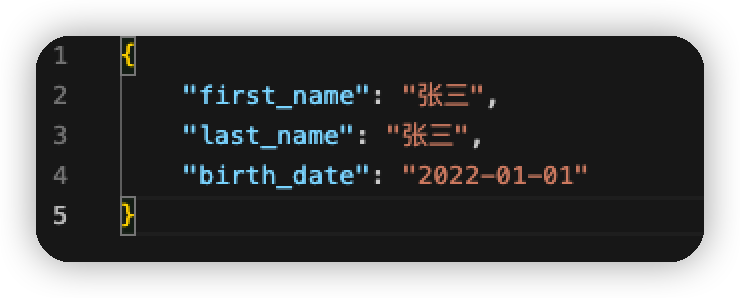
# - p post请求参数文件
# -T:POST数据所使用的Content-type头信息。
ab -n 100 -c 10 -p ./authors.txt -T application/json http://127.0.0.1:8804/authors
结果分析
Server Software:        Werkzeug/2.0.0  # web  服务器
Server Hostname:        127.0.0.1       # IP
Server Port:            8804            # 端口

Document Path:          /authors        # URL
Document Length:        266 bytes       # 数据长度

Concurrency Level:      10              # 并发数
Time taken for tests:   0.276 seconds   # 所有请求总耗时
Complete requests:      100             # 总请求数
Failed requests:        0               # 失败请求数
Non-2xx responses:      100             #  非2xx的响应
Total transferred:      47800 bytes
Total body sent:        23600
HTML transferred:       26600 bytes
Requests per second:    362.64 [#/sec] (mean)  # *重点* QPS 每秒钟请求数量
Time per request:       27.575 [ms] (mean)     # *重点* 请求平均耗时
Time per request:       2.758 [ms] (mean, across all concurrent requests)    # *重点* 服务器平均请求处理时间
Transfer rate:          169.28 [Kbytes/sec] received
                        83.58 kb/s sent
                        252.86 kb/s total

Connection Times (ms)  # 请求各阶段耗时
              min  mean[+/-sd] median   max
Connect:        0    0   0.0      0       0
Processing:     4   26   4.9     27      33
Waiting:        3   25   5.0     26      31
Total:          4   26   4.9     27      33

Percentage of the requests served within a certain time (ms)  # 请求处理时间分布
  50%     27
  66%     28
  75%     28
  80%     29
  90%     29
  95%     30
  98%     32
  99%     33
 100%     33 (longest request)
主要三个参数:Requests per second、Time per request、Time per request

 浙公网安备 33010602011771号