


***服务器多用户配置
一时心血来潮买了搬瓦工一年的VPS,买来就搭了个SS科学上网用,现在还没想到做什么其它的东西。
记录一下 *** 的多用户配置。官方单用户配置,多用户配置。
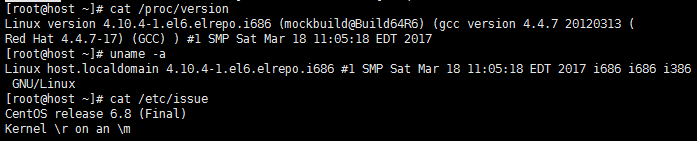
- 首先看一下我的Linux版本信息,CentOS 6.8
- 编辑SS配置文件(在 /etc 目录下新建或编辑 ***.json 文件)

SS配置格式如下:
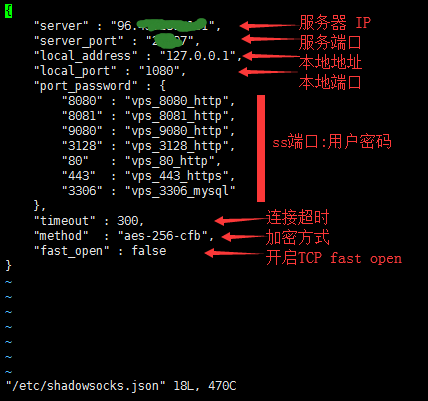
- 配置完了保存退出(:wq),重启SS服务使配置生效即可。

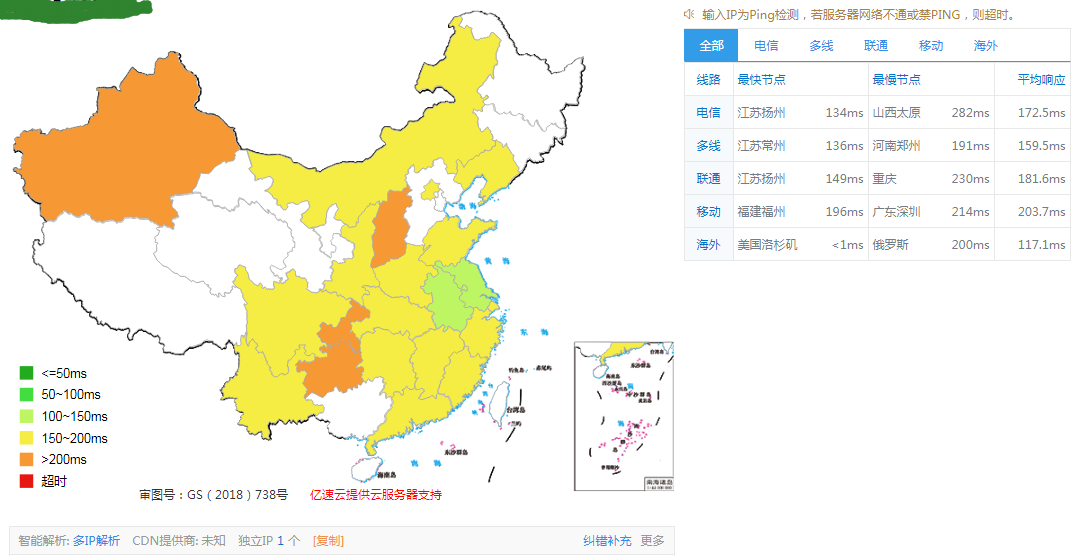
- ping 一下,看看能不能用。
![]()
============================================================
一键式:https://raw.githubusercontent.com/ToyoDAdoubi/doubi/master/ssr.sh
wget -N --no-check-certificate "https://raw.githubusercontent.com/ToyoDAdoubi/doubi/master/ssr.sh" && chmod +x ssr.sh
shell脚本:


1 #!/usr/bin/env bash 2 PATH=/bin:/sbin:/usr/bin:/usr/sbin:/usr/local/bin:/usr/local/sbin:~/bin 3 export PATH 4 5 #================================================= 6 # System Required: CentOS 6+/Debian 6+/Ubuntu 14.04+ 7 # Description: Install the *** server 8 # Version: 2.0.38 9 # Author: Toyo 10 # Blog: https://doub.io/ss-jc42/ 11 #================================================= 12 13 sh_ver="2.0.38" 14 filepath=$(cd "$(dirname "$0")"; pwd) 15 file=$(echo -e "${filepath}"|awk -F "$0" '{print $1}') 16 ssr_folder="/usr/local/***" 17 ssr_ss_file="${ssr_folder}/***" 18 config_file="${ssr_folder}/config.json" 19 config_folder="/etc/***" 20 config_user_file="${config_folder}/user-config.json" 21 ssr_log_file="${ssr_ss_file}/ssserver.log" 22 Libsodiumr_file="/usr/local/lib/libsodium.so" 23 Libsodiumr_ver_backup="1.0.13" 24 Server_Speeder_file="/serverspeeder/bin/serverSpeeder.sh" 25 LotServer_file="/appex/bin/serverSpeeder.sh" 26 BBR_file="${file}/bbr.sh" 27 jq_file="${ssr_folder}/jq" 28 Green_font_prefix="\033[32m" && Red_font_prefix="\033[31m" && Green_background_prefix="\033[42;37m" && Red_background_prefix="\033[41;37m" && Font_color_suffix="\033[0m" 29 Info="${Green_font_prefix}[信息]${Font_color_suffix}" 30 Error="${Red_font_prefix}[错误]${Font_color_suffix}" 31 Tip="${Green_font_prefix}[注意]${Font_color_suffix}" 32 Separator_1="——————————————————————————————" 33 34 check_root(){ 35 [[ $EUID != 0 ]] && echo -e "${Error} 当前账号非ROOT(或没有ROOT权限),无法继续操作,请使用${Green_background_prefix} sudo su ${Font_color_suffix}来获取临时ROOT权限(执行后会提示输入当前账号的密码)。" && exit 1 36 } 37 check_sys(){ 38 if [[ -f /etc/redhat-release ]]; then 39 release="centos" 40 elif cat /etc/issue | grep -q -E -i "debian"; then 41 release="debian" 42 elif cat /etc/issue | grep -q -E -i "ubuntu"; then 43 release="ubuntu" 44 elif cat /etc/issue | grep -q -E -i "centos|red hat|redhat"; then 45 release="centos" 46 elif cat /proc/version | grep -q -E -i "debian"; then 47 release="debian" 48 elif cat /proc/version | grep -q -E -i "ubuntu"; then 49 release="ubuntu" 50 elif cat /proc/version | grep -q -E -i "centos|red hat|redhat"; then 51 release="centos" 52 fi 53 bit=`uname -m` 54 } 55 check_pid(){ 56 PID=`ps -ef |grep -v grep | grep server.py |awk '{print $2}'` 57 } 58 SSR_installation_status(){ 59 [[ ! -e ${config_user_file} ]] && echo -e "${Error} 没有发现 *** 配置文件,请检查 !" && exit 1 60 [[ ! -e ${ssr_folder} ]] && echo -e "${Error} 没有发现 *** 文件夹,请检查 !" && exit 1 61 } 62 Server_Speeder_installation_status(){ 63 [[ ! -e ${Server_Speeder_file} ]] && echo -e "${Error} 没有安装 锐速(Server Speeder),请检查 !" && exit 1 64 } 65 LotServer_installation_status(){ 66 [[ ! -e ${LotServer_file} ]] && echo -e "${Error} 没有安装 LotServer,请检查 !" && exit 1 67 } 68 BBR_installation_status(){ 69 if [[ ! -e ${BBR_file} ]]; then 70 echo -e "${Error} 没有发现 BBR脚本,开始下载..." 71 cd "${file}" 72 if ! wget -N --no-check-certificate https://raw.githubusercontent.com/ToyoDAdoubi/doubi/master/bbr.sh; then 73 echo -e "${Error} BBR 脚本下载失败 !" && exit 1 74 else 75 echo -e "${Info} BBR 脚本下载完成 !" 76 chmod +x bbr.sh 77 fi 78 fi 79 } 80 # 设置 防火墙规则 81 Add_iptables(){ 82 iptables -I INPUT -m state --state NEW -m tcp -p tcp --dport ${ssr_port} -j ACCEPT 83 iptables -I INPUT -m state --state NEW -m udp -p udp --dport ${ssr_port} -j ACCEPT 84 ip6tables -I INPUT -m state --state NEW -m tcp -p tcp --dport ${ssr_port} -j ACCEPT 85 ip6tables -I INPUT -m state --state NEW -m udp -p udp --dport ${ssr_port} -j ACCEPT 86 } 87 Del_iptables(){ 88 iptables -D INPUT -m state --state NEW -m tcp -p tcp --dport ${port} -j ACCEPT 89 iptables -D INPUT -m state --state NEW -m udp -p udp --dport ${port} -j ACCEPT 90 ip6tables -D INPUT -m state --state NEW -m tcp -p tcp --dport ${port} -j ACCEPT 91 ip6tables -D INPUT -m state --state NEW -m udp -p udp --dport ${port} -j ACCEPT 92 } 93 Save_iptables(){ 94 if [[ ${release} == "centos" ]]; then 95 service iptables save 96 service ip6tables save 97 else 98 iptables-save > /etc/iptables.up.rules 99 ip6tables-save > /etc/ip6tables.up.rules 100 fi 101 } 102 Set_iptables(){ 103 if [[ ${release} == "centos" ]]; then 104 service iptables save 105 service ip6tables save 106 chkconfig --level 2345 iptables on 107 chkconfig --level 2345 ip6tables on 108 else 109 iptables-save > /etc/iptables.up.rules 110 ip6tables-save > /etc/ip6tables.up.rules 111 echo -e '#!/bin/bash\n/sbin/iptables-restore < /etc/iptables.up.rules\n/sbin/ip6tables-restore < /etc/ip6tables.up.rules' > /etc/network/if-pre-up.d/iptables 112 chmod +x /etc/network/if-pre-up.d/iptables 113 fi 114 } 115 # 读取 配置信息 116 Get_IP(){ 117 ip=$(wget -qO- -t1 -T2 ipinfo.io/ip) 118 if [[ -z "${ip}" ]]; then 119 ip=$(wget -qO- -t1 -T2 api.ip.sb/ip) 120 if [[ -z "${ip}" ]]; then 121 ip=$(wget -qO- -t1 -T2 members.3322.org/dyndns/getip) 122 if [[ -z "${ip}" ]]; then 123 ip="VPS_IP" 124 fi 125 fi 126 fi 127 } 128 Get_User(){ 129 [[ ! -e ${jq_file} ]] && echo -e "${Error} JQ解析器 不存在,请检查 !" && exit 1 130 port=`${jq_file} '.server_port' ${config_user_file}` 131 password=`${jq_file} '.password' ${config_user_file} | sed 's/^.//;s/.$//'` 132 method=`${jq_file} '.method' ${config_user_file} | sed 's/^.//;s/.$//'` 133 protocol=`${jq_file} '.protocol' ${config_user_file} | sed 's/^.//;s/.$//'` 134 obfs=`${jq_file} '.obfs' ${config_user_file} | sed 's/^.//;s/.$//'` 135 protocol_param=`${jq_file} '.protocol_param' ${config_user_file} | sed 's/^.//;s/.$//'` 136 speed_limit_per_con=`${jq_file} '.speed_limit_per_con' ${config_user_file}` 137 speed_limit_per_user=`${jq_file} '.speed_limit_per_user' ${config_user_file}` 138 connect_verbose_info=`${jq_file} '.connect_verbose_info' ${config_user_file}` 139 } 140 urlsafe_base64(){ 141 date=$(echo -n "$1"|base64|sed ':a;N;s/\n/ /g;ta'|sed 's/ //g;s/=//g;s/+/-/g;s/\//_/g') 142 echo -e "${date}" 143 } 144 ss_link_qr(){ 145 SSbase64=$(urlsafe_base64 "${method}:${password}@${ip}:${port}") 146 SSurl="ss://${SSbase64}" 147 SSQRcode="http://doub.pw/qr/qr.php?text=${SSurl}" 148 ss_link=" SS 链接 : ${Green_font_prefix}${SSurl}${Font_color_suffix} \n SS 二维码 : ${Green_font_prefix}${SSQRcode}${Font_color_suffix}" 149 } 150 ssr_link_qr(){ 151 SSRprotocol=$(echo ${protocol} | sed 's/_compatible//g') 152 SSRobfs=$(echo ${obfs} | sed 's/_compatible//g') 153 SSRPWDbase64=$(urlsafe_base64 "${password}") 154 SSRbase64=$(urlsafe_base64 "${ip}:${port}:${SSRprotocol}:${method}:${SSRobfs}:${SSRPWDbase64}") 155 SSRurl="ssr://${SSRbase64}" 156 SSRQRcode="http://doub.pw/qr/qr.php?text=${SSRurl}" 157 ssr_link=" SSR 链接 : ${Red_font_prefix}${SSRurl}${Font_color_suffix} \n SSR 二维码 : ${Red_font_prefix}${SSRQRcode}${Font_color_suffix} \n " 158 } 159 ss_ssr_determine(){ 160 protocol_suffix=`echo ${protocol} | awk -F "_" '{print $NF}'` 161 obfs_suffix=`echo ${obfs} | awk -F "_" '{print $NF}'` 162 if [[ ${protocol} = "origin" ]]; then 163 if [[ ${obfs} = "plain" ]]; then 164 ss_link_qr 165 ssr_link="" 166 else 167 if [[ ${obfs_suffix} != "compatible" ]]; then 168 ss_link="" 169 else 170 ss_link_qr 171 fi 172 fi 173 else 174 if [[ ${protocol_suffix} != "compatible" ]]; then 175 ss_link="" 176 else 177 if [[ ${obfs_suffix} != "compatible" ]]; then 178 if [[ ${obfs_suffix} = "plain" ]]; then 179 ss_link_qr 180 else 181 ss_link="" 182 fi 183 else 184 ss_link_qr 185 fi 186 fi 187 fi 188 ssr_link_qr 189 } 190 # 显示 配置信息 191 View_User(){ 192 SSR_installation_status 193 Get_IP 194 Get_User 195 now_mode=$(cat "${config_user_file}"|grep '"port_password"') 196 [[ -z ${protocol_param} ]] && protocol_param="0(无限)" 197 if [[ -z "${now_mode}" ]]; then 198 ss_ssr_determine 199 clear && echo "===================================================" && echo 200 echo -e " ***账号 配置信息:" && echo 201 echo -e " I P\t : ${Green_font_prefix}${ip}${Font_color_suffix}" 202 echo -e " 端口\t : ${Green_font_prefix}${port}${Font_color_suffix}" 203 echo -e " 密码\t : ${Green_font_prefix}${password}${Font_color_suffix}" 204 echo -e " 加密\t : ${Green_font_prefix}${method}${Font_color_suffix}" 205 echo -e " 协议\t : ${Red_font_prefix}${protocol}${Font_color_suffix}" 206 echo -e " 混淆\t : ${Red_font_prefix}${obfs}${Font_color_suffix}" 207 echo -e " 设备数限制 : ${Green_font_prefix}${protocol_param}${Font_color_suffix}" 208 echo -e " 单线程限速 : ${Green_font_prefix}${speed_limit_per_con} KB/S${Font_color_suffix}" 209 echo -e " 端口总限速 : ${Green_font_prefix}${speed_limit_per_user} KB/S${Font_color_suffix}" 210 echo -e "${ss_link}" 211 echo -e "${ssr_link}" 212 echo -e " ${Green_font_prefix} 提示: ${Font_color_suffix} 213 在浏览器中,打开二维码链接,就可以看到二维码图片。 214 协议和混淆后面的[ _compatible ],指的是 兼容原版协议/混淆。" 215 echo && echo "===================================================" 216 else 217 user_total=`${jq_file} '.port_password' ${config_user_file} | sed '$d' | sed "1d" | wc -l` 218 [[ ${user_total} = "0" ]] && echo -e "${Error} 没有发现 多端口用户,请检查 !" && exit 1 219 clear && echo "===================================================" && echo 220 echo -e " ***账号 配置信息:" && echo 221 echo -e " I P\t : ${Green_font_prefix}${ip}${Font_color_suffix}" 222 echo -e " 加密\t : ${Green_font_prefix}${method}${Font_color_suffix}" 223 echo -e " 协议\t : ${Red_font_prefix}${protocol}${Font_color_suffix}" 224 echo -e " 混淆\t : ${Red_font_prefix}${obfs}${Font_color_suffix}" 225 echo -e " 设备数限制 : ${Green_font_prefix}${protocol_param}${Font_color_suffix}" 226 echo -e " 单线程限速 : ${Green_font_prefix}${speed_limit_per_con} KB/S${Font_color_suffix}" 227 echo -e " 端口总限速 : ${Green_font_prefix}${speed_limit_per_user} KB/S${Font_color_suffix}" && echo 228 for((integer = ${user_total}; integer >= 1; integer--)) 229 do 230 port=`${jq_file} '.port_password' ${config_user_file} | sed '$d' | sed "1d" | awk -F ":" '{print $1}' | sed -n "${integer}p" | sed -r 's/.*\"(.+)\".*/\1/'` 231 password=`${jq_file} '.port_password' ${config_user_file} | sed '$d' | sed "1d" | awk -F ":" '{print $2}' | sed -n "${integer}p" | sed -r 's/.*\"(.+)\".*/\1/'` 232 ss_ssr_determine 233 echo -e ${Separator_1} 234 echo -e " 端口\t : ${Green_font_prefix}${port}${Font_color_suffix}" 235 echo -e " 密码\t : ${Green_font_prefix}${password}${Font_color_suffix}" 236 echo -e "${ss_link}" 237 echo -e "${ssr_link}" 238 done 239 echo -e " ${Green_font_prefix} 提示: ${Font_color_suffix} 240 在浏览器中,打开二维码链接,就可以看到二维码图片。 241 协议和混淆后面的[ _compatible ],指的是 兼容原版协议/混淆。" 242 echo && echo "===================================================" 243 fi 244 } 245 # 设置 配置信息 246 Set_config_port(){ 247 while true 248 do 249 echo -e "请输入要设置的***账号 端口" 250 read -e -p "(默认: 2333):" ssr_port 251 [[ -z "$ssr_port" ]] && ssr_port="2333" 252 echo $((${ssr_port}+0)) &>/dev/null 253 if [[ $? == 0 ]]; then 254 if [[ ${ssr_port} -ge 1 ]] && [[ ${ssr_port} -le 65535 ]]; then 255 echo && echo ${Separator_1} && echo -e " 端口 : ${Green_font_prefix}${ssr_port}${Font_color_suffix}" && echo ${Separator_1} && echo 256 break 257 else 258 echo -e "${Error} 请输入正确的数字(1-65535)" 259 fi 260 else 261 echo -e "${Error} 请输入正确的数字(1-65535)" 262 fi 263 done 264 } 265 Set_config_password(){ 266 echo "请输入要设置的***账号 密码" 267 read -e -p "(默认: doub.io):" ssr_password 268 [[ -z "${ssr_password}" ]] && ssr_password="doub.io" 269 echo && echo ${Separator_1} && echo -e " 密码 : ${Green_font_prefix}${ssr_password}${Font_color_suffix}" && echo ${Separator_1} && echo 270 } 271 Set_config_method(){ 272 echo -e "请选择要设置的***账号 加密方式 273 274 ${Green_font_prefix} 1.${Font_color_suffix} none 275 ${Tip} 如果使用 auth_chain_a 协议,请加密方式选择 none,混淆随意(建议 plain) 276 277 ${Green_font_prefix} 2.${Font_color_suffix} rc4 278 ${Green_font_prefix} 3.${Font_color_suffix} rc4-md5 279 ${Green_font_prefix} 4.${Font_color_suffix} rc4-md5-6 280 281 ${Green_font_prefix} 5.${Font_color_suffix} aes-128-ctr 282 ${Green_font_prefix} 6.${Font_color_suffix} aes-192-ctr 283 ${Green_font_prefix} 7.${Font_color_suffix} aes-256-ctr 284 285 ${Green_font_prefix} 8.${Font_color_suffix} aes-128-cfb 286 ${Green_font_prefix} 9.${Font_color_suffix} aes-192-cfb 287 ${Green_font_prefix}10.${Font_color_suffix} aes-256-cfb 288 289 ${Green_font_prefix}11.${Font_color_suffix} aes-128-cfb8 290 ${Green_font_prefix}12.${Font_color_suffix} aes-192-cfb8 291 ${Green_font_prefix}13.${Font_color_suffix} aes-256-cfb8 292 293 ${Green_font_prefix}14.${Font_color_suffix} salsa20 294 ${Green_font_prefix}15.${Font_color_suffix} chacha20 295 ${Green_font_prefix}16.${Font_color_suffix} chacha20-ietf 296 ${Tip} salsa20/chacha20-*系列加密方式,需要额外安装依赖 libsodium ,否则会无法启动*** !" && echo 297 read -e -p "(默认: 5. aes-128-ctr):" ssr_method 298 [[ -z "${ssr_method}" ]] && ssr_method="5" 299 if [[ ${ssr_method} == "1" ]]; then 300 ssr_method="none" 301 elif [[ ${ssr_method} == "2" ]]; then 302 ssr_method="rc4" 303 elif [[ ${ssr_method} == "3" ]]; then 304 ssr_method="rc4-md5" 305 elif [[ ${ssr_method} == "4" ]]; then 306 ssr_method="rc4-md5-6" 307 elif [[ ${ssr_method} == "5" ]]; then 308 ssr_method="aes-128-ctr" 309 elif [[ ${ssr_method} == "6" ]]; then 310 ssr_method="aes-192-ctr" 311 elif [[ ${ssr_method} == "7" ]]; then 312 ssr_method="aes-256-ctr" 313 elif [[ ${ssr_method} == "8" ]]; then 314 ssr_method="aes-128-cfb" 315 elif [[ ${ssr_method} == "9" ]]; then 316 ssr_method="aes-192-cfb" 317 elif [[ ${ssr_method} == "10" ]]; then 318 ssr_method="aes-256-cfb" 319 elif [[ ${ssr_method} == "11" ]]; then 320 ssr_method="aes-128-cfb8" 321 elif [[ ${ssr_method} == "12" ]]; then 322 ssr_method="aes-192-cfb8" 323 elif [[ ${ssr_method} == "13" ]]; then 324 ssr_method="aes-256-cfb8" 325 elif [[ ${ssr_method} == "14" ]]; then 326 ssr_method="salsa20" 327 elif [[ ${ssr_method} == "15" ]]; then 328 ssr_method="chacha20" 329 elif [[ ${ssr_method} == "16" ]]; then 330 ssr_method="chacha20-ietf" 331 else 332 ssr_method="aes-128-ctr" 333 fi 334 echo && echo ${Separator_1} && echo -e " 加密 : ${Green_font_prefix}${ssr_method}${Font_color_suffix}" && echo ${Separator_1} && echo 335 } 336 Set_config_protocol(){ 337 echo -e "请选择要设置的***账号 协议插件 338 339 ${Green_font_prefix}1.${Font_color_suffix} origin 340 ${Green_font_prefix}2.${Font_color_suffix} auth_sha1_v4 341 ${Green_font_prefix}3.${Font_color_suffix} auth_aes128_md5 342 ${Green_font_prefix}4.${Font_color_suffix} auth_aes128_sha1 343 ${Green_font_prefix}5.${Font_color_suffix} auth_chain_a 344 ${Green_font_prefix}6.${Font_color_suffix} auth_chain_b 345 ${Tip} 如果使用 auth_chain_a 协议,请加密方式选择 none,混淆随意(建议 plain)" && echo 346 read -e -p "(默认: 2. auth_sha1_v4):" ssr_protocol 347 [[ -z "${ssr_protocol}" ]] && ssr_protocol="2" 348 if [[ ${ssr_protocol} == "1" ]]; then 349 ssr_protocol="origin" 350 elif [[ ${ssr_protocol} == "2" ]]; then 351 ssr_protocol="auth_sha1_v4" 352 elif [[ ${ssr_protocol} == "3" ]]; then 353 ssr_protocol="auth_aes128_md5" 354 elif [[ ${ssr_protocol} == "4" ]]; then 355 ssr_protocol="auth_aes128_sha1" 356 elif [[ ${ssr_protocol} == "5" ]]; then 357 ssr_protocol="auth_chain_a" 358 elif [[ ${ssr_protocol} == "6" ]]; then 359 ssr_protocol="auth_chain_b" 360 else 361 ssr_protocol="auth_sha1_v4" 362 fi 363 echo && echo ${Separator_1} && echo -e " 协议 : ${Green_font_prefix}${ssr_protocol}${Font_color_suffix}" && echo ${Separator_1} && echo 364 if [[ ${ssr_protocol} != "origin" ]]; then 365 if [[ ${ssr_protocol} == "auth_sha1_v4" ]]; then 366 read -e -p "是否设置 协议插件兼容原版(_compatible)?[Y/n]" ssr_protocol_yn 367 [[ -z "${ssr_protocol_yn}" ]] && ssr_protocol_yn="y" 368 [[ $ssr_protocol_yn == [Yy] ]] && ssr_protocol=${ssr_protocol}"_compatible" 369 echo 370 fi 371 fi 372 } 373 Set_config_obfs(){ 374 echo -e "请选择要设置的***账号 混淆插件 375 376 ${Green_font_prefix}1.${Font_color_suffix} plain 377 ${Green_font_prefix}2.${Font_color_suffix} http_simple 378 ${Green_font_prefix}3.${Font_color_suffix} http_post 379 ${Green_font_prefix}4.${Font_color_suffix} random_head 380 ${Green_font_prefix}5.${Font_color_suffix} tls1.2_ticket_auth 381 ${Tip} 如果使用 *** 加速游戏,请选择 混淆兼容原版或 plain 混淆,然后客户端选择 plain,否则会增加延迟 ! 382 另外, 如果你选择了 tls1.2_ticket_auth,那么客户端可以选择 tls1.2_ticket_fastauth,这样即能伪装又不会增加延迟 ! 383 如果你是在日本、美国等热门地区搭建,那么选择 plain 混淆可能被墙几率更低 !" && echo 384 read -e -p "(默认: 1. plain):" ssr_obfs 385 [[ -z "${ssr_obfs}" ]] && ssr_obfs="1" 386 if [[ ${ssr_obfs} == "1" ]]; then 387 ssr_obfs="plain" 388 elif [[ ${ssr_obfs} == "2" ]]; then 389 ssr_obfs="http_simple" 390 elif [[ ${ssr_obfs} == "3" ]]; then 391 ssr_obfs="http_post" 392 elif [[ ${ssr_obfs} == "4" ]]; then 393 ssr_obfs="random_head" 394 elif [[ ${ssr_obfs} == "5" ]]; then 395 ssr_obfs="tls1.2_ticket_auth" 396 else 397 ssr_obfs="plain" 398 fi 399 echo && echo ${Separator_1} && echo -e " 混淆 : ${Green_font_prefix}${ssr_obfs}${Font_color_suffix}" && echo ${Separator_1} && echo 400 if [[ ${ssr_obfs} != "plain" ]]; then 401 read -e -p "是否设置 混淆插件兼容原版(_compatible)?[Y/n]" ssr_obfs_yn 402 [[ -z "${ssr_obfs_yn}" ]] && ssr_obfs_yn="y" 403 [[ $ssr_obfs_yn == [Yy] ]] && ssr_obfs=${ssr_obfs}"_compatible" 404 echo 405 fi 406 } 407 Set_config_protocol_param(){ 408 while true 409 do 410 echo -e "请输入要设置的***账号 欲限制的设备数 (${Green_font_prefix} auth_* 系列协议 不兼容原版才有效 ${Font_color_suffix})" 411 echo -e "${Tip} 设备数限制:每个端口同一时间能链接的客户端数量(多端口模式,每个端口都是独立计算),建议最少 2个。" 412 read -e -p "(默认: 无限):" ssr_protocol_param 413 [[ -z "$ssr_protocol_param" ]] && ssr_protocol_param="" && echo && break 414 echo $((${ssr_protocol_param}+0)) &>/dev/null 415 if [[ $? == 0 ]]; then 416 if [[ ${ssr_protocol_param} -ge 1 ]] && [[ ${ssr_protocol_param} -le 9999 ]]; then 417 echo && echo ${Separator_1} && echo -e " 设备数限制 : ${Green_font_prefix}${ssr_protocol_param}${Font_color_suffix}" && echo ${Separator_1} && echo 418 break 419 else 420 echo -e "${Error} 请输入正确的数字(1-9999)" 421 fi 422 else 423 echo -e "${Error} 请输入正确的数字(1-9999)" 424 fi 425 done 426 } 427 Set_config_speed_limit_per_con(){ 428 while true 429 do 430 echo -e "请输入要设置的每个端口 单线程 限速上限(单位:KB/S)" 431 echo -e "${Tip} 单线程限速:每个端口 单线程的限速上限,多线程即无效。" 432 read -e -p "(默认: 无限):" ssr_speed_limit_per_con 433 [[ -z "$ssr_speed_limit_per_con" ]] && ssr_speed_limit_per_con=0 && echo && break 434 echo $((${ssr_speed_limit_per_con}+0)) &>/dev/null 435 if [[ $? == 0 ]]; then 436 if [[ ${ssr_speed_limit_per_con} -ge 1 ]] && [[ ${ssr_speed_limit_per_con} -le 131072 ]]; then 437 echo && echo ${Separator_1} && echo -e " 单线程限速 : ${Green_font_prefix}${ssr_speed_limit_per_con} KB/S${Font_color_suffix}" && echo ${Separator_1} && echo 438 break 439 else 440 echo -e "${Error} 请输入正确的数字(1-131072)" 441 fi 442 else 443 echo -e "${Error} 请输入正确的数字(1-131072)" 444 fi 445 done 446 } 447 Set_config_speed_limit_per_user(){ 448 while true 449 do 450 echo 451 echo -e "请输入要设置的每个端口 总速度 限速上限(单位:KB/S)" 452 echo -e "${Tip} 端口总限速:每个端口 总速度 限速上限,单个端口整体限速。" 453 read -e -p "(默认: 无限):" ssr_speed_limit_per_user 454 [[ -z "$ssr_speed_limit_per_user" ]] && ssr_speed_limit_per_user=0 && echo && break 455 echo $((${ssr_speed_limit_per_user}+0)) &>/dev/null 456 if [[ $? == 0 ]]; then 457 if [[ ${ssr_speed_limit_per_user} -ge 1 ]] && [[ ${ssr_speed_limit_per_user} -le 131072 ]]; then 458 echo && echo ${Separator_1} && echo -e " 端口总限速 : ${Green_font_prefix}${ssr_speed_limit_per_user} KB/S${Font_color_suffix}" && echo ${Separator_1} && echo 459 break 460 else 461 echo -e "${Error} 请输入正确的数字(1-131072)" 462 fi 463 else 464 echo -e "${Error} 请输入正确的数字(1-131072)" 465 fi 466 done 467 } 468 Set_config_all(){ 469 Set_config_port 470 Set_config_password 471 Set_config_method 472 Set_config_protocol 473 Set_config_obfs 474 Set_config_protocol_param 475 Set_config_speed_limit_per_con 476 Set_config_speed_limit_per_user 477 } 478 # 修改 配置信息 479 Modify_config_port(){ 480 sed -i 's/"server_port": '"$(echo ${port})"'/"server_port": '"$(echo ${ssr_port})"'/g' ${config_user_file} 481 } 482 Modify_config_password(){ 483 sed -i 's/"password": "'"$(echo ${password})"'"/"password": "'"$(echo ${ssr_password})"'"/g' ${config_user_file} 484 } 485 Modify_config_method(){ 486 sed -i 's/"method": "'"$(echo ${method})"'"/"method": "'"$(echo ${ssr_method})"'"/g' ${config_user_file} 487 } 488 Modify_config_protocol(){ 489 sed -i 's/"protocol": "'"$(echo ${protocol})"'"/"protocol": "'"$(echo ${ssr_protocol})"'"/g' ${config_user_file} 490 } 491 Modify_config_obfs(){ 492 sed -i 's/"obfs": "'"$(echo ${obfs})"'"/"obfs": "'"$(echo ${ssr_obfs})"'"/g' ${config_user_file} 493 } 494 Modify_config_protocol_param(){ 495 sed -i 's/"protocol_param": "'"$(echo ${protocol_param})"'"/"protocol_param": "'"$(echo ${ssr_protocol_param})"'"/g' ${config_user_file} 496 } 497 Modify_config_speed_limit_per_con(){ 498 sed -i 's/"speed_limit_per_con": '"$(echo ${speed_limit_per_con})"'/"speed_limit_per_con": '"$(echo ${ssr_speed_limit_per_con})"'/g' ${config_user_file} 499 } 500 Modify_config_speed_limit_per_user(){ 501 sed -i 's/"speed_limit_per_user": '"$(echo ${speed_limit_per_user})"'/"speed_limit_per_user": '"$(echo ${ssr_speed_limit_per_user})"'/g' ${config_user_file} 502 } 503 Modify_config_connect_verbose_info(){ 504 sed -i 's/"connect_verbose_info": '"$(echo ${connect_verbose_info})"'/"connect_verbose_info": '"$(echo ${ssr_connect_verbose_info})"'/g' ${config_user_file} 505 } 506 Modify_config_all(){ 507 Modify_config_port 508 Modify_config_password 509 Modify_config_method 510 Modify_config_protocol 511 Modify_config_obfs 512 Modify_config_protocol_param 513 Modify_config_speed_limit_per_con 514 Modify_config_speed_limit_per_user 515 } 516 Modify_config_port_many(){ 517 sed -i 's/"'"$(echo ${port})"'":/"'"$(echo ${ssr_port})"'":/g' ${config_user_file} 518 } 519 Modify_config_password_many(){ 520 sed -i 's/"'"$(echo ${password})"'"/"'"$(echo ${ssr_password})"'"/g' ${config_user_file} 521 } 522 # 写入 配置信息 523 Write_configuration(){ 524 cat > ${config_user_file}<<-EOF 525 { 526 "server": "0.0.0.0", 527 "server_ipv6": "::", 528 "server_port": ${ssr_port}, 529 "local_address": "127.0.0.1", 530 "local_port": 1080, 531 532 "password": "${ssr_password}", 533 "method": "${ssr_method}", 534 "protocol": "${ssr_protocol}", 535 "protocol_param": "${ssr_protocol_param}", 536 "obfs": "${ssr_obfs}", 537 "obfs_param": "", 538 "speed_limit_per_con": ${ssr_speed_limit_per_con}, 539 "speed_limit_per_user": ${ssr_speed_limit_per_user}, 540 541 "additional_ports" : {}, 542 "timeout": 120, 543 "udp_timeout": 60, 544 "dns_ipv6": false, 545 "connect_verbose_info": 0, 546 "redirect": "", 547 "fast_open": false 548 } 549 EOF 550 } 551 Write_configuration_many(){ 552 cat > ${config_user_file}<<-EOF 553 { 554 "server": "0.0.0.0", 555 "server_ipv6": "::", 556 "local_address": "127.0.0.1", 557 "local_port": 1080, 558 559 "port_password":{ 560 "${ssr_port}":"${ssr_password}" 561 }, 562 "method": "${ssr_method}", 563 "protocol": "${ssr_protocol}", 564 "protocol_param": "${ssr_protocol_param}", 565 "obfs": "${ssr_obfs}", 566 "obfs_param": "", 567 "speed_limit_per_con": ${ssr_speed_limit_per_con}, 568 "speed_limit_per_user": ${ssr_speed_limit_per_user}, 569 570 "additional_ports" : {}, 571 "timeout": 120, 572 "udp_timeout": 60, 573 "dns_ipv6": false, 574 "connect_verbose_info": 0, 575 "redirect": "", 576 "fast_open": false 577 } 578 EOF 579 } 580 Check_python(){ 581 python_ver=`python -h` 582 if [[ -z ${python_ver} ]]; then 583 echo -e "${Info} 没有安装Python,开始安装..." 584 if [[ ${release} == "centos" ]]; then 585 yum install -y python 586 else 587 apt-get install -y python 588 fi 589 fi 590 } 591 Centos_yum(){ 592 yum update 593 cat /etc/redhat-release |grep 7\..*|grep -i centos>/dev/null 594 if [[ $? = 0 ]]; then 595 yum install -y vim unzip net-tools 596 else 597 yum install -y vim unzip 598 fi 599 } 600 Debian_apt(){ 601 apt-get update 602 cat /etc/issue |grep 9\..*>/dev/null 603 if [[ $? = 0 ]]; then 604 apt-get install -y vim unzip net-tools 605 else 606 apt-get install -y vim unzip 607 fi 608 } 609 # 下载 *** 610 Download_SSR(){ 611 cd "/usr/local/" 612 wget -N --no-check-certificate "https://github.com/ToyoDAdoubiBackup/***/archive/manyuser.zip" 613 #git config --global http.sslVerify false 614 #env GIT_SSL_NO_VERIFY=true git clone -b manyuser https://github.com/ToyoDAdoubiBackup/***.git 615 #[[ ! -e ${ssr_folder} ]] && echo -e "${Error} ***服务端 下载失败 !" && exit 1 616 [[ ! -e "manyuser.zip" ]] && echo -e "${Error} ***服务端 压缩包 下载失败 !" && rm -rf manyuser.zip && exit 1 617 unzip "manyuser.zip" 618 [[ ! -e "/usr/local/***-manyuser/" ]] && echo -e "${Error} ***服务端 解压失败 !" && rm -rf manyuser.zip && exit 1 619 mv "/usr/local/***-manyuser/" "/usr/local/***/" 620 [[ ! -e "/usr/local/***/" ]] && echo -e "${Error} ***服务端 重命名失败 !" && rm -rf manyuser.zip && rm -rf "/usr/local/***-manyuser/" && exit 1 621 rm -rf manyuser.zip 622 [[ -e ${config_folder} ]] && rm -rf ${config_folder} 623 mkdir ${config_folder} 624 [[ ! -e ${config_folder} ]] && echo -e "${Error} ***配置文件的文件夹 建立失败 !" && exit 1 625 echo -e "${Info} ***服务端 下载完成 !" 626 } 627 Service_SSR(){ 628 if [[ ${release} = "centos" ]]; then 629 if ! wget --no-check-certificate https://raw.githubusercontent.com/ToyoDAdoubi/doubi/master/service/ssr_centos -O /etc/init.d/ssr; then 630 echo -e "${Error} ***服务 管理脚本下载失败 !" && exit 1 631 fi 632 chmod +x /etc/init.d/ssr 633 chkconfig --add ssr 634 chkconfig ssr on 635 else 636 if ! wget --no-check-certificate https://raw.githubusercontent.com/ToyoDAdoubi/doubi/master/service/ssr_debian -O /etc/init.d/ssr; then 637 echo -e "${Error} ***服务 管理脚本下载失败 !" && exit 1 638 fi 639 chmod +x /etc/init.d/ssr 640 update-rc.d -f ssr defaults 641 fi 642 echo -e "${Info} ***服务 管理脚本下载完成 !" 643 } 644 # 安装 JQ解析器 645 JQ_install(){ 646 if [[ ! -e ${jq_file} ]]; then 647 cd "${ssr_folder}" 648 if [[ ${bit} = "x86_64" ]]; then 649 mv "jq-linux64" "jq" 650 #wget --no-check-certificate "https://github.com/stedolan/jq/releases/download/jq-1.5/jq-linux64" -O ${jq_file} 651 else 652 mv "jq-linux32" "jq" 653 #wget --no-check-certificate "https://github.com/stedolan/jq/releases/download/jq-1.5/jq-linux32" -O ${jq_file} 654 fi 655 [[ ! -e ${jq_file} ]] && echo -e "${Error} JQ解析器 重命名失败,请检查 !" && exit 1 656 chmod +x ${jq_file} 657 echo -e "${Info} JQ解析器 安装完成,继续..." 658 else 659 echo -e "${Info} JQ解析器 已安装,继续..." 660 fi 661 } 662 # 安装 依赖 663 Installation_dependency(){ 664 if [[ ${release} == "centos" ]]; then 665 Centos_yum 666 else 667 Debian_apt 668 fi 669 [[ ! -e "/usr/bin/unzip" ]] && echo -e "${Error} 依赖 unzip(解压压缩包) 安装失败,多半是软件包源的问题,请检查 !" && exit 1 670 Check_python 671 #echo "nameserver 8.8.8.8" > /etc/resolv.conf 672 #echo "nameserver 8.8.4.4" >> /etc/resolv.conf 673 \cp -f /usr/share/zoneinfo/Asia/Shanghai /etc/localtime 674 } 675 Install_SSR(){ 676 check_root 677 [[ -e ${config_user_file} ]] && echo -e "${Error} *** 配置文件已存在,请检查( 如安装失败或者存在旧版本,请先卸载 ) !" && exit 1 678 [[ -e ${ssr_folder} ]] && echo -e "${Error} *** 文件夹已存在,请检查( 如安装失败或者存在旧版本,请先卸载 ) !" && exit 1 679 echo -e "${Info} 开始设置 ***账号配置..." 680 Set_config_all 681 echo -e "${Info} 开始安装/配置 ***依赖..." 682 Installation_dependency 683 echo -e "${Info} 开始下载/安装 ***文件..." 684 Download_SSR 685 echo -e "${Info} 开始下载/安装 ***服务脚本(init)..." 686 Service_SSR 687 echo -e "${Info} 开始下载/安装 JSNO解析器 JQ..." 688 JQ_install 689 echo -e "${Info} 开始写入 ***配置文件..." 690 Write_configuration 691 echo -e "${Info} 开始设置 iptables防火墙..." 692 Set_iptables 693 echo -e "${Info} 开始添加 iptables防火墙规则..." 694 Add_iptables 695 echo -e "${Info} 开始保存 iptables防火墙规则..." 696 Save_iptables 697 echo -e "${Info} 所有步骤 安装完毕,开始启动 ***服务端..." 698 Start_SSR 699 } 700 Update_SSR(){ 701 SSR_installation_status 702 echo -e "因破娃暂停更新***服务端,所以此功能临时禁用。" 703 #cd ${ssr_folder} 704 #git pull 705 #Restart_SSR 706 } 707 Uninstall_SSR(){ 708 [[ ! -e ${config_user_file} ]] && [[ ! -e ${ssr_folder} ]] && echo -e "${Error} 没有安装 ***,请检查 !" && exit 1 709 echo "确定要 卸载***?[y/N]" && echo 710 read -e -p "(默认: n):" unyn 711 [[ -z ${unyn} ]] && unyn="n" 712 if [[ ${unyn} == [Yy] ]]; then 713 check_pid 714 [[ ! -z "${PID}" ]] && kill -9 ${PID} 715 if [[ -z "${now_mode}" ]]; then 716 port=`${jq_file} '.server_port' ${config_user_file}` 717 Del_iptables 718 Save_iptables 719 else 720 user_total=`${jq_file} '.port_password' ${config_user_file} | sed '$d' | sed "1d" | wc -l` 721 for((integer = 1; integer <= ${user_total}; integer++)) 722 do 723 port=`${jq_file} '.port_password' ${config_user_file} | sed '$d' | sed "1d" | awk -F ":" '{print $1}' | sed -n "${integer}p" | sed -r 's/.*\"(.+)\".*/\1/'` 724 Del_iptables 725 done 726 Save_iptables 727 fi 728 if [[ ${release} = "centos" ]]; then 729 chkconfig --del ssr 730 else 731 update-rc.d -f ssr remove 732 fi 733 rm -rf ${ssr_folder} && rm -rf ${config_folder} && rm -rf /etc/init.d/ssr 734 echo && echo " *** 卸载完成 !" && echo 735 else 736 echo && echo " 卸载已取消..." && echo 737 fi 738 } 739 Check_Libsodium_ver(){ 740 echo -e "${Info} 开始获取 libsodium 最新版本..." 741 Libsodiumr_ver=$(wget -qO- "https://github.com/jedisct1/libsodium/tags"|grep "/jedisct1/libsodium/releases/tag/"|head -1|sed -r 's/.*tag\/(.+)\">.*/\1/') 742 [[ -z ${Libsodiumr_ver} ]] && Libsodiumr_ver=${Libsodiumr_ver_backup} 743 echo -e "${Info} libsodium 最新版本为 ${Green_font_prefix}${Libsodiumr_ver}${Font_color_suffix} !" 744 } 745 Install_Libsodium(){ 746 if [[ -e ${Libsodiumr_file} ]]; then 747 echo -e "${Error} libsodium 已安装 , 是否覆盖安装(更新)?[y/N]" 748 read -e -p "(默认: n):" yn 749 [[ -z ${yn} ]] && yn="n" 750 if [[ ${yn} == [Nn] ]]; then 751 echo "已取消..." && exit 1 752 fi 753 else 754 echo -e "${Info} libsodium 未安装,开始安装..." 755 fi 756 Check_Libsodium_ver 757 if [[ ${release} == "centos" ]]; then 758 yum update 759 echo -e "${Info} 安装依赖..." 760 yum -y groupinstall "Development Tools" 761 echo -e "${Info} 下载..." 762 wget --no-check-certificate -N "https://github.com/jedisct1/libsodium/releases/download/${Libsodiumr_ver}/libsodium-${Libsodiumr_ver}.tar.gz" 763 echo -e "${Info} 解压..." 764 tar -xzf libsodium-${Libsodiumr_ver}.tar.gz && cd libsodium-${Libsodiumr_ver} 765 echo -e "${Info} 编译安装..." 766 ./configure --disable-maintainer-mode && make -j2 && make install 767 echo /usr/local/lib > /etc/ld.so.conf.d/usr_local_lib.conf 768 else 769 apt-get update 770 echo -e "${Info} 安装依赖..." 771 apt-get install -y build-essential 772 echo -e "${Info} 下载..." 773 wget --no-check-certificate -N "https://github.com/jedisct1/libsodium/releases/download/${Libsodiumr_ver}/libsodium-${Libsodiumr_ver}.tar.gz" 774 echo -e "${Info} 解压..." 775 tar -xzf libsodium-${Libsodiumr_ver}.tar.gz && cd libsodium-${Libsodiumr_ver} 776 echo -e "${Info} 编译安装..." 777 ./configure --disable-maintainer-mode && make -j2 && make install 778 fi 779 ldconfig 780 cd .. && rm -rf libsodium-${Libsodiumr_ver}.tar.gz && rm -rf libsodium-${Libsodiumr_ver} 781 [[ ! -e ${Libsodiumr_file} ]] && echo -e "${Error} libsodium 安装失败 !" && exit 1 782 echo && echo -e "${Info} libsodium 安装成功 !" && echo 783 } 784 # 显示 连接信息 785 debian_View_user_connection_info(){ 786 format_1=$1 787 if [[ -z "${now_mode}" ]]; then 788 now_mode="单端口" && user_total="1" 789 IP_total=`netstat -anp |grep 'ESTABLISHED' |grep 'python' |grep 'tcp6' |awk '{print $5}' |awk -F ":" '{print $1}' |sort -u |grep -E -o "([0-9]{1,3}[\.]){3}[0-9]{1,3}" |wc -l` 790 user_port=`${jq_file} '.server_port' ${config_user_file}` 791 user_IP_1=`netstat -anp |grep 'ESTABLISHED' |grep 'python' |grep 'tcp6' |grep ":${user_port} " |awk '{print $5}' |awk -F ":" '{print $1}' |sort -u |grep -E -o "([0-9]{1,3}[\.]){3}[0-9]{1,3}" ` 792 if [[ -z ${user_IP_1} ]]; then 793 user_IP_total="0" 794 else 795 user_IP_total=`echo -e "${user_IP_1}"|wc -l` 796 if [[ ${format_1} == "IP_address" ]]; then 797 get_IP_address 798 else 799 user_IP=`echo -e "\n${user_IP_1}"` 800 fi 801 fi 802 user_list_all="端口: ${Green_font_prefix}"${user_port}"${Font_color_suffix}\t 链接IP总数: ${Green_font_prefix}"${user_IP_total}"${Font_color_suffix}\t 当前链接IP: ${Green_font_prefix}${user_IP}${Font_color_suffix}\n" 803 user_IP="" 804 echo -e "当前模式: ${Green_background_prefix} "${now_mode}" ${Font_color_suffix} 链接IP总数: ${Green_background_prefix} "${IP_total}" ${Font_color_suffix}" 805 echo -e "${user_list_all}" 806 else 807 now_mode="多端口" && user_total=`${jq_file} '.port_password' ${config_user_file} |sed '$d;1d' | wc -l` 808 IP_total=`netstat -anp |grep 'ESTABLISHED' |grep 'python' |grep 'tcp6' |awk '{print $5}' |awk -F ":" '{print $1}' |sort -u |grep -E -o "([0-9]{1,3}[\.]){3}[0-9]{1,3}" |wc -l` 809 user_list_all="" 810 for((integer = ${user_total}; integer >= 1; integer--)) 811 do 812 user_port=`${jq_file} '.port_password' ${config_user_file} |sed '$d;1d' |awk -F ":" '{print $1}' |sed -n "${integer}p" |sed -r 's/.*\"(.+)\".*/\1/'` 813 user_IP_1=`netstat -anp |grep 'ESTABLISHED' |grep 'python' |grep 'tcp6' |grep "${user_port}" |awk '{print $5}' |awk -F ":" '{print $1}' |sort -u |grep -E -o "([0-9]{1,3}[\.]){3}[0-9]{1,3}"` 814 if [[ -z ${user_IP_1} ]]; then 815 user_IP_total="0" 816 else 817 user_IP_total=`echo -e "${user_IP_1}"|wc -l` 818 if [[ ${format_1} == "IP_address" ]]; then 819 get_IP_address 820 else 821 user_IP=`echo -e "\n${user_IP_1}"` 822 fi 823 fi 824 user_list_all=${user_list_all}"端口: ${Green_font_prefix}"${user_port}"${Font_color_suffix}\t 链接IP总数: ${Green_font_prefix}"${user_IP_total}"${Font_color_suffix}\t 当前链接IP: ${Green_font_prefix}${user_IP}${Font_color_suffix}\n" 825 user_IP="" 826 done 827 echo -e "当前模式: ${Green_background_prefix} "${now_mode}" ${Font_color_suffix} 用户总数: ${Green_background_prefix} "${user_total}" ${Font_color_suffix} 链接IP总数: ${Green_background_prefix} "${IP_total}" ${Font_color_suffix} " 828 echo -e "${user_list_all}" 829 fi 830 } 831 centos_View_user_connection_info(){ 832 format_1=$1 833 if [[ -z "${now_mode}" ]]; then 834 now_mode="单端口" && user_total="1" 835 IP_total=`netstat -anp |grep 'ESTABLISHED' |grep 'python' |grep 'tcp' |grep '::ffff:' |awk '{print $5}' |awk -F ":" '{print $4}' |sort -u |grep -E -o "([0-9]{1,3}[\.]){3}[0-9]{1,3}" |wc -l` 836 user_port=`${jq_file} '.server_port' ${config_user_file}` 837 user_IP_1=`netstat -anp |grep 'ESTABLISHED' |grep 'python' |grep 'tcp' |grep ":${user_port} " | grep '::ffff:' |awk '{print $5}' |awk -F ":" '{print $4}' |sort -u |grep -E -o "([0-9]{1,3}[\.]){3}[0-9]{1,3}"` 838 if [[ -z ${user_IP_1} ]]; then 839 user_IP_total="0" 840 else 841 user_IP_total=`echo -e "${user_IP_1}"|wc -l` 842 if [[ ${format_1} == "IP_address" ]]; then 843 get_IP_address 844 else 845 user_IP=`echo -e "\n${user_IP_1}"` 846 fi 847 fi 848 user_list_all="端口: ${Green_font_prefix}"${user_port}"${Font_color_suffix}\t 链接IP总数: ${Green_font_prefix}"${user_IP_total}"${Font_color_suffix}\t 当前链接IP: ${Green_font_prefix}${user_IP}${Font_color_suffix}\n" 849 user_IP="" 850 echo -e "当前模式: ${Green_background_prefix} "${now_mode}" ${Font_color_suffix} 链接IP总数: ${Green_background_prefix} "${IP_total}" ${Font_color_suffix}" 851 echo -e "${user_list_all}" 852 else 853 now_mode="多端口" && user_total=`${jq_file} '.port_password' ${config_user_file} |sed '$d;1d' | wc -l` 854 IP_total=`netstat -anp |grep 'ESTABLISHED' |grep 'python' |grep 'tcp' | grep '::ffff:' |awk '{print $5}' |awk -F ":" '{print $4}' |sort -u |grep -E -o "([0-9]{1,3}[\.]){3}[0-9]{1,3}" |wc -l` 855 user_list_all="" 856 for((integer = 1; integer <= ${user_total}; integer++)) 857 do 858 user_port=`${jq_file} '.port_password' ${config_user_file} |sed '$d;1d' |awk -F ":" '{print $1}' |sed -n "${integer}p" |sed -r 's/.*\"(.+)\".*/\1/'` 859 user_IP_1=`netstat -anp |grep 'ESTABLISHED' |grep 'python' |grep 'tcp' |grep "${user_port}"|grep '::ffff:' |awk '{print $5}' |awk -F ":" '{print $4}' |sort -u |grep -E -o "([0-9]{1,3}[\.]){3}[0-9]{1,3}" ` 860 if [[ -z ${user_IP_1} ]]; then 861 user_IP_total="0" 862 else 863 user_IP_total=`echo -e "${user_IP_1}"|wc -l` 864 if [[ ${format_1} == "IP_address" ]]; then 865 get_IP_address 866 else 867 user_IP=`echo -e "\n${user_IP_1}"` 868 fi 869 fi 870 user_list_all=${user_list_all}"端口: ${Green_font_prefix}"${user_port}"${Font_color_suffix}\t 链接IP总数: ${Green_font_prefix}"${user_IP_total}"${Font_color_suffix}\t 当前链接IP: ${Green_font_prefix}${user_IP}${Font_color_suffix}\n" 871 user_IP="" 872 done 873 echo -e "当前模式: ${Green_background_prefix} "${now_mode}" ${Font_color_suffix} 用户总数: ${Green_background_prefix} "${user_total}" ${Font_color_suffix} 链接IP总数: ${Green_background_prefix} "${IP_total}" ${Font_color_suffix} " 874 echo -e "${user_list_all}" 875 fi 876 } 877 View_user_connection_info(){ 878 SSR_installation_status 879 echo && echo -e "请选择要显示的格式: 880 ${Green_font_prefix}1.${Font_color_suffix} 显示 IP 格式 881 ${Green_font_prefix}2.${Font_color_suffix} 显示 IP+IP归属地 格式" && echo 882 read -e -p "(默认: 1):" ssr_connection_info 883 [[ -z "${ssr_connection_info}" ]] && ssr_connection_info="1" 884 if [[ ${ssr_connection_info} == "1" ]]; then 885 View_user_connection_info_1 "" 886 elif [[ ${ssr_connection_info} == "2" ]]; then 887 echo -e "${Tip} 检测IP归属地(ipip.net),如果IP较多,可能时间会比较长..." 888 View_user_connection_info_1 "IP_address" 889 else 890 echo -e "${Error} 请输入正确的数字(1-2)" && exit 1 891 fi 892 } 893 View_user_connection_info_1(){ 894 format=$1 895 if [[ ${release} = "centos" ]]; then 896 cat /etc/redhat-release |grep 7\..*|grep -i centos>/dev/null 897 if [[ $? = 0 ]]; then 898 debian_View_user_connection_info "$format" 899 else 900 centos_View_user_connection_info "$format" 901 fi 902 else 903 debian_View_user_connection_info "$format" 904 fi 905 } 906 get_IP_address(){ 907 #echo "user_IP_1=${user_IP_1}" 908 if [[ ! -z ${user_IP_1} ]]; then 909 #echo "user_IP_total=${user_IP_total}" 910 for((integer_1 = ${user_IP_total}; integer_1 >= 1; integer_1--)) 911 do 912 IP=`echo "${user_IP_1}" |sed -n "$integer_1"p` 913 #echo "IP=${IP}" 914 IP_address=`wget -qO- -t1 -T2 http://freeapi.ipip.net/${IP}|sed 's/\"//g;s/,//g;s/\[//g;s/\]//g'` 915 #echo "IP_address=${IP_address}" 916 user_IP="${user_IP}\n${IP}(${IP_address})" 917 #echo "user_IP=${user_IP}" 918 sleep 1s 919 done 920 fi 921 } 922 # 修改 用户配置 923 Modify_Config(){ 924 SSR_installation_status 925 if [[ -z "${now_mode}" ]]; then 926 echo && echo -e "当前模式: 单端口,你要做什么? 927 ${Green_font_prefix}1.${Font_color_suffix} 修改 用户端口 928 ${Green_font_prefix}2.${Font_color_suffix} 修改 用户密码 929 ${Green_font_prefix}3.${Font_color_suffix} 修改 加密方式 930 ${Green_font_prefix}4.${Font_color_suffix} 修改 协议插件 931 ${Green_font_prefix}5.${Font_color_suffix} 修改 混淆插件 932 ${Green_font_prefix}6.${Font_color_suffix} 修改 设备数限制 933 ${Green_font_prefix}7.${Font_color_suffix} 修改 单线程限速 934 ${Green_font_prefix}8.${Font_color_suffix} 修改 端口总限速 935 ${Green_font_prefix}9.${Font_color_suffix} 修改 全部配置" && echo 936 read -e -p "(默认: 取消):" ssr_modify 937 [[ -z "${ssr_modify}" ]] && echo "已取消..." && exit 1 938 Get_User 939 if [[ ${ssr_modify} == "1" ]]; then 940 Set_config_port 941 Modify_config_port 942 Add_iptables 943 Del_iptables 944 Save_iptables 945 elif [[ ${ssr_modify} == "2" ]]; then 946 Set_config_password 947 Modify_config_password 948 elif [[ ${ssr_modify} == "3" ]]; then 949 Set_config_method 950 Modify_config_method 951 elif [[ ${ssr_modify} == "4" ]]; then 952 Set_config_protocol 953 Modify_config_protocol 954 elif [[ ${ssr_modify} == "5" ]]; then 955 Set_config_obfs 956 Modify_config_obfs 957 elif [[ ${ssr_modify} == "6" ]]; then 958 Set_config_protocol_param 959 Modify_config_protocol_param 960 elif [[ ${ssr_modify} == "7" ]]; then 961 Set_config_speed_limit_per_con 962 Modify_config_speed_limit_per_con 963 elif [[ ${ssr_modify} == "8" ]]; then 964 Set_config_speed_limit_per_user 965 Modify_config_speed_limit_per_user 966 elif [[ ${ssr_modify} == "9" ]]; then 967 Set_config_all 968 Modify_config_all 969 else 970 echo -e "${Error} 请输入正确的数字(1-9)" && exit 1 971 fi 972 else 973 echo && echo -e "当前模式: 多端口,你要做什么? 974 ${Green_font_prefix}1.${Font_color_suffix} 添加 用户配置 975 ${Green_font_prefix}2.${Font_color_suffix} 删除 用户配置 976 ${Green_font_prefix}3.${Font_color_suffix} 修改 用户配置 977 —————————— 978 ${Green_font_prefix}4.${Font_color_suffix} 修改 加密方式 979 ${Green_font_prefix}5.${Font_color_suffix} 修改 协议插件 980 ${Green_font_prefix}6.${Font_color_suffix} 修改 混淆插件 981 ${Green_font_prefix}7.${Font_color_suffix} 修改 设备数限制 982 ${Green_font_prefix}8.${Font_color_suffix} 修改 单线程限速 983 ${Green_font_prefix}9.${Font_color_suffix} 修改 端口总限速 984 ${Green_font_prefix}10.${Font_color_suffix} 修改 全部配置" && echo 985 read -e -p "(默认: 取消):" ssr_modify 986 [[ -z "${ssr_modify}" ]] && echo "已取消..." && exit 1 987 Get_User 988 if [[ ${ssr_modify} == "1" ]]; then 989 Add_multi_port_user 990 elif [[ ${ssr_modify} == "2" ]]; then 991 Del_multi_port_user 992 elif [[ ${ssr_modify} == "3" ]]; then 993 Modify_multi_port_user 994 elif [[ ${ssr_modify} == "4" ]]; then 995 Set_config_method 996 Modify_config_method 997 elif [[ ${ssr_modify} == "5" ]]; then 998 Set_config_protocol 999 Modify_config_protocol 1000 elif [[ ${ssr_modify} == "6" ]]; then 1001 Set_config_obfs 1002 Modify_config_obfs 1003 elif [[ ${ssr_modify} == "7" ]]; then 1004 Set_config_protocol_param 1005 Modify_config_protocol_param 1006 elif [[ ${ssr_modify} == "8" ]]; then 1007 Set_config_speed_limit_per_con 1008 Modify_config_speed_limit_per_con 1009 elif [[ ${ssr_modify} == "9" ]]; then 1010 Set_config_speed_limit_per_user 1011 Modify_config_speed_limit_per_user 1012 elif [[ ${ssr_modify} == "10" ]]; then 1013 Set_config_method 1014 Set_config_protocol 1015 Set_config_obfs 1016 Set_config_protocol_param 1017 Set_config_speed_limit_per_con 1018 Set_config_speed_limit_per_user 1019 Modify_config_method 1020 Modify_config_protocol 1021 Modify_config_obfs 1022 Modify_config_protocol_param 1023 Modify_config_speed_limit_per_con 1024 Modify_config_speed_limit_per_user 1025 else 1026 echo -e "${Error} 请输入正确的数字(1-9)" && exit 1 1027 fi 1028 fi 1029 Restart_SSR 1030 } 1031 # 显示 多端口用户配置 1032 List_multi_port_user(){ 1033 user_total=`${jq_file} '.port_password' ${config_user_file} | sed '$d' | sed "1d" | wc -l` 1034 [[ ${user_total} = "0" ]] && echo -e "${Error} 没有发现 多端口用户,请检查 !" && exit 1 1035 user_list_all="" 1036 for((integer = ${user_total}; integer >= 1; integer--)) 1037 do 1038 user_port=`${jq_file} '.port_password' ${config_user_file} | sed '$d' | sed "1d" | awk -F ":" '{print $1}' | sed -n "${integer}p" | sed -r 's/.*\"(.+)\".*/\1/'` 1039 user_password=`${jq_file} '.port_password' ${config_user_file} | sed '$d' | sed "1d" | awk -F ":" '{print $2}' | sed -n "${integer}p" | sed -r 's/.*\"(.+)\".*/\1/'` 1040 user_list_all=${user_list_all}"端口: "${user_port}" 密码: "${user_password}"\n" 1041 done 1042 echo && echo -e "用户总数 ${Green_font_prefix}"${user_total}"${Font_color_suffix}" 1043 echo -e ${user_list_all} 1044 } 1045 # 添加 多端口用户配置 1046 Add_multi_port_user(){ 1047 Set_config_port 1048 Set_config_password 1049 sed -i "8 i \" \"${ssr_port}\":\"${ssr_password}\"," ${config_user_file} 1050 sed -i "8s/^\"//" ${config_user_file} 1051 Add_iptables 1052 Save_iptables 1053 echo -e "${Info} 多端口用户添加完成 ${Green_font_prefix}[端口: ${ssr_port} , 密码: ${ssr_password}]${Font_color_suffix} " 1054 } 1055 # 修改 多端口用户配置 1056 Modify_multi_port_user(){ 1057 List_multi_port_user 1058 echo && echo -e "请输入要修改的用户端口" 1059 read -e -p "(默认: 取消):" modify_user_port 1060 [[ -z "${modify_user_port}" ]] && echo -e "已取消..." && exit 1 1061 del_user=`cat ${config_user_file}|grep '"'"${modify_user_port}"'"'` 1062 if [[ ! -z "${del_user}" ]]; then 1063 port="${modify_user_port}" 1064 password=`echo -e ${del_user}|awk -F ":" '{print $NF}'|sed -r 's/.*\"(.+)\".*/\1/'` 1065 Set_config_port 1066 Set_config_password 1067 sed -i 's/"'$(echo ${port})'":"'$(echo ${password})'"/"'$(echo ${ssr_port})'":"'$(echo ${ssr_password})'"/g' ${config_user_file} 1068 Del_iptables 1069 Add_iptables 1070 Save_iptables 1071 echo -e "${Inof} 多端口用户修改完成 ${Green_font_prefix}[旧: ${modify_user_port} ${password} , 新: ${ssr_port} ${ssr_password}]${Font_color_suffix} " 1072 else 1073 echo -e "${Error} 请输入正确的端口 !" && exit 1 1074 fi 1075 } 1076 # 删除 多端口用户配置 1077 Del_multi_port_user(){ 1078 List_multi_port_user 1079 user_total=`${jq_file} '.port_password' ${config_user_file} | sed '$d' | sed "1d" | wc -l` 1080 [[ "${user_total}" = "1" ]] && echo -e "${Error} 多端口用户仅剩 1个,不能删除 !" && exit 1 1081 echo -e "请输入要删除的用户端口" 1082 read -e -p "(默认: 取消):" del_user_port 1083 [[ -z "${del_user_port}" ]] && echo -e "已取消..." && exit 1 1084 del_user=`cat ${config_user_file}|grep '"'"${del_user_port}"'"'` 1085 if [[ ! -z ${del_user} ]]; then 1086 port=${del_user_port} 1087 Del_iptables 1088 Save_iptables 1089 del_user_determine=`echo ${del_user:((${#del_user} - 1))}` 1090 if [[ ${del_user_determine} != "," ]]; then 1091 del_user_num=$(sed -n -e "/${port}/=" ${config_user_file}) 1092 echo $((${ssr_protocol_param}+0)) &>/dev/null 1093 del_user_num=$(echo $((${del_user_num}-1))) 1094 sed -i "${del_user_num}s/,//g" ${config_user_file} 1095 fi 1096 sed -i "/${port}/d" ${config_user_file} 1097 echo -e "${Info} 多端口用户删除完成 ${Green_font_prefix} ${del_user_port} ${Font_color_suffix} " 1098 else 1099 echo "${Error} 请输入正确的端口 !" && exit 1 1100 fi 1101 } 1102 # 手动修改 用户配置 1103 Manually_Modify_Config(){ 1104 SSR_installation_status 1105 port=`${jq_file} '.server_port' ${config_user_file}` 1106 vi ${config_user_file} 1107 if [[ -z "${now_mode}" ]]; then 1108 ssr_port=`${jq_file} '.server_port' ${config_user_file}` 1109 Del_iptables 1110 Add_iptables 1111 fi 1112 Restart_SSR 1113 } 1114 # 切换端口模式 1115 Port_mode_switching(){ 1116 SSR_installation_status 1117 if [[ -z "${now_mode}" ]]; then 1118 echo && echo -e " 当前模式: ${Green_font_prefix}单端口${Font_color_suffix}" && echo 1119 echo -e "确定要切换为 多端口模式?[y/N]" 1120 read -e -p "(默认: n):" mode_yn 1121 [[ -z ${mode_yn} ]] && mode_yn="n" 1122 if [[ ${mode_yn} == [Yy] ]]; then 1123 port=`${jq_file} '.server_port' ${config_user_file}` 1124 Set_config_all 1125 Write_configuration_many 1126 Del_iptables 1127 Add_iptables 1128 Save_iptables 1129 Restart_SSR 1130 else 1131 echo && echo " 已取消..." && echo 1132 fi 1133 else 1134 echo && echo -e " 当前模式: ${Green_font_prefix}多端口${Font_color_suffix}" && echo 1135 echo -e "确定要切换为 单端口模式?[y/N]" 1136 read -e -p "(默认: n):" mode_yn 1137 [[ -z ${mode_yn} ]] && mode_yn="n" 1138 if [[ ${mode_yn} == [Yy] ]]; then 1139 user_total=`${jq_file} '.port_password' ${config_user_file} | sed '$d' | sed "1d" | wc -l` 1140 for((integer = 1; integer <= ${user_total}; integer++)) 1141 do 1142 port=`${jq_file} '.port_password' ${config_user_file} | sed '$d' | sed "1d" | awk -F ":" '{print $1}' | sed -n "${integer}p" | sed -r 's/.*\"(.+)\".*/\1/'` 1143 Del_iptables 1144 done 1145 Set_config_all 1146 Write_configuration 1147 Add_iptables 1148 Restart_SSR 1149 else 1150 echo && echo " 已取消..." && echo 1151 fi 1152 fi 1153 } 1154 Start_SSR(){ 1155 SSR_installation_status 1156 check_pid 1157 [[ ! -z ${PID} ]] && echo -e "${Error} *** 正在运行 !" && exit 1 1158 /etc/init.d/ssr start 1159 check_pid 1160 [[ ! -z ${PID} ]] && View_User 1161 } 1162 Stop_SSR(){ 1163 SSR_installation_status 1164 check_pid 1165 [[ -z ${PID} ]] && echo -e "${Error} *** 未运行 !" && exit 1 1166 /etc/init.d/ssr stop 1167 } 1168 Restart_SSR(){ 1169 SSR_installation_status 1170 check_pid 1171 [[ ! -z ${PID} ]] && /etc/init.d/ssr stop 1172 /etc/init.d/ssr start 1173 check_pid 1174 [[ ! -z ${PID} ]] && View_User 1175 } 1176 View_Log(){ 1177 SSR_installation_status 1178 [[ ! -e ${ssr_log_file} ]] && echo -e "${Error} ***日志文件不存在 !" && exit 1 1179 echo && echo -e "${Tip} 按 ${Red_font_prefix}Ctrl+C${Font_color_suffix} 终止查看日志" && echo -e "如果需要查看完整日志内容,请用 ${Red_font_prefix}cat ${ssr_log_file}${Font_color_suffix} 命令。" && echo 1180 tail -f ${ssr_log_file} 1181 } 1182 # 锐速 1183 Configure_Server_Speeder(){ 1184 echo && echo -e "你要做什么? 1185 ${Green_font_prefix}1.${Font_color_suffix} 安装 锐速 1186 ${Green_font_prefix}2.${Font_color_suffix} 卸载 锐速 1187 ———————— 1188 ${Green_font_prefix}3.${Font_color_suffix} 启动 锐速 1189 ${Green_font_prefix}4.${Font_color_suffix} 停止 锐速 1190 ${Green_font_prefix}5.${Font_color_suffix} 重启 锐速 1191 ${Green_font_prefix}6.${Font_color_suffix} 查看 锐速 状态 1192 1193 注意: 锐速和LotServer不能同时安装/启动!" && echo 1194 read -e -p "(默认: 取消):" server_speeder_num 1195 [[ -z "${server_speeder_num}" ]] && echo "已取消..." && exit 1 1196 if [[ ${server_speeder_num} == "1" ]]; then 1197 Install_ServerSpeeder 1198 elif [[ ${server_speeder_num} == "2" ]]; then 1199 Server_Speeder_installation_status 1200 Uninstall_ServerSpeeder 1201 elif [[ ${server_speeder_num} == "3" ]]; then 1202 Server_Speeder_installation_status 1203 ${Server_Speeder_file} start 1204 ${Server_Speeder_file} status 1205 elif [[ ${server_speeder_num} == "4" ]]; then 1206 Server_Speeder_installation_status 1207 ${Server_Speeder_file} stop 1208 elif [[ ${server_speeder_num} == "5" ]]; then 1209 Server_Speeder_installation_status 1210 ${Server_Speeder_file} restart 1211 ${Server_Speeder_file} status 1212 elif [[ ${server_speeder_num} == "6" ]]; then 1213 Server_Speeder_installation_status 1214 ${Server_Speeder_file} status 1215 else 1216 echo -e "${Error} 请输入正确的数字(1-6)" && exit 1 1217 fi 1218 } 1219 Install_ServerSpeeder(){ 1220 [[ -e ${Server_Speeder_file} ]] && echo -e "${Error} 锐速(Server Speeder) 已安装 !" && exit 1 1221 cd /root 1222 #借用91yun.rog的开心版锐速 1223 wget -N --no-check-certificate https://raw.githubusercontent.com/91yun/serverspeeder/master/serverspeeder.sh 1224 [[ ! -e "serverspeeder.sh" ]] && echo -e "${Error} 锐速安装脚本下载失败 !" && exit 1 1225 bash serverspeeder.sh 1226 sleep 2s 1227 PID=`ps -ef |grep -v grep |grep "serverspeeder" |awk '{print $2}'` 1228 if [[ ! -z ${PID} ]]; then 1229 rm -rf /root/serverspeeder.sh 1230 rm -rf /root/91yunserverspeeder 1231 rm -rf /root/91yunserverspeeder.tar.gz 1232 echo -e "${Info} 锐速(Server Speeder) 安装完成 !" && exit 1 1233 else 1234 echo -e "${Error} 锐速(Server Speeder) 安装失败 !" && exit 1 1235 fi 1236 } 1237 Uninstall_ServerSpeeder(){ 1238 echo "确定要卸载 锐速(Server Speeder)?[y/N]" && echo 1239 read -e -p "(默认: n):" unyn 1240 [[ -z ${unyn} ]] && echo && echo "已取消..." && exit 1 1241 if [[ ${unyn} == [Yy] ]]; then 1242 chattr -i /serverspeeder/etc/apx* 1243 /serverspeeder/bin/serverSpeeder.sh uninstall -f 1244 echo && echo "锐速(Server Speeder) 卸载完成 !" && echo 1245 fi 1246 } 1247 # LotServer 1248 Configure_LotServer(){ 1249 echo && echo -e "你要做什么? 1250 ${Green_font_prefix}1.${Font_color_suffix} 安装 LotServer 1251 ${Green_font_prefix}2.${Font_color_suffix} 卸载 LotServer 1252 ———————— 1253 ${Green_font_prefix}3.${Font_color_suffix} 启动 LotServer 1254 ${Green_font_prefix}4.${Font_color_suffix} 停止 LotServer 1255 ${Green_font_prefix}5.${Font_color_suffix} 重启 LotServer 1256 ${Green_font_prefix}6.${Font_color_suffix} 查看 LotServer 状态 1257 1258 注意: 锐速和LotServer不能同时安装/启动!" && echo 1259 read -e -p "(默认: 取消):" lotserver_num 1260 [[ -z "${lotserver_num}" ]] && echo "已取消..." && exit 1 1261 if [[ ${lotserver_num} == "1" ]]; then 1262 Install_LotServer 1263 elif [[ ${lotserver_num} == "2" ]]; then 1264 LotServer_installation_status 1265 Uninstall_LotServer 1266 elif [[ ${lotserver_num} == "3" ]]; then 1267 LotServer_installation_status 1268 ${LotServer_file} start 1269 ${LotServer_file} status 1270 elif [[ ${lotserver_num} == "4" ]]; then 1271 LotServer_installation_status 1272 ${LotServer_file} stop 1273 elif [[ ${lotserver_num} == "5" ]]; then 1274 LotServer_installation_status 1275 ${LotServer_file} restart 1276 ${LotServer_file} status 1277 elif [[ ${lotserver_num} == "6" ]]; then 1278 LotServer_installation_status 1279 ${LotServer_file} status 1280 else 1281 echo -e "${Error} 请输入正确的数字(1-6)" && exit 1 1282 fi 1283 } 1284 Install_LotServer(){ 1285 [[ -e ${LotServer_file} ]] && echo -e "${Error} LotServer 已安装 !" && exit 1 1286 #Github: https://github.com/0oVicero0/serverSpeeder_Install 1287 wget --no-check-certificate -qO /tmp/appex.sh "https://raw.githubusercontent.com/0oVicero0/serverSpeeder_Install/master/appex.sh" 1288 [[ ! -e "/tmp/appex.sh" ]] && echo -e "${Error} LotServer 安装脚本下载失败 !" && exit 1 1289 bash /tmp/appex.sh 'install' 1290 sleep 2s 1291 PID=`ps -ef |grep -v grep |grep "appex" |awk '{print $2}'` 1292 if [[ ! -z ${PID} ]]; then 1293 echo -e "${Info} LotServer 安装完成 !" && exit 1 1294 else 1295 echo -e "${Error} LotServer 安装失败 !" && exit 1 1296 fi 1297 } 1298 Uninstall_LotServer(){ 1299 echo "确定要卸载 LotServer?[y/N]" && echo 1300 read -e -p "(默认: n):" unyn 1301 [[ -z ${unyn} ]] && echo && echo "已取消..." && exit 1 1302 if [[ ${unyn} == [Yy] ]]; then 1303 wget --no-check-certificate -qO /tmp/appex.sh "https://raw.githubusercontent.com/0oVicero0/serverSpeeder_Install/master/appex.sh" && bash /tmp/appex.sh 'uninstall' 1304 echo && echo "LotServer 卸载完成 !" && echo 1305 fi 1306 } 1307 # BBR 1308 Configure_BBR(){ 1309 echo && echo -e " 你要做什么? 1310 1311 ${Green_font_prefix}1.${Font_color_suffix} 安装 BBR 1312 ———————— 1313 ${Green_font_prefix}2.${Font_color_suffix} 启动 BBR 1314 ${Green_font_prefix}3.${Font_color_suffix} 停止 BBR 1315 ${Green_font_prefix}4.${Font_color_suffix} 查看 BBR 状态" && echo 1316 echo -e "${Green_font_prefix} [安装前 请注意] ${Font_color_suffix} 1317 1. 安装开启BBR,需要更换内核,存在更换失败等风险(重启后无法开机) 1318 2. 本脚本仅支持 Debian / Ubuntu 系统更换内核,OpenVZ和Docker 不支持更换内核 1319 3. Debian 更换内核过程中会提示 [ 是否终止卸载内核 ] ,请选择 ${Green_font_prefix} NO ${Font_color_suffix}" && echo 1320 read -e -p "(默认: 取消):" bbr_num 1321 [[ -z "${bbr_num}" ]] && echo "已取消..." && exit 1 1322 if [[ ${bbr_num} == "1" ]]; then 1323 Install_BBR 1324 elif [[ ${bbr_num} == "2" ]]; then 1325 Start_BBR 1326 elif [[ ${bbr_num} == "3" ]]; then 1327 Stop_BBR 1328 elif [[ ${bbr_num} == "4" ]]; then 1329 Status_BBR 1330 else 1331 echo -e "${Error} 请输入正确的数字(1-4)" && exit 1 1332 fi 1333 } 1334 Install_BBR(){ 1335 [[ ${release} = "centos" ]] && echo -e "${Error} 本脚本不支持 CentOS系统安装 BBR !" && exit 1 1336 BBR_installation_status 1337 bash "${BBR_file}" 1338 } 1339 Start_BBR(){ 1340 BBR_installation_status 1341 bash "${BBR_file}" start 1342 } 1343 Stop_BBR(){ 1344 BBR_installation_status 1345 bash "${BBR_file}" stop 1346 } 1347 Status_BBR(){ 1348 BBR_installation_status 1349 bash "${BBR_file}" status 1350 } 1351 # 其他功能 1352 Other_functions(){ 1353 echo && echo -e " 你要做什么? 1354 1355 ${Green_font_prefix}1.${Font_color_suffix} 配置 BBR 1356 ${Green_font_prefix}2.${Font_color_suffix} 配置 锐速(ServerSpeeder) 1357 ${Green_font_prefix}3.${Font_color_suffix} 配置 LotServer(锐速母公司) 1358 注意: 锐速/LotServer/BBR 不支持 OpenVZ! 1359 注意: 锐速/LotServer/BBR 不能共存! 1360 ———————————— 1361 ${Green_font_prefix}4.${Font_color_suffix} 一键封禁 BT/PT/SPAM (iptables) 1362 ${Green_font_prefix}5.${Font_color_suffix} 一键解封 BT/PT/SPAM (iptables) 1363 ${Green_font_prefix}6.${Font_color_suffix} 切换 ***日志输出模式 1364 ——说明:SSR默认只输出错误日志,此项可切换为输出详细的访问日志" && echo 1365 read -e -p "(默认: 取消):" other_num 1366 [[ -z "${other_num}" ]] && echo "已取消..." && exit 1 1367 if [[ ${other_num} == "1" ]]; then 1368 Configure_BBR 1369 elif [[ ${other_num} == "2" ]]; then 1370 Configure_Server_Speeder 1371 elif [[ ${other_num} == "3" ]]; then 1372 Configure_LotServer 1373 elif [[ ${other_num} == "4" ]]; then 1374 BanBTPTSPAM 1375 elif [[ ${other_num} == "5" ]]; then 1376 UnBanBTPTSPAM 1377 elif [[ ${other_num} == "6" ]]; then 1378 Set_config_connect_verbose_info 1379 else 1380 echo -e "${Error} 请输入正确的数字 [1-6]" && exit 1 1381 fi 1382 } 1383 # 封禁 BT PT SPAM 1384 BanBTPTSPAM(){ 1385 wget -N --no-check-certificate https://raw.githubusercontent.com/ToyoDAdoubi/doubi/master/ban_iptables.sh && chmod +x ban_iptables.sh && bash ban_iptables.sh banall 1386 rm -rf ban_iptables.sh 1387 } 1388 # 解封 BT PT SPAM 1389 UnBanBTPTSPAM(){ 1390 wget -N --no-check-certificate https://raw.githubusercontent.com/ToyoDAdoubi/doubi/master/ban_iptables.sh && chmod +x ban_iptables.sh && bash ban_iptables.sh unbanall 1391 rm -rf ban_iptables.sh 1392 } 1393 Set_config_connect_verbose_info(){ 1394 SSR_installation_status 1395 Get_User 1396 if [[ ${connect_verbose_info} = "0" ]]; then 1397 echo && echo -e "当前日志模式: ${Green_font_prefix}简单模式(只输出错误日志)${Font_color_suffix}" && echo 1398 echo -e "确定要切换为 ${Green_font_prefix}详细模式(输出详细连接日志+错误日志)${Font_color_suffix}?[y/N]" 1399 read -e -p "(默认: n):" connect_verbose_info_ny 1400 [[ -z "${connect_verbose_info_ny}" ]] && connect_verbose_info_ny="n" 1401 if [[ ${connect_verbose_info_ny} == [Yy] ]]; then 1402 ssr_connect_verbose_info="1" 1403 Modify_config_connect_verbose_info 1404 Restart_SSR 1405 else 1406 echo && echo " 已取消..." && echo 1407 fi 1408 else 1409 echo && echo -e "当前日志模式: ${Green_font_prefix}详细模式(输出详细连接日志+错误日志)${Font_color_suffix}" && echo 1410 echo -e "确定要切换为 ${Green_font_prefix}简单模式(只输出错误日志)${Font_color_suffix}?[y/N]" 1411 read -e -p "(默认: n):" connect_verbose_info_ny 1412 [[ -z "${connect_verbose_info_ny}" ]] && connect_verbose_info_ny="n" 1413 if [[ ${connect_verbose_info_ny} == [Yy] ]]; then 1414 ssr_connect_verbose_info="0" 1415 Modify_config_connect_verbose_info 1416 Restart_SSR 1417 else 1418 echo && echo " 已取消..." && echo 1419 fi 1420 fi 1421 } 1422 Update_Shell(){ 1423 sh_new_ver=$(wget --no-check-certificate -qO- -t1 -T3 "https://raw.githubusercontent.com/ToyoDAdoubi/doubi/master/ssr.sh"|grep 'sh_ver="'|awk -F "=" '{print $NF}'|sed 's/\"//g'|head -1) && sh_new_type="github" 1424 [[ -z ${sh_new_ver} ]] && echo -e "${Error} 无法链接到 Github !" && exit 0 1425 if [[ -e "/etc/init.d/ssr" ]]; then 1426 rm -rf /etc/init.d/ssr 1427 Service_SSR 1428 fi 1429 wget -N --no-check-certificate "https://raw.githubusercontent.com/ToyoDAdoubi/doubi/master/ssr.sh" && chmod +x ssr.sh 1430 echo -e "脚本已更新为最新版本[ ${sh_new_ver} ] !(注意:因为更新方式为直接覆盖当前运行的脚本,所以可能下面会提示一些报错,无视即可)" && exit 0 1431 } 1432 # 显示 菜单状态 1433 menu_status(){ 1434 if [[ -e ${config_user_file} ]]; then 1435 check_pid 1436 if [[ ! -z "${PID}" ]]; then 1437 echo -e " 当前状态: ${Green_font_prefix}已安装${Font_color_suffix} 并 ${Green_font_prefix}已启动${Font_color_suffix}" 1438 else 1439 echo -e " 当前状态: ${Green_font_prefix}已安装${Font_color_suffix} 但 ${Red_font_prefix}未启动${Font_color_suffix}" 1440 fi 1441 now_mode=$(cat "${config_user_file}"|grep '"port_password"') 1442 if [[ -z "${now_mode}" ]]; then 1443 echo -e " 当前模式: ${Green_font_prefix}单端口${Font_color_suffix}" 1444 else 1445 echo -e " 当前模式: ${Green_font_prefix}多端口${Font_color_suffix}" 1446 fi 1447 else 1448 echo -e " 当前状态: ${Red_font_prefix}未安装${Font_color_suffix}" 1449 fi 1450 } 1451 check_sys 1452 [[ ${release} != "debian" ]] && [[ ${release} != "ubuntu" ]] && [[ ${release} != "centos" ]] && echo -e "${Error} 本脚本不支持当前系统 ${release} !" && exit 1 1453 echo -e " *** 一键管理脚本 ${Red_font_prefix}[v${sh_ver}]${Font_color_suffix} 1454 ---- Toyo | doub.io/ss-jc42 ---- 1455 1456 ${Green_font_prefix}1.${Font_color_suffix} 安装 *** 1457 ${Green_font_prefix}2.${Font_color_suffix} 更新 *** 1458 ${Green_font_prefix}3.${Font_color_suffix} 卸载 *** 1459 ${Green_font_prefix}4.${Font_color_suffix} 安装 libsodium(chacha20) 1460 ———————————— 1461 ${Green_font_prefix}5.${Font_color_suffix} 查看 账号信息 1462 ${Green_font_prefix}6.${Font_color_suffix} 显示 连接信息 1463 ${Green_font_prefix}7.${Font_color_suffix} 设置 用户配置 1464 ${Green_font_prefix}8.${Font_color_suffix} 手动 修改配置 1465 ${Green_font_prefix}9.${Font_color_suffix} 切换 端口模式 1466 ———————————— 1467 ${Green_font_prefix}10.${Font_color_suffix} 启动 *** 1468 ${Green_font_prefix}11.${Font_color_suffix} 停止 *** 1469 ${Green_font_prefix}12.${Font_color_suffix} 重启 *** 1470 ${Green_font_prefix}13.${Font_color_suffix} 查看 *** 日志 1471 ———————————— 1472 ${Green_font_prefix}14.${Font_color_suffix} 其他功能 1473 ${Green_font_prefix}15.${Font_color_suffix} 升级脚本 1474 " 1475 menu_status 1476 echo && read -e -p "请输入数字 [1-15]:" num 1477 case "$num" in 1478 1) 1479 Install_SSR 1480 ;; 1481 2) 1482 Update_SSR 1483 ;; 1484 3) 1485 Uninstall_SSR 1486 ;; 1487 4) 1488 Install_Libsodium 1489 ;; 1490 5) 1491 View_User 1492 ;; 1493 6) 1494 View_user_connection_info 1495 ;; 1496 7) 1497 Modify_Config 1498 ;; 1499 8) 1500 Manually_Modify_Config 1501 ;; 1502 9) 1503 Port_mode_switching 1504 ;; 1505 10) 1506 Start_SSR 1507 ;; 1508 11) 1509 Stop_SSR 1510 ;; 1511 12) 1512 Restart_SSR 1513 ;; 1514 13) 1515 View_Log 1516 ;; 1517 14) 1518 Other_functions 1519 ;; 1520 15) 1521 Update_Shell 1522 ;; 1523 *) 1524 echo -e "${Error} 请输入正确的数字 [1-15]" 1525 ;; 1526 esac

 浙公网安备 33010602011771号