


1、sed简介
1.1 sed概述
sed 编辑器被称作流编辑器(stream editor),与普通的交互式文本编辑器截然不同。在交互式文本编辑器(比如Vim)中,可以用键盘命令交互式地插入、删除或替换文本数据。流编辑器则是根据事先设计好的一组规则编辑数据流。
sed 编辑器根据命令来处理数据流中的数据,这些命令要么从命令行中输入,要么保存在命
令文本文件中。sed 编辑器可以执行下列操作。
(1) 从输入中读取一行数据。
(2) 根据所提供的编辑器命令匹配数据。
(3) 按照命令修改数据流中的数据。
(4) 将新的数据输出到STDOUT。
在流编辑器匹配并针对一行数据执行所有命令之后,会读取下一行数据并重复这个过程。在
流编辑器处理完数据流中的所有行后,就结束运行。
sed 是从文件或管道中读取一行,处理一行,输出一行;再读取一行,再处理一行,再输出一行,直到最后一行。每当处理一行时,把当前处理的行存储在临时缓冲区中,称为模式空间(PatternSpace),接着用 sed 命令处理缓冲区中的内容,处理完成后,把缓冲区的内容送往屏幕。接着处理下一行,这样不断重复,直到文件末尾。一次处理一行的设计模式使得 sed 性能很高,sed 在读取大文件时不会出现卡顿的现象。如果使用 vi 命令打开几十M上百M的文件,明显会出现有卡顿的现象,这是因为 vi 命令打开文件是一次性将文件加载到内存,然后再打开。sed 就避免了这种情况,一行一行的处理,打开速度非常快,执行速度也很快。
2、sed工作流程
sed 的工作流程主要包括读取、执行和显示三个过程:
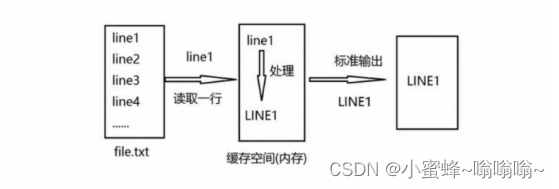
- 读取: sed 从输入流 (文件、管道、标准输入) 中读取一行内容并存储到临时的缓冲区中(又称模式空间,pattern space )。
- 执行: 默认情况下,所有的 sed 命令都在模式空间中顺序地执行,除非指定了行的地址,否则 sed 命令将会在所有的行上依次执行。
- 显示: 发送修改后的内容到输出流。在发送数据后,模式空间将会被清空。在所有的文件内容都被处理完成之前,上述过程将重复执行, 直至所有内容被处理完。
详细处理流程如下:
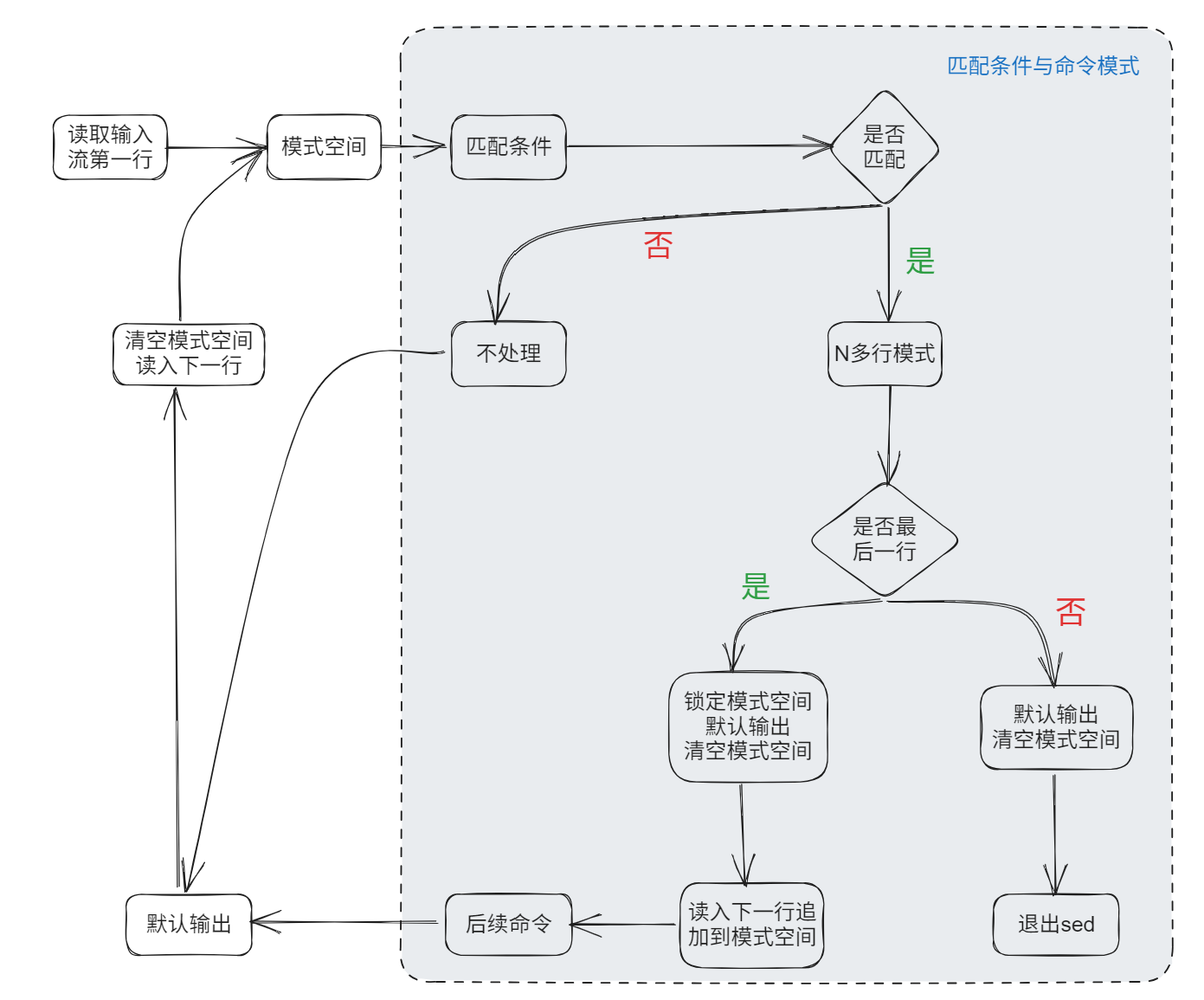
注意:
- 1、默认情况下所有的 sed 命令都是在模式空间内执行的,因此输入的文件并不会发生任何变化,除非使用 "sed -i" 修改源文件、或使用重定向输出到新的文件中。
- 2、模式空间 (pattern buffer) 是一块活跃的缓冲区,在sed编辑器执行命令时它会保存待检查的文本
- 3、还有另外一个缓冲区叫做 保持空间 (hold buffer),在处理模式空间中的某些行时,可以用保持空间来临时保存一些行。在每一个循环结束的时候,SED将会移除模式空间中的内容,但是该缓冲区中的内容在所有的循环过程中是持久存储的。SED命令无法直接在该缓冲区中执行,因此SED允许数据在 保持空间 和 模式空间之间切换
- 4、初始情况下,保持空间 和 模式空间 这两个缓冲区都是空的
- 5、如果没有提供输入文件的话,SED将会从标准输入接收请求
- 6、如果没有提供地址范围的话,默认情况下SED将会对所有的行进行操作
3、sed语法结构
sed [OPTION]... {script-only-if-no-other-script} [input-file]...

sed [选项] '匹配条件和操作指令' 文件名

#如:
cat 文件名 | sed [选项] '匹配条件和操作指令'
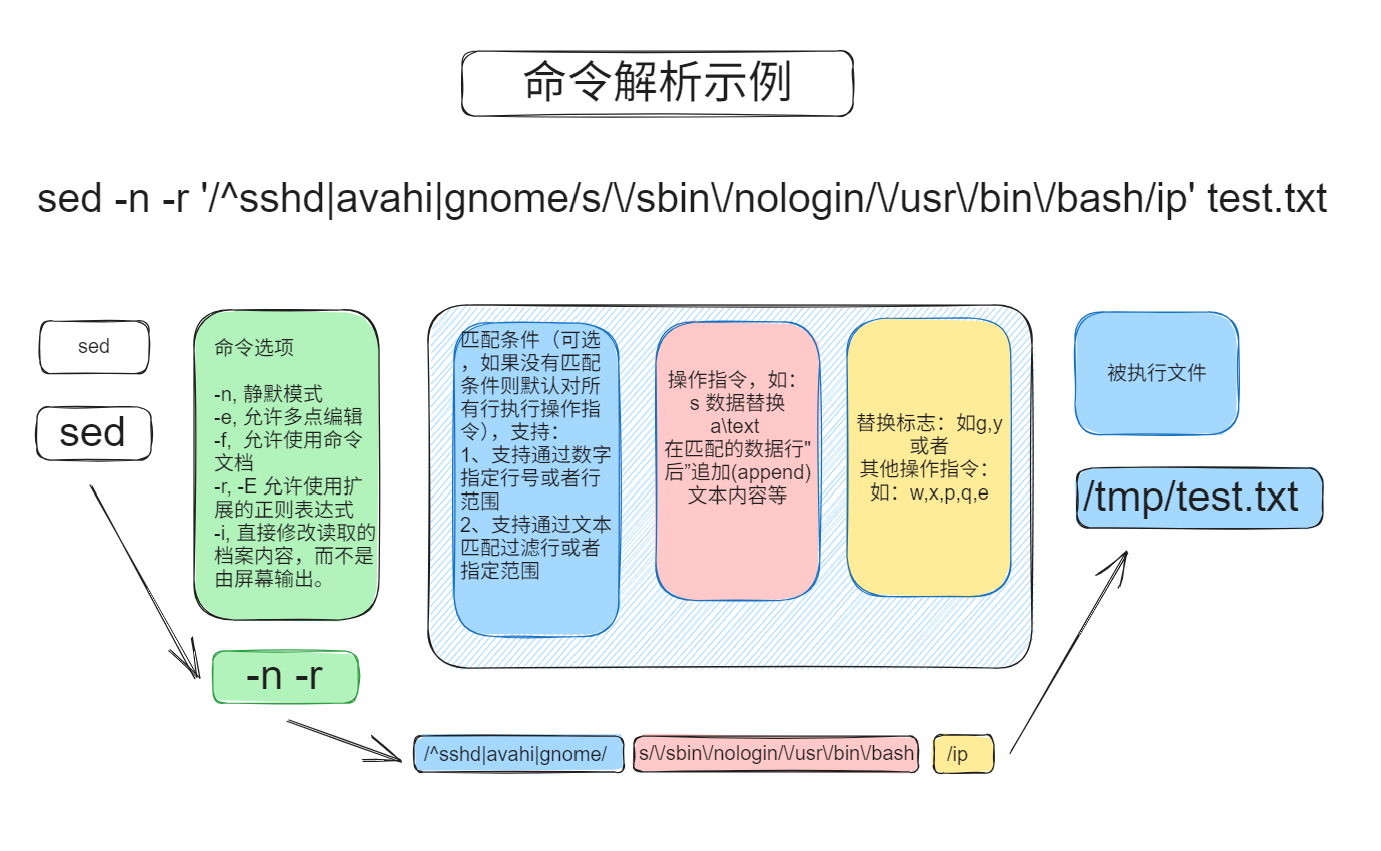
各模块介绍如下:
3.1 sed命令选项(命令选项)
-n,--quiet,--silent:禁止自动打印模式(常配合p使用,进显示处理后的结果)。sed -n '/hello/p' filename使用/hello/匹配所有含有“hello”的行,p匹配行--debug:以注解的方式显示sed的执行过程,帮助调试脚本。sed --debug 's/foo/bar' filename,当你使用sed修改内容时,会显示调试信息,以便了解脚本如何运行-e script, --expression=script: 在命令行中直接指定sed脚本(允许多个sed表达式)。sed -e 's/foo/bar -e 's/hello/world/' filename将文件中的的foo替换为bar,然后将hello替换为world-f script-file, --file=script-file:从指定的脚本中读取sed命令。sed -f script.sed filenamescript.sed是包含多个sed命令的脚本文件,sed会按顺序执行这些命令--follow-symlinks:当指定-i时,sed会跟随符号链接(symlink)指向的实际文件进行编辑。sed -i --follow-symlinks 's/foo/bar'-l N, --line-length=N: 当使用l参数(列出行内容)时,指定输出的行宽(N代表字符数),echo 'hello world'|sed -l 5 'l'--posix:禁用GNU扩展,使sed遵循POSIX标准语法。sed --posix 's/foo/bar' filename。这将禁用sed的一些非标准特性,确保sed在标准POSIX环境下工作。-E,-r, --regexp-extended:使用扩展的正则表达式(ERE),这与基本正则表达式(BRE)相比,简化了一些语法(例如不用转义括号和+)。echo "abc123"|sed -E 's/[a-z]+([0-9])/\1/'使用扩展正则表达式,匹配并提取字母后的数字。-s, --separate: 将多个输出文件视为独立的流,而不是作为一个连续的流处理。sed -s 's/foo/bar/' file1.txt file2.txt,sed将会分别处理file1.txt和file2.txt,而不是将他们作为一个整体处理--sandbox:以沙盒模式运行,禁止使用e,r,w命令,防止sed修改文件或执行外部命令。sed --sandbox 's/foo/bar/' filename启动沙盒模式,防止sed脚本执行危险的操作。-u, --unbuffered:减少从输入文件读取数据时的缓冲区大小,并更频繁的刷新输出。sed -u 's/foo/bar/ filename'立即处理结果并输出到标准输出,而不是等到处理大量数据后输出-z, --null-data: 将输入中的行分隔符从换行符\n替换为nul字符\0,这在处理二进制数据以null作为分隔符的文本时很有用。sed -z 's/foo/bar/' filename使用null字符作为行分隔符处理文本
[root@entos7 sed_test]# sed '' book.txt
#命令为空,sed默认情况下会输出模式空间中的内容
1) A Storm of Swords, George R. R. Martin, 1216
2) The Two Towers, J. R. R. Tolkien, 352
3) The Alchemist, Paulo Coelho, 197
4) The Fellowship of the Ring, J. R. R. Tolkien, 432
5) The Pilgrimage, Paulo Coelho, 288
6) A Game of Thrones, George R. R. Martin, 864

[root@entos7 sed_test]# sed 'p' book.txt
#命令中包含了输出命令`p`,会输出模式空间中的内容,并且sed默认情况下会输出模式空间中的内容,因此每行被打印了两次
[root@entos7 sed_test]# sed 'p' book.txt
1) A Storm of Swords, George R. R. Martin, 1216
2) A Storm of Swords, George R. R. Martin, 1216
3) The Two Towers, J. R. R. Tolkien, 352
4) The Two Towers, J. R. R. Tolkien, 352
5) The Alchemist, Paulo Coelho, 197
6) The Alchemist, Paulo Coelho, 197
7) The Fellowship of the Ring, J. R. R. Tolkien, 432
8) The Fellowship of the Ring, J. R. R. Tolkien, 432
9) The Pilgrimage, Paulo Coelho, 288
10) The Pilgrimage, Paulo Coelho, 288
11) A Game of Thrones, George R. R. Martin, 864
12) A Game of Thrones, George R. R. Martin, 864

[root@entos7 sed_test]# sed -n 'p' book.txt
# 使用-n静默模式,取消了sed默认情况下会输出模式空间中的内容,因此只会打印一行
1) A Storm of Swords, George R. R. Martin, 1216
2) The Two Towers, J. R. R. Tolkien, 352
3) The Alchemist, Paulo Coelho, 197
4) The Fellowship of the Ring, J. R. R. Tolkien, 432
5) The Pilgrimage, Paulo Coelho, 288
6) A Game of Thrones, George R. R. Martin, 864
3.2 匹配条件与操作指令
3.2.1 匹配条件
默认情况下,在sed中使用的命令会作用于文本数据的所有行。如果只想将命令用于特定的行或者某些行,则需要使用行寻址功能,在sed中包含两种形式的行寻址。
- 以数字形式表示的行空间
- 以文本模式来过滤行
格式如下:
| 格式 | 描述 |
|---|---|
| /pattern /command | 匹配数据行(支持正则表达式) |
| /pattern1/,/pattern2/ command | 匹配从pattern1开始到pattern2结束的行(支持正则表达式) |
| n(数字) command | 使用“行号”匹配,范围是1-$($表示最后一行) |
| addr1,addr2 command | 使用“行号或正则”定位,匹配从addr1到addr2的所有行 |
| addr1,+n command | 使用“行号或正则”定位,匹配从addr1开始及后面的n行 |
| n~step command | 使用“行号”,匹配从行号开始开始,步长为step的所有数据行 |
3.2.2 常见操作指令
sed常用命令选项(操作指令选项)
| 指令 | 描述 | 简单示例 |
|---|---|---|
!<script> |
表示对前面的匹配结果取反后,执行后面的命令 | sed -n '/foo/!p' filename,只打印不包含有foo的行 |
| p | 打印当前匹配的行 | sed -n '/foo/p' filename,只打印含有foo的行 |
| l | 小写L,打印当前匹配的行,并打印控制字符 | sed -l '/foo/l' filename,只打印含有foo的行,并打印控制字符 |
| = | 打印当前读取数据所在的行号 | sed -n '1,15 =' filename,打印1到15行的行号 |
a\<text> |
在匹配的数据行‘后’追加(append)文本内容 | sed '/foo/a\hello world' filename, 在每个含有‘foo’的行, 下面追加一行‘hello world’ |
i\<text> |
在匹配的数据行‘前’插入(insert)文本内容 | sed '/foo/i\hello world',在每个含有‘foo’的行,前面追加一行‘hello world’ |
c\<text> |
将匹配的数据行“整行”内容变更(change)特定的文本内容 | sed '/foo/c\hello world' filename,将每个含有'foo'的整行,都替换为‘hello world’ |
| d | 行删除,删除(delete)匹配的数据行整行 | sed '/foo/d' filename,一般放在操作指令的最后,删除每个包含有foo的行 |
r <filename> |
从文件中读取(read)数据,并追加到匹配的数据行后 | sed -i '/foo/r datafile' filename,将data文件中的内容追加到每个匹配到foo的行数据的后面 |
w <filename> |
将当前匹配到的数据,写入(wirte)特定的文件中 | sed -n '/foo/w newfile' filename,将匹配到的行写入到newfile中 |
q[exit code] |
立即退出(quit)sed脚本 | 打印第5行之前的数据,类似sed '1,5p' |
s/regexp/replace |
使用正则匹配,将匹配到的数据替换(substitue)为特定内容 | sed 's/foo/bar/' filename将每个含有foo行中的第一个foo替换为bar |
| e | 执行(excute):允许在替换文本中进行命令执行 | echo 'ls /tmp'|sed 's/ls/ls -l/e',将sed命令的结果当做命令执行;即输出ls -l /tmp的结果 |
| & | 引用匹配的整个字符串 | echo "hello"|sed 's/hello/& ok/'将hello,替换为hello ok。 |
3.2.3 替换标志
| 指令 | 描述 | 简单示例 |
|---|---|---|
| n(数字) | 只替换第n次出现的匹配项 | sed 's/foo/bar/2' filename将每个含有foo行中第二次出现的foo替换为bar |
| g | 全局替换(gobal substitution):替换匹配的每一行中的所有匹配项 | sed '/pattern/s/foo/bar/g' filename将每个匹配的每一行中的所有foo替换为bar |
| i | 忽略大小写(ignore case):进行不区分大小写的匹配 | sed -n '/foo/ip' filename,打印文件行中包含foo的行,不区分大小写 |
3.2.4 高级操作指令
| 指令 | 说明 |
|---|---|
| h | 将“模式空间”中的数据复制到“保持空间” |
| H | 将“模式空间”中的数据追加到“保持空间” |
| g | 将“保持空间”中的数据复制到“模式空间” |
| G | 将“保持空间”中的数据复制到“模式空间” |
| x | 将“模式空间”和“保持空间”中的数据交换 |
| n | 读取下一行数据复制到“模式空间” |
| N | 读取下一行数据追加到“模式空间” |
| :label | 为t或b指令定义label标签 |
| t label | 满足条件时调到标签(label),如果没有(label),则跳转到指令的结尾 |
| b label | 跳转到label,如果没有label,则跳转到指令的结尾 |
| y/源/目标 | 以字符为单位将源字符转换为目标字符 |
4、示例
示例数据:
[root@entos7 sed_test]# cat testdata.txt
1 The quick red fox jumps over the lazy cat.
2 The quick brown fox jumps over the lazy dog.
3 The quick red fox jumps over the lazy cat.
4 The quick brown fox jumps over the lazy dog.
5 The quick red fox jumps over the lazy cat.
6 The quick brown fox jumps over the lazy dog.
7 The quick red fox jumps over the lazy cat.
8 The quick brown fox jumps over the lazy dog.
9 The quick red fox jumps over the lazy cat.
10 The quick brown fox jumps over the lazy dog.
11 The quick red fox jumps over the lazy cat.
12 The quick brown fox jumps over the lazy dog.
13 The quick red fox jumps over the lazy cat.
14 The quick brown fox jumps over the lazy dog.
15 The quick red fox jumps over the lazy cat.
16 The quick brown fox jumps over the lazy dog.
17 The quick red fox jumps over the lazy cat.
18 The quick brown fox jumps over the lazy dog.
19 The quick red fox jumps over the lazy cat.
20 The quick brown fox jumps over the lazy dog.
4.1 匹配范围
# 行号范围,打印第3到5行

[root@entos7 sed_test]# sed -n '3,5p' testdata.txt
3 The quick red fox jumps over the lazy cat.
4 The quick brown fox jumps over the lazy dog.
5 The quick red fox jumps over the lazy cat.

# 正则表达式匹配范围,从匹配start_pattern的行开始,到end_pattern的行结束
[root@entos7 sed_test]# sed -n '/3 The/,/6 The/ s/over/under/p' testdata.txt
3 The quick red fox jumps under the lazy cat.
4 The quick brown fox jumps under the lazy dog.
5 The quick red fox jumps under the lazy cat.
6 The quick brown fox jumps under the lazy dog.
13 The quick red fox jumps under the lazy cat.
14 The quick brown fox jumps under the lazy dog.
15 The quick red fox jumps under the lazy cat.
16 The quick brown fox jumps under the lazy dog.
注意:
- 行命令会在文件 file 中先寻找匹配 pattern1 的行,然后从该行开始,执行编辑命令,直到找到匹配 pattern2 的行。
- 但是需要注意的是,使用文本区间过滤文本时,只要匹配到了开始模式(pattern1),编辑命令就会开始执行,直到匹配到结束模式(pattern2),这会导致一种情况:一个文本中,先匹配到了一对 pattern1、pattern2,对该文本区间中的文本执行了编辑命令;然后,在 pattern2 之后又匹配到了 pattern1,这时就会再次开始执行编辑命令,因此,在使用文本区间过滤时要注意这一点
# 使用数字与文本模式匹配行范围,然后用!取反,对不符合删选范围的行进行打印
[root@entos7 sed_test]# sed -n '1,/18 The/!p' testdata.txt
19 The quick red fox jumps over the lazy cat.
20 The quick brown fox jumps over the lazy dog.

# 通过指定步长,打印所有奇数行
[root@entos7 sed_test]# sed -n '1~2p' testdata.txt
1 The quick red fox jumps over the lazy cat.
3 The quick red fox jumps over the lazy cat.
5 The quick red fox jumps over the lazy cat.
7 The quick red fox jumps over the lazy cat.
9 The quick red fox jumps over the lazy cat.
11 The quick red fox jumps over the lazy cat.
13 The quick red fox jumps over the lazy cat.
15 The quick red fox jumps over the lazy cat.
17 The quick red fox jumps over the lazy cat.
19 The quick red fox jumps over the lazy cat.
4.2 增删改
4.2.1 替换操作
4.2.1.1 基础替换
# 只替换文本中第一次出新的匹配项,并将结果输出到标准输出
sed 's/far/bar' filename

# 只替换每行中第三次出现的匹配项
sed 's/far/bar/3' filename

# 只打印替换过的行
sed -n 's/far/bar/p' filename

# 编辑原文件同时创建备份文件
[root@entos7 sed_test]# sed -i.bak '1~2 s/over/under/' testdata.txt
[root@entos7 sed_test]# ls
# 查看发现创建了testdata.txt.bak的备份文件
book.txt  data0.txt  data1.txt  data4.txt  testdata.txt  testdata.txt.bak  test.txt
[root@entos7 sed_test]# cat testdata.txt.bak
# 查看备份文件,发现为源文件内容
1 The quick red fox jumps over the lazy cat.
2 The quick brown fox jumps over the lazy dog.
3 The quick red fox jumps over the lazy cat.
4 The quick brown fox jumps over the lazy dog.
5 The quick red fox jumps over the lazy cat.
6 The quick brown fox jumps over the lazy dog.
7 The quick red fox jumps over the lazy cat.
8 The quick brown fox jumps over the lazy dog.
9 The quick red fox jumps over the lazy cat.
10 The quick brown fox jumps over the lazy dog.
11 The quick red fox jumps over the lazy cat.
12 The quick brown fox jumps over the lazy dog.
13 The quick red fox jumps over the lazy cat.
14 The quick brown fox jumps over the lazy dog.
15 The quick red fox jumps over the lazy cat.
16 The quick brown fox jumps over the lazy dog.
17 The quick red fox jumps over the lazy cat.
18 The quick brown fox jumps over the lazy dog.
19 The quick red fox jumps over the lazy cat.
20 The quick brown fox jumps over the lazy dog.
[root@entos7 sed_test]# cat testdata.txt
# 查看原文件发现已经被更改over改为under
1 The quick red fox jumps under the lazy cat.
2 The quick brown fox jumps over the lazy dog.
3 The quick red fox jumps under the lazy cat.
4 The quick brown fox jumps over the lazy dog.
5 The quick red fox jumps under the lazy cat.
6 The quick brown fox jumps over the lazy dog.
7 The quick red fox jumps under the lazy cat.
8 The quick brown fox jumps over the lazy dog.
9 The quick red fox jumps under the lazy cat.
10 The quick brown fox jumps over the lazy dog.
11 The quick red fox jumps under the lazy cat.
12 The quick brown fox jumps over the lazy dog.
13 The quick red fox jumps under the lazy cat.
14 The quick brown fox jumps over the lazy dog.
15 The quick red fox jumps under the lazy cat.
16 The quick brown fox jumps over the lazy dog.
17 The quick red fox jumps under the lazy cat.
18 The quick brown fox jumps over the lazy dog.
19 The quick red fox jumps under the lazy cat.
20 The quick brown fox jumps over the lazy dog.
4.2.1.2 组合替换
# 替换并写入新文件,将替换过的行写入新文件
[root@entos7 sed_test]# sed '1,5 s/lazy/crazy/w testdata_new.txt' testdata.txt
[root@entos7 sed_test]# cat testdata_new.txt
1 The quick red fox jumps under the crazy cat.
2 The quick brown fox jumps over the crazy dog.
3 The quick red fox jumps under the crazy cat.
4 The quick brown fox jumps over the crazy dog.
5 The quick red fox jumps under the crazy cat.

# 结合标记符&,在匹配的字符串后添加后缀
[root@entos7 sed_test]# sed -n '1,5 s/lazy/old &/p' testdata.txt
1 The quick red fox jumps under the old lazy cat.
2 The quick brown fox jumps over the old lazy dog.
3 The quick red fox jumps under the old lazy cat.
4 The quick brown fox jumps over the old lazy dog.
5 The quick red fox jumps under the old lazy cat.

# 将sed结果作为命令执行
[root@entos7 sed_test]# echo "systemctl restart sshd" | sed 's/restart/status/e'
● sshd.service - OpenSSH server daemon
   Loaded: loaded (/usr/lib/systemd/system/sshd.service; enabled; vendor preset: enabled)
   Active: active (running) since Tue 2025-06-17 21:20:33 CST; 23h ago
     Docs: man:sshd(8)
           man:sshd_config(5)
 Main PID: 6494 (sshd)
    Tasks: 1
   CGroup: /system.slice/sshd.service
           └─6494 /usr/sbin/sshd -D

Jun 17 21:20:33 entos7.6-1 systemd[1]: Starting OpenSSH server daemon...
Jun 17 21:20:33 entos7.6-1 sshd[6494]: Server listening on 0.0.0.0 port 22.
Jun 17 21:20:33 entos7.6-1 sshd[6494]: Server listening on :: port 22.
Jun 17 21:20:33 entos7.6-1 systemd[1]: Started OpenSSH server daemon.
Jun 17 21:31:59 entos7.6-1 sshd[7606]: Accepted password for root from 192.168.16.3 port 53182 ssh2
Jun 18 17:07:26 entos7.6-1 sshd[24252]: Accepted password for root from 192.168.16.3 port 64271 ssh2

# 行号范围及全部替换
sed -n '1,5 s/foo/bar/g' filename

# 正则表达式匹配范围:从包含'start'的行开始,从包含'end'的行结束,替换'foo'为'bar'
sed -n '/start/,/end/ s/foo/bar/g' filename

# 命令组合,从第一行开始到第一行空白行为止,替换'foo'为'bar'
sed -n '1,/^$/ s/foo/bar/g' filename

# 倒数行范围,将除了从第一行到包含'end’的行之后的行,所有行的'foo'替换为'bar'
sed -n '1,/end/ s/foo/bar/g' filename

# 设置步长,替换所有行中的'foo'为'bar'
sed -n '1~2 s/foo/bar/g' filename
4.2.2 更新操作(a\i\c)
a,i,c分别表示在行下,行上插入新的内容,以及整行替换
4.1.2.1 行下追加
# 在包含“19 The”的行下插入新的内容
[root@entos7 sed_test]# sed '/19 The/a\new line' testdata.txt
......
19 The quick red fox jumps under the lazy cat.
new line
20 The quick brown fox jumps over the lazy dog.
# 在第5行下面插入新的内容
[root@entos7 sed_test]# sed '5 a\new line' testdata.txt
1 The quick red fox jumps under the lazy cat.
2 The quick brown fox jumps over the lazy dog.
3 The quick red fox jumps under the lazy cat.
4 The quick brown fox jumps over the lazy dog.
5 The quick red fox jumps under the lazy cat.
new line
6 The quick brown fox jumps over the lazy dog.
.....
4.1.2.2 行上插入
# 在含有‘3 The’的行上插入新内容
[root@entos7 sed_test]# sed '/^3 The/i\new line' testdata.txt
1 The quick red fox jumps under the lazy cat.
2 The quick brown fox jumps over the lazy dog.
new line
3 The quick red fox jumps under the lazy cat.
4 The quick brown fox jumps over the lazy dog.
......
# 在第3行之前插入新内容
[root@entos7 sed_test]# sed '3i\new line' testdata.txt
1 The quick red fox jumps under the lazy cat.
2 The quick brown fox jumps over the lazy dog.
new line
3 The quick red fox jumps under the lazy cat.
4 The quick brown fox jumps over the lazy dog.
......
4.1.2.3 替换当前行
sed -i '/1 The/c\newline' filename
[root@entos7 sed_test]# sed -i '/1 The/c\new line' testdata_new.txt
# 替换匹配到的行
[root@entos7 sed_test]# sed -i '5 c\new line' testdata_new.txt
# 将第5行替换为新的内容
[root@entos7 sed_test]# cat testdata_new.txt
new line
2 The quick brown fox jumps over the crazy dog.
3 The quick red fox jumps under the crazy cat.
4 The quick brown fox jumps over the crazy dog.
new line
4.2.3 删除操作
# 删除全文内容
[root@entos7 sed_test]# sed -i 'd' testdata_new.txt
[root@entos7 sed_test]# cat testdata_new.txt

# 删除第1行
[root@entos7 sed_test]# cat testdata_new1.txt
1 The quick red fox jumps under the crazy cat.
2 The quick brown fox jumps over the crazy dog.
3 The quick red fox jumps under the crazy cat.
4 The quick brown fox jumps over the crazy dog.
5 The quick red fox jumps under the crazy cat.
[root@entos7 sed_test]# cat testdata_new1.txt
2 The quick brown fox jumps over the crazy dog.
3 The quick red fox jumps under the crazy cat.
4 The quick brown fox jumps over the crazy dog.
5 The quick red fox jumps under the crazy cat.

# 删除最后一行
[root@entos7 sed_test]# sed -i '$d' testdata_new1.txt
[root@entos7 sed_test]# cat testdata_new1.txt
2 The quick brown fox jumps over the crazy dog.
3 The quick red fox jumps under the crazy cat.
4 The quick brown fox jumps over the crazy dog.

# 删除空白行
sed -i '/^$/d' filename

# 删除以#开头的行
sed -i '/^#/d' filename

# 删除文件中所有以'test'开头的行
sed -i '^test' filename

# 删除文件的第2行到末尾所有行
sed -i '2,$d' filename
4.3 脚本文件
sed脚本 scriptfile 是一个sed的命令清单,启动Sed时,以 -f选项引导脚本文件名。Sed脚本规则如下:
- 1.在命令的末尾不能有任何空白或文本;
- 2.如果在一行中有多个命令,要用分号分隔;
- 3.以 # 开头的行为注释行,且不能跨行;
4.3.1 使用方法
测试数据
[root@entos7 sed_test]# cat data5.txt
1 This is a test of the test script.
2 This is the second test of the test script.
3 This is a test of the test script.
4 This is the third test of the test script.
5 This is a test of the test script.
6 This is the fourth test of the test script.
7 This is a test of the test script.
8 This is the fifth test of the test script.
9 This is a test of the test script.
10 This is the sixth test of the test script.
# 这将按照scriptfile.sed中的命令来编辑filename文件
sed -f scriptfile.sed filename

# 如果你不希望实际修改文件,可以添加 -n 标志和 p命令来打印结果而不是直接写入文件
sed -nf scriptfile.sed filename
# p命令加到scriptfile.sed中每一行命令的末尾
[root@entos7 sed_test]# cat test_script.sed
# 这是注释,会被sed忽略

# 替换文件中第一行的‘test’为‘prictice’
1s/test/prictice/

# 从第3行到第5行,替换script为shell script
3,5s/script/shell script/

# 删除包含‘second’的行
/second/d

# 在包含“third”的行之前插入新行
/third/i\
This is new line

# 在文件末尾添加一行
$ a\
This is the new line at the end of file
4.3 标记操作
4.3.1 已匹配字符串标记(&)
标记符合匹配条件的字符串
# 正则表达式"\w\+"匹配每一个单词,使用[&]替换它,&对应于之前所匹配到的单词
[root@entos7 sed_test]# echo "This is a test line"|sed 's/\w\+/[&]/g'
[This] [is] [a] [test] [line]

# 将hello替换为hello world
[root@entos7 sed_test]# echo "hello ni hao"|sed 's/hello/& world/'
hello world ni hao
4.3.2 字符串匹配标记(\n)
匹配给定样式的一部分:
1. \(...\)用于匹配字符串,对于匹配到的第一个字符串就标记为\1,依次类推匹配到的第二个结果就是\2;
2. 未定义\(...\)时,效果等同于&标记;
[root@entos7 sed_test]# echo "This is digit 71448 in a number"| sed 's/digit \([0-9]\+\)/\1/'
This is 71448 in a number
#使用\([0-9]\+\)标记了多个数字组成的字符串,然后用\1指代该字符串进行了替换

[root@entos7 sed_test]# echo "hello WORLD"|sed 's/\([a-z]\+\) \([A-Z]\+\)/\2 \1/'
WORLD hello
# 使用([a-z]\+\) \([A-Z]\+\)匹配并标记了2个字符串,然后通过/2 /1进行指代替换
4.4 组合多个表达式
方法
# 使用-e选项,指定多个sed表达式
sed -e '表达式' -e '表达式' filename

# 使用管道符 | ,对结果复用sed命令
sed '表达式' filename | sed '表达式'

# 在表达式中使用;
sed '表达式1;表达式2' filename
文件读写
# 1、从文件读取r
# 将文件datafile里的内容读取出来,显示在filename中匹配的行下面
# 如果匹配多行,则将文件datafile的内容,显示在filename中所有匹配的行每一行的下面

[root@entos7 sed_test]# cat testfile.txt
1 The quick red fox jumps over the lazy cat.
2 The quick brown fox jumps over the lazy dog.
3 The quick red fox jumps over the lazy cat.
4 The quick brown fox jumps over the lazy dog.
5 The quick red fox jumps over the lazy cat.
6 The quick brown fox jumps over the lazy dog.
7 The quick red fox jumps over the lazy cat.
8 The quick brown fox jumps over the lazy dog.
9 The quick red fox jumps over the lazy cat.
10 The quick brown fox jumps over the lazy dog.
[root@entos7 sed_test]# cat datafile
New line test
[root@entos7 sed_test]# sed  '1~2 r datafile' testfile.txt
1 The quick red fox jumps over the lazy cat.
New line test
2 The quick brown fox jumps over the lazy dog.
3 The quick red fox jumps over the lazy cat.
New line test
4 The quick brown fox jumps over the lazy dog.
5 The quick red fox jumps over the lazy cat.
New line test
6 The quick brown fox jumps over the lazy dog.
7 The quick red fox jumps over the lazy cat.
New line test
8 The quick brown fox jumps over the lazy dog.
9 The quick red fox jumps over the lazy cat.
New line test
10 The quick brown fox jumps over the lazy dog.


# 2、写入新文件w
# 将文件testfile.txt中所有匹配的的数据行,都写入新文件newfile中
[root@entos7 sed_test]# sed  -n '2~2 w newfile' testfile.txt
[root@entos7 sed_test]# cat newfile
2 The quick brown fox jumps over the lazy dog.
4 The quick brown fox jumps over the lazy dog.
6 The quick brown fox jumps over the lazy dog.
8 The quick brown fox jumps over the lazy dog.
10 The quick brown fox jumps over the lazy dog.

# 将文件testfile.txt中匹配的项替换后写入newfile中
[root@entos7 sed_test]# sed -n '2~2 s/dog/cat/w newfile' testfile.txt
[root@entos7 sed_test]# cat newfile
2 The quick brown fox jumps over the lazy cat.
4 The quick brown fox jumps over the lazy cat.
6 The quick brown fox jumps over the lazy cat.
8 The quick brown fox jumps over the lazy cat.
10 The quick brown fox jumps over the lazy cat.
5、高级指令使用说明
5.1 保持空间和模式空间说明
在sed编辑器中,有两个非常重要的概念:保持空间(hold space)和模式空间(pattern space)
1、模式空间(pattern space)
- 模式空间是sed用于处理输入文本的地方
- 当sed读取输入文件的每一行时,他会将这一行放入模式空间,然后对模式空间中的内容执行指定的编辑命令
- 默认情况下,模式空间的内容在处理后被输出到标准输出,然后清空模式空间
- 模式空间的大小通常受限于系统内存,但通常只处理单行文本
2、保持空间(hold space)
- 保持空间是sed的第二个缓冲区,它允许sed在处理模式空间的内容时保存数据。
- 保持空间可以用来保存模式空间中当前行的副本,或者在不同行之间传递数据。
5.2 高级命令说明
| 指令 | 说明 |
|---|---|
| h | 将“模式空间”中的数据复制到“保持空间” |
| H | 将“模式空间”中的数据追加到“保持空间” |
| g | 将“保持空间”中的数据复制到“模式空间” |
| G | 将“保持空间”中的数据复制到“模式空间” |
| x | 将“模式空间”和“保持空间”中的数据交换 |
| n | 读取下一行数据复制到“模式空间” |
| N | 读取下一行数据追加到“模式空间” |
| :label | 为t或b指令定义label标签 |
| t label | 满足条件时调到标签(label),如果没有(label),则跳转到指令的结尾 |
| b label | 跳转到label,如果没有label,则跳转到指令的结尾 |
| y/源/目标 | 以字符为单位将源字符转换为目标字符 |
下面通过几个例子来说明高级命令的使用方法
5.3、示例
示例数据
[root@entos7 sed_test]# cat data_advance
Frist
Second
Third
Fourth
Fifth
Sixth
Seventh
5.3.1 将文档数据反转
示例如下:
[root@entos7 sed_test]# sed '1!G;h;$!d' data_advance
Seventh
Sixth
Fifth
Fourth
Third
Second
Frist
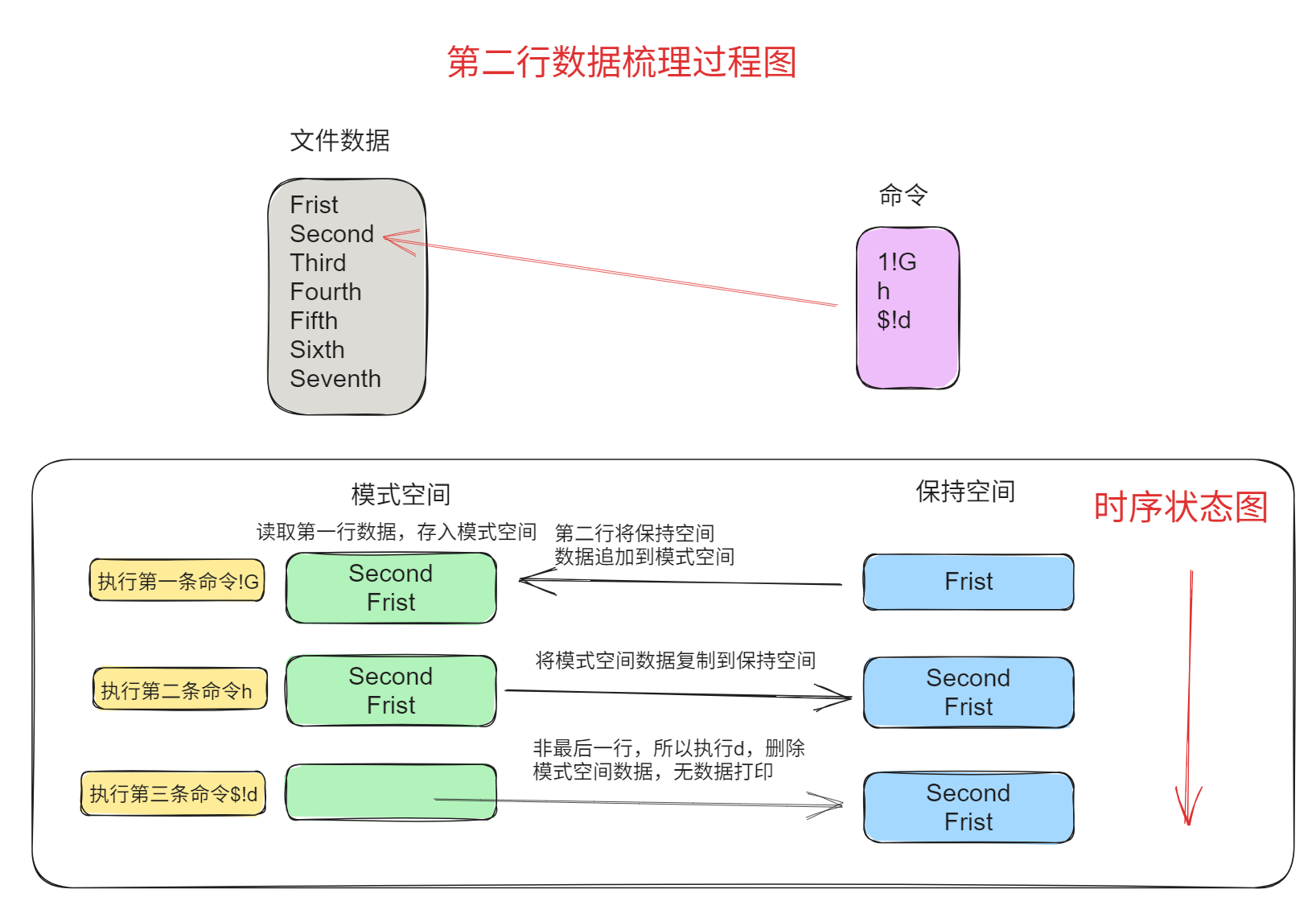
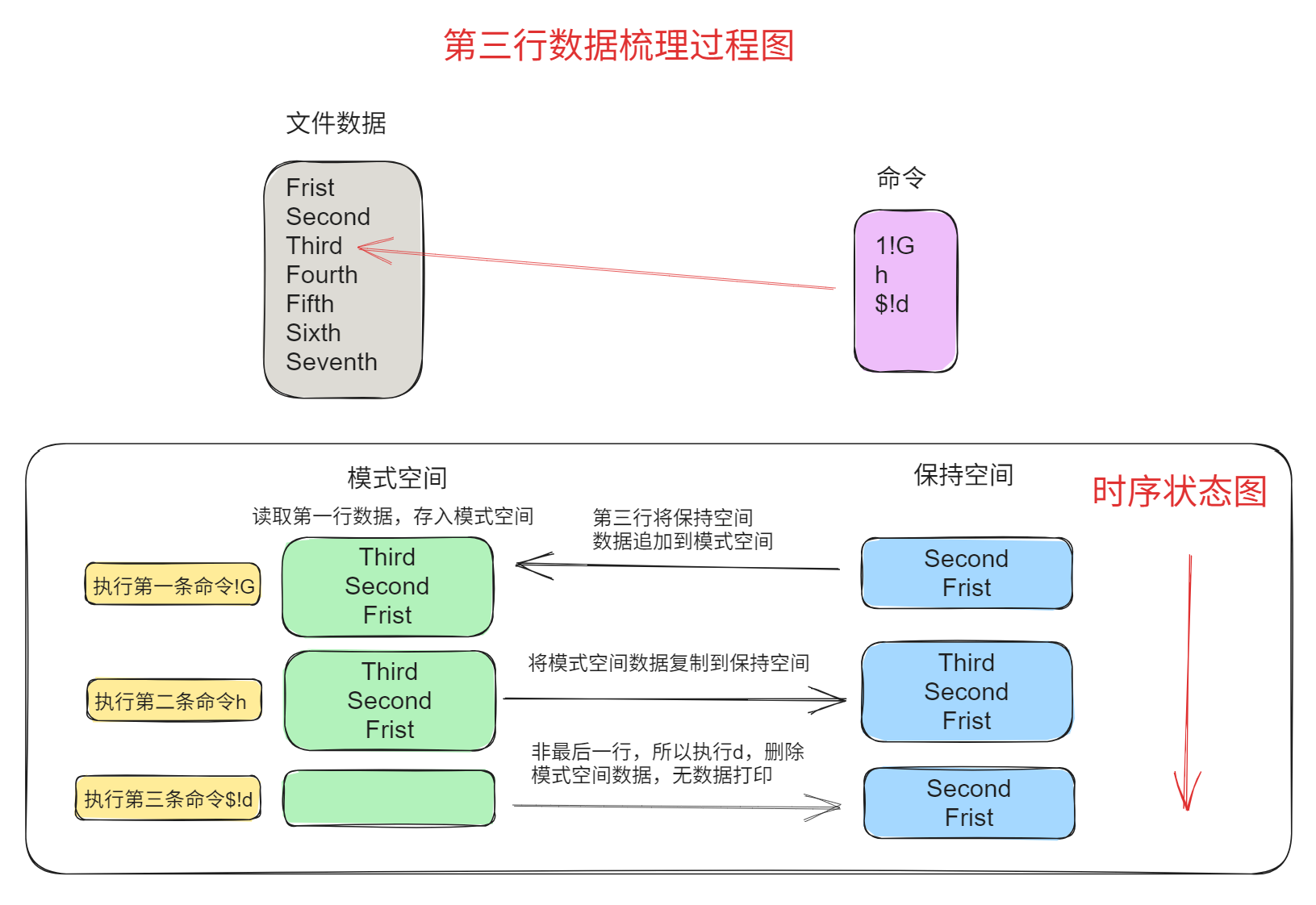
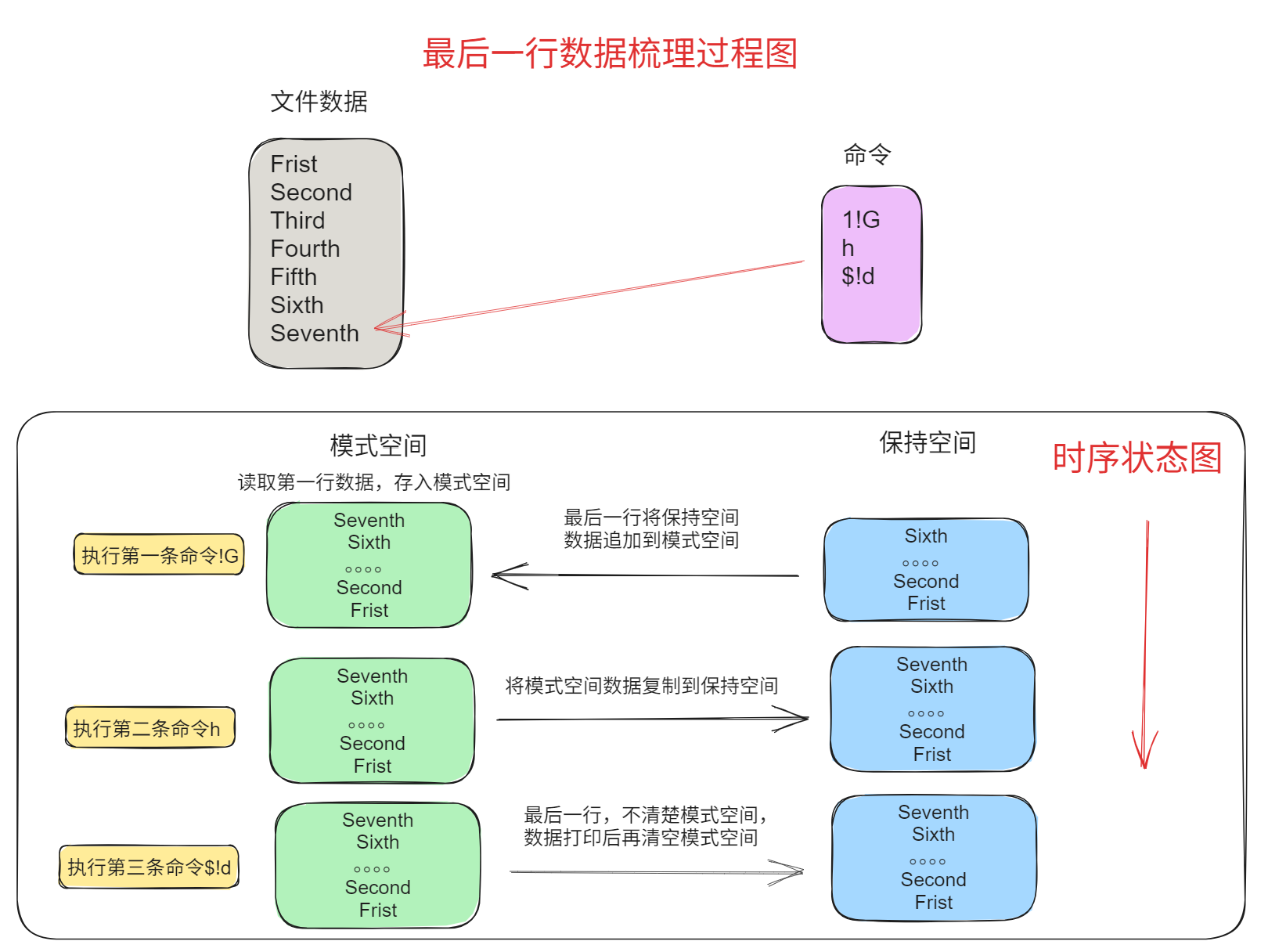
说明:
- 第一行左边为文件内容,箭头所指为sed当前处理的行,右侧为sed命令;
- 后面三行左侧绿色为模式空间内容,右侧蓝色为保持空间内容。
- 每次sed只读取文件中一行到模式空间,即每次执行sed命令前,模式空间中只有文件中当前处理行内容,这一点没有在图中表现。
- 每一行表示一个命令处理完后两个空间中的内容
图示如下:
第一步,读取文件的行一行"First"进行处理,最后一个命令将模式空间内容删除,所以不会在屏幕上打印内容
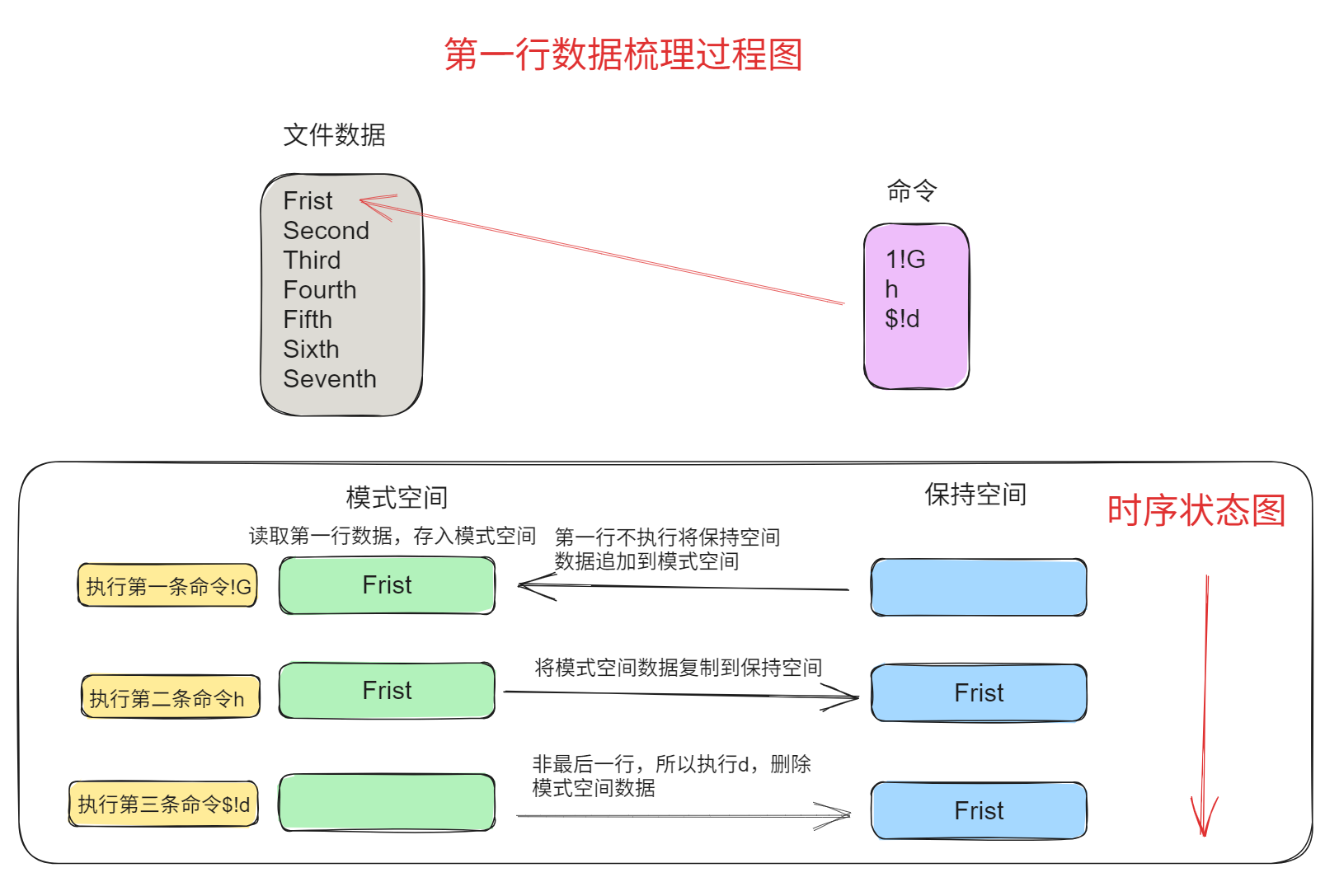
第二步,读取第二行“Sencond”进行处理,最后一个命令$!d将非最后一行模式空间内容删除,所以不会在屏幕上打印内容
第三步,读取第三行“Third”进行处理,最后一个命令$!d将非最后一行模式空间内容删除,所以不会在屏幕上打印内容
最后一步,读取最后一行“Seventh”进行处理,注意sed处理完之后会把,会把模式空间中内容打印到屏幕并自动清空模式空间
5.3.2 将文件每行复制
示例如下:
[root@entos7 sed_test]# sed -n '1h;1!H;H;$x;$!d;p' data_advance
Frist
Frist
Second
Second
Third
Third
Fourth
Fourth
Fifth
Fifth
Sixth
Sixth
Seventh
Seventh
5.3.3 将匹配的行都复制并追加到文件末尾
[root@entos7 sed_test]# sed -n '/th/H;$G;p' data_advance
Frist
Second
Third
Fourth
Fifth
Sixth
Seventh

Fourth
Fifth
Sixth

# 1、将匹配到有th的行追加到保持空间,因为此时保持空间为空行,所以输出结果多一个空行
# 2、当处理到最后一行时,将保持空间的内容追加到模式空间,然后输出到标准输出并清空模式空间
5.3.4 退出
#打印完第10行后,退出sed

sed '10q' filename
本文主要参考:
sed 命令详解及示例
sed高级用法:模式空间(pattern space)和保持空间(hold space)
在此特别感谢

 浙公网安备 33010602011771号