
每日会议20230419
进度汇报:
吕金帅:完成了对车主表的页面显示
张博文:解决了Listview在Fragment中不能显示的问题。
代码支持:
 BottomNavigationView bottomNavigationView = findViewById(R.id.bottomnavigation);
//        NavController navController = Navigation.findNavController(this, R.id.fragment);
        NavHostFragment navHostFragment = (NavHostFragment) getSupportFragmentManager().findFragmentById(R.id.fragment);
        NavController navController = navHostFragment.getNavController();
        AppBarConfiguration configuration = new AppBarConfiguration.Builder(bottomNavigationView.getMenu()).build();
        NavigationUI.setupActionBarWithNavController(this, navController, configuration);
        NavigationUI.setupWithNavController(bottomNavigationView, navController);
赵纪旭:完成了购物车页面的编写。
代码及其实现:
<template>
	<view class="cart-container" v-if="cart.length !== 0">

    <view>
      <!-- 底部的边框线 -->
        <image src="/static/cart_border@2x.png" class="address-border"></image>
    </view>

		<!-- 购物车商品列表的标题区域 -->
		<view class="cart-title">
		  <!-- 左侧的图标 -->
		  <uni-icons type="shop" size="25"></uni-icons>
		  <!-- 描述文本 -->
		  <text class="cart-title-text">购物车</text>
		</view>

    <view></view>

    <!-- 商品列表区域 -->
    <!-- uni-swipe-action 是最外层包裹性质的容器 -->
    <uni-swipe-action>
      <block v-for="(goods, i) in cart" :key="i">
        <!-- uni-swipe-action-item 可以为其子节点提供滑动操作的效果。需要通过 options 属性来指定操作按钮的配置信息 -->
        <uni-swipe-action-item :options="options" @click="swipeActionClickHandler(goods)">
          <my-goods :goods="goods" :show-radio="true" :show-num="true" @radio-change="radioChangeHandler" @num-change="numberChangeHandler"></my-goods>
        </uni-swipe-action-item>
      </block>
    </uni-swipe-action>

    <!-- 结算区域 -->
    <my-settle></my-settle>

	</view>

  <!-- 空白购物车区域 -->
    <view class="empty-cart" v-else>
      <image src="/static/cart_empty@2x.png" class="empty-img"></image>
      <text class="tip-text">空空如也~</text>
    </view>
</template>

<script>
	import badgeMix from '@/mixins/tabbar-badge.js'
	// 按需导入 mapState 这个辅助函数
	import { mapState, mapMutations } from 'vuex'

	export default {
	  // 将 badgeMix 混入到当前的页面中进行使用
	  mixins: [badgeMix],
    computed: {
        // 将 m_cart 模块中的 cart 数组映射到当前页面中使用
        ...mapState('m_cart', ['cart']),
      },
		data() {
			return {
			options: [{
			      text: '删除', // 显示的文本内容
			      style: {
			        backgroundColor: '#C00000' // 按钮的背景颜色
			      }
			    }]
			};
		},
    methods: {
        ...mapMutations('m_cart', ['updateGoodsState', 'updateGoodsCount', 'removeGoodsById']),
        // 商品的勾选状态发生了变化
        radioChangeHandler(e) {
           console.log(e)
          this.updateGoodsState(e)
        },
        // 商品的数量发生了变化
        numberChangeHandler(e) {
          this.updateGoodsCount(e)
        },
        // 点击了滑动操作按钮
         swipeActionClickHandler(goods) {
          this.removeGoodsById(goods.goods_id)
        }
      }
	}
</script>

<style lang="scss">
.cart-container {
  padding-bottom: 50px;
}
// 底部边框线的样式
.address-border {
  display: block;
  width: 100%;
  height: 6px;
}

.cart-title {
  height: 40px;
  display: flex;
  align-items: center;
  font-size: 16px;
  padding-left: 5px;
  border-bottom: 1px solid #efefef;
  .cart-title-text {
    margin-left: 10px;
  }
}

.empty-cart {
  display: flex;
  flex-direction: column;
  align-items: center;
  padding-top: 150px;

  .empty-img {
    width: 90px;
    height: 90px;
  }

  .tip-text {
    font-size: 12px;
    color: gray;
    margin-top: 15px;
  }
}
</style>
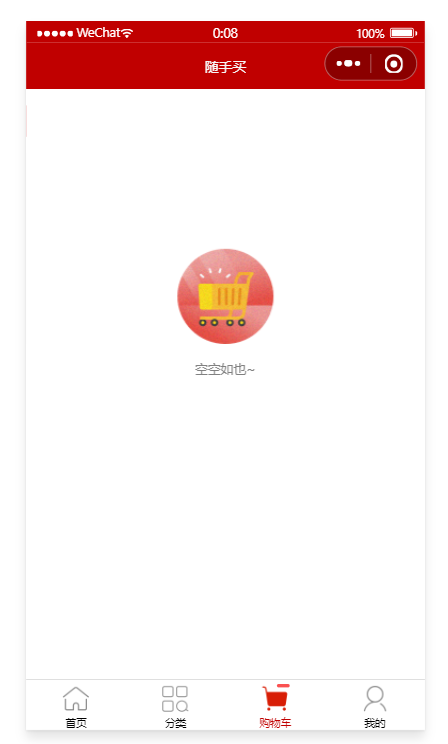
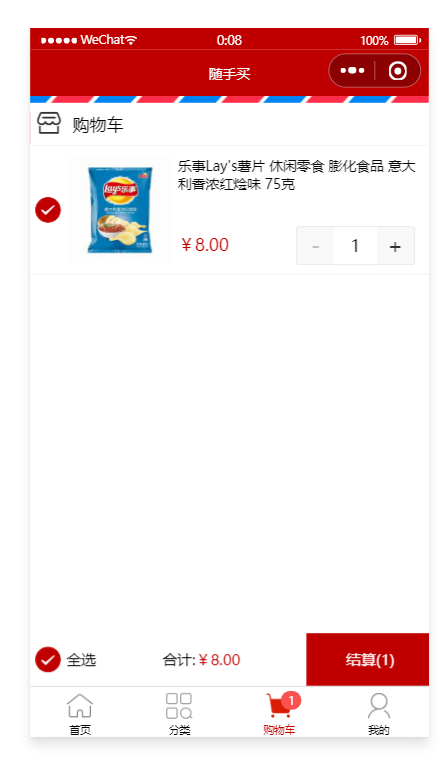
具体目标:显示商品栏;实现小程序的购物车角标的显示,完成购物车商品的添加,完成购物车的物品单个勾选。


 浙公网安备 33010602011771号