

C# WPF PrintDialog 打印(3)
前面https://www.cnblogs.com/yinyu5/p/18634080使用PrintDocument方法打印了Canvas,这里打印下面的DataGrid列表内容:

这里DataGrid的数据源是DataTable,后台代码:


  1 private void PrintDocument_DataTable_Method(string Title, DataTable dataTable)
  2         {
  3             PrintDialog printDialog = new PrintDialog();
  4             printDialog.PrintQueue = LocalPrintServer.GetDefaultPrintQueue();
  5             printDialog.PageRangeSelection = PageRangeSelection.AllPages;
  6
  7             if (printDialog.ShowDialog() == true)
  8             {
  9                 FixedDocument fixedDoc = new FixedDocument();
 10                 Size pageSize = new Size(printDialog.PrintableAreaWidth, printDialog.PrintableAreaHeight);
 11                 double offsetLeft = 20;
 12                 double titleHeight = 30;
 13                 double titleMargin = 5;
 14                 double rectHeight = 5;
 15                 double rectMargin = 5;
 16                 double rowHeight = 20;
 17                 double columnHeight = 18;
 18                 double columnBorderThickness = 1;
 19                 double cellThickness = 1;
 20                 int cellWidth = 100;
 21                 BrushConverter brushConverter = new BrushConverter();
 22                 Brush columnBackgrouneBrush = (Brush)brushConverter.ConvertFromString("#D3DBDE");
 23                 Brush borderBrush = (Brush)brushConverter.ConvertFromString("#8BA2AF");
 24                 int totalRows = dataTable.Rows.Count;
 25                 int totalColumns = dataTable.Columns.Count;
 26                 //计算页数
 27                 int rowsPerPage = (int)((pageSize.Height - offsetLeft - (titleHeight + 2 * titleMargin) - (rectHeight + rectMargin * 2) - (columnHeight + 2 * columnBorderThickness))
 28                     / (rowHeight + 2 * cellThickness));
 29                 int totalPages = (totalRows + rowsPerPage - 1) / rowsPerPage;
 30
 31                 for (int pageIndex = 0; pageIndex < totalPages; pageIndex++)
 32                 {
 33                     PageContent pageContent = new PageContent();
 34                     FixedPage fixedPage = new FixedPage();
 35                     fixedPage.Width = pageSize.Width;
 36                     fixedPage.Height = pageSize.Height;
 37                     //总布局
 38                     StackPanel stackPanel_Total = new StackPanel();
 39                     stackPanel_Total.Orientation = Orientation.Vertical;
 40                     stackPanel_Total.Width = pageSize.Width;
 41                     // 添加标题
 42                     TextBlock title = new TextBlock
 43                     {
 44                         Text = Title,
 45                         FontSize = titleHeight,
 46                         FontWeight = FontWeights.Bold,
 47                         Margin = new Thickness(titleMargin),
 48                         HorizontalAlignment = HorizontalAlignment.Center
 49                     };
 50                     stackPanel_Total.Children.Add(title);
 51                     //添加长方形横杠
 52                     Rectangle rectangle = new Rectangle
 53                     {
 54                         Height = rectHeight,
 55                         Fill = System.Windows.Media.Brushes.Black,
 56                         Margin = new Thickness(rectMargin)
 57                     };
 58                     stackPanel_Total.Children.Add(rectangle);
 59                     // 添加列名
 60                     StackPanel stackPanel = new StackPanel();
 61                     stackPanel.Orientation = Orientation.Horizontal;
 62                     stackPanel.Margin = new Thickness(offsetLeft, 0, 0, 0);
 63                     for (int i = 0; i < totalColumns; i++)
 64                     {
 65                         TextBlock columnName = new TextBlock
 66                         {
 67                             Text = dataTable.Columns[i].ColumnName,
 68                             Foreground = System.Windows.Media.Brushes.Black,
 69                             FontWeight = FontWeights.Bold,
 70                             FontSize = columnHeight,
 71                             Width = cellWidth,
 72                             TextWrapping = TextWrapping.Wrap
 73                         };
 74                         Border border = new Border
 75                         {
 76                             BorderBrush = borderBrush,
 77                             Background = columnBackgrouneBrush,
 78                             BorderThickness = new Thickness(columnBorderThickness, columnBorderThickness, columnBorderThickness, columnBorderThickness)
 79                         };
 80                         border.Child = columnName;
 81                         stackPanel.Children.Add(border);
 82                     }
 83                     stackPanel_Total.Children.Add(stackPanel);
 84                     //添加DataTable的行内容
 85                     StackPanel stackPanel_Ver = new StackPanel();
 86                     stackPanel_Ver.Orientation = Orientation.Vertical;
 87                     stackPanel_Ver.Margin = new Thickness(offsetLeft, 0, 0, 0);
 88                     for (int rowIndex = pageIndex * rowsPerPage; rowIndex < (pageIndex + 1) * rowsPerPage && rowIndex < totalRows; rowIndex++)
 89                     {
 90                         StackPanel stackPanel_Hor = new StackPanel();
 91                         stackPanel_Hor.Orientation = Orientation.Horizontal;
 92                         for (int i = 0; i < totalColumns; i++)
 93                         {
 94                             TextBlock columnCell = new TextBlock
 95                             {
 96                                 Text = dataTable.Rows[rowIndex][i].ToString(),
 97                                 FontSize = 15,
 98                                 Width = cellWidth,
 99                                 TextWrapping = TextWrapping.Wrap
100                             };
101                             Border columnCell_Border = new Border
102                             {
103                                 BorderBrush = borderBrush,
104                                 BorderThickness = new Thickness(columnBorderThickness, columnBorderThickness, columnBorderThickness, columnBorderThickness)
105                             };
106                             columnCell_Border.Child = columnCell;
107                             stackPanel_Hor.Children.Add(columnCell_Border);
108                         }
109                         stackPanel_Ver.Children.Add(stackPanel_Hor);
110                     }
111                     stackPanel_Total.Children.Add(stackPanel_Ver);
112                     fixedPage.Children.Add(stackPanel_Total);
113                     ((IAddChild)pageContent).AddChild(fixedPage);
114                     fixedDoc.Pages.Add(pageContent);
115                 }
116                 // 开始打印
117                 printDialog.PrintDocument(fixedDoc.DocumentPaginator, "打印 DataGrid");
118             }
119         }
打印出来的PDF文件效果如下:
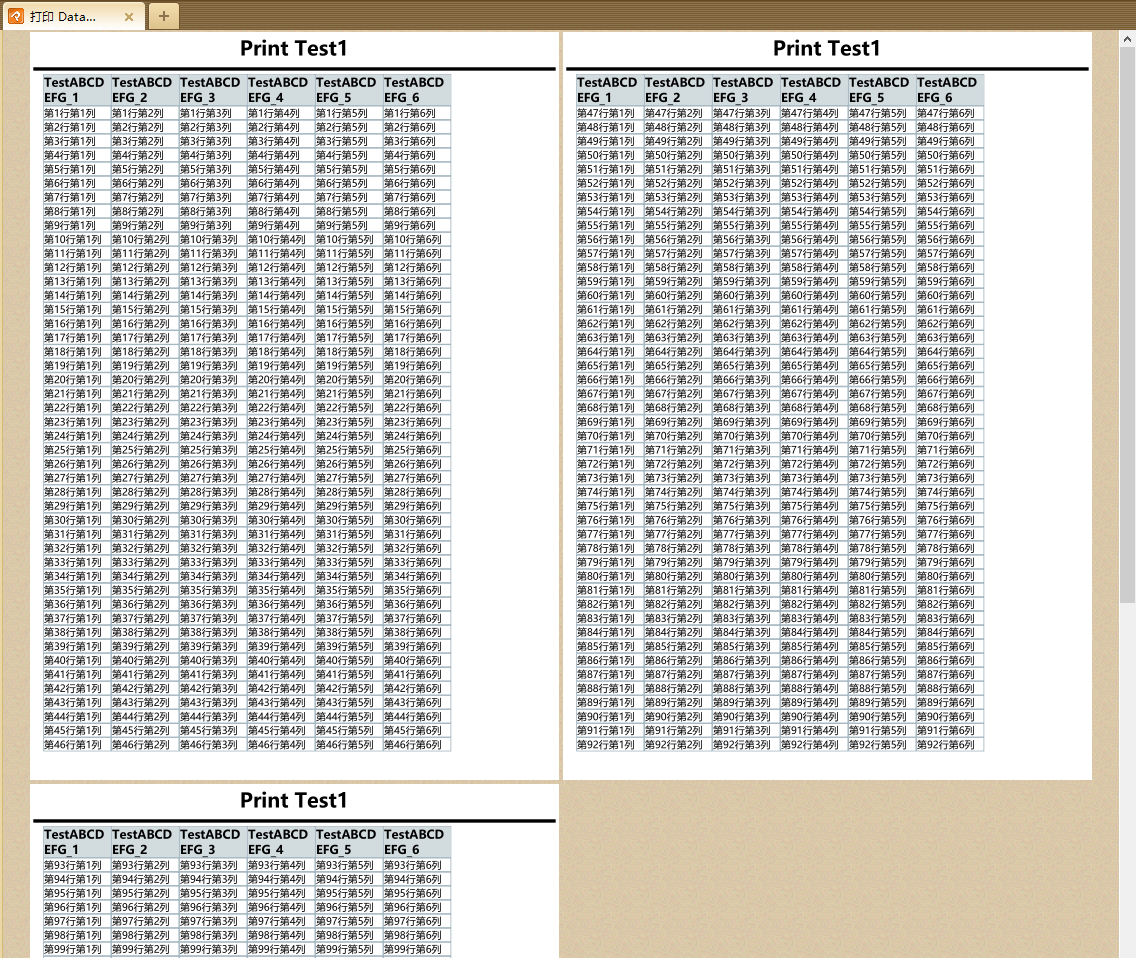
这里使用了StackPanel和Border组合简单实现了类似于表格的样式,个人可根据实际的需要进行布局调整。

 浙公网安备 33010602011771号