
LaTeX中一组图片分页显示的方法
Sometimes you need to divide up a figure over multiple floats, for instance because the figure is too big to fit on one page. In this case you can use continued figures using the caption package.
Put this in your preamble:
\usepackage{caption}
\DeclareCaptionLabelFormat{cont}{#1~#2\alph{ContinuedFloat}}
\captionsetup[ContinuedFloat]{labelformat=cont}
Then you can use continued floats as follows.
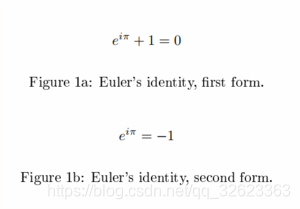
\begin{figure}
	\ContinuedFloat*
	\[ e^{i \pi} + 1 = 0 \]
	\caption{Euler's identity, first form.}
\end{figure}
\begin{figure}
	\ContinuedFloat
	\[ e^{i \pi} = -1 \]
	\caption{Euler's identity, second form.}
\end{figure}
然后显示为:
本文转载自:https://en.wikibooks.org/wiki/LaTeX/Floats,_Figures_and_Captions

 浙公网安备 33010602011771号