

期末作业
一、GUI:
# -*- coding:utf-8 -*-
import wx
class MyFrame(wx.Frame):
    def __init__(self,parent,id):
        wx.Frame.__init__(self,parent,id,title="班级信息收集",size=(400,300))
        #创建面板
        panel = wx.Panel(self)
        #创建文本和密码输入框
        self.title = wx.StaticText(panel,label="班级信息收集",pos=(140,20))
        self.label_user = wx.StaticText(panel,label="班  级",pos=(50,50))
        self.text_user = wx.TextCtrl(panel,pos=(100,50),size=(235,25),style = wx.TE_LEFT)
        self.label_user = wx.StaticText(panel,pos=(50,90),label="姓  名")
        self.text_user = wx.TextCtrl(panel,pos=(100,90),size=(235,25),style = wx.TE_LEFT)
        self.label_user = wx.StaticText(panel,label="学  号",pos=(50,130))
        self.text_user = wx.TextCtrl(panel,pos=(100,130),size=(235,25),style = wx.TE_LEFT)
        #创建“确定”和“取消”按钮
        self.bt_confirm = wx.Button(panel,label='确定',pos=(105,170))
        self.bt_cancel  = wx.Button(panel,label='取消',pos=(195,170))

if __name__ == '__main__':
    app = wx.App()
    frame = MyFrame(parent=None,id=-1)
    frame.Show()
    app.MainLoop()
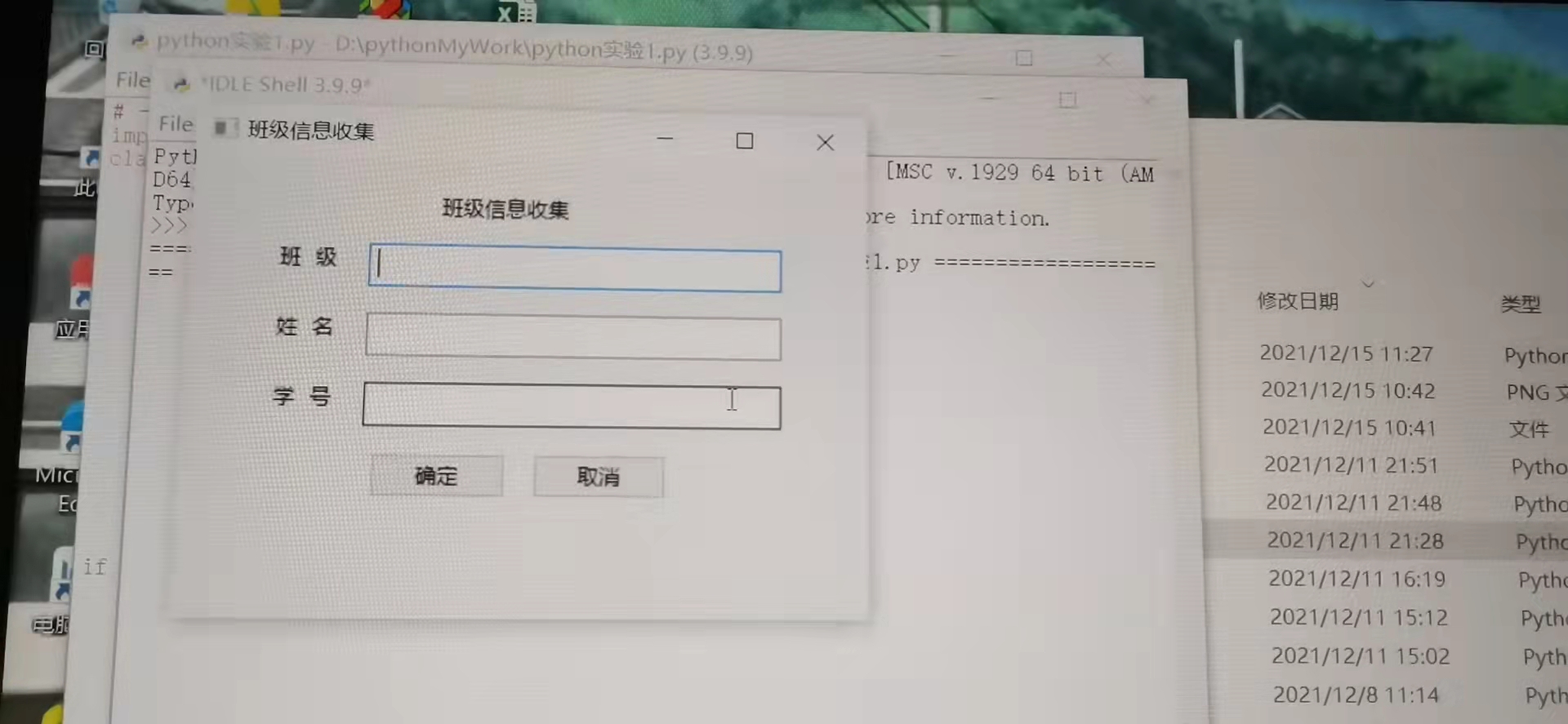
二、碰撞小球
import sys
import pygame

pygame.init()
size = width, height = 640,480
screen = pygame.display.set_mode(size)
color = (240,134,56)

ball = pygame.image.load("bogball.png")
ballrect = ball.get_rect()

speed = [5,5]
clock = pygame.time.Clock()

#执行死循环,确保窗口一直显示
while True:
    clock.tick(60)
    #检查事件
    for event in pygame.event.get():
        if event.type == pygame.QUIT:
            pygame.quit()
            sys.exit()

    ballrect = ballrect.move(speed)
    #碰到左右边缘
    if ballrect.left < 0 or ballrect.right > width:
        speed[0] = -speed[0]
    #碰到上下边缘
    if ballrect.top < 0 or ballrect.bottom > height:
        speed[1] = -speed[1]

    screen.fill(color)
    screen.blit(ball,ballrect)
    pygame.display.flip()
→这个是小球碰撞的视频 但是我不确定它有没有上传成功(手指戳戳
三、愤怒的小鸟
import math
import pymunk                       # 导入pymunk模块
import turtle                       # 导入海龟模块,用它来渲染刚体
import random
import physicbox

def display_xy(event):
        """朝向鼠标指针"""
        x = event.x - screen.window_width()/2      #转换成海龟坐标系中的x坐标
        y = screen.window_height()/2 - event.y     #转换成海龟坐标系中的y坐标
        screen.title(str(x) + "," + str(y) + "turtle_pymunk愤怒的小鸟原型程序")

def calculate_force():

    """计算拉力值"""
    dx =  (fixed_position[0] - virtual_ball.xcor())  # 算出水平位移
    dy =  (fixed_position[1] - virtual_ball.ycor())  # 算出垂直位移
    if int(dx) == 0 : dx = random.choice([-0.1,0.1])

    # 向量操作
    length = math.sqrt( dx**2 + dy**2 )
    # 向量标准化
    dx =  dx /length
    dy =  dy /length

    force =   dx*20000  , dy *20000                    # 方向向量,此处用来代表力的大小和方向
    return force

def draw_line(x,y):
    """画线"""
    draw_line_turtle.clear()
    draw_line_turtle.pendown()
    draw_line_turtle.goto(x,y)
    draw_line_turtle.penup()
    draw_line_turtle.goto(fixed_position)
    virtual_ball.goto(x,y)

    force = calculate_force()              # 计算力

    dx,dy = force[0]/500 ,force[1]/500
    #print(dx,dy)
    parabolic_points.clear()               # 抛物线上的点坐标
    x , y = fixed_position

    for i in range(30):                    # 画的点的个数
        x = x +  dx
        y = y +  dy
        dy =  dy + gravity_y /100          # 垂直速度不断变小
        parabolic_points.append((round(x),round(y)))
    #print(parabolic_points)

# 画抛物线
def draw_parabola():
    global parabolic_points
    if parabolic_points:
        draw_parabola_turtle.clear()
        draw_parabola_turtle.clearstamps()     # 清除所有图章
        for point in parabolic_points:         # 在每个坐标点盖个图章
            draw_parabola_turtle.goto(point)
            draw_parabola_turtle.stamp()

        draw_parabola_turtle.clear()
        draw_parabola_turtle.clearstamps()     # 清除所有图章
        screen.update()
    screen.ontimer(draw_parabola,100)


def shoot(x,y):
    virtual_ball.ondrag(None)                     # 取消虚拟球的拖曳事件
    force = calculate_force()                     # 计算力
    if virtual_ball.distance(draw_line_turtle)>0: # 如果到物理球的距离大于或等于球的直径,则认为是碰到了
       virtual_ball.ht()                          # 虚拟球隐藏
       ball.body.force = force                    # 给力

    # 延时擦除
    time_counter = 0

    def delay_clear():
        nonlocal time_counter
        if time_counter < 1 :
            time_counter += 1
            screen.ontimer(delay_clear,1000)
        else:
            draw_line_turtle.clear()             # 发射时清除皮筋
            draw_parabola_turtle.clearstamps()   # 清除抛物线
            parabolic_points.clear()

    delay_clear()

parabolic_points = []                    # 抛物线上散列点
width,height = 1024,800


screen = turtle.Screen()                 # 新建海龟窗口,用于渲染形状的
screen.delay(0)
screen.title("turtle_pymunk愤怒的小鸟原型程序")
screen.setup(width,height)
screen.bgpic("images/bg.png")
screen.addshape("images/bird.gif")       # 50 x 50

screen.addshape("images/platform.gif")   # 168 x 166
screen.addshape("images/wood1.gif")      # 406 x 38
screen.addshape("images/wood2.gif")      # 166 x 82
screen.addshape("images/ground.gif")     # 1024x250
screen.addshape("images/verticle1.gif")  # 96x408
screen.addshape("images/verticle2.gif")  # 96x351
screen.addshape("images/verticle3.gif")  # 96x314
screen.addshape("images/verticle4.gif")  # 96x269
screen.addshape("images/verticle5.gif")  # 96x210
screen.addshape("images/verticle6.gif")  # 96x114
screen.addshape("images/pig.gif")        # 102x92


# 新建重力空间
space = pymunk.Space()                   # 设定重力空间
gravity_y = -100
space.gravity = 0,gravity_y              # 设置重力参数

# 新建静止的平台,参数为:重力空间,gif图形,图形宽高,坐标,用于放要发射的球
px,py  = -400,-300
ball_platform = physicbox.StaticPhysicBox(space,"images/platform.gif",(168,166),(px,py))

fixed_position = ball_position = (px,  py+166/2+50/2)   # 平台中心点y坐 + 平台高度/2 + 球高度/2,这样球刚好在平台上
ball = physicbox.PhysicBall(space,"images/bird.gif",ball_position,25)  # 25是半径

# 画皮筋要用到的海龟对象
draw_line_turtle = turtle.Turtle(visible=False)
draw_line_turtle.penup()
draw_line_turtle.goto(0,300)
draw_line_turtle.color("gray")
draw_line_turtle.write("按空格键重置",align='center',font=("黑体",32,"normal"))
draw_line_turtle.goto(ball_position)
draw_line_turtle.pensize(5)
draw_line_turtle.color("orange")

# 画抛物线要用到的海龟对象
draw_parabola_turtle = turtle.Turtle(visible=False,shape='circle')
draw_parabola_turtle.shapesize(0.5,0.5)
draw_parabola_turtle.penup()
draw_parabola_turtle.color("magenta")

# 虚拟球用来显示拉的时候的球,并不是真正发射的球
virtual_ball = turtle.Turtle("images/bird.gif",visible=False)
virtual_ball.penup()
virtual_ball.goto(fixed_position)
virtual_ball.st()
virtual_ball.ondrag(draw_line)
virtual_ball.onrelease(shoot)

balls = []
balls.append(ball)
# 小猪
pig1 = ball_platform = physicbox.PhysicBall(space,"images/pig.gif",(360,270),25)
balls.append(pig1)

# 最下面的横木
wood1 = physicbox.StaticPhysicBox(space,"images/wood1.gif",(406,38),(250, -200))
# 竖立的木
verticle1 = physicbox.StaticPhysicBox(space,"images/verticle1.gif",(96,408),( 360, 20))

screen.cv.bind("<Motion>",display_xy)    # 绑定鼠标移动事件

def reset_ball():
    """重置待发射的小球"""
    ball.reborn()
    virtual_ball.goto(fixed_position)
    virtual_ball.ondrag(draw_line)
    virtual_ball.st()

screen.onkey(reset_ball,"space")        # 按空格键重置小球
screen.listen()
draw_parabola()                         # 画抛物线
while True:

    space.step(0.02)                     # 把空间中的弹球按重力原理等进行坐标等的更新
    for b in balls:
       b.turtle.goto(b.body.position)

    screen.update()
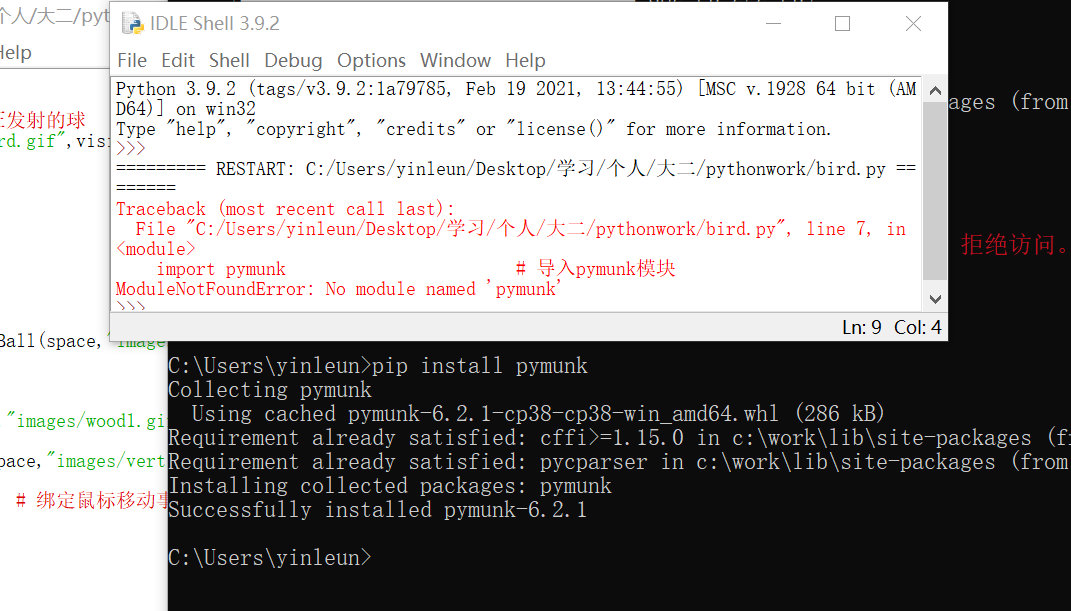
😵还是运行不了 私密马赛了老师 我猪头好痛

 浙公网安备 33010602011771号