
Kubernetes
服务部署发展
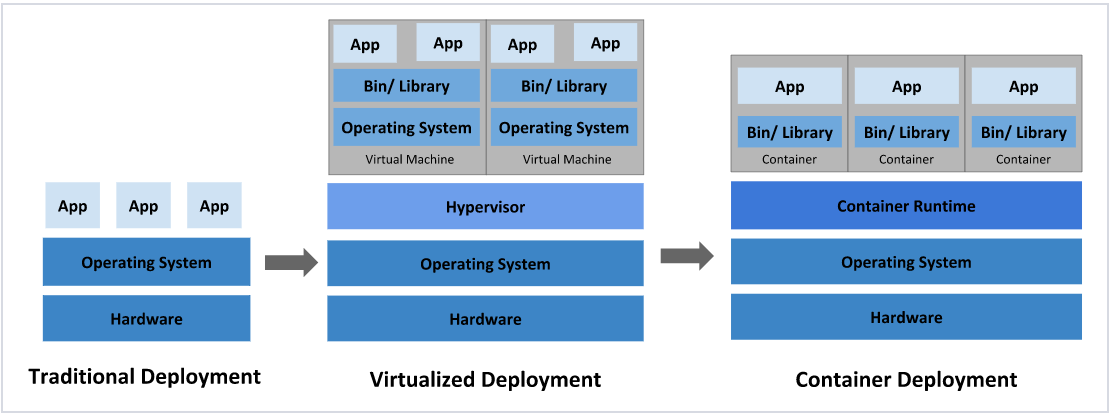
传统化部署
直接将应用程序部署在物理机上
优点:简单,不需要其它技术的参与
缺点:不能为应用程序定义资源使用边界,很难合理地分配计算资源,而且程序之间容易产生影响
虚拟化部署
在一台物理机上运行多个虚拟机,每个虚拟机都是独立的一个环境
优点:程序环境不会相互产生影响,提供了一定程度的安全性
缺点:增加了操作系统,浪费了部分资源
容器化部署
类似虚拟化,共享操作系统
优点:可以保证每个容器拥有自己的文件系统、CPU、内存、进程空间
优点:运行应用程序所需要的资源都被容器包装,并和底层基础架构解耦
优点:容器化的应用程序可以跨云服务商、跨Linux操作系统发行版进行部署
容器编排工具
kubernetes简介
概念
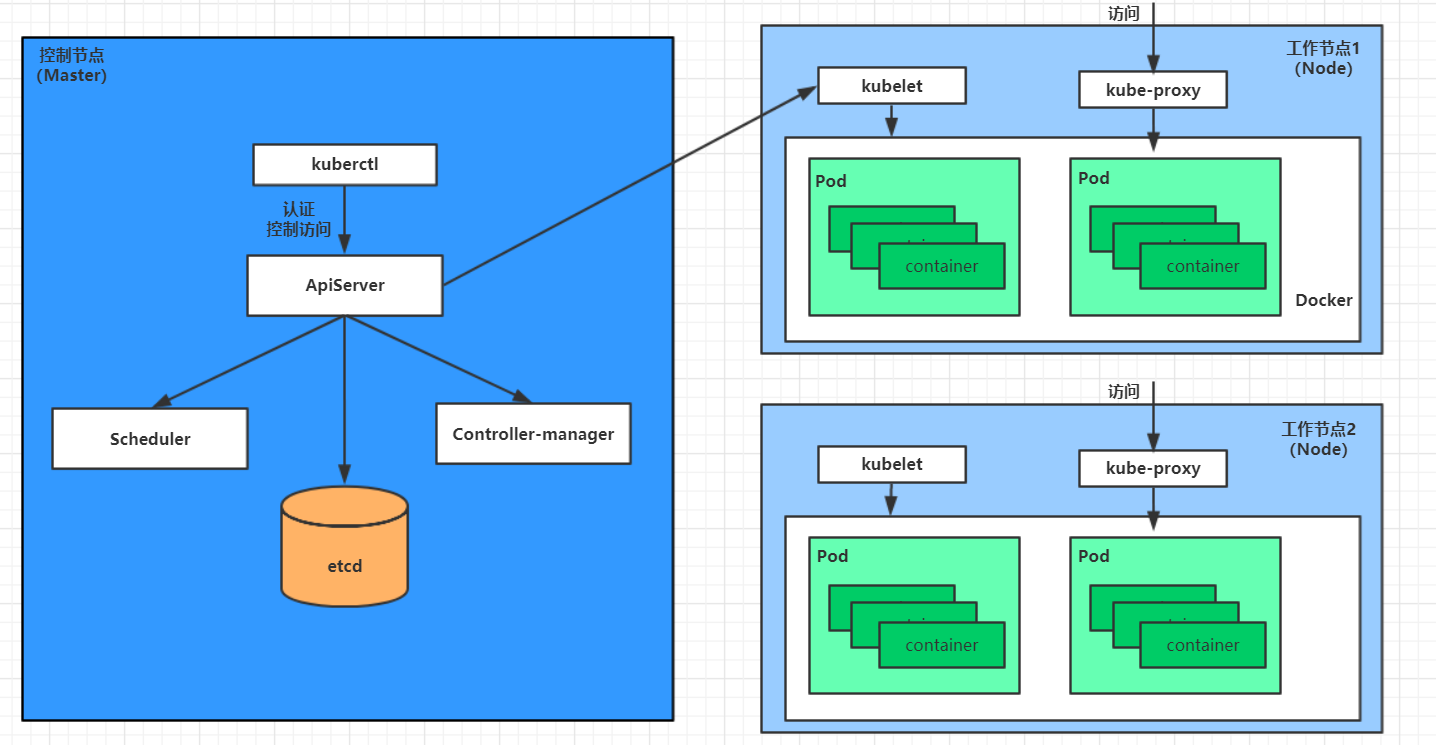
kubernetes的本质是一组服务器集群,它可以在集群的每个节点上运行特定的程序,来对节点中的容器进行管理,目的是实现资源管理的自动化
(1)Master    :kubernetes集群的管理控制节点
(2)Node      :kubernetes集群的工作负载节点
(3)Pod       :kubernetes集群的最小控制单元
(4)Controller:kubernetes集群控制行为的执行者
(5)Service   :kubernetes集群中Pod对外提供服务的访入口
(6)Lable     :kubernetes集群中用于分类
(7)NameSpace :kubernetes集群中用于隔离Pod的运行环境
功能
(1)自我修复:一旦某一个容器崩溃,能够在1秒中左右迅速启动新的容器
(2)弹性伸缩:可以根据需要,自动对集群中正在运行的容器数量进行调整
(3)服务发现:服务可以通过自动发现的形式找到它所依赖的服务
(4)负载均衡:如果一个服务起动了多个容器,能够自动实现请求的负载均衡
(5)版本回退:如果发现新发布的程序版本有问题,可以立即回退到原来的版本
(6)存储编排:可以根据容器自身的需求自动创建存储卷
组件
管理节点
ApiServer        :负责接收用户输入的命令,提供认证、授权、API注册和发现功能
Scheduler        :负责集群资源调度,按照预定的调度策略将任务调度到相应的node节点上
ControllerManager:负责维护集群的状态,程序部署安排、故障检测、自动扩展、滚动更新
Etcd             :负责存储集群中各种资源对象的信息
计算节点
Kubelet          :负责接收Master节点的命令并管理容器
KubeProxy        :负责提供集群内部的服务发现和负载均衡
Docker           :负责节点上容器的各种操作
kubernetes管理
资源列表
(1)namespace
(2)pod
(3)label
(4)deployment
(5)service
管理方式
命令式对象管理:直接使用命令去操作kubernetes资源(kubectl run nginx-pod --image=nginx:1.17.1 --port=80)
命令式对象配置:通过命令和配置文件去操作kubernetes资源(kubectl create/patch -f nginx-pod.yaml)
声明式对象配置:通过apply命令和配置文件去操作kubernetes资源,只用于创建和更新资源(kubectl apply -f nginx-pod.yaml)
| 类型 | 操作对象 | 适用环境 | 优点 | 缺点 |
|---|---|---|---|---|
| 命令式对象管理 | 对象 | 测试 | 简单 | 只能操作活动对象,无法审计、跟踪 |
| 命令式对象配置 | 文件 | 开发 | 可以审计、跟踪 | 项目大时,配置文件多,操作麻烦 |
| 声明式对象配置 | 目录 | 开发 | 支持目录操作 | 意外情况下难以调试 |
资源详解
namespace
描述
实现多套环境的资源隔离
系统namespace
[root@master ~]# kubectl  get namespace
NAME              STATUS   AGE
default           Active   45h     #  所有未指定Namespace的对象都会被分配在default命名空间
kube-node-lease   Active   45h     #  集群节点之间的心跳维护,v1.13开始引入
kube-public       Active   45h     #  此命名空间下的资源可以被所有人访问(包括未认证用户)
kube-system       Active   45h     #  所有由Kubernetes系统创建的资源都处于这个命名空间
pod
描述
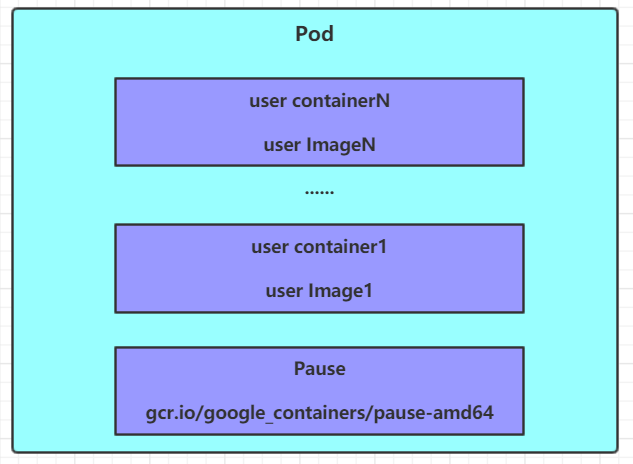
Pod是kubernetes集群进行管理的最小单元,程序要运行必须部署在容器中,而容器必须存在于Pod中,Pod可以认为是容器的封装,一个Pod中可以存在一个或者多个容器
label
deployment
service
命令对象管理
namespace
查看namespace状态
//查看所有namespace状态
[root@node01 ~]# kubectl get namespace
NAME                     STATUS   AGE
cdb                      Active   3d14h
cdi                      Active   6d16h
ceph-csi                 Active   6d16h
cluster-network-addons   Active   6d16h
default                  Active   6d19h
dmcp-instance            Active   3d14h
dmcp-system              Active   6d16h
eck                      Active   6d16h
kube-node-lease          Active   6d19h
kube-public              Active   6d19h
kube-system              Active   6d19h
kubevirt                 Active   6d16h
mcp                      Active   3d17h
rabbitmq-system          Active   3d14h
//查看特定namespace状态
[root@node01 ~]# kubectl get namespace default
NAME      STATUS   AGE
default   Active   6d19h> 查看namespace详情
//指定输出格式(wide、json、yaml)
[root@node01 ~]# kubectl get namespace default -o wide
NAME      STATUS   AGE
default   Active   6d19h

[root@node01 ~]# kubectl get namespace default -o json
{
    "apiVersion": "v1",
    "kind": "Namespace",
    "metadata": {
        "creationTimestamp": "2022-09-06T03:41:46Z",
        "managedFields": [
            {
                "apiVersion": "v1",
                "fieldsType": "FieldsV1",
                "fieldsV1": {
                    "f:status": {
                        "f:phase": {}
                    }
                },
                "manager": "kube-apiserver",
                "operation": "Update",
                "time": "2022-09-06T03:41:46Z"
            }
        ],
        "name": "default",
        "resourceVersion": "192",
        "selfLink": "/api/v1/namespaces/default",
        "uid": "2cc2187c-a7de-4bf8-b0b3-c06a8145ecf9"
    },
    "spec": {
        "finalizers": [
            "kubernetes"
        ]
    },
    "status": {
        "phase": "Active"
    }
}

[root@node01 ~]# kubectl get namespace default -o yaml
apiVersion: v1
kind: Namespace
metadata:
  creationTimestamp: "2022-09-06T03:41:46Z"
  managedFields:
  - apiVersion: v1
    fieldsType: FieldsV1
    fieldsV1:
      f:status:
        f:phase: {}
    manager: kube-apiserver
    operation: Update
    time: "2022-09-06T03:41:46Z"
  name: default
  resourceVersion: "192"
  selfLink: /api/v1/namespaces/default
  uid: 2cc2187c-a7de-4bf8-b0b3-c06a8145ecf9
spec:
  finalizers:
  - kubernetes
status:
  phase: Active
查看namespace详情
//查看所有namespace详情
[root@node01 ~]# kubectl describe namespace
Name:         cdb
Labels:       control-plane=controller-manager
Annotations:  <none>
Status:       Active

No resource quota.

No LimitRange resource.


Name:         cdi
Labels:       cdi.kubevirt.io=
Annotations:  <none>
Status:       Active

No resource quota.

No LimitRange resource.


Name:         ceph-csi
Labels:       <none>
Annotations:  <none>
Status:       Active

No resource quota.

No LimitRange resource.


Name:         cluster-network-addons
Labels:       app.kubernetes.io/component=network
              app.kubernetes.io/managed-by=cnao-operator
              name=cluster-network-addons
              networkaddonsoperator.network.kubevirt.io/version=0.57.0
Annotations:  <none>
Status:       Active

No resource quota.

No LimitRange resource.


Name:         default
Labels:       <none>
Annotations:  <none>
Status:       Active

No resource quota.

No LimitRange resource.


Name:         dmcp-instance
Labels:       <none>
Annotations:  <none>
Status:       Active

No resource quota.

No LimitRange resource.


Name:         dmcp-system
Labels:       <none>
Annotations:  <none>
Status:       Active

No resource quota.

No LimitRange resource.


Name:         eck
Labels:       name=eck
Annotations:  <none>
Status:       Active

No resource quota.

No LimitRange resource.


Name:         kube-node-lease
Labels:       <none>
Annotations:  <none>
Status:       Active

No resource quota.

No LimitRange resource.


Name:         kube-public
Labels:       <none>
Annotations:  <none>
Status:       Active

No resource quota.

No LimitRange resource.


Name:         kube-system
Labels:       <none>
Annotations:  <none>
Status:       Active

No resource quota.

No LimitRange resource.


Name:         kubevirt
Labels:       kubevirt.io=
              openshift.io/cluster-monitoring=true
Annotations:  <none>
Status:       Active

No resource quota.

No LimitRange resource.


Name:         mcp
Labels:       <none>
Annotations:  <none>
Status:       Active

No resource quota.

No LimitRange resource.


Name:         rabbitmq-system
Labels:       app.kubernetes.io/component=rabbitmq-cluster-operator
              app.kubernetes.io/name=rabbitmq-system
              app.kubernetes.io/part-of=rabbitmq
Annotations:  <none>
Status:       Active

No resource quota.

No LimitRange resource.
//查看特定namespace详情
[root@node01 ~]# kubectl describe namespace default
Name:         default
Labels:       <none>
Annotations:  <none>
Status:       Active

No resource quota.

No LimitRange resource.
创建namespace
[root@node01 ~]# kubectl create namespace yingxin
namespace/yingxin created~~~
> 删除namespace
~~~shell
[root@node01 ~]# kubectl delete namespace yingxin
namespace "yingxin" deleted
pod
查看pod信息
# 支持参数
[root@master ~]# kubectl get pods -n dev
NAME    READY   STATUS    RESTARTS   AGE
nginx   1/1     Running   0          190s
查看pod详情
[root@master ~]# kubectl describe pod nginx -n dev
Name:         nginx
Namespace:    dev
Priority:     0
Node:         node1/192.168.5.4
Start Time:   Wed, 08 May 2021 09:29:24 +0800
Labels:       pod-template-hash=5ff7956ff6
              run=nginx
Annotations:  <none>
Status:       Running
IP:           10.244.1.23
IPs:
  IP:           10.244.1.23
Controlled By:  ReplicaSet/nginx
Containers:
  nginx:
    Container ID:   docker://4c62b8c0648d2512380f4ffa5da2c99d16e05634979973449c98e9b829f6253c
    Image:          nginx:latest
    Image ID:       docker-pullable://nginx@sha256:485b610fefec7ff6c463ced9623314a04ed67e3945b9c08d7e53a47f6d108dc7
    Port:           80/TCP
    Host Port:      0/TCP
    State:          Running
      Started:      Wed, 08 May 2021 09:30:01 +0800
    Ready:          True
    Restart Count:  0
    Environment:    <none>
    Mounts:
      /var/run/secrets/kubernetes.io/serviceaccount from default-token-hwvvw (ro)
Conditions:
  Type              Status
  Initialized       True
  Ready             True
  ContainersReady   True
  PodScheduled      True
Volumes:
  default-token-hwvvw:
    Type:        Secret (a volume populated by a Secret)
    SecretName:  default-token-hwvvw
    Optional:    false
QoS Class:       BestEffort
Node-Selectors:  <none>
Tolerations:     node.kubernetes.io/not-ready:NoExecute for 300s
                 node.kubernetes.io/unreachable:NoExecute for 300s
Events:
  Type    Reason     Age        From               Message
  ----    ------     ----       ----               -------
  Normal  Scheduled  <unknown>  default-scheduler  Successfully assigned dev/nginx-5ff7956ff6-fg2db to node1
  Normal  Pulling    4m11s      kubelet, node1     Pulling image "nginx:latest"
  Normal  Pulled     3m36s      kubelet, node1     Successfully pulled image "nginx:latest"
  Normal  Created    3m36s      kubelet, node1     Created container nginx
  Normal  Started    3m36s      kubelet, node1     Started container nginx
创建pod
[root@master ~]# kubectl run nginx --image=nginx:latest --port=80 --namespace dev
deployment.apps/nginx created
删除pod
# 必须先删除Pod控制器,否则会不断生成新的Pod
# 删除此Pod的Pod控制器
[root@master ~]# kubectl delete deploy nginx -n dev
deployment.apps "nginx" deleted

# 删除指定Pod
[root@master ~]# kubectl delete pod nginx -n dev
pod "nginx" deleted
访问Pod
[root@master ~]# curl http://10.244.1.23:80
<!DOCTYPE html>
<html>
<head>
	<title>Welcome to nginx!</title>
</head>
<body>
	<p><em>Thank you for using nginx.</em></p>
</body>
</html>
label
查看label信息
查看label详情
创建label
删除label
deployment
查看deployment信息
查看deployment详情
创建deployment
删除deployment
service
查看service信息
查看service详情
创建service
删除service

 浙公网安备 33010602011771号