

scrapy爬虫学习(一)----安装框架初识
scrapy学习菜鸟教程:https://www.runoob.com/w3cnote/scrapy-detail.html
windows下:
1、安装Scrapy框架
直接pip install scrapy可能会出错。
所以你可以先安装lxml:pip install lxml(已安装请忽略)。
安装所需依赖(找对应的python版本安装):
安装pyOpenSSL:在官网下载wheel文件。
安装Twisted:在官网下载wheel文件。
安装PyWin32:在官网下载wheel文件。
下载地址 https://www.lfd.uci.edu/~gohlke/pythonlibs/
执行命令:
pip install wheel
pip install pyOpenSSL-19.1.0-py2.py3-none-any.whl
pip install pywin32-227-cp37-cp37m-win_amd64.whl
pip install Twisted-20.3.0-cp37-cp37m-win_amd64.whl
pip install Scrapy /*Scrapy已经安装好*/
创建项目:scrapy startproject xxx
进入项目:cd xxx
进入项目:cd xxx
文件目录结构:
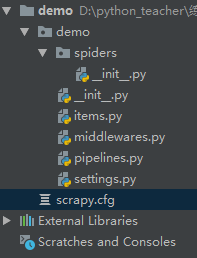
scrapy.cfg项目的配置文件
demo/items.py项目的目标文件,装数据的容器
demo/middlewares.py项目的中间件
demo/pipelines.py项目的管道文件,处理item字段
demo/settings.py项目的设置文件
新建的爬虫文件在spiders下面,创建爬虫文件的时候先进入这个文件夹,执行命令scrapy genspider xxx(爬虫名) xxx.com (爬取域)
spiders下面的__init__.py里面的文件内容:(不能删除这些注释,删掉了可能会无法导包等等问题)
# This package will contain the spiders of your Scrapy project
#
# Please refer to the documentation for information on how to create and manage
# your spiders.
创建爬虫:scrapy genspider xxx(爬虫名) xxx.com (爬取域)
生成文件:scrapy crawl xxx -o xxx.json (生成某种类型的文件)
生成文件:scrapy crawl xxx -o xxx.json (生成某种类型的文件)
检查爬虫是否ok:scrapy check xxx (爬虫名)
运行爬虫:scrapy crawl XXX(爬虫名) 爬虫以爬虫名为主
运行爬虫:scrapy crawl XXX(爬虫名) 爬虫以爬虫名为主
列出所有爬虫:scrapy list
获得配置信息:scrapy settings [options]
在返回结果数据时python2默认编码环境是ASCII,当和取回的数据格式不一致时会出现乱码。可以指定保存内容的编码格式,在新建的爬虫文件代码最上方添加:获得配置信息:scrapy settings [options]
import sys
reload(sys)
sys.setdefaultencoding("utf-8")

 浙公网安备 33010602011771号