
12.22熟悉常用的HBase操作2
(二)HBase数据库操作
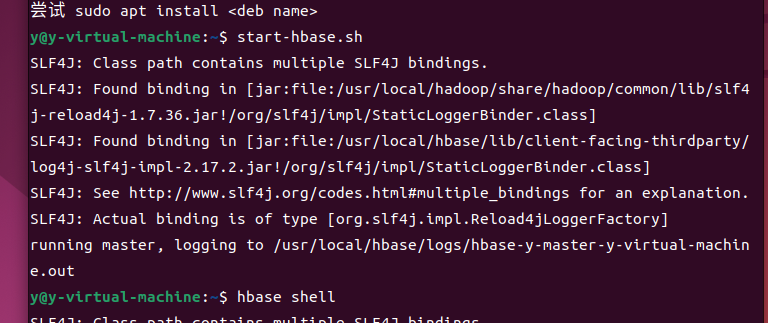
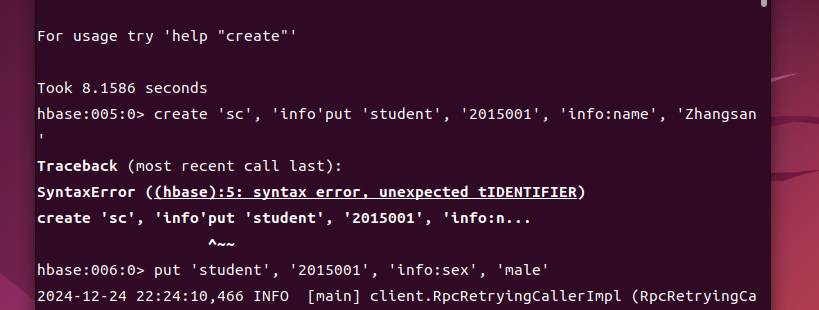
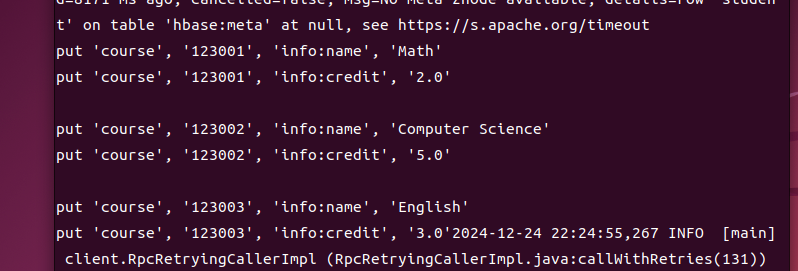
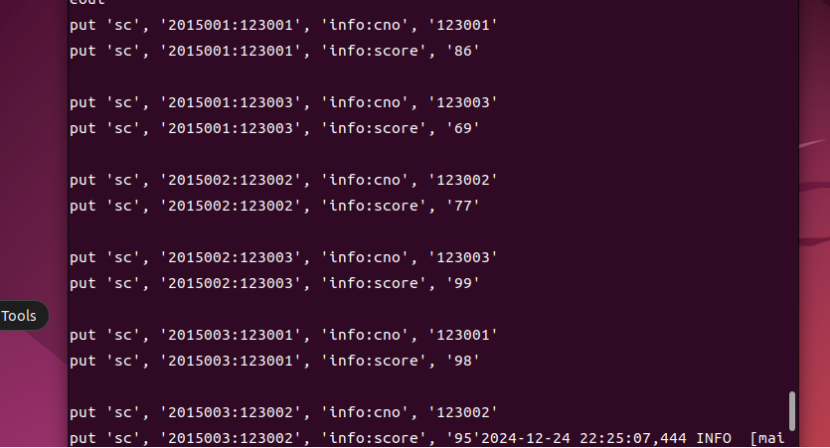
1. 现有以下关系型数据库中的表和数据(见表14-3到表14-5),要求将其转换为适合于HBase存储的表并插入数据:
表14-3 学生表(Student)
|
学号(S_No) |
姓名(S_Name) |
性别(S_Sex) |
年龄(S_Age) |
|
2015001 |
Zhangsan |
male |
23 |
|
2015002 |
Mary |
female |
22 |
|
2015003 |
Lisi |
male |
24 |
表14-4 课程表(Course)
|
课程号(C_No) |
课程名(C_Name) |
学分(C_Credit) |
|
123001 |
Math |
2.0 |
|
123002 |
Computer Science |
5.0 |
|
123003 |
English |
3.0 |
表14-5 选课表(SC)
|
学号(SC_Sno) |
课程号(SC_Cno) |
成绩(SC_Score) |
|
2015001 |
123001 |
86 |
|
2015001 |
123003 |
69 |
|
2015002 |
123002 |
77 |
|
2015002 |
123003 |
99 |
|
2015003 |
123001 |
98 |
|
2015003 |
123002 |
95 |
2. 请编程实现以下功能:
(1)createTable(String tableName, String[] fields)
创建表,参数tableName为表的名称,字符串数组fields为存储记录各个字段名称的数组。要求当HBase已经存在名为tableName的表的时候,先删除原有的表,然后再创建新的表。
(2)addRecord(String tableName, String row, String[] fields, String[] values)
向表tableName、行row(用S_Name表示)和字符串数组fields指定的单元格中添加对应的数据values。其中,fields中每个元素如果对应的列族下还有相应的列限定符的话,用“columnFamily:column”表示。例如,同时向“Math”、“Computer Science”、“English”三列添加成绩时,字符串数组fields为{“Score:Math”, ”Score:Computer Science”, ”Score:English”},数组values存储这三门课的成绩。
(3)scanColumn(String tableName, String column)
浏览表tableName某一列的数据,如果某一行记录中该列数据不存在,则返回null。要求当参数column为某一列族名称时,如果底下有若干个列限定符,则要列出每个列限定符代表的列的数据;当参数column为某一列具体名称(例如“Score:Math”)时,只需要列出该列的数据。
(4)modifyData(String tableName, String row, String column)
修改表tableName,行row(可以用学生姓名S_Name表示),列column指定的单元格的数据。
(5)deleteRow(String tableName, String row)
删除表tableName中row指定的行的记录。
HBase操作类
import org.apache.hadoop.hbase.HBaseConfiguration;
import org.apache.hadoop.hbase.client.Admin;
import org.apache.hadoop.hbase.client.Connection;
import org.apache.hadoop.hbase.client.ConnectionFactory;
import org.apache.hadoop.hbase.client.Delete;
import org.apache.hadoop.hbase.client.Put;
import org.apache.hadoop.hbase.client.Result;
import org.apache.hadoop.hbase.client.ResultScanner;
import org.apache.hadoop.hbase.client.Scan;
import org.apache.hadoop.hbase.client.Table;
import org.apache.hadoop.hbase.client.TableDescriptor;
import org.apache.hadoop.hbase.client.TableDescriptorBuilder;
import org.apache.hadoop.hbase.util.Bytes;
public class HBaseOperations {
private Connection connection;
public HBaseOperations() throws Exception {
org.apache.hadoop.conf.Configuration config = HBaseConfiguration.create();
this.connection = ConnectionFactory.createConnection(config);
}
public void createTable(String tableName, String[] fields) throws Exception {
try (Admin admin = connection.getAdmin()) {
if (admin.tableExists(Bytes.toBytes(tableName))) {
admin.disableTable(Bytes.toBytes(tableName));
admin.deleteTable(Bytes.toBytes(tableName));
}
TableDescriptor tableDescriptor = TableDescriptorBuilder.newBuilder(Bytes.toBytes(tableName))
.setColumnFamily(ColumnFamilyDescriptorBuilder.of("info"))
.build();
admin.createTable(tableDescriptor);
}
}
public void addRecord(String tableName, String row, String[] fields, String[] values) throws Exception {
try (Table table = connection.getTable(Bytes.toBytes(tableName))) {
Put put = new Put(Bytes.toBytes(row));
for (int i = 0; i < fields.length; i++) {
String[] parts = fields[i].split(":");
String columnFamily = parts[0];
String column = parts.length > 1 ? parts[1] : null;
if (column != null) {
put.addColumn(Bytes.toBytes(columnFamily), Bytes.toBytes(column), Bytes.toBytes(values[i]));
}
}
table.put(put);
}
}
public void scanColumn(String tableName, String column) throws Exception {
try (Table table = connection.getTable(Bytes.toBytes(tableName))) {
Scan scan = new Scan();
if (column.contains(":")) {
scan.addColumn(Bytes.toBytes(column.split(":")[0]), Bytes.toBytes(column.split(":")[1]));
} else {
scan.addFamily(Bytes.toBytes(column));
}
ResultScanner scanner = table.getScanner(scan);
for (Result result : scanner) {
System.out.println(result);
}
}
}
public void modifyData(String tableName, String row, String column, String newValue) throws Exception {
try (Table table = connection.getTable(Bytes.toBytes(tableName))) {
Put put = new Put(Bytes.toBytes(row));
String[] parts = column.split(":");
String columnFamily = parts[0];
String columnQualifier = parts.length > 1 ? parts[1] : null;
if (columnQualifier != null) {
put.addColumn(Bytes.toBytes(columnFamily), Bytes.toBytes(columnQualifier), Bytes.toBytes(newValue));
table.put(put);
}
}
}
public void deleteRow(String tableName, String row) throws Exception {
try (Table table = connection.getTable(Bytes.toBytes(tableName))) {
Delete delete = new Delete(Bytes.toBytes(row));
table.delete(delete);
}
}
public void close() throws Exception {
if (connection != null) {
connection.close();
}
}
}
Main类:
public class Main {
public static void main(String[] args) {
try {
HBaseOperations hBaseOps = new HBaseOperations();
// 创建表
String[] fields = {"Score:Math", "Score:Computer Science", "Score:English"};
hBaseOps.createTable("student", fields);
// 添加记录
String[] values = {"86", "77", "99"};
hBaseOps.addRecord("student", "Mary", fields, values);
// 扫描列
hBaseOps.scanColumn("student", "Score");
// 修改数据
hBaseOps.modifyData("student", "Mary", "Score:Math", "90");
// 删除行
hBaseOps.deleteRow("student", "Mary");
hBaseOps.close();
} catch (Exception e) {
e.printStackTrace();
}
}
}

 浙公网安备 33010602011771号