Ubuntu搭建ssh服务器

Ubuntu安装后默认只有ssh客户端,即只能在Ubuntu内去连接其他ssh服务器,若想实现我们的Ubuntu被其他主机远程连接,则需要自己去安装ssh服务端。

安装

进入Ubuntu18.04,打开终端,su进入root,输入命令:

sudo apt install openssh-server

执行结果:
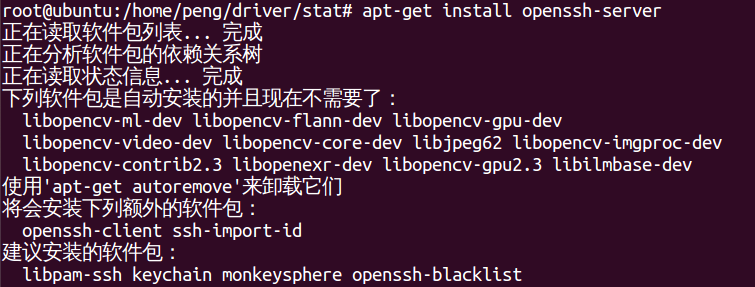
在这里插入图片描述

重启ssh服务器

命令:

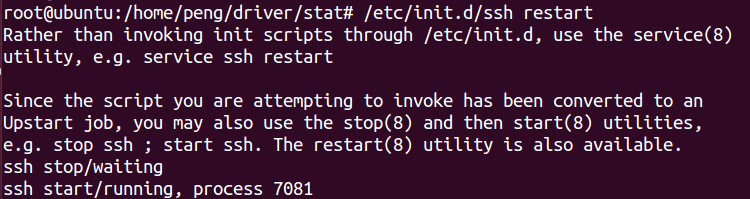
/etc/init.d/ssh restart

在这里插入图片描述

service sshd restart

修改配置文件

vim /etc/ssh/sshd_config

连接测试

连接工具很多,本文用secureCRT。
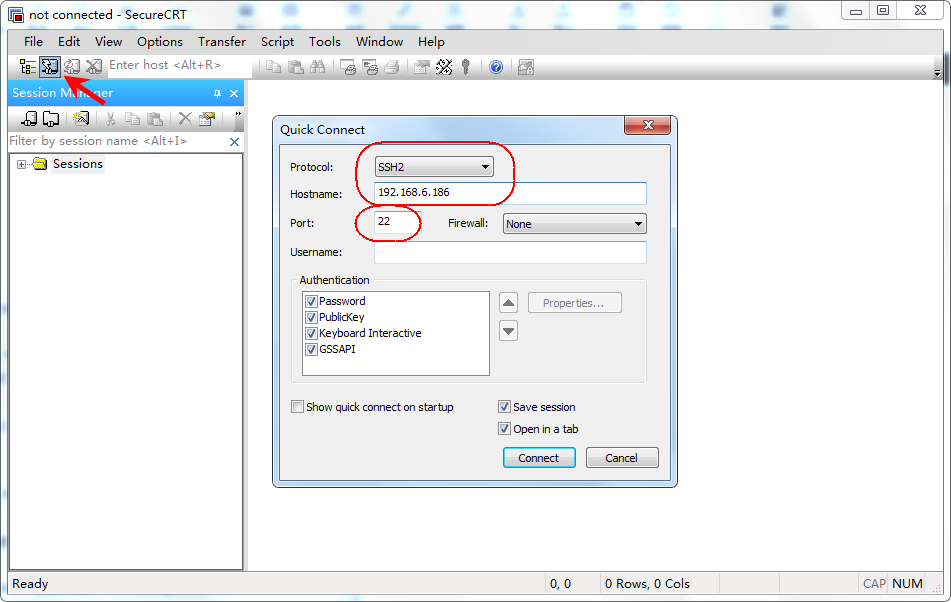
在这里插入图片描述![在这里插入图片描述]( https://img-blog.csdnimg.cn/20200827152904271.png?x-oss-process=image/watermark ,type_ZmFuZ3poZW5naGVpdGk,shadow_10,text_aHR0cHM6Ly9ibG9nLmNzZG4ubmV0L2Rhb2Nhb2thZmVp,size_16,color_FFFFFF,t_70#pic_center)![在这里插入图片描述]( https://img-blog.csdnimg.cn/2020082715331112.png?x-oss-process=image/watermark ,type_ZmFuZ3poZW5naGVpdGk,shadow_10,text_aHR0cHM6Ly9ibG9nLmNzZG4ubmV0L2Rhb2Nhb2thZmVp,size_16,color_FFFFFF,t_70#pic_center)

![ww]( https://img-blog.csdnimg.cn/20200827153051917.png?x-oss-process=image/watermark ,type_ZmFuZ3poZW5naGVpdGk,shadow_10,text_aHR0cHM6Ly9ibG9nLmNzZG4ubmV0L2Rhb2Nhb2thZmVp,size_16,color_FFFFFF,t_70#pic_center)
![在这里插入图片描述]( https://img-blog.csdnimg.cn/20200827153331855.png?x-oss-process=image/watermark ,type_ZmFuZ3poZW5naGVpdGk,shadow_10,text_aHR0cHM6Ly9ibG9nLmNzZG4ubmV0L2Rhb2Nhb2thZmVp,size_16,color_FFFFFF,t_70#pic_center)
![在这里插入图片描述]( https://img-blog.csdnimg.cn/20200827153350684.png?x-oss-process=image/watermark ,type_ZmFuZ3poZW5naGVpdGk,shadow_10,text_aHR0cHM6Ly9ibG9nLmNzZG4ubmV0L2Rhb2Nhb2thZmVp,size_16,color_FFFFFF,t_70#pic_center)
Ok,可以使用了

更多Linux信息,请关注 一口Linux

posted @ 2020-08-27 18:00  一口Linux  阅读(678)  评论(0)    收藏  举报