


Excel导出模板,在不同的sheet页面添加不同的数据
一、代码
@Slf4j
@Component
public class P0ExcelTemplateHandler {
    private static final String EXCEL_TEMPLATE_PATH = "excel/SeaFreightBatchImport.xlsx";

    /**
     * 处理Excel模板,填充数据并返回InputStream
     * @param productNames 产品名称列表
     * @param warehouseNames 仓库名称列表
     */
    public InputStream processExcelTemplate(List<String> productNames, List<String> warehouseNames) throws IOException {
        // 1. 读取模板文件
        ClassPathResource resource = new ClassPathResource(EXCEL_TEMPLATE_PATH);
        XSSFWorkbook workbook = new XSSFWorkbook(resource.getInputStream());

        try {
            // 2. 处理渠道列表sheet
            processChannelSheet(workbook, productNames);
            // 3. 处理我司仓库地址sheet
            processWarehouseSheet(workbook, warehouseNames);
            // 4. 处理单票下单sheet的下拉选择
            processOrderSheet(workbook, productNames.size());
            // 5. 将处理后的workbook转换为InputStream
            ByteArrayOutputStream outputStream = new ByteArrayOutputStream();
            workbook.write(outputStream);
            return new ByteArrayInputStream(outputStream.toByteArray());
        } finally {
            workbook.close();
        }
    }

    /**
     * 处理渠道列表sheet,填充产品名称到A列
     */
    private void processChannelSheet(XSSFWorkbook workbook, List<String> productNames) {
        XSSFSheet sheet = workbook.getSheet("渠道列表");
        if (sheet == null) {
            throw new RuntimeException("Excel模板中缺少'渠道列表'sheet");
        }
        // 清空原有内容
        clearSheetContent(sheet);
        // 填充产品名称到A列(从A1开始)
        for (int i = 0; i < productNames.size(); i++) {
            XSSFRow row = sheet.createRow(i);
            // A列
            XSSFCell cell = row.createCell(0);
            cell.setCellValue(productNames.get(i));
        }
    }

    /**
     * 处理我司仓库地址sheet,填充仓库名称到A列
     */
    private void processWarehouseSheet(XSSFWorkbook workbook, List<String> warehouseNames) {
        XSSFSheet sheet = workbook.getSheet("我司仓库地址");
        if (sheet == null) {
            throw new RuntimeException("Excel模板中缺少'我司仓库地址'sheet");
        }

        // 清空原有内容
        clearSheetContent(sheet);
        // 填充仓库名称到A列(从A1开始)
        for (int i = 0; i < warehouseNames.size(); i++) {
            XSSFRow row = sheet.createRow(i);
            // // A列
            XSSFCell cell = row.createCell(0);
            cell.setCellValue(warehouseNames.get(i));
        }
    }

    /**
     * 处理单票下单sheet,添加渠道下拉选择
     */
    private void processOrderSheet(XSSFWorkbook workbook, int productCount) {
        XSSFSheet sheet = workbook.getSheet("单票下单");
        if (sheet == null) {
            throw new RuntimeException("Excel模板中缺少'单票下单'sheet");
        }
        // 创建数据验证Helper
        XSSFDataValidationHelper dvHelper = new XSSFDataValidationHelper(sheet);
        // 设置下拉列表的引用范围:渠道列表!$A$1:$A$productCount
        String formula = String.format("渠道列表!$A$1:$A$%d", productCount);
        XSSFDataValidationConstraint dvConstraint = (XSSFDataValidationConstraint)
                dvHelper.createFormulaListConstraint(formula);
        // // 行号从0开始,H列是第7列
        // 设置应用范围:H4单元格(渠道选择单元格)
        CellRangeAddressList addressList = new CellRangeAddressList(3, 3, 7, 7);
        // 创建数据验证并添加到sheet
        XSSFDataValidation validation = (XSSFDataValidation) dvHelper.createValidation(dvConstraint, addressList);
        // 显示下拉箭头
        validation.setSuppressDropDownArrow(false);
        // 清除原有数据验证
        sheet.getDataValidations().clear();
        sheet.addValidationData(validation);
        // 设置默认值(可选)
        if (productCount > 0) {
            // 第4行(0开始索引)
            XSSFRow row = sheet.getRow(3);
            if (row == null) {
                row = sheet.createRow(3);
            }
            // H列
            XSSFCell cell = row.getCell(7);
            if (cell == null) {
                cell = row.createCell(7);
            }
        }
    }

    /**
     * 清空sheet内容
     */
    private void clearSheetContent(XSSFSheet sheet) {
        int lastRowNum = sheet.getLastRowNum();
        for (int i = 0; i <= lastRowNum; i++) {
            XSSFRow row = sheet.getRow(i);
            if (row != null) {
                sheet.removeRow(row);
            }
        }
    }
}
二、引入依赖
<dependency>
	<groupId>org.apache.poi</groupId>
	<artifactId>poi-ooxml</artifactId>
	<version>3.17</version>
</dependency>
三、说明
excel 导出模板,有多个 sheet页,有些数据需要从其他sheet页引入,生成下拉框,需要导出的excel模板在有些sheet页面插入数据,导出的 字节流里面有数据,可以下载模板,有数据显示
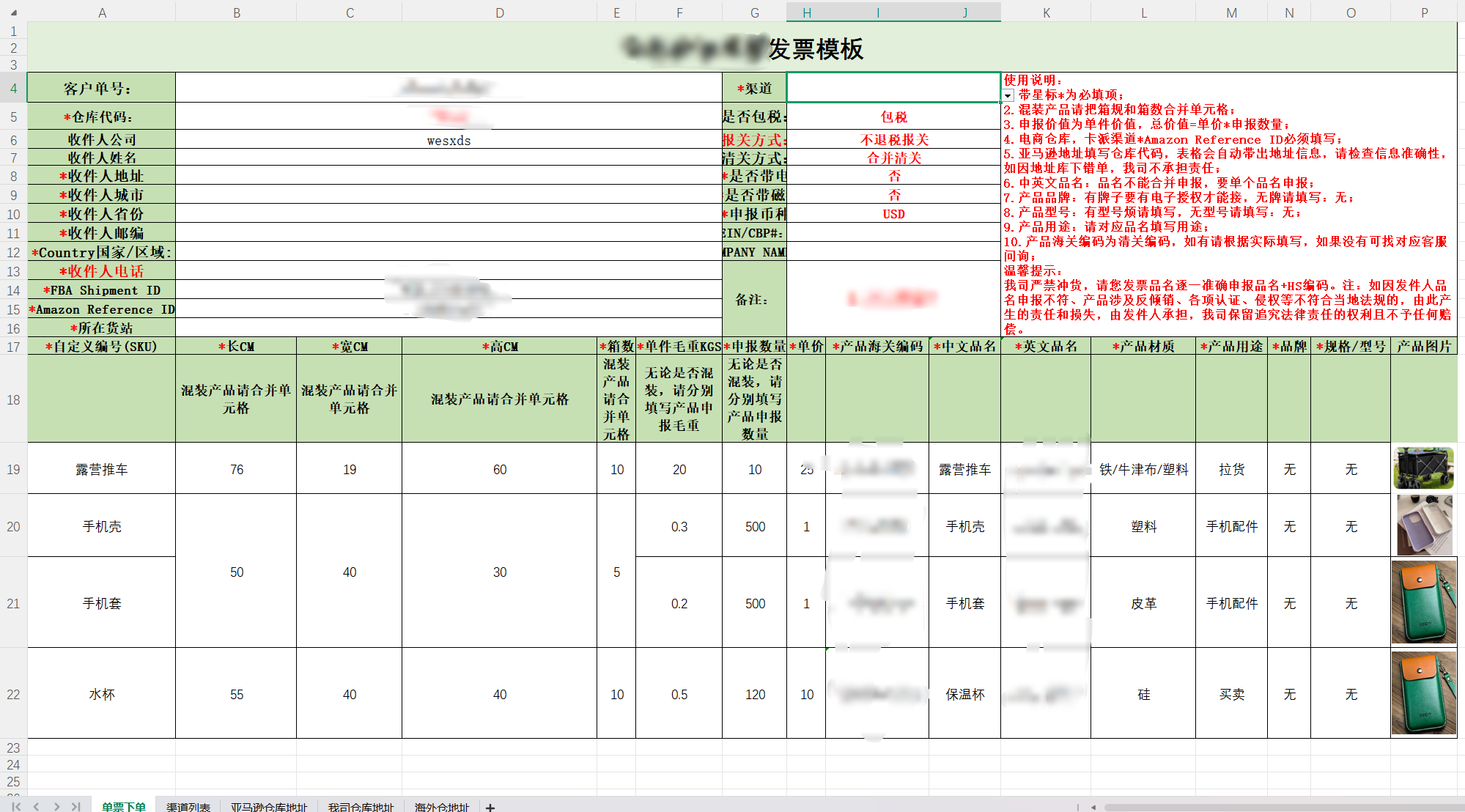
例如:图片中:所在货站 的数据是从我司仓库地址A列里面引入的数据;渠道 的数据从 渠道列表中A列里面引数据。

 浙公网安备 33010602011771号