
所需文件
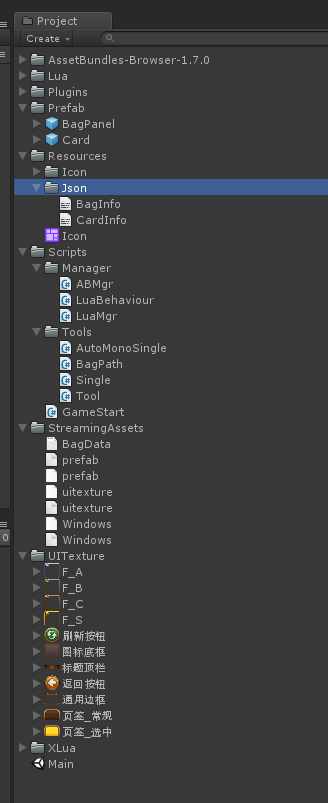
所需工具
AssetBundles-Browser-1.7.0
xLua-master
JsonUtility.lua
自定义工具类
单例
AutoMonoSingle.cs
using System.Collections;
using System.Collections.Generic;
using UnityEngine;

public class AutoMonoSingle<T> : MonoBehaviour where T : Component
{
    private static T instance;

    public static T Instance
    {
        get
        {
            if (instance == null)
            {
                GameObject obj = new GameObject(typeof(T).ToString());
                instance = obj.AddComponent<T>();
                DontDestroyOnLoad(obj);
            }
            return instance;
        }
    }
}
Single.cs
using System.Collections;
using System.Collections.Generic;
using UnityEngine;

public class Single<T> where T : new()
{
    private static T instance;

    public static T Instance
    {
        get {
            if (instance == null)
            {
                instance = new T();
            }
            return instance;
        }
    }
}
工具
Tool.cs
using System.Collections;
using System.Collections.Generic;
using UnityEngine;
namespace BagTools
{
    public static class Tool
    {
        /// <summary>
        /// 获取一个不重复的新的卡片的ID
        /// </summary>
        /// <returns></returns>
        public static int GetNewCardID()
        {
            //自增的模式
            //存储一个当前未使用的ID, 未使用的ID就是(当前最大的ID + 1)
            //如果本地没有存储未使用的ID, 证明ID从0或1开始
            //存储通过PlayerPrefs
            int id = 0;
            //判断本地是否存储了ID
            if (PlayerPrefs.HasKey("ID"))
            {
                //本地存储的就是未使用的,直接取出使用
                id = PlayerPrefs.GetInt("ID");
            }
            //再将一个未使用的存储到本地
            PlayerPrefs.SetInt("ID", id + 1);
            return id;
        }
    }
}
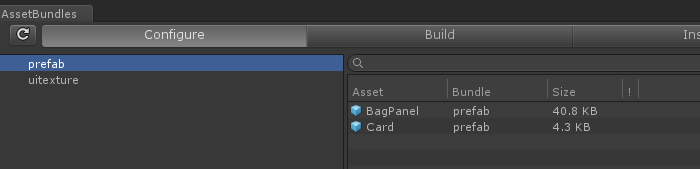
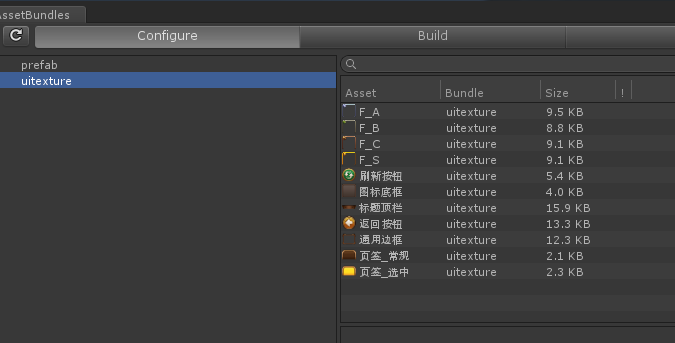
AB包内容
BagPanel, Card预制体 命名为"prefab" , 背景框等图片文件 命名为uitexture
Json文件
BagInfo.txt
{
    "capacity":42,
    "newcomer":
    [
        "H_C_10001","O_B_20002","S_A_30003",
        "U_B_20004","H_B_20001","U_C_10002",
        "U_C_10002","H_C_10001","S_S_40003",
        "U_S_40005"
    ]
}
CardInfo.txt
[
    {"style":"H_C_10001","name":"船长","race":"人族","atk":1,"def":3,"miss":0,"crit":1,"icon":"i_10001","level":"C","combineProb":8,"skill":"","desc":"会开船不会开车"},
    {"style":"U_C_10002","name":"小黑","race":"不死族","atk":3,"def":0,"miss":1,"crit":2,"icon":"i_10002","level":"C","combineProb":8,"skill":"","desc":"会射箭的小黑"},
    {"style":"S_C_10003","name":"火女","race":"精灵族","atk":3,"def":1,"miss":0,"crit":1,"icon":"i_10003","level":"C","combineProb":8,"skill":"","desc":"这个火女有点热"},
    {"style":"O_C_10004","name":"剑圣","race":"兽族","atk":2,"def":2,"miss":1,"crit":2,"icon":"i_10004","level":"C","combineProb":8,"skill":"","desc":"会转圈的剑圣"},
    {"style":"O_C_10005","name":"牛头","race":"兽族","atk":0,"def":5,"miss":0,"crit":0,"icon":"i_10005","level":"C","combineProb":8,"skill":"","desc":"抗揍的牛头"},
    {"style":"H_B_20001","name":"光法","race":"人族","atk":5,"def":1,"miss":0,"crit":2,"icon":"i_20001","level":"B","combineProb":13,"skill":"","desc":"没有头发的法师"},
    {"style":"O_B_20002","name":"熊猫","race":"兽族","atk":3,"def":3,"miss":1,"crit":2,"icon":"i_20002","level":"B","combineProb":13,"skill":"","desc":"酒量很高的熊猫"},
    {"style":"S_B_20003","name":"敌法","race":"精灵族","atk":4,"def":1,"miss":1,"crit":3,"icon":"i_20003","level":"B","combineProb":13,"skill":"","desc":"专杀法师的刺客"},
    {"style":"U_B_20004","name":"骨弓","race":"不死族","atk":5,"def":0,"miss":0,"crit":3,"icon":"i_20004","level":"B","combineProb":13,"skill":"","desc":"射的很快的骷髅"},
    {"style":"S_B_20005","name":"小鹿","race":"精灵族","atk":1,"def":4,"miss":4,"crit":0,"icon":"i_20005","level":"B","combineProb":13,"skill":"","desc":"有容乃大"},
    {"style":"H_A_30001","name":"冰女","race":"人族","atk":5,"def":2,"miss":2,"crit":4,"icon":"i_30001","level":"A","combineProb":20,"skill":"","desc":"这个冰女有点冷"},
    {"style":"O_A_30002","name":"地精","race":"兽族","atk":3,"def":3,"miss":5,"crit":1,"icon":"i_30002","level":"A","combineProb":20,"skill":"","desc":"啥用没有的地精"},
    {"style":"S_A_30003","name":"小小","race":"精灵族","atk":5,"def":5,"miss":0,"crit":1,"icon":"i_30003","level":"A","combineProb":20,"skill":"","desc":"山一样的小小"},
    {"style":"U_A_30004","name":"骨法","race":"不死族","atk":6,"def":1,"miss":2,"crit":3,"icon":"i_30004","level":"A","combineProb":20,"skill":"","desc":"绿的发光的骷髅"},
    {"style":"H_A_30005","name":"飞机","race":"人族","atk":5,"def":1,"miss":2,"crit":3,"icon":"i_30005","level":"A","combineProb":20,"skill":"","desc":"经常被打的飞机"},
    {"style":"H_S_40001","name":"火枪","race":"人族","atk":6,"def":1,"miss":3,"crit":5,"icon":"i_40001","level":"S","combineProb":35,"skill":"","desc":"射的很远的火枪"},
    {"style":"O_S_40002","name":"大祭司","race":"兽族","atk":5,"def":4,"miss":3,"crit":4,"icon":"i_40002","level":"S","combineProb":35,"skill":"","desc":"兽人永不为奴"},
    {"style":"S_S_40003","name":"白虎","race":"精灵族","atk":6,"def":3,"miss":3,"crit":5,"icon":"i_40003","level":"S","combineProb":35,"skill":"","desc":"吃猫粮的白虎"},
    {"style":"S_S_40004","name":"玄武","race":"精灵族","atk":4,"def":6,"miss":6,"crit":1,"icon":"i_40004","level":"S","combineProb":35,"skill":"","desc":"顶着龟壳的玄武 "},
    {"style":"U_S_40005","name":"骷髅王","race":"不死族","atk":5,"def":5,"miss":5,"crit":2,"icon":"i_40005","level":"S","combineProb":35,"skill":"","desc":"青龙死后变成的骷髅王"}
]
实现过程
一、启动文件
GameStart.cs
using System.Collections;
using System.Collections.Generic;
using UnityEngine;

public class GameStart : MonoBehaviour
{
    private System.Action save;
    private void Awake()
    {
        LuaMgr.Instance.DoRequireFile("Start");

        LuaMgr.Instance.Global.Get("Save", out save);
    }

    private void OnDestroy()
    {
        if (save != null)
        {
            save();
        }
        save = null;
    }

}
lua执行文件
LuaBehaviour.cs
using System.Collections;
using System.Collections.Generic;
using UnityEngine;
using XLua;
using System;

public class LuaBehaviour : MonoBehaviour
{
    //通过一个文件名字就能执行整个lua文件
    public string luaName;

    //定义一个独立的存储区(LuaTable)
    private LuaTable scriptLua;

    //生命周期函数映射的委托
    private Action awake;
    private Action start;
    private Action update;
    private Action destroy;


    private void Awake()
    {
        //创建独立的存储区 LuaTable
        scriptLua = LuaMgr.Instance.LuaEnv.NewTable();

        //创建元表,元表中注入元方法 __index 使其指向Global
        LuaTable meta = LuaMgr.Instance.LuaEnv.NewTable();
        meta.Set("__index", LuaMgr.Instance.Global);
        //设置 scriptLua 的 元表为meta
        scriptLua.SetMetaTable(meta);
        meta.Dispose();

        //将gameObject  transform注入到scriptLua
        scriptLua.Set("gameObject", gameObject);
        scriptLua.Set("transform", transform);

        //执行lua语句
        LuaMgr.Instance.DoFileLua(luaName, luaName, scriptLua);

        //映射所有的生命周期函数
        scriptLua.Get("Awake", out awake);
        scriptLua.Get("Start", out start);
        scriptLua.Get("Update", out update);
        scriptLua.Get("OnDestroy", out destroy);

        if (awake != null)
        {
            awake();
        }
    }

    void Start ()
    {
        if (start != null)
        {
            start();
        }
    }


    void Update ()
    {
        if (update != null)
        {
            update();
        }
    }

    private void OnDestroy()
    {
        if (destroy != null)
        {
            destroy();
        }

        awake = null;
        start = null;
        update = null;
        destroy = null;
        scriptLua.Dispose();
    }
}
AB包管理类
ABMgr.cs
using System.Collections;
using System.Collections.Generic;
using UnityEngine;
using System.IO;

public class ABMgr : AutoMonoSingle<ABMgr>
{
    //防止卸载前重复加载
    //加载某个AB包前先加载其依赖
    private Dictionary<string, AssetBundle> loaded =
        new Dictionary<string, AssetBundle>();

    //加载路径
    private string path;

    public string Path
    {
        get {
            if (path == null || path == "")
            {
                //根据平台判断路径
#if UNITY_EDITOR || UNITY_STANDALONE_WIN
                path = Application.streamingAssetsPath + "/";
#else
                path = Application.persistentDataPath + "/";
#endif
            }
            return path;
        }
    }

    //不同的平台,主包的名字不同
    public string MainABName
    {
        get {
#if UNITY_STANDALONE_WIN
            return "Windows";
#elif UNITY_ANDROID
            return "Android";
#elif UNITY_IOS
            return "iOS";
#else
            return "AssetBundle";
#endif
        }
    }

    //主包
    private AssetBundle main;

    //主manifest文件
    private AssetBundleManifest manifest;

    //加载AB包
    public AssetBundle Load(string abName)
    {
        AssetBundle ab = null;
        //判断是否存在
        if (!loaded.TryGetValue(abName, out ab))
        {
            //判断要加载的AB包是否存在
            if (!File.Exists(Path + abName))
            {
                Debug.LogError("指定加载的AB包文件不存在,请检查加载路径:" + Path + abName);
                return null;
            }

            //加载主包
            if (main == null)
            {
                //为了程序的健壮性,可以判断主包文件是否存在
                if (!File.Exists(Path + MainABName))
                {
                    Debug.LogError("主包文件不存在,请检查加载路径:" + Path + MainABName);
                    return null;
                }
                main = AssetBundle.LoadFromFile(Path + MainABName);
            }

            //加载Manifest文件
            if (manifest == null)
            {
                manifest = main.LoadAsset<AssetBundleManifest>("AssetBundleManifest");
            }

            //获取依赖
            string[] deps = manifest.GetAllDependencies(abName);
            //遍历加载依赖
            foreach (var depName in deps)
            {
                //判断依赖是否加载过
                if (!loaded.ContainsKey(depName))
                {
                    AssetBundle dep = AssetBundle.LoadFromFile(Path + depName);
                    loaded[depName] = dep;
                }
            }
            //加载当前AB包
            ab = AssetBundle.LoadFromFile(Path + abName);
            loaded[abName] = ab;
        }
        return ab;
    }

    //卸载
    public void Unload(string abName, bool isUnloadObjects = false)
    {
        AssetBundle ab = null;
        //是否加载过
        if (loaded.TryGetValue(abName, out ab))
        {
            ab.Unload(isUnloadObjects);
            //从字典中删除
            loaded.Remove(abName);
        }
    }

    public void UnloadAll(bool isUnloadObjects = false)
    {
        foreach (var ab in loaded.Values)
        {
            ab.Unload(isUnloadObjects);
        }
        loaded.Clear();
    }

    //加载指定ab包的指定资源
    public Object LoadAsset(string abName, string assetName)
    {
        AssetBundle ab = Load(abName);
        if (ab != null)
        {
            return ab.LoadAsset(assetName);
        }
        return null;
    }

    public Object LoadAsset(string abName, string assetName, System.Type type)
    {
        AssetBundle ab = Load(abName);
        if (ab != null)
        {
            return ab.LoadAsset(assetName, type);
        }
        return null;
    }

    public T LoadAsset<T>(string abName, string assetName) where T : Object
    {
        AssetBundle ab = Load(abName);
        if (ab != null)
        {
            return ab.LoadAsset<T>(assetName);
        }
        return default(T);
    }

}
lua管理类
LuaMgr.cs
using System.Collections;
using System.Collections.Generic;
using UnityEngine;
using XLua;
using System.IO;

public class LuaMgr : AutoMonoSingle<LuaMgr>
{
    //lua GC的间隔时间
    const int GCInterval = 5;

    //最后一次GC的时间
    float lastTime = 0;

    private void Awake()
    {
        luaenv = new LuaEnv();

        //添加自定义的加载器
        luaenv.AddLoader(FolderLoader);
        luaenv.AddLoader(AssetBundleLoader);


    }

    //用到Update函数
    private void Update()
    {
        //定期调用Lua的Tick
        if (Time.time - lastTime > GCInterval)
        {
            luaenv.Tick();
            lastTime = Time.time;
        }
    }

    //虚拟机
    private LuaEnv luaenv;

    public LuaEnv LuaEnv
    {
        get {
            return luaenv;
        }
    }

    public LuaTable Global
    {
        get {
            return luaenv.Global;
        }
    }


    //执行lua语句
    public void DoLua(string lua, string chunkName = "chunk", LuaTable lt = null)
    {
        luaenv.DoString(lua, chunkName, lt);
    }

    //通过lua文件名, 读取lua文件,执行lua语句
    public void DoFileLua(string fileName, string chunkName = "chunk", LuaTable lt = null)
    {
        //luaenv.DoString(string.Format("require('{0}')", fileName), chunkName, lt);
        //想要通过加载器来加载出lua文件中的lua语句
        //luaenv.customLoaders 存储已经添加的加载器
        //遍历调用每一个加载器
        foreach (var loader in luaenv.customLoaders)
        {
            byte[] bytes = loader(ref fileName);
            if (bytes != null)
            {
                //加载成功
                //将字节数组转换成lua语句
                string lua = System.Text.Encoding.UTF8.GetString(bytes);
                DoLua(lua, chunkName, lt);
                //就不需要调用下一个加载器
                return;
            }
        }


    }

    //通过自定义加载器执行lua文件
    public void DoRequireFile(string fileName, string chunkName = "chunk", LuaTable lt = null)
    {
        luaenv.DoString(string.Format("require('{0}')", fileName), chunkName, lt);
    }

    //两个自定义加载器

    //在编辑器的情况下,从Assets/Lua文件夹中加载
    //存储Lua文件夹下及其子文件路径
    List<string> editorLuaChildList;
    byte[] FolderLoader(ref string fileName)
    {
#if UNITY_EDITOR
        if (editorLuaChildList == null)
        {
            //将所有的子路径存储进来
            editorLuaChildList = new List<string>();
            string folder = Application.dataPath + "/Lua/";
            editorLuaChildList.Add(folder);

            string[] child = Directory.GetDirectories(folder);
            foreach (var item in child)
            {
                editorLuaChildList.Add(item + "/");
            }
        }

        foreach (var dirPath in editorLuaChildList)
        {
            string path = string.Format("{0}{1}.lua", dirPath, fileName);
            if (File.Exists(path))
            {
                return File.ReadAllBytes(path);
            }
        }
#endif
        return null;
    }

    //从AB包中加载
    byte[] AssetBundleLoader(ref string fileName)
    {
        //名字为lua的AB包存储所有的lua文件
        TextAsset asset = ABMgr.Instance.LoadAsset<TextAsset>("lua", fileName);
        //不一定加载到资源
        if (asset != null)
        {
            return asset.bytes;
        }
        return null;
    }


}
UnityAPI.lua
-- UnityEngine
GameObject = CS.UnityEngine.GameObject
Transform = CS.UnityEngine.Transform
Resources = CS.UnityEngine.Resources
Application = CS.UnityEngine.Application
Sprite = CS.UnityEngine.Sprite -- 精灵图
PlayerPrefs = CS.UnityEngine.PlayerPrefs
Vector2 = CS.UnityEngine.Vector2
Vector3 = CS.UnityEngine.Vector3
TextAsset = CS.UnityEngine.TextAsset
Input = CS.UnityEngine.Input
KeyCode = CS.UnityEngine.KeyCode
Random = CS.UnityEngine.Random

-- UnityEngine.UI
Image = CS.UnityEngine.UI.Image
Text = CS.UnityEngine.UI.Text
Button = CS.UnityEngine.UI.Button
Toggle = CS.UnityEngine.UI.Toggle
Slider = CS.UnityEngine.UI.Slider

-- UnityEngine.U2D
SpriteAtlas = CS.UnityEngine.U2D.SpriteAtlas

print("Unity API 初始化完成")
自定义文件的API
SelfAPI.lua
-- 直接执行单例的变量 ABMgr是对象
ABMgr = CS.ABMgr.Instance

Path = CS.BagTools.Path
Tool = CS.BagTools.Tool

print("Self API 初始化完成")
lua的启动文件
Start.lua
print("Start ... ...")

-- 所有需要初始化提前执行的Lua脚本都要提前执行
require('UnityAPI')
require('SelfAPI')

JsonUti = require('JsonUtility')


-- 读取数据的部分一定要在 require('JsonUtility') 之后
-- 读取部分要使用JsonUtility解析
CardInfoMgr = require('CardInfoMgr')
-- 初始化静态数据
CardInfoMgr:Init()
-- 测试是否初始化成功
-- print(CardInfoMgr:GetInfo("H_C_10001").name)

BagDataMgr = require("BagDataMgr")
BagDataMgr:Init()

-- 测试
--[[
for k,v in pairs(BagDataMgr.normalList) do
    print(k,v.id, v.style)
end

for k,v in pairs(BagDataMgr.rareList) do
    print(k,v.id, v.style)
end
]]

-- 从AB包中加载背包界面的预制体,克隆岛Canvas下
Canvas = GameObject.Find("Canvas").transform
-- ABMgr是AB包管理器的对象,不是类
local bagPrefab = ABMgr:LoadAsset("prefab", "BagPanel", typeof(GameObject))
-- 克隆背包界面
BagPanelObj = GameObject.Instantiate(bagPrefab, Canvas)

-- 提供给C#的GameStart的OnDestroy调用的
function Save()
    BagDataMgr:Save()
end
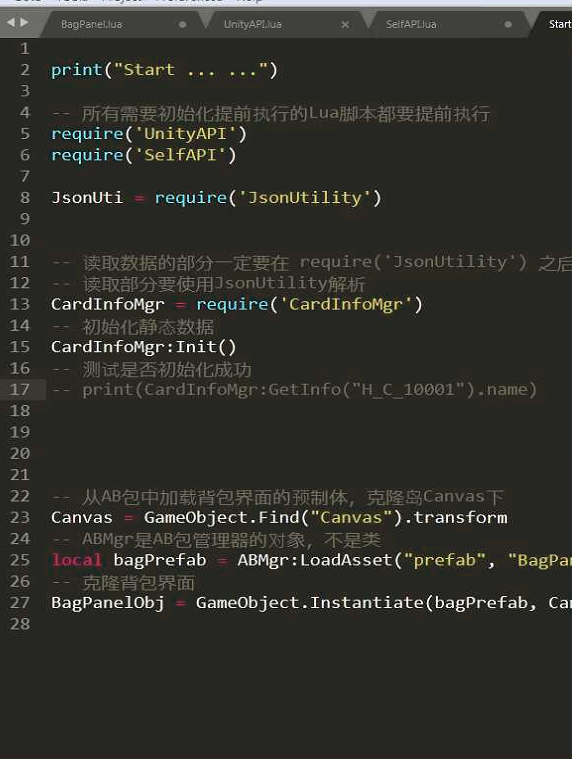
加载画布,bagpanel界面
bagPanel.lua
二、背包静态数据
存储所有卡牌的静态数据的,字典结构
cardInfoMgr.lua
local Mgr = {}

-- 存储所有卡牌的静态数据的,字典结构
-- 使用table模拟字典存储, table键是style,table值是tabel
Mgr.infoDic = {}

-- 单独存储S卡的style
Mgr.sList = {}
-- 单独存储普通卡的style
Mgr.abcList = {}

-- 初始化方法,读取静态数据
function Mgr:Init()
    -- 通过self拿到Mgr表
    -- 读取静态数据表的Json
    local json = Resources.Load("Json/CardInfo", typeof(TextAsset)).text
    -- 解析Json  使用JsonUti.decode
    -- array 是 模拟数据的 table
    local array = JsonUti.decode(json)
    -- 遍历数据
    for i = 1, #array do
        -- info是  {"style":"H_C_10001","name":"船长","race":"人族","atk":1,"def":3,"miss":0,"crit":1,"icon":"i_10001","level":"C","combineProb":8,"skill":"","desc":"会开船不会开车"}
        -- 在lua中上面结构使用 table 来存储, 所以info是table
        local info = array[i]
        --print(info.style, info.name, info.level)
        -- 将info存储Mgr.infoDic  键是style  值是info
        self.infoDic[info.style] = info

        if info.level == "S" then
            table.insert(self.sList, info.style)
        else
            table.insert(self.abcList, info.style)
        end
    end
end

-- 通过style获取对应单条卡牌数据
function Mgr:GetInfo(style)
    return self.infoDic[style]
end

return Mgr
背包数据管理类
BagDataMgr.lua
local Mgr = {}

local fileName = "BagData.txt"
local path = Path.BagDataPath .. fileName;

-- 背包的容量
Mgr.capacity = 0

-- 存储普通和稀有的List,Lua中需要使用table来模拟List
Mgr.normalList = {}
Mgr.rareList = {}

-- 通过id 与style生成一个新的 表
local function NewCardData(id ,style)
    local data = {}
    data.id = id
    data.style = style
    return data
end

-- 从文件中读取数据
function Mgr:Init()

    -- 读取背包的容量数据与新手礼包
    local json = Resources.Load("Json/BagInfo", typeof(TextAsset)).text
    local bagInfo = JsonUti.decode(json)
    -- 获取容量
    self.capacity = bagInfo.capacity
    -- print("背包的容量:" .. self.capacity)

    -- 判断文件是否存在
    -- 打开文件, 'r'以只读的形式打开文件
    local file = io.open(path, 'r')
    -- 如果文件不存在,那么file为nil, 否则为文件句柄,可以通过file来进行文件读取
    if file then
        -- print("文件存在")
        -- '*a'表示读取文件的所有内容
        local json = file:read('*a')
        -- 解析文件内容
        local bagData = JsonUti.decode(json)
        self.normalList = bagData["NormalList"]
        self.rareList = bagData["RareList"]
        -- 关闭文件
        file:close()
    else
        -- print("文件不存在")
        -- 给新手礼包  array是字符串类型的数组
        local array = bagInfo.newcomer
        -- 遍历数组
        for i = 1, #array do
            local style = array[i]
            -- 生成新的ID
            local id = Tool.GetNewCardID()
            -- 通过卡牌的等级,放在不同的table中
            local info = CardInfoMgr:GetInfo(style)

            -- 要插入 { id = 1, style = "H_C_10001" }
            local data = NewCardData(id, style)
            if info.level == "S" then
                -- 添加到Mgr.rareList, 放在表的结尾
                -- 使用lua内置的table.insert方法 table.insert(表, 插入的数据)
                table.insert(self.rareList, data)
            else
                table.insert(self.normalList, data)
            end
        end
    end


end

-- 存储数据
function Mgr:Save()
    -- { "NormalList":[{id= 1, style="H_C_10001"}], "RareList":[{id= 1, style="H_C_10001"}] }
    local bagData = {}
    bagData.NormalList = self.normalList
    bagData.RareList = self.rareList
    -- 将表结构转换为Json
    local json = JsonUti.encode(bagData)
    -- print(json)
    -- 写入文件, "w"表示写入, 如果文件不存在则创建文件,文件存在,则将文件的内容全部清理重新写入
    local file = io.open(path, "w")
    file:write(json)
    -- 关闭文件
    file:close()
end


-- 添加数据
function Mgr:AddCard(style)
    -- 获取新的ID
    local id = Tool.GetNewCardID()
    local data = NewCardData(id, style)
    local info = CardInfoMgr:GetInfo(style)
    if info.level == "S" then
        table.insert(self.rareList, data)
    else
        table.insert(self.normalList, data)
    end
end


return Mgr
背包文件加载的路径
Path.cs
using System.Collections;
using System.Collections.Generic;
using UnityEngine;

namespace BagTools
{
    public static class Path
    {
        //背包数据的路径
        private static string bagDataPath;

        public static string BagDataPath
        {
            get
            {
                if (bagDataPath == null || bagDataPath == "")
                {
#if UNITY_EDITOR || UNITY_STANDALONE_WIN
                    bagDataPath = Application.streamingAssetsPath + "/";
#else
                bagDataPath = Application.persistentDataPath + "/";
#endif
                }
                return bagDataPath;
            }
        }

    }

}
三、生成卡牌
背包界面
四、生成图片
BagPanel.lua中实现加载不同卡牌的icon的精灵图
五、切换卡牌的种类
bagPanel.lua
print("Bag Panel ... ...")

local gridPrefab = nil
local gridParent = nil

-- 两个Toggle组件存储
local labels = {}

-- 存储所有的格子 数组结构
local grids = {}
-- 存储当前卡牌
local cards = {}

-- 生成格子
local function InitGrid(gridNum)
    -- 根据格子数量生成格子
    for i = 1, gridNum do
         gridObj = GameObject.Instantiate(gridPrefab, gridParent)
         gridObj.name = "Grid_" .. i
         gridObj:SetActive(true)
         -- 存储到grids中
         table.insert(grids, gridObj.transform)
    end
end

-- 更新卡牌视图的方法,  cardObj:卡牌物体,
local function UpdateCardView(cardObj, id, style)
    -- 修改物体的名字
    cardObj.name = id .. "&" .. style
    -- 获取卡牌的基本信息,  通过style
    local info = CardInfoMgr:GetInfo(style)
    -- 获取icon的Image组件, frame的Image组件,修改图片
    local iconImage = cardObj:GetComponent(typeof(Image))
    -- 加载图标的图集
    local iconAtlas = Resources.Load("Icon", typeof(SpriteAtlas))
    -- 通过图标的名字,从图集中加载图片
    local iconSprite = iconAtlas:GetSprite(info.icon)
    -- 修改图标的图片
    iconImage.sprite = iconSprite

    -- 获取边框Image
    local frameImage = cardObj.transform:Find("Frame"):GetComponent(typeof(Image))
    -- 从AB包中加载图片
    local frameName = "F_" .. info.level
    local framSprite = ABMgr:LoadAsset("uitexture", frameName, typeof(Sprite))
    -- 修改边框的图片
    frameImage.sprite = framSprite

end

-- 通过toggle组件的isOn,判断返回的数据
local function CheckLabel()
    -- 通过toggle组件的isOn,判断返回的数据
    for i = 1,#labels do
        if labels[i].isOn then
            --判断当前的选中的名字
            if labels[i].name == "Rare" then
                return BagDataMgr.rareList
            else
                return BagDataMgr.normalList
            end
        end
    end
    return nil
end

-- 根据传入的数据, 生成卡牌
local function UpdateView(datas)
    -- cards:  [ {id = 1, style = "H_C_100001"},{id = 1, style = "H_C_100001"} ]
    -- 数据不能比格子数量多
    if #datas > #grids then
        return
    end

    -- 将之前的卡牌清理掉
    for i = 1,#cards do
        GameObject.Destroy(cards[i])
    end
    -- 将表清空
    cards = {}

    local cardPrefab = ABMgr:LoadAsset("prefab", "Card", typeof(GameObject))

    -- 遍历格子,生成对应的卡牌
    for i = 1, #grids do
        -- 判断当前格子是否有数据
        if i <= #datas then
            -- 有数据, 在当前的格子上克隆卡牌
            local cardObj = GameObject.Instantiate(cardPrefab, grids[i])

            local id = datas[i].id
            local style = datas[i].style
            -- 通过方法更新卡牌图标与边框
            UpdateCardView(cardObj, id, style)

            -- 添加到cardObjs
            table.insert(cards, cardObj)
        else
            -- 没有数据,直接跳出循环
            break
        end
    end
end

-- 比较逻辑函数
local function CompareTo(v1, v2)
    -- 返回值只有true和false
    -- true v1 排在 v2前
    -- 如果比较相等 一定返回false
    -- v1: {id = 1, style = "H_C_10001"}
    -- v2: {id = 1, style = "H_C_10001"}
    -- 第一重权重比较 比的level
    local info1 = CardInfoMgr:GetInfo(v1.style)
    local info2 = CardInfoMgr:GetInfo(v2.style)
    -- info1.level是字符串, lua中可以对字符串进行大小比较
    if info1.level < info2.level then
        return true
    elseif info1.level > info2.level then
        return false
    else
        -- 第二重比较种族, style的开头字母就是种族,所以直接比较style就可以
        if v1.style < v2.style then
            return true
        elseif v1.style > v2.style then
            return false
        else
            return false
        end
    end
end

-- 排序
local function Sort()
    -- 根据当前选择的toggle判断对哪个列表进行排序
    for i = 1,#labels do
        if labels[i].isOn then
            --判断当前的选中的名字
            if labels[i].name == "Rare" then
                -- 对稀有排序  table.sort(表, 比较的逻辑函数)
                table.sort(BagDataMgr.rareList, CompareTo)

            else
                -- 对普通进行排序
                table.sort(BagDataMgr.normalList, CompareTo)
            end
        end
    end
end


function Awake()
    -- 获取格子物体 GameObject
    gridPrefab = transform:Find("Grid").gameObject
    -- 获取格子父物体 Transform
    gridParent = transform:Find("GridRect/Viewport/Content")

    -- 获取Toggle的父物体
    local labelParent = transform:Find("GridRect/Labels")
    -- 遍历labelParent的子物体, 子物体的索引是从0开始
    for i = 0, labelParent.childCount - 1 do
        -- 从当前子物体上获取Toggle组件
        local child = labelParent:GetChild(i)
        local toggle = child:GetComponent(typeof(Toggle))
        -- 对toggle组件添加事件
        toggle.onValueChanged:AddListener(function(isOn)
            if isOn then
                -- 判断传入的是普通还是稀有,通过Toggle
                local datas = CheckLabel()
                UpdateView(datas)
            end
        end)

        -- 添加到labels中
        table.insert(labels, toggle)
    end

    -- 获取排序的按钮,并且添加事件
    local sortButton = transform:Find("GridRect/SortButton"):GetComponent(typeof(Button))
    sortButton.onClick:AddListener(function()
        Sort()
        -- 判断传入的是普通还是稀有,通过Toggle
        local datas = CheckLabel()
        UpdateView(datas)
    end)

    -- 生成格子
    InitGrid(BagDataMgr.capacity)
end

function Start()
    -- 更新卡牌界面
    -- 判断传入的是普通还是稀有,通过Toggle
    local datas = CheckLabel()
    UpdateView(datas)
end

function Update()
    if Input.GetKeyDown(KeyCode.S) then
        --随机S
        if #BagDataMgr.rareList < BagDataMgr.capacity then
            local index = Random.Range(1, #CardInfoMgr.sList + 1)
            index = math.modf(index)
            local style = CardInfoMgr.sList[index]
            BagDataMgr:AddCard(style)
            -- 判断传入的是普通还是稀有,通过Toggle
            local datas = CheckLabel()
            UpdateView(datas)
        end
    end

    if Input.GetKeyDown(KeyCode.Space) then
        --随机普通
        if #BagDataMgr.normalList < BagDataMgr.capacity then
            local index = Random.Range(1, #CardInfoMgr.abcList + 1)
            index = math.modf(index)
            print("count:", #CardInfoMgr.abcList, index)
            local style = CardInfoMgr.abcList[index]
            BagDataMgr:AddCard(style)
            -- 判断传入的是普通还是稀有,通过Toggle
            local datas = CheckLabel()
            UpdateView(datas)
        end
    end
end

function OnDestroy()

end

 浙公网安备 33010602011771号