
nginx config2
一.nginx简介
Nginx (发音为[engine x])专为性能优化而开发,其最知名的优点是它的稳定性和低系统资源消耗,以及对并发连接的高处理能力(单台物理服务器可支持30000~50000个并发连接), 是一个高性能的 HTTP 和反向代理服务器,也是一个IMAP/POP3/SMTP 代理服。
实际使用中,nginx主要:反向代理、负载均衡
二.nginx基本配置与参数说明
#运行用户
user nobody;#启动进程,通常设置成和cpu的数量相等
worker_processes 1;
#全局错误日志及PID文件
#error_log  logs/error.log;
#error_log  logs/error.log  notice;
#error_log  logs/error.log  info;
#pid logs/nginx.pid;
#工作模式及连接数上限
events {
#epoll是多路复用IO(I/O Multiplexing)中的一种方式,
#仅用于linux2.6以上内核,可以大大提高nginx的性能
use epoll;
#单个后台worker process进程的最大并发链接数
worker_connections 1024;
# 并发总数是 worker_processes 和 worker_connections 的乘积
# 即 max_clients = worker_processes * worker_connections
# 在设置了反向代理的情况下,max_clients = worker_processes * worker_connections / 4 为什么
# 为什么上面反向代理要除以4,应该说是一个经验值
# 根据以上条件,正常情况下的Nginx Server可以应付的最大连接数为:4 * 8000 = 32000
# worker_connections 值的设置跟物理内存大小有关
# 因为并发受IO约束,max_clients的值须小于系统可以打开的最大文件数
# 而系统可以打开的最大文件数和内存大小成正比,一般1GB内存的机器上可以打开的文件数大约是10万左右
# 我们来看看360M内存的VPS可以打开的文件句柄数是多少:
# $ cat /proc/sys/fs/file-max
# 输出 34336
# 32000 < 34336,即并发连接总数小于系统可以打开的文件句柄总数,这样就在操作系统可以承受的范围之内
# 所以,worker_connections 的值需根据 worker_processes 进程数目和系统可以打开的最大文件总数进行适当地进行设置
# 使得并发总数小于操作系统可以打开的最大文件数目
# 其实质也就是根据主机的物理CPU和内存进行配置
# 当然,理论上的并发总数可能会和实际有所偏差,因为主机还有其他的工作进程需要消耗系统资源。
# ulimit -SHn 65535
}
#设定http服务器
http {
#设定mime类型,类型由mime.type文件定义
include mime.types;default_type application/octet-stream;#设定日志格式
    log_format  main  '$remote_addr - $remote_user [$time_local] "$request" '
                      '$status $body_bytes_sent "$http_referer" '
'"$http_user_agent" "$http_x_forwarded_for"';access_log logs/access.log main;
#sendfile 指令指定 nginx 是否调用 sendfile 函数(zero copy 方式)来输出文件,
#对于普通应用,必须设为 on,
#如果用来进行下载等应用磁盘IO重负载应用,可设置为 off,
#以平衡磁盘与网络I/O处理速度,降低系统的uptime.
sendfile on;#tcp_nopush on;
#连接超时时间
#keepalive_timeout 0;
keepalive_timeout 65;tcp_nodelay on;
#FastCGI相关参数是为了改善网站的性能:减少资源占用,提高访问速度。下面参数看字面意思都能理解。
fastcgi_connect_timeout 300;
fastcgi_send_timeout 300;
fastcgi_read_timeout 300;
fastcgi_buffer_size 64k;
fastcgi_buffers 4 64k;
fastcgi_busy_buffers_size 128k;
fastcgi_temp_file_write_size 128k;
#upstream的负载均衡,(以权重方式分发),weight是权重,可以根据机器配置定义权重。weigth参数表示权值,权值越高被分配到的几率越大。
upstream blog.nginx.com {
    server 192.168.80.121:80 weight=3;
    server 192.168.80.122:80 weight=2;
    server 192.168.80.123:80 weight=3;
}#upstream的负载均衡,(以nginx热备方式分发),其它所有的非backup Server down或者忙的时候,请求backup机器。所以这台机器压力会最轻。
upstream blog.nginx.com {
    server 192.168.80.121:80;
    server 192.168.80.122:80;
    server 192.168.80.123:80 backup;
}#开启gzip压缩
gzip on;gzip_disable "MSIE [1-6].";
#设定请求缓冲
client_header_buffer_size 128k;large_client_header_buffers 4 128k;
#设定虚拟主机配置
server {
#侦听80端口
listen 80;#定义访问地址,域名可以有多个,用空格隔开
server_name www.nginx.cn nginx.cn ;
#定义服务器的默认网站根目录位置
root html;
#设定本虚拟主机的访问日志
access_log logs/nginx.access.log main;
#默认请求
location / {
   #定义首页索引文件的名称
   index index.php index.html index.htm;
}
#对 “/” 启用反向代理
location / {
    proxy_pass http://127.0.0.1:88;
    proxy_redirect off;
    proxy_set_header X-Real-IP $remote_addr;
    #后端的Web服务器可以通过X-Forwarded-For获取用户真实IP
    proxy_set_header X-Forwarded-For $proxy_add_x_forwarded_for;
    #以下是一些反向代理的配置,可选。
    proxy_set_header Host $host;
    client_max_body_size 10m; #允许客户端请求的最大单文件字节数
    client_body_buffer_size 128k; #缓冲区代理缓冲用户端请求的最大字节数,
    proxy_connect_timeout 90; #nginx跟后端服务器连接超时时间(代理连接超时)
    proxy_send_timeout 90; #后端服务器数据回传时间(代理发送超时)
    proxy_read_timeout 90; #连接成功后,后端服务器响应时间(代理接收超时)
    proxy_buffer_size 4k; #设置代理服务器(nginx)保存用户头信息的缓冲区大小
    proxy_buffers 4 32k; #proxy_buffers缓冲区,网页平均在32k以下的设置
    proxy_busy_buffers_size 64k; #高负荷下缓冲大小(proxy_buffers*2)
    proxy_temp_file_write_size 64k;
    #设定缓存文件夹大小,大于这个值,将从upstream服务器传
}
#设定查看Nginx状态的地址
location /NginxStatus {
    stub_status on;
    access_log on;
    auth_basic “NginxStatus”;
    auth_basic_user_file conf/htpasswd;
    #htpasswd文件的内容可以用apache提供的htpasswd工具来产生。
}
#本地动静分离反向代理配置
#所有jsp的页面均交由tomcat或resin处理
location ~ .(jsp|jspx|do)?$ {
    proxy_set_header Host $host;
    proxy_set_header X-Real-IP $remote_addr;
    proxy_set_header X-Forwarded-For $proxy_add_x_forwarded_for;
    proxy_pass http://127.0.0.1:8080;
}
#所有静态文件由nginx直接读取不经过tomcat或resin
location ~ .*.(htm|html|gif|jpg|jpeg|png|bmp|swf|ioc|rar|zip|txt|flv|mid|doc|ppt
                |pdf|xls|mp3|wma)$ {
    expires 15d;
}
location ~ .*.(js|css)?$ {
    expires 1h;
}
# 定义错误提示页面
error_page   500 502 503 504 /50x.html;
location = /50x.html {
}
#静态文件缓存时间设置,nginx自己处理
location ~ ^/(images|javascript|js|css|flash|media|static)/ {
   #过期30天,静态文件不怎么更新,过期可以设大一点,
   #如果频繁更新,则可以设置得小一点。
   expires 30d;
}
#PHP 脚本请求全部转发到 FastCGI处理. 使用FastCGI默认配置.
location ~ .php$ {
   fastcgi_pass 127.0.0.1:9000;
   fastcgi_index index.php;
   fastcgi_param  SCRIPT_FILENAME  $document_root$fastcgi_script_name;
   include fastcgi_params;
}
#禁止访问 .htxxx 文件
location ~ /.ht {
   deny all;
}
}
}
三.nginx配置超时时间
http://my.oschina.net/xsh1208/blog/199674
四.Nginx中的upstream轮询机制介绍【负载均衡】
Nginx中upstream有以下几种方式:
1、轮询(weight=1)
默认选项,当weight不指定时,各服务器weight相同, 每个请求按时间顺序逐一分配到不同的后端服务器,如果后端服务器down掉,能自动剔除。
upstream bakend {
    server 192.168.1.10;
    server 192.168.1.11;
}
2、weight
指定轮询几率,weight和访问比率成正比,用于后端服务器性能不均的情况。
如果后端服务器down掉,能自动剔除。
比如下面配置,则1.11服务器的访问量为1.10服务器的两倍。
upstream bakend {
    server 192.168.1.10 weight=1;
    server 192.168.1.11 weight=2;
}
3、ip_hash
每个请求按访问ip的hash结果分配,这样每个访客固定访问一个后端服务器,可以解决session不能跨服务器的问题。
如果后端服务器down掉,要手工down掉。
upstream resinserver{
    ip_hash;
    server 192.168.1.10:8080;
    server 192.168.1.11:8080;
}
4、fair(第三方插件)
按后端服务器的响应时间来分配请求,响应时间短的优先分配。
upstream resinserver{
    server 192.168.1.10:8080;
    server 192.168.1.11:8080;
    fair;
}
5、url_hash(第三方插件)
按访问url的hash结果来分配请求,使每个url定向到同一个后端服务器,后端服务器为缓存服务器时比较有效。
在upstream中加入hash语句,hash_method是使用的hash算法
upstream resinserver{
   server 192.168.1.10:8080;
   server 192.168.1.11:8080;
   hash $request_uri;
   hash_method crc32;
}
设备的状态有:
1.down 表示单前的server暂时不参与负载
2.weight 权重,默认为1。 weight越大,负载的权重就越大。
3.max_fails 允许请求失败的次数默认为1。当超过最大次数时,返回proxy_next_upstream 模块定义的错误
4.fail_timeout max_fails次失败后,暂停的时间。
5.backup 备用服务器, 其它所有的非backup机器down或者忙的时候,请求backup机器。所以这台机器压力会最轻。
五.nginx启动、重启、关闭操作介绍
启动nginx:
nginx -c /path/to/nginx.conf

重启nginx:
nginx -s reload  :修改配置后重新加载生效
nginx -s reopen  :重新打开日志文件
nginx -t -c /path/to/nginx.conf 测试nginx配置文件是否正确

关闭nginx:
nginx -s stop  :快速停止nginx
         quit  :完整有序的停止nginx

其他的停止nginx 方式:

ps -ef | grep nginx

kill -QUIT 主进程号     :从容停止Nginx
kill -TERM 主进程号     :快速停止Nginx
pkill -9 nginx          :强制停止Nginx

平滑重启nginx:
kill -HUP 主进程号|
1
2
3
4
5
6
7
8
9
10
11
12
13
14
15
16
17
18
19
20
21
22
23
24
25
26
27
28
29
30
31
32
33
34
35
36
37
38
39
40
41
42
43
44
45
46
47
48
49
50
51
52
53
54
55
56
57
58
59
60
61
62
63
64
65
66
67
68
69
70
71
72
73
74
75
76
77
78
79
80
81
82
83
84
85
86
87
88
89
90
91
92
93
94
95
96
97
98
99
100
101
102
103
104
105
106
107
108
109
110
111
112
113
114
115
116
117
118
119
120
121
122
123
|
#运行用户
user nobody;
#启动进程,通常设置成和cpu的数量相等
worker_processes 1;
#全局错误日志及PID文件
#error_log logs/error.log;
#error_log logs/error.log notice;
#error_log logs/error.log info;
#pid logs/nginx.pid;
#工作模式及连接数上限
events {
#epoll是多路复用IO(I/O Multiplexing)中的一种方式,
#仅用于linux2.6以上内核,可以大大提高nginx的性能
use epoll;
#单个后台worker process进程的最大并发链接数
worker_connections 1024;
# 并发总数是 worker_processes 和 worker_connections 的乘积
# 即 max_clients = worker_processes * worker_connections
# 在设置了反向代理的情况下,max_clients = worker_processes * worker_connections / 4 为什么
# 为什么上面反向代理要除以4,应该说是一个经验值
# 根据以上条件,正常情况下的Nginx Server可以应付的最大连接数为:4 * 8000 = 32000
# worker_connections 值的设置跟物理内存大小有关
# 因为并发受IO约束,max_clients的值须小于系统可以打开的最大文件数
# 而系统可以打开的最大文件数和内存大小成正比,一般1GB内存的机器上可以打开的文件数大约是10万左右
# 我们来看看360M内存的VPS可以打开的文件句柄数是多少:
# $ cat /proc/sys/fs/file-max
# 输出 34336
# 32000 < 34336,即并发连接总数小于系统可以打开的文件句柄总数,这样就在操作系统可以承受的范围之内
# 所以,worker_connections 的值需根据 worker_processes 进程数目和系统可以打开的最大文件总数进行适当地进行设置
# 使得并发总数小于操作系统可以打开的最大文件数目
# 其实质也就是根据主机的物理CPU和内存进行配置
# 当然,理论上的并发总数可能会和实际有所偏差,因为主机还有其他的工作进程需要消耗系统资源。
# ulimit -SHn 65535
}
http {
#设定mime类型,类型由mime.type文件定义
include mime.types;
default_type application/octet-stream;
#设定日志格式
log_format main '$remote_addr - $remote_user [$time_local] "$request" '
'$status $body_bytes_sent "$http_referer" '
'"$http_user_agent" "$http_x_forwarded_for"';
access_log logs/access.log main;
#sendfile 指令指定 nginx 是否调用 sendfile 函数(zero copy 方式)来输出文件,
#对于普通应用,必须设为 on,
#如果用来进行下载等应用磁盘IO重负载应用,可设置为 off,
#以平衡磁盘与网络I/O处理速度,降低系统的uptime.
sendfile on;
#tcp_nopush on;
#连接超时时间
#keepalive_timeout 0;
keepalive_timeout 65;
tcp_nodelay on;
#开启gzip压缩
gzip on;
gzip_disable "MSIE [1-6].";
#设定请求缓冲
client_header_buffer_size 128k;
large_client_header_buffers 4 128k;
#设定虚拟主机配置
server {
#侦听80端口
listen 80;
#定义使用 www.nginx.cn访问
server_name www.nginx.cn;
#定义服务器的默认网站根目录位置
root html;
#设定本虚拟主机的访问日志
access_log logs/nginx.access.log main;
#默认请求
location / {
#定义首页索引文件的名称
index index.php index.html index.htm;
}
# 定义错误提示页面
error_page 500 502 503 504 /50x.html;
location = /50x.html {
}
#静态文件,nginx自己处理
location ~ ^/(images|javascript|js|css|flash|media|static)/ {
#过期30天,静态文件不怎么更新,过期可以设大一点,
#如果频繁更新,则可以设置得小一点。
expires 30d;
}
#PHP 脚本请求全部转发到 FastCGI处理. 使用FastCGI默认配置.
location ~ .php$ {
fastcgi_pass 127.0.0.1:9000;
fastcgi_index index.php;
fastcgi_param SCRIPT_FILENAME $document_root$fastcgi_script_name;
include fastcgi_params;
}
#禁止访问 .htxxx 文件
location ~ /.ht {
deny all;
}
}
}
|
一、I/O类型及与其相关概念:
1.1同步和异步:synchronous, asynchronous 【关注的是消息通知机制】
同步:调用发出不会立即返回,但一旦返回就可以返回最终结果;
异步:调用发出之后,被调用方立即返回消息,但返回的非最终结果;被调用者通过状态、通知机制来通知调者,或通过回调函数来处理结果;
1.2阻塞和非阻塞:block, nonblock【关注的是调用等等调用结果(消息、返回值)时的状态】
阻塞:调用结果返回之前,调用者(调用线程)会被挂起;调用者只有在得到结果之后才会返回;
阻塞:调用结果返回之前,调用不会阻塞当前线程;
1.3五种I/O模型;
阻塞型IO [blocking IO]
非阻塞型IO [nonblocking IO]
复用型IO [IO multiplexing]【slect,poll复用器】pefork,worker
信号驱动型IO [signal driven IO]【epoll】 event
异步IO [asyncrhonous IO]
其工作流程如下:


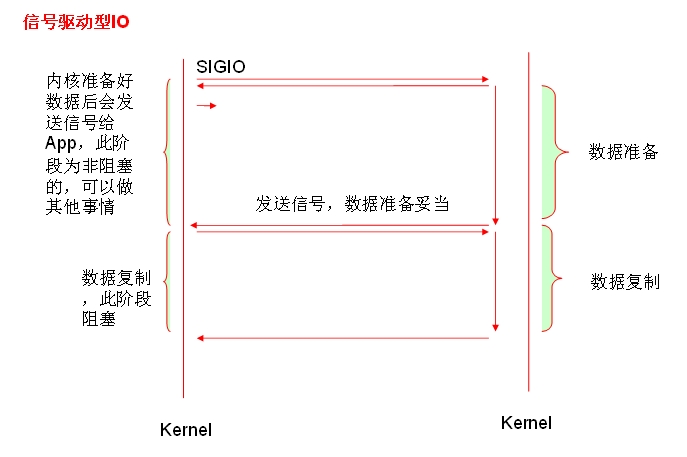

可结合此博客图文对比理解:http://www.xuebuyuan.com/1674303.html
1.4一个read操作:(1) 等待数据准备好;(2) 从内核向进程复制数据;
1.5 轮询与触发
(1)轮询:用一个进程,但是使用非阻塞的I/O读取数据,当一个I/O不可读的时候立刻返回,检查下一个是否可读,这种形式的循环为轮询(polling),这种方法比较浪费CPU时间,因为大多数时间是不可读,但是仍花费时间不断反复执行read系统调用
(2)水平触发:当条件满足后会一直响应;信号驱动IO为例;此处理解为,当数据准备好后,内核会一直发送消息通知进程,直到进程响应为止
(3)边缘触发:当条件满足的瞬间才会响应;
1.5Select、Poll、Epoll
1.5.1 Select
(1)最大并发数限制,因为一个进程所打开的 FD (文件描述符)是有限制的,由 FD_SETSIZE 设置,默认值是 1024/2048 ,因此 Select 模型的最大并发数就被相应限制了。文件描述符数FD_SETSIZE 此处无法更改
(2)效率问题,select 每次调用都会线性扫描全部的 FD 集合,这样效率就会呈现线性下降,把 FD_SETSIZE 改大的后果就是,大家都慢慢来,什么?都超时了。
(3)内核 / 用户空间内存拷贝问题,如何让内核把 FD 消息通知给用户空间呢?在这个问题上select 采取了内存拷贝方法。
总结为:1.连接数受限 2.查找配对速度慢 3.数据由内核拷贝到用户态
1.5.2 Poll
基本上效率和 select 是相同的, select 缺点的 (2) 和 (3)它都没有改掉。
1.5.3 Epoll
(1) Epoll 没有最大并发连接的限制,上限是最大可以打开文件的数目,这个数字一般远大于 2048, 一般来说这个数目和系统内存关系很大 ,具体数目可以 cat /proc/sys/fs/file-max 察看。
(2)效率提升,Epoll 最大的优点就在于它只管你“活跃”的连接 ,而跟连接总数无关,因此在实际的网络环境中,Epoll 的效率就会远远高于 select 和 poll 。
(3)内存拷贝,Epoll 在这点上使用了“共享内存 ”,这个内存拷贝也省略了
更多资料请参考:http://blog.csdn.net/fanbird2008/article/details/16941217(模型内容来自此博客)
http://www.oschina.net/question/234345_40335
http://xingyunbaijunwei.blog.163.com/blog/static/76538067201241685556302/
http://blog.chinaunix.net/uid-24459558-id-2605975.html
1.6 prefork、worker、event
prefork:多进程模型,每个进程响应一个请求;稳定性好,但并发能力有限;预先生成多个空闲进程;select系统调用,最多1024个;
worker:多进程模型,每个进程可生成多个线程,每个线程响应一个请求;预先生成多个空闲线程;(select)
event:一个进程直接响应n个请求;可同时启动多个进程
1.7 nginx支持的IO类型:
异步IO(aio)、信号驱动型(边缘触发)、内存映射、事件驱动 libevent:epoll
二、Nginx概念及特点简介:
2.1 概念;
Nginx (读作"engine X") 由IgorSysoev(俄罗斯)于2005年编写,是一个免费、开源、高性能的HTTP服务器和反向代理,也可以作为一个IMAP/POP3代理服务器。Nginx因为稳定,丰富的功能集,配置简单,资源占用低而闻名世界。
2.2 Nginx的特性:
(1)模块化设计、较好扩展性
(2)高可靠性:每个worker进程相对独立,master进程在1个worker进程出错时可以快速“拉起”新的worker子进程提供服务
(3)低内存消耗:10000个keep-alive连接在Nginx仅消耗2.5MB
(4)支持热部署:master管理进程与worker工作进程的分离设计,使得Nginx能够提供热部署功能,即可以在7×24小时不间断服务的前提下,升级Nginx的可执行文件。当然,它也支持不停止服务就更新配置项、更换日志文件等功能。
2.3 基本功能:
(1)静态资源的web服务器,能缓存打开的文件 描述符
(2)http, smtp, pop3协议的反向代理服务器,缓存、负载均衡;
(3)支持FastCGI (fpm)
(4)模块化,非DSO机制,过滤器zip,SSI及图像大小调整;
(5)支持SSL
2.4 扩展功能:
基于名称和IP的虚拟主机访问控制
支持keepalive
支持平滑升级
定制访问日志 ,支持使用日志缓冲区提高日志存储性能
支持url rewrite(路径重写)
支持路径别名
支持基于IP及用户的访问控制
支持速率限制,支持并发数限制
2.5 Nginx的基本架构:(非阻塞、事件驱动、一个master生成一个或多个worker, 每个worker响应n个请求)
一个master进程,生成一个或多个worker
事件驱动: epoll, kqueue,/dev/poll (event ports)
消息通知:select, poll, rtsignals
支持sendfile, sendfile64
支持AIO(异步IO)
支持mmap(内存映射)
2.6 模块类型:
核心模块:core modules
标准HTTP模块:Standard HTTP modules
可选HTTP模块:Optional HTTP modules
邮件模块:Mail modules(作为邮件反向代理服务器时用)
第三方模块:3rd party modules
以上概念更多更详细请参考:http://book.2cto.com/201304/19610.html
http://www.tuicool.com/articles/VV7nim6
三、安装方法
3.1 RPM包安装:http://nginx.org/en/linux_packages.html#stable
3.2 源码安装;
(1)下载源码包
lftp ftp://172.16.0.1/pub/Sources/sources/nginx/nginx-1.6.2.tar.gz
mget http://nginx.org/en/download.html Stable version
(2)编译环境准备
# yum groupinstall "Development Tools""Server Platform Development"
# yum install pcre-devel openssl-devel -y
(3)解压安装
# tar xf nginx-1.6.2.tar.gz
# cd nginx-1.6.2
# ./configure --prefix=/usr/local/nginx--conf-path=/etc/nginx/nginx.conf --user=nginx --group=nginx--error-log-path=/var/log/nginx/error.log--http-log-path=/var/log/nginx/access.log --pid-path=/var/run/nginx/nginx.pid--lock-path=/var/lock/nginx.lock --with-http_ssl_module--with-http_stub_status_module --with-http_gzip_static_module --with-http_flv_module--with-http_mp4_module --http-client-body-temp-path=/var/tmp/nginx/client--http-proxy-temp-path=/var/tmp/nginx/proxy--http-fastcgi-temp-path=/var/tmp/nginx/fastcgi
# make && make install
# mkdir /var//tmp/nginx/{client,proxy,fastcgi} -pv
(4)启动与关闭
# /usr/local/nginx/sbin/nginx -t #检查语法
# /usr/local/nginx/sbin/nginx #启动nginx,
# ss -tnlp #查看80端口,在浏览器上查看nginx成功启动 [ps -elFH,查看nginx启动的进程]
#killall nginx
(5)配置启动服务脚本【脚本添加具体内容见附件Nginx服务启动脚本】
# vim /etc/rc.d/init.d/nginx
# chmod +x /etc/rc.d/init.d/nginx
# chkconfig --add nginx
# chkconfig --list nginx
# service nginx restart
四、核心模块相关配置文件(ngx_http_core_module);
4.1 语法着色【扩展插件】
(1)下载nginx.vim
wget http://www.vim.org/scripts/script.php?script_id=1886
lftp ftp://172.16.0.1/pub/Sources/sources/nginx/nginx.vim
(2)安装nginx.vim
将nginx.vim放置于~/.vim/syntax/目录,
# mkdir .vim/syntax/ -pv
# cp nginx.vim .vim/syntax/
(3)配置 nginx.vim
而后在~/.vim/filetype.vim中添加如下行:
au BufRead,BufNewFile/etc/nginx/*,/usr/local/nginx/conf/* if &ft == '' | setfiletype nginx |endif
其中“/etc/nginx”为nginx配置文件的目录
4.2核心配置段:Main 配置段
对应协议配置段:如http{...}
主体架构。如下图所示

4.3 配置指令要以分号结尾,语法格式:
directivevalue1 [value2...];
4.4 支持使用变量:
模块内置变量
自定义变量
setvar_name value
4.5 主配置段的指令的类别:
用于调试、定位问题
正常运行必备的配置
优化性能的配置
事件相关的配置
4.6 正常运行的必备配置:
(1) user USERNAME [GROUPNAME];
指定运行worker进程的用户 和组,例如:user nginx nginx;s
(2)pid /path/to/pid_file;
指定nginx的pid文件;
(3) worker_rlimit_nofile #;
指定一个worker进程所能够打开的最大文件句柄数(进程数);
(4)worker_rlimit_sigpending #;
指定每个用户能够发往worker的信号的数量;
4.7 优化性能相关的配置:
(1)worker_processes #:
worker线程的个数;通常应该为物理CPU核心个数减1;
(2)worker_cpu_affinity cpumask ...;
绑定worker进程至指定的CPU上;
CPUMASK (假如有四颗cpu,表示法)
0001
0010
0100
1000
例如:worker_cpu_affinity 00000001 00000010 00000100;
(3)timer_resolution t;时间解析度:每隔多久更新一次缓存;在x86_64系统上不用配置
gettimeofday();
(4)worker_priority nice;范围【-20, 19】
4.8 事件相关的配置:
(1)accept_mutex [on|off] 【做压力测试时候用】
内部调用用户 请求至各worker时用的负载均衡锁;打开时表示能让多个worker轮流地、序列化地与响应新请求;
(2)lock_file /path/to/lock_file; 锁文件
(3)accept_mutex_delay #ms;
每个worker进程拿到互斥锁可以相应请求,而此为等待拿到互斥锁的时间
(4)use [epoll|rgsig|select|poll];
定义使用的事件模型;建议让Nginx自动选择;
(5)worker_connections #;
每个worker进程所能够响应的最大并发请求数;
4.9 用于调试、定位问题:
(1)daemon [off|on]
是否以守护进程方式启动nginx;
(2)master_process on|off;
是否以master/worker模型来运行nginx;
(3)error_log /path/to/error_log level;
错误日志文件及其级别;出于调试的目的,可以使用debug级别,但此级别只有在编译nginx时使用了--with-debug选项才有效;
更多详细信息参考:http://nginx.org/en/docs/ngx_core_module.html
4.10 虚拟主机相关的配置:【虚拟机及其他练习及演示信息参照附件Nginx配置练习】
(1) 定义一个虚拟主机;写在server {}配置段
(2)listen
监听的端口
完整格式 :listenaddress[:port] [default_server] [ssl] [spdy] [proxy_protocol] [setfib=number][fastopen=number] [backlog=number] [rcvbuf=size] [sndbuf=size][accept_filter=filter] [deferred] [bind] [ipv6only=on|off][so_keepalive=on|off|[keepidle]:[keepintvl]:[keepcnt]];
常用格式:listenaddress[:port] [default_server] ssl
解析:
backlog=number:指明TCP协议backlog队列的大小。默认为-1,表示不设置;
rcvbuf=size:设定监听句柄的SO_RCVBUF参数;【接收缓冲大小】
[sndbuf=size]【发送缓冲大小】
[bind] 【表示一个端口绑定监听多个地址】
[ssl] 表示当前监听的端口需要支持ssl功能
Sets the address and port for IP, or the path for a UNIX-domain socket on which the server will accept requests. Both address and port, or only address or only port can be specified. An address may also be a hostname, for example:
listen 127.0.0.1:8000;
listen 127.0.0.1;
listen 8000;
listen *:8000;
listen localhost:8000;
(3)server_name name [...];【服务器名称或主机名】
后可跟多个主机名;名称还可以使用通配符和正则表达式(~);如果被匹配到,则可以响应
匹配规则:
(a) 先做精确匹配;例如:www.magedu.com:
(b) 左侧通配符匹配,例如:*.magedu.com;
(c) 右侧通配符匹配,例如:www.*;
(d) 正则表达式匹配,例如: ~^.*\.magedu\.com$
(e)default_server;如果都没有被匹配到,则显示默认主机
(4) location【多个优先级相同,靠前的locationn匹配】
(a)[=|~|~*|^~] /uri {...}
功能:允许根据用户请求的URI来匹配定义的各location,匹配到时,此请求将被相应的location块中的配置所处理;
=: 精确匹配检查;
~: 正则表达式模式匹配,区分字符大小写;
~*:正则表达式模式 匹配,不区分字符大小写;
^~:URI的前半部分匹配,不检查正则表达式;
匹配优先级:精确匹配(=)、^~、~和~*、由不带符号的URL进行左侧匹配;
Let’sillustrate the above by an example:
location = / {
[ configuration A]
}
location / { #以/为起始的所有路径
[ configuration B]
}
location /documents/ {
[ configuration C]
}
location ^~ /images/ {
[ configuration D]
}
location ~* \.(gif|jpg|jpeg)$ {
[ configuration E]
}
The“/” request will match configuration A, the“/index.html” request will match configuration B, the“/documents/document.html”request will match configuration C, the“/images/1.gif” request will match configuration D, and the “/documents/1.jpg”request will match configuration E.
(b)location @name
前缀“@”定义了命名[指定]路径。这种路径不在一般的请求处理中使用,而是用在请求重定向中。这些路径不能嵌套,也不能包含嵌套路径。
(5)root
设置web资源路径映射;用于指明请求的URL所对应的文档的根目录路径;
location /images/ { #【locations中也可省略】
root "/web/imgs/"; #【images的访问路径为/web/imgs/images;images目录必须存在,index.html在images目录下】
}
(6)alias path
用于location配置段,定义路径别名
location /images/ {
alias /www/pictures/; #【images的访问路径为/www/pictures/index.html】
}
注意:root表示指明路径为对应location的“ /” URL;alias表示路径映射,即location中的URL是相对于alias所指明的路径而言;
(7)index file 【默认主页面】
indexindex.html;
放置位置:http,server,location 都可以,放在http,对所有server有效;放在server中,对所有location生效;放置location,则只对location有效
(8)error_page code [...] [=code]URI | @name【有名称的location,反向代理时会用到】
根据http状态码重定向错误页面
error_page 404 /404.html
=[code]: 以指定的响应码进行响应;省略code表示以新资源的响应码为响应码;
(9)try_files
try_filespath1[,path2,...] URI
用在location中,定义多个路径,当用户访问一个路径时;如果第一个path找不到第一个,找第二个,…,如果都找不到,则重定向至最后一个参数的URI-path(了解即可)
4.11 网络连接相关的配置:
(1)keepalive_timeout time;
保持连接的超时时长,默认为75s;
(2)keepalive_requests #;
在一次保持连接上允许承载最大资源请求数;
(3)keepalive_disable [msie6|safari|none]
为指定类型的浏览器禁用长连接;
(4)tcp_nodelay on|off
对长连接是否使用TCP_NODELAY选项;【当客户请求的资源少而小的时候,启用,客户体验好】
(5)client_header_timeout time;
读取http请求报文首部的超时时长;【对于较慢的网络连接,不怎么去响应】
(6)client_body_timeout time;
读取http请求报文body部分的超时时长;【一般不会超时;对于上传网速慢的不利,可能上传不成功,所以建议设置时长稍长一点】
(7)send_timeout time;
发送响应报文的超时时长;
4.12 对客户端请求进行限制:【通常用于http、server、location中】
(1)limit_except METHOD {...} 【在方法上做安全限制】
指定对范围之外的其它方法的访问控制;
limit_exceptGET { #【指定范围之外的其他方法访问控制】
allow172.16.0.0/16;
deny all;
} 【只允许172.16网段的主机使用除GET以外的其他方法请求】
2、client_body_max_size SIZE; 【对用户上传文件的限制】
限制请求报文中body部分的上限;通过检测请求报文首部中的"Content_Length"来判定;
3、limit_rate speed;
限制客户端每秒种传输的字节数,默认为0,表示无限制;
4.13 对内存或磁盘资源进行分配【一般情况下,都不需要调整】
(1)client_body_in_file_only on|clean|off;
请求报文的body部分是否可暂存于磁盘【对于body较大者】;on表示允许,并且即使请求结束,也不会删除暂存的内容;clean表示会删除;off不允许暂存;
(2)client_body_in_single_buffer on|off
请求报文的body部分是否可暂存在内存【内核内存】的buffer中,默认off;允许会提高性能
(3)client_body_buffer_size size;
如果(2)为on时,定义暂存空间大小
(4)client_body_temp_path DIR [level1 [level2[level3 [level4]]]]
如果(2)为on时【Client_body的】暂存文件存储路径
例如:client_body_temp_path/var/tmp/nginx/client 1 2 【一级子目录中,用2个字符定义路径,如ab,ac,ad…】
(5)client_header_buffer_size size:
接收用户请求报文的首部部分指定【分配】的内存空间的大小
4.14 MIME类型相关的配置:
1、types {}
定义MIME types至文件的扩展名;
例如:types {
text/html.html; 【如果本地加载的资源为text/html类型的,都当作为.html的子类型】
image/jpeg .jpg;
}
2、default_type MIME-TYPE;
指定默认MINE类型
4.15 文件操作优化相关的配置:
(1)sendfile on|off;
【由内核代为完成系统调用;对于文件大小有限制,所以sendfile64可支持更大文件系统调用】【更详细概念参考博客sendfile】
(2)aio on|off;
是否启用内核级别的异步IO功能
(3)directio size|off; 【直接IO】
是否使用O_DIRECT选项去请求读取文件;与sendfile功能互斥;【数据不经过内核,直接加载至磁盘,与sentfile互斥;一般关闭;开启影响性能,但数据安全】
(4)open_file_cache max=N[inactive=time] |off;【是否打开缓存大小,在交互式模式下;】
nginx可以缓存以下三种信息:
(a) 文件句柄、文件大小和最近一次修改时间;
(b) 打开目录的目录结构;
(c) 没有找到的或者没有权限操作的文件的相关信息;
max=N表示可缓存的最大条目上限;一旦到达上限,则会使用LRU从缓存中删除最近最少使用的条目;
inactive=time:在inactive指定的时长内没有被访问过的缓存条目就会淘汰【删除】inactive 默认时间60s;;
如果内存空间足够用,打开会提高nginx性能
(5)open_file_cache_errors on|off;
是否缓存在文件缓存中缓存打开文件时出现找不到路径,没有权限等的错误信息;
(6)open_file_cache_min_uses time;
每隔多久检查一次缓存中缓存条目的有效性;默认60s;
重点关注:server{},location{}, listen, server_name, root, alias, keepalive_timeout,keepalive_requests, error_page
五、其他模块相关配置【编译时若默认没有,想启用,则编译进nginx】
5.1 基于IP的访问控制:【ngx_http_access_module】【编译时默认有此模块】
指令:Derectives:allow, deny
指令适用控制段:Context: http,server, location, limit_except
ExampleConfiguration
location / {
deny 192.168.1.1;
allow 192.168.1.0/24;
allow 10.1.1.0/16;
deny all;
}
The rulesare checked in sequence until the first match is found. In this example, accessis allowed only for IPv4 networks 10.1.1.0/16 and 192.168.1.0/24 excluding the address 192.168.1.1
5.2基于用户的basic认证配置: 【ngx_http_auth_basic_module】
ExampleConfiguration
location / {
auth_basic "closed site";【禁止访问的区域】
auth_basic_user_file conf/htpasswd;【用户账号文件】
}
htpasswd命令创建用户账号文件;
5.3 基于gzip实现响应报文压缩:【ngx_http_gzip_module】
The ngx_http_gzip_module module is a filter that compressesresponses using the “gzip” method. This often helps to reduce thesize of transmitted data by half or even more.
Directives:gzip,gzip_proxied,gzip_types,etc.
Context:http,server,locaion
ExampleConfiguration
gzip on; #功能开启
gzip_min_length 1024; #起始压缩为1K
gzip_proxied expired no-cache no-store private auth; #对于私人认证信息不使用缓存压缩
gzip_types text/plain application/xml; 对text/plainapplication/xml 类型文件压缩
5.4 定制响应首部【ngx_http_headers_module】
The ngx_http_headers_module module allows adding the “Expires” and “Cache-Control” header fields, and arbitrary fields, to a response header.
Example Configuration
expires 24h; 定义respose headers 缓存有效期
expires modified +24h; 修改时间向后延长24h
expires @24h; 指定缓存有效期到当天几点几分
add_header Cache-Control private;
Syntax:add_header name value [always];
Default:—Context:http, server, location, if in location
5.5 定制访问日志
ExampleConfiguration
log_format compression '$remote_addr - $remote_user [$time_local] ' 【远程/客户端地址;远程用户;本地时间】
'"$request" $status $bytes_sent ' 【请求的URL及相关信息;状态码;发送字节】
'"$http_referer" "$http_user_agent" "$gzip_ratio"'; 【上一级的页面是从哪里跳转过来的;浏览器类型;压缩比】
access_log /spool/logs/nginx-access.log compression buffer=32k;
5.6 定义合法引用:【ngx_http_referer_module】【防盗链】
Context: server,location
Example Configuration
valid_referers none blocked server_names
*.example.com example.* www.example.org/galleries/
~\.google\.; 【以上定义的都为合法引用】
if ($invalid_referer) {
return 403;
}
Parameters can be as follows:
None: ”the “Referer” field is missing in the request header;
Blocked:the “Referer” field is present in the request header, but its value has been deleted by a firewall or proxy server; such values are strings that do not start with “http://” or “https://”;
Server_names :the “Referer” request header field contains one of the server names;
5.7 URL rewrite:【ngx_http_rewrite_module】【网站某模块迁移了;做镜像站点;多个域名,但一个站点】
(1)Syntax:rewrite regex replacement [flag];
Context: server, location, if
Flag: last、break、redirect、permanent
Example:
server {
...
rewrite ^(/download/.*)/media/(.*)\..*$ $1/mp3/$2.mp3 last;
rewrite ^(/download/.*)/audio/(.*)\..*$ $1/mp3/$2.ra last;
return 403;
...
}
解析:【以/download开头的的,后面跟任意文件,中间有media,后面跟任意文件,以任意文件结尾;替换为$1不变,还是download,之后跟把.*替换为mp3;其他同理】
Rewrite更多标志位信息:http://www.76ku.cn/articles/archives/317
(2)Syntax: if (condition) {...}
Context: server, location
比较表达式:
= :等值比较
!= :不等值比较
~ :模式匹配区分大小写
~* :不区分大小写
!~ :是否不匹配,不匹配为真,匹配则为假(不区分大小写)
!~* :是否不匹配(区分大小写)
-f, !-f :判断文件是否存在与不存在
-d, !-d :判断是否为目录与不为目录
-e, !-e :判断文件、目录、符号链接是否存在与不存在
-x, !-x :判断文件是否能执行与不能执行
Examples
if ($invalid_referer) {
return 403;
}
(3)Syntax: return code [text];
return code URL ;
return URL
Context: server, location, if
(4)Syntax: set $variable value
Context: server, location, if
5.8 Status 【Sngx_http_stub_status_module】
The ngx_http_stub_status_module module provides access to basic statusinformation.
This moduleis not built by default, it should be enabled with the --with-http_stub_status_moduleconfigurationparameter.
ExampleConfiguration
location/basic_status {
stub_status;
}
Thisconfiguration creates a simple web page with basic status data which may looklike as follows:
Activeconnections: 291
serveraccepts handled requests
16630948 16630948 31070465
Reading:6 Writing: 179 Waiting: 106
5.9 SSL 【ngx_http_ssl_module】
Syntax:
ssl on | off;
ssl_certificate file;
ssl_certificate_key file;
ssl_ciphers ciphers;
ssl_session_cache off | none | [builtin[:size]] [shared:name:size];
ssl_prefer_server_ciphers on | off;
ssl_protocols [SSLv2] [SSLv3] [TLSv1][TLSv1.1] [TLSv1.2];
ssl_session_timeout time;
Context:http, server
ExampleConfiguration
To reducethe processor load it is recommended to
set thenumber of worker processes equal to the number of processors,
enablekeep-alive connections,
enable theshared session cache,
disable thebuilt-in session cache,
andpossibly increase the session lifetime (by default, 5 minutes):
worker_processesauto;
http {
...
server {
listen 443 ssl;
keepalive_timeout 70;
ssl_protocols SSLv3 TLSv1 TLSv1.1 TLSv1.2;
ssl_ciphers AES128-SHA:AES256-SHA:RC4-SHA:DES-CBC3-SHA:RC4-MD5;
ssl_certificate /usr/local/nginx/conf/cert.pem;
ssl_certificate_key/usr/local/nginx/conf/cert.key;
ssl_session_cache shared:SSL:10m;
ssl_session_timeout 10m;
...
}
更多资料请参考以下网站
Nginx英文官方网站:http://nginx.org/
Nginx中文官方网站:http://nginx.org/cn/
Nginx中文文档http://nginx.com/doc/

 浙公网安备 33010602011771号