
【VS2017】WPF使用报表工具RDLC完成报表
【运行环境】vs2017 运行环境4.6.1
【配置环境】NuGet搜索:Microsoft.ReportViewer,顺带也装一下对应的Common 装微软自己发布的,不要装第三方的(还有个WebForms的,如果一起装了可能会出现其他问题后面再说)
安装完成之后记得重启下vs,不然创建rdlc文件时,可能找不到RDLC报表选项


安装完再引用一下
System.Printing
System.Management
System.Drawing
【步骤】
1、新建实体类
 public  class members
    {
        public string name { get; set; }
        public string amount { get; set; }
    }
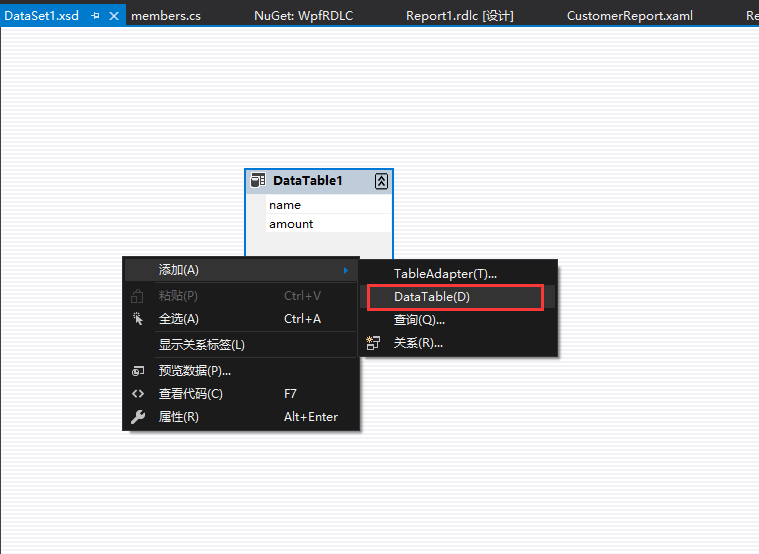
2、创建一个数据集DataSet1,打开后右键创建表,然后添加列,列名和实体类中的名字保持一致性
3、创建RDLC

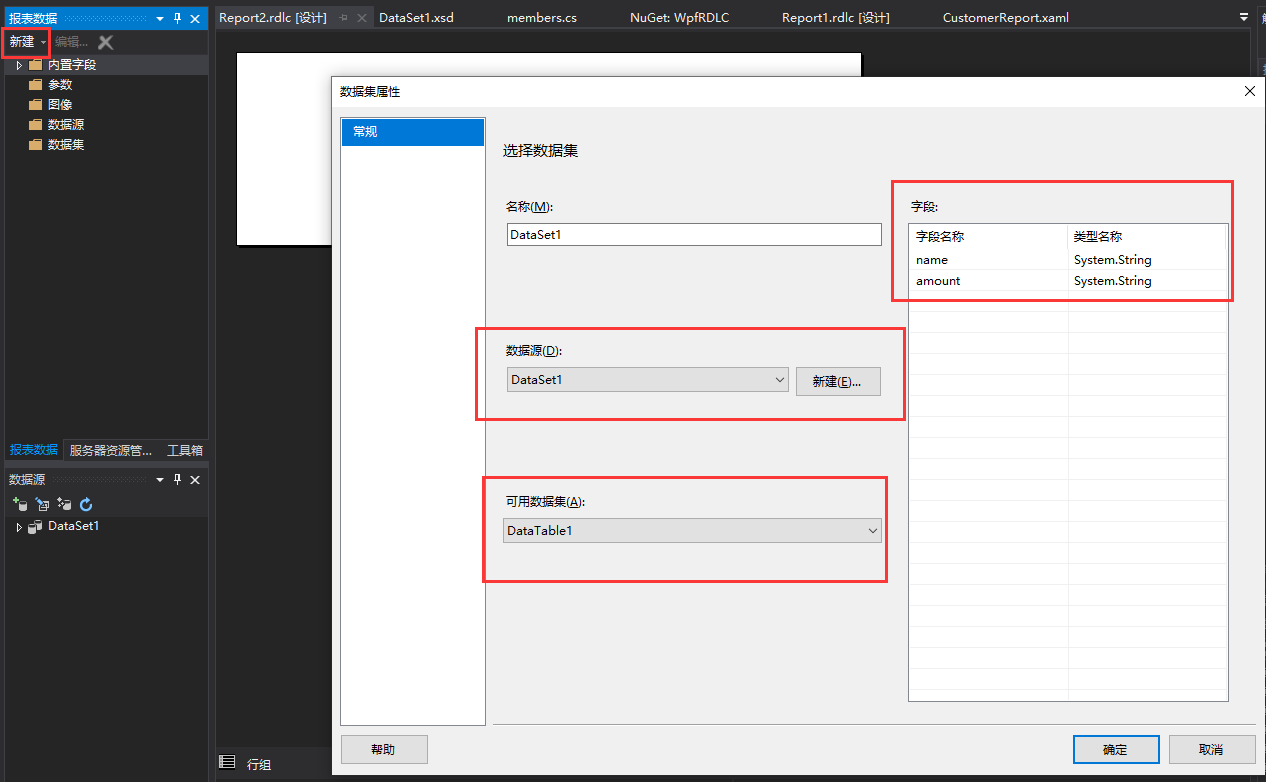
4、注意左边--新建--数据集 选择刚刚创建的数据集DataSet1,系统就自动加载了数据集中对应的table以及table对应的字段
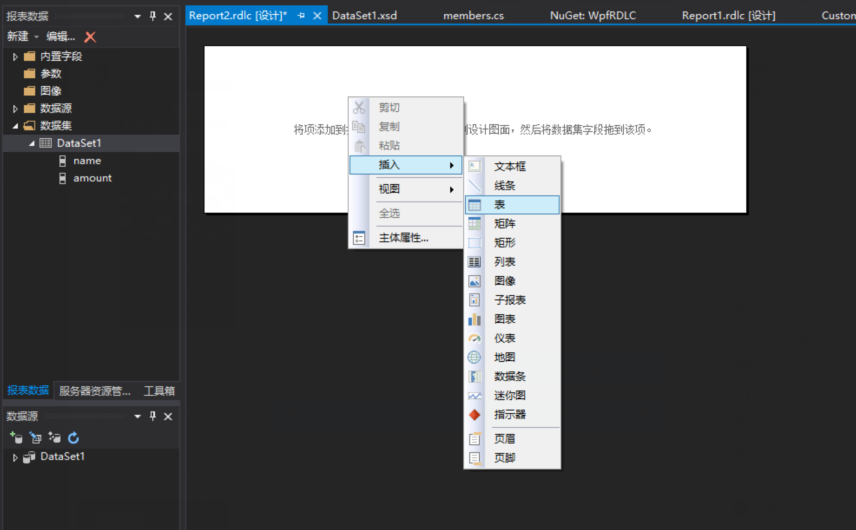
5、在空白区域--右键--插入--表
6、在表中编辑列名及列对应的字段
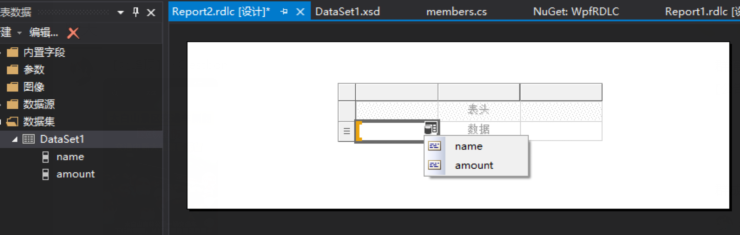
7、也可以插入表头,编辑列的名字 如果打出来的字乱码不显示中文,记得右键--文本框属性--修改字体类型

8、创建ReportViewer子控件,页面代码如下: 如果提示找不到WindowsFormsHost,则需要单独下载 WindowsFormsIntegration.dll文件,引用后即可解决错误提示
<UserControl x:Class="WpfRDLC.ReportViewer1"
             xmlns="http://schemas.microsoft.com/winfx/2006/xaml/presentation"
             xmlns:x="http://schemas.microsoft.com/winfx/2006/xaml"
             xmlns:mc="http://schemas.openxmlformats.org/markup-compatibility/2006"
             xmlns:d="http://schemas.microsoft.com/expression/blend/2008"
             xmlns:rv="clr-namespace:Microsoft.Reporting.WinForms;assembly=Microsoft.ReportViewer.WinForms"
             xmlns:local="clr-namespace:WpfRDLC"
             mc:Ignorable="d"
             d:DesignHeight="450" d:DesignWidth="800" Loaded="UserControl_Loaded">
            <Grid HorizontalAlignment="Stretch" VerticalAlignment="Stretch" >
                <WindowsFormsHost Name="printArea">
                    <rv:ReportViewer x:Name="reportViewer1" RenderingComplete="ReportViewer1_RenderingComplete" />
                </WindowsFormsHost>
            </Grid>
</UserControl>
后台代码: 工作就是初始化数据,赋值
PS一个错误:参数 1: 无法从“Microsoft.Reporting.WebForms.ReportDataSource”转换为“Microsoft.Reporting.WinForms.ReportDataSource”
这个错误的原因就是 我在本地也安装了Microsoft.Reporting.WebForms.ReportViewer 而且引用了这个命名空间,导致在Add(数据集合)这里报错,改下命名空间为WinForms就可解决
 private void UserControl_Loaded(object sender, RoutedEventArgs e)
        {
            DataTable dt = new DataTable();
            dt.Columns.Add(new DataColumn("name", typeof(string)));
            dt.Columns.Add(new DataColumn("amount", typeof(string)));

            DataRow dr = dt.NewRow();
            dr["name"] = "日照钢铁";
            dr["amount"] = "100";

            dt.Rows.Add(dr);
            ReportDataSource reportDataSource = new ReportDataSource();
            reportDataSource.Name = "DataSet1";
            reportDataSource.Value = dt;
            reportViewer1.LocalReport.DataSources.Add(reportDataSource);

            reportViewer1.LocalReport.ReportPath = "C:\\Users\\yanghao\\Desktop\\My_RDLC\\WpfRDLC\\Report1.rdlc";
            //刷新
            reportViewer1.RefreshReport();
        }

        private void ReportViewer1_RenderingComplete(object sender, Microsoft.Reporting.WinForms.RenderingCompleteEventArgs e)
        {

        }
9、创建CustomerReport窗体,在界面上加载上面的ReportViewer子控件
<Window x:Class="WpfRDLC.CustomerReport"
        xmlns="http://schemas.microsoft.com/winfx/2006/xaml/presentation"
        xmlns:x="http://schemas.microsoft.com/winfx/2006/xaml"
        xmlns:d="http://schemas.microsoft.com/expression/blend/2008"
        xmlns:mc="http://schemas.openxmlformats.org/markup-compatibility/2006"
        xmlns:local="clr-namespace:WpfRDLC"
        mc:Ignorable="d"
        Title="CustomerReport" Height="450" Width="800">
    <Grid>
        <local:ReportViewer1></local:ReportViewer1>
    </Grid>
</Window>
10、主页面放一个按钮,点击调用CustomerReport窗体
private void Button_Click(object sender, RoutedEventArgs e)
        {
            CustomerReport rpt = new CustomerReport();
            rpt.ShowDialog();
        }
11、最后就可以运行项目了
我的示例代码地址:
链接: https://pan.baidu.com/s/1CMiiYa17t2kS2U__tRcUMQ
提取码: dswn
参考自:https://blog.csdn.net/weixin_43976890/article/details/99591427

 浙公网安备 33010602011771号